Do you ever feel like you’re managing your support team with your eyes closed? One minute things seem fine, and the next, a key customer is looking for a quicker response, and you’re checking your reports to figure out how to optimize your workflow.
If that hits a little too close to home, you’re in the right place. This guide is all about getting a real handle on Zendesk agent performance and SLA tracking. We’ll move into a more proactive, data-informed way of working. While Zendesk gives you an industry-leading set of tools to start, you’ll often find that an intelligent AI layer is a great way to further scale and improve things in 2026.
What is Zendesk agent performance and SLA tracking?
Let's quickly get on the same page. Service Level Agreements (SLAs) are the promises you make to customers about how quickly you'll respond and solve their problems. They set clear expectations. Inside Zendesk, you can even set up Group SLAs (sometimes called OLAs) to manage how quickly work gets passed between your own internal teams.
Agent Performance is bigger than just one number. It’s about looking at an agent's work as a whole: how efficient they are, the quality of their support, and how well they follow your team's processes.
To track performance well, it's best to combine these ideas, using SLA data as an essential part of the bigger picture. This helps you understand the nuances of different ticket types, from simple password resets to more complex technical investigations.
The native Zendesk toolkit for agent performance and SLA tracking
Zendesk provides a solid, enterprise-grade foundation for tracking performance right out of the box. Understanding its extensive capabilities is the first step to optimizing your support strategy.
What Zendesk offers natively
Zendesk's built-in tools are based on two main things: policies and comprehensive reporting.
-
SLA Policies: You can set up specific SLA policies based on things like ticket priority or type, with targets for first reply time or total resolution time. This lets you define what a "good" response time looks like for different kinds of issues.
-
Zendesk Explore Dashboards: This is your home base for analytics. The ready-made dashboards give you a world-class overview of the important metrics. The Tickets & Efficiency tabs help you track ticket volume and response times, while the Satisfaction & SLAs tabs are for keeping an eye on CSAT scores and how often you’re hitting your SLA goals.
-
Custom Reporting: If you need to dig deeper, you can build custom reports in Zendesk Explore. It offers incredible flexibility and sophisticated options for those who want to create highly detailed, bespoke reports tailored to their specific business logic.
Getting the most out of Zendesk's native tools
While the toolkit is a powerful starting point, teams often look for ways to enhance their visibility as they scale.
Zendesk Explore is excellent for historical reporting, allowing you to look back at performance over the last week or month to identify long-term trends. This is essential for strategic planning and high-level decision-making.
For teams with very specialized needs, Zendesk's sophisticated reporting system allows for deep dives. While it offers a wealth of data, some teams choose to complement this with real-time automation tools to stay even more agile.
Finally, Zendesk serves as a powerful central hub for your support data. To get the most complete picture, many teams use integrations to connect Zendesk with other internal knowledge sources like Confluence or Google Docs. This provides agents with even more context, directly supporting their performance.

This is where tools that connect all your knowledge sources come in handy. For example, a complementary AI platform like eesel AI can link to Zendesk, Confluence, and Google Docs. This gives agents and automation even more context to solve issues faster and more accurately, which directly supports your Zendesk performance metrics.
Beyond volume: key metrics for Zendesk agent performance and SLA tracking
To get a true feel for agent performance, you need a balanced set of metrics. Don't just look at speed; consider efficiency, quality, and process all at once.
Efficiency metrics: tracking your team's speed
These numbers tell you how quickly your team is handling tickets. They’re a standard part of any professional support setup.
-
First Reply Time (FRT): How long it takes for an agent to send the first public reply after a ticket is created.
-
Total Resolution Time (TRT): The entire time a ticket is open, from start to finish.
-
Agent Work Time (AWT): The actual time an agent spends working on a ticket, not including time spent waiting for a customer reply.
To add even more value to these metrics, some teams use AI assist tools. The AI Copilot from eesel AI, for instance, can help draft high-quality replies in seconds based on your team's existing knowledge. This supports agents in maintaining both speed and high standards for their first response.
Quality metrics: focusing on the customer experience
Quality metrics are all about the customer’s experience and whether the problem was actually solved.
-
Customer Satisfaction (CSAT): The most direct way to measure quality, taken straight from customer feedback surveys.
-
One-Touch Resolutions: The percentage of tickets solved with just one agent reply. This is a solid indicator of both efficiency and clear communication.
-
Reopened Ticket Rate: Monitoring this helps ensure that customers are getting complete solutions the first time around.
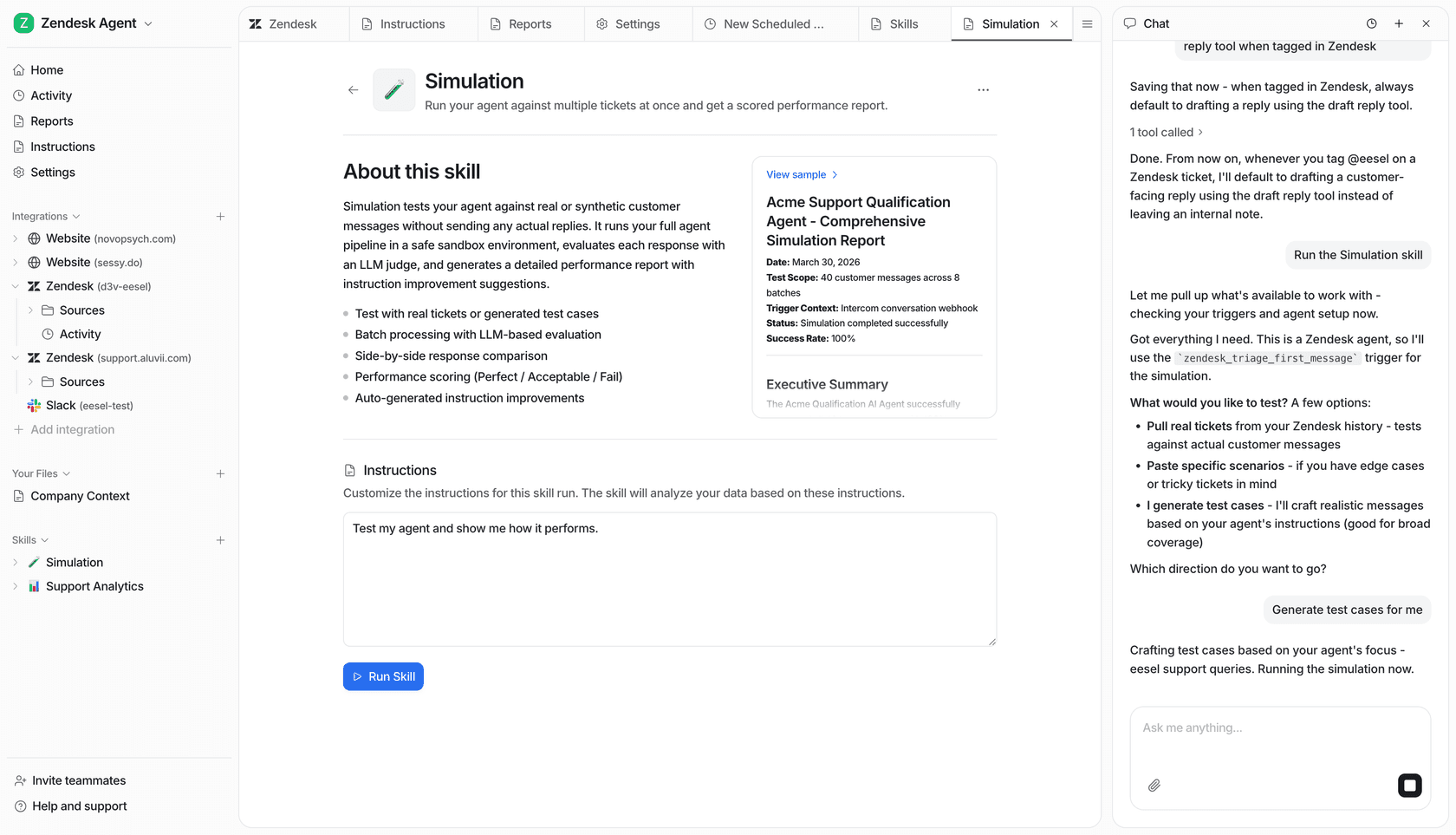
To gain even deeper insights into these metrics at scale, modern AI can be a helpful addition. For example, eesel AI can analyze historical tickets to help build a knowledge base, highlighting areas where more documentation might benefit the team. It even has a simulation mode to help you understand how automation can support your resolution goals while maintaining quality.
Adherence and workflow metrics: following established processes
These metrics check if your team is sticking to your established workflows, which is key for providing a consistent experience.
-
SLA Achievement Rate: The percentage of tickets that met all of their SLA goals.
-
Ticket Triage Accuracy: Ensuring tickets are correctly tagged and routed to the right team.
To support these processes, automation can be a powerful ally. The AI Triage product from eesel AI can work alongside Zendesk to automatically tag and route tickets based on their content. This helps ensure every ticket is handled according to your process, allowing your agents to focus on high-value customer interactions.
Understanding Zendesk pricing and tiered options
Zendesk offers a variety of subscription plans designed to scale with your business. Each tier provides a robust set of features for performance and SLA tracking as of 2026.
Zendesk Suite pricing plans
Here’s a quick look at the features available at different levels for performance and SLA tracking.
| Plan | Price (per agent/month, billed annually) | Key Performance & SLA Features |
|---|---|---|
| Suite Team | $55 | Prebuilt analytics dashboards, 1 help center, basic routing. |
| Suite Professional | $115 | Customizable reporting, CSAT surveys, Service Level Agreements (SLAs), real-time insights, skills-based routing. |
| Suite Enterprise | $169 | Custom agent roles, audit logs, sandbox environment, Group SLAs (OLAs). |
Choosing the right plan for your tracking strategy
Zendesk provides tiered plans to match different team sizes and requirements. The ability to define custom SLAs is a powerful feature available starting with the "Suite Professional" plan, while "Enterprise" offers advanced capabilities like Group SLAs for internal handoffs.
These native tools provide a world-class foundation for any support team. To further enhance this foundation, many teams choose to add an external AI platform like eesel AI. It works seamlessly with any Zendesk plan, offering specialized tools like real-time ticket analysis and automated triage without requiring a plan upgrade. This allows you to scale your capabilities at your own pace with predictable, usage-based pricing.
From comprehensive reports to proactive Zendesk agent performance and SLA tracking
So, what should you take away from all this?
Effective Zendesk agent performance and SLA tracking is about taking a balanced approach and looking at the complete picture of efficiency, quality, and process. Zendesk’s own tools provide a mature and reliable foundation for this tracking.
To really get ahead in 2026, you can pair Zendesk with complementary tools that provide additional real-time insights and help unify your company knowledge, further empowering your support team.
Get started with smarter Zendesk agent performance and SLA tracking
eesel AI is designed to work within the Zendesk ecosystem, enhancing the already powerful capabilities of your helpdesk.
-
Go live in minutes: Connect to Zendesk with one click for a seamless integration.
-
Unify your knowledge: Complement your Zendesk data with context from Confluence, Google Docs, Slack, and more.
-
Stay in control: Use features like simulation mode to test your setup, allowing you to roll out enhancements at a pace that works for your team.
Ready to enhance your reporting? Sign up for eesel AI for free and see how AI can complement your Zendesk agent performance and SLA tracking.
Frequently asked questions
What exactly does Zendesk agent performance and SLA tracking involve beyond just counting solved tickets?
It encompasses evaluating an agent's overall work, including efficiency, the quality of their support, and adherence to processes. SLA tracking specifically focuses on promises made to customers regarding response and resolution times, ensuring expectations are met consistently.
What are the primary features of using Zendesk's built-in features for Zendesk agent performance and SLA tracking?
Zendesk's native tools are excellent for historical analysis, helping teams identify trends over time. While Zendesk provides a powerful central hub for data, you can further enhance its capabilities by integrating other knowledge sources that your agents might use.
Which specific metrics should I prioritize for a comprehensive understanding of Zendesk agent performance and SLA tracking, beyond just reply times?
Beyond efficiency metrics like First Reply Time and Total Resolution Time, prioritize quality metrics such as Customer Satisfaction (CSAT) and One-Touch Resolutions. Also, track adherence metrics like SLA Achievement Rate and Ticket Triage Accuracy to ensure process compliance.
How can an AI platform like eesel AI significantly improve Zendesk agent performance and SLA tracking?
eesel AI enhances performance by providing real-time insights, unifying knowledge across all your apps, and supporting repetitive tasks like ticket triage. This helps agents respond faster and more accurately, directly boosting efficiency and quality metrics within the Zendesk ecosystem.
Does my current Zendesk subscription tier impact my capabilities for Zendesk agent performance and SLA tracking?
Yes, Zendesk offers tiered plans to match different team sizes. Features like defining custom SLAs and using Group SLAs are available in the Zendesk Suite Professional or Enterprise tiers, providing robust tools for growing organizations.
If I decide to implement a complementary AI tool, how complicated is it to integrate for improved Zendesk agent performance and SLA tracking?
Complementary AI platforms like eesel AI are designed for quick integration, often connecting to Zendesk with a single click. This means you can go live and start seeing benefits in minutes, providing a seamless addition to your existing Zendesk setup.