A LiveAgent AI agent can mean a writing assistant, a customer-facing chatbot, or a background agent that acts on tickets. I would start with the job you need done, then check which feature has the required context and permissions.
This guide covers the native options and an eesel CLI evaluation for teams comparing support teammates. The CLI example tests a renewal-policy response. It does not assume that logging in to eesel connects your LiveAgent account.
Which LiveAgent AI feature do you need?
| Job | Starting point | What to verify |
|---|---|---|
| Prepare a response for review | Answer Assistant | What context reached the draft |
| Answer visitors in chat | AI Chatbot with FlowHunt | Knowledge, handover, and enabled tools |
| Act on tickets after an event | AI Agents with automatic rules | Allowed actions and run results |
| Connect an external AI client | Personal MCP integration | The user's identity and permissions |
These choices can coexist. A team might keep humans sending replies while using an automatic agent for tagging. The important distinction is not whether a feature sounds autonomous; it is whether the task calls for a suggestion or a change to a customer record.
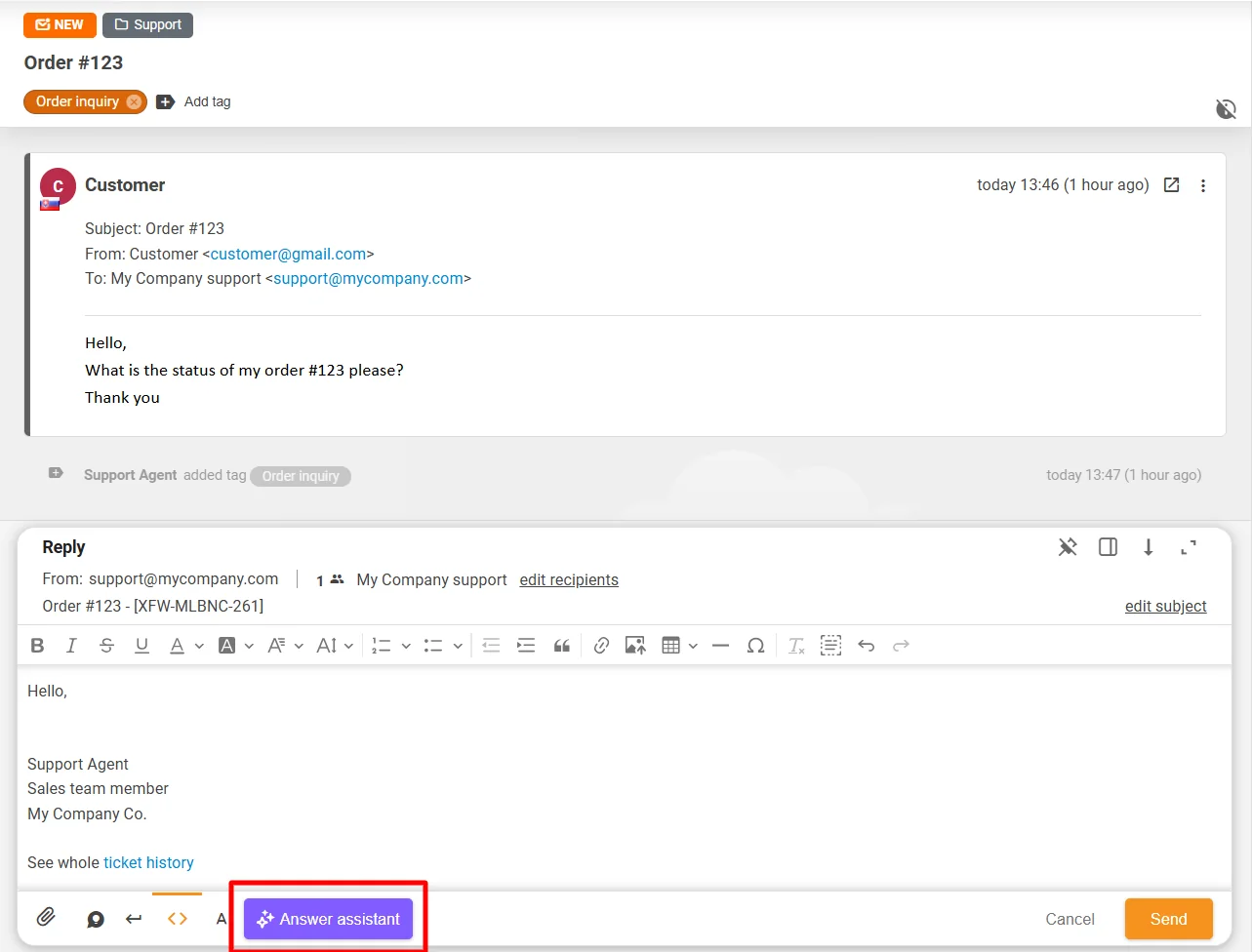
Answer Assistant: draft and review
The Answer Assistant overview describes a reply-editor tool connected through FlowHunt or OpenAI. It can generate a response from a ticket's message history or refine an existing draft. In refinement mode, the previous ticket messages are not supplied as context.
The person reviews the result and moves it into the ticket reply editor before sending. That makes it a useful place to start if the immediate goal is writing assistance rather than background ticket handling.
AI Chatbot: configure knowledge and handover
The chatbot setup guide uses a FlowHunt agent attached to a LiveAgent chat button. Sources can include website content, uploaded documents, and prepared questions and answers. The guide also describes internal knowledge sources, including databases.
Review the template's tools, knowledge scope, and instructions before publishing it. Configure the LiveAgent chatbot and its online or offline chat-button scenario. A bot that should only answer questions does not need every ticket action a template offers.
Do not generalize a limitation of the reply editor to the chatbot's configured sources. Equally, access to a source does not guarantee a correct answer: check a policy exception and a question whose answer is absent.
AI Agents: actions triggered by rules
LiveAgent's AI Agents documentation now describes agents configured under Configuration > AI > AI Agents. An automatic rule invokes the agent through its AI provider. The agent uses the built-in Model Context Protocol (MCP) server to call permitted tools.
Set the provider, instructions, and allowed tools for the job. For example, a tagging workflow should not also receive permission to resolve tickets merely because that tool exists. Review the rule's scope before enabling it and inspect the resulting run under Reports > AI Agent Runs.
Run completion alone is not your acceptance criterion. For a tagging pilot, check the actual tag on the intended test ticket and whether unrelated tickets remained unchanged.
Personal MCP access is a different permission path
The MCP integration guide supports external clients through bearer tokens or OAuth 2.1. Actions use the connected user's identity and role permissions.
An automatic AI agent has an administrator-selected allowed-tool list. A personal MCP connection exposes the tool set subject to the user's role. Do not assume the automatic agent's narrower tool list protects a separate personal connection.
If you connect a coding agent, inspect the account role and client approvals before asking it to work on tickets. Keep credentials out of shared prompts and reports. Review the ticket's activity history to establish which identity performed an action.
Understand the bills before comparing prices
Separate the LiveAgent subscription from the AI provider and native tool-call accounting. The provider depends on the feature you choose; OpenAI and FlowHunt are not both required for every workflow.
The current AI budget guide counts one MCP tool call as one credit. It describes a free account allocation of 300,000 credits at the time of this September 2026 review. Do not turn that into a promise of unlimited free AI or a recurring monthly credit grant.
Monthly budgets and the account credit pool are separate limits. Reaching either can stop a run. Provider charges still need checking against your chosen provider's terms.
| Cost or limit | What to record for a pilot |
|---|---|
| Helpdesk subscription | Plan, seats, and billing term |
| AI provider | Selected provider and actual usage |
| Native tool credits | Calls per run and remaining balance |
| Monthly budget | Which rule uses it and its cap |
| Human review | Time spent checking and correcting results |
Do not compare a tool-call count directly with another vendor's ticket or task price. First define the same workload, then record what each system consumed to complete it.
Evaluate an eesel teammate through the CLI
The eesel CLI operates the same eesel teammate and workspace as the dashboard. A person can inspect it from a terminal, a script can collect its JSON output, and Claude Code, Cursor, or Codex can help review the setup.
For a LiveAgent buyer, the useful comparison is a support task with a clear review standard. Can the teammate distinguish an approved renewal policy from an unverified customer claim? What source is missing? What would it need before acting?
This is not LiveAgent's MCP connection. The eesel integration overview explains that supported sources, triggers, and actions differ by integration. This guide does not establish a native LiveAgent connector. Verify the available connection before planning ticket automation; a custom API workflow needs separate configuration and testing.
Inspect before asking it to work
With Node.js 18.17 or newer:
npx @eesel/cli login
npx @eesel/cli whoami
npx @eesel/cli agents
npx @eesel/cli integrations --agent PILOT_AGENT_ID
npx @eesel/cli instructions --agent PILOT_AGENT_ID
npx @eesel/cli automations --agent PILOT_AGENT_ID
npx @eesel/cli status --agent PILOT_AGENT_ID
Replace PILOT_AGENT_ID with the intended teammate. Selection is not isolation: it retains its integration permissions and existing automations. Login also does not grant access to a separate helpdesk.
You can give a coding agent this bounded assignment:
Use read-only eesel CLI commands to identify the selected teammate's knowledge sources, connections, and existing automations. Report missing prerequisites for a renewal-policy test. Do not connect accounts, start chats, change settings, or act on tickets.
Inspecting configuration is free. Asking the teammate to perform an analysis through chat is billed work.
Test a disputed renewal without acting on it
Make the approved renewal policy available through a connected source or uploaded file. Check that it is ready to use. Disable write actions before this fictional rehearsal; the commands below do not configure those permissions.
npx @eesel/cli new --name "renewal-policy-comparison" --agent PILOT_AGENT_ID
npx @eesel/cli chat "Fictional support case: a customer says their annual subscription renewed yesterday and requests a refund. Using the approved renewal policy, draft a reply and identify missing facts. Do not look up real customers, contact anyone, change a subscription, or issue a refund." --agent PILOT_AGENT_ID
npx @eesel/cli chat "The customer now says they requested cancellation last week but has no confirmation. Revise the draft without assuming cancellation was completed or a refund was approved." --agent PILOT_AGENT_ID
The second message continues the conversation. The test is whether the teammate preserves uncertainty when new information arrives, not whether it produces a confident-sounding reply.
| Test observation | What it tells you |
|---|---|
| Cites the applicable policy | It found relevant guidance; review the interpretation |
| Asks for cancellation evidence | It has not treated a claim as a verified event |
| Invents a completed refund | The draft fails even if its tone is helpful |
| States what a human must check | The handover includes a usable next step |
The CLI's --dry-run previews a server call. It does not replace this answer-quality review.
Verify delivery separately
A successful fictional conversation does not prove any LiveAgent ticket was updated. Once you have confirmed an authorized connection, define one permitted action on a synthetic test record, require approval where supported, and verify the result in the destination system.
For an eesel workflow, inspect activity and held actions through the CLI:
npx @eesel/cli activity --agent PILOT_AGENT_ID
npx @eesel/cli approvals --agent PILOT_AGENT_ID
npx @eesel/cli billing
Review any proposed action before approving it. Keep customer-facing replies and financial changes outside a draft-only pilot. Workspace billing can include other teammates, so it is not automatically the cost of your selected test.

Choose based on the work you need done
If the task is reply drafting inside LiveAgent, evaluate Answer Assistant first. If it is background ticket work, inspect the native AI agent's tools and rules. If you want to compare an eesel support teammate, use the CLI to inspect its setup and test your policy cases before connecting a production workflow.
The eesel pricing guide describes task-based billing. Include billed CLI chats, connected-workflow usage, and review time in the comparison rather than assuming one interface makes work free.
Try eesel to evaluate a support teammate through the CLI. Start with a disputed renewal, check the evidence behind its answer, and verify the connection before asking it to act on tickets.
Frequently asked questions
Is the LiveAgent AI agent still only a roadmap feature?
How is the LiveAgent Answer Assistant different?
Does LiveAgent AI require both OpenAI and FlowHunt?
Can LiveAgent AI only read knowledge base articles?
Are personal MCP connections restricted like automatic AI agents?


Article by
Rama Adi Nugraha
Rama is a software engineer at eesel AI with two years of experience writing about B2B SaaS, AI tools, and customer support technology. Based in Bali, Indonesia, he brings a developer's perspective to product comparisons — cutting through marketing copy to what the integrations and APIs actually do.