


LFM3 is Liquid AI's new family of six open models of about 2B parameters each, released on October 27, 2026, and the text model, LFM3-1.7B, averages 49.37 on Liquid's 29-benchmark table against 47.24 for Qwen3.5-9B, a model five times its size. It's built for local agents: it decodes 43.6 tokens per second on an iPhone 17 Pro using 1.90 GB of memory, about 2.8x faster than the next model Liquid tested.
The family covers text, vision, audio, an "omni" model that sees, hears and talks, and two decision models (d1-2B and d1-Omni-2B) that answer questions about a ticket or document in milliseconds instead of writing a reply. The weights are free on Hugging Face, but only for companies under $10M in annual revenue, and there's no published API price for LFM3 yet.
The catch: Liquid's own model card says not to use LFM3-1.7B for agentic coding or complex multi-step reasoning, and every number above is vendor-reported. For support teams, the interesting piece is d1-2B, which can route and tag a ticket in one pass. A model still needs a helpdesk around it, which is why teams like Dokument 24 use a ready-made AI helpdesk teammate to tag and draft every new Zendesk ticket instead of wiring up a model themselves.
What is LFM3?
LFM3 is the third generation of Liquid Foundation Models from Liquid AI, the company behind small models meant to run on phones, laptops and cars rather than in a data center. Liquid announced LFM3 on October 27, 2026 as "every modality for specialized intelligence," and the first release covers models "in the 2B parameter range."
I come at new models from the search side (what are people actually asking about it?) with a builder's question underneath: what would it take to run this behind a real product? For LFM3 the answer is more interesting than for most launches, because it isn't one model, it's a family.
All six post-trained models branch from one backbone, LFM3-1.7B-Base, which was pre-trained on 22 trillion tokens and it has a 256K-token context window. Instead of one big general model, the pitch from Liquid is that you pick the small one that fits the job, fine-tune it on your own data, and run it on the device.
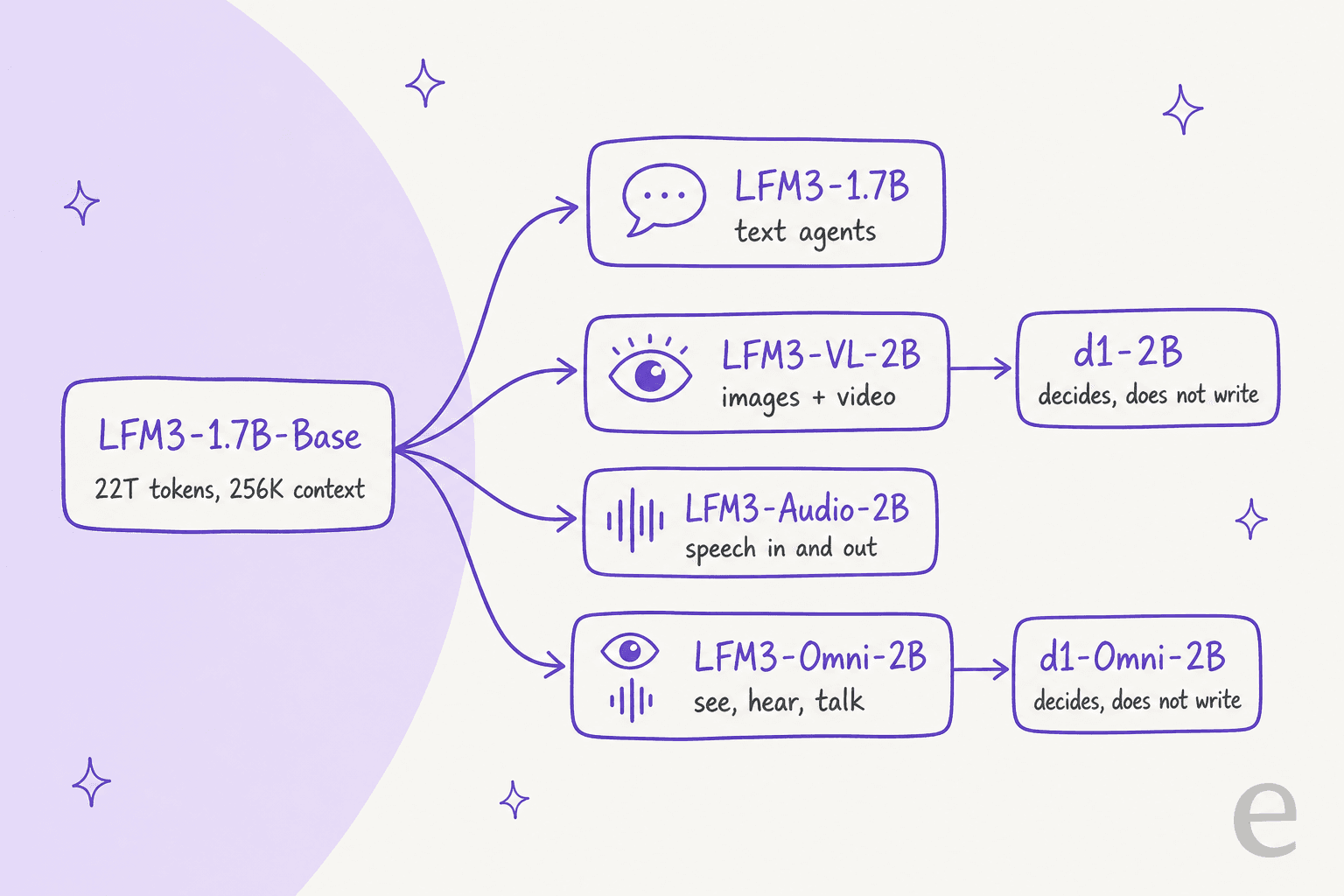
The LFM3 models at a glance
Here's the full first release, with the numbers from each Hugging Face model card:
| Model | What it does | Parameters | Context |
|---|---|---|---|
| LFM3-1.7B | Text, tool calling, local agents | 1.73B | 256K |
| LFM3-VL-2B | Images and video in, text out, with step-by-step thinking | 1.92B | 128K |
| LFM3-Audio-2B | Speech recognition, speech output, speech translation | 2B | 32K |
| LFM3-Omni-2B | Text, image, video and audio in; text and speech out | 2.17B | 32K |
| d1-2B | Decisions on text and images, no generated text | 1.92B | 128K |
| d1-Omni-2B | Decisions on text, images and audio | 2B | Not stated |
The text model understands 16 languages, including English, Arabic, Chinese, Japanese, Hindi and Polish, per its model card, which is something that matters when you run multilingual support. The omni model speaks in 19 languages and locales.
What changed in the LFM3 architecture?
LFM2 proved that a mix of short convolutions and attention could run fast on a phone. LFM3 keeps that idea and adds a third ingredient. Of its 24 layers, the thing worth noting here is that 13 are gated short convolutions, while 5 are sliding-window attention with a 256-token window and 6 are global attention. Liquid calls it a "tri-hybrid."
The main point of the redesign are about long context. The launch post says LFM3-1.7B matches LFM2-1.2B on short prompts across edge devices, per parameter, and is about 25% faster with 8K tokens in context. Liquid found the design with a hardware-in-the-loop search across 14 device and backend combinations, from a Samsung Galaxy S26 Ultra and a Raspberry Pi 5 to Apple M4 Max laptops and the Qualcomm Hexagon NPU.
Training was heavier in terms of agent work this time. The last 3.5 trillion pre-training tokens were curated data with "a larger share of agentic traces and diverse tool calls," and the text model then went through four post-training stages: supervised fine-tuning on 1.75 trillion tokens, mixed reinforcement learning, distillation from six specialist teachers, and agentic reinforcement learning inside real agent harnesses like OpenClaw and Hermes Agent.
How good is LFM3-1.7B on benchmarks?
On Liquid AI's own table, LFM3-1.7B beats much bigger models on agent and instruction-following tasks, but it loses on coding and knowledge. Its average over 29 benchmarks are 49.37, against 47.24 for Qwen3.5-9B, 39.27 for Qwen3.5-4B, 39.19 for MiniCPM5 2B and 31.74 for Gemma 4 E4B.
Here's a slice of the published results:
| Benchmark | LFM3-1.7B | MiniCPM5 2B | Gemma 4 E4B | Qwen3.5-4B | Qwen3.5-9B |
|---|---|---|---|---|---|
| AutomationBench (public) | 41.29 | 4.71 | 1.92 | 8.67 | 15.10 |
| WebArena-Verified | 38.42 | 9.11 | 17.06 | 21.92 | 28.94 |
| BFCL V4 (tool calling) | 71.39 | 62.65 | 48.25 | 55.12 | 62.83 |
| τ³-bench | 68.01 | 69.44 | 33.53 | 65.98 | 67.11 |
| IFBench | 73.03 | 62.08 | 44.56 | 38.16 | 48.84 |
| SWE-bench Verified (OpenCode) | 43.40 | 34.80 | 0.50 | 41.20 | 51.20 |
| GPQA Diamond | 63.37 | 65.15 | 57.88 | 75.76 | 80.40 |
| RULER 128K | 65.56 | 37.96 | 18.82 | 84.63 | 87.11 |
| Average (29 benchmarks) | 49.37 | 39.19 | 31.74 | 39.27 | 47.24 |
The τ³-bench row is the one I'd look at first if you work in support, because τ-bench simulates an agent helping customers through multi-turn conversations with tools and policies. LFM3-1.7B scores 68.01, roughly level with Qwen3.5-9B's 67.11 and just behind MiniCPM5 2B's 69.44. That's strong for its size, which is fine, but it isn't the runaway lead you see on AutomationBench. (For how bigger hosted models compare on support work, I keep a running pick of the best AI model for support tickets.)
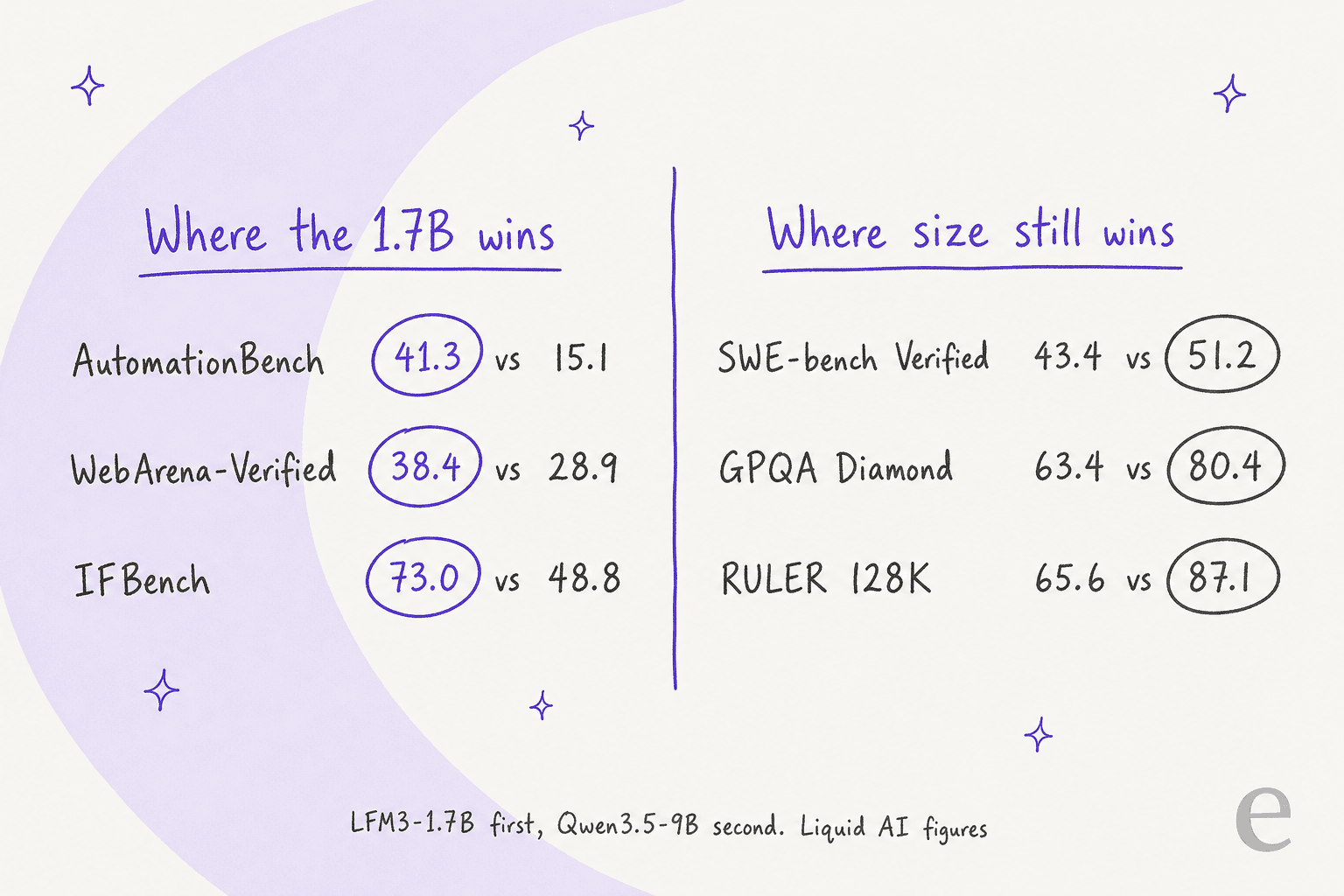
The split is the real story. LFM3-1.7B is good at following instructions and calling tools, and weak where raw knowledge or long-context recall decides the score. Liquid is saying as much: search "helps close the knowledge gap," nearly doubling its Humanity's Last Exam score from 7.17 to 13.90 when tools are allowed. One reader on the launch thread summed up the table this way:
"Agentic coding numbers on par with Qwen3.5-4B, the rest of the numbers on par with Qwen3.5-9B. Most impressive for a 1.7B model!"

One more number that is worth to know: on AA-Omniscience, a test that rewards saying "I don't know" over guessing, LFM3-1.7B scored 92.93 on non-hallucination against 13.64 for Qwen3.5-4B. Its accuracy on the same test was only 7.07, so it mostly gets there by declining to answer. For a model that's meant to call search or a knowledge base anyway, that's the right instinct, and it's the same habit you want when you prevent AI hallucinations in support.
How fast is LFM3 on a phone or laptop?
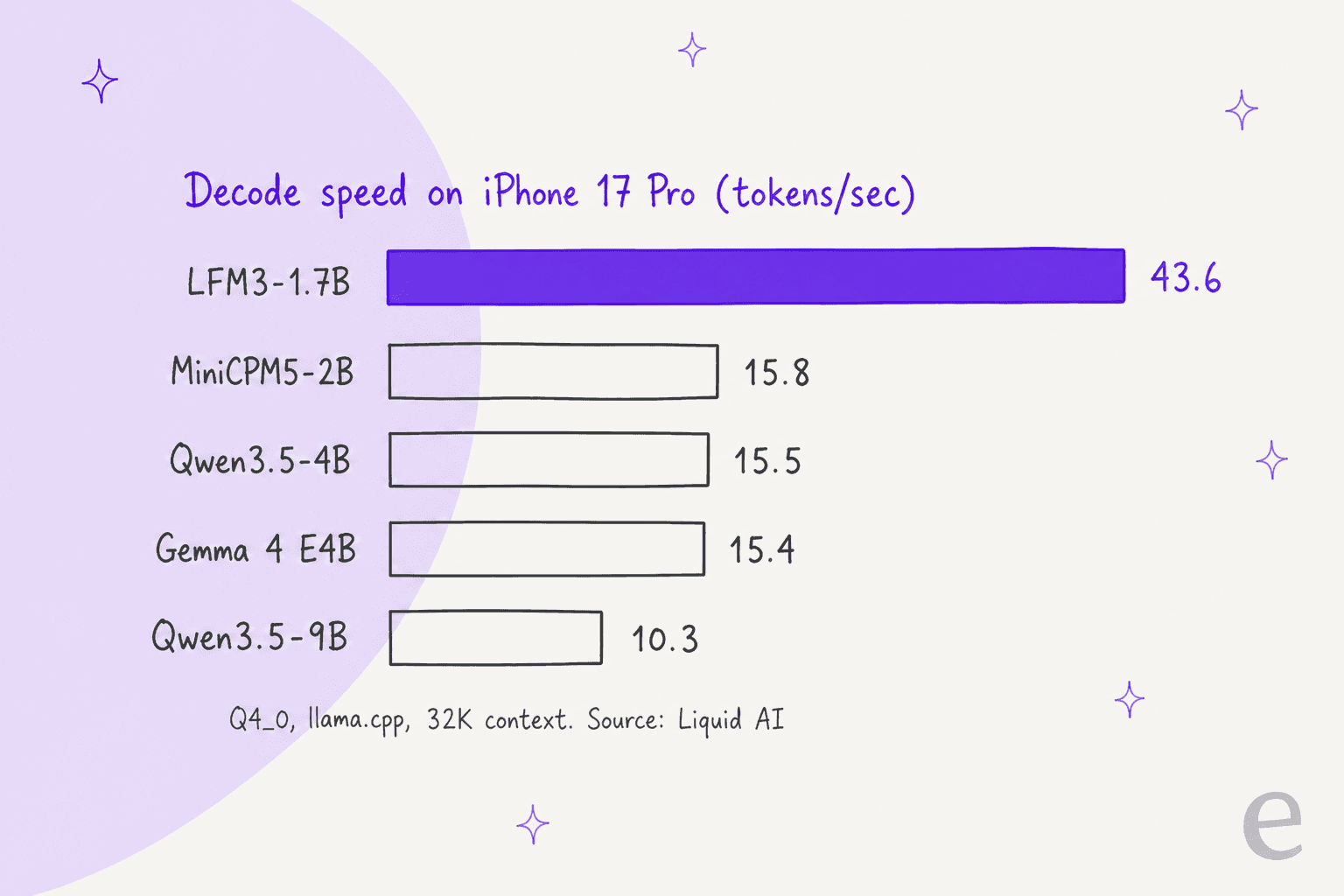
Very fast for its class. Liquid tested with llama.cpp at Q4_0 and a 32K-token context, and LFM3-1.7B was the fastest model in all three devices, decoding 1.8 to 2.8 times faster than the next one, and it also used the least memory.
| Device | LFM3-1.7B decode | Next fastest | LFM3-1.7B memory |
|---|---|---|---|
| iPhone 17 Pro | 43.6 tok/s | 15.8 (MiniCPM5-2B) | 1.90 GB |
| Apple M5 Max | 237.1 tok/s | 106.0 (MiniCPM5-2B) | 2.25 GB |
| AMD Ryzen AI Max+ 395 | 129.6 tok/s | 70.1 (MiniCPM5-2B) | 2.75 GB |
Long context stays cheap too. A full 128K-token context needs 1.6 GB of KV cache, the memory a model uses to hold the conversation so far, against 4.3 GB for Qwen3.5-4B and 5.6 GB for MiniCPM5-2B. Compare that with a dense mid-size model like Nanbeige 4.3, which needs about 28 GB of cache at the same length.
On servers the numbers goes a bit silly. On one NVIDIA B300 at 1,024 concurrent requests, LFM3-1.7B produced 41,710 output tokens per second, which Liquid rounds to 3.6 billion tokens per day. To show it off, Liquid ran more than 300,000 LFM3-1.7B agents in parallel over the Enron email archive. On its own low-latency serving stack, p95 latency for a short request stayed at 150 ms even at 500 requests per second on one B200.
What can the vision, audio and omni models do?
The other models in the family are where LFM3 gets unusual for a 2B launch. Each one is small enough to run on a phone, and each covers a job that usually need a bigger cloud model.
LFM3-VL-2B is the first Liquid vision model that takes video, and it reasons step by step before answering. Across 62 vision benchmarks it averages 71.4, ahead of Gemini 3.5 Flash Lite (70.0) and level with Gemma 4 12B (71.7), a model more than six times larger. It's within two points of GPT-5.6 Luna (73.4). It scores highest in document, OCR and chart reading (83.9) and GUI understanding (83.1).
LFM3-Audio-2B transcribes, speaks and translates speech, with a new streaming audio encoder that starts processing while you're still talking. Liquid says that the time to first token can be as low as 50 ms.
LFM3-Omni-2B is Liquid's first model that sees, listens and talks in one: you can ask a spoken question about an image and get a spoken answer, or ask it about a video with sound. It can also turn a spoken request plus what's on screen straight into a structured tool call. Liquid's demo has it booking a flight by voice on a laptop. If you're weighing voice tools for a support line, my roundup of the best AI voice agents covers the hosted side, and this guide to an AI voice agent for support covers the setup.
What are the d1 decision models for?
This is the part of LFM3 I'd pay the most attention on if you run a support team. d1-2B and d1-Omni-2B don't write anything. You give them an input and a list of questions, and they answer all of them in a single forward pass, each with a calibrated probability. Liquid lists "a support ticket, an invoice, an app screen, a photo, a voice note" as typical inputs.
The d1-2B model card uses a support ticket as its main example: a customer charged twice whose parcel never arrived. In one pass the model picks a team (billing, shipping or technical) and says whether a refund is due, then also lists the topics and scores the urgency. Liquid reports 5.7 ms per decision on an H100. That's exactly the shape of ticket triage work, which is why I think this is the most practical model in the release for helpdesk teams. I covered the wider category in my explainer on decision models.
New in this generation are typed answers. On top of yes/no, multiple choice and scores, the d1 models can:
- Point: draw a box around something you describe, or count every instance.
- Read: pull text, numbers and dates from a document with the exact span, or say "not found."
- Estimate: give a number with a likely range.
- Pick: select every option that applies, each with its own probability.
d1-2B replaces the older d1-3B with a third fewer parameters. On Liquid's "Typed Decisions (customer service cases)" test, d1-Omni-2B scored 50.5 with written input and 48.0 when the same questions were spoken, and 83.4 on DecisionBench, a business routing and triage test. Those are Liquid's own benchmarks, so treat them as a starting point for your own testing. If you want the manual version of the same job first, here's how to automate ticket triage with rules. A Liquid engineer on the launch thread put the hardware case plainly:
"If you want to do local classification/image processing, I think the d1-2B is amazing, it can run on 1GB of unified RAM."
The card is also honest about limits: knowledge-heavy questions favor larger models, and answers get less reliable past about 64K tokens of input.
How much does LFM3 cost?
The weights are free for most companies, and there's no published API price yet. Here's what's on Liquid's pricing page and its license as of October 28, 2026:
| Option | Price | Notes |
|---|---|---|
| Open weights, company under $10M revenue | Free | LFM Open License v1.0, based on Apache 2.0 |
| Open weights, company at $10M+ revenue | Paid license, quote only | Contact Liquid sales; revenue counts across the whole corporate group |
| Research and qualified non-profits | Free | No revenue limit |
| Liquid API, LFM3 models | Not published | Not listed on the pricing page yet |
| Liquid API, d1 | $0.02 per 1M input tokens, $0 output | Older d1, not the LFM3-based d1-2B |
| Liquid API, LFM2.5-24B-A2B | $0.05 input / $0.70 output per 1M tokens | Liquid's larger hosted model |
| New Liquid Console account | $2 free credit | Per organization |
Two details matters more than the prices. First, the $10M revenue threshold counts your whole corporate group, not the product, and the number of users doesn't matter. Second, the license has no copyleft, so you can keep a fine-tuned version private, as long as you include attribution and a copy of the license when you redistribute.
OpenRouter is named as a day-0 launch partner, but on October 28 its Liquid page listed only older Liquid models and d1.1, with no LFM3 model yet. If you want a hosted model with a public rate card today, the comparison is GPT-6 Luna pricing. Gemini 3.5 Flash Lite is the other cheap option.
How do you run LFM3?
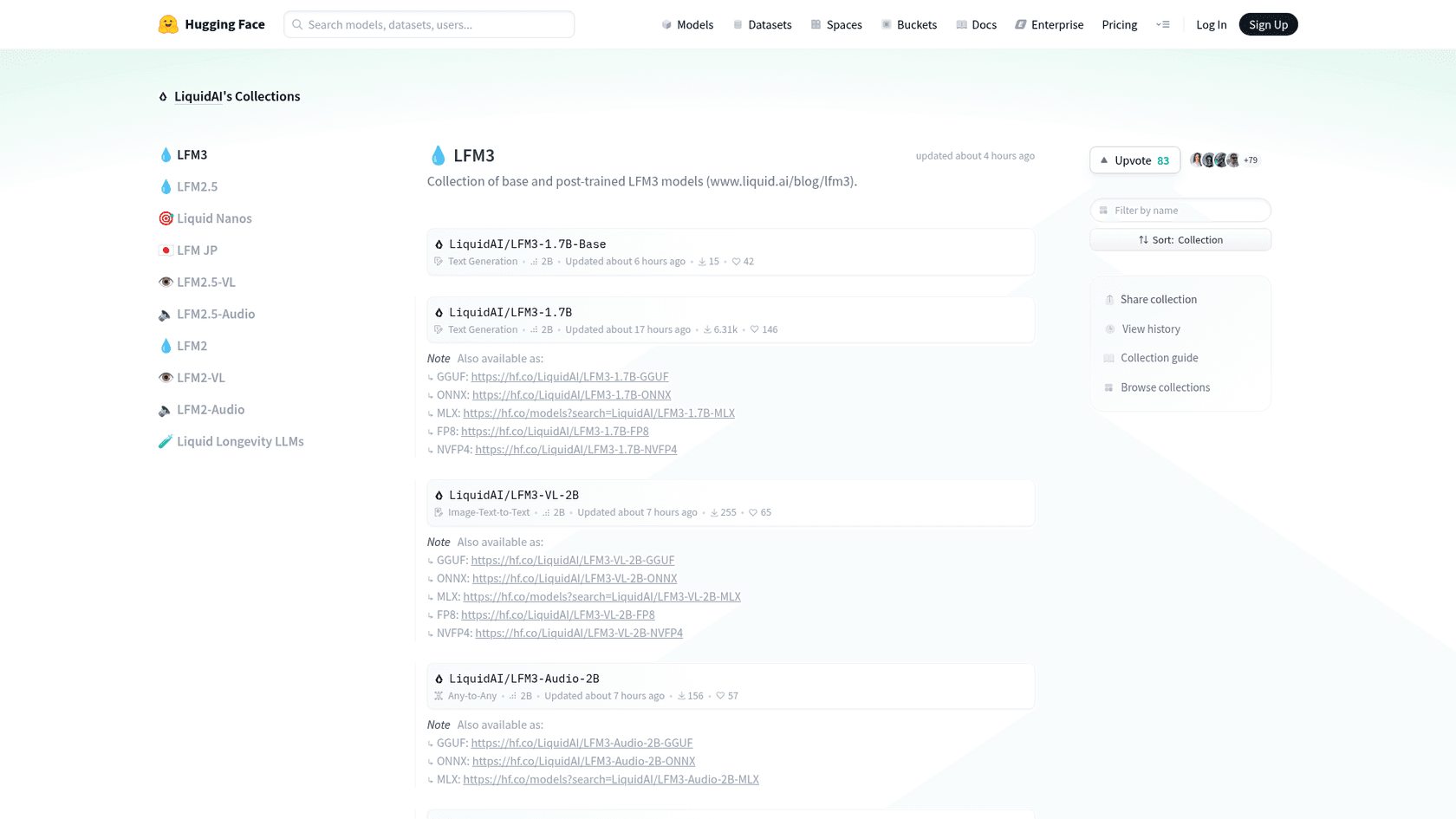
You download it from Hugging Face and run it locally, or try it in Liquid's browser playground first. The LFM3 collection has each model in BF16, GGUF, MLX 4-bit and ONNX, with FP8 and NVFP4 builds for servers.
The quickest local route is llama.cpp. The LFM3-1.7B docs give this command, with Liquid's recommended settings:
llama-cli -hf LiquidAI/LFM3-1.7B-GGUF --temp 0.1 --top-k 50 --repeat-penalty 1.1
A few things to know before you start:
- You need a recent build. The GGUF card says you need an LFM3-compatible llama.cpp build. The Q4_0 file is
1.05 GBand Q8_0 is1.85 GB. - vLLM and SGLang work for serving. Liquid's own GPU benchmarks used SGLang 0.5.22 with LFM3 support.
- Thinking is on by default. The chat template opens a
<think>block, and the card warns that turning it off can be inconsistent. - Tool calls changed format. LFM3 uses an XML format that's a superset of Qwen3-Coder's, not the custom format from LFM2, so older parsers need an update.
- Fine-tuning is cheap. Liquid has TRL notebooks for SFT, DPO and GRPO on LFM3-1.7B. Its wind-turbine inspection demo fine-tuned LFM3-VL-2B on about 3,000 photos in a few hours on one A100. (For support content, RAG vs fine-tuning is the more common question.)
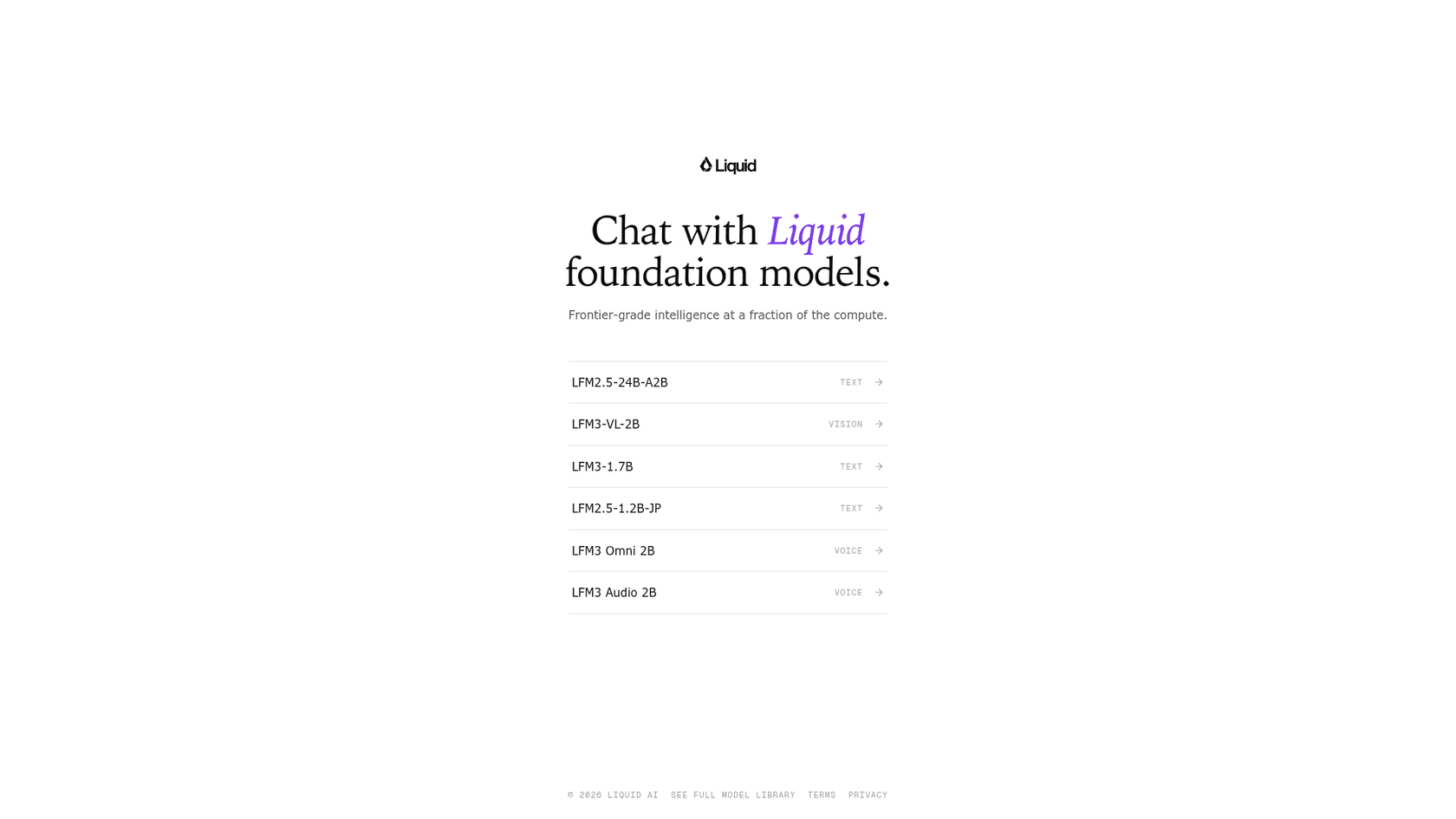
If you'd rather try before downloading, the Liquid Playground has LFM3-1.7B, LFM3-VL-2B, LFM3 Omni 2B and LFM3 Audio 2B in a model picker.
What are early users saying about LFM3?
It's a day old, so hands-on reports are thin and mostly from the Hacker News launch thread, which reached 101 points and 36 comments. The early notes are the useful reality check on the benchmark table.
One reader caught a basic factual slip in the playground and blamed quantization:
"when asked “what does a cow say?”, LFM3-1.7B said that a cow can say “Oink”... I assume this is lower quant problem, though: Q8 versions I’ve played with through llama both give the correct “moo” answer."
Another found the heavy tool-use training showing up where it wasn't asked for, on a trivia question with no system prompt:
"I am seeing the following in the reasoning trace: > However, the instructions say I must use available tools when answering questions."
Day-one tooling was rough in places, too. One reader couldn't load the MLX builds in LM Studio or two other MLX runners. The most relevant comment for support work came from someone using the previous generation to triage incoming messages:
"The LFM annotations are basically triage... Right now LFM 2.6 gets trustworthy annotations on just over 40% of data points."
That's a realistic picture of a small model in production: it handles the easy pass, and a bigger model or a person handles the rest. It's the same split what I'd use for AI ticket classification.
Where does LFM3 fall short?
The honest limits are mostly in Liquid's own fine print:
- Not for agentic coding or hard reasoning. The LFM3-1.7B card says it's "not recommended for agentic coding or complex multi-step reasoning," and suggests retrieval or search for knowledge-heavy tasks. The vision model's card adds multi-turn conversations to that list.
- Every number is vendor-reported. Artificial Analysis hadn't listed LFM3 on October 28, so there's no independent score yet.
- The license isn't Apache 2.0. It's close, but the $10M revenue threshold means bigger companies need a paid deal before shipping it.
- Short context on the voice models. LFM3-Audio-2B and LFM3-Omni-2B have 32K-token windows, an eighth of the text model's.
- Tooling is still catching up. The vision card lists llama.cpp support as in review, without video, and vLLM support as in progress.
Should you use LFM3?
It depends on what you're building:
- On-device assistants and local agents: yes, try LFM3-1.7B first. Nothing else Liquid compared runs this fast in this little memory, and it was trained inside real agent harnesses. It belongs on any list of open-source AI agents to test.
- Classification, routing and extraction at scale: look at d1-2B. One pass, many questions, milliseconds per decision, and about 1 GB of RAM. It's a natural fit for ticket routing and tagging.
- Voice and camera apps: LFM3-Omni-2B is the rare small model that hears and speaks. Mind the 32K context.
- Coding agents: no. Liquid says so itself, and models like Nanbeige 4.3 or the Nemotron 3.5 Bolt pair are better places to start.
- A customer support agent: LFM3 is a strong engine for parts of the job, especially triage, but it isn't an agent by itself. The next section is about what's missing.
Running small models on a real support queue
A model like d1-2B can tell you a ticket is about billing and urgent. To actually help, something still has to sit inside your helpdesk, read the ticket when it arrives, look things up in your help center and past tickets, write the tag back, draft the reply, and know which tickets a person should take. That's the job eesel's AI helpdesk teammate is built for, one of the ready-to-work AI teammates you hire for a specific role rather than a model you have to wire up.

Dokument 24, a Danish online legal documents company, is a good example of triage in practice. Between August 8 and September 8, 2026, eesel prepared about 680 Zendesk tickets, tagged about 430 of them by product (will, prenuptial agreement, future power of attorney or company formation) and left about 670 draft replies in Danish as internal notes for the team to send. It answers from about 2,600 web pages and Zendesk items. Qontro, an ERP software company in Auckland, runs a draft on every Freshdesk ticket, but outages, data loss, migrations and billing go straight to a person. Those routing rules are the part that a benchmark never tests, which is also what decides the real cost per ticket.
Before going live, eesel runs your setup against your past tickets so you can see its answers before a customer does. I wrote up how that testing works separately. And if you like working from a terminal the way you would with a local model, the eesel CLI lets you, a script, or a coding agent like Claude Code connect integrations, edit the agent's standing instructions, approve or deny its pending actions, and read its activity log, all as JSON.
Try eesel
LFM3 is a fast, cheap engine for on-device agents and one-pass decisions like routing a ticket. If what you need is tickets tagged, routed and drafted in your Zendesk AI or Freshdesk setup this week, eesel's AI helpdesk teammate joins your helpdesk in minutes, learns from your past tickets and help center, and works within the rules you set. It's free to start with 100 credits and no card, so you can test it on real tickets before you decide. Try eesel.
Frequently Asked Questions
What is LFM3?
LFM3 is the third generation of Liquid Foundation Models from Liquid AI, released on October 27, 2026. The first release is six open-weight models of about 2B parameters each, all built on one backbone called LFM3-1.7B-Base: a text model, a vision model, an audio model, an omni model and two decision models. They sit in the same group of small language models as MiniCPM5 2B and the small Gemma 4 sizes.
Is LFM3 free to use?
The weights are free to download from Hugging Face under the LFM Open License v1.0, which is based on Apache 2.0. Commercial use is free only while your company group makes less than $10 million a year in revenue; above that you need a paid license from Liquid AI. Research and qualified non-profit use has no revenue limit. Compare that with fully Apache 2.0 models like Nanbeige 4.3.
How much does the LFM3 API cost?
Liquid AI hasn't published a per-token price for any LFM3 model yet. Its pricing page lists only d1 ($0.02 per million input tokens, $0 output), d1-ultra ($0.042 / $0) and LFM2.5-24B-A2B ($0.05 / $0.70), and new organizations get $2 of free credit. LFM3 isn't on OpenRouter yet either. For context on hosted model pricing, see GPT-6 Luna pricing.
How much memory does LFM3-1.7B need?
About 1 GB at 4-bit. The Q4_0 GGUF file is 1.05 GB and Q8_0 is 1.85 GB. In Liquid AI's tests it used 1.90 GB on an iPhone 17 Pro at 32K context, and a full 128K context needs 1.6 GB of KV cache, against 4.3 GB for Qwen3.5-4B. That's why it's one of the few small models that runs on a phone with long context.
Is LFM3-1.7B better than Qwen3.5?
On Liquid AI's own table, LFM3-1.7B averages 49.37 across 29 benchmarks against 47.24 for Qwen3.5-9B, a model about five times larger. It wins clearly on business automation and browser tasks (AutomationBench 41.29 vs 15.10) and loses on coding and knowledge (GPQA Diamond 63.37 vs 80.40). These are vendor numbers, not independent tests. See the Qwen overview for the other side.
Can LFM3 be used for customer support ticket triage?
The d1-2B decision model is the best fit. Its model card shows it routing a ticket to billing, shipping or technical, flagging refunds and scoring urgency in one pass. You'd still need to connect it to your helpdesk and test it on your own tickets. For ready-made options, see the best AI for support ticket triage.
What are the LFM3 d1 decision models?
d1-2B and d1-Omni-2B are models that don't write text. You give them an input, like a ticket, invoice, photo or voice note, plus a list of questions, and they answer all of them in a single pass with a probability for each answer. d1-2B handles text and images, d1-Omni-2B adds audio. Read more on decision models.