


What "Palmier and Claude" actually means
Search "Palmier Claude" and you are really asking one question: what does it look like when Claude edits video for you? The short answer is that Palmier Pro treats your AI agent as a first-class operator of the editor, not a helper bolted onto the side. (If you want the full tour of the app itself, I wrote a separate Palmier overview.)
Palmier is a native Mac editor from a two-person Y Combinator team (Summer 2024). It looks and behaves like a real timeline editor, multi-track video and audio, trim, split, speed, transform, export to Premiere and DaVinci, but two ideas make it different. First, AI generation lives on the timeline itself. Second, the editor is operable by an agent: Claude, Cursor, or Codex can connect and work the project directly.
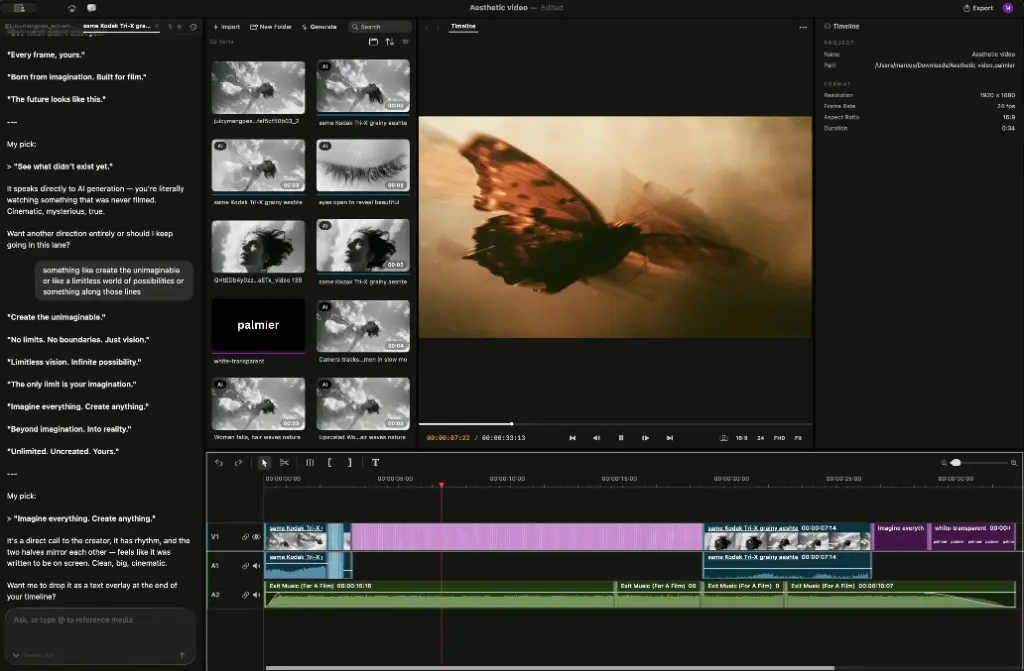
That second idea is the one people keep singling out. As one observer put it after the launch:
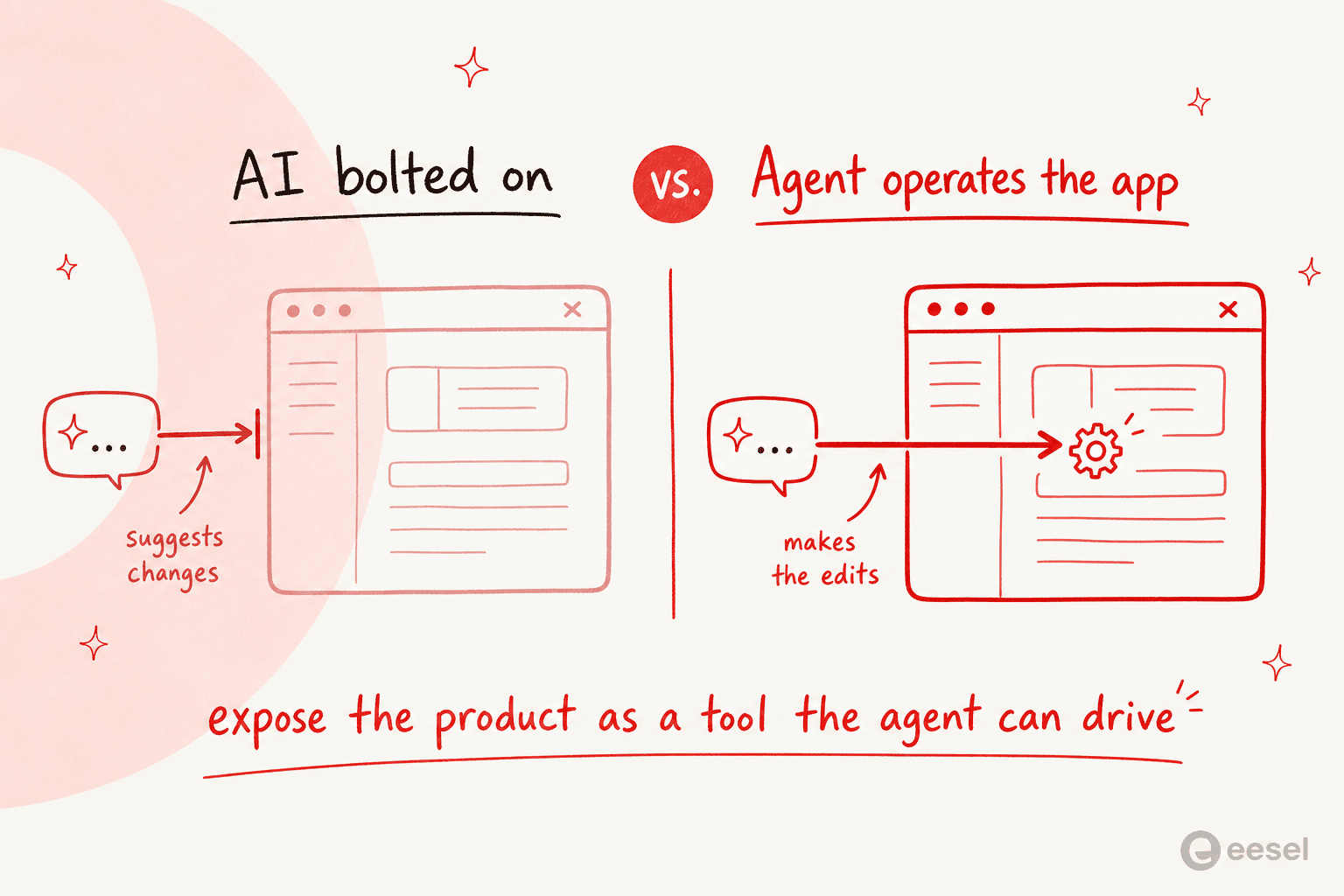
"The agent operates the editor itself, rather than suggesting changes in a separate chat window. It's a clean example of a broader pattern. Instead of bolting an AI assistant onto a product, you expose the product itself as a tool an agent can drive."

That is the distinction worth holding onto. Plenty of tools now have a "chat with AI" panel. Very few hand the agent the actual controls.
How Claude drives the timeline through MCP
The connective tissue is the Model Context Protocol. When Palmier is running, it exposes a local MCP server, a small standard interface that lets an outside agent read the project and call the editor's functions. Claude connects to that server and, from then on, it can see your timeline and act on it.
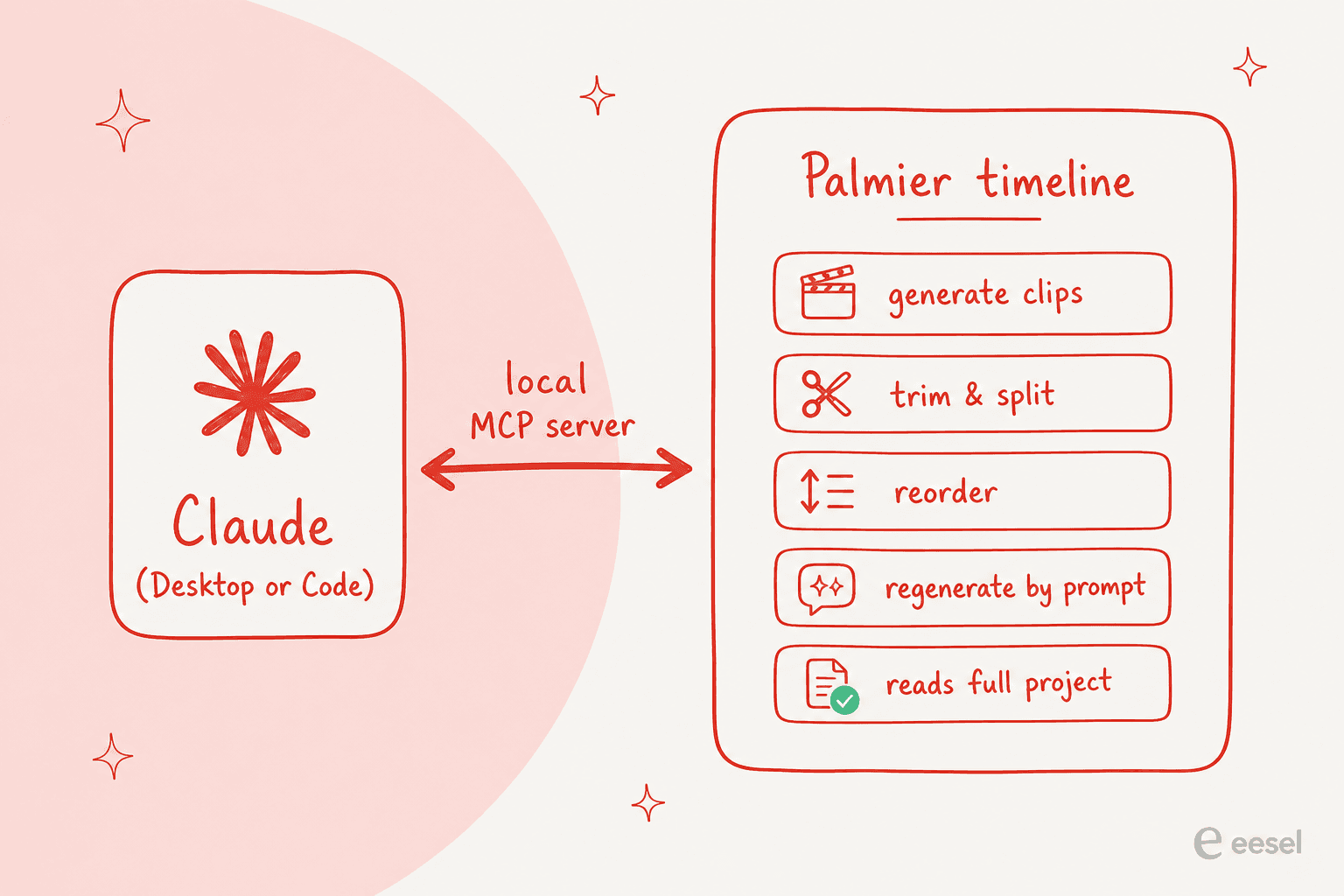
Concretely, per Palmier's docs, an agent connected over MCP can generate images, video, and audio and place them on the timeline; trim, split, reorder, and adjust clips; and rerun or tweak any AI-generated clip by prompt. The key word is context: the agent sees your whole project, so "make the intro tighter" or "swap the third shot for something moodier" lands against the real timeline, not a blank prompt box.
If you have used Claude Code on a repo, the mental model transfers cleanly. There, Claude reads your files and edits them in place. Here, it reads your timeline and edits that in place. Same agent loop, different surface.
Setting it up
Getting Claude wired into Palmier is refreshingly short:
- Download Palmier Pro. Grab the
.dmgfrom GitHub and open it. You need macOS 26 (Tahoe) or later, and no account is required. - Open a project. Start a new project or open an existing one, so the agent has a timeline to work against.
- Open Help then MCP Instructions. Inside the app, this panel gives you setup steps and a one-click install for Claude Desktop, Claude Code, Cursor, and Codex.
- Connect from Claude. Enable the MCP connection in your agent, and Claude can now read the project and edit the timeline.
From there you just talk to Claude the way you already do. "Generate three moody B-roll shots of a city at night, drop them after the title card, and trim each to two seconds" is a reasonable first instruction, and the clips land on the timeline where you asked.
What Claude can (and can't) do in the timeline
It is worth being precise about the boundary, because "the agent can edit video" invites bigger assumptions than the tool actually supports. Here is the honest split.
| Claude can | Claude can't |
|---|---|
| Generate images, video, and audio into the project | Get around the macOS 26 (Tahoe) requirement |
| Place, trim, split, and reorder clips on the timeline | Edit a project it is not connected to |
| Rerun or tweak an AI clip by changing the prompt | Generate media for free (it spends your credits) |
| Read the full project context before acting | Export to a format Palmier does not support |
| Draft a first cut, add captions, organize files | Replace your judgment on what actually looks good |
The thing I would flag: the agent is strong at the mechanical work, sorting footage, drafting a rough assembly, generating filler shots, but the taste is still yours. That is not a knock, and I go deeper on where it shines and where it drags in my Palmier Pro review. It is the same place we have landed after years of putting agents on live customer support queues: the agent removes the grind, a human still owns the calls that matter.
The loop this actually kills
To see why on-timeline editing matters, look at the workflow it replaces. The founder described the old pain plainly:
"Making AI videos means bouncing between tools constantly. You generate a clip in the web, import it to Premiere, realize one section doesn't work, go back, regenerate, reimport. That loop repeats dozens of times per video."
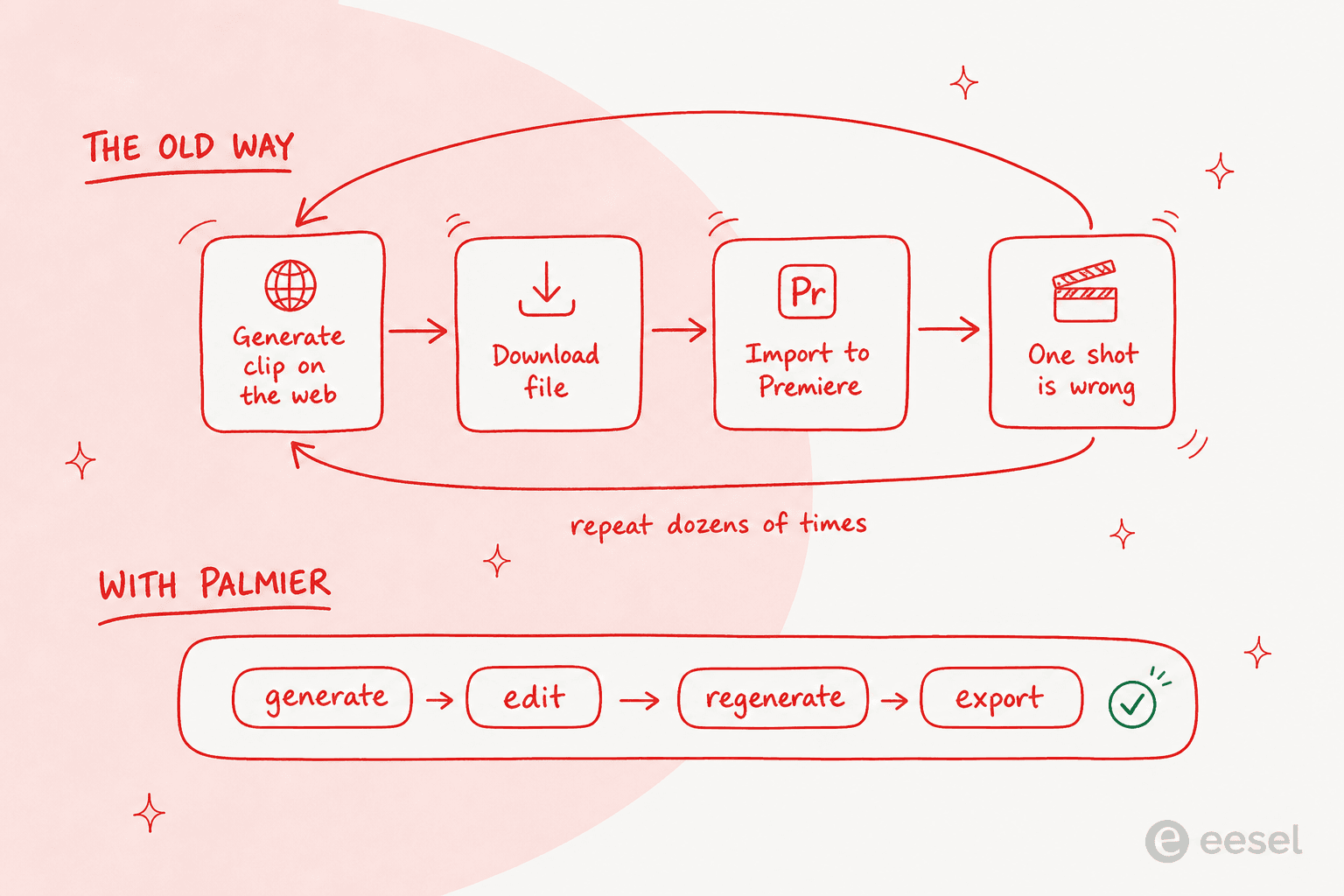
Palmier collapses that. Because every clip keeps its prompt, model, and reference images attached, you (or Claude) can regenerate a shot in place instead of leaving to re-prompt somewhere else and re-importing. One reviewer thought this provenance was the real insight, not the generation itself:
"The folder mess is the real product insight here. AI video does not fail only at generation quality; it fails when every prompt, reference, and half-good clip loses its history. Keeping the prompt, model, and reference inside the timeline sounds small, but it changes review behavior."
The generation itself leans on frontier models, Kling V3, Seedance 2.0, Google's Veo 3.1, and Grok Imagine, so what Claude produces is only as good as the model you point it at.
Which way should you drive Palmier?
You have four ways to operate the editor with AI, and they are not interchangeable. Here is a quick way to pick.
Match the agent to how you like to work:
Built-in chat or Claude Desktop. The lowest-friction path. Describe the shot or edit in plain language and let the agent place it. Best if you do not live in a terminal and want to stay inside the app.
Claude Code. For repeatable, scripted edits, or if you already run Claude Code on your other work. Same MCP access, in a workflow you can version and rerun.
Cursor or Codex. Connect the same way through MCP. Reach for these if they are already your daily agent, so video sits next to everything else you drive.
Whichever you pick, the underlying capabilities are identical, because they all talk to the same MCP server. The choice is about where you are most comfortable, not about what the agent can do.
What it costs
This is the part that trips people up, so let me be exact: the editor is free, and connecting Claude is free. Credits, and only credits, cost money, and they are spent only on AI generation, video, image, audio, upscaling, and Palmier's own chat. Editing and export never burn a credit.
| Plan | Launch price | Regular price | Credits / month | What you get |
|---|---|---|---|---|
| Free | $0 | $0 | - | Full editor, MCP for Claude, Cursor, Codex; no account |
| Pro | $29 / mo | $49 / mo | 5,000 | Everything in Free, plus image, video, audio generation |
| Max | $69 / mo | $99 / mo | 12,000 | Everything in Pro, plus priority support |
| Custom | Contact | - | Volume | Private Slack channel, security and procurement help |
As a rough guide, Palmier says 5,000 credits is around 333 images or 3 to 7 minutes of generated video, though heavier models at higher resolution burn through them faster. If you want the full breakdown with worked examples, I put that in the Palmier Pro pricing post.
The practical read: because letting Claude drive costs nothing extra beyond the generation you would pay for anyway, there is no separate "agent tax." The agent is just a faster way to spend the same credits.
The limits worth knowing
Being fair means naming what is not great yet.
It is macOS 26 only. This is the hard gate. Minimum macOS 26 (Tahoe) means Windows, Linux, and anyone on an older Mac are simply out. If that is you, I rounded up the closest options in Palmier for Windows.
It is young. Palmier Pro launched publicly in mid-2026, so there is not yet a deep well of long-term user reviews. Most of the signal is early and enthusiastic, which is worth reading with the usual pinch of salt.
The name is a running joke. Even fans keep swiping at it:
"Terrible name but Palmier Pro is pretty good as an AI video editor."
None of these are dealbreakers if you are a Mac creator making AI-heavy video. They are just the honest edges of a new product, and I would rather you hear them now than after the download.
Try eesel
If what caught your eye here is the pattern, an agent that operates your tool instead of chatting alongside it, that is exactly what we build at eesel, just pointed at customer support instead of video.
eesel is an AI agent that plugs into your helpdesk (Zendesk, Freshdesk, Gorgias, and more), trains on your past tickets and knowledge base, and then works the queue directly: it reads the ticket, drafts or sends the reply, tags and routes, and escalates the ones a human should take. Same idea as Claude in Palmier, the agent has the controls, not just an opinion, and you can simulate it against your real historical tickets before it ever touches a live conversation. It is free to try.
