


Why look past Palmier in the first place
I want to be fair to Palmier here, because it earns the attention. The core insight is genuinely good: making AI video means bouncing between tools constantly, and Palmier collapses that loop into one timeline where every clip remembers its prompt, model, and references. The team used it to make 15+ launch videos for Y Combinator companies before shipping it, and even skeptical observers single out the agent-operates-the-editor idea as the real novelty.
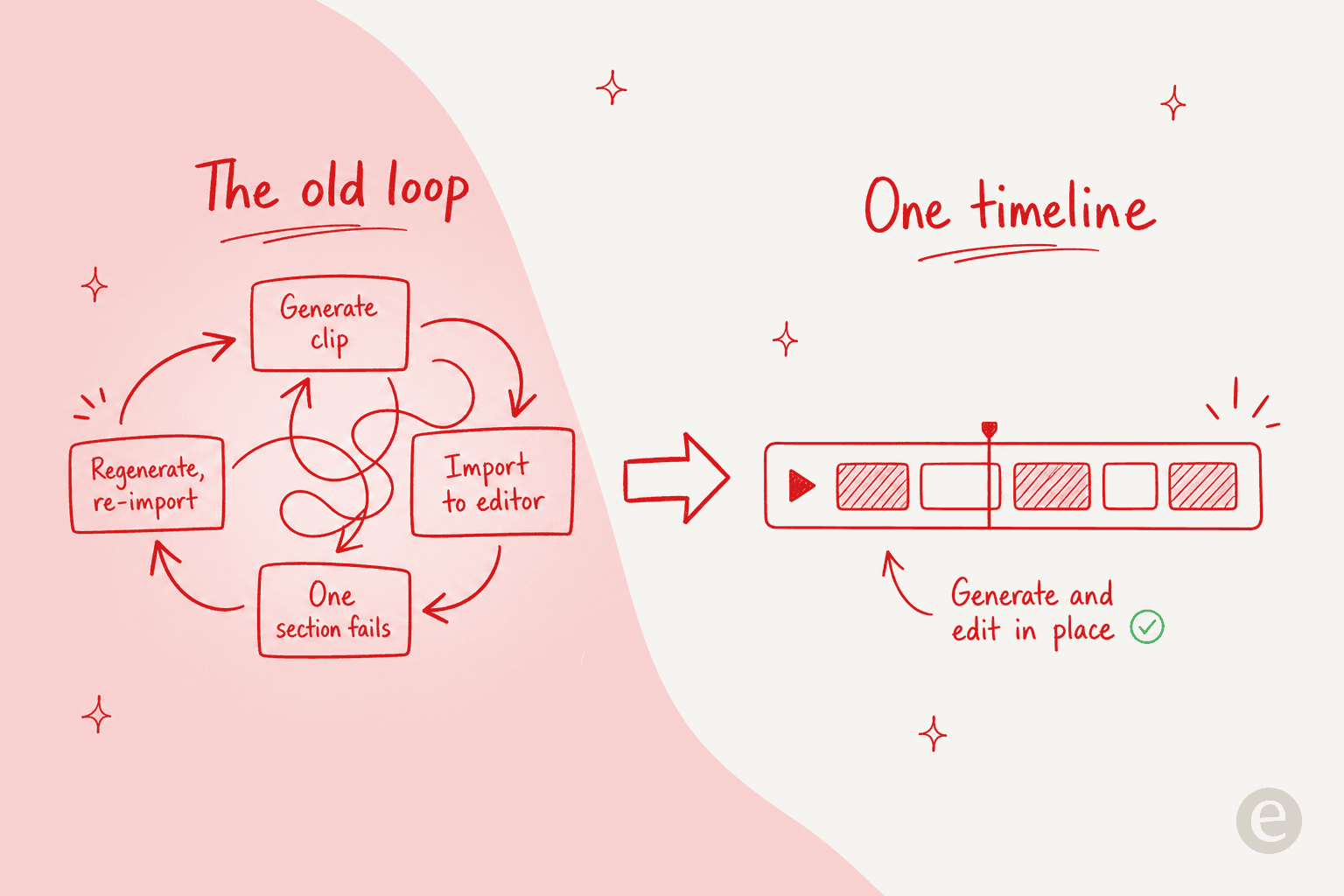
So why leave? Three reasons keep coming up, and none of them is "the product is bad":
- The platform gate. Palmier is macOS only, and not just any Mac: it needs macOS 26 (Tahoe). That rules out every Windows and Linux user, plus anyone on an older Mac. It is the single biggest reason people search for an alternative, and it is why we wrote a whole post on Palmier for Windows.
- The credit meter. Editing is free, but AI generation runs on credits. The Pro plan is $29/mo at launch pricing ($49 regular) for 5,000 credits, which the site rates at roughly 333 images or 3 to 7 minutes of generated video. Heavy generators burn that fast.
- It is brand new. Palmier launched publicly in mid-2026. There is no deep track record, no Reddit backlog of edge cases, and the community signal is still thin. Some teams want a tool that has been battered by a few million users first.
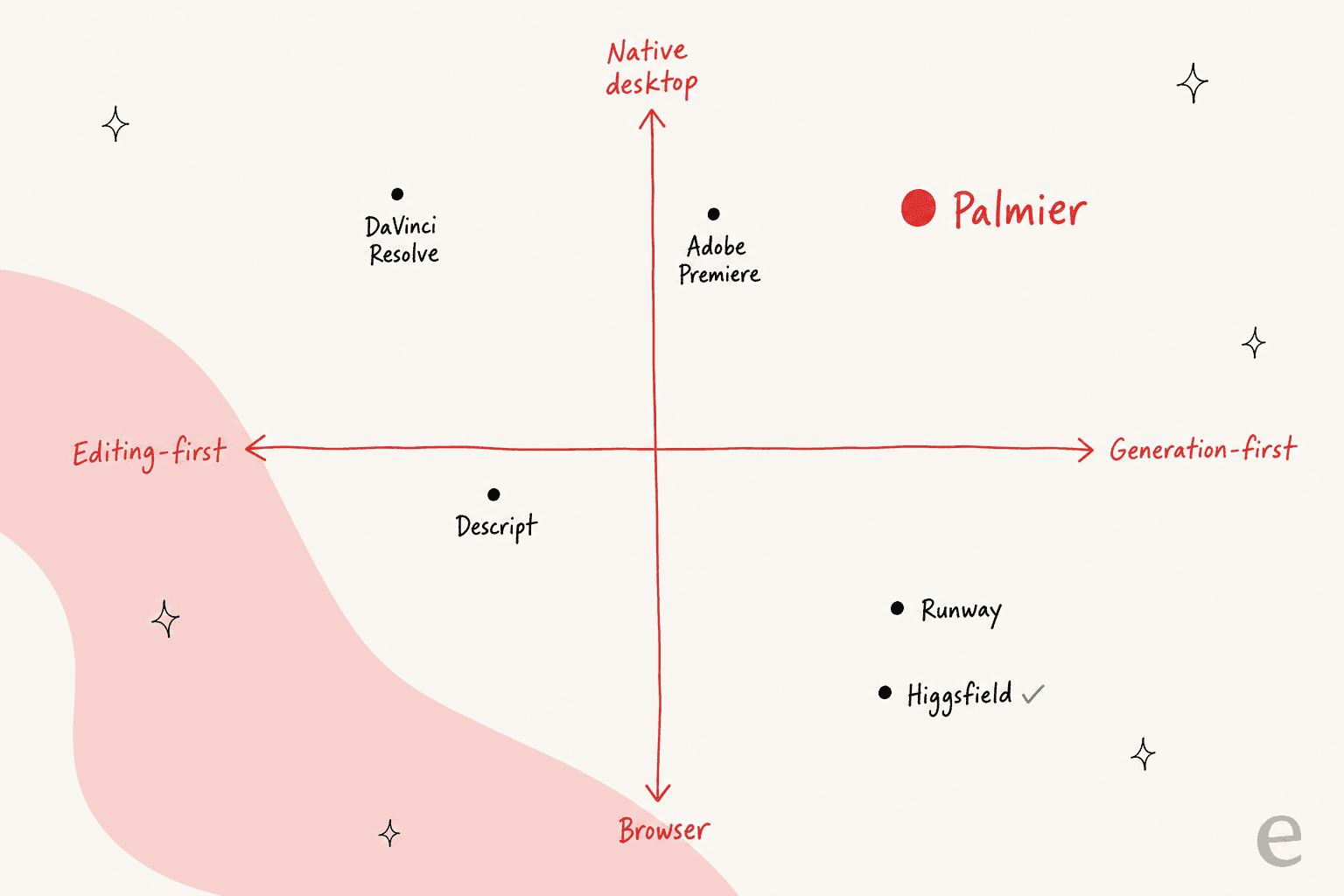
Here is the thing I would tell a friend: the alternatives split cleanly into two camps. Some are editors that added AI (DaVinci, Premiere, Descript, CapCut). Others are generators that added light editing (Runway, Higgsfield). Palmier is unusual because it sits in the top-right of that map, native and generation-first. Knowing which camp you actually need is 80% of the decision.
How I compared them
I have spent most of my time at eesel building the plumbing that lets an AI agent actually operate a product through its APIs, so Palmier's MCP-drives-the-editor design is the part I find most exciting, and the lens I judged these tools through. For each one I looked at four things: what the AI actually does (not the tagline), what it costs including the credit small print, what platforms it runs on, and who it genuinely fits. Prices below are current as of July 2026 and pulled from each vendor's own pages.
Here is the whole field at a glance before the individual verdicts.
| Tool | Best for | Platform | Standout AI features | Model backbone | Starting price |
|---|---|---|---|---|---|
| DaVinci Resolve | Free pro editing | Mac, Windows, Linux | Magic Mask, Super Scale, Voice Isolation | Neural Engine (in-house) | Free; Studio $295 once |
| Descript | Talking-head, podcasts | Mac, Windows, web | Text-based editing, Studio Sound, Underlord | In-house + partners | Free; $16/mo annual |
| CapCut | Fast social video | Win, Mac, web, mobile | Auto captions, background remover, TTS | ByteDance (in-house) | Free; ~$9.99/mo |
| Adobe Premiere Pro | AI inside a full NLE | Windows, Mac | Generative Extend, text-based editing | Adobe Firefly | $22.99/mo |
| Runway | Pure AI generation | Any browser | Gen-4.5, Act-One, Aleph 2.0 | Gen-4.5 + partners | Free; $15/mo |
| Higgsfield | Cinematic AI motion | Browser + plugins | Camera-motion presets, Soul, @ characters | Seedance 2.0, Nano Banana Pro | $9/mo |
| Kapwing | Browser collaboration | Any browser | AI video generator, Trim with Transcript | Veo, Sora, Kling, Wan | Free; $16/mo annual |
| VEED | Social + marketing teams | Any browser | AI avatars, auto-subtitles, dubbing | Fabric 1.0 + partners | Free; $20/mo |
| Palmier (reference) | Agent-driven Mac editing | macOS 26 only | Timeline-native generation, MCP agent | Kling V3, Seedance 2.0, Veo 3.1 | Free; $29/mo launch |
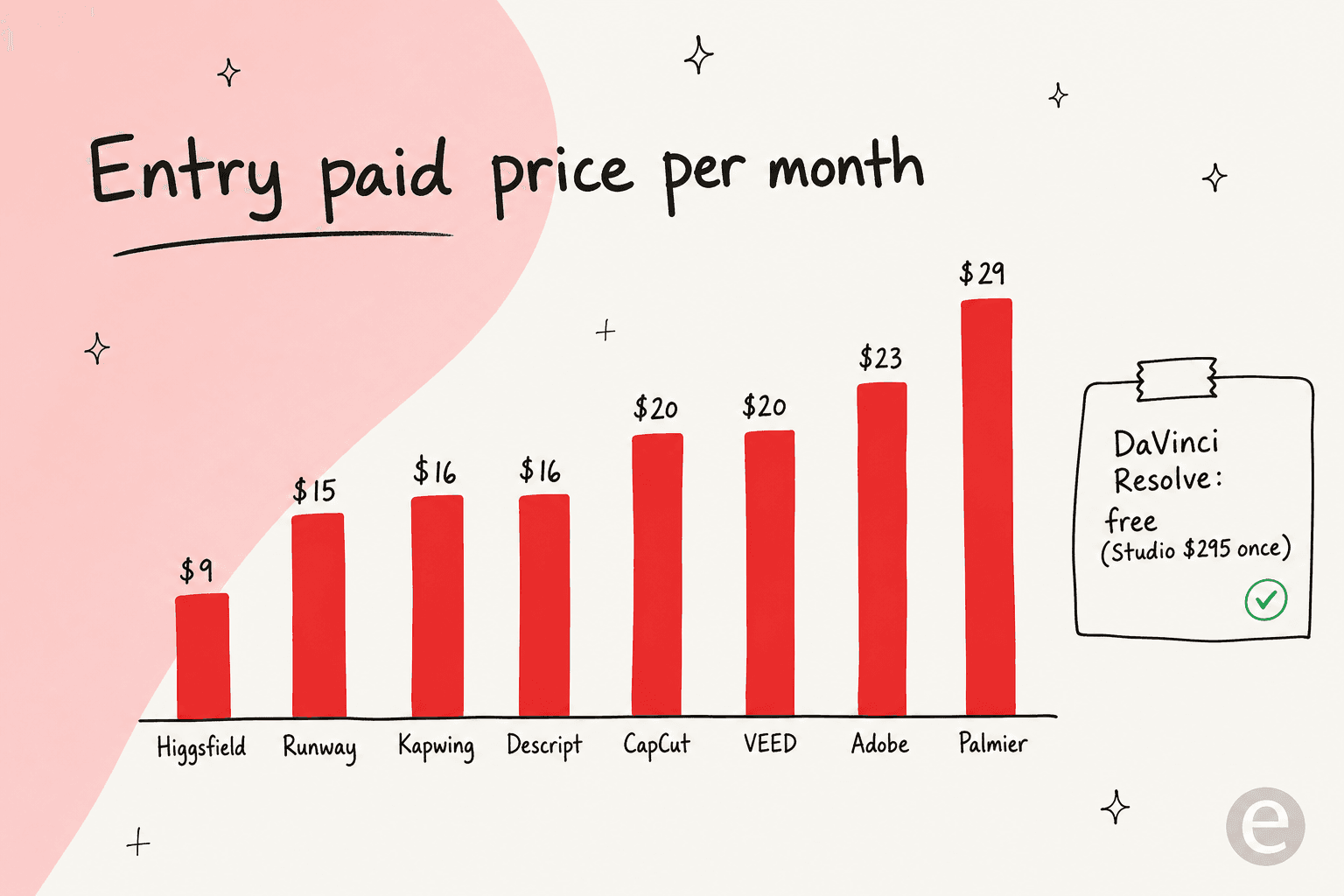
One more view worth a second, because price is where the "which do I pick" question usually lands. Palmier sits at the top of the paid entry range; the generators undercut it, and DaVinci ducks the subscription entirely.
1. DaVinci Resolve: the best free Palmier alternative
Best for: anyone who wants a genuinely professional editor without a subscription, on any operating system.
If a Windows user or a Mac holdout asked me for one name, this is it. DaVinci Resolve from Blackmagic Design bundles editing, color, VFX, motion graphics, and audio into one app, and the free version is not a crippled trial. It runs on Mac, Windows and Linux, which quietly solves Palmier's biggest problem before you even open it.
The AI lives in the DaVinci Neural Engine: Magic Mask isolates and tracks a subject across a shot without manual rotoscoping, Super Scale uprezzes HD footage to 4K or 8K, and Voice Isolation strips background noise out of dialogue. Version 21 adds IntelliSearch for AI content search across your media. The catch: those Neural Engine tools are Studio-only.
"Great value for money, fantastic choice for creating videos with and it is renown for being the industry standard for colour grading."

Pricing is refreshingly simple in a world of credit meters: the base app is free, and DaVinci Resolve Studio 21 is a one-time $295 perpetual license with free updates, no subscription. What it does not have is Palmier's "generate a clip from a prompt on the timeline" model, so if that is what pulled you to Palmier, pair Resolve with a generator.
Verdict: the best free Palmier alternative, full stop. Pick it for real editing muscle; pair it with Runway or Higgsfield if you also need generation.
2. Descript: best for talking-head and podcast video
Best for: creators cutting interviews, podcasts, screen recordings, and anything driven by a talking voice.
Descript took the idea Palmier applies to generation and applied it to editing: you edit the video by editing its transcript. Delete a sentence in the text, and the video cuts with it. For talking-head content that is the fastest workflow I have used, and it is a different job than Palmier's cinematic-generation angle.
The AI features are the reason to be here. Studio Sound cleans up audio in one click, Remove Filler Words strips every "um" and "uh" across a whole recording, and Underlord, Descript's AI co-editor, turns a raw recording into a tight cut and takes natural-language direction, which is the closest thing on this list to Palmier's chat-driven editing.
Pricing runs Free, then Hobbyist at $16/mo (annual, or $24 monthly), Creator at $24, and Business at $50, with AI metered by a monthly credit allowance. It holds 4.6/5 across 906 reviews on G2. It runs on Mac, Windows, and the web, so like most of this list it clears Palmier's platform gate.
Verdict: the pick when your video is really someone talking. It is not a cinematic-generation tool, so do not expect Palmier's or Runway's clip quality.
3. CapCut: best for fast social and short-form
Best for: TikTok, Reels and Shorts creators who want AI effects and captions with a near-zero learning curve.
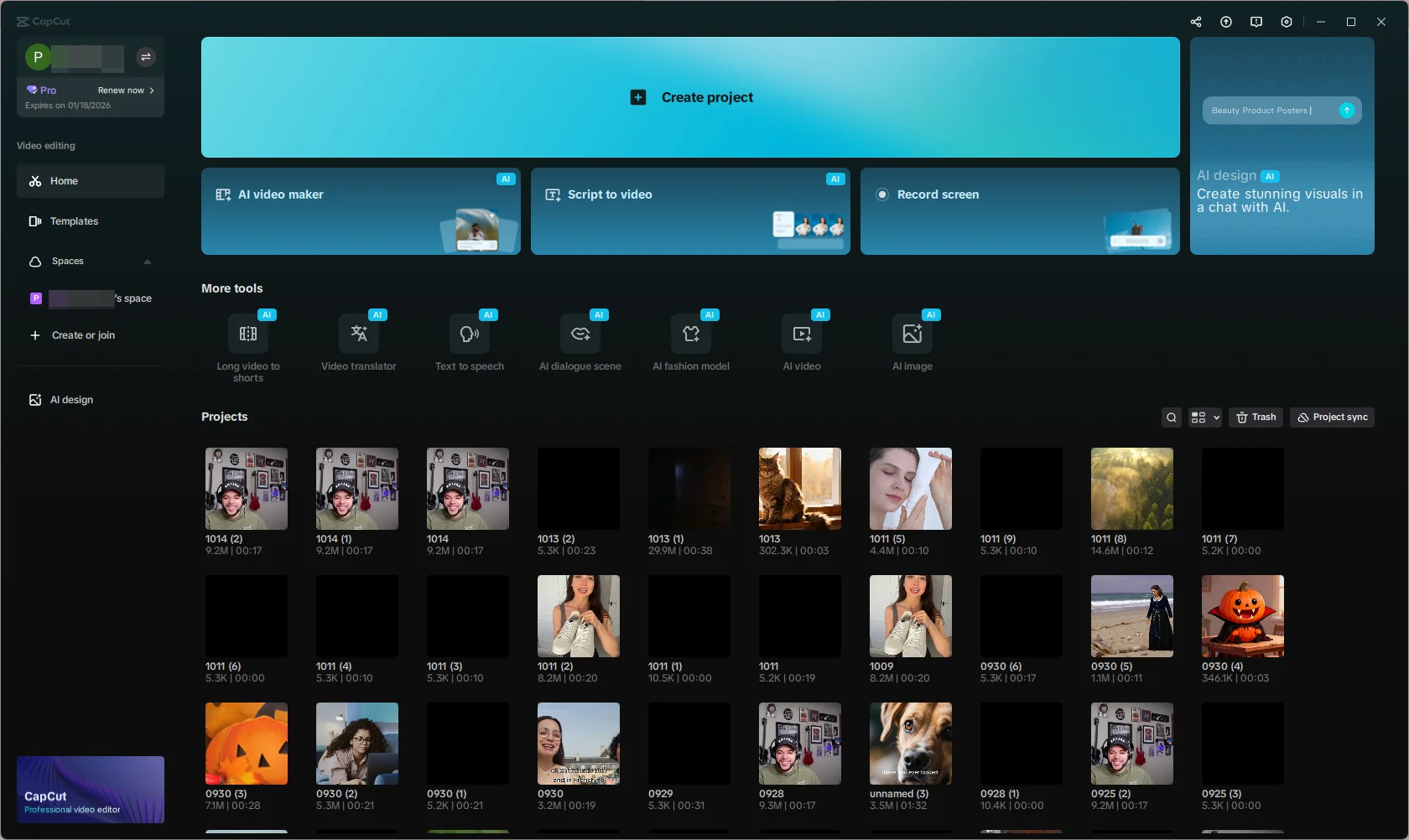
CapCut, from TikTok's parent ByteDance, is the mass-market pick, and it is very good at what it does. Auto captions transcribe speech into synced, styleable subtitles, the background remover does one-tap green-screen with no physical backdrop, and text-to-speech turns a script into voiceover from 200+ voices. It runs everywhere: Windows, Mac, web, and mobile.
Two things temper the recommendation, and they matter more than usual for anyone doing client work. First, paywall creep: features that used to be free keep moving behind Pro, and Pro roughly doubled to $19.99/mo in an early-2026 restructure. The frustration is loud:
"Literally the most basic features are Pro now?... today I wanted to edit a very short video... apparently adding your own sounds ('extract audio') is also not free... So what CAN you do for free now? Cut, crop, and change the speed of your video? smh"

Second, a mid-2025 terms-of-service update granted ByteDance a broad, perpetual license to uploaded content, which is a real reason some creators avoid it for client footage. Pricing is Free, Standard $9.99/mo, and Pro $19.99/mo (or $179.99/yr).
Verdict: the easiest on-ramp for social video, and hard to beat on speed. Read the terms before you put a client's footage through it.
4. Adobe Premiere Pro: best AI inside a full pro NLE
Best for: professionals who already live in Premiere and want the generative AI in-app.
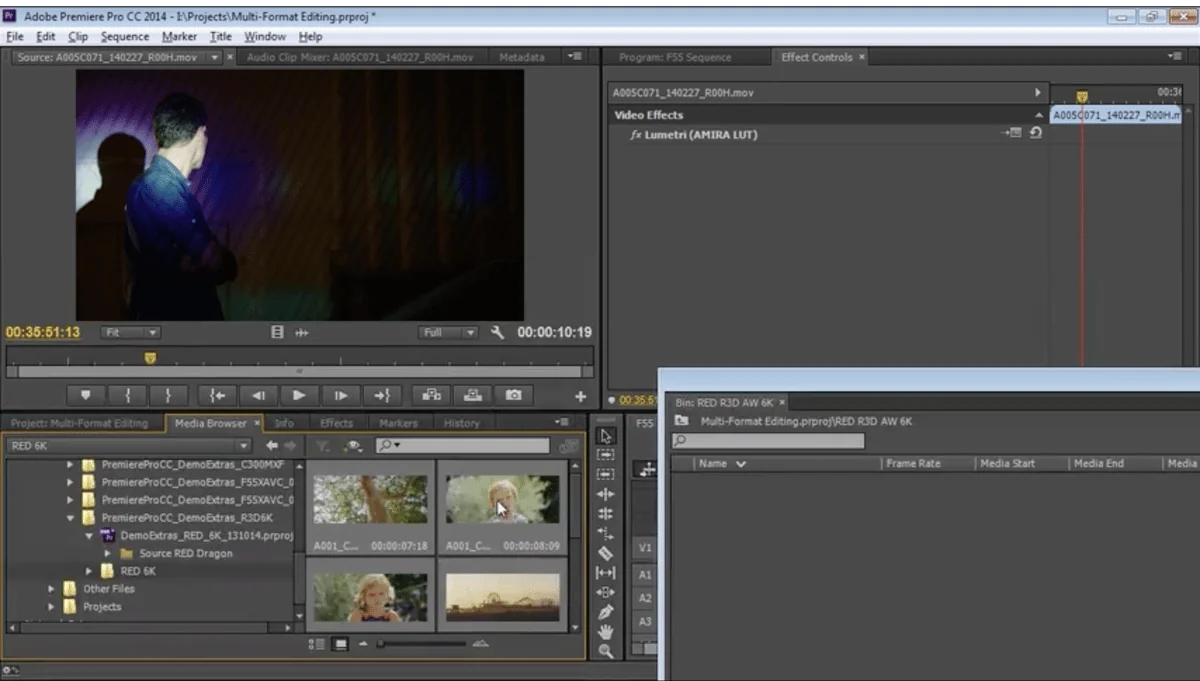
Adobe Premiere Pro is the incumbent, and it has folded Firefly generative AI into the timeline. Generative Extend stretches clips, adds frames, and even generates missing ambient sound; text-based editing auto-transcribes on import so you can rough-cut by pasting transcript text; and Enhance Speech cleans up dialogue. It is the most Palmier-like of the traditional editors in that the generation happens in the tool.
The value shows up when the AI removes grunt work:
"When they integrated the automatic transcript, it saved me 3 hours of work per day. One of the latest features is text-based editing, which has also helped me save about two hours of work per day."

The friction is cost and lock-in. The single-app plan is $22.99/mo (annual, billed monthly), with just 25 monthly generative credits; the full Creative Cloud is $69.99/mo. Multiple G2 reviewers call it expensive for solo creators, and cancelling the subscription removes all access, the classic subscription trade-off Palmier's open-source editor sidesteps.
Verdict: the right call if you already edit in Premiere and want AI without leaving it. Overkill (and pricey) if you just want quick generation.
5. Runway: best for pure AI generation
Best for: creators for whom the AI-generated clip is the point, not the editing.

Runway is the heavyweight generator, and it is the tool Palmier's own founders name as one you currently bounce out to. Its Gen-4.5 model is frontier-grade (Runway claims it tops the Artificial Analysis text-to-video benchmark), Act-One drives character facial performance from an actor's video with no motion-capture rig, and Aleph 2.0 lets you edit one frame and propagate that change across a clip. It runs in any browser and even exposes a Runway MCP server for agents, which is the closest thing here to Palmier's design philosophy.
The universal complaint is the one you should plan around: credits burn, including on generations you did not want.
"Doesn't follow prompts and it uses up credits for a video generated that isn't correct. I used up 600 credits on one scene that runway couldn't create... I am wasting money for garbage."
Pricing is Free (125 one-time credits), Standard $15/mo (625 credits), Pro $35 (2,250), and Max $95 (9,500). At 60 credits per 5 seconds on Gen-4.5, a serious project eats a plan quickly, the same credit dynamic that pushes people off Palmier's meter too.
Verdict: the best generation quality on this list. It is a generator, not an editor, so pair it with DaVinci or Premiere for the actual cut.
6. Higgsfield: best for cinematic AI motion
Best for: creators who want dramatic, camera-driven AI shots and are watching their budget.
Higgsfield is the other generator Palmier explicitly names, and its signature is motion. Its video generator animates a still image and lets you pick a camera-motion preset to control the movement, which is how it gets that cinematic look; the Soul model covers photoreal images with 100+ named style presets; and @-referencing keeps a character or location consistent across generations. It runs in the browser and even ships Premiere and DaVinci plugins.
It is also the cheapest paid entry point on this list, starting at $9/mo for 120 credits, with Pro at $29 and Max at $79. Sentiment is positive but honest about limits:
"I think Higgsfield is great for generating prototype video ideas. Elements of the video can seem inconsistent at times. The NSFW block can be overzealous at times. The video creation will probably be more consistent in the future, so 4 out of 5 stars."

It sits at 4.0/5 across ~3,200 Trustpilot reviews. Like Runway, it runs on Seedance 2.0 under the hood, one of the same models Palmier wires into its timeline.
Verdict: the value pick for cinematic AI motion, especially for prototyping shots. Consistency is still hit-or-miss, so budget for a few re-rolls.
7. Kapwing: best browser-based collaborative editor
Best for: teams that want AI generation plus a full editor in one shared online workspace.
Kapwing is what you reach for when the work is collaborative and browser-bound. Its AI video generator builds a first-draft video from a prompt, script, PDF, or footage (running Veo, Sora, Kling and Wan under the hood), Trim with Transcript gives you Descript-style text-based cutting, and the whole thing lives in real-time shared workspaces with comment-on-video review. No install, works on any OS.
Pricing is credit-based on top of the plan fee: Free ($0, 10 credits, watermark), Pro $16/mo annual (1,000 credits/mo, no watermark, 4K), and Business $50. The credit model is the thing to watch, since AI actions like subtitling and dubbing draw from the same monthly pool.
Verdict: the best pick for a team editing together in a browser. If you are a solo creator chasing cinematic generation, Runway or Higgsfield give you more per credit.
8. VEED: best for social and marketing teams at scale
Best for: marketing teams producing social and training video, especially with subtitles and avatars.
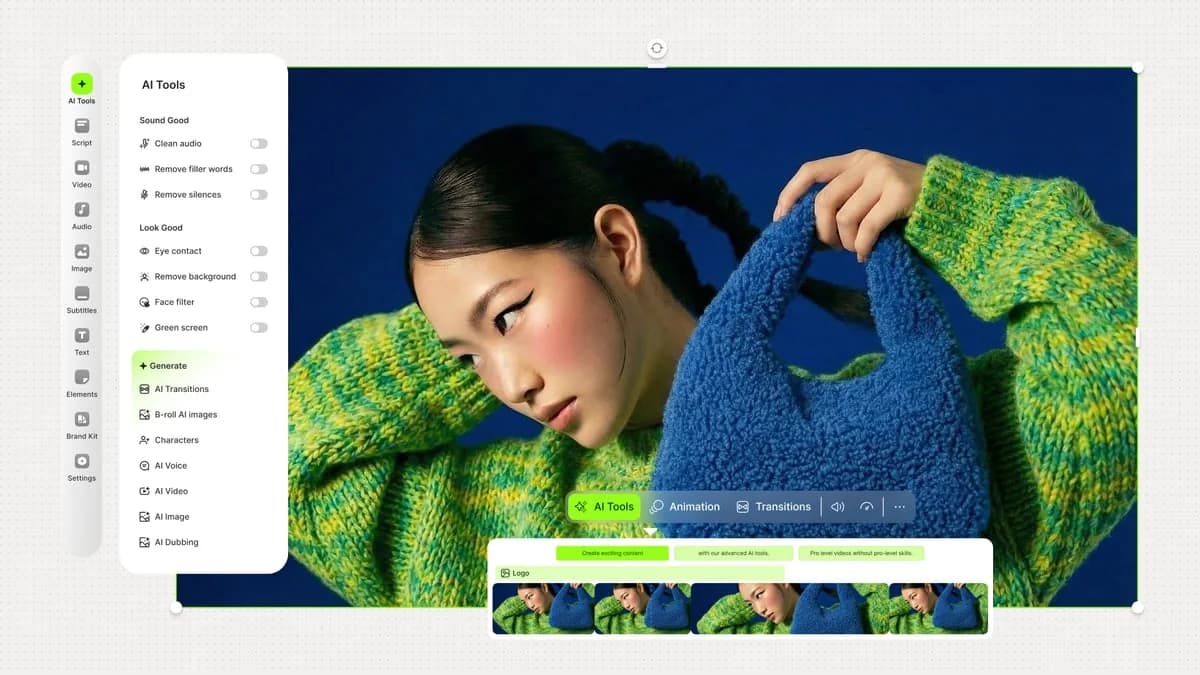
VEED rounds out the list as the polished, team-friendly browser editor. Auto-subtitles and translation cover 125+ languages with AI dubbing, its AI avatars and text-to-video turn a script into a finished presenter video (powered by partner models plus VEED's own Fabric 1.0 for lip-sync), and AI voice handles neural voiceover. Everything runs in the browser, no download.
Users consistently praise the captioning and the low learning curve:
"I love the auto subtitle feature - I find it to be very accurate and helpful. Editing with the script is also useful as I can delete chunks of interviews... This app is very intuitive, and I had no trouble onboarding."
It holds 4.6/5 across 2,145 reviews. Pricing is Free, Creator $20/mo, Pro $44, and Studio $70 per user.
Verdict: the strongest choice for a marketing team that needs subtitles, avatars and translation at volume. Less suited to cinematic, prompt-driven film work.
So which one should you pick?
If you take one thing away, let it be the two-camps split: decide whether you need an editor or a generator first, then match the platform and budget. Here is the short version, then a picker to shortcut it.
Which Palmier alternative fits you?
Pick what matters most. None of these need macOS 26.
The honest summary: DaVinci Resolve is where I would send most people who just need a great editor without a bill, Runway and Higgsfield are the closest to Palmier's generation magic, and if Palmier's macOS 26 requirement is your only blocker, any browser tool on this list gets you unblocked today.
The pattern worth stealing from Palmier
Step back from the video-editing question and there is a bigger idea in Palmier worth keeping. The reason people call it novel is not the generation quality, it is that Palmier exposes the editor itself as something an agent can operate through an MCP server, instead of bolting a chat assistant onto the side. The agent does not suggest edits in a separate window; it drives the actual tool.
That is exactly the shift happening in customer support, and it is the pattern we build on at eesel. We have spent years putting AI agents on live support queues, and the lesson is the same as Palmier's: an assistant that sits in a sidebar and drafts suggestions is a toy next to an agent that actually operates your helpdesk, reads your knowledge, and resolves the ticket end to end.
Try eesel
If the part of Palmier that excites you is "an agent that runs the tool for you," that is the whole idea behind eesel AI, just pointed at support instead of video. eesel plugs into your existing helpdesk, trains on your knowledge base and past tickets, and runs as an autonomous agent that resolves front-line tickets on its own, the same "expose the product as a tool an agent drives" pattern Palmier applies to the timeline.
The difference we care about most is that you can simulate a rollout against your historical tickets before it ever touches a live customer, because we have watched confident-sounding bots give wrong answers and would rather show you the numbers first. If you run customer service and want an agent that does the work rather than suggesting it, it is free to try.