


Is Palmier available on Windows?
No, and it is worth being precise about why, because the reason tells you how likely a Windows version really is.
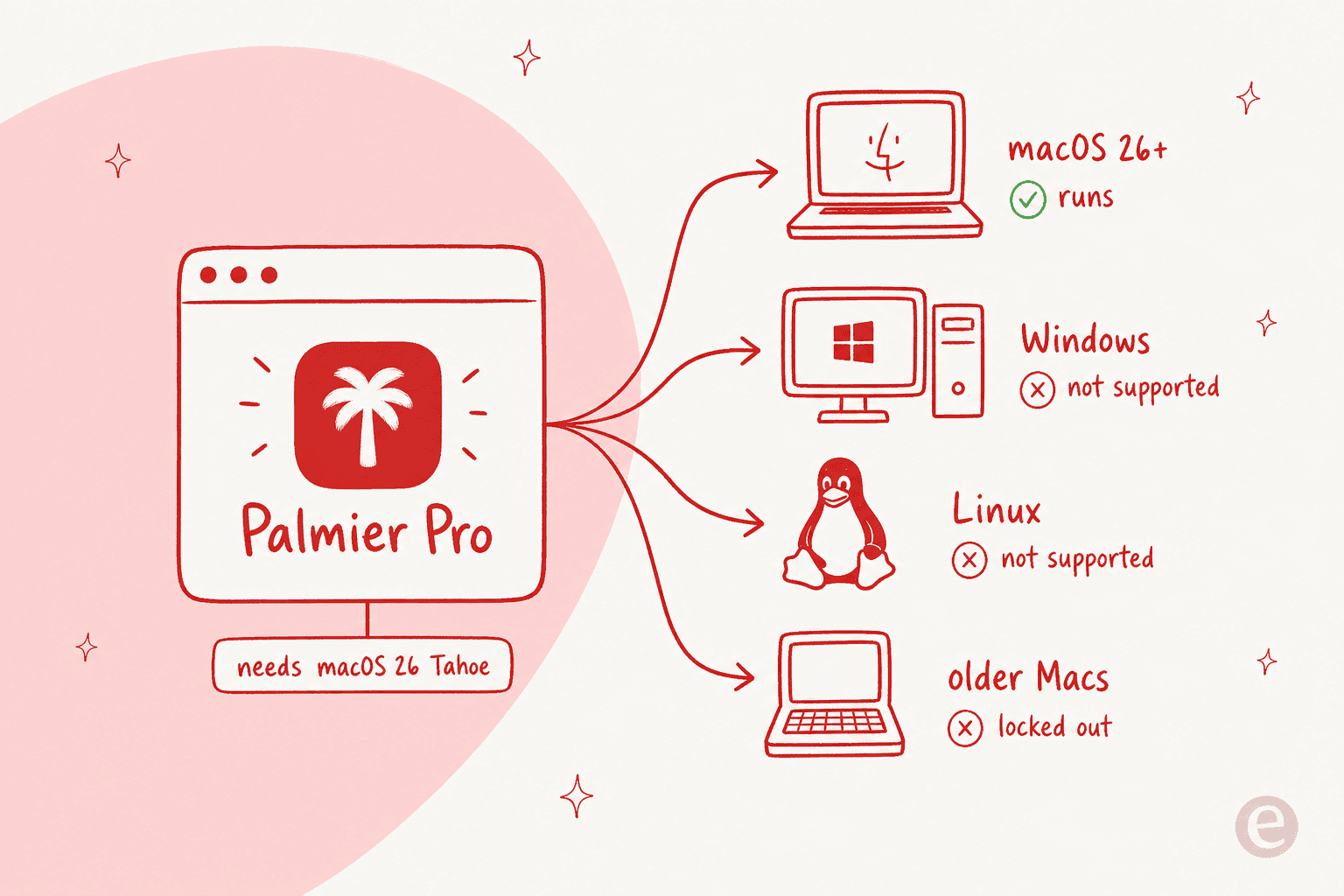
Palmier Pro is distributed as a macOS .dmg from its GitHub releases, and the docs are blunt about the requirement: it needs macOS 26 (Tahoe) or later. That single line rules out a lot of people at once:
- Windows users, entirely.
- Linux users, entirely.
- Mac users who have not upgraded to macOS 26.
As an engineer, this is the part I would flag before anything else. Palmier is not a web app wrapped in a desktop shell, the kind of thing that ships on every platform for free. It is built natively against the newest Apple frameworks, which is exactly what lets it feel fast and lets an agent operate the timeline locally. That same choice is what makes a Windows port a real rebuild, not a checkbox. Nothing Palmier has published hints that one is coming, so I would not hold my breath.
If you are cross-platform, this is not a footnote, it is the whole decision. The pricing, the credits, the model lineup, none of it matters until you are on a Mac running Tahoe.
What Palmier actually is (and why it is Mac-only)
It helps to know what you are missing before you decide how hard to chase it.
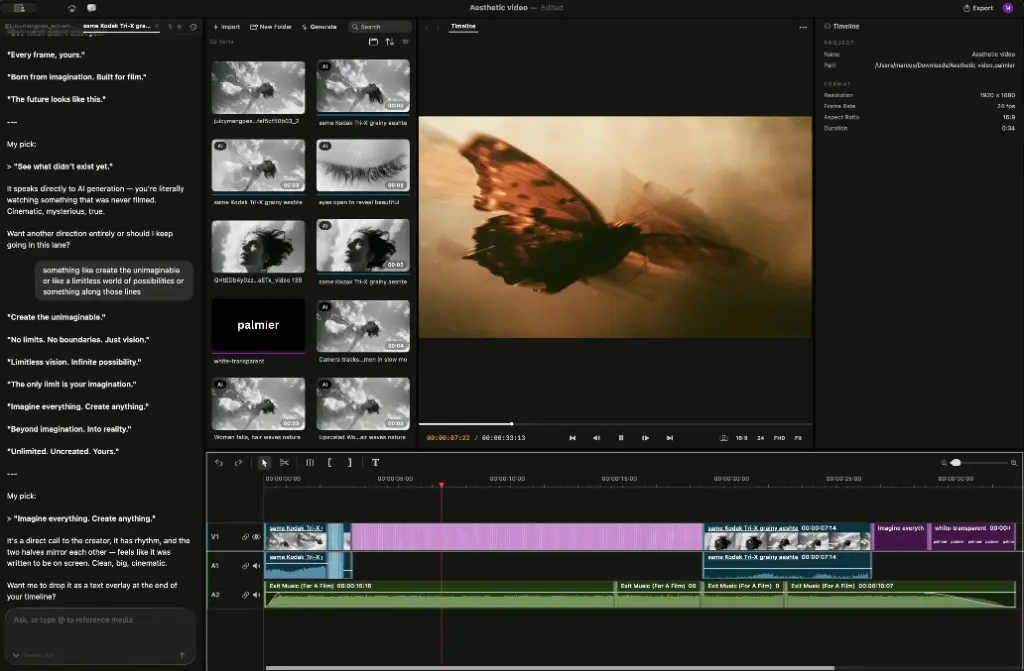
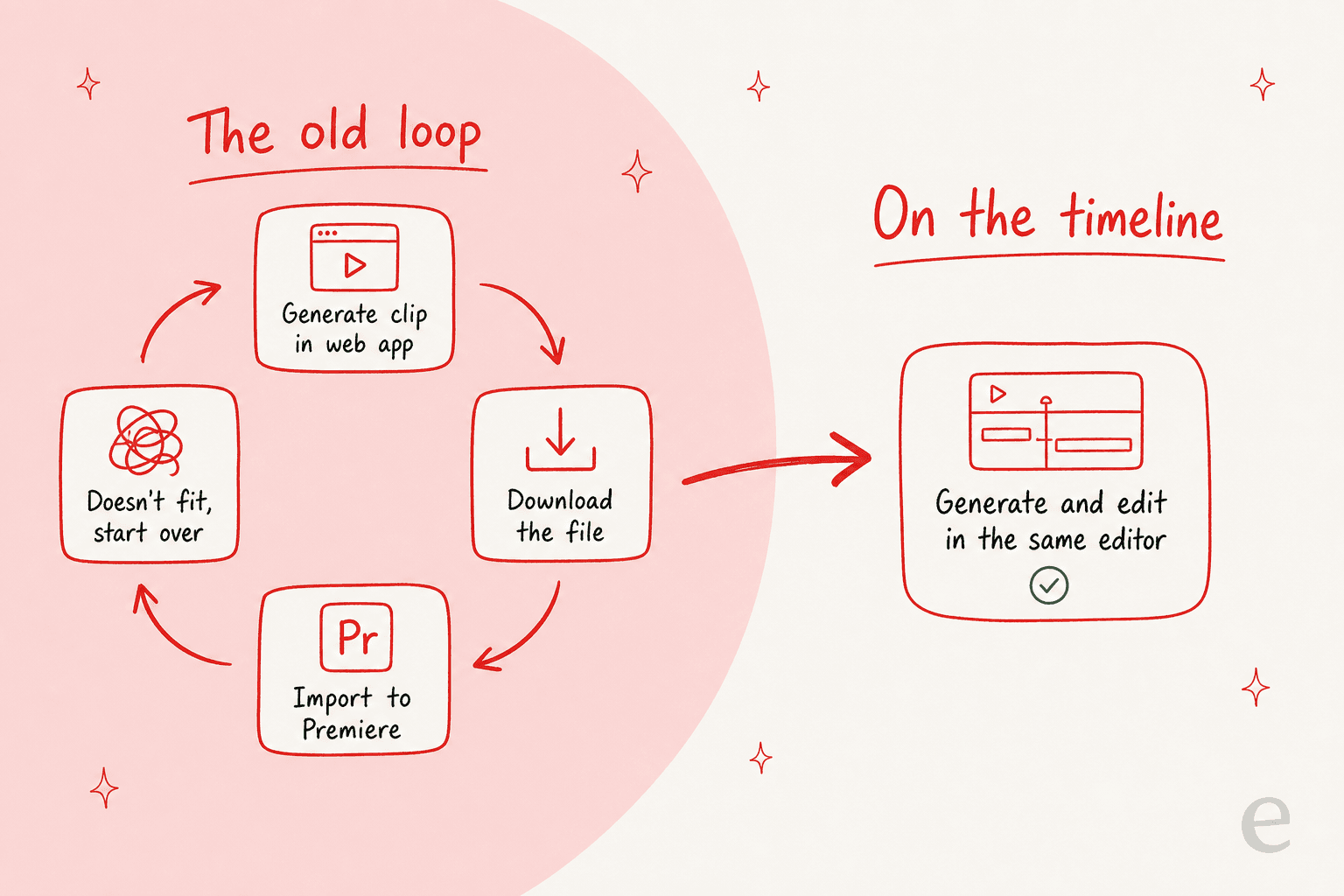
Palmier is a native macOS video editor "built for AI," from a two-person Y Combinator team. The pitch that separates it from every other AI-video tool: generation lives on the timeline. Instead of generating a clip in a web app, downloading it, and re-importing it into Premiere, you generate image, video, and audio directly in the editor, and every clip keeps its prompt, model, and reference images attached.
The loop that Palmier is built to kill is the one every AI-video creator knows too well.
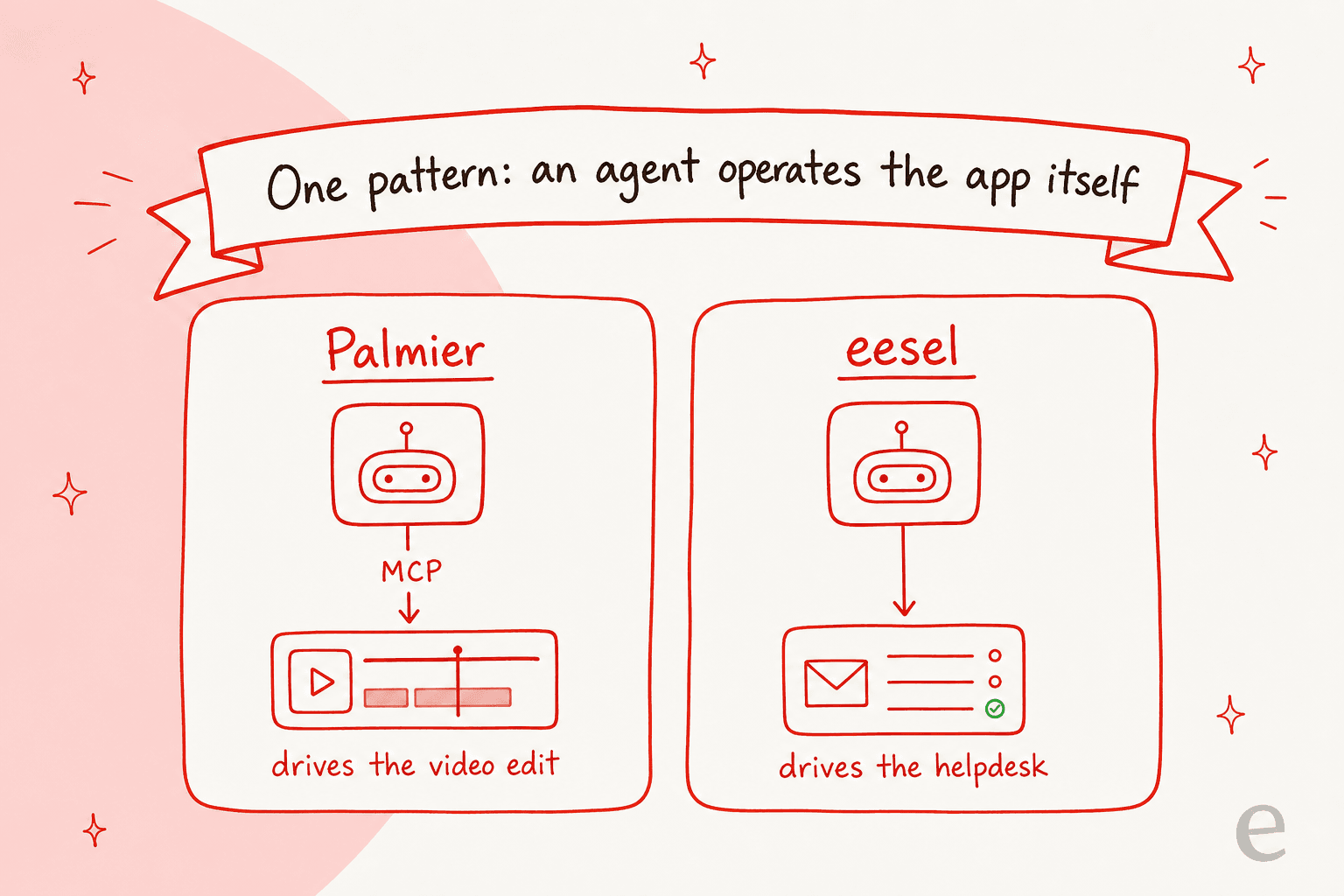
The second novel piece is that the editor is operable by AI agents. When Palmier is running, it exposes a local MCP server, and coding agents like Claude, Cursor, or Codex can connect and edit the timeline directly, generating clips, trimming, reordering, all with full project context. Early observers latched onto this specifically:
"The agent operates the editor itself, rather than suggesting changes in a separate chat window. It's a clean example of a broader pattern. Instead of bolting an AI assistant onto a product, you expose the product itself as a tool an agent can drive."

Both of those things, the on-timeline generation and the local agent server, lean hard on being a native Mac app. That is the answer to "why not Windows": the architecture that makes Palmier interesting is also the architecture that keeps it off your PC.
Can you actually run Palmier on Windows anyway?
People ask, so here is the honest rundown. None of these are things I would call a real solution, but you should know what is on the table.
- Cloud Mac service. Services like MacinCloud or a cloud Mac instance rent you a remote macOS machine you control from Windows. This can run Palmier if the instance is on macOS 26, but you are paying a second subscription, you are editing video over a remote desktop connection (laggy, and video scrubbing is the worst case for that), and AI generation still costs Palmier credits on top. It works in theory, it is miserable in practice.
- Borrow or buy a Mac. The only genuinely clean path. A Mac on macOS 26 runs Palmier as intended. If you are seriously invested in Palmier's workflow, this is the real answer, and it is a big ask just to try an editor.
- Hackintosh. Running macOS on non-Apple hardware has always been fragile, and macOS 26 on unsupported hardware is a moving target that breaks on updates. Not worth it for a video editor you need to be stable.
- Virtual machine. Running macOS in a VM on Windows is both a licensing gray area and painfully slow for GPU-bound work like video, which is the one thing you need this for. Skip it.
The pattern across all four: you are spending real time and money to route around a gate, for a tool whose best trick (a local agent driving a native app) degrades the moment you virtualize it. My honest take is that a Windows user is better off picking an editor built for their machine.
The best AI video editors that run on Windows
This is where I would actually point a Windows user. Each of these runs natively on Windows (or in any browser), and each covers a real slice of what Palmier does. Start with the quick picker, then the table and verdicts.
Which Windows AI video editor fits you?
Pick what matters most. No Mac required for any of these.
| Tool | Platform | AI features | Starting price | Best for |
|---|---|---|---|---|
| DaVinci Resolve | Windows, Mac, Linux | Neural Engine: magic mask, voice isolation, text-based editing, relight | Free; Studio $295 one-time | Free, pro-grade editing + finishing |
| Runway | Any browser (Windows OK) | Frontier generative video + image models | Free credits; paid from ~$15/mo | Pure AI generation |
| CapCut | Windows, Mac, web | Auto-captions, script-to-video, AI effects | Free; Pro from ~$9.99/mo | Fast social and short-form video |
| Descript | Windows, Mac | Transcript-based editing, AI voices, filler-word removal | Free; paid from ~$24/mo | Talking-head, podcast, and screen video |
| Adobe Premiere Pro | Windows, Mac | Firefly generative extend, text-based editing | ~$22.99/mo | Pros who want generation inside a full NLE |
| Filmora | Windows, Mac | AI copilot, text-to-video, AI music, smart cutout | ~$49.99/yr | Beginners on a budget |
A few of these deserve a real verdict rather than a row.
DaVinci Resolve is the one I would install first on a Windows machine. The free version is a genuinely professional editor, not a crippled trial, and its Neural Engine AI tools (magic mask, voice isolation, text-based editing) are built in rather than metered. It does not have Palmier's "generate a clip from a prompt on the timeline" model, so pair it with a generator if that is what you are after. Verdict: the best free Palmier alternative on Windows, full stop.
Runway is the closest match if what pulled you to Palmier was the generation, not the editing. It runs in any browser, so Windows is a non-issue, and its generative video models are among the strongest available. The trade-off is that it is credit-metered and generation-first, so heavy use gets expensive and the timeline editing is lighter than a real NLE. Verdict: pick this if AI clips are the point and editing is secondary.
CapCut is the low-friction choice for social and short-form. It has a real Windows desktop app, a huge library of AI effects and auto-captioning, and a free tier that covers a lot. It is less "cinematic launch film" and more "TikTok and Reels at speed." Verdict: the easiest Windows on-ramp if you make short social video.
If you want to plug frontier models into an editor the way Palmier does, note that Palmier itself leans on a shelf of them, Kling V3, Seedance 2.0, Veo 3.1, and Grok Imagine. Most of those are reachable from Windows directly through their own web apps, which is another way to get the generation without the Mac gate, you just lose the single-timeline convenience.
The pattern worth stealing from Palmier
Here is the thing I would not want you to miss while you are hunting for a Windows workaround. The most interesting thing about Palmier is not that it edits video, it is how the AI works: an agent that operates the actual tool through MCP, instead of a chat box bolted onto the corner suggesting things for a human to copy-paste.
Even a reviewer who disliked the name landed on the product being good:
"Terrible name but Palmier Pro is pretty good as an AI video editor."
That "agent drives the app directly" pattern is not video-specific, and it is not Mac-specific. It is the same bet a few of us have been making in a completely different domain: customer support.
Try eesel
I spend my days building exactly this kind of thing, just aimed at the helpdesk instead of the timeline. That is the whole idea behind eesel: where Palmier lets Claude drive your video edit, eesel is an AI agent for customer service that plugs into your existing helpdesk (Zendesk, Freshdesk, Gorgias, Help Scout, and more) and actually resolves tickets, drafts replies, and triages, rather than suggesting things in a sidebar for a human to action.

And because letting AI loose on live customers is scarier than letting it loose on a video edit, you can simulate it on your past tickets before it ever answers a real one. Best of all, unlike Palmier, there is no platform gate: eesel runs in your browser on any machine, Windows very much included. It is free to try and takes minutes to connect.
If Palmier's "agent drives the app" model is what caught your eye, that is the same bet, just for the helpdesk instead of the timeline, and one you can actually run on your PC today.