

What Palmier Pro is, in one paragraph
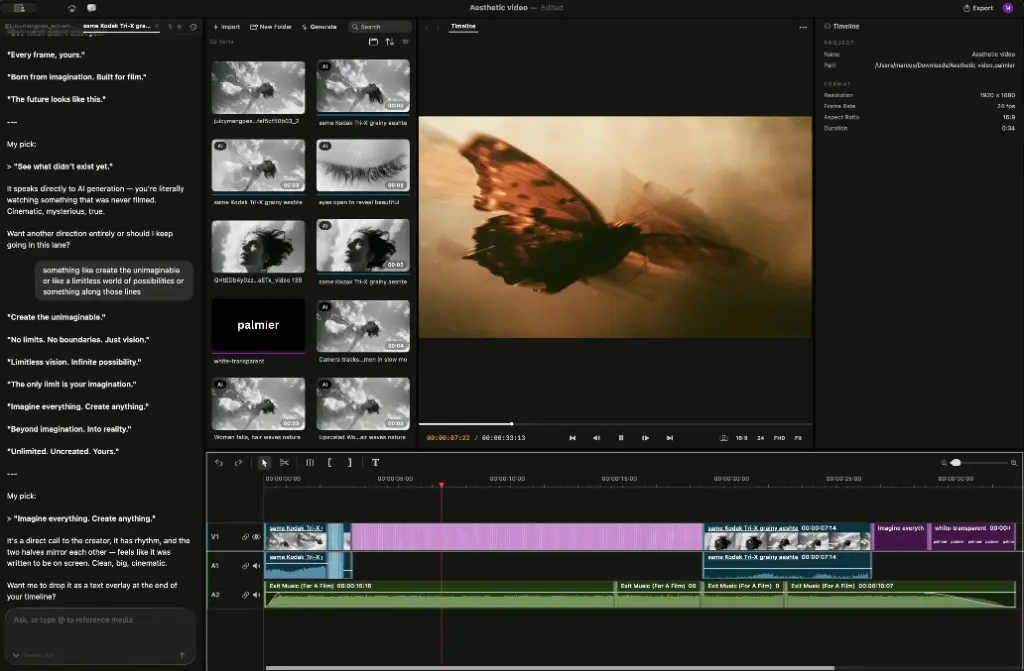
I build AI agents for a living, so what pulled me into Palmier was not the video output, it was the plumbing. Palmier Pro is a native macOS video editor "built for AI," from a two-person Y Combinator team. Two things make it different from every other AI-video tool. First, generation lives on the timeline: you generate image, video, and audio inside the editor, and every clip keeps its prompt, model, and reference images attached. Second, the editor is operable by AI agents, so Claude, Cursor, or Codex can connect through a local MCP server and edit the timeline directly.
Everything I liked and disliked flows from those two choices, so this review is really about whether that architecture earns the macOS-only tax.
What Palmier Pro gets right
1. The editor is actually free, and actually an editor
This is the part most "AI video" tools get backwards. Most gate the editor behind a subscription and meter generation on top. Palmier gives the editor away and charges only for the model calls. The free tier is not a crippled trial: it is multi-track video, audio, image, and text, with trim, split, speed, opacity, and transform, plus export to MP4 (H.264, H.265, ProRes) and NLE XML for Premiere Pro and DaVinci Resolve. You can use it forever at $0 if you shoot your own footage and never touch a credit. As an engineer, "give away the app, charge for the expensive compute" is the pricing model I actually respect, because it lines the company's incentive up with mine.
2. On-timeline generation kills the worst loop in AI video
Anyone who has made AI video knows the loop: generate a clip in a web app, download it, drag it into Premiere, realize it is wrong, tab back, regenerate, download again. Palmier collapses that into one place. You generate on the timeline, the clip lands where you want it, and its prompt and model stay attached so a regeneration is one edit, not a five-app relay. The time saved is real, and it is the kind of thing you only feel once you have suffered the old way.
3. The agent-operates-the-app architecture is the actually novel bit
This is what I keep coming back to. When Palmier is running it exposes a local MCP server, and an agent connects and edits the timeline with full project context, generating clips, trimming, reordering. It is not a chat box that writes suggestions for you to copy-paste; the agent has hands on the actual tool. Early observers zeroed in on exactly this:
"The agent operates the editor itself, rather than suggesting changes in a separate chat window. It's a clean example of a broader pattern. Instead of bolting an AI assistant onto a product, you expose the product itself as a tool an agent can drive."

I will say more below about why that pattern matters well beyond video, because it is the same bet I make in my own day job.
4. One credit balance, a shelf of frontier models
Your credits buy access to a lineup of top generation models wired straight into the timeline: Kling V3, Seedance 2.0 (ByteDance), Veo 3.1 (Google), Grok Imagine (xAI), "and more." Instead of four subscriptions and four export folders, it is one balance in one editor. That is a real convenience, and it is also why the pricing is honest about being variable, a heavy Veo render is not the same spend as a quick Kling image.
What Palmier Pro gets wrong (or leaves you guessing)
No review is complete without the parts that would stop me. There are three, and one is close to a dealbreaker.
1. macOS 26 (Tahoe) only, and that is a hard wall
Palmier is Mac-native and requires the newest macOS. There is no Windows, no Linux, no web version, and even Mac users on older OS versions are locked out. For a huge share of would-be users this ends the conversation before pricing even comes up. It is a deliberate trade, the native-first architecture is what makes on-timeline generation and the local agent server fast, but it is still the single hardest gate on the product. If you are on a PC, I wrote a whole Palmier for Windows piece on the (thin) workarounds and the better alternatives.
2. You cannot budget credits to the dollar
Palmier does not publish a per-generation credit cost. The pricing page offers a rough guide, 5,000 credits is about 333 images or 3-7 minutes of generated video, but that "3-7 minutes" is a 2x spread, and for a heavy user that is the difference between one plan and the next. You cannot pre-calculate your bill the way you can with a token-priced LLM like GPT-5.6. It is not dishonest, generation costs really do vary by model and resolution, but it does mean you sign up on a ballpark, not a quote.
3. Today's prices are launch discounts
The $29 Pro and $69 Max you see now are limited-time launch pricing. Budget for the regular $49 and $99 if you are planning past the promo. Locking in early is the value play if you know you will keep using it; just do not treat the launch price as the forever price.
There is also the open-core question early observers keep raising: the editor and MCP server are open source and free, generation is the paid credit-based part. That split is clean today, but it is the obvious place future friction shows up if credit costs creep. For a full teardown of the numbers, my Palmier Pro pricing post has the plan table.
Should you actually use it?
The whole review comes down to a few forks: your machine, and whether you want editing or generation. Walk it here rather than take my word for it.
The short version of that tree: Mac + editing = install the free tier today; Mac + generation = try Pro; anything else = this is not your tool yet. Even one independent reviewer who hated the branding landed on the product being good:
"Terrible name but Palmier Pro is pretty good as an AI video editor."
My verdict
As someone who builds agent software rather than cinematic video, here is my honest read. The free editor is a no-brainer install the day you are on a Mac running Tahoe and touching AI video at all, there is no account, no cost, and it collapses the loop that makes AI video miserable. The paid tiers are a "try Pro, upgrade if you feel the ceiling" call: at $29/mo launch, Pro is a low-risk test of whether the credits cover your output, and if AI video is your main output, Max's larger allotment pays for itself.
The thing that would stop me is not the price, it is the macOS-26 requirement, which quietly disqualifies a huge share of would-be users, and the credit opacity, which means you commit on a ballpark. Neither is a reason not to try the free editor; both are reasons to be clear-eyed before you subscribe. For the category, and this early in its life, that is a strong showing.
The pattern worth stealing from Palmier
Here is the part I care about most, because it is my actual day job. The most interesting thing about Palmier is not that it edits video, it is how the AI works: an agent that operates the real tool through MCP, instead of a chat box bolted to the corner suggesting things for a human to action. That pattern is not video-specific, and it is not Mac-specific.

It is the same bet a few of us have been making in a completely different domain: customer support.
Try eesel
I spend my days building exactly this kind of thing, just aimed at the helpdesk instead of the timeline. That is the whole idea behind eesel: where Palmier lets Claude drive your video edit, eesel is an AI agent for customer service that plugs into your existing helpdesk (Zendesk, Freshdesk, Gorgias, Help Scout, and more) and actually resolves tickets, drafts replies, and triages, rather than suggesting things in a sidebar for a human to copy-paste.
And because letting AI loose on live customers is scarier than letting it loose on a video edit, you can simulate it on your past tickets before it ever answers a real one. Unlike Palmier, there is no platform gate: eesel runs in your browser on any machine. It is free to try and takes minutes to connect.
If Palmier's "agent drives the app" model is what caught your eye in this review, that is the same bet, just for the helpdesk instead of the timeline.