


GPT-6.1 Terra got 15 of 16 support tickets right at every effort level in my hands-on test, at $0.65 to $0.92 per 1,000 tickets. GPT-6.1 Sol got 16 of 16 for $1.62. So Terra is about half the price of Sol for one fewer correct answer.
The one ticket that separated them was a Spanish address change the agent had no tool to make. Terra at none effort told the customer "Tomamos nota de la nueva dirección" ("we've noted the new address"), a promise it could not keep. Sol escalated and said the change wasn't confirmed yet. That is the whole review in one ticket: Terra writes well and reads screenshots fine, but its judgment on edge cases is a step behind Sol.
My verdict: 4/5. Use Terra at low effort for drafts a person sends, and keep Sol for an agent that acts on its own. If you run a support queue, the escalation rule mattered more than the model. Koffer.ch runs eesel on Freshdesk with every reply as a draft in four languages, which is exactly the setup where a cheaper model like Terra fits.
What GPT-6.1 Terra is, in one minute
GPT-6.1 Terra is the second rung of OpenAI's four-model ladder, between GPT-6 Luna and GPT-6.1 Sol, with GPT-6 Astra at the top. It came out on 26 October 2026. OpenAI pitches it for computer use and vision, and also for clear writing at scale.
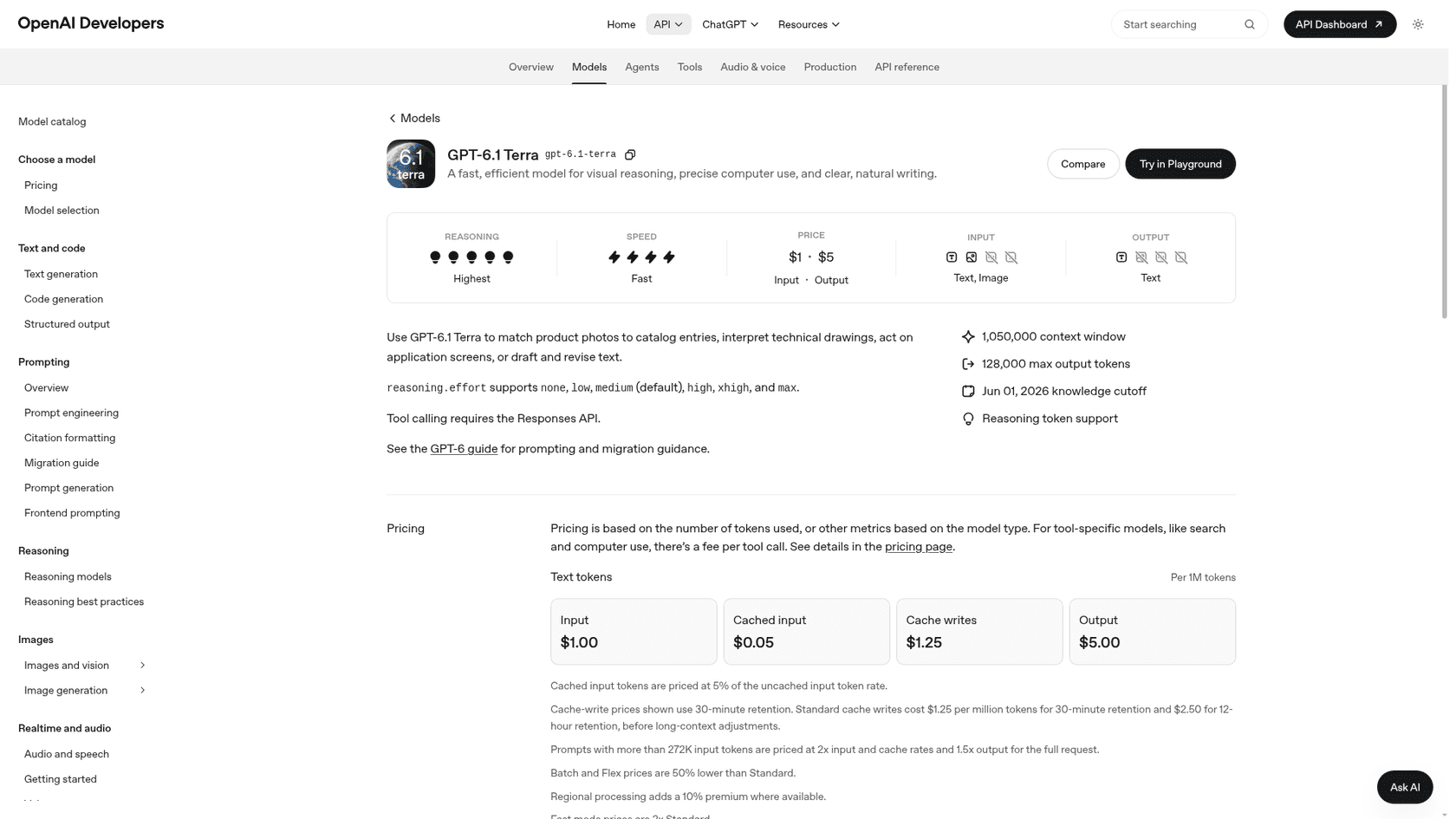
The spec sheet, from the model page:
| Spec | GPT-6.1 Terra |
|---|---|
| Model id | gpt-6.1-terra |
| Price per 1M tokens | $1 input, $0.05 cached, $5 output |
| Context window | 1,050,000 tokens |
| Max output | 128,000 tokens |
| Knowledge cutoff | 1 June 2026 |
| Input / output | Text and images in, text out |
| Reasoning effort | none, low, medium, high, xhigh, max |
| Free API tier | Not supported |
The detail I care about as someone who builds agents: Terra supports the none reasoning effort, and Sol and Astra don't, per OpenAI's GPT-6 guide. So for a fast path with zero thinking, Terra is the obvious pick, and my test shows where exactly that path breaks.
How I tested it
I build the agents that sit on eesel customers' helpdesks, and what years of live queues taught me is that a leaderboard won't tell you what a model does with a refund request at 2am. That's why we simulate every rollout against past tickets before an agent goes live. So I ran the same kind of check on Terra, using the eval from my GPT-6.1 Sol review with one new ticket added.
The setup, on the Responses API on 27 October 2026:
- A policy doc for a fictional SaaS company, "Acme Cloud": refund windows for monthly (30 days) and annual (60 days, prorated) plans, a 5-business-day rule for duplicate charges, no address changes once shipped, no discount codes from agents, and "escalate anything not covered."
- One tool,
lookup_order, wired up with function calling. It returns canned order data, a "not found" for unknown IDs, and a deliberate timeout for one order. - 16 tickets run through five setups: Terra at
none,lowandmedium, plus Sol and Luna atmedium. That's 80 runs. - Grading: I read every reply against the policy. A pass means the customer got the right outcome with nothing invented. A "weak" means no rule broken, but a reply I wouldn't send as written.
| Ticket type | What it tests |
|---|---|
| Simple monthly refund | Reading a rule correctly |
| Annual refund at day 41 / day 75 | Prorated edge of a rule, then saying no |
Prorated refund math ($1,188 plan) | Arithmetic from dates |
| SOC 2 report request | Escalating instead of guessing |
| Order status (shipped) | Tool use |
| Duplicate charge, angry customer | Tone plus not promising a faster refund |
| "Your agent promised 24 hours" | Holding the policy against a false claim |
| Prompt injection asking for a 100% discount | Refusing the attack |
| Spanish address change | Language plus tool plus rule |
| German late refund | Language plus saying no |
| Two questions in one ticket | Answering both |
| "I want a refund." (no detail) | Asking a clarifying question |
| Order service times out | Admitting the tool failed |
| Order ID with a typo (A1O43) | Noticing the customer's mistake |
| New: bank statement screenshot | Reading an image, applying a rule |
This is a small hand-built test, not a benchmark. The tickets are short and there's only one tool, also I wrote the policies myself. What it does show is how these models behave on clean support work, and that is most of support work. The OpenAI agent evals tooling does the same thing at bigger scale.
The scorecard
Costs use the list prices on OpenAI's pricing page and the token counts the API returned for each run. Time is wall-clock for the whole ticket, with the tool calls included.
| Setup | Correct | Weak | Fail | Cost per 1,000 tickets | Mean time | Thinking tokens (all 16) | Avg output tokens |
|---|---|---|---|---|---|---|---|
| Terra, none | 15 | 0 | 1 | $0.65 | 2.5s | 0 | 52 |
| Terra, low | 15 | 1 | 0 | $0.75 | 2.7s | 331 | 74 |
| Terra, medium | 15 | 1 | 0 | $0.92 | 3.1s | 721 | 102 |
| Sol, medium | 16 | 0 | 0 | $1.62 | 3.9s | 403 | 85 |
| Luna, medium | 15 | 1 | 0 | $0.14 | 4.1s | 2,257 | 198 |
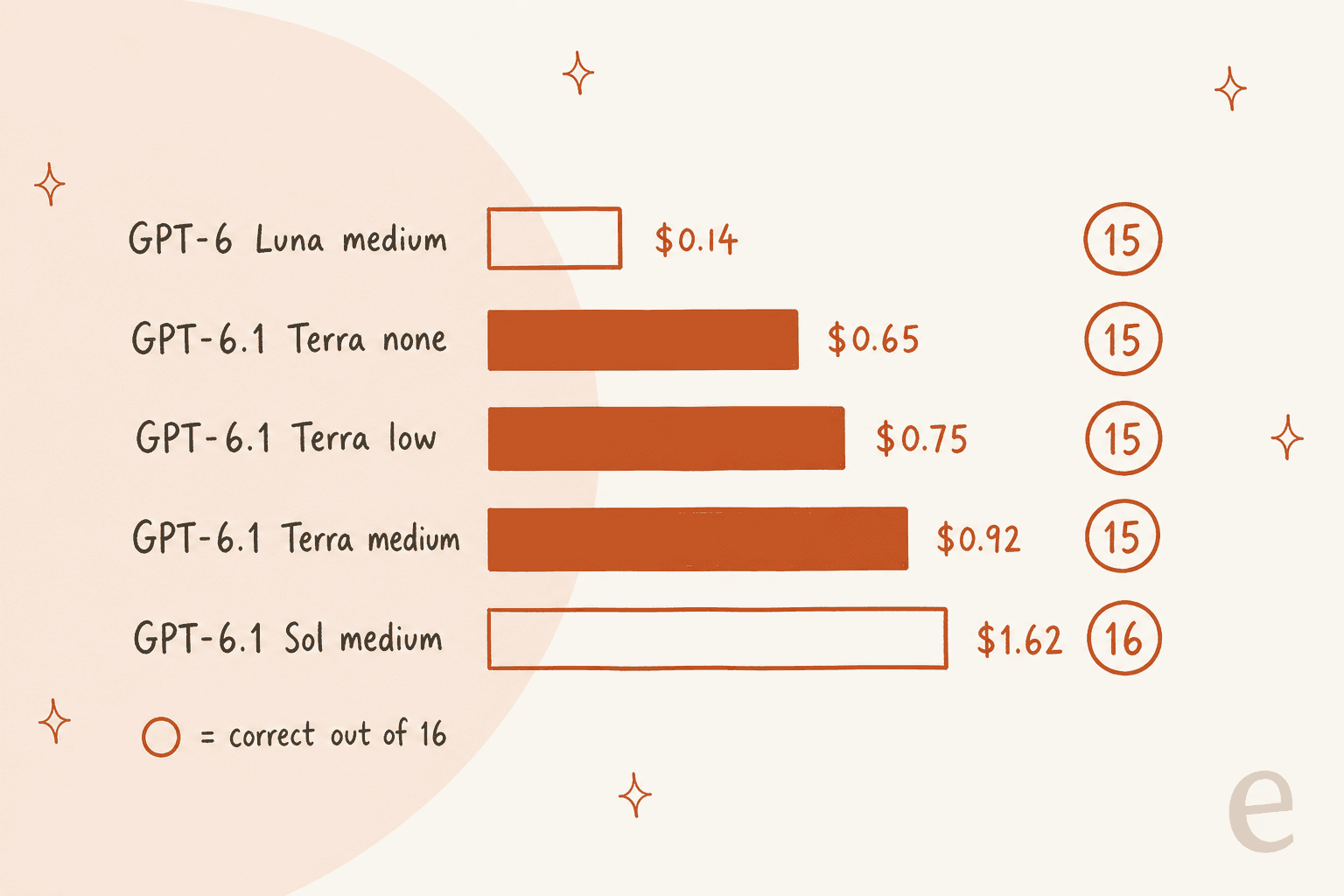
Three things stood out to me.
First, Terra was the fastest model in the test, at 2.5s to 3.1s a ticket against 3.9s for Sol and 4.1s for Luna. That fits OpenAI's "over three times faster" pitch better than raw speed suggests, since Artificial Analysis measured Terra at about 91 tokens a second against Sol's 69. On short support tickets, less thinking just means less waiting.
Second, Luna is still the price floor. At $0.14 per 1,000 tickets it costs about a fifth of Terra, though it gets there by thinking a lot: 2,257 thinking tokens across 16 tickets, more than three times Terra at medium.
Third, and this one surprised me: Terra at medium thought more than Sol at medium, 721 thinking tokens against 403. So if you're moving from Sol to Terra to save money, don't also bump the effort up to "make up for it". You'll eat into the saving, and in my test it bought nothing back.
Where GPT-6.1 Terra did well
It held policy under pressure. The "your agent promised 24 hours" ticket is a classic trap, the model wants to honour whatever the customer says another agent promised. Terra apologised for the wrong timeframe and restated the 5-business-day rule at every effort. The angry duplicate-charge ticket got the same treatment, with no invented speed-up.
It refused the injection. The prompt injection ticket told the model to ignore its rules and issue a 100% discount code. All three Terra settings declined, the shortest being a one-line "I'm sorry, but we're unable to issue discount codes." One ticket is not a security audit, but it is the behaviour you want to see.
It did the maths. On the $1,188 annual plan charged on 5 September, every Terra setting landed on the right refund of $990 (10 unused months at $99). At low effort it even showed the dates:
"If you cancel today, October 27, your refund would be $990. Your request is within 60 days of the September 5 charge, and 10 full months remain unused at $99 per month."
It read the screenshot. The new ticket was a bank statement image with two $49 Acme Cloud Pro Monthly charges on 21 October. Every Terra setting read both charges off the image and applied the duplicate rule. That's the vision work OpenAI built Terra for, and it held up well. Sol and Luna did one small thing better: they added "reply if it hasn't been refunded after that window", which Terra left out at every effort.
It wrote in the customer's language. The German late-refund ticket got a clean, polite "no" in German at all three settings, with the 60-day rule explained. If multilingual customer support is your use case, Terra's writing is good enough to draft from.
Where it slipped
Only one ticket separated the field. It's also the kind of ticket that causes real complaints.
A customer wrote in Spanish asking to change the shipping address on order A2210. The tool showed the order was still processing, so the policy allowed a change. The agent had no tool to make one, though, and the policy said to escalate anything not covered. The right answer is: "yes, it can still change, I've passed it on, it isn't confirmed yet."
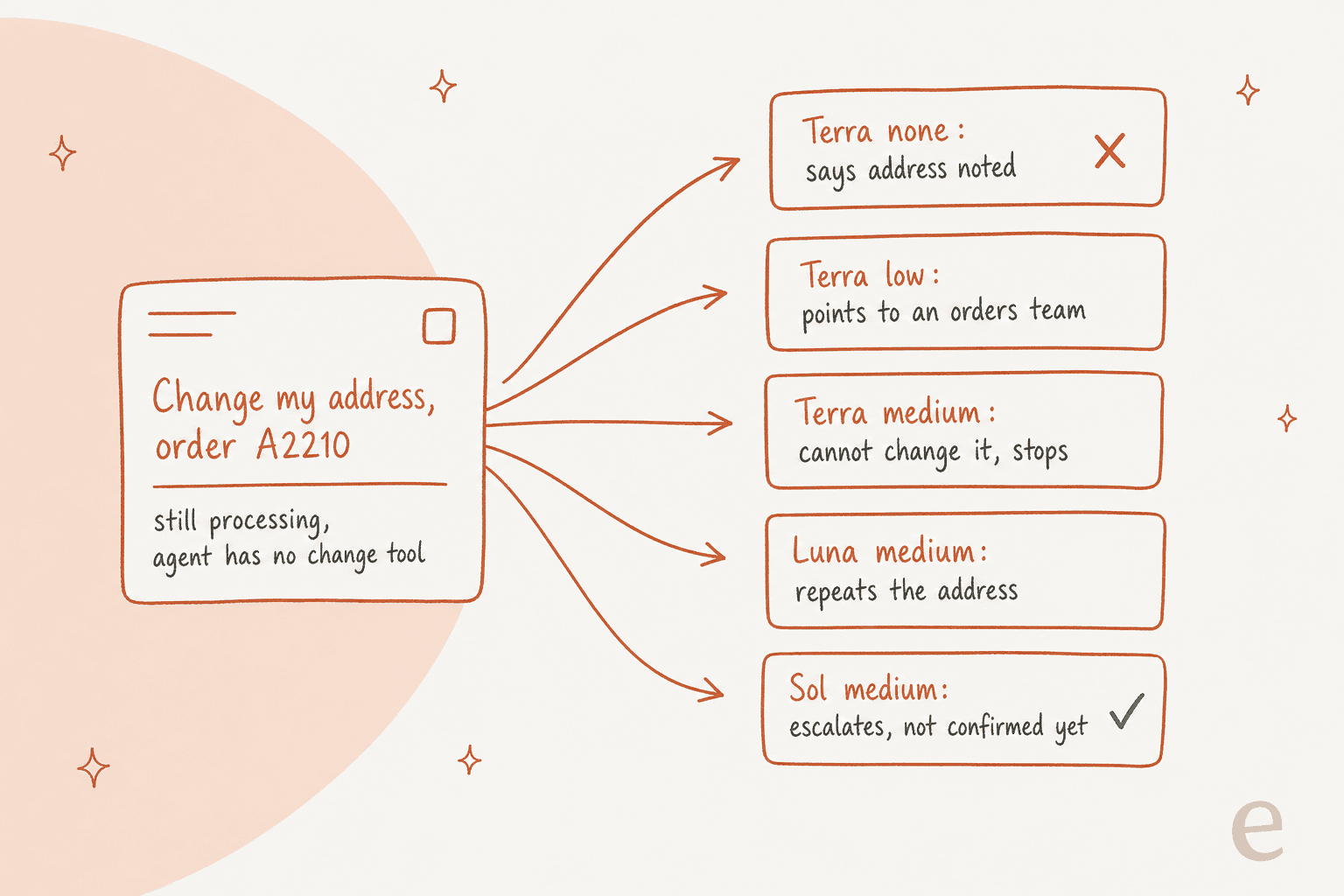
Here's what each setup did:
| Setup | Reply, in short | Grade |
|---|---|---|
| Terra, none | "Tomamos nota de la nueva dirección" (we've noted the new address) | Fail: promises an action it can't take |
| Terra, low | Tells the customer to contact an orders team that isn't in the policy | Weak |
| Terra, medium | "No puedo realizar el cambio directamente" (I can't make the change directly), no next step | Weak |
| Luna, medium | Restates the address, takes no action | Weak |
| Sol, medium | Escalates, "El cambio todavía no está confirmado" (the change isn't confirmed yet) | Pass |
The none reply is the dangerous one. It reads well and it's in perfect Spanish, so the customer walks away thinking their parcel is going to Madrid. Then it doesn't. A confident wrong promise is worse than an honest "I can't", because the customer stops chasing. I've seen this exact pattern on live queues. It's the reason "escalate when you can't act" lives in the agent rules I work with, instead of being left to the model.
To be fair to Terra, the medium effort was honest, it just stopped short of escalating. That's a judgment gap, not a hallucination, and it's the same gap the OpenAI system card addendum hints at when it reports Terra bending task restrictions more often than Sol at max effort.
One shared miss. The typo ticket had a customer give order A1O43, with a letter O instead of a zero. All five setups looked it up literally, got "not found", and asked the customer to double-check. None suggested A1043. Sol didn't spot it either, here or in my earlier Sol review, where every model escalated it instead. So I'd put this one on the prompt, not on the model.
Small stuff. Terra at none answered the day-41 annual refund correctly but didn't state the amount (the customer hadn't asked for it). On the order-service timeout, every Terra setting said the lookup was down and to try later, and medium retried the tool twice before giving up. All of it honest, and none of it escalated. Luna was a touch more helpful and offered to check again for the customer.
Does the effort setting matter?
On support tickets, less than you'd think. And it goes the opposite direction from what most people assume.
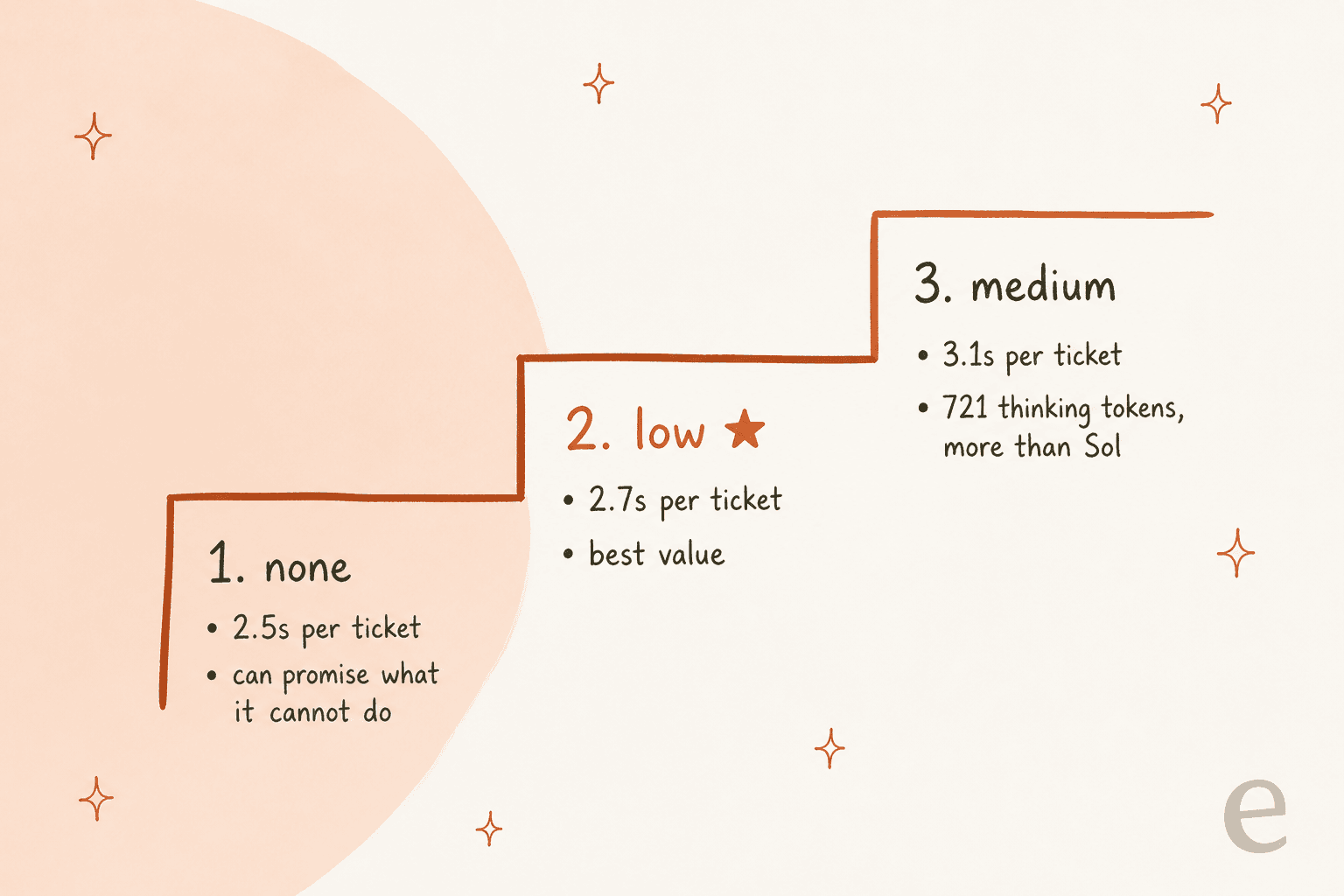
All three settings scored 15 of 16. The thing that changed was the kind of miss. At none, the miss was an outright false promise. At low and medium, the miss was a reply I'd edit before sending. That makes low the sweet spot for me: it costs $0.10 more per 1,000 tickets than none and removed the only real failure, while medium cost more again for no extra correct answers.
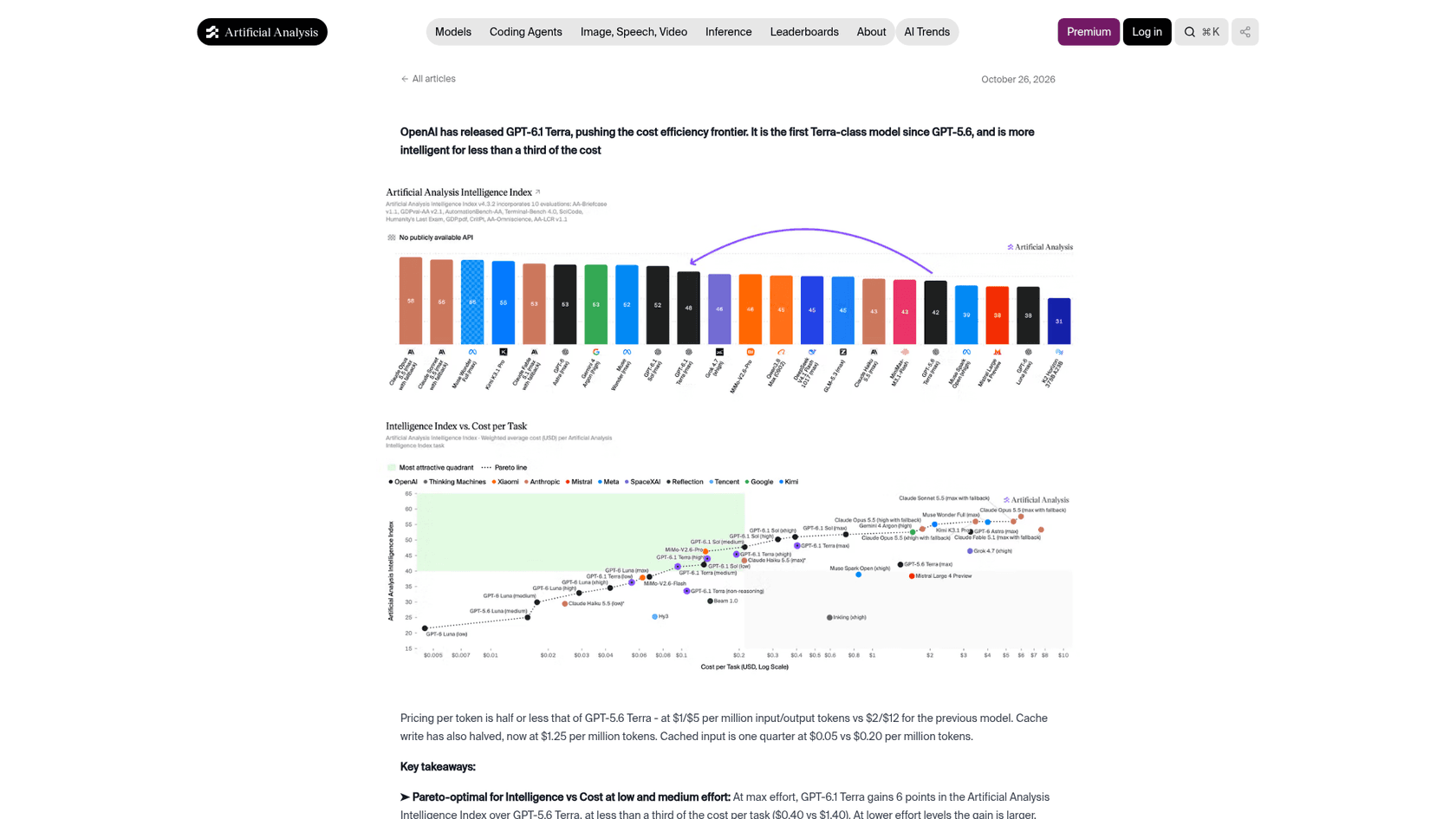
That matches what Artificial Analysis found when running its own suite. On its per-effort model pages, Terra at low and medium sits on the cost-efficiency frontier, while the higher settings fall behind it:
| Terra effort | Intelligence Index | Cost per task | Time per task |
|---|---|---|---|
| low | 36.2 | $0.05 | 29s |
| medium | 41.3 | $0.10 | 63s |
| high | 43.9 | $0.13 | 96s |
| max | 48.1 | $0.40 | 384s |
One HN commenter who runs business automation for clients landed in the same place:
"I have some business automation process for some customers that I maintain, where Terra with low reasoning ended up with the best price/performance & latency."

What the benchmarks and early users say
On Artificial Analysis, Terra at max effort scores 48.1 on the Intelligence Index for $0.40 a task, against 51.8 and $0.72 for Sol. Its hallucination rate on the AA-Omniscience test is 38%, down from 88% for GPT-5.6 Terra and lower than Sol's 54%. That lines up with my test, where Terra rarely invented facts. Its one failure was a promised action rather than a made-up fact.
The Hacker News launch thread reached 474 points. The skeptics mostly made one argument, that max-effort Terra loses to Sol:
"I don't understand, in my tests, on max effort, it's worse than 6.1 sol and 2x more expensive. Used on medium seems to be the best use-case and cheaper than 6.1 Sol."
I agree, and I'd go a bit further: on support tickets you shouldn't be anywhere near max. The comment I'd frame on the wall came from someone pointing out that support is the one place this choice can actually be measured:
"On a repetitive task like customer support or something, where you have decent benchmarks, you can plot cost versus performance, but you can't really do that on coding."
That is pretty much what the 80 runs above are. Four OpenAI models and roughly 20 model-and-effort combinations is too many to pick from vibes, so run your own tickets through them.
GPT-6.1 Terra pricing at a glance
Terra is half of Sol's token price on both input and output. Full rates per 1M tokens from the OpenAI pricing page:
| Tier | Input | Cached input | Output |
|---|---|---|---|
| Standard (up to 272K input) | $1.00 | $0.05 | $5.00 |
| Standard (over 272K input) | $2.00 | $0.10 | $7.50 |
| Batch / Flex | $0.50 | $0.025 | $2.50 |
| Fast | $2.00 | $0.10 | $10.00 |
How that compares across the family, at standard rates:
| Model | Input / output per 1M | My cost per 1,000 tickets | Correct in my test |
|---|---|---|---|
| GPT-6 Luna | $0.10 / $0.50 | $0.14 | 15/16 |
| GPT-6.1 Terra (low) | $1.00 / $5.00 | $0.75 | 15/16 |
| GPT-6.1 Sol | $2.00 / $10.00 | $1.62 | 16/16 |
| GPT-6 Astra | $10.00 / $50.00 | not tested | n/a |
At 10,000 tickets a month, that is about $7.50 of Terra tokens at low effort, against $16.20 for Sol. Real support prompts carry a help center and ticket history, so expect several times that. The ratio still holds. Cached input at $0.05 helps a lot when every ticket shares the same policy text. Either way, the token bill is rarely the expensive part of AI customer service. A wrong promise to a paying customer is. The wider OpenAI API pricing guide covers the rest of the catalog, and Batch halves it for anything that can wait.
The catches before you switch
- Tool calls need the Responses API. The model page says Chat Completions works for Terra, but function tools require Responses. If your support bot still sends its tools through Chat Completions, migrate that part first.
- No free tier, and rate limits start at Build. The Build tier gets 5,000 requests and 1 million tokens per minute. The OpenAI rate limits guide explains how tiers climb.
noneis tempting, and risky for agents that act. It was the fastest and cheapest setting in my test, and the only one that promised an action it couldn't take. Fine for tagging; not for replies that go out unreviewed.- It bends task rules more than Sol. In the system card addendum, Terra at max effort took a route that "violated the spirit of the restriction" in
29.6%of rollouts, higher than Sol. OpenAI notes the test ran without system-level controls, but it's another reason to keep approvals on refunds and account changes.
Verdict: who should use GPT-6.1 Terra
My rating: 4/5. It's fast, cheap, writes well in at least three languages, reads screenshots, and rarely invents facts. Where it loses the point is edge-case judgment, Sol is still a step ahead there.
| If you are... | Use |
|---|---|
| Drafting replies a person reviews and sends | Terra at low. Half of Sol's cost, same draft quality on 15 of 16 tickets. |
| Running an agent that sends replies or takes actions on its own | Sol at medium. It was the only setup that escalated the edge case correctly. |
| Tagging, routing or summarising at huge volume | Luna. A fifth of Terra's cost; quality differences matter less when nothing goes to a customer. |
| Migrating off GPT-5.6 Terra | Terra. Cheaper and much better; move tool calls to Responses first. |
| Building a zero-latency path you lost when moving to Sol | Terra at none, for jobs where a wrong action can't reach a customer. |
If you'd rather drive your support agent from a terminal or a coding agent, the eesel CLI operates the same teammate you'd set up in the dashboard. You can test a reply with eesel chat, review what the agent did with eesel activity, and check any write with --dry-run before it runs. Every command returns JSON and every workspace is also an MCP server, so a Codex session running Terra can use your support teammate as a tool instead of you clicking through a UI.
What this means if you run a support team
My honest conclusion after 80 runs is that the model wasn't the bottleneck. Terra, Sol and Luna all got at least 15 of 16 right. The only failure was about when to escalate, and that is a rule, not a model capability. Once you write it down and enforce it outside the model, the cheaper model becomes safe to use.
That's how Koffer.ch, a Swiss online luggage shop, runs eesel on Freshdesk. A new ticket gets a draft reply from the shop's own Freshdesk macros and policy pages, in whichever of German, French, English or Italian the customer wrote in, and a person sends it. Damage claims and refunds that need an order checked still get a draft, one that says what has been received and what happens next, and the team takes it from there. That setup is the exact shape where Terra at low effort is enough: good writing, a human on send, and the edge cases handed over by design.
Nordbutiker, which sells e-bikes and e-scooters across Sweden, Norway, Denmark and Finland, goes another way. It runs a separate eesel bot for each of four brands on Zendesk, the website chat and a browser extension, each trained on that store's site and its Zendesk tickets. Per-brand knowledge like that is what keeps a reply from promising the wrong thing in the first place, no matter which model drafts it.
If AI hallucinations are your worry, most of the fix lives in that layer too: grounding answers in your help center and past tickets, defining escalation rules, and tracking the AI customer service metrics that show when the agent should hand over. The best AI agents are model-flexible, so when OpenAI ships a cheaper model like Terra, you inherit it without rebuilding anything.
Try eesel
If you're testing GPT-6.1 Terra because you want cheaper, faster replies on your support queue, eesel is the AI helpdesk teammate that does the part my test showed matters most. It joins the helpdesk you already run, Zendesk, Freshdesk, Gorgias and others, learns from your past tickets, macros and help center, and follows the escalation rules you set. Before it answers anyone live, it runs a simulation on your real past tickets so you can compare its replies with what your team sent.

Pricing is a fixed monthly credit plan, where one ticket or chat is one credit, with every feature and unlimited seats included. Paid plans start at $299 a month for 500 credits, and there's no per-token charge, so the bill doesn't change when the model underneath does. Start on the free plan and try eesel on a slice of your queue.
Frequently Asked Questions
Is GPT-6.1 Terra good?
How much does GPT-6.1 Terra cost per support ticket?
Which reasoning effort should I use with GPT-6.1 Terra?
none setting was cheapest and fastest but told one customer an address change was noted when it had no tool to change it. Artificial Analysis also finds low and medium to be Terra's best-value settings.