
Why look past ZCode
Let me be fair to ZCode first, because the switching decision only makes sense if you know what you'd be giving up. I ship the integrations and agent plumbing at eesel, so when a new agentic tool lands I read it for what the agent actually does under the marketing, and I wrote up the full ZCode review separately. The short version: GLM-5.2 is a real, frontier-adjacent model that happens to be open weight, landing between Claude Opus 4.7 and Opus 4.8 on Z.ai's own agentic-coding numbers. That is a big deal, and the app around it can plan, write, run, and self-verify a whole task.
So why do people look for a ZCode alternative anyway? Three reasons come up again and again in the launch-week threads:
- Speed and stability. Early users report it runs roughly half as fast as Opus 4.8 and that "you have to retry each request at least 3 times because the API is so unstable."
- Opaque, thirsty pricing. The plans are sold as multiples of a "base usage allowance" Z.ai never discloses, and the model spends a lot of tokens per task, so quota burns fast.
- Trust. A proprietary agent from a Chinese lab that wants full system access is a hard sell for a chunk of developers, benchmarks aside.
None of that makes GLM-5.2 a bad model. It makes ZCode, the app, a version-3.x product with rough edges, which is exactly what you'd expect two weeks after launch. If any of those three is your sticking point, here's where I'd go.
How I picked, and how to choose
I weighed these on the things that actually decide whether an agentic coding tool sticks: how autonomous the agent really is (multi-file edits and self-verification, not just autocomplete), whether it's open or a walled vertical stack like ZCode, how transparent the pricing is, and how seriously it takes permissions. The field sorts pretty cleanly along two axes.
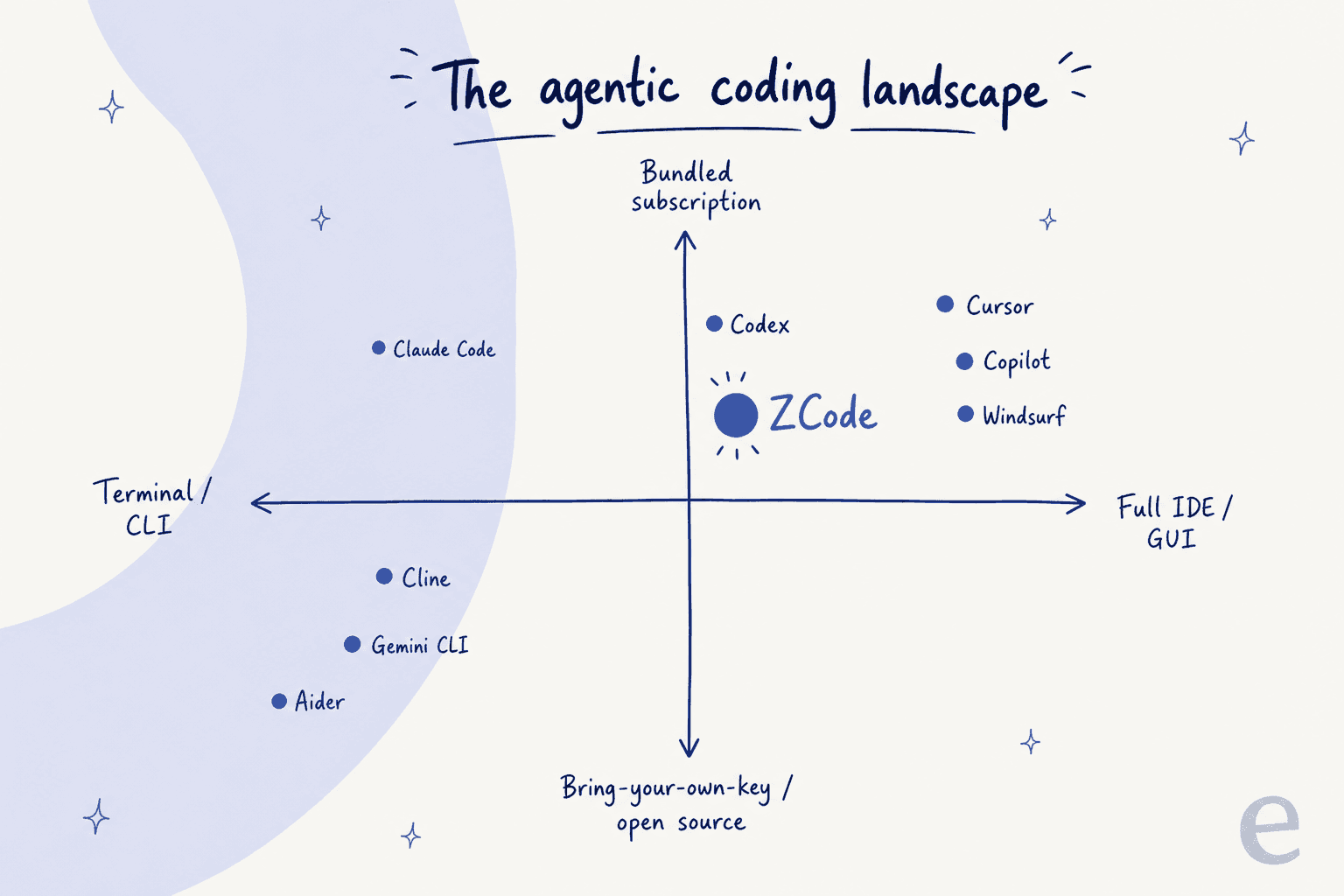
The vertical split is the big one. ZCode is a single owned-end-to-end stack: the agent, the GLM-5.2 model, and the subscription all come from one company. That buys tuning, but it also means vendor lock-in. Most alternatives sit on the other side, either a model-agnostic harness (Claude Code, Cline, Aider) or an editor you can point at different models. If you want the conceptual version of what these agents are doing, I wrote up the agent loop and the difference between an agent and a rule-based bot elsewhere.
Here's the quick comparison before the detail.
| Tool | Type | Cheapest paid | Open source? | Models | Best for |
|---|---|---|---|---|---|
| ZCode | Desktop agent | $18/mo (GLM Lite) | Model only, app no | GLM-5.2 (+ BYO key) | Running GLM-5.2 in a native app |
| Claude Code | Terminal + IDE agent | $20/mo (Pro) | No | Claude (Opus/Sonnet) | Autonomous whole-codebase work |
| Cursor | AI-native IDE | $20/mo (Pro) | No | Frontier + Composer | AI woven into a VS Code workflow |
| GitHub Copilot | IDE + cloud agent | $10/mo (Pro) | No | Claude, Codex, GitHub | Teams already living in GitHub |
| OpenAI Codex | Cloud + CLI agent | $20/mo (Plus) | CLI only | GPT-5.6 (Sol/Terra/Luna) | Parallel "delegate and return" tasks |
| Windsurf (Devin) | Agentic IDE | $20/mo (Pro) | No | Claude, SWE-1.6 | Cascade agent + Devin's cloud agents |
| Cline | VS Code extension | Free + tokens | Yes (Apache 2.0) | 200+ via BYO key | Open-source, model-agnostic control |
| Gemini CLI | Terminal agent | Free tier | Yes (Apache 2.0) | Gemini 3 | A truly free terminal agent |
| Aider | Terminal pair programmer | Free + tokens | Yes (Apache 2.0) | Any model | Git-native, no-subscription hacking |
1. Claude Code
Best for: developers who live in the terminal and want an autonomous, whole-codebase agent for multi-file edits and long-running tasks, not just line-by-line autocomplete.
Claude Code is Anthropic's agentic coding tool, and it's the one ZCode is most often compared to. It started as a terminal agent and now also runs inside VS Code, JetBrains, the web, Slack, and GitHub Actions. It reads and edits real files, runs shell commands, and uses agentic search to map a codebase on its own rather than making you paste in snippets. Where ZCode gives you a native GUI, Claude Code gives you a harness you can point at different Claude models and drive from anywhere.
The standout is genuine autonomy with a serious safety model. It runs parallel subagents, coordinates multi-file edits with dependency awareness, and, crucially, is read-only by default: a built-in set of commands runs without a prompt, but anything that modifies your system needs explicit approval, and it can only write inside the working directory unless you say otherwise. That permission discipline is the thing ZCode's "Full Access" toggle handles more bluntly.
The honest downsides are a steep learning curve and context drift. Power users say much of the value lives in the CLI and it isn't obviously better than Cursor or Copilot until you learn it, and on long, complex projects it can lose the thread and contradict earlier decisions, a recurring critique on both its 4.9/5 average on G2 reviews and Hacker News.
"Every time I read comments saying Claude Code is far better than Cursor, I fire it up, pay for a subscription, and run it on a large, complex TypeScript codebase. First, the whole process takes a hell of a lot of time. Second, the learning curve is steep"

Pricing: bundled with Claude subscriptions, no separate fee. Free tier included; Pro is $20/mo (or $17/mo billed annually); Max is from $100/mo (5x usage) or $200/mo (20x); Team seats start at $20/seat/mo. You can also run it pay-as-you-go on the API. Like ZCode, exact per-plan usage caps aren't published.
Verdict: the strongest all-round ZCode alternative if you're comfortable in a terminal. You trade ZCode's open-weight model and native GUI for a more mature agent, a much better permission model, and the frontier-quality of Opus 4.8. If model choice is your bottleneck, my notes on model selection go deeper.
2. Cursor
Best for: full-time developers who want AI woven directly into a familiar VS Code workflow, with the best autocomplete in the category.
Cursor, from Anysphere, is an AI-native fork of VS Code. It keeps the interface you already know and rebuilds the workflow around AI: an autonomous Agent mode that can run terminal commands and edit across files, a predictive Tab autocomplete, and full-codebase context via semantic indexing. Where ZCode hands you a whole task in a standalone app, Cursor keeps you in the editor and lets the agent build, test, and show you a diff to review.
Two things stand out. The Tab autocomplete is, by consensus, the best AI editor autocomplete going, it does multi-line, cross-file edits and predicts your next jump. And because it's a VS Code fork, your extensions, keybindings, and muscle memory carry over, so onboarding is measured in hours. Cursor also ships Composer 2.5, its own in-house coding model tuned for fast agentic edits.
The trade-offs are pricing friction and contested model quality. Every plan is usage-based: you get an included amount of model usage, then on-demand billing kicks in, and heavy Composer sessions can burn through frontier-model credits unpredictably, the repeated re-tiering (Pro, then Pro+, then Ultra) reflects real repricing churn. And Cursor's claim that Composer 2.5 rivals frontier models is disputed by independent testers.
"I tested it yesterday. It is pretty bad. Just like with Composer 2, it's fast, but quality is nowhere near what Cursor claims with their benchmarks. It is not even at Opus 4.5 level."
That said, its daily-driver fans are loyal for a reason:
"Yes, I use it as my daily driver at Discourse, the Cursor Tab autocompletion is still the best AI-based editor autocomplete I have used."
Pricing: Hobby (free), Pro at $20/mo, and Teams at $40/user/mo are confirmed on Cursor's pricing page; higher individual tiers (Pro+ and Ultra) scale the included usage up to around $200/mo. All plans bill on-demand usage in arrears once your included amount is spent.
Verdict: the pick if you want to stay in a VS Code-style editor rather than move to a terminal or a standalone app. It's more polished than ZCode day to day, but watch the usage-based bill, and don't take Composer's benchmark claims at face value.
3. GitHub Copilot
Best for: teams already living inside GitHub who want autonomous coding wired into issues, PRs, and Actions with zero new tooling.
GitHub Copilot is the incumbent, and it's quietly become agentic. Beyond the original autocomplete, it now has an in-IDE agent mode that autonomously edits across files, and a cloud Copilot coding agent you assign an issue to, it researches the repo, makes changes on a branch, and opens a pull request on its own, running in an ephemeral GitHub Actions sandbox. There's also a Copilot CLI and a desktop app for orchestrating multiple agents (Copilot, Claude, and Codex) side by side.
Its edge is being the platform developers already use. The coding agent runs inside Issues, PRs, and Actions with no extra setup, and inline completions stay free on every tier so casual users never touch a bill. You can also swap the underlying model per task.
The catch, and it's a fresh one, is billing. As of June 2026, Copilot moved to usage-based AI Credits metered by token consumption. Completions stay free, but chat, agent mode, code review, and the CLI draw down credits, so a single big agent-mode prompt can eat a chunk of your monthly allotment. The autonomous coding agent is also boxed in: one repo, one branch, one PR, roughly 59-minute sessions, GitHub-hosted repos only.
"One good prompt into Github Copilot 'Agent Mode' (running Claude 4) asking for a new feature can often result in up to 5 to 7 files being generated, and a total of 1000 lines of code being written."
Pricing: Free ($0), Pro ($10/user/mo), Pro+ ($39/user/mo), Business ($19/user/mo), Enterprise ($39/user/mo), with paid plans able to buy more usage once the monthly credits run out. See the plans page for the current credit allowances.
Verdict: the natural ZCode alternative for a team, not a solo hacker. If your work already flows through GitHub issues and PRs, nothing else plugs in this cleanly, just model the new usage-based credits before you turn agent mode loose.
4. OpenAI Codex
Best for: teams inside the OpenAI ecosystem who want a methodical agent that fans out parallel cloud tasks, bug hunts, refactors, PRs, rather than just autocomplete in the editor.
OpenAI Codex (the 2025/2026 agent, not the old 2021 API) is one coding agent across three surfaces: a cloud agent in ChatGPT that runs long tasks in sandboxed environments, a free open-source Codex CLI, and an IDE extension. It's powered by OpenAI's Codex-tuned models, the GPT-5.6 "Sol / Terra / Luna" family as of mid-2026. Where ZCode keeps everything on your machine, Codex leans into the cloud: delegate a task, it spins up a sandbox, clones the repo, runs the tests, and opens a PR.
Two capabilities stand out: parallel agents (several tasks progressing at once) and a strong reputation for careful, methodical bug-finding and code review. It's also bundled into a ChatGPT subscription you may already pay for, and the CLI itself is free and open source. Interestingly, several launch-week ZCode users said ZCode's UI is actually closer to Codex than to Claude Code.
The downsides are opaque, moving pricing and the need for supervision. Since April 2026, Codex usage is metered in credits tied to token consumption with rate limits that reset every five hours, hard to forecast, and OpenAI itself pegs power-user spend at $100-$200/dev/month. Left unsupervised, it can accumulate technical debt fast.
"It's about on par with a bad junior engineer at this point... If you just let it run loose on a codebase without close supervision you'll devolve into a mess of technical debt pretty quickly."
Pricing: not sold separately, bundled into ChatGPT: Free ($0), Go ($8/mo), Plus ($20/mo), Pro (from $100/mo, up to $200/mo for the 20x tier), Business ($20-25/user/mo), plus API pay-as-you-go. The CLI is free and open source.
Verdict: the best "delegate and come back later" agent on the list, and a fair swap if you trust OpenAI's models more than GLM-5.2. Just supervise it and budget for the credits, the same opaque-usage problem that pushes people off ZCode applies here too.
5. Windsurf (now Devin Desktop)
Best for: developers who want an autonomous multi-file agent (Cascade) inside a VS Code-style editor, increasingly as the local front-end to Cognition's cloud Devin agents.
Windsurf is worth including with a big asterisk: the brand is being retired. Born as Codeium, rebranded to Windsurf, it survived a chaotic 2025, OpenAI's $3B deal collapsed, Google licensed the tech and hired the founders, and Cognition (maker of the Devin agent) acquired the rest. As of 2026 windsurf.com redirects to devin.ai, and the product is presented as "Devin Desktop (formerly Windsurf)."
The agent itself, Cascade, is a strong one: multi-file edits with auto-generated shell commands (Windsurf shipped this before Cursor's Composer), a built-in planning agent, Fast Context for millisecond repo retrieval, checkpoints, and up to 20 tool calls per prompt. Under Cognition it also gets an Agent Command Center for juggling local and cloud agents, plus free unlimited access to Cognition's own SWE-1.6 model, even on the free tier.
The cons are mostly about turmoil and history. The product identity is mid-transition into Devin, the old credit system drew heavy "burning infinite credits" complaints before it switched to daily/weekly quotas in March 2026, and much of the differentiation is the underlying model (mostly Claude), so value beyond the model can feel thin.
"I really think more people should give Windsurf a go. It's really good... As the conversation shifted towards Cursor vs Claude code vs Codex people seem to have stopped mentioning it which is a shame. Source: user for 12 months - not a shill."
Pricing: Free ($0), Pro ($20/mo, up from $15 before March 2026), Max ($200/mo), Teams ($40/user/mo), Enterprise custom, now unified with Devin's plans.
Verdict: a capable Cascade agent, but you're buying into a product mid-merger. If you like the VS Code-agent feel and want a path into Cognition's cloud Devin agents, it's a real option; if brand stability matters, note that "Windsurf" as a standalone name is on the way out.
6. Cline
Best for: developers who want a fully open-source, model-agnostic agent inside VS Code and are comfortable paying API providers directly instead of a fixed subscription.
Cline (Apache 2.0, formerly "Claude Dev") is the open-source answer to ZCode's walled stack. It's a VS Code extension that reads, writes, and edits files, runs terminal commands, and works through multi-step tasks with approval on every step. The whole thing is bring-your-own-key: plug in credentials from Anthropic, OpenAI, Google, OpenRouter, or a local model, and the extension is free. It's one of the most-used agents in the category, with 60k+ GitHub stars and 8M+ installs (self-reported).
The signature features are Plan/Act modes (explore and strategize, then execute) and total model freedom, 200+ models via OpenRouter, Bedrock, Vertex, and local runners like Ollama. Checkpoints give one-click undo on any step, and MCP support lets it reach databases and external systems. Because you can point it at GLM-5.2 directly, Cline is also the most literal way to keep ZCode's model without ZCode's app.
The honest catch is cost. Cline is agentic, so one "implement this feature" request fans out into many LLM calls, and heavy use on frontier models can run $100-200+/month, often more than a flat Cursor or Copilot subscription. The upside is transparency: you see exactly what each call costs, and switching to a cheaper model drops the bill immediately.
"What everyone is really sleeping on is Deepseek paid API with Cline and VSCode. An agent that can refactor entire codebases with a 128.0k context window that costs dimes. It generates entire blocks of code and tests them for $0.02 a pop."
Pricing: the extension is free and open source. You pay your model provider directly with no Cline markup (Claude Sonnet, for example, runs about $3 per million input tokens / $15 per million output). An optional Cline-hosted pay-as-you-go credits path exists for teams that want one bill.
Verdict: the open-source pick for control freaks, in the best sense. If ZCode's proprietary, full-access agent is what worries you, Cline is the transparent, inspectable opposite, just watch the token meter on frontier models.
7. Gemini CLI
Best for: developers who want a truly free, open-source terminal agent backed by Gemini's large context window, especially for big-codebase reads and Google-ecosystem work.
Gemini CLI is Google's open-source (Apache 2.0) terminal agent, and its headline is the free tier: log in with a personal Google account, no credit card, and you get a generous daily allowance. It runs a ReAct-style loop (reason, call a tool, observe, iterate), supports MCP, ships built-in tools for file ops, shell, and web fetch with Google Search grounding, and reads GEMINI.md context files, the direct equivalent of ZCode's model but in an open, free-to-start package. It's one of the highest-starred agent repos on GitHub (100k+ stars).
The big draw is simply that it's free and open, with a large context window that's strong for reading and reasoning over big codebases in one pass, plus multimodal input (PDFs, images, sketches). For a lot of exploratory or read-heavy work, that free tier is hard to argue with.
The cons are reliability and instability of the offering itself. Multiple developers report it does a worse job than Claude Code at making edits that actually compile, and Google has changed the free-tier models and access repeatedly (Pro models removed from the free tier around April 2026, and access rules shifted again mid-year), with docs that have been openly confusing. A "request" is also fuzzy, one prompt can trigger dozens of API calls, so the daily cap goes faster than it looks.
"Been using Claude Code (4 Opus) fairly successfully in a large Rust codebase... Tried Gemini CLI today and it was pretty much a failure. It did a notably worse job than Claude at having the Rust code modifications compile successfully."
Pricing: free tier via a personal Google account (roughly 1,000 requests/day). Paid paths include your own Gemini API key (billed per token) and Gemini Code Assist subscriptions (Standard around $19/seat/mo, Enterprise around $45/seat/mo). Verify current caps on Google's live quota page, they move often.
Verdict: the best free ZCode alternative to just try tonight. It won't match Claude Code on tricky edits, but for a zero-cost, open-source terminal agent with a huge context window, nothing else on the list gets you started this cheaply.
8. Aider
Best for: developers who live in the terminal and want a git-native, model-agnostic pair programmer without a subscription or a GUI.
Aider is the veteran of this list, and it's still one of the sharpest. It runs entirely in your terminal, edits code in your local git repo, and its defining trait is deep git integration: every change is auto-committed with a real commit message, so the whole session is auditable and reversible with normal git tools. It's free, open source, and bring-your-own-key, point it at Claude, GPT, DeepSeek, Gemini, or a local model.
The clever bits are the repo map (a tree-sitter analysis of your whole codebase for context on large projects) and architect/editor mode, a two-model workflow where a strong reasoning model proposes the solution and a cheaper, faster model applies the diffs. Aider also maintains a well-known polyglot coding leaderboard that many developers use to compare how well models actually write and edit code.
The trade-offs are that it's terminal-only with a minimal GUI, so teams wanting a full graphical IDE will find it bare, and you absorb all API costs directly (no fixed-price ceiling). It's also non-agentic in feel, it keeps you in the loop, which some love and others find has a high bar.
"Aider was also some of the most amazing prior art... an amazing TUI experience. CC won because it offered token hungry devs a fixed price for almost infinite usage in the early days with stacks of VC cash to burn."
Pricing: free and open source (no subscription, no seat fee). You pay your model provider per token, one user recalls bootstrapping a small project on about $20 of Sonnet credits; heavy frontier-model use on a big repo runs much higher.
Verdict: the pick for terminal purists who want their AI edits to land as clean git commits. It's the least flashy ZCode alternative and, for a certain kind of developer, the most trustworthy, nothing happens to your repo that isn't a reversible commit.
The pricing reality across the field
Zoom out and the money splits into three shapes. There's a cheap paid entry point almost everywhere, $10 for Copilot Pro, $18 for ZCode's GLM Lite, $20 for Claude Code, Cursor, Codex, and Windsurf, but that headline number rarely tells you what you'll actually spend.
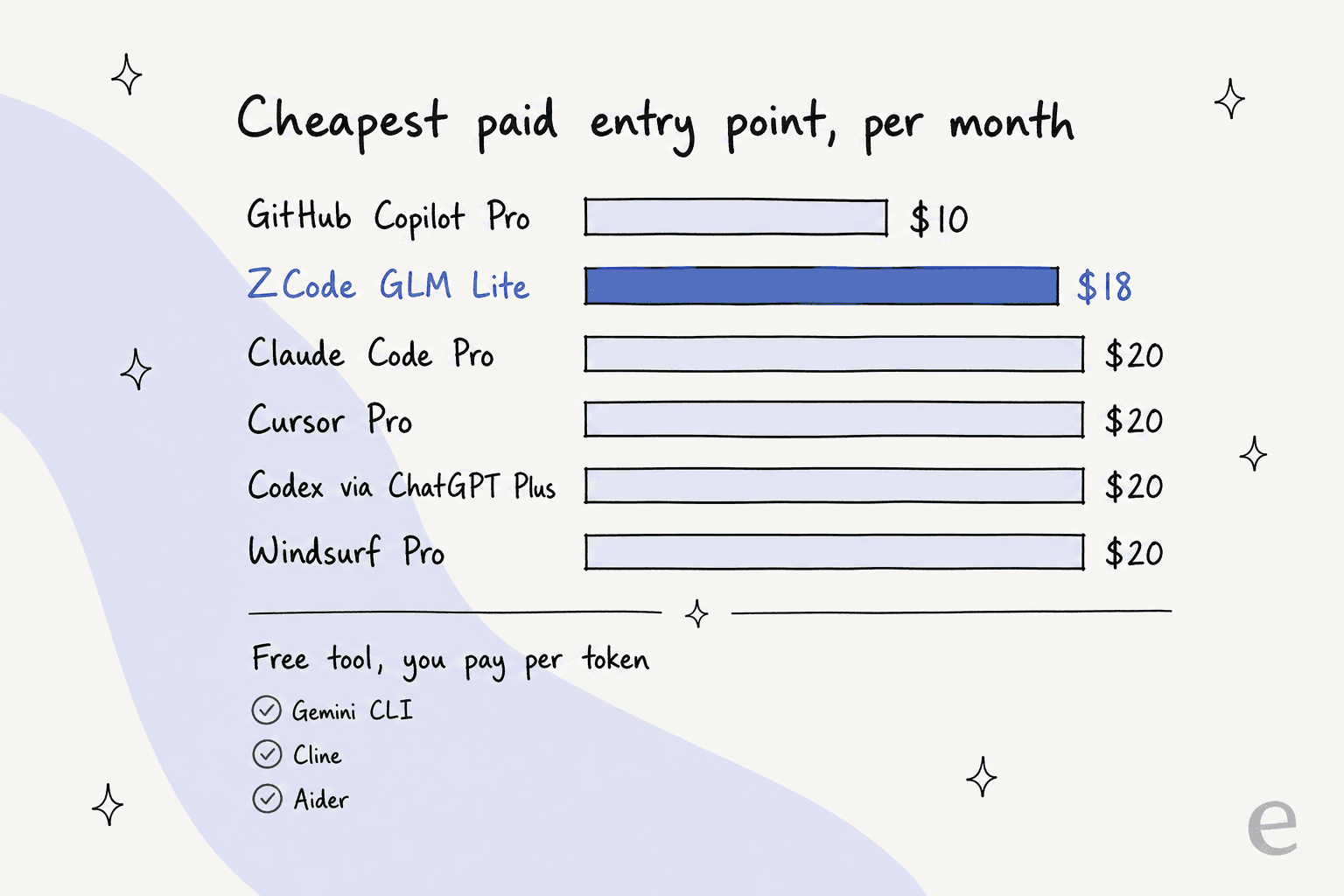
The thing that decides your real bill is the model of billing, not the entry price. There are three:
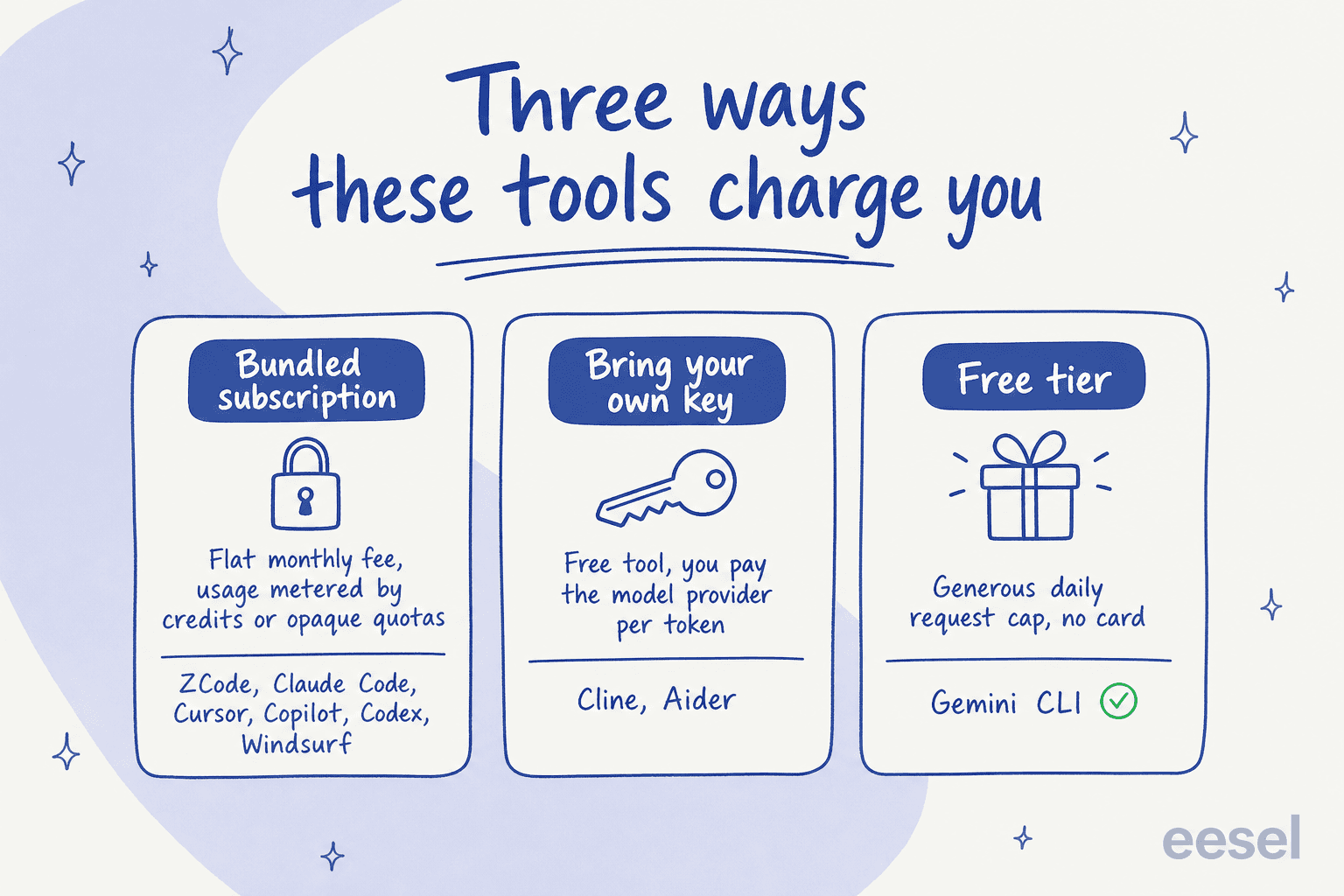
The pattern I'd flag: almost every bundled subscription now meters usage in credits or quotas you can't fully see, ZCode's undisclosed "base allowance," Cursor's on-demand burn, Copilot's new AI Credits, Codex's five-hour rate windows. Watching vendors sell autonomy in units nobody can price is familiar to me. It's the same reason eesel prices per resolved ticket, a unit you can actually forecast, rather than an opaque credit. The bring-your-own-key open-source tools (Cline, Aider) flip that: the bill is unpredictable too, but at least it's fully transparent and drops the moment you switch to a cheaper model.
The real lesson: autonomy needs a harness
Here's the thing I keep coming back to, and it's bigger than which coding app wins. An autonomous agent is only as trustworthy as the harness you put around it.
Look across all eight tools and the good design decisions are the same, and they're the guardrails, not the autonomy. Claude Code is read-only by default and asks before it touches your system. Cline makes you approve every step until you flip auto-approve. Aider turns every edit into a reversible git commit. Copilot's coding agent runs in an ephemeral sandbox. Strip those away and you have a very capable model with root on your machine and no brakes, which is exactly what the ZCode skeptics were worried about.
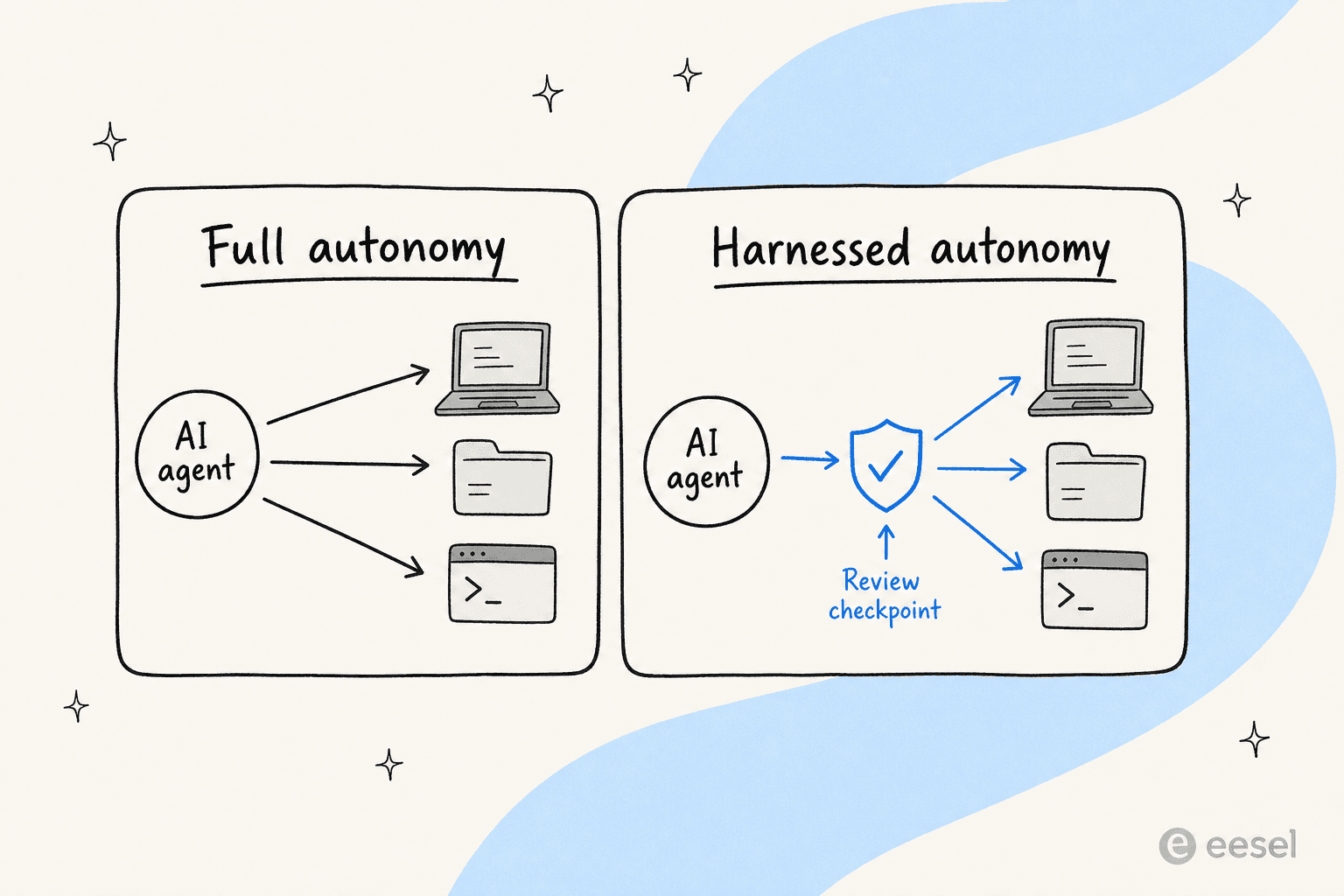
I find this reassuring, because it's the exact conclusion I reached building AI for support. I've spent the last three-plus years putting AI agents on live customer queues, and the early, painful lesson was watching a confident-sounding bot give a wrong answer to a real customer. A coding agent that hallucinates a function breaks a build you can revert. A support agent that hallucinates a refund policy breaks trust you can't. So the whole industry is converging on the same shape: give the agent room to work, put a checkpoint between it and anything irreversible, and prove it works before you let it loose. For support specifically, that means a review step before each reply goes out. It also means a clean escalation path when the agent is unsure. The autonomy is the easy part now, the harness is the product.
Try eesel
If you're watching this whole agentic-coding wave and thinking "I want an agent like this, but for my support queue," that's basically what I build. eesel is an AI teammate for your helpdesk: it plugs into Zendesk, Freshdesk, Gorgias, HubSpot, or Front, learns from your past tickets and help docs on day one, and drafts or fully resolves tier-1 conversations.

The differentiator is the same harness idea from the section above. Before eesel replies to a single customer, its simulation mode runs the agent against thousands of your real historical tickets, so you see exactly what it would have said and how much it would have resolved, and you fix the gaps before going live. It starts supervised, drafting only, and you grant autonomy on the easy tickets when you trust it, with confidence-based routing so low-confidence questions become a draft instead of a wrong answer. You can try eesel free, and it's priced per resolved ticket, not per opaque credit.
Frequently Asked Questions
What is the best ZCode alternative in 2026?
Is there a free alternative to ZCode?
How much do ZCode alternatives cost?
Is Claude Code or Cursor a better ZCode alternative?
Do these coding agents work for customer support too?


Article by
Rama Adi
Rama is a software engineer at eesel AI with two years of experience writing about B2B SaaS, AI tools, and customer support technology. Based in Bali, Indonesia, he brings a developer's perspective to product comparisons — cutting through marketing copy to what the integrations and APIs actually do.