
What Risotto is
Full disclosure before we start: I work at eesel, and I spend my days shipping the integrations that connect AI agents to helpdesks. That means two things for this review. One, I have opinions about what separates a good demo from a tool that survives contact with a real queue. Two, eesel plays in a neighbouring lane, so I have kept the eesel talk to the one section where it is genuinely relevant and reviewed Risotto on its own terms everywhere else.
Risotto is a Y Combinator Winter 2024 company built by three ex-HelloSign engineers. The most telling detail in its origin story is that co-founder Alex Confer ran IT at Gusto and Dropbox before starting the company. Risotto is the tool he wanted and could not find, and it shows: this is software built by people who have actually sat in the IT seat, drowning in the same password-reset ticket for the hundredth time.
The pitch is simple. Instead of making employees file a ticket in a portal they forget exists, Risotto answers them where they already are, in a Slack thread. It reads the question, checks your knowledge, and either resolves it end-to-end or escalates to a human with the full context attached. Here it is fielding a VPN problem, reading the screenshot the employee pasted, and working out that the company has since moved off AWS VPN:
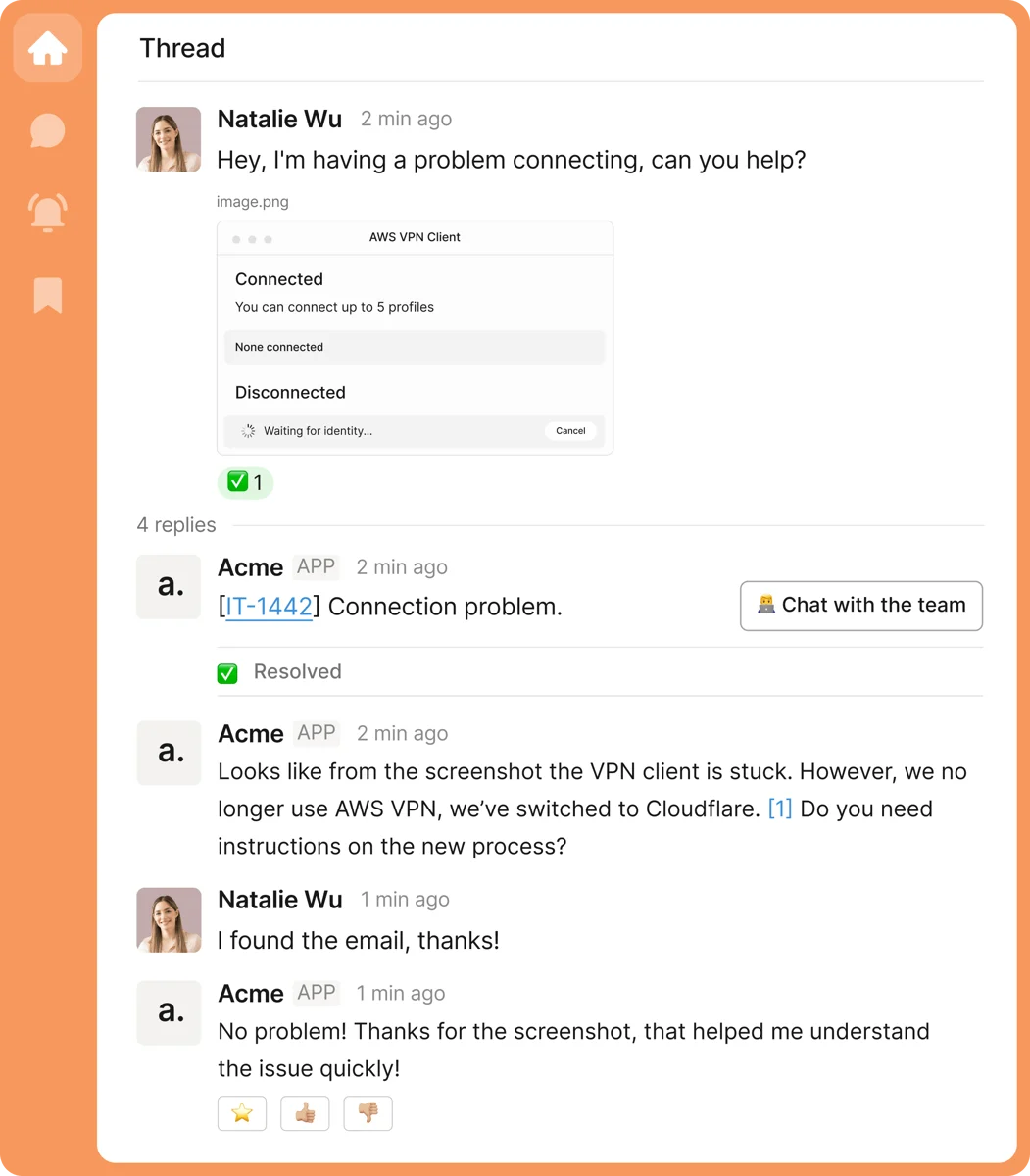
That multi-modal touch, reading an attached screenshot rather than just the text, is a nice sign of how much the product leans on modern models rather than keyword matching. It is a real AI IT help desk, not a decision-tree bot wearing an AI badge.
How Risotto actually works
Under the marketing, the mechanism is refreshingly concrete. At setup you connect four things: your chat tool (Slack or Teams), your ticketing platform (Jira, Freshservice, or Zendesk), your identity provider, and your docs. Risotto says most customers are live within a day, and that is plausible because it is connecting to systems you already run rather than asking you to rebuild anything.
From there, every request runs through the same loop:
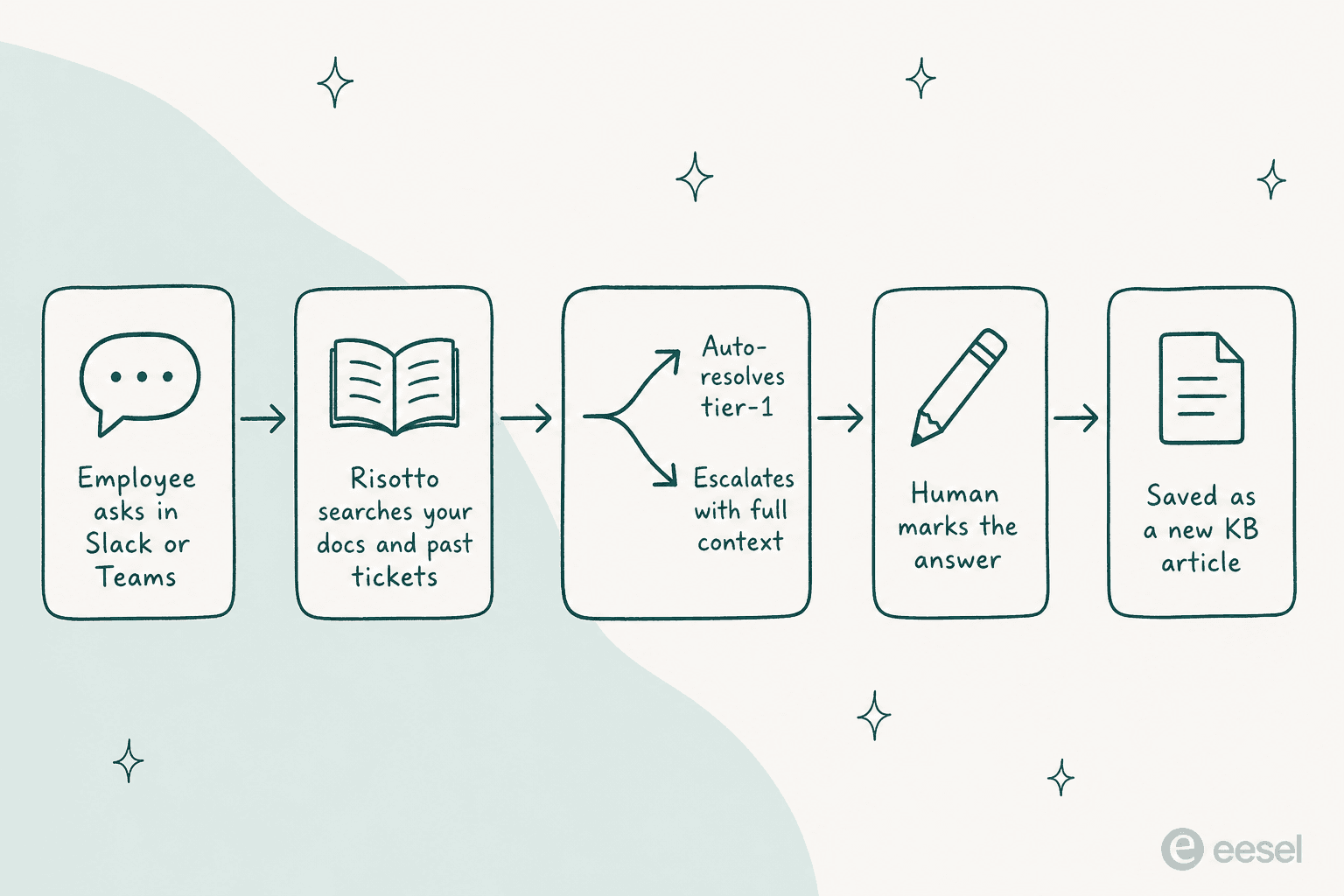
Two parts of this loop are worth calling out. First, the knowledge source. Risotto pulls from your docs across Notion, Confluence, and internal wikis, but it also reads your resolved Slack conversations, so answers that only ever lived in someone's DMs become reusable. Hazel Health's Head of IT made exactly this point: it was "pulling insights from our own past Slack conversations, surfacing knowledge that would have otherwise been buried."
Second, the self-updating knowledge loop. When a human resolves something the AI could not, they drop a writing-hand emoji on the thread, and Risotto captures it into a doc and adds it to the knowledge base. It is a small design decision that quietly solves the biggest problem with any AI help desk: keeping the knowledge current without anyone owning a documentation chore.
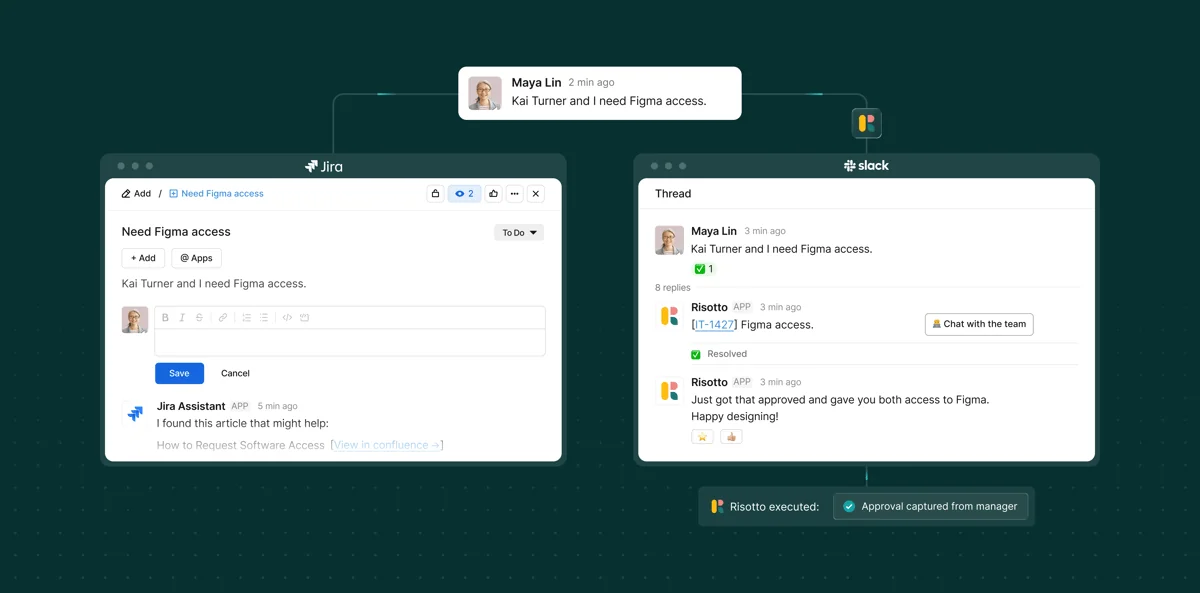
The whole thing runs as a genuine three-way sync. A conversation in Slack becomes a tracked ticket in Jira, and updates flow both ways, so the ticket record and the chat never drift apart:
Tier-1 resolution in chat
This is the core of the product, and it is the part Risotto does well. The AI handles the full back-and-forth of a real request, not a single canned reply. Ask it to help set up 1Password on a new Mac and it walks you through the Okta steps, checks in, and closes the loop when you confirm it worked:
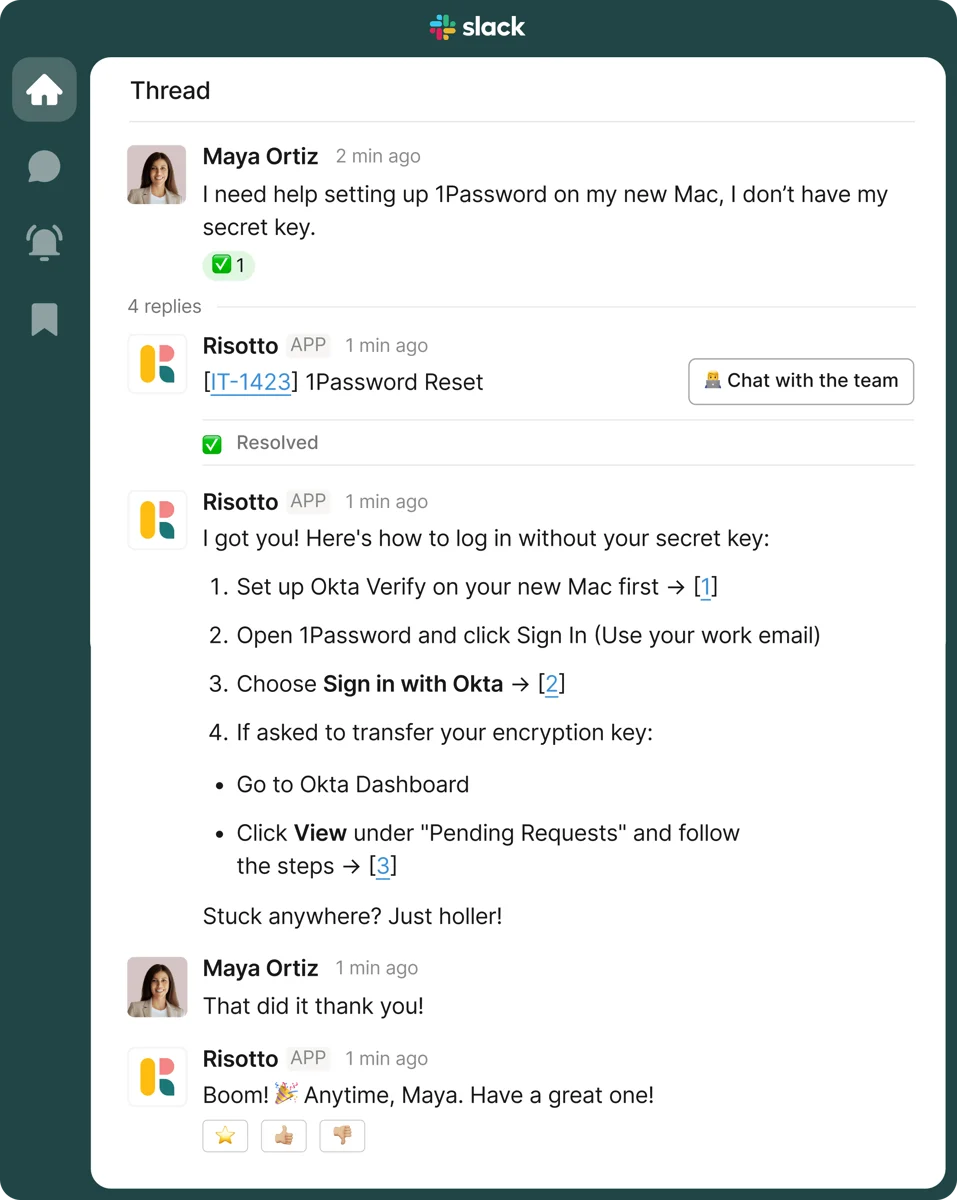
Risotto claims 20-60% of tier-1 tickets get resolved with no human, and the numbers its own customers report land squarely in that band rather than at the optimistic top of it:
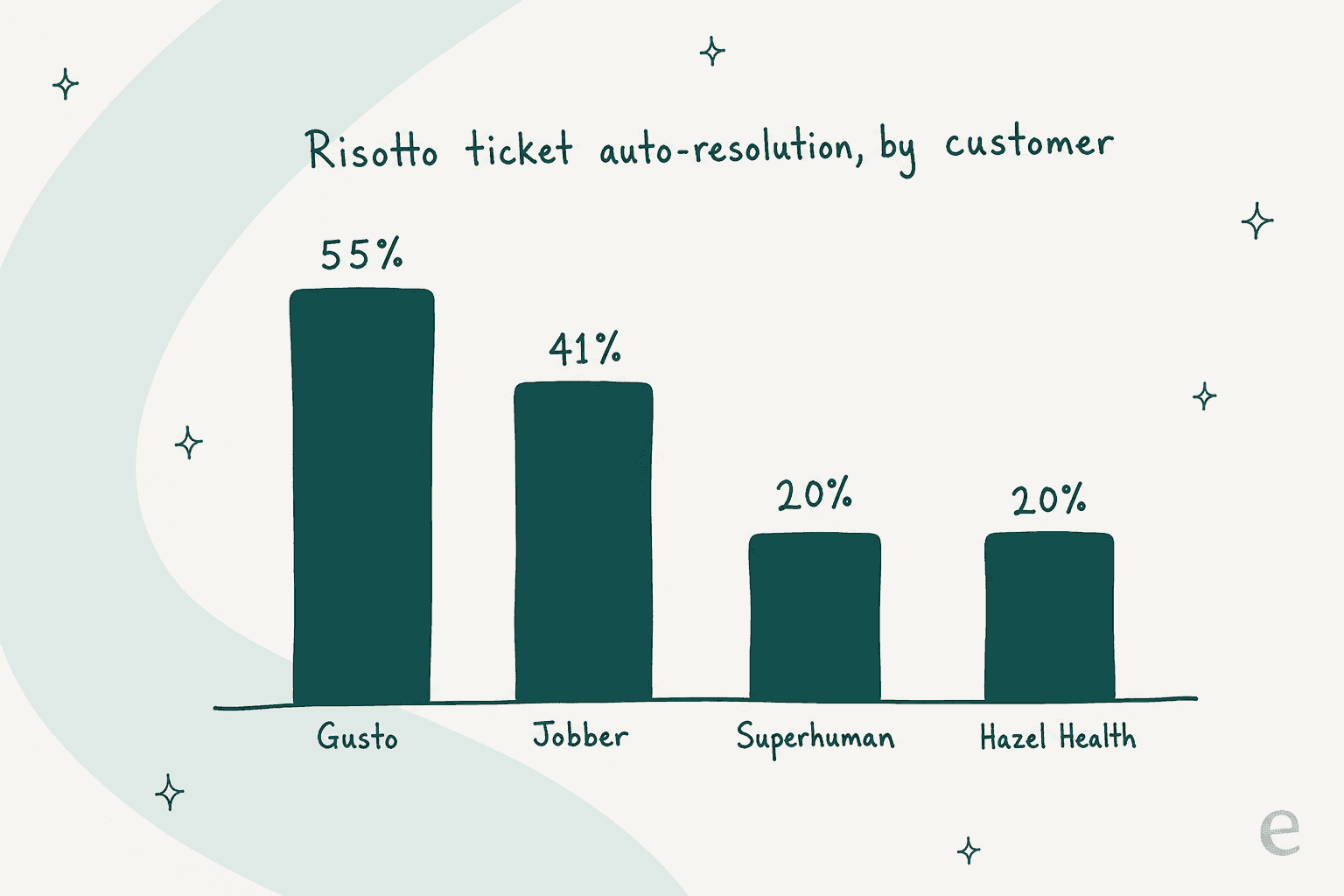
Gusto's Head of AIT Operations reports 55% of tickets auto-resolved and 114,000 hours of employee wait time saved, with the AI resolving in five hours what took humans thirty-five. Jobber landed 41% on its revenue-technology queue and saved 2,747 hours. Those are vendor-published numbers, so treat them as best-case, but the fact that they cluster around the 20-55% mark rather than a suspiciously round "80%" makes them easier to believe. This is solid tier-1 deflection, not a fantasy.
Software access, approvals, and runbooks
If tier-1 answers are the table stakes, access provisioning is where Risotto earns its keep. This is the feature G2 reviewers keep singling out. Someone asks for a tool in Slack, Risotto checks the policy, routes the approval, grants access through your identity provider, and keeps the audit trail, all without an admin ever opening the Okta console:
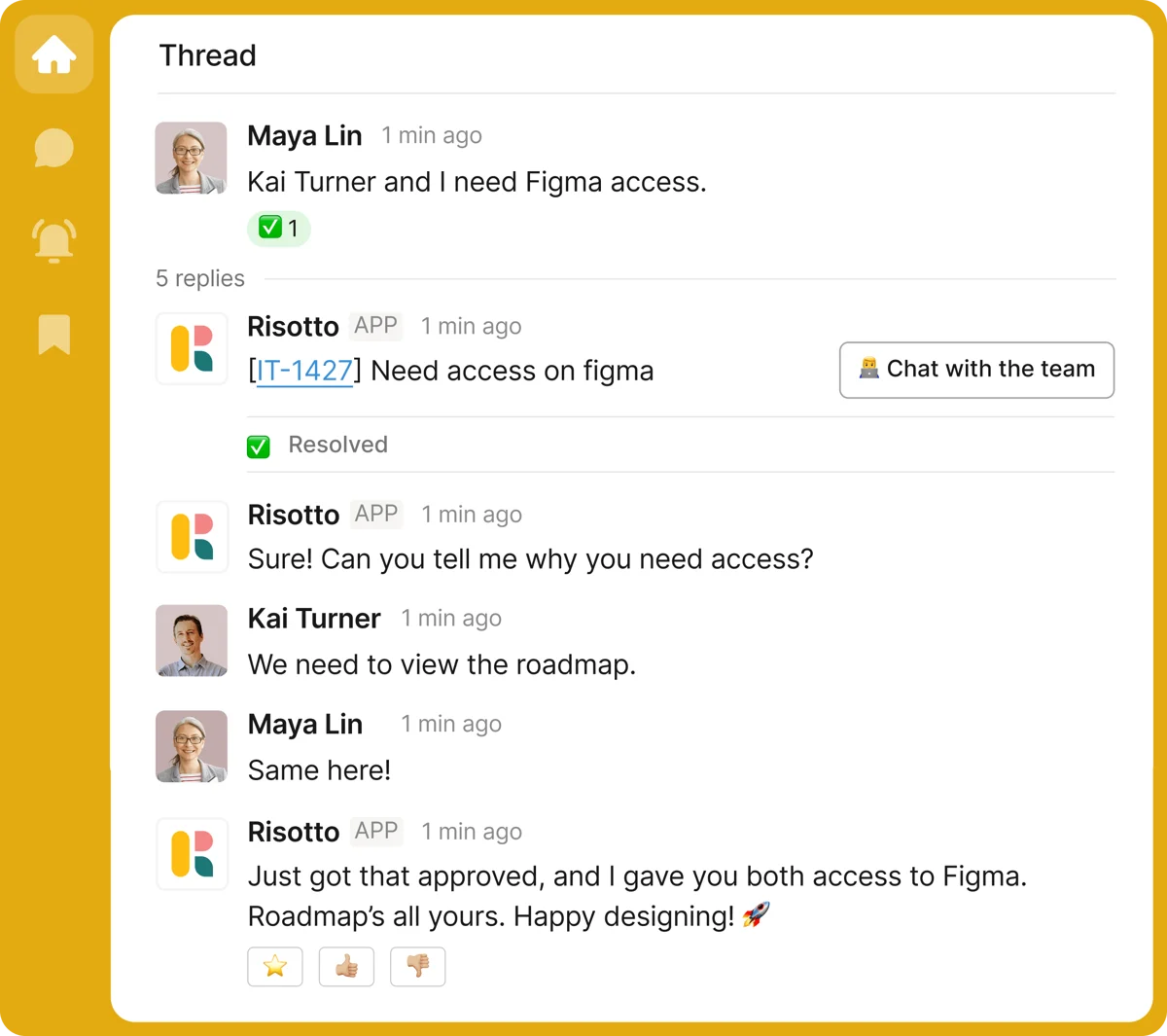
Behind this sit runbooks: no-code, plain-English workflows for the repeatable stuff like onboarding, offboarding, and time-based access grants that auto-expire. They can trigger real actions across Okta, BambooHR, Jamf, and Linear, and anything without a native connector can be reached through Risotto's MCP support. Because it grants temporary access that expires on its own and logs every action, Risotto also folds in a chunk of what companies otherwise buy a separate identity-governance tool for, which is a smart bit of scope for a security-conscious IT team. One G2 reviewer summed up the appeal: their team no longer logs into "the Okta admin console, navigating to the right group, and clicking through multiple steps, for every single request."
It works inside your ticketing tool
Risotto is emphatic that it is not here to rip out your ticketing system. It layers on top. If a request comes in through Jira rather than Slack, Risotto answers it right there in the ticket, and the resolution syncs back:
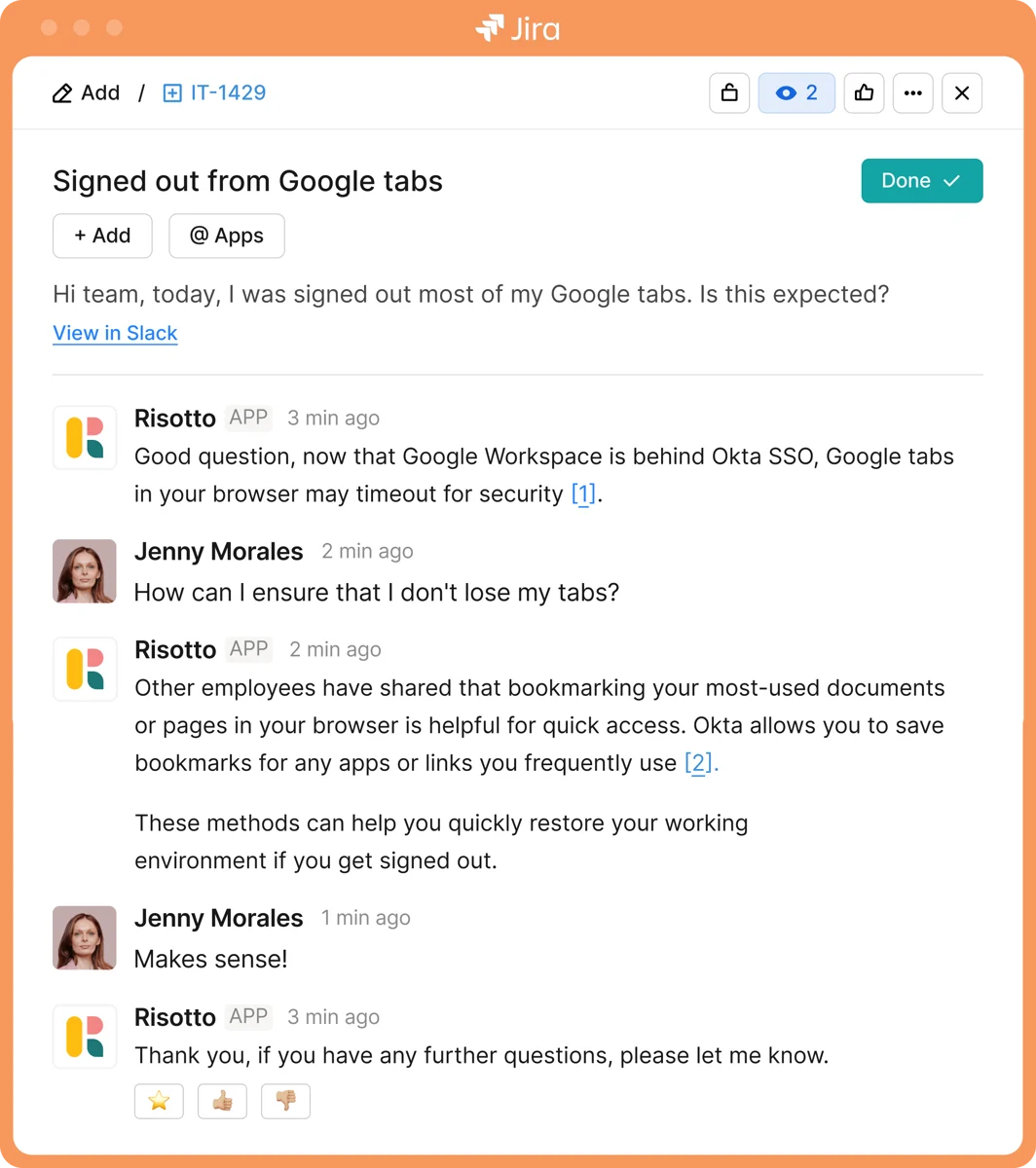
The integration list is broad for a company this young: ticketing (Jira Service Management, Freshservice, Zendesk, ServiceNow, Linear), identity (Okta, Microsoft Entra, Google Workspace), knowledge (Confluence, Notion, Guru, SharePoint, Google Drive), and HRIS (Workday, BambooHR, HiBob). Device management is still marked coming soon, so double-check that if MDM automation is on your list. This "keep your stack, add a layer" positioning is the same one Risotto uses against ServiceNow and Freshservice on its own comparison pages, and for an internal IT team already invested in Jira, it is a sensible way to avoid a migration.
One desk for every department
The other place Risotto stretches nicely is beyond IT. Because the intake is just "ask a question in chat," the same bot can front HR, finance, and legal, with department-level permissions so a private HR ticket stays private. Requests can land from Slack, Teams, or a synced Jira ticket and still route to the right team:
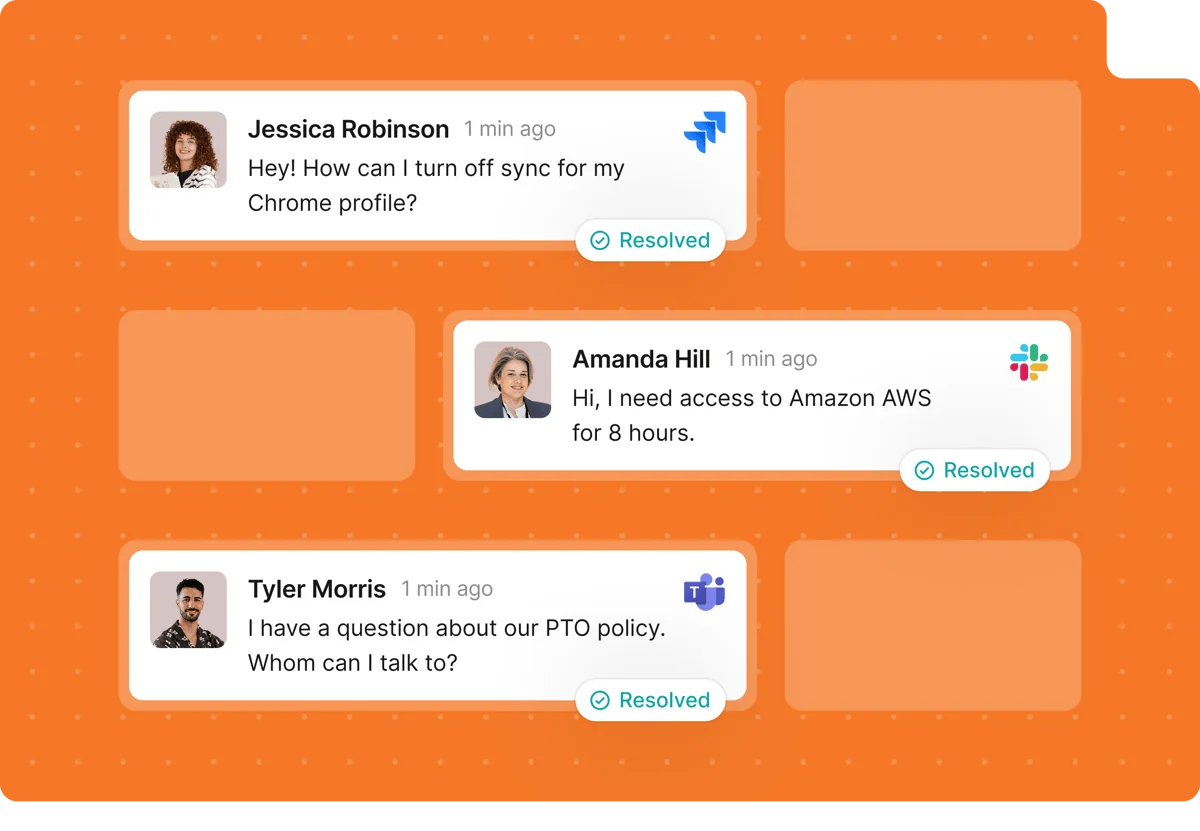
Superhuman's story is the clearest example: it started Risotto in IT, and its compliance manager reports that engineering and RevOps then asked to join because "they also get lots of the same questions over and over again." That land-and-expand pattern is real, and it is a genuinely good reason to run one internal help desk instead of five.
Analytics and reporting
Risotto reports the metrics an IT lead actually presents to their manager: requests solved, time to first response, time to resolve, and the breakdown of tickets across resolved, escalated, awaiting approval, and denied.
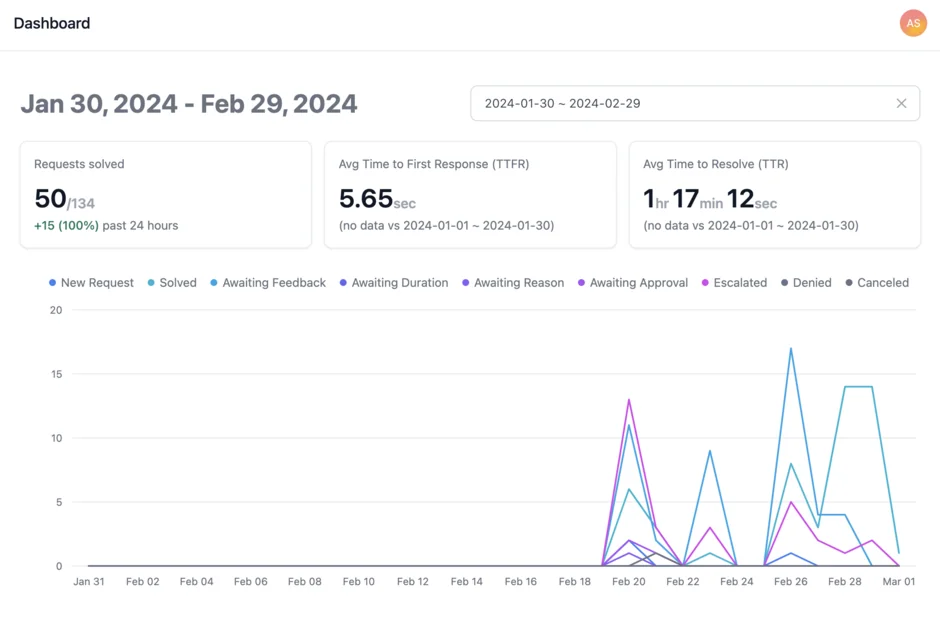
There is also a plain-English querying layer and anomaly detection that flags request spikes. The one gap I noticed: there is no explicit CSAT metric on the analytics page, which is a fair omission for an internal-IT tool where nobody rates their password reset, but worth knowing if you care about satisfaction scoring.
Risotto pricing
Here is where Risotto is a little coy, so let me lay out every surface I could find.
| Plan / surface | Price | Billing unit | Notable limits |
|---|---|---|---|
| Startup (pricing page) | $1,250/month, paid annually | Flat company rate | Companies under 200 employees; 30-day free trial |
| Enterprise (pricing page) | Quote-only | Custom | Adds custom branding, HIPAA, white-glove onboarding, dedicated CSM |
| AWS Marketplace (listing) | $90 per user | Per user, 12-month contract | One license covers all departments; 30-day refund window |
The headline is a flat $1,250/month for the Startup plan, gated by company size rather than a seat count, with a 30-day free trial. Above 200 employees you are into quote-only Enterprise, which is also where HIPAA lives. SOC 2 Type II is included from Startup up.
Two things to flag. First, the flat floor cuts both ways: it is predictable and it rewards heavy use, but a 30-person IT-only rollout still pays the full $1,250, which is steep at that size. Second, the AWS Marketplace $90-per-user figure is the only genuinely per-seat number Risotto publishes, and it is a different purchase path from the website. If you are procuring through AWS, that math may work out very differently, so get both quotes.
What real users say
This is where I have to be honest about the evidence. Risotto is a 2024 startup, and third-party reviews are thin. The one platform with real, verifiable feedback is G2, which carries four reviews at 4.8/5, and G2 itself flags that there are "not enough reviews to provide buying insight." So take the sentiment below as early signal, not settled consensus.
The praise is consistent and specific. Fast setup and the Okta access flow come up again and again:
"The initial setup was incredibly easy, having a positive impact almost right out of the box and taking less than a standard call to connect."

One reviewer running IT for a 600-person org with a two-person team put a number on it:
"Risotto has saved us nearly 16000 hours in manpower over the last 3 months, handling 25% of our ticket volume without escalation."
The most useful review is the critical one, because it points at a real product edge. Risotto's access logic can be a little trigger-happy:
"The access-handling logic is too eager. If a user mentions a tool, Risotto often jumps straight to provisioning access rather than first checking existing resources, sometimes the user just needs guidance or context about that tool, not access granted."
The other recurring wish is the ability to coach the bot inline, leaving an internal note on a ticket to teach it for next time, rather than editing the knowledge base separately. Both are the kind of gaps you would expect a fast-moving young product to close, but they are worth knowing going in.
Where Risotto is a great fit, and where it isn't
After going through the product, the boundary is clear, and it is not a knock on Risotto. It is a focused tool that knows what it is:
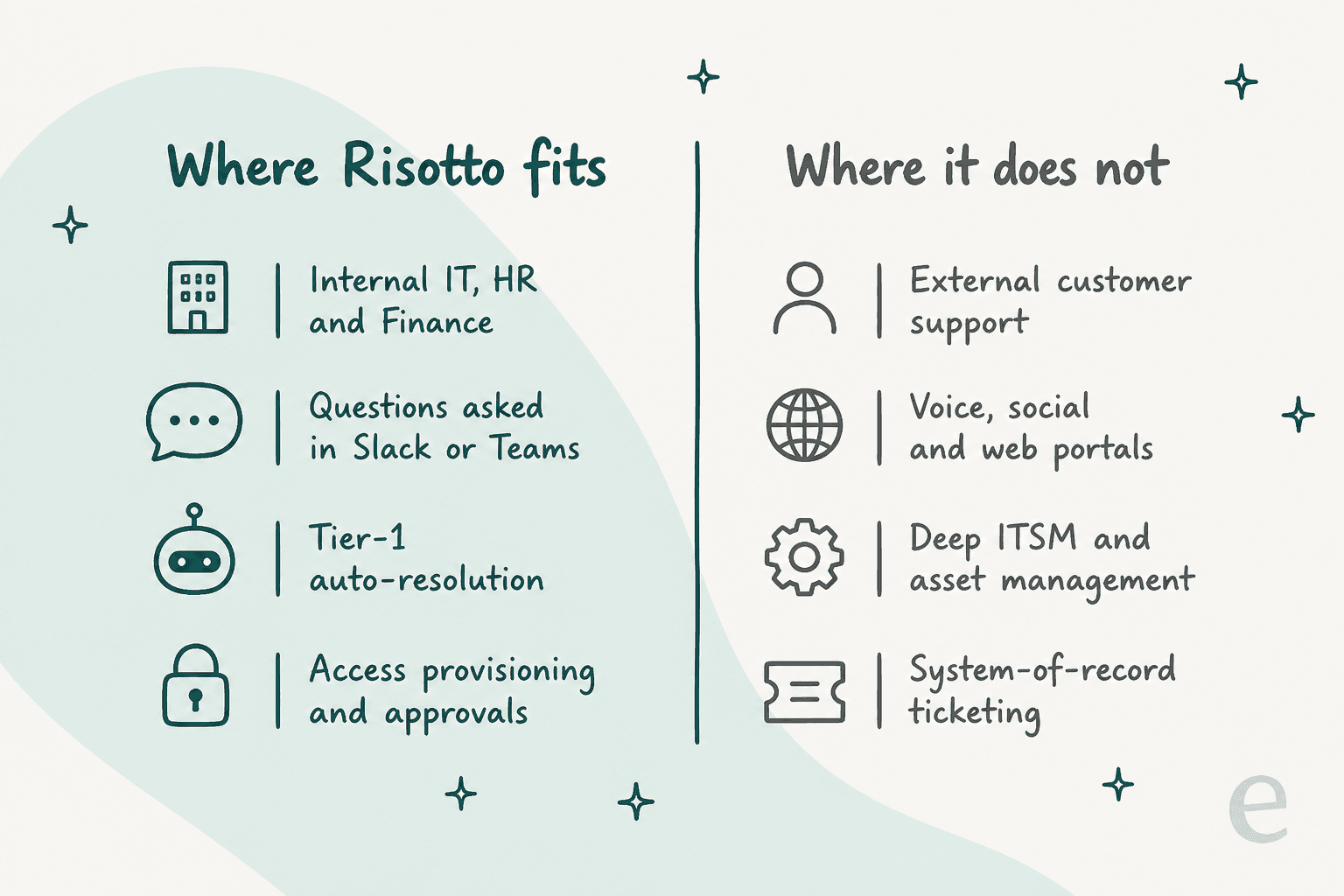
Risotto is a strong pick if you are a mid-market company that runs on Slack or Teams, your pain is internal IT (plus maybe HR and finance), and you want tier-1 answers and access provisioning without a six-month rollout. It is genuinely one of the better options for AI-powered ITSM in that specific shape.
It is the wrong tool if your queue is external customers, if you need voice, social, or web-portal channels, or if you are looking for a full ITSM system of record with deep change management and asset tracking. Risotto explicitly leaves that to the incumbents and admits it only handles end-to-end ticketing "if your requirements are simple."
The one gap I would push Risotto on is testing. Its whole message is "go live in a day," and I get the appeal, but its own docs mention no way to simulate the AI against your historical tickets before it starts answering real ones. Having watched confident-sounding bots quietly give wrong answers, I would want to see how it behaves on my last thousand tickets before I let it loose. A guided sales demo is not the same thing as a dry run over your own data.
Risotto vs the tools it sits on top of
Because Risotto positions itself as a layer, the honest comparison is not "Risotto or Jira" but "Risotto plus your existing tool." Here is how it stacks against the ticketing systems it augments, using its own framing (which, fair warning, is Risotto's marketing, so verify the competitor numbers against Freshservice and Zendesk directly):
| Dimension | Risotto | Zendesk / Freshservice |
|---|---|---|
| Primary job | Internal IT automation in chat | Customer service / full ITSM ticketing |
| Home surface | Slack and Teams | Web portal and agent workspace |
| Tier-1 auto-resolution | 20-60% (true resolution) | Deflection-led, lower |
| Access provisioning | Native, wired to your IdP | Separate tooling |
| Setup time | Hours to days | Weeks to months |
| Role | A layer on top | The system of record |
The takeaway: Risotto is not trying to be your ITSM platform. It is trying to be the AI that makes the platform you already have quieter. For an internal IT team, that is a smart, buyable proposition. If you want to go deeper on the incumbents, our best ServiceNow alternatives and Jira alternatives roundups are a good next stop.
Try eesel
Here is the one place the eesel contrast is worth your time, and it is a matter of lane, not a head-to-head. Risotto answers your employees. eesel answers your customers.
If the queue drowning your team is customer-facing support rather than internal IT, eesel is the AI teammate built for that job. Instead of living in Slack, it joins the helpdesk you already run, Zendesk, Freshdesk, Gorgias, or Front, learns from your past tickets and help center, and drafts or fully resolves customer conversations in your existing workflow:

And the one gap I flagged in Risotto is exactly where eesel leans in: before an eesel teammate answers a single live customer, you can run a simulation over thousands of your real past tickets and see the resolution rate and the exact replies it would have sent. You get to decide it is ready instead of hoping. Pricing is usage-based rather than a flat floor, so a small team does not pay enterprise money on day one. You can try eesel free, no sales call required.
If your problem really is internal IT in Slack, though, Risotto is a well-built, focused tool, and I would happily point an IT lead at its free trial.
Frequently Asked Questions
What is Risotto and who is it for?
Risotto is an AI IT help desk that lives inside Slack and Microsoft Teams. It auto-resolves tier-1 internal requests (password resets, access, how-to questions) for IT, HR, and finance teams, and it is aimed at mid-market companies that already run on Slack. It is not built for external customer support.
How much does Risotto cost?
Risotto's public pricing page lists a Startup plan at $1,250 per month (billed annually) for companies under 200 employees, plus a quote-only Enterprise tier. Its AWS Marketplace listing shows a separate $90-per-user, 12-month license. HIPAA sits on the Enterprise plan only.
How much of the ticket queue can Risotto actually automate?
Risotto claims 20-60% of tier-1 tickets. Its own case studies land there: Gusto reports 55% auto-resolved, Jobber 41% on revenue-tech tickets, and G2 reviewers cite 25% and 40-45%. Real numbers depend on your knowledge base quality.
Does Risotto replace Jira, Zendesk, or Freshservice?
No. Risotto is designed to sit on top of your existing ticketing tool with a two-way sync, not replace it. If you are weighing the incumbents, see our takes on Freshservice AI and ServiceNow alternatives.
How does Risotto handle software access requests?
An employee asks in Slack, and Risotto checks the policy, routes the approval, grants access through your identity provider (like Okta), and logs the audit trail. Temporary access can auto-expire, which folds in part of what a separate identity-governance tool would do. It is the feature G2 reviewers praise most.
Is Risotto secure, and is it SOC 2 or HIPAA compliant?
Risotto is SOC 2 Type II compliant from the Startup plan up, and follows your existing identity permissions with zero-trust access and per-action audit logging. HIPAA compliance is limited to the quote-only Enterprise plan, so healthcare teams should plan for that tier.
What is the best Risotto alternative for customer support?
Risotto is internal-IT only. If your queue is customer-facing, you want an AI teammate that plugs into your helpdesk instead, like eesel. It joins Zendesk, Freshdesk, Gorgias, or Front, and simulates against your past tickets before going live.


Article by
Rama Adi Nugraha
Rama is a software engineer at eesel AI with two years of experience writing about B2B SaaS, AI tools, and customer support technology. Based in Bali, Indonesia, he brings a developer's perspective to product comparisons — cutting through marketing copy to what the integrations and APIs actually do.