Why teams look past BlackBeltHelp
Let me be fair first, because BlackBeltHelp earns real credit. It is the only AI-plus-human helpdesk built for higher ed, it is used by 130+ colleges including Columbia and Johns Hopkins, and its newer AI Front Desk voice product will authenticate a caller, reset a password, open a ticket, and hand off to a human with full context. If your problem is "I have no night or weekend coverage and no staff to hire," a managed desk is a legitimate answer.
The reasons schools start shopping around usually come down to three things.
First, pricing you cannot see. The BlackBeltHelp pricing page is a feature-inclusion matrix with zero dollar amounts, no billing unit, and no self-serve signup. You get a number by calling sales, and many institutions buy through cooperative agreements like CollegeBuys instead of a public rate card. That is normal for enterprise managed services, but it makes budgeting and comparison hard.
Second, you are handing over the queue. With an outsourced desk, a third party's agents answer your students, and the classic worry is that outsourced tier-1 gets judged on ticket-close rate, which quietly punishes the escalations your students actually need:
"The problem, of course, is that Tier 1 support are outsourced and a huge part of their evaluations are how many tickets they close. Escalating hurts their numbers, so it's hard to get cases escalated, especially if you're not a paying customer."

Third, plenty of campuses already have a support team and a help desk. They do not want to replace either. They want to take the repetitive load, the password resets, the "where is my financial aid" questions, the LMS logins, off their staff's plate. That is a very different purchase from renting an entire desk, and it is where the augment-your-team tools come in.
How I picked these alternatives
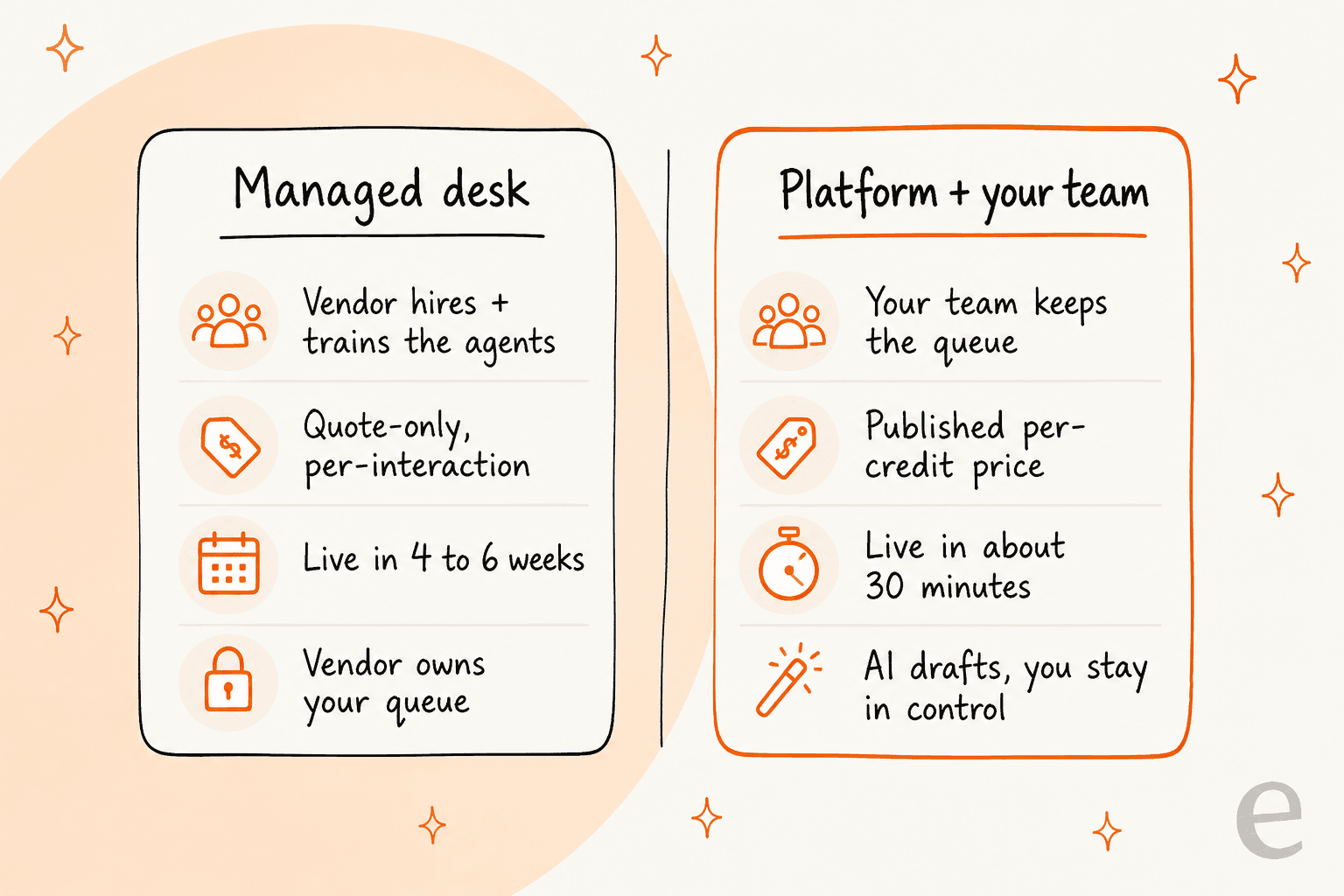
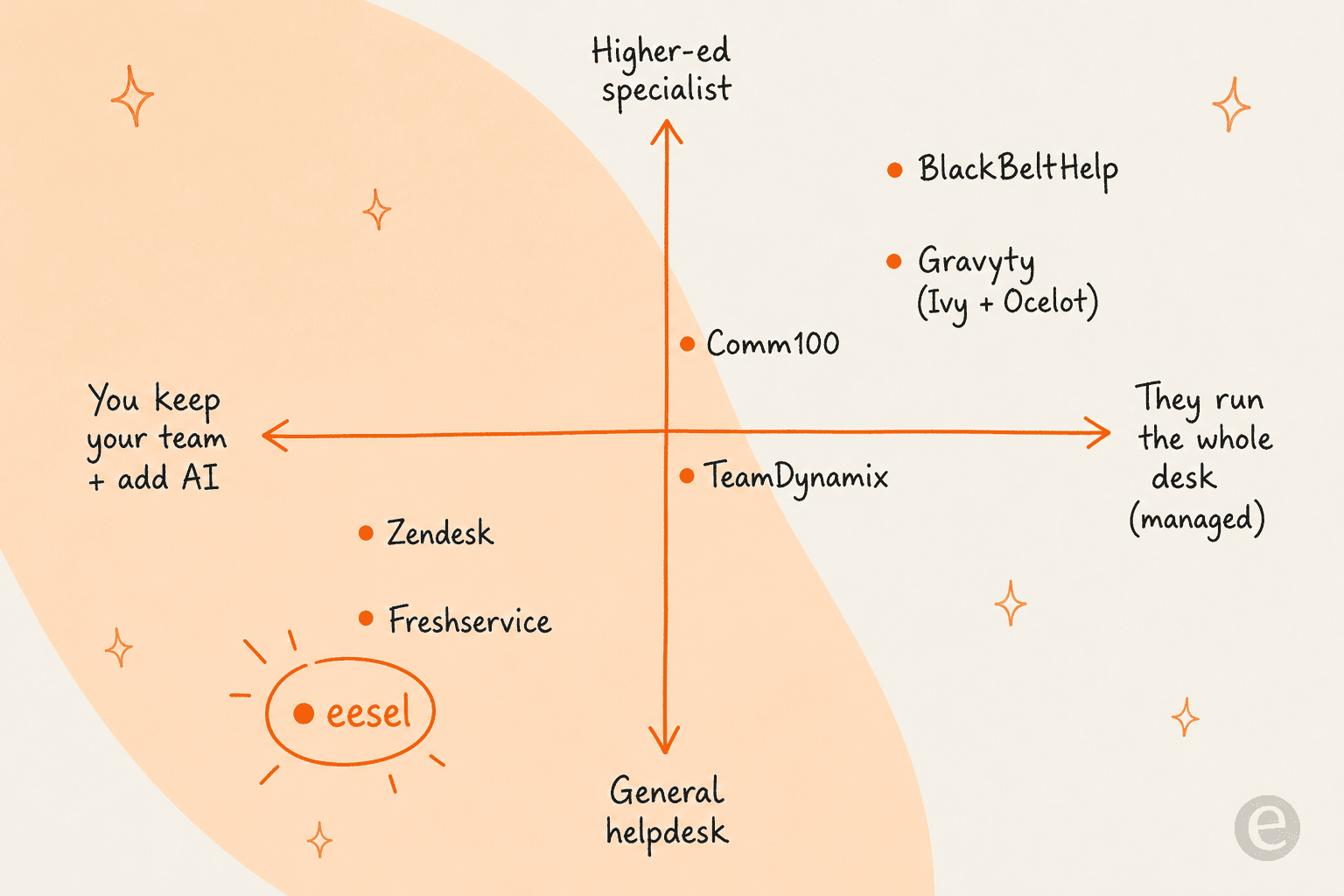
I split the shortlist along the axis that actually matters for a campus buyer: do you want someone to run the desk, or do you want to run it with AI help? Then I looked at four things for each tool: how well it fits higher education, whether it publishes real pricing, whether it plugs into what you already run, and how fast it goes live.
I only kept tools that are real, current, and either purpose-built for higher ed or a strong fit for campus IT and student support. Where I could find published prices, I used them. Where a vendor is quote-only, I said so plainly rather than guessing.
Here is where the six land.
The BlackBeltHelp alternatives at a glance
| Tool | Best for | Higher-ed focus | Voice AI | Pricing | Deploys as |
|---|---|---|---|---|---|
| eesel AI | Keeping your team and adding AI | General, works for campus IT | Chat/ticket first | From $299/mo for 500 credits, free tier | Layer on your existing help desk |
| Gravyty (Ivy + Ocelot) | Student lifecycle engagement | Purpose-built for higher ed | Ivy adds SMS/IVR add-ons | Quote-only | Managed / hosted platform |
| Comm100 | Live chat + AI for student services | Flagship vertical | Voice add-on | From ~$39/agent/mo, AI Agent from ~$23 | Per-agent software |
| TeamDynamix | Campus ITSM + integrations | Strong in higher-ed IT | Conversational AI bots | Quote-only | No-code software you run |
| Zendesk | Omnichannel support at scale | General | AI voice available | Per-agent + per-resolution AI | Software you run |
| Freshservice | IT service desk for campus IT | General ITSM | Freddy voice | Per-agent + Freddy add-on | Software you run |
Prices and models change, so treat this as a starting point and confirm on each vendor's own page before you sign anything.
Now, which situation are you actually in?
1. eesel AI

Best for: campus teams that already have staff and a help desk, and just want the repetitive tier-1 volume cleared.
eesel AI is the opposite bet to BlackBeltHelp. Instead of renting an outsourced desk, you keep your own agents and drop an AI teammate onto the help desk you already run. It learns from your past tickets, your help center, and docs in tools like Confluence, Notion, Google Docs, and SharePoint, then drafts replies for your team to approve or answers on its own once you trust the accuracy.
The part that matters for a nervous IT director: before it touches a live student, eesel can simulate over past tickets and score its answers against what your team actually sent, so you see how it will behave before flipping it on. We have watched confident-sounding bots quietly give wrong answers, which is exactly why that dry run exists.
Because it is a platform, not a service, there is also an eesel CLI and MCP server for the more technical campus teams. It is the same agent as the dashboard, driven from a terminal: every command prints JSON, so a person can set up a chat bubble or connect a help desk from the command line, scripts can automate it in CI, and coding agents like Claude Code or Cursor can drive the setup for you. If your team lives in scripts and infrastructure, that is a real difference from a managed desk you can only reach through a support rep.
Pros:
- Keeps your team in control; AI drafts first, auto-solves when you are ready.
- Simulation over your real tickets before go-live, so no blind switch-flip.
- Plugs into existing help desks like Zendesk, Freshdesk, and Front.
- Published pricing and a free tier you can test with today.
Cons:
- It is not a managed service; you still own the queue and the escalations.
- Not higher-ed-specific out of the box, so financial-aid or SIS content has to come from your own knowledge, not a pre-built campus model.
- No dedicated inbound voice-AI product in the way BlackBeltHelp's Front Desk is voice-first.
Pricing: starts at $299/month for 500 credits, where one ticket or chat handled is one credit, scaling up through fixed monthly batches. There is a free tier with 100 credits and no card required, so you can pilot before committing.
Verdict: if you have a team and want to hand the boring half of the queue to AI without changing tools, this is the strongest pick on the list. Skip it only if you have no staff to run the desk at all, in which case a managed service is the honest answer.
2. Gravyty (Ivy.ai + Ocelot)
Best for: schools that want a higher-ed-native student engagement layer across admissions, financial aid, and retention.
This is the closest philosophical match to BlackBeltHelp, because it is built for campuses and nothing else. Ivy.ai and Ocelot both joined Gravyty and are now co-marketed as "Ivy and Ocelot." Ivy's IvyQuantum chatbot trains only on your own website and knowledge base, and Ocelot brings Ocelot One, an AI virtual assistant plus live chat and two-way SMS, with a pre-built higher-ed knowledge base and a financial-aid video library baked in.
The proof points are real and campus-shaped. Ocelot cites 500 schools and 15.6 million questions answered in the last 12 months, and it is rated 4.7 out of 5 on Capterra across 44 reviews. Ivy points to case studies like Temple University cutting call volume by 50%. Their whole pitch is around the metrics higher ed cares about, like enrollment melt and FAFSA support.
Pros:
- Purpose-built for higher education, with content models for financial aid, enrollment, and advising.
- Strong, higher-ed-specific proof points and named campus customers.
- Multilingual student engagement across chat and SMS.
Cons:
- Quote-only pricing, no public rates and no free tier, so it shares BlackBeltHelp's budgeting problem.
- Ocelot is text-first with no dedicated voice-AI product, so it is not a like-for-like swap for a voice-led desk.
- More an engagement layer than a full ticketing and IT service desk.
Pricing: quote-only. Ivy uses a lead-capture configurator based on student headcount and departments; Ocelot publishes no tiers. Expect to talk to sales.
Verdict: the natural shortlist entry if you specifically want higher-ed-native AI for the student lifecycle and are comfortable with a sales-led buy. Less of a fit if you want IT service management or transparent pricing.
3. Comm100
Best for: student services teams that want live chat plus AI, with the option of managed chat coverage.
Comm100 is an omnichannel platform (live chat, an AI Agent chatbot, AI Copilot, ticketing, and voice) with higher education as a flagship vertical. Its education page leads with 100+ institutions and 500k+ students engaged, and the ROI stats are the kind a provost screenshots: Georgia State cut summer melt by 22%, San Jose State automated 55% of chats, and UBC reduced student wait time by 30%.
The reason it lands between the managed and software camps is that Comm100 sells both the software and, historically, managed live-chat coverage, so you can staff it yourself or lean on their team for after-hours chat. That flexibility is useful for a campus that wants to start self-serve and add coverage later.
Pros:
- Deep, well-documented higher-ed track record with named universities and real outcome numbers.
- Publishes real starting prices, unusual in this category.
- Omnichannel across 12 channels plus an AI Agent that automates up to 80% of queries.
Cons:
- The best AI pieces (Copilot, Insights, QA) and the top live-chat tier are quote-only "Contact Sales."
- Per-agent pricing can add up as your team grows, versus per-conversation models.
- Payment accepted only in US and Canadian dollars, worth noting for international campuses.
Pricing: Live Chat from $39/agent/mo ($31 annual), the AI Agent from about $23/agent/mo annual, Ticketing and Messaging from $47/agent/mo, with add-ons for voice and knowledge base. A 30-day free trial, no free-forever tier.
Verdict: a strong choice if student-facing live chat is your center of gravity and you like the idea of published pricing with an optional managed safety net. Less ideal if your core need is internal IT ticketing.
4. TeamDynamix
Best for: campus IT teams that want a no-code ITSM platform they run themselves, with AI bots layered in.
TeamDynamix is the sharpest structural contrast to BlackBeltHelp on this list. Where BlackBeltHelp is a managed service that runs the desk for you, TeamDynamix is no-code ITSM and ESM software that your own IT team configures and operates, bundled with an integration platform (iPaaS) so you can wire campus systems together without heavy code. It is very common in higher-ed IT, with schools like the University of Michigan and Florida State, and it was named a Challenger in the 2026 Gartner Magic Quadrant.
Its AI story is Conversational AI: multi-channel virtual support agents across web, SMS, Slack, and Teams that match intent, ingest knowledge with generative AI, and take actions. Vendor numbers claim ticket deflection of 30 to 60% and resolution up to 90% faster.
Pros:
- A true IT service management platform, not just a chatbot, with assets, projects, and workflows.
- No-code builders keep admin overhead low for lean campus IT teams.
- Strong higher-ed footprint and analyst recognition.
Cons:
- Quote-only pricing; both the pricing and platform pages return no public rates.
- You run it, so there is real configuration and ownership work up front.
- Broad platform scope can be more than a team that only needs student-facing AI.
Pricing: quote-only, sold on total cost of ownership rather than a sticker price. Request a demo for numbers.
Verdict: the right call if you want to own a full campus ITSM stack and add AI bots inside it. Overkill if all you actually want is to deflect student FAQs.
5. Zendesk

Best for: larger campuses that want a mature omnichannel platform with built-in AI.
Zendesk is the default omnichannel help desk for a reason: it is polished, it scales, and it now ships AI agents, copilot, and voice as part of the platform. For a big institution consolidating email, chat, phone, and social into one agent workspace, it is a safe, well-supported foundation, and eesel connects to Zendesk if you want a more configurable AI layer than the native one.
Two honest caveats for a campus buyer. Zendesk is general-purpose, so there is no higher-ed content model or student-lifecycle framing out of the box. And its AI resolution pricing is billed on top of seats, at published automated-resolution rates that can climb with volume, so model your costs before committing.
Pros:
- Mature, reliable omnichannel platform with a deep integrations catalog.
- Native AI agents, copilot, and voice inside one workspace.
- Huge ecosystem and hiring pool, so staff onboarding is easy.
Cons:
- No higher-ed-specific content or student-lifecycle features.
- AI resolutions are billed on top of per-agent seats, which adds up at scale.
- More platform than a small campus team may need.
Pricing: per-agent plans plus per-resolution AI charges; see Zendesk pricing for current tiers.
Verdict: a solid backbone for a large institution that wants everything in one place. If you already run it, adding an AI layer like eesel on top is often cheaper and more controllable than scaling native AI resolutions.
6. Freshservice
Best for: campus IT departments that want a clean, modern ITSM tool with AI built in.
Freshservice is Freshworks' IT service desk, and it is a strong fit for the campus-IT half of what BlackBeltHelp does: tickets, asset management, and workflows with Freddy AI for agent assist, a virtual agent, and voice. It is easier to stand up than heavier enterprise ITSM, which suits a lean IT team that wants structure without a six-month rollout.
Like Zendesk, it is general-purpose rather than higher-ed-native, so student-services content is on you to build. Freddy's more advanced agent features also sit on higher tiers and add-ons, so read the plan matrix carefully before you assume a feature is included.
Pros:
- Modern, approachable ITSM with assets and workflows for campus IT.
- Freddy AI for agent assist, virtual agent, and voice.
- Faster to deploy than most enterprise service desks.
Cons:
- No higher-ed-specific student-lifecycle features.
- The strongest Freddy capabilities are gated to higher plans and add-ons.
- Focused on IT service management, so it is not a student-engagement tool by itself.
Pricing: per-agent plans with the Freddy AI Copilot and agent as paid add-ons; check Freshservice pricing for current numbers.
Verdict: a great modern service desk for campus IT that wants to run its own stack. Pair it with a configurable AI layer if you want deflection beyond what the native Freddy tiers give you.
Outsource the desk, or keep your team and add AI?
Step back and the choice is cleaner than a six-way tool comparison makes it look.
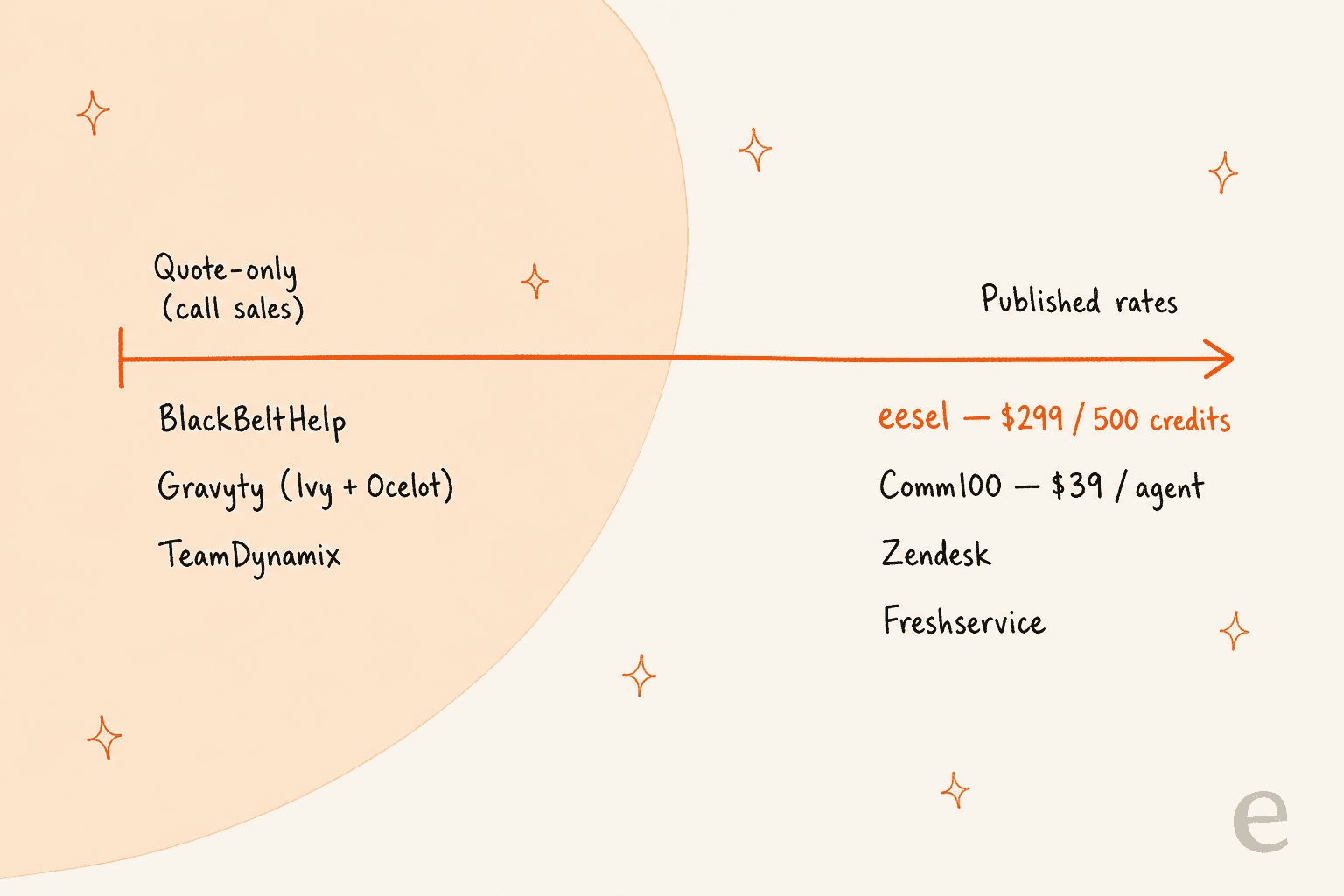
If you truly cannot staff a desk, a managed higher-ed service like BlackBeltHelp, Gravyty, or Comm100's managed chat is a real answer, and you accept quote-only pricing and a third party running your queue as the cost of that. That is a fair trade for some campuses, and there is nothing wrong with paying for people when you do not have them.
But most schools reading a "BlackBeltHelp alternatives" post already have a team. They are not short on people; they are short on time, because the same tier-1 tickets come in every August. For that situation, renting a whole new desk is the expensive way to solve a narrow problem. Adding AI to the help desk you already run keeps your staff, your data, and your escalations in-house, and it is the difference between an AI teammate and hiring an agency. The honest counter-view, worth respecting, is that some people will always prefer a human on the line:
"People will pay more money specifically to not interact with AI, just as they do now when they avoid phone or offshore support."
That is real, and the answer is not "AI everything." It is AI on the repetitive, scripted volume, humans on the rest, which is exactly the split a good augment-your-team setup gives you.
Try eesel for your campus help desk

If your campus already has a support team and a help desk, eesel AI is the way to clear the repetitive load without renting a new desk or ripping out your stack. It connects to what you already run, learns from your past tickets and help center, and simulates against past tickets before it answers a single student, so you can see the accuracy before you trust it live. Your team keeps the queue; the AI takes the password resets and the "where's my aid" questions.
You can be live in minutes and try it on a free tier with no credit card, and technical teams can drive the whole thing from the eesel CLI if they would rather script it than click. It is a lighter, more transparent starting point than a quote-only managed contract, and if you outgrow it, you will at least know exactly what you are paying for.
Frequently Asked Questions
What are the best BlackBeltHelp alternatives for higher education?
How much does BlackBeltHelp cost compared to the alternatives?
What is the difference between a managed helpdesk and AI support software?
Can AI handle tier-1 campus tickets like password resets?


Article by
Kurnia Kharisma Agung Samiadjie
Kurnia is a software engineer and writer at eesel AI with two years of SEO experience, writing about AI tools, helpdesk software, and customer support. He pairs a developer's understanding of how these products are built with search-driven research into what actually ranks and resonates with the people searching for them.