Gorgias AI ticket prioritization: what the AI detects, and what sets the priority

Kira

Katelin Teen
Last edited November 22, 2026

Gorgias doesn't prioritize tickets with AI on its own: it detects an intent and a sentiment on every customer message, on every Helpdesk plan, and a rule you write turns them into Low, Normal, High or Critical. Every new ticket starts as Normal, and with auto-assignment on, Gorgias hands out Critical tickets first. Gorgias's starter template, "Set critical priority value on negative sentiment tickets", ranks by mood; for an online store, urgency usually means an order that can still be cancelled or changed, so match intents like Order::Cancel against the order's fulfillment status instead. If you'd rather write that as one plain rule, an AI helpdesk agent such as eesel reads each Gorgias message with the customer's orders and sets the priority itself, and with the eesel CLI an AI coding agent can upload your help articles and macros or ask eesel test questions before going live, though connecting Gorgias still needs an admin's approval.
How does ticket priority work in Gorgias?
Gorgias added a dedicated priority field with four values, per its ticket priority announcement: Low, Normal, High and Critical. Its Assign priority to tickets article says every new ticket is set to Normal by default, and that "how you determine the priority of each ticket is up to you".
Priority gets set in three ways:
- By hand. Any role can click the priority icon at the top right of a ticket, or change several at once from a view.
- By a rule. The account owner, admins and leads can add a Set priority action to a rule.
- By a macro. The announcement lists a macro action that sets priority when an agent applies the macro; Gorgias macros covers the rest of what macros do.
It's on all Helpdesk plans, and so are the AI-detected intents and sentiments the rules read, so none of this needs an AI Agent subscription.
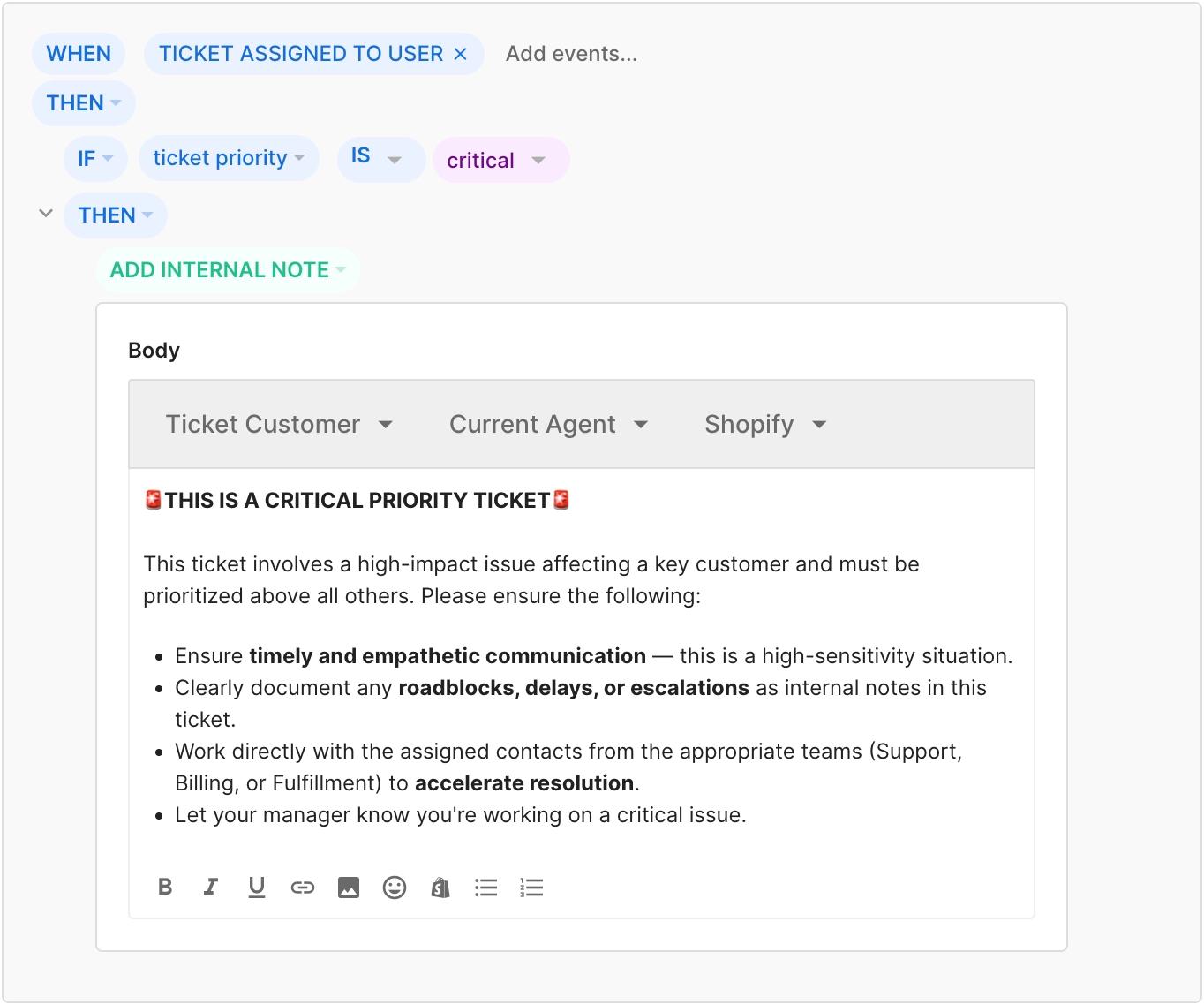
What priority changes is mostly the order of work. If auto-assignment is on, "tickets with a higher priority are assigned first", and of two tickets with the same priority the older one goes first. Without auto-assignment, priority is a filter and a sort order in views and Advanced Search, and a condition other rules can check. Gorgias's own example rule adds handling instructions when a Critical ticket is assigned:
Where does the AI come in?
The AI part is detection. Per Gorgias's Intents and sentiments explained, Gorgias reads the conversation each time the customer sends a message and gives the ticket one intent, written as category and subcategory, such as Order::Refund. It also gives each customer message a sentiment: positive, negative or neutral.
A few details decide how far you can lean on them:
- The intents are fixed. There are 55 of them across 13 categories, and "you can't create, rename, or remove them". Order alone has 10, including Order::Cancel, Order::Edit, Order::Damaged, Order::Missing Item and Order::Wrong Item.
- The intent can change. "A ticket that starts as Order::Status becomes Return::Request if the customer later asks to send the item back."
- Only customer messages count. Your team's replies and internal notes get no intent.
- Sentiment is per message and hidden. "Sentiments aren't shown on tickets, but you can use them in rules and reports."
- Negative means dissatisfied, not urgent. Gorgias's example of a negative message is "I just received the package and I'm very disappointed."
None of that sets priority. The rule builder has Message Intents and Message Sentiments conditions, and Set priority as an action, and the rule is what connects them. Gorgias tagging and routing covers the same intents used for tags and teams, and AI sentiment analysis how sentiment models read a message.
Why the negative-sentiment template is the wrong default
Gorgias suggests starting from a rule template called Set critical priority value on negative sentiment tickets. It's quick, and it ranks by how the customer feels.
The trouble is that the most expensive tickets in an online store often aren't angry. Gorgias's own urgent ticket best practices give the example "Ordered the wrong item. Need to cancel immediately!" That customer is in a hurry, not upset, and the window to act closes when the warehouse ships the order. Meanwhile a customer disappointed with a colour is negative, and can wait an hour without anything getting worse.
If Critical goes to every negative message, it stops meaning anything, and auto-assignment puts a mild complaint ahead of an order you could still have stopped. Here's how I'd rank instead:
- Critical for Order::Cancel and Order::Edit when the customer's last Shopify order is still unfulfilled. The rule builder's Shopify Last Order conditions include fulfillment status, and an address-change macro handles the change itself.
- High for Order::Damaged, Order::Wrong Item and Order::Missing Item: the customer has paid and is waiting on a fix.
- High for negative sentiment, so upset customers still move up without taking Critical, which I'd keep for tickets where waiting costs money.
- Normal for everything else, and Low for Other::No Reply, which Gorgias uses for messages that don't need an answer.
One caveat on step 1: the Shopify condition reads the customer's last order, so a customer asking to cancel an older order can match on the wrong one.
How do you set up a priority rule in Gorgias?
From Gorgias's Assign priority to tickets and rule builder articles:
- Open the menu at the top left and select Workflows.
- Under Tools, select Rules, then Create rule and Create Custom Rule.
- Set the trigger in the WHEN block. New Message In Ticket with
message from agent is falsechecks every customer message and skips your team's replies; Ticket Created runs once, which suits conditions that don't change, like a VIP's order count. - Add your conditions, for example Message Intents contains one of Order::Cancel, Order::Edit.
- Click THEN, select Action, choose Set priority and pick low, high or critical.
- Click Create rule.
Then build a view filtered to High and Critical so leads can watch them, and turn on auto-assignment if you want priority to decide who gets what next; Gorgias auto assign covers capacity and availability. Gorgias automation maps where rules sit beside Flows and AI Agent.
Does priority update as the conversation changes?
Only when a rule runs again. The intent can change mid-conversation, but a rule on Ticket Created runs once. And the rule builder notes that Ticket Updated "does not fire on changes to message intents or message body".
So if a delivery question becomes a cancellation in the second message, a Ticket Created rule has already left it at Normal. Add New Message In Ticket as the trigger, with message from agent is false, so the rule checks each new customer message. Two things to know:
- Nothing lowers priority for you. A ticket that went Critical stays Critical after the order is cancelled unless an agent or another rule changes it.
- Several rules can set priority. Keep the list short and the conditions distinct, so you know which rule set a ticket's priority when an agent asks.
What Gorgias's prioritization can't do
- It only knows 55 reasons. A store-specific urgency, such as a pre-order deadline or a gift that has to arrive by a date, needs keyword or tag conditions, not an intent.
- It ranks by labels, not reading. The rule sees the intent and the sentiment, not why the customer is writing in their own words.
- Sentiment is invisible to agents. An agent sees the priority but not that negative sentiment set it, so add a tag in the same rule if you want them to know why.
- Order context is the last order. Shopify conditions read the customer's last order, not the one they're writing about.
Prioritizing tickets with AI covers what to rank by in general, and VIP routing rules and automatic VIP rules cover the customer-value side in Gorgias. Zendesk teams can compare Zendesk priority rules.
Where does eesel fit?
eesel is an AI teammate that joins a team's tools; on support it works in the helpdesk queue, learns from past tickets and is tested against them before it acts. In Gorgias it runs on each customer message, reads the whole ticket and the customer's recent orders, then does what your instructions say: set priority, add tags from your list, set custom fields and assign a teammate or team, per the eesel Gorgias docs.
That turns the ranking above into one sentence instead of four rules: "Critical when the customer wants to cancel or change an order that hasn't shipped, high when something arrived damaged, wrong or missing." Because it reads the customer's recent orders, not just the last one, and runs on every customer message, it can lower the priority again when a later message shows the problem is solved. Your Gorgias rules and auto-assignment keep working on the priority it sets, and the same order data can go into replies, as in order data in replies.
Rúngne, a climbing apparel brand on Gorgias, runs an eesel triage agent that tags each new ticket from a fixed list, vip included, and sends a B2B partner's ticket straight to the teammate who handles partners.
Try eesel on your Gorgias queue
If your Critical view is full of complaints while cancellations wait, write your priority rules as plain sentences and start eesel on a test ticket before it touches the queue. What eesel does alone and what waits for a person's yes is set per action in actions and approvals, so priority changes can wait for a teammate's approval until you trust them.

Try eesel with your own priority rules, or compare options in best AI for Gorgias. For what a closed ticket scored afterwards, see Gorgias AI quality assurance, and for plan costs, Gorgias pricing for Shopify stores.