Freshservice Freddy AI pricing explained: a complete 2026 guide

Kira

Katelin Teen
Last edited June 12, 2026

The short answer on what Freddy AI actually costs
Here's the honest version: you can't get a clean "Freddy AI costs $X" out of Freshworks, because Freddy isn't one product with one price. It's three products billed three different ways, sitting on top of a base service desk seat that itself has four tiers.
That's not us being cagey. It's how the Freshservice pricing page is structured: Freddy AI Agent, Freddy AI Copilot, and Freddy AI Insights each appear as their own rows, with their own billing units, and the dollar figures for two of the three aren't on the public page at all. Before you can budget for Freddy, you have to understand the seat it rides on.
The base plans Freddy sits on top of
Freshservice's core IT service management product has four per-agent tiers, billed monthly per agent. These are the prices you pay before a single line of AI gets switched on. Here's the Freshservice pricing at the ITSM SKU, billed annually:
| Plan | Price (billed annually) | Who it's for | Freddy AI |
|---|---|---|---|
| Starter | $19 / agent / month | First service desk, moving off shared inboxes | Add-on / overage only |
| Growth | $49 / agent / month | Teams building foundational ITSM practices | Add-on / overage only |
| Pro | $99 / agent / month | Unifying service management across functions | Add-on / overage only |
| Enterprise | Custom quote | Mature IT orgs leaning on AI | Freddy AI included |
Notice the right-hand column. The "Freddy AI included" badge sits only on Enterprise. On Starter, Growth, and Pro, Freddy is something you bolt on or pay for as overage, not something that comes with the plan. In practice that means the teams who actually want Freddy AI working across their service desk get nudged onto the custom-quote tier, where the per-seat number stops being public. That gate is the first thing to factor into any Freshservice AI cost estimate.
The three Freddy AI products you're paying for
Once you're on a plan that can run Freddy, you're really buying up to three separate things. They don't share a billing unit, which is exactly why the total is hard to predict. This is the Freddy AI lineup as it applies to Freshservice:
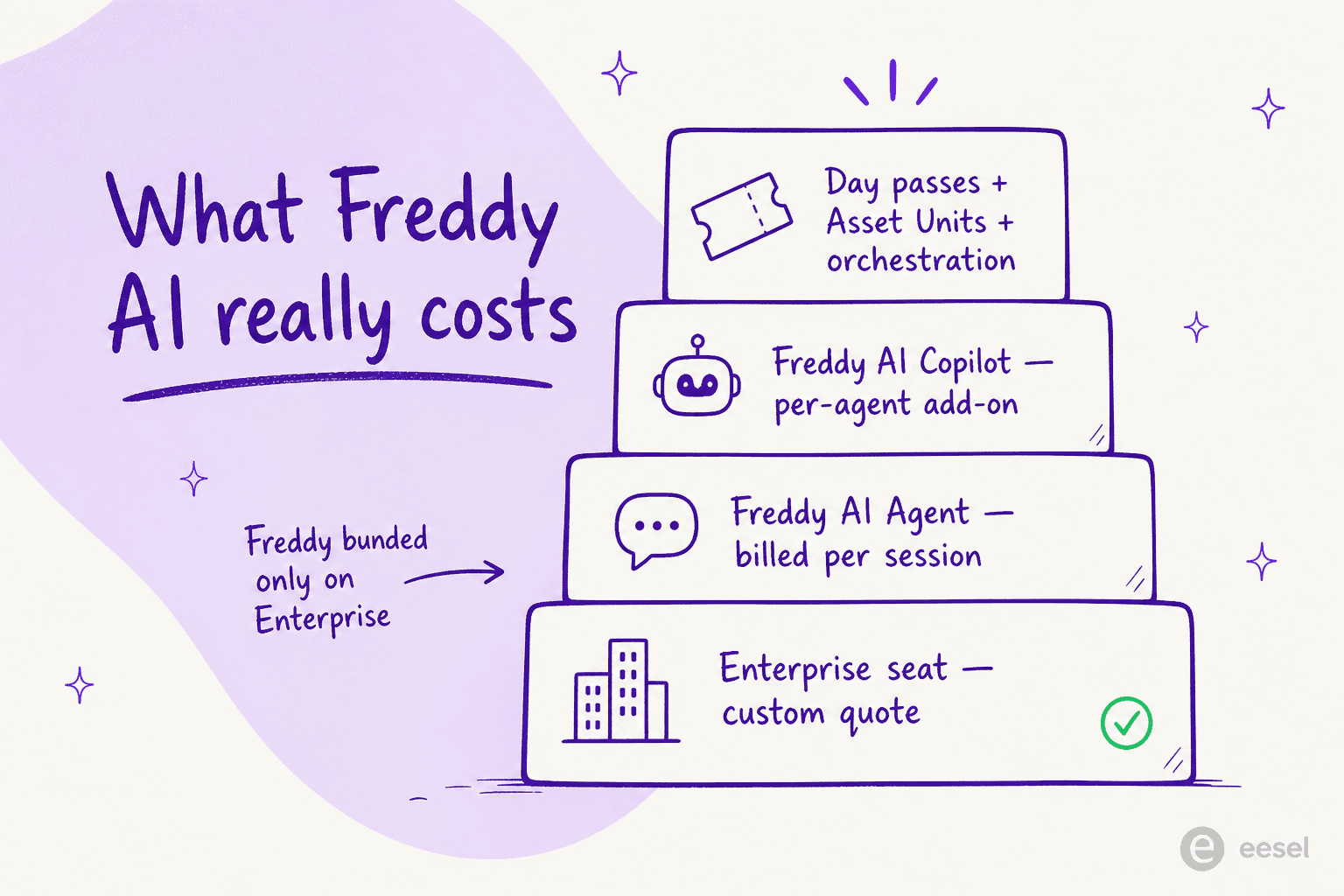
- Freddy AI Agent is the autonomous, employee-facing bot, the layer that resolves password resets, status lookups, and routine requests before they reach a human. Freshworks claims it can resolve up to 80% of queries, though that's a vendor figure, not an independently verified one. It's billed per session.
- Freddy AI Copilot is the agent-assist layer inside the workspace: suggested replies, ticket summaries, real-time translation. It's billed per agent, as a selective add-on.
- Freddy AI Insights is the analytics layer for leaders: proactive alerts with root-cause analysis, SLA-breach spotting, conversational querying.
Three products, three meters. Let's take the two that actually move your bill.
How Freddy AI Agent sessions are billed
This is the part that catches teams off guard. Freddy AI Agent isn't priced per seat or per resolution. It's priced per session, and Freshworks defines a session in its pricing FAQ as "any interaction a unique user has with an AI Agent within a 24-hour period."
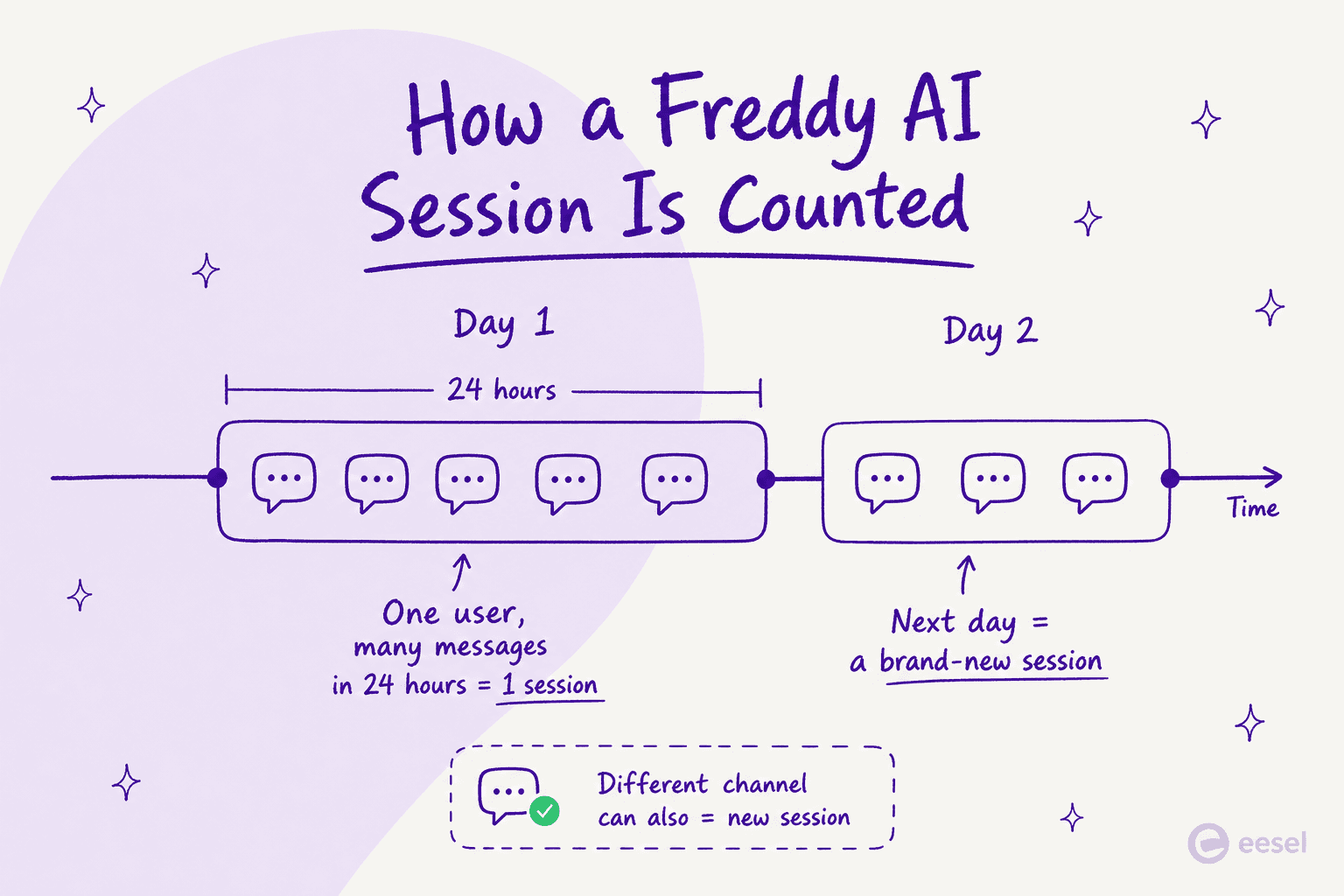
So one employee can fire off five questions in a morning and it's still a single billable session. Good. But if the same person comes back the next day with a follow-up, that's a new session, and a fresh charge. Each Freshservice Enterprise license includes 1,200 Freddy AI Agent sessions per year, prorated for shorter cycles. Past that, you buy session packs.
Here's the catch: the session-pack and overage rate isn't published on the Freshservice pricing page. It's quote-based. For a sense of scale, Freshworks' customer-service product, Freshdesk, does publish its session rates, and they land between roughly $0.10 and $0.49 per session depending on which product you're on (see our Freshdesk Freddy AI pricing breakdown for the detail). Freshservice ITSM doesn't commit to a public number, so the only way to know your overage cost is to ask sales.
The deeper issue with session billing is the same one you hit with any consumption meter: it scales with volume you don't fully control. A major incident, a company-wide outage, or an onboarding wave can push session counts up fast, and unlike a per-seat line item, there's no fixed ceiling unless you negotiate one.
Freddy AI Copilot: the per-agent add-on
Freddy AI Copilot is the simpler of the two to reason about, with one frustrating gap. It's priced per agent, and it's selective, you only pay for the agents who actually use it, not the whole team.
The frustrating gap: the per-agent Copilot dollar figure isn't published on the Freshservice pricing page either. On the Freshdesk side, Freshworks lists Copilot at $29 per agent per month (billed annually), available only on Pro and Enterprise plans (our Freshdesk Freddy Copilot pricing guide covers the CX version). Whether Freshservice ITSM matches that exact number is something you'll confirm on a quote, but it's a reasonable planning anchor: budget roughly $29 per agent per month on top of the Enterprise seat for anyone who needs in-workspace assist.
That add-on math compounds. A 20-agent team adding Copilot for everyone is looking at an extra ~$580 a month on top of base seats and any session overage, the kind of layering that makes Freshservice AI pricing hard to forecast.
A worked example: what a mid-size team actually pays
Numbers make this concrete. Take a 600-person organization with a 4-person IT team, the exact profile one Freshservice admin described on Reddit. To run Freddy AI across the service desk, that team needs Enterprise (the only tier where Freddy is included). Their bill stacks up like this:
- Enterprise seats: 4 agents on a custom quote. Enterprise isn't public, but it sits above the $99 Pro price, so call it north of $400 a month for four seats at minimum.
- Freddy AI Agent sessions: 1,200 included per Enterprise license per year. A 600-employee org generating even 150 AI interactions a month from unique users will brush against that allowance, then start paying quote-based overage.
- Freddy AI Copilot: roughly $29 per agent per month for the agents who use it, so ~$116 a month if all four do.
None of those three lines is fully knowable before a sales call, which is the honest takeaway. Two of the three Freddy meters are gated, so "what will this cost us" can't be answered from the website. For a team that just wants a predictable monthly number, that's a real friction point, and it's worth weighing against the cost of an AI agent versus a human agent before committing.
The hidden costs nobody quotes you
Beyond the three headline meters, a few things tend to surface only after you've signed:
- The Enterprise gate itself. Wanting Freddy effectively means wanting the top tier. As one sysadmin put it bluntly, "the freddy AI is an add on so expensive for what it can do and only available at enterprise." That's a quote from an r/sysadmin thread on picking a ticketing system.
- Sessions reset, they don't roll over. Session allowances are tied to your billing cycle. Forecast low and you pay overage; forecast high and you've bought capacity you lose at renewal.
- The handoff tax. Metered AI cost is only half the story. One admin reported that five months after enabling Freddy, tier-1 resolution time actually went up:
"Autoresolve is maybe 25% which is fine i guess. But our MTTR actually went UP. About 20% compared to where we were before... its like 2-3 extra minutes per ticket just reading the AI context... Dup tickets are up like 15ish percent."

- You're locked to one model. A Freshservice user explained on Reddit why they layered a third-party tool on top instead: "you don't have the ability to choose which LLMs you want to use. Also, its pricing is tied to the agents not the employees."
That last point is the one that costs you indirectly. If the AI underneath isn't keeping pace, you're paying a premium and getting middling deflection. The same threads describe Freshservice's AI as "abysmal for incident deflection" with no learning loop from unhelpful ratings, which is the kind of thing that quietly erodes any ROI the pricing promised. We dig into this more in our piece on Freshservice AI limitations.
What this means for your budget
To be fair to Freshservice: the base ITSM product is well-liked, and deservedly so. It's clean, fast to stand up, and a sensible pick for sub-500-employee orgs, which is part of why it shows up in our best ITSM for small business guide. The pricing complaint isn't about the service desk. It's about the AI layer, where the model is metered, gated to the top tier, and mostly priced behind a quote.
If you're the kind of buyer who needs to know the number before you sign, that's a hard combination. Per-session, per-agent, and custom-quote billing all in one stack means your Freshservice ROI math depends on volume you can't fully predict. We saw this pattern repeatedly in our own conversations with support teams: an ops lead at a payouts fintech doing 7,000 to 8,000 escalated tickets a month told us that per-interaction pricing was simply a non-starter at their scale, and an email-security company on Freshdesk burned through 200 API calls in a single test day and immediately worried about what that meant at production volume. Metered AI pricing punishes exactly the high-volume teams who'd benefit most from automation.
A more predictable alternative: flat per-task pricing
This is where the pricing model matters more than the feature checklist. eesel takes the opposite approach to the Freddy stack: instead of metering sessions, gating AI to a top tier, and quoting per-agent add-ons, it charges a flat fee per task with no per-seat fees at all.
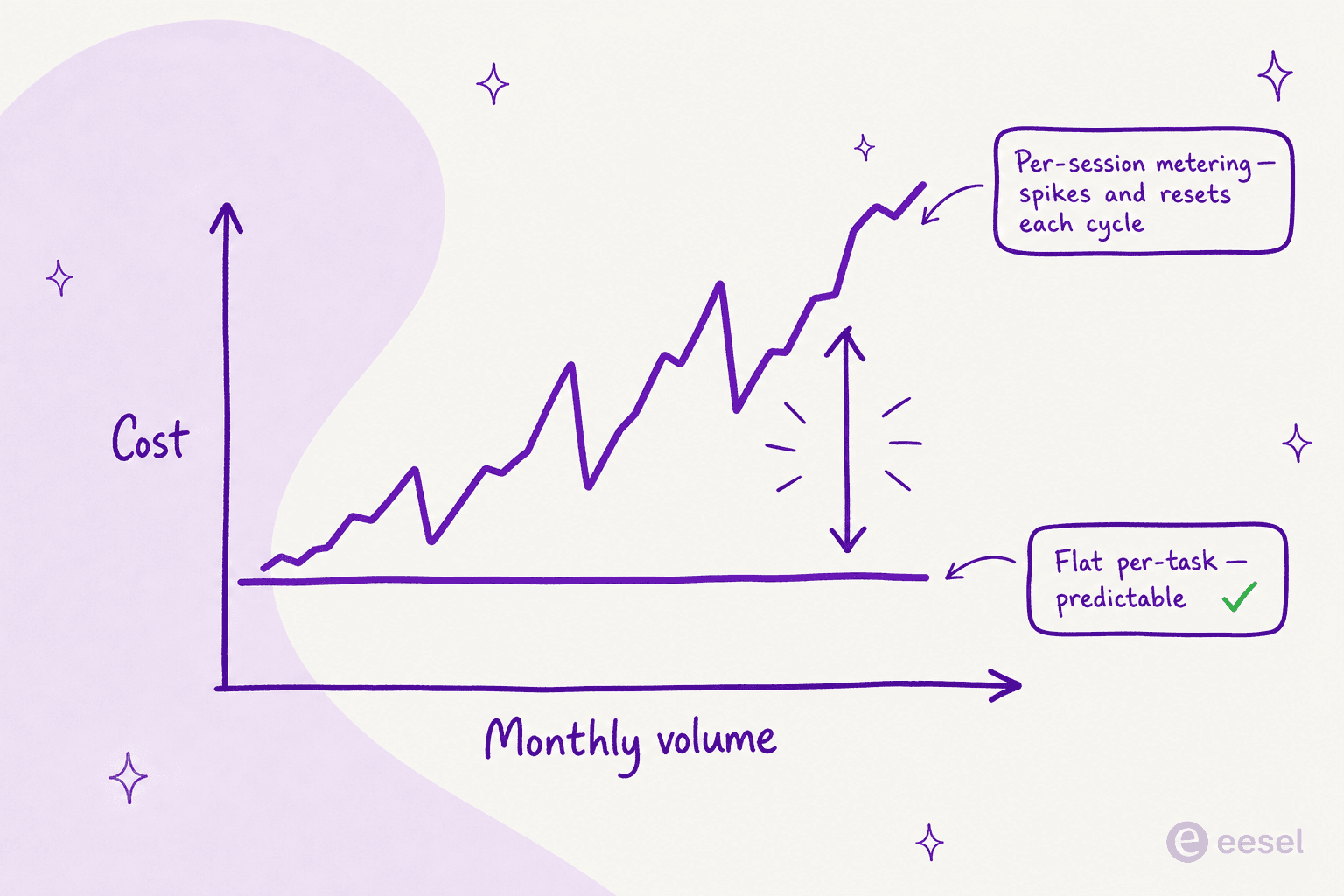
A "task" is the whole interaction: one resolved ticket or one chat session, regardless of how many back-and-forth messages it took. At $0.40 per task, a team resolving 1,000 tickets a month pays a flat $400, full stop, with no overage meter and a spend cap you set yourself. There's no Enterprise gate to clear before the AI turns on, and no separate per-agent charge for agent-assist.
| Dimension | Freshservice Freddy AI | eesel |
|---|---|---|
| Billing unit | Per session + per agent + custom quote | Flat per task |
| AI Agent cost | Per session; 1,200/yr included on Enterprise, then quote-based overage | $0.40 per resolved interaction |
| Agent-assist | Per-agent add-on (~$29/agent/mo on the CX product; gated on ITSM) | Included, no per-seat fee |
| Gating | Freddy bundled only on Enterprise | All features, no tier gate |
| Cost predictability | Volume-dependent, mostly quote-based | Flat, with a self-set spend cap |
| Model choice | Locked to Freshworks' model | Bring your own (Claude, GPT, others) |
The other difference: eesel runs inside the helpdesks you already use, training on your past tickets and existing knowledge to start resolving from day one, rather than asking you to live entirely inside one vendor's ecosystem. If you're weighing options broadly, it's worth reading alongside our best AI helpdesk agent review and our best AI for support ticket triage roundup.
Try eesel
eesel is an AI teammate that lives inside your existing helpdesk, drafts and resolves tickets autonomously, and bills as a flat fee per task, no per-seat charges, no per-session meter, and a hard spend cap so the bill never surprises you. The one differentiator worth calling out for anyone burned by Freddy's session model: you can route just a slice of your tickets to start (say 200 of 1,000) and pay only for those, then scale when the numbers prove out.

You can see the full pricing (it's all public, no quote required) or start free with $50 in usage credit, no card needed.
Frequently Asked Questions
How much does Freshservice Freddy AI cost?
Is Freddy AI included in all Freshservice plans?
How are Freshservice Freddy AI Agent sessions counted?
How many Freddy AI sessions does Freshservice Enterprise include?
What's a cheaper, more predictable alternative to Freshservice Freddy AI?


Article by
Kira
A Computer Science student deeply passionate in the fields of UI/UX Design and Web Development with a knack on writing. Fusing technical expertise with a creative flair, I'm driven to craft innovative and user-centric solutions, leveraging both coding proficiency and design sensibilities to create seamless, impactful experiences.