


The Freddy AI thank you detector is a Freshworks feature that reads the intent of a reply to a resolved ticket and keeps the ticket closed if the customer is just saying thanks. It runs in both Freshdesk (as a toggle inside the Freddy AI Insights add-on) and Freshservice (as a Workflow Automator condition you build yourself).
It matters because the default helpdesk behaviour reopens a ticket on any reply, so a "thanks!" inflates your reopen rate, drags down first-contact resolution, and wastes agent time re-closing tickets that were never actually unresolved.
The detector is AI intent detection, not a keyword match, and it only suppresses a reopen when Freddy is more than 90% confident the reply is gratitude. That is the good news and the catch: it errs toward reopening, it won't fire when the requester is an agent, and a few teams report it being fiddly to get working. If you want the same outcome without being tied to one helpdesk's add-on tier, an AI support layer like eesel can handle thank-you noise, triage, and resolution across Freshdesk, Zendesk, and the rest.
What the Freddy AI thank you detector actually does
Picture the end of a normal support ticket. You resolve it, the customer fires back a quick "thank you so much, that fixed it!", and your helpdesk dutifully flips the ticket back to open and drops it into someone's queue. Multiply that across a busy week and you have a queue full of gratitude masquerading as work.
The thank you detector is Freshworks' answer to that. Powered by Freddy AI, it reads each reply that lands on a resolved or closed ticket and decides whether the message is a real request for help or just an expression of thanks. As Freshworks puts it in the Freshdesk setup doc, Freddy can "understand the intent of customer and collaborator responses to 'resolved' or 'closed' tickets to decide if it should be reopened or not." If it is gratitude, the ticket stays closed. If it looks like a genuine follow-up, the ticket reopens exactly as it always would.
It is worth being precise about scope: the detector only governs the reopen decision on tickets that are already resolved or closed. It is not a deflection bot and it does not auto-resolve fresh tickets, so it sits alongside, rather than replacing, the rest of Freddy AI's suite. That includes the AI Agent, Copilot reply drafting, and Insights.
Why a "thanks!" reopening your tickets is a real problem
This sounds like a small annoyance until you look at what it does to your reporting. Every spurious reopen is a ticket that was perfectly resolved but now shows up in the data as a failure.
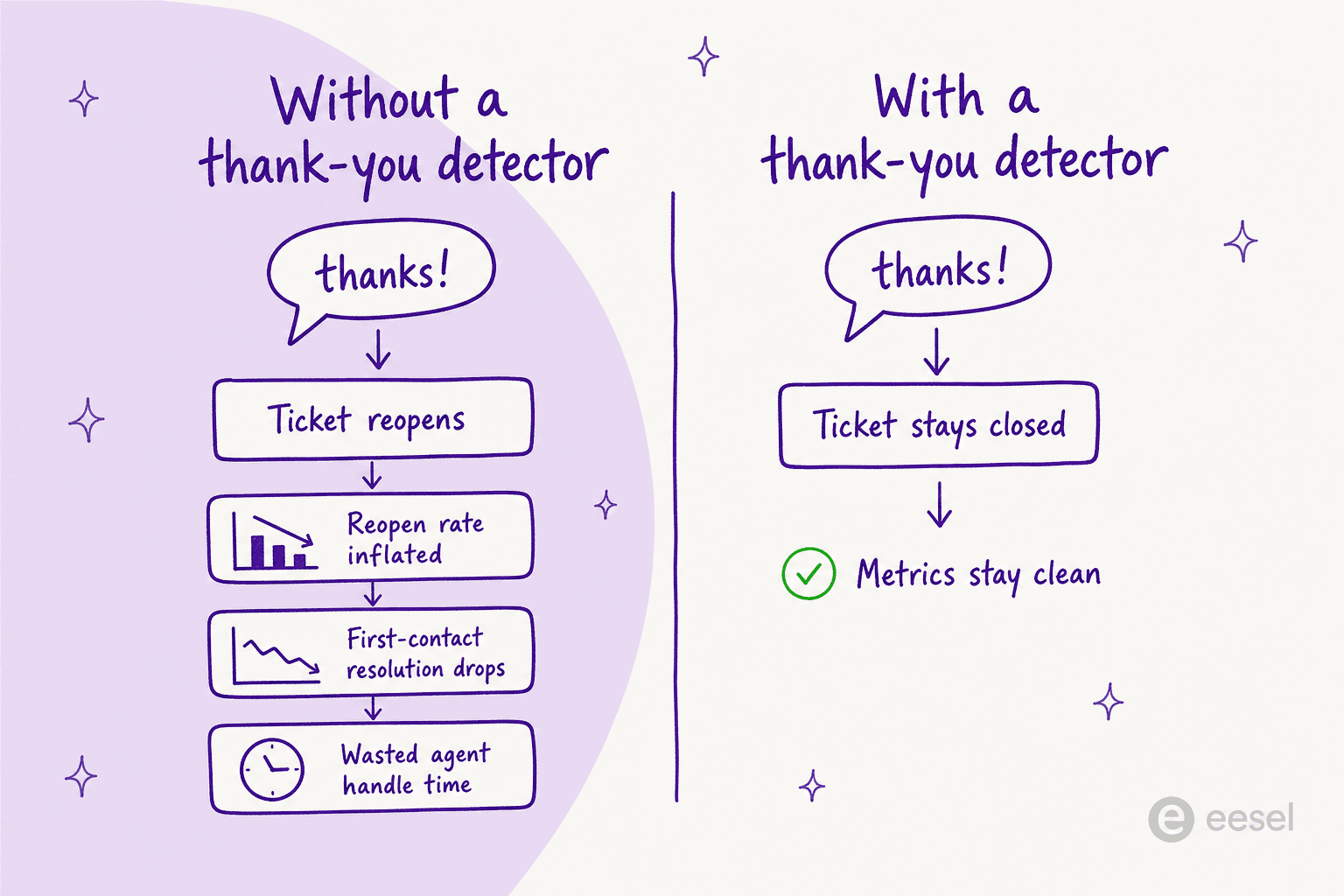
The metric that takes the worst hit is reopen rate. ManageEngine's analytics team documented a live customer dashboard where "about 30-60% of incoming requests have been reopened everyday in the last 30 days," against their guidance that a healthy rate sits "at about 10-20% depending on the size of your organization" (ManageEngine PitStop). When acknowledgement replies count as reopens, a team can blow past that healthy band on noise alone. The same write-up notes reopened tickets "negatively impact daily resolution target and pose serious threats to SLA compliance."
Freshworks is blunt about the cost in its own docs: auto-reopening on every reply "leads to skewed ticketing metrics and overwhelming 'Thank you' messages, turning into a major challenge for maintaining service desk efficiency" (Freshservice). The downstream damage hits the numbers teams actually report on: first-contact resolution reads low, handle time creeps up, and CSAT reporting gets muddier because a resolved-and-thanked ticket looks identical to one that bounced. (If CSAT is your worry, sending the survey only after resolution is confirmed is a neat companion fix.)
And this is not a Freshworks-specific quirk. Support practitioners have complained about it on every platform for years:
"This may be one of those basic/funny/stupid things, but my ticket system reopens a ticket if it gets a new email after being marked as resolved. The problem I'm having is people saying 'thanks!' after I mark a ticket as resolved... has anyone found a solid recipe for tackling this?"
u/orion3311, r/sysadmin, "Support tickets and 'thanks'"

That thread pulled 211 comments, and near-identical complaints turn up in the Zoho and Atlassian communities. The problem is universal; what differs is how cleanly each helpdesk solves it.
How the thank you detector works under the hood
The thing that makes Freddy's version more than a glorified keyword filter is the confidence threshold. Both the Freshdesk and Freshservice docs state it plainly: "The high confidence level threshold set for Freddy is greater than 90%. This means, only if Freddy is extremely confident, it will continue to keep a ticket closed" (Freshdesk).
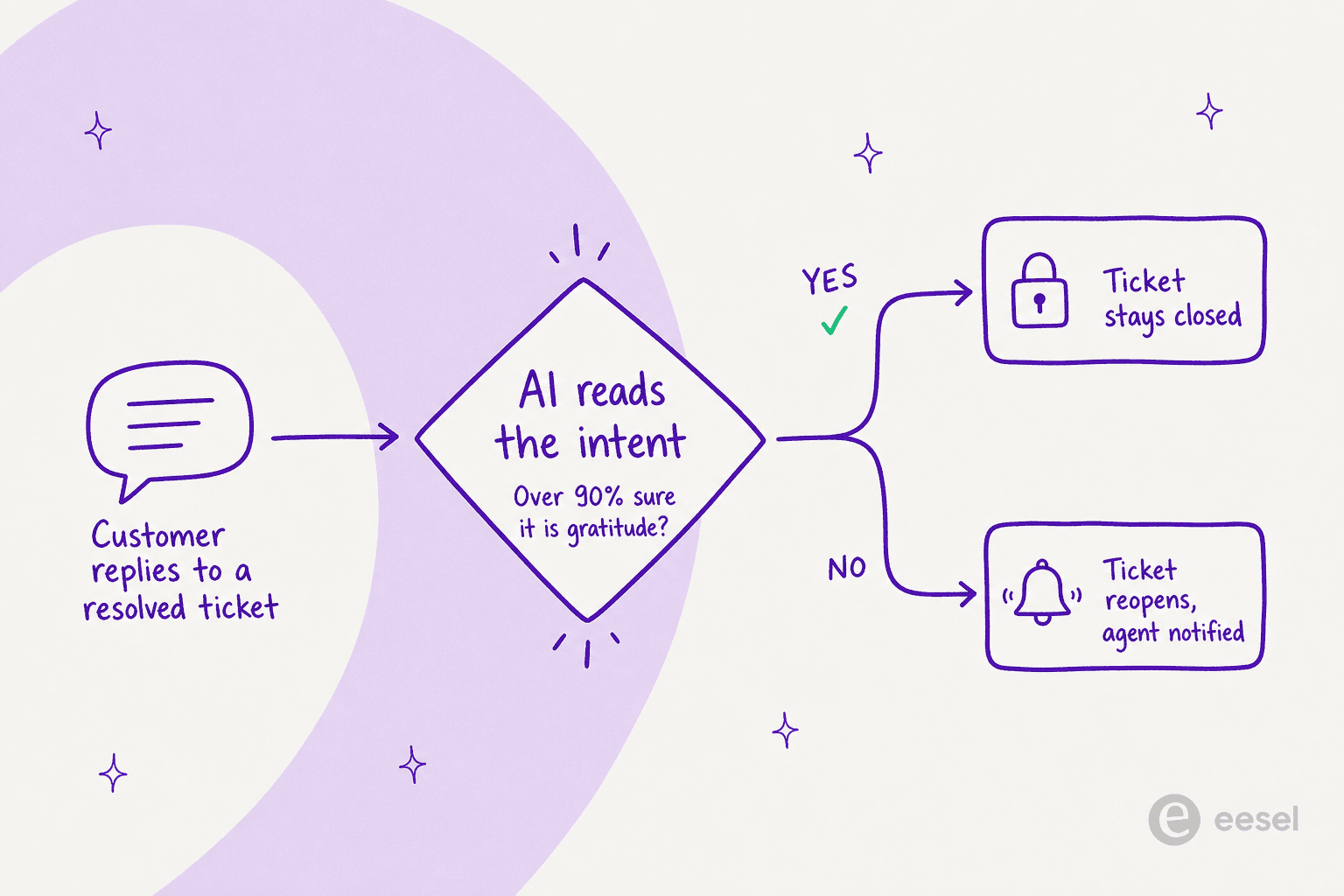
That bar is deliberately high, and it tells you how Freshworks tuned the feature: it would rather wrongly reopen a thank-you than wrongly swallow a real follow-up. For a support team, that is the right default. The cost of an extra reopen is a few seconds; the cost of silently burying a customer who actually needs help is a churn risk.
Freshdesk adds one more layer that most rule-based systems can't match: a self-learning feedback loop. If Freddy keeps a ticket closed and an agent reopens it anyway, that trains the model not to keep similar tickets closed next time; if Freddy reopens something an agent then closes, it learns the other way (Freshdesk). Because it works on intent rather than the literal word "thanks," it also covers all Freshdesk-supported languages out of the box, which is exactly where keyword triggers fall down.
How to set up the Freddy AI thank you detector
Here is the part that trips people up: setup is different depending on which Freshworks product you are in.
In Freshdesk: a toggle inside the Freddy Insights add-on
In Freshdesk and Freshdesk Omni, the detector is a built-in switch rather than something you assemble. It lives under Freddy AI Insights and ships as part of the Freddy AI Insights add-on, which means plan tier matters: Freshworks' pricing page now lists Freddy AI Insights as Enterprise only, while the availability matrix in the older setup doc lists Pro and Enterprise, so check your plan before counting on it. If you are weighing whether the add-on is worth it, our Freshdesk Freddy AI pricing breakdown walks through the per-agent maths.
In Freshservice: a Workflow Automator condition you build
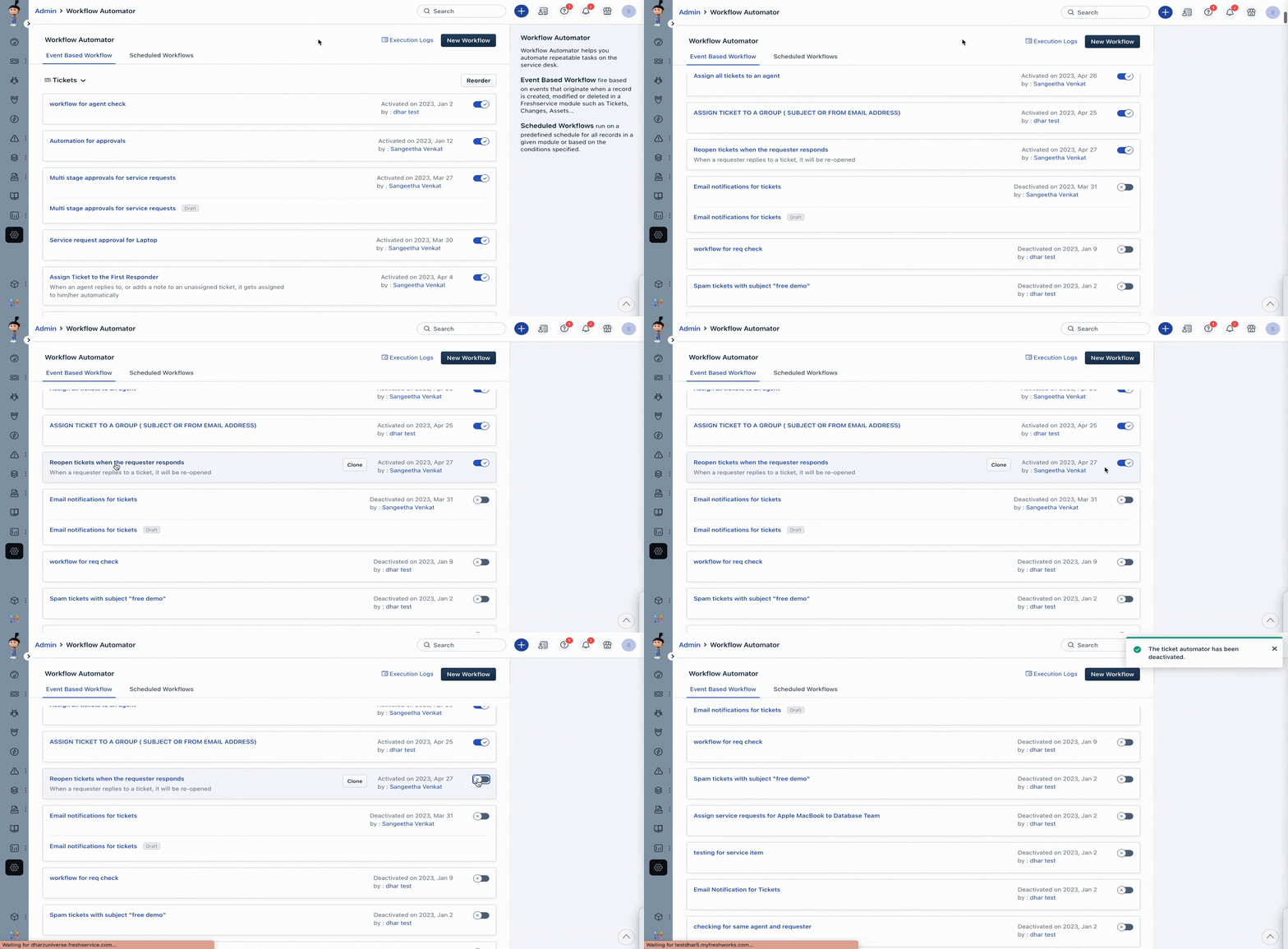
Freshservice gives you more control and asks for more setup in return. There is no single toggle; instead you build the detector as a Workflow Automator rule under Admin Settings. You will find the automator list under the admin area:
The rule itself is short. You set the event to a reply being sent by the requester, then add the condition that does the real work. When you start typing in the condition field, Freddy Suggestion appears as an option alongside the usual ticket properties, and you set it to "Thank you a message":
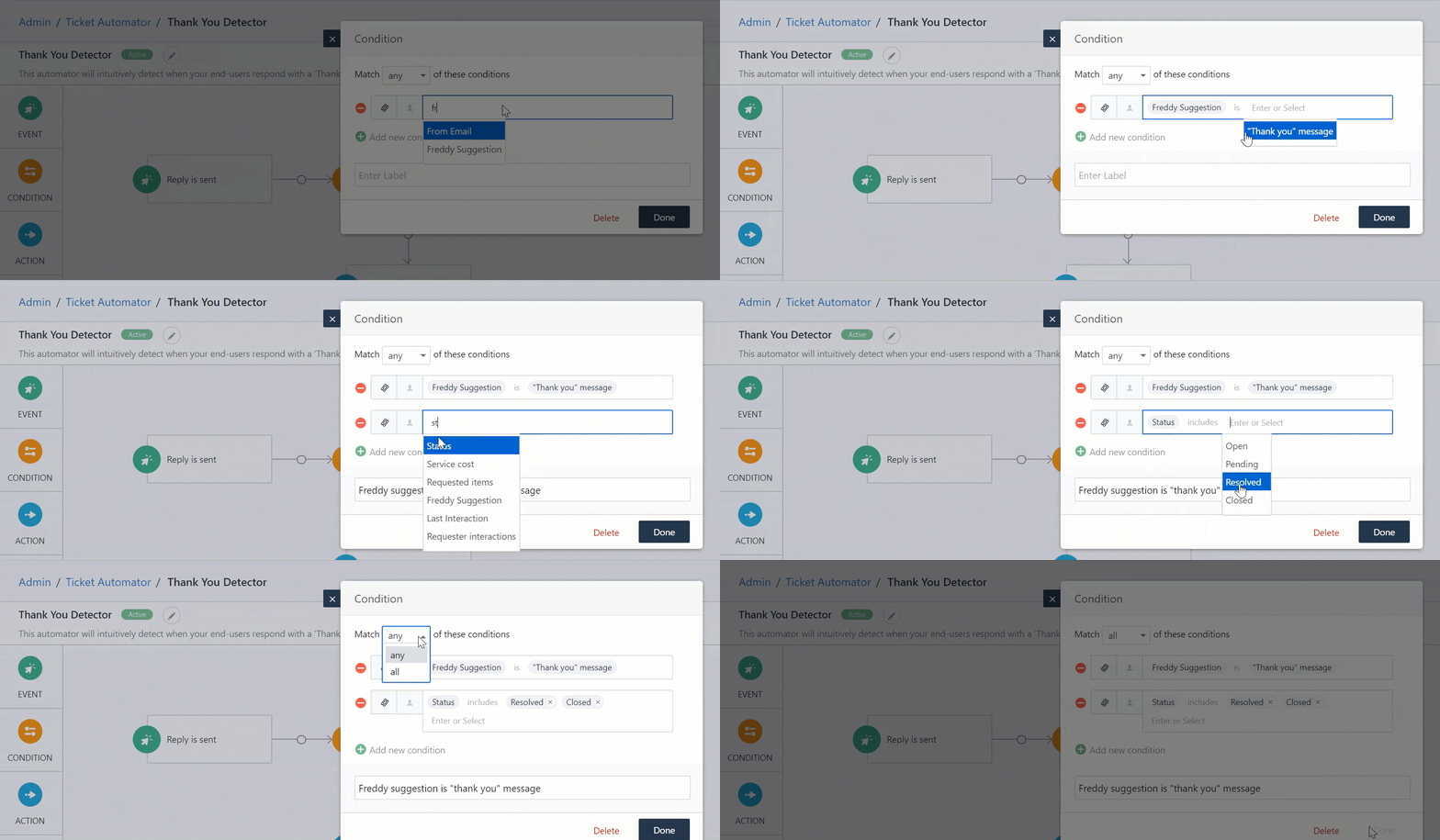
From there you wire up the actions. When the condition is met (it is a thank-you), you set the status to closed; when it isn't, you set the status to open and email the assigned agent so a real follow-up never slips through:
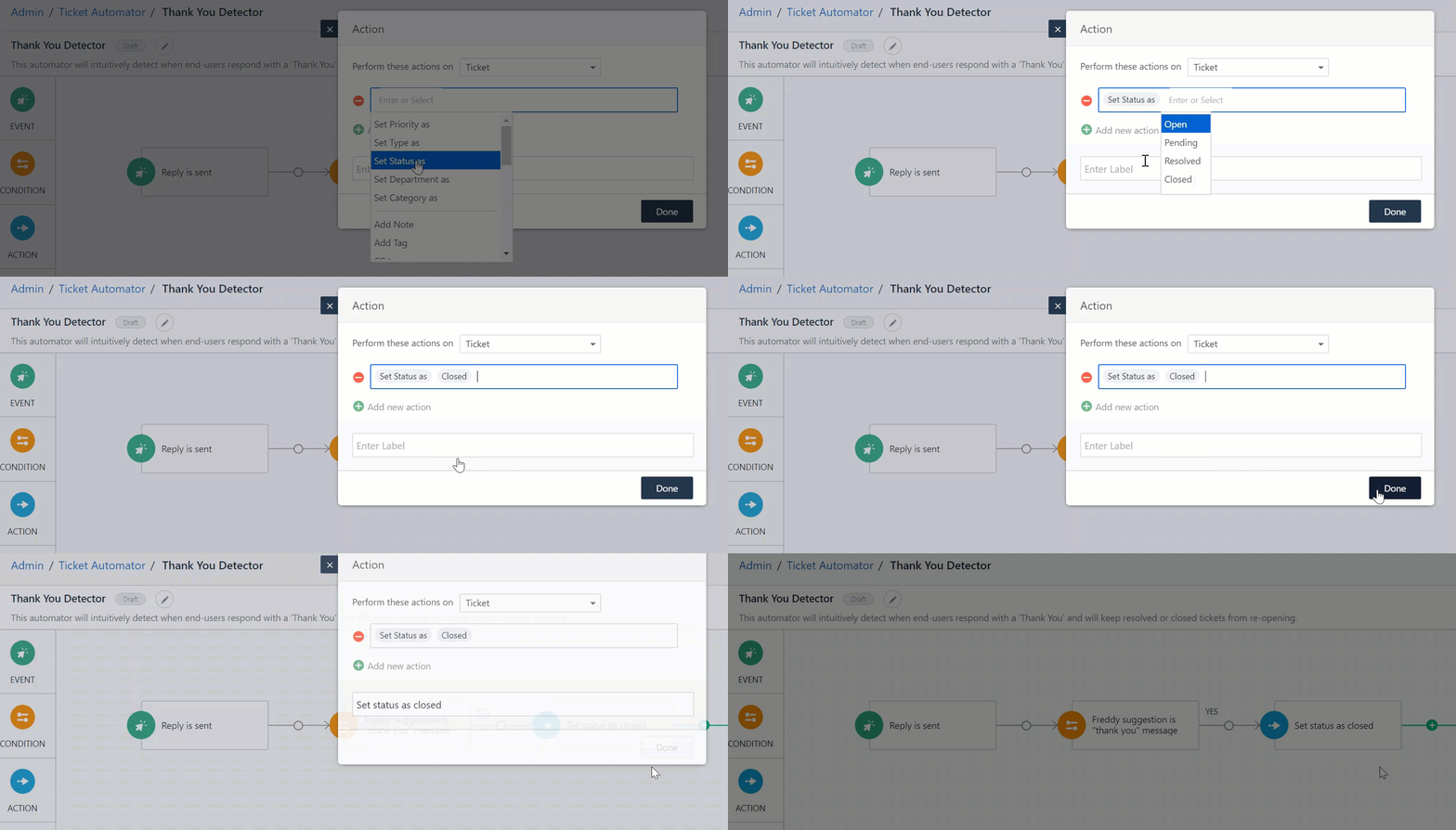
The cleaner shortcut, if you would rather not build from scratch, is to edit the default Freshservice automator named "Reopen tickets when the requester responds" and add a single condition: Freddy Suggestion is not Thank you Message. That tells the existing reopen rule to skip gratitude and leave everything else untouched.
The limits worth knowing before you switch it on
A fair guide names the catches, and this feature has a few that matter.
First, the requester rule. The detector "works only if the requester of a ticket is an end-user (a contact in the helpdesk) or a Collaborator. It doesn't work if the requester is a helpdesk agent" (Freshdesk). For internal IT desks where agents file tickets on behalf of staff, that is a real gap.
Second, false negatives are possible by design. Because of the 90% bar, ambiguous replies reopen, which is safe but not perfect. Freshworks recommends a sensible backstop: turn on the "Requester replies to ticket" agent notification so a human is emailed on every customer reply and can manually reopen if Freddy got a borderline call wrong.
Third, it is not always plug-and-play. At least one team on the Freshworks Community reported enabling the detector and adjusting the reopen rule, only to find "it still isn't working... It's not even detecting." If you switch it on and nothing changes, check that your reopen automation order is right and that the requester is an end-user, not an agent. For a wider view of where Freddy's automation stops short, our Freshservice AI limitations guide is a good companion read.
How other helpdesks handle thank-you replies
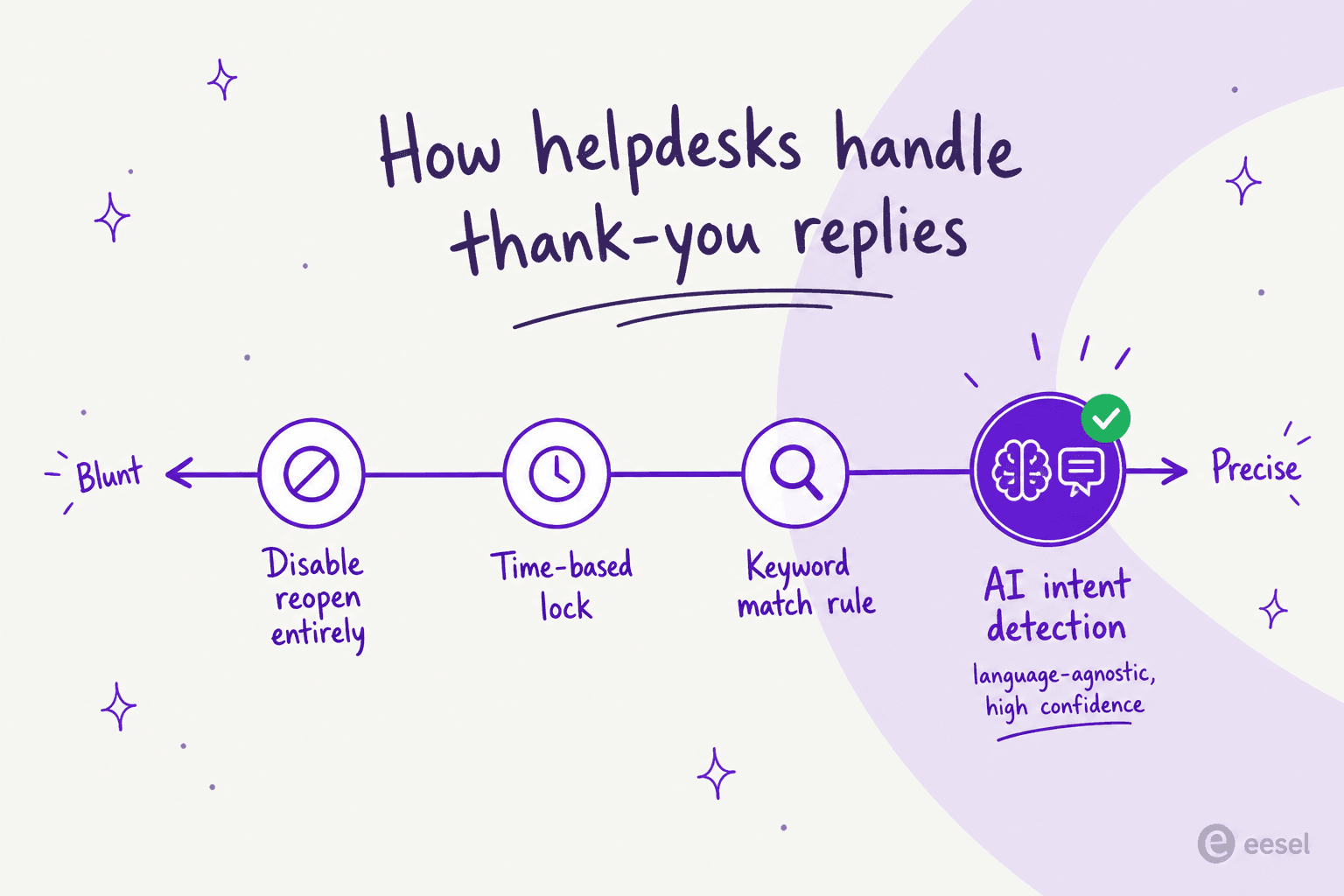
Freshworks is ahead here, but it helps to see the full field before deciding it is the deciding factor. Most helpdesks tackle the same problem with blunter instruments.
| Helpdesk | Native thank-you detection? | Mechanism |
|---|---|---|
| Freshdesk / Freshservice | Yes, AI intent detection | Freddy "Thank You Detector": >90% confidence, all languages, self-learning |
| Zendesk | Not documented | Custom trigger chains or keyword triggers; the solved-to-closed window |
| Gorgias | Partial | "No-reply/Thanks" auto-close Rule template (keyword/intent); third-party AI app |
| Zoho Desk | No | Uncheck "Fall-Back to Default" on Closed; custom function for exact match |
| Help Scout | No | Conversation Lock (time-based) only |
Zendesk is the instructive case. Its docs describe no native detector, so the most-upvoted community recipe is a multi-trigger workaround: tag tickets on solve, auto-re-solve any reply, and email customers a "secret" key phrase they must paste to genuinely reopen. The author is honest that "this method does not resolve the reopen ticket metric in reporting." Zoho's fix is a "Fall-Back to Default" toggle that stops all replies from reopening, which is blunt, and Help Scout offers only a time-based Conversation Lock that turns a late "thanks" into a brand-new conversation, which is the other half of the inflation problem.
The pattern is clear: Freshdesk's Freddy is the only one of the five I checked with language-agnostic AI intent detection out of the box. The others rely on keyword matching (which misses indirect or non-English thanks), status toggles (which block everything), or third-party bolt-ons.
Try eesel
If the thread running through this guide resonates (gratitude shouldn't count as work, and your reopen rate shouldn't lie), the underlying job is bigger than one toggle. eesel is an AI support layer that plugs into the helpdesk you already use, including Freshdesk, Zendesk, and Gorgias, and acts as an autonomous teammate: it triages incoming tickets, drafts and sends replies, and resolves the repetitive ones end to end, so acknowledgement noise and tier-1 volume both stop reaching a human.
The differentiator worth calling out: eesel isn't gated behind a specific plan tier or locked to one vendor's AI, and you brief it in plain language the way you would onboard a new hire. Pricing is one fixed monthly plan, from $299/month for 500 credits (a ticket or chat is 1 credit), with a free plan of 100 credits. If you want clean metrics across every channel rather than per-helpdesk patchwork, you can try eesel and have it running in minutes.