

MAI Realtime 1 is Microsoft's first speech-to-speech model, and it is strongest at talking and weakest at finishing. It scored 98.9% on Big Bench Audio, the best on Microsoft's launch chart, but completed 57.5% of τ-Voice customer-service tasks, sixth of 13 models. At $1.35 an hour it is cheap, but it is a limited preview, so pilot it with a human handoff before it answers a real phone line.
That handoff is the part eesel covers: an AI helpdesk teammate that works the ticket queue behind the call. With the eesel CLI, a coding agent can load your call scripts and policies into it, then test answers before go-live.
What is MAI Realtime 1?
MAI Realtime 1 is a speech-to-speech model from Microsoft AI, the group behind MAI Transcribe 2 and the MAI Voice models. It takes in audio and answers in audio in one step, so there is no transcript-to-text-model-to-voice relay in the middle. Microsoft launched it at Ignite on November 17, 2026 and calls it its first speech-to-speech model.
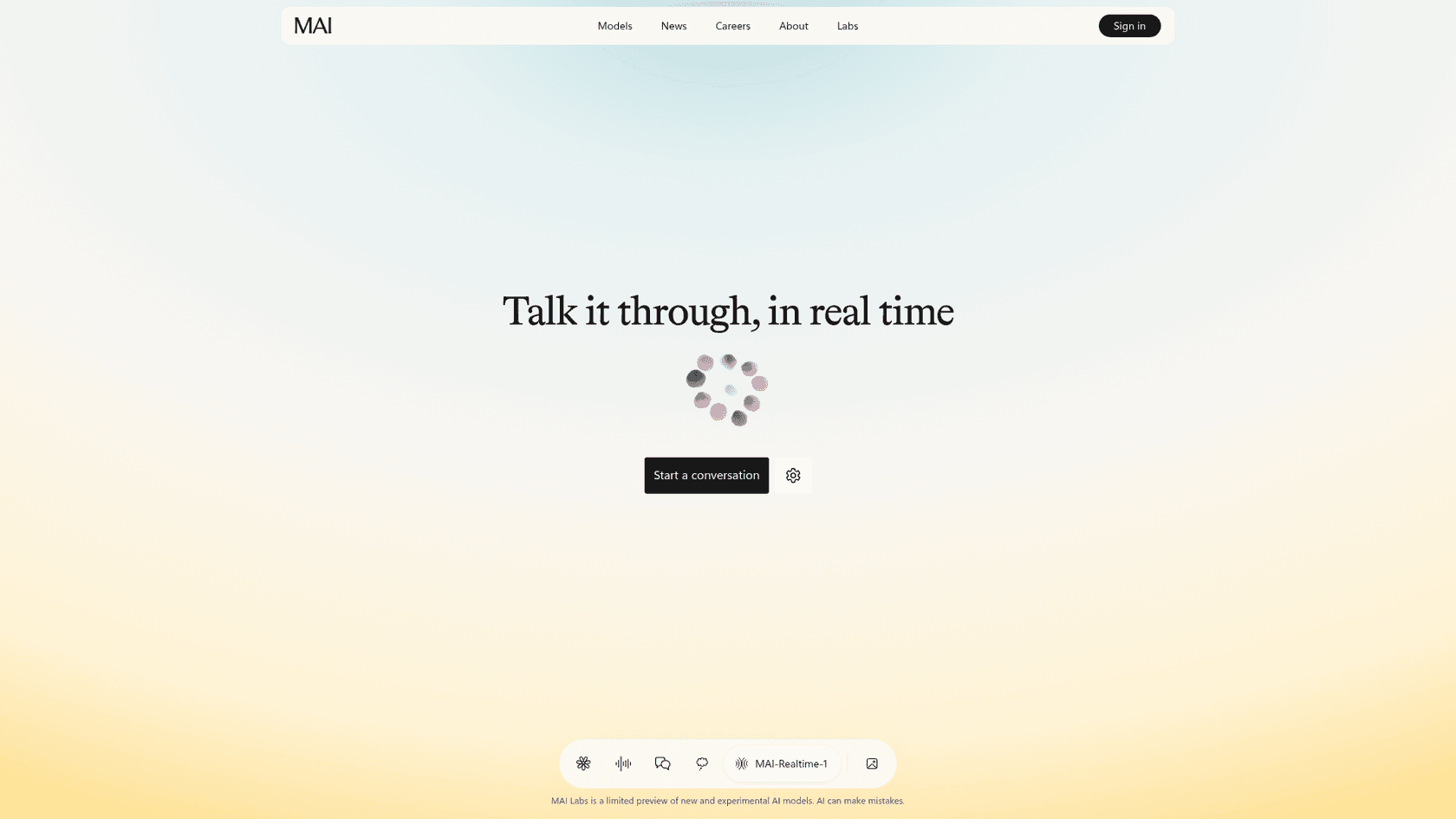
I'm on the customer support side at eesel, so the first thing I ask about any voice model is whether it can run a call to the end, not whether it sounds nice. Here is the short fact sheet before I get to that.
| Question | Answer | Source |
|---|---|---|
| What is it? | Speech-to-speech model for voice agents | Launch post |
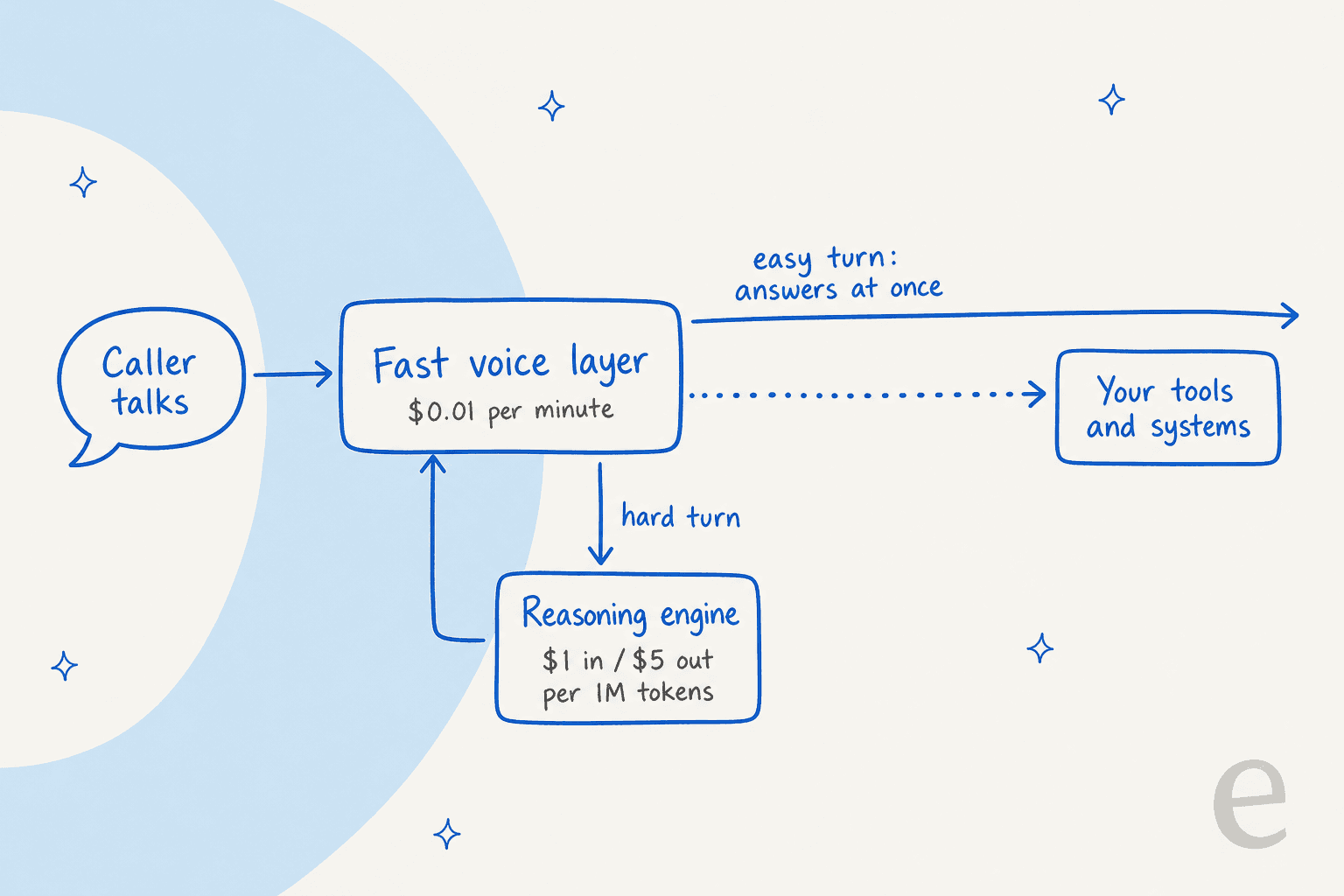
| Price | $0.01 per audio minute, plus reasoning at $1 / $5 per 1M input / output tokens | Launch post footnote |
| Access | Limited Foundry preview and MAI Labs; no billing until public preview | Launch post |
| API | Compatible with the OpenAI Realtime API | Launch post |
| Named testers | Agoda and Reservations.ai | Launch post |
| Coming to | Dynamics 365 Contact Center, and Dragon Copilot for simulated patient conversations | Launch post |
| Not published | Latency number, language list, voices, regions | Launch post |
That last row matters. The launch post gives benchmark charts and a price, but no latency figure, language list or voice list, so anything beyond the table is yours to measure in the preview.
How does MAI Realtime 1 work?
It runs two layers. A fast voice layer keeps the conversation moving, and when a request needs deeper thinking, Microsoft says the model hands the turn to "a more powerful reasoning engine" so the answer still arrives without a long pause. The voice layer is the $0.01 minute rate. The reasoning engine is the separately billed token line, which I broke down in my MAI Realtime 1 pricing post.
Microsoft lists five behaviors it built for, and they read like a checklist of what makes phone calls awkward:
- Natural turn-taking. It handles interruptions, quick acknowledgments like "mm-hm," and knows when to wait for someone to finish.
- Noise handling. It recognizes requests with background noise or other people talking.
- Real-world action. It connects to enterprise systems and tools, so a voice agent can do more than answer questions.
- Personas. Tone, style and behavior change through prompting.
- Adaptive reasoning. The fast-then-deep split above.
Microsoft's model page shows one worked example: a flight booking from Paris to Rome that runs 1 minute 21 seconds. The caller asks for Thursday, nonstop, window seat, under $200, then switches to Friday mid-call and says "same preferences and budget." The agent keeps all three constraints and quotes a $164 fare. That is a good demo of context carrying across a change of plan. It is a scripted demo, so treat it as the best case.
For developers, the part that lowers switching cost is compatibility with the OpenAI Realtime API. If your app already speaks that format, testing the model is mostly an endpoint change, though I would re-test tool calls on your own flows, since that is where voice agents usually break.
What is MAI Realtime 1 good at?
Spoken reasoning, by a clear margin. On Big Bench Audio, which asks reasoning questions out loud, MAI Realtime 1 scored 98.9% at $1.35 an hour on a fixed 40-question subset. Nothing else on the chart beat it, and the next best, Eleven Realtime v1 Max, scored 98.8% at $4.80.
Price is the second strength. Only Gemini 3.8 Live at $0.84 an hour is cheaper on Microsoft's chart. GPT-Realtime-2.1 High costs $10.75 an hour, nearly 8 times as much, and scored 95.8%.
Two caveats come with both numbers. The MAI figures are from Microsoft's internal evaluation, while the rivals' scores and costs come from Artificial Analysis. Microsoft also notes that results vary by evaluation setup and workload. Good signs, not a verdict. An independent run will tell us more.
Where does MAI Realtime 1 fall short?
On finishing the job. The second benchmark in the launch post, τ-Voice, simulates a customer calling a service desk to get something done, like changing a booking or processing a return. MAI Realtime 1 completed 57.5%, sixth of 13 models. Ahead of it: Phonic 1 High (79.9%), GPT-Live-1 Astra (74.5%), Grok Voice 3.0 (71.6%), Gemini 3.8 Live Extended Thinking (68.6%) and GPT-Live-1 Sol (59.3%).
The more interesting finding is that a high spoken-reasoning score does not predict a high task score. I lined up every model on the chart that has both numbers.
| Model | Big Bench Audio | τ-Voice | Gap |
|---|---|---|---|
| GPT-Live-1 Astra (medium) | 90.1% | 74.5% | 15.6 pts |
| Gemini 3.8 Live Extended Thinking | 97.7% | 68.6% | 29.1 pts |
| Eleven Realtime v1 Mini | 75.9% | 46.8% | 29.1 pts |
| GPT-Live-1 Sol (low) | 89.0% | 59.3% | 29.7 pts |
| MAI Realtime 1 | 98.9% | 57.5% | 41.4 pts |
| GPT-Realtime-2.1 Mini High | 74.7% | 29.4% | 45.3 pts |
| GPT-Realtime-2.1 High | 95.8% | 45.7% | 50.1 pts |
| Eleven Realtime v1 Max | 98.8% | 47.6% | 51.2 pts |
| Gemini 3.8 Live | 91.7% | 30.1% | 61.6 pts |
Scores from Microsoft's launch post; gap is my subtraction. Competitor figures are Artificial Analysis; MAI Realtime 1 is Microsoft's internal evaluation. τ-Voice covers full-duplex models only, so Big Bench Audio rows without a τ-Voice score are left out.
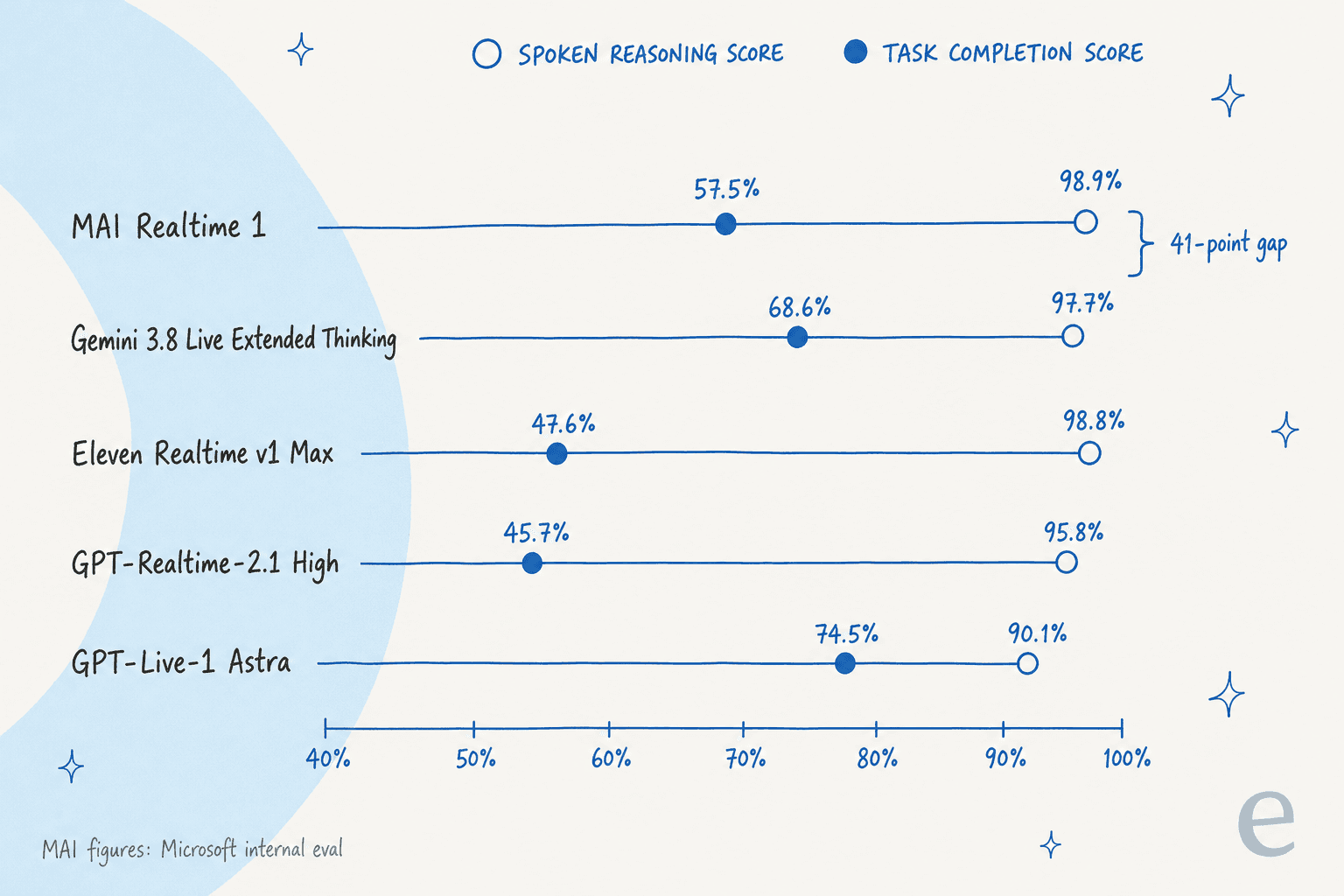
Every model drops from the first benchmark to the second. MAI sits mid-table on the gap: the highest spoken-reasoning score on the chart, paired with a middling task score. GPT-Live-1 Astra has the smallest gap, 15.6 points. I would not read this as a flaw in MAI so much as a reminder that spoken reasoning and completing a tool-driven task are different skills, and the support job needs the second one.
What does 57.5% mean on a support phone line?
Plan for about four in ten simulated tasks not completing. I would not apply that figure to your own calls, because τ-Voice uses simulated callers and set tasks, and Microsoft's number is its own. But it is the only task-completion figure on the table, and it is enough to design around.
In my day-to-day on the support queue, an unfinished call is rarely the real problem. The problem is the unfinished call that reaches a person with no context, so the caller has to start over.
Here is the pattern I would build around any voice model in this range:
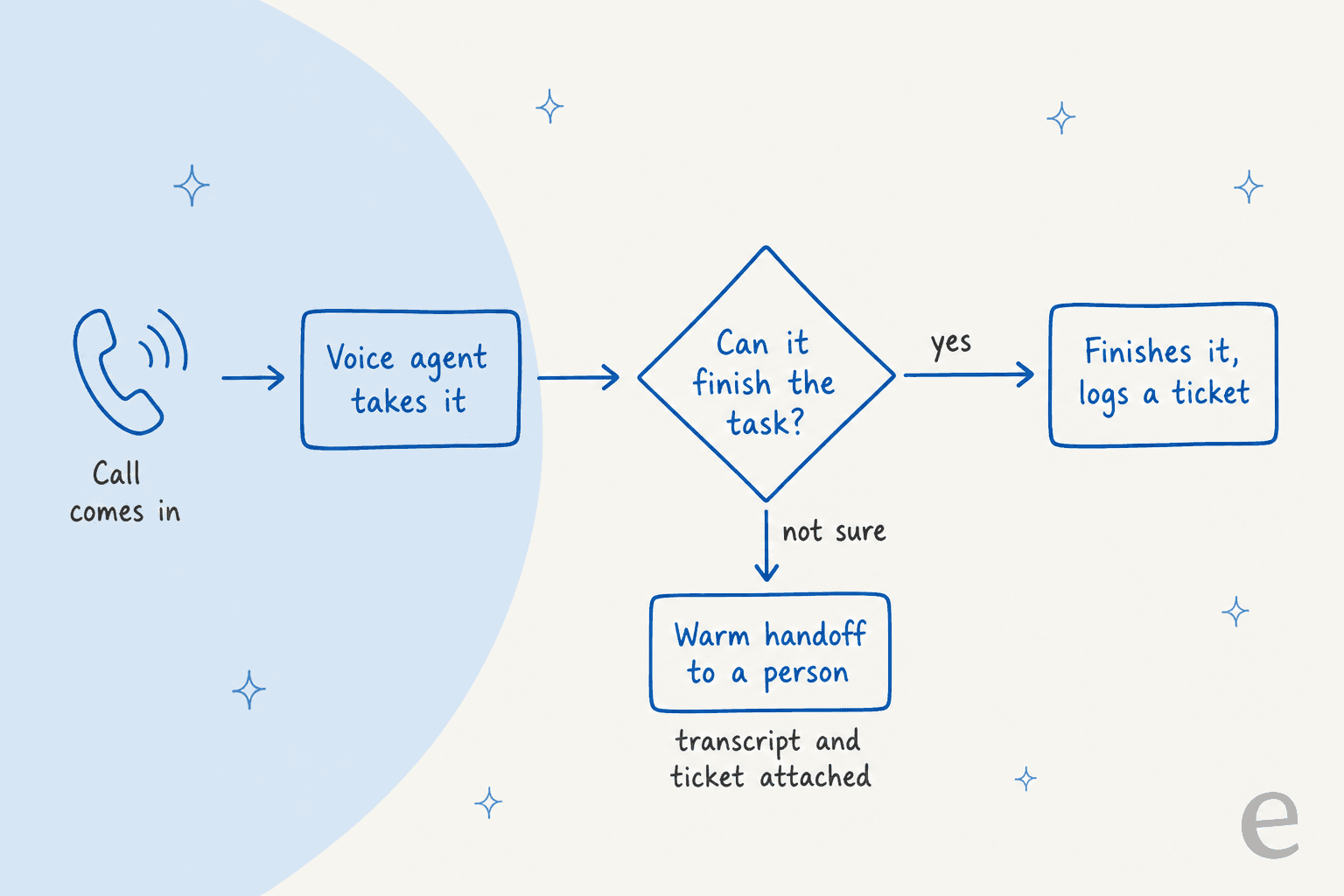
The decision that matters is the diamond. A buyer in an eesel sales call, a CX lead handling around 7,000 tickets a month, put it this way:
"I need an AI who is only handling the tickets that it's confident to handle and all the other ones, leave them alone."
A CX lead running about 7,000 tickets a month on Gorgias, from an eesel sales call, March 2026
That is the whole design brief for a voice line too. Phone support is the channel where a wrong or half-finished answer is worst, because the caller is waiting in real time, so the handoff needs a transcript and a ticket attached, not a cold transfer.
BEAUTEK, a German equipment supplier whose own phone line is staffed 8:30 to 16:30 on weekdays, runs eesel as a live chat on its site on top of Zendesk. In one month (8 August to 8 September 2026) eesel answered 77 website chats and created 20 Zendesk tickets from chat for a person to pick up, with the customer's details and the conversation attached. The same shape works behind a phone model: the AI takes what it can finish, and everything else arrives as a ticket someone can pick up.
Who should use MAI Realtime 1 today?
Right now, teams that can join the preview and already have a human fallback. It is not open for production use. Microsoft's route in is a limited-access Foundry preview, and the public demo in MAI Labs needs sign-in, an 18+ confirmation, runs sessions of up to 2 minutes, and says it is for personal use only, not for commercial, school or work use.
| If you are... | My take |
|---|---|
| Already on Microsoft Foundry or Dynamics 365 Contact Center | Register for the preview now. The model is coming to Dynamics 365 Contact Center, and you will be first in line |
| Building on the OpenAI Realtime API | Test it as a drop-in on one non-critical flow, and measure latency yourself |
| Running a small support phone line | Wait for public preview. A price of $0.01 a minute is not the bottleneck; handoff design is |
| Doing booking or routing calls | Good first test. The Paris-to-Rome booking demo is the closest published example |
| Needing refunds or account changes by voice | Pilot only with a human approving, given the 57.5% task score |
| Comparing voice models on cost per finished task | Read my pricing breakdown; on Microsoft's numbers it is the cheapest per completed task |
I would not pick it today if you need a language list or voice list, because the launch post does not publish one. Ask Microsoft in the preview form before you commit.
The wider field is moving fast. GPT-Live-1, Grok Voice 3.0 and ElevenLabs all ship voice agents today, and my AI voice companies comparison covers packaged options. The MAI launch post reached Hacker News on launch day with 3 points and no comments, so there is no practitioner feedback to lean on yet. The first people who run it on real calls will set the story.
Try eesel behind your phone line
A voice model is one layer of a phone line. The other layer is what the agent knows and where the call lands when it can't finish. eesel's AI helpdesk teammate joins your helpdesk, learns from your past tickets and help center, and works the queue the phone calls spill into. It hands off to your team with the conversation attached, and you can test it on historical tickets before it goes live.
If you are weighing AI for phone support, start with the queue, then add voice once the answers hold up.