


How I reviewed Mercury 3
I build features and AI agents at eesel, so I read a model launch differently from a benchmark table. I care about the seams: what the API does by default, how the output streams, what happens on the slow requests, and where an agent breaks when the model is the weak link. eesel has run AI on live support queues for years, and the one habit that stuck is that no model goes near a customer until it has replayed real past tickets. Lab numbers have never told us whether it works.
So this review is built from four things. Inception's own launch post and API docs. OpenRouter's performance page, which publishes percentiles on real traffic. The Hacker News launch thread, where people tested it on their own work within hours. And Inception's own chat app, which shows the diffusion process on screen.
If you want the launch basics first (specs, the full benchmark table, access routes), start with my Mercury 3 overview. If you only care about cost, Rama's Mercury 3 pricing breakdown prices it per task. This post is the verdict.
Mercury 3 review scorecard
Here's how I scored it, and why.
| Category | Score | Why |
|---|---|---|
| Real-world speed | 4.0 / 5 | 221 tok/s median on OpenRouter beats Luna and Haiku, but the tail is slow |
| Quality for its class | 4.0 / 5 | Ahead on 10 of 12 vendor benchmarks, Luna- or Haiku-level in daily use |
| Price | 3.5 / 5 | Cheapest output in class at launch, most expensive at list |
| Reliability | 3.5 / 5 | 0.58% tool call errors, 2.51% structured output errors on OpenRouter |
| Maturity and openness | 3.5 / 5 | No independent benchmarks, text only, closed weights, size undisclosed |
| Overall | 3.7 / 5 | A real step for diffusion LLMs, best used as a fast helper model |
The score would move up quickly if two things happen: an independent leaderboard like Artificial Analysis confirms the benchmark table, and OpenRouter's slow tail tightens as Inception adds capacity. Neither is true on launch day.
What diffusion changes in practice
Almost every model you've used, from GPT-6.1 Sol to DeepSeek V4.1 Flash, writes one token at a time, left to right. Mercury 3 drafts the whole answer as noisy text and refines it over a few passes. My diffusion models explainer covers the theory. What matters for a review is what that does to your code and your users.
Text arrives in blocks, not tokens
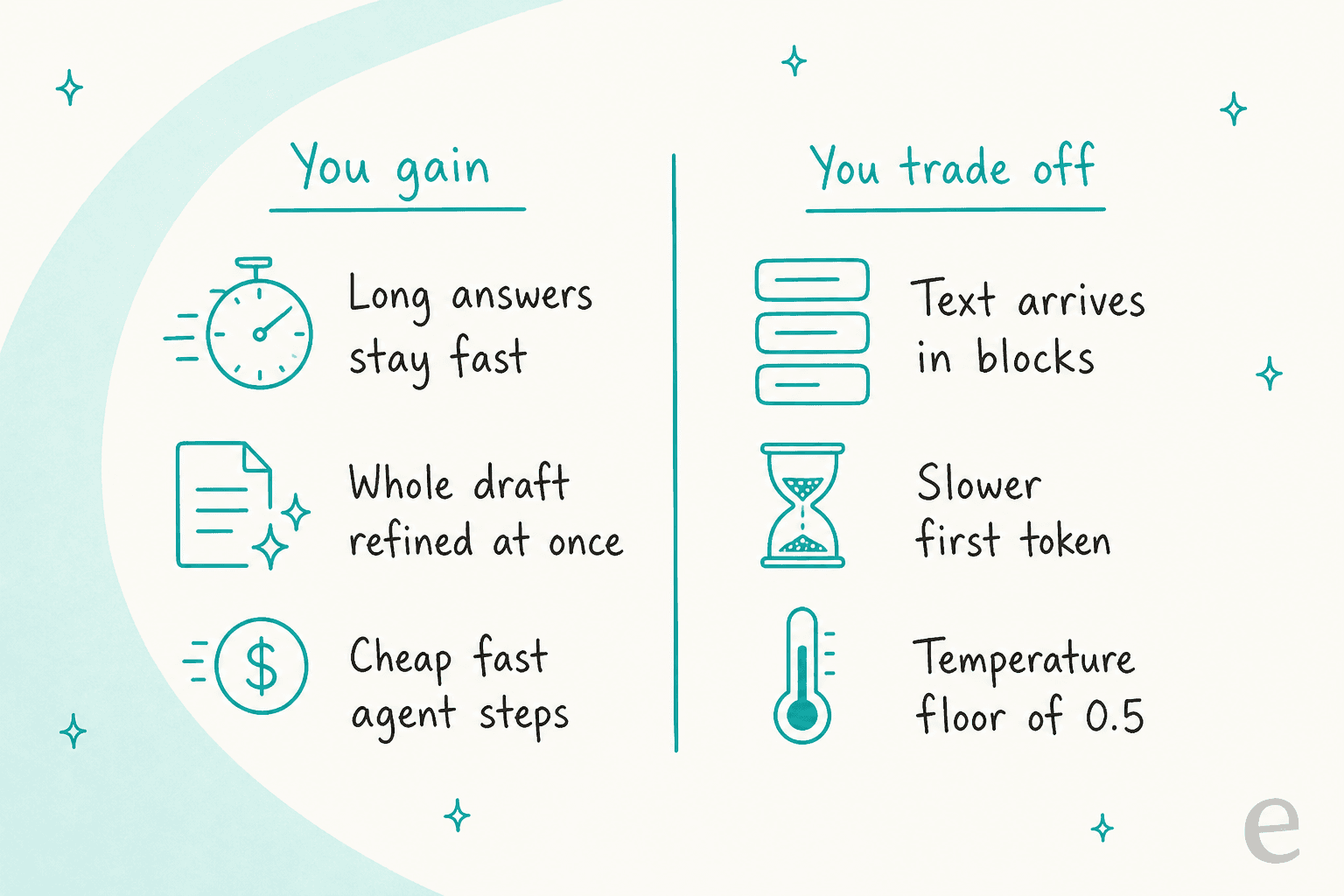
Inception's streaming docs say responses stream "block-by-block", where a block is a chunk of refined text, not a single token. In a chat window that looks different from the familiar word-by-word trickle: nothing, then a sentence, then the next. There's also an optional diffusing mode where each chunk is the full answer so far, so your UI has to overwrite the text on every step instead of appending to it. That's a fun demo and an easy bug if your front end assumes appends.
This is also my best guess for why testers on Hacker News kept mentioning time to first token. One wrote that "Ttft is quite slow with mercury" in the launch thread, and another tester said "the issue with speed seems to be that ttft is still high." Tokens per second tells you how fast the answer finishes, not how soon the user sees something.
Long answers barely cost more time
The upside is the flip side. A token-by-token model takes twice as long to write twice as much. A diffusion model refines the whole block in parallel, so the gap widens as answers and reasoning get longer. Inception's co-founder Volodymyr Kuleshov made that point on launch day: as reasoning models think longer per answer, the speed advantage grows. That's why the model fits multi-step agents better than one-line replies.
The defaults aren't the benchmarked model
This is the detail I'd flag to any team trying it. Every score in Inception's launch table was run at medium reasoning effort. But the reasoning effort docs say that if you leave reasoning_effort out, mercury-3 defaults to low. Mercury 2 and 2.5 defaulted to medium.
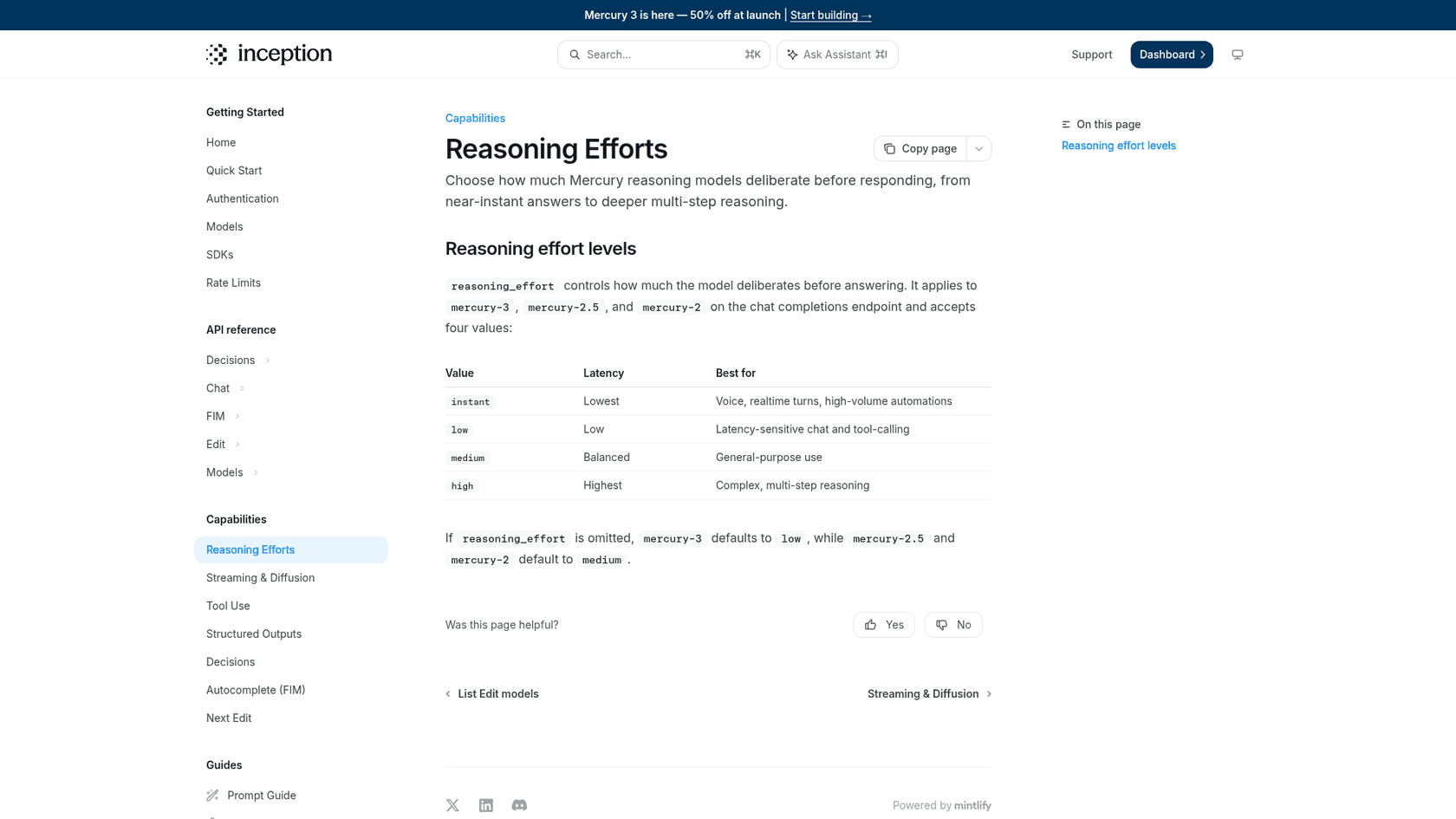
So a quick test with no effort set is testing a faster, lighter setting than the one in the table. That's a sensible default for speed, but set medium explicitly before you compare quality. And don't assume high is better: one tester noticed in Simon Willison's pelican drawings that "the medium pelican is better than the high". That's one doodle, not a benchmark, but it's a good reason to test each level on your own task.
Temperature starts at 0.5
Inception's model docs list Mercury 3's temperature as adjustable from 0.5 to 1.0. If your pipeline sets temperature to 0 for repeatable output (classification, extraction, test fixtures), you can't do that here. Pair it with structured outputs and a schema check instead. For pure labelling jobs, Inception's separate Mercury Decide model is built for classification.
Claimed speed vs measured speed
Inception's number is 1,068 output tokens per second on NVIDIA GPUs. My overview covered the median gap. What I wanted for this review was the spread, because an agent's total wait is set by its slow calls, not its average ones.
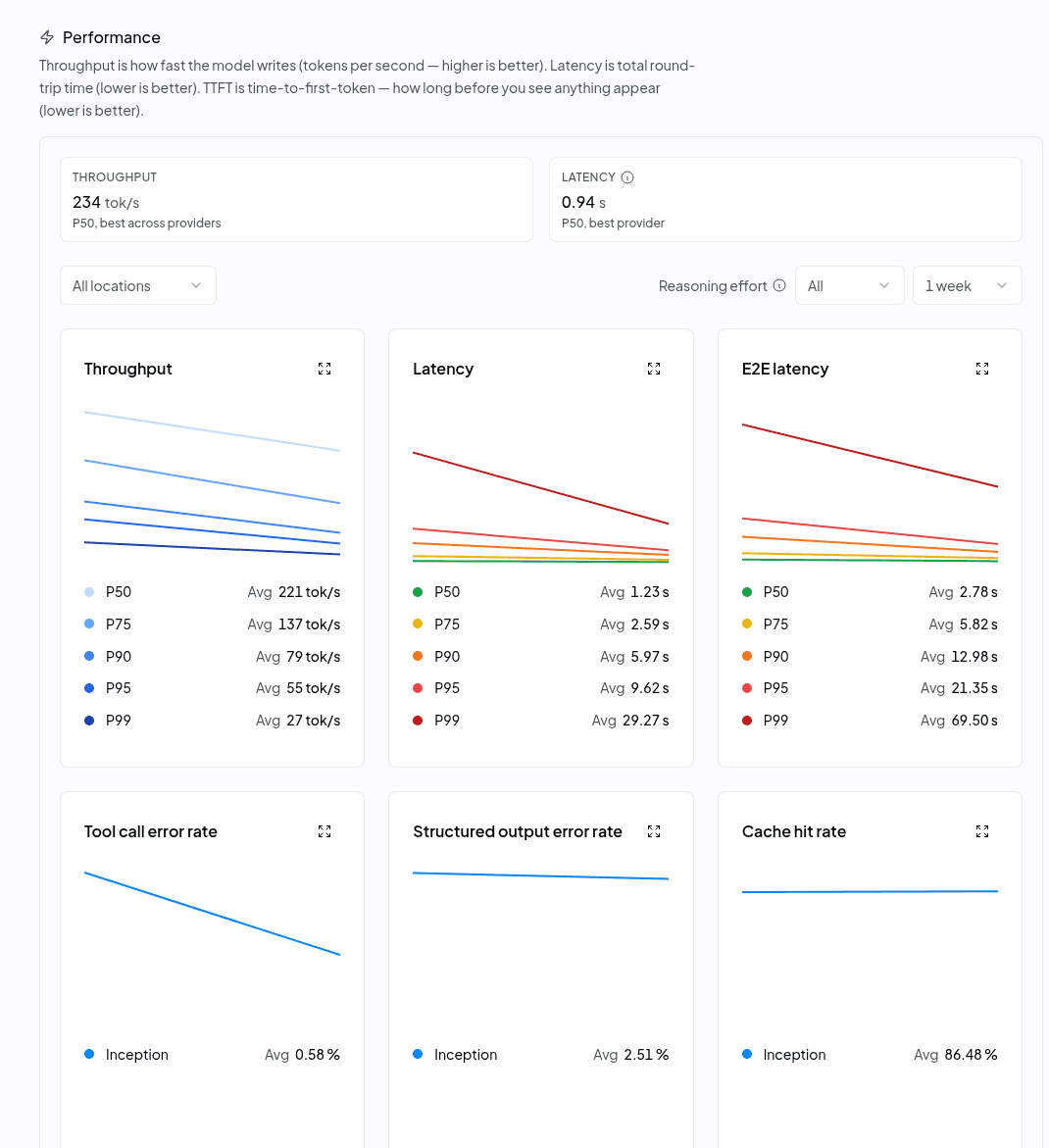
OpenRouter routes every Mercury 3 request to Inception and publishes percentiles. Here's what its performance page showed on 20 October 2026, averaged over a week:
| Percentile | Throughput | Latency | End-to-end |
|---|---|---|---|
| P50 | 221 tok/s | 1.23 s | 2.78 s |
| P75 | 137 tok/s | 2.59 s | 5.82 s |
| P90 | 79 tok/s | 5.97 s | 12.98 s |
| P95 | 55 tok/s | 9.62 s | 21.35 s |
| P99 | 27 tok/s | 29.27 s | 69.50 s |
The median is good. Inception's own table puts GPT-6 Luna at about 130 tokens per second and Haiku 5.5 at about 240, so Mercury 3 on real traffic sits roughly level with Haiku and well ahead of Luna. The tail is the problem: one request in ten runs at 79 tokens per second or slower, and one in a hundred takes over a minute end to end.
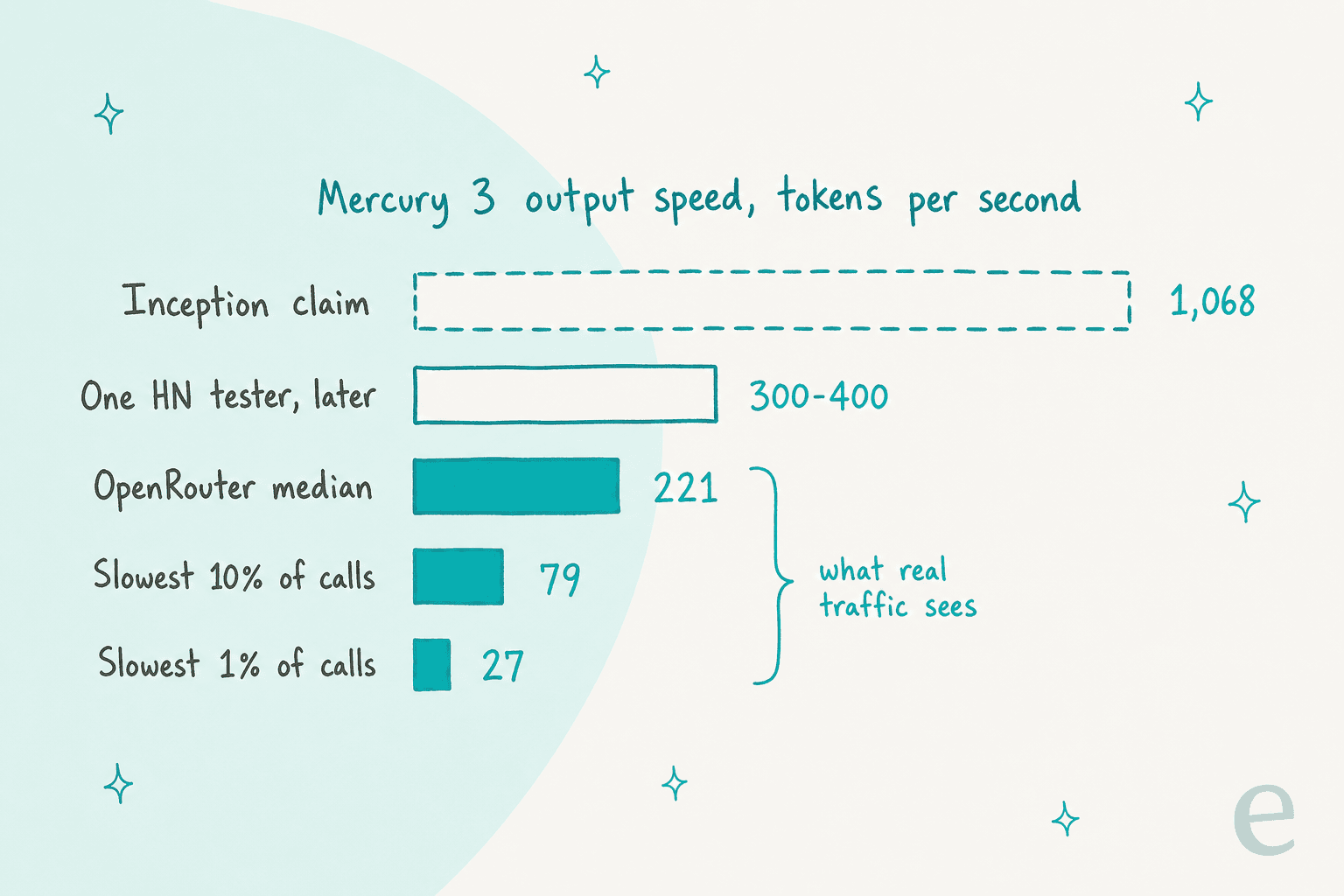
Two caveats keep this fair. OpenRouter blends every reasoning effort its callers choose, and launch week traffic is spiky. Speeds were already improving for some users by the end of day one:
"I've been trialing this for the last few hours. It was quite slow at first, but now I'm getting around 300-400tps. Still nowhere near 1000tps, but it's still incredibly fast compared to what I'm used to with other models."

Simon Willison, by contrast, found the speed "a bit disappointing" and saw no gain from calling Inception's API directly instead of OpenRouter. My read: the median is real and useful today, the 1,068 figure is a best case on Inception's own hardware, and the tail is the number to watch over the next month. If you're comparing raw speed options, my Groq 3 LPX post covers the hardware route instead of the model route.
Benchmark reality check
The launch table is strong. Mercury 3 beats Luna and Haiku 5.5 on 10 of 12 tests each, and the widest gaps are on agent work: SWE-Bench Atlas at 51.08 against 33.33 for Luna, and τ³-bench Banking at 30.24 against 23.00 and 13.06. The full table is in my Mercury 3 overview, so here I'll focus on how much weight it can carry.
- It's Inception's run. There's no Artificial Analysis page for Mercury 3 yet, and Kuleshov said on Hacker News that third-party benchmarking and task completion times are still to come.
- One effort level only. All 12 rows are at medium. A commenter asked why, noting there's no low-to-max curve. We don't know if Luna or Haiku close the gap at higher effort.
- The losses are close; some wins are wide. It trails Luna on AA-Omniscience (46.44 vs 46.94) and AA-LCR (77.67 vs 78.30) by a hair, and trails Haiku 5.5 on MRCR v2 (75.50 vs 78.40) and DeepSWE (46.31 vs 51.62). Long-document recall is the area I'd test hardest.
- The vendor's own read is modest. Kuleshov described it as Haiku- or Luna-level in daily use, which I think is the honest frame.
"That means that it won't yet replace Opus or Fable as the primary driver of a harness, but we have used it successfully for subagents"
The hands-on reports line up with that. One developer built a small macOS app end to end with it:
"I made it come up with a plan for this tool and had it implement the thing end to end in about 8 or 9 steps. It originally messed up the coordinate calculation but quickly corrected that when I pointed it out and other than that it one-shotted all the other steps."
The same tester said the job used 26 million tokens, 1.3 million of them uncached, at around 160 tokens per second. That's a useful real-world shape: a coding harness re-sends a lot of context, which is why the cache price matters as much as the headline rate. Another tester rebuilt a UML renderer across three turns and said it updated the HTML correctly.
Strengths and limits
Here's the balanced version, in the order I'd weigh them.
Where it's strong:
- Agent loops. Speed compounds when a task makes a dozen model calls in a row. Inception's launch partner TinyFish says it completed half of 50 live Mind2Web web tasks, "significantly more than GPT-6.1-Sol."
- Helper and subagent work. Context compaction, routing, summarising tool output. On the older Mercury 2, Augment Code reported an 82% drop in compaction latency and a 90% drop in cost against its previous model. That's Mercury 2, but Mercury 3 is the same pitch with a bigger model.
- Long contexts at a flat price. A 1M-token window at one rate, where Haiku 5.5 bills 5x past 100K tokens. My Haiku 5.5 pricing guide has the details.
- Easy to try. It's OpenAI compatible, with 100 million free tokens on new keys and setup guides for Cursor, LangChain and Vapi.
Where it's limited:
- The slow tail. P90 throughput of 79 tok/s and P99 end-to-end time of 69.5 seconds on OpenRouter's one-week view.
- Structured output isn't flawless. OpenRouter shows a 2.51% structured output error rate, so keep a validator in the loop.
- Text only, closed weights, undisclosed size. Inception says multimodal is in internal prototypes. For open diffusion weights, DiffusionGemma is the alternative.
- Price after the promo. At $0.70 per million output tokens, list price is above Luna's and Haiku's $0.50, and Inception hasn't announced an end date for the 50% discount.
- Availability is still settling. OpenRouter's three-day availability read 99.26%, with visible dips on launch day.
Is Mercury 3 right for your workload?
Most of the "should I switch" decision comes down to three questions: how many calls sit in a row, whether a person is waiting, and whether you need something Mercury 3 doesn't offer. The picker below walks through them.
Answer three questions to see whether Mercury 3 fits a workload, and what to test before switching.
The pattern is simple: the more calls in a row and the more a person is waiting, the more Mercury 3 earns its place. For a single background call, speed won't change anything, and at list price Luna or Haiku are the cheaper pick. My GPT-6 Luna pricing breakdown has their side of that math.
How Mercury 3 fits a support workload
Support is one of the four production uses Inception names, and the launch quotes Lorikeet, a support AI vendor, saying Mercury 3 "beat other models on latency while also performing higher on evals and in production." The benchmark that maps closest to support, τ³-bench Banking, is also where Mercury 3's lead is widest.
But read that score carefully. A 30.24 means the model failed most of those simulated banking tasks, just less often than its rivals. That's normal for small, fast models, and it's the reason a model is never the whole support agent. Speed helps most in live channels like AI live chat and voice agents, where a customer is watching the screen. On email tickets, a two-second gap changes nothing.
Where a fast helper model fits best in support is the pile of small jobs around each reply. Think ticket triage, tagging, summarising long threads and pulling order details. That's the same subagent pattern Inception describes for coding. It's also what a real support deployment looks like when you open it up.
Lesson Pro, which runs private lesson brands including GOSKATE, is a good example. Its eesel agents work across two Zendesk accounts. On every ticket the agent first works out which brand the customer belongs to, then leaves an internal note and drafts a reply signed as that brand. Job applications, voicemails and order forms are skipped on purpose. Between 8 August and 8 September 2026 it worked about 1,900 tickets, left about 1,700 notes and drafted about 560 replies for the team to send. When a teammate writes "@eesel find instructors near this lesson", it searches past tickets in the nearby towns for instructors who taught there.
None of that hinges on whether the model behind it writes at 221 or 1,068 tokens per second. It hinges on the brand rule, the skip list, the drafts going to a person first, and the testing. That's the difference I keep coming back to: Mercury 3 is infrastructure; eesel is the employee. If you're picking the model layer yourself, my guides to the best support ticket model and AI hallucination prevention cover the guardrails, and testing an AI agent covers the step most teams skip.
Who should use Mercury 3, and who should wait
Use it now if you:
- Build agents with long chains of calls: browser agents, search agents, research loops. This is where its speed compounds.
- Run coding harnesses and want a fast helper. Kuleshov's own advice is subagents, not the lead model, which fits Claude Code or Cursor setups where a larger model plans.
- Pay for Luna or Haiku on high-volume, low-stakes calls and can live with list price later. Test at medium effort before you swap.
Wait or pick something else if you:
- Need image input, open weights or temperature 0. Gemini 3.8 Flash handles images, and small language models cover self-hosting.
- Rely on exact recall across long documents. Run your own eval first.
- Make one model call per request with nobody waiting. Speed won't change your numbers, so choose on quality and price.
- Need guaranteed latency. Until the P90 and P99 tighten, keep a fallback model or a timeout around it.
If you're still mapping the options, my roundup of the best AI agents and the Claude Haiku 5.5 review are the natural next reads.
Try eesel
A fast model gets you a fast token. It doesn't get you a Zendesk connection, a brand rule, a list of tickets to skip, or a way to replay last month's conversations before anything goes live. eesel's AI helpdesk teammate arrives with those. It joins your existing Zendesk or other helpdesk, reads your help center, macros and past tickets, and runs on the triggers you switch on, like an @eesel mention in an internal note.

If you test models from a terminal, you'll like the eesel CLI. It drives the same teammate as the dashboard: eesel integrations connect zendesk starts the helpdesk connection, eesel automations lists and switches on what the agent does by itself, and eesel chat "how do I reset a password?" asks it a question and streams the answer. Every command prints JSON, so a coding agent can run the setup for you. My AI agent CLI guide goes further.
Plans start at $299 a month for 500 credits, and the free trial includes 100 credits with no card. Try eesel on your own past tickets, or see the pricing page first. If your job is content rather than tickets, the roster also has an AI blog writer.