

Why SaaS support is its own animal
I build AI support agents at eesel, and I've spent the last few years watching them go live on real support queues. SaaS is the vertical where the reader's own product is the thing being asked about, and that changes the shape of the problem.
Two things make SaaS support different. First, the questions are technical and version-specific: "why did my API call return a 403", "does the new plan include SSO", "how do I connect this to my warehouse". Generic answers do not cut it, and a plausible-sounding wrong one gets screenshotted into a churn thread. Second, your knowledge is a mess, and not because your team is sloppy. A real answer lives partly in the help center, partly in a Slack thread from three weeks ago, partly in an old macro, and partly in the head of the one engineer who shipped the feature. A support AI that only reads the marketing site will confidently miss all of it.
There's also a build-versus-buy temptation that hits SaaS teams harder than anyone, because you can build it. One team we work with, GENERAL BYTES, put the trade-off plainly:
"We could try to write our own LLM application but we didn't want to invest our time into that. We wanted something that we would not have to maintain."
Karel, GENERAL BYTES
That's the honest read. Wiring a RAG pipeline to your docs is a weekend demo; keeping it accurate as your product ships every week is a full-time job you did not budget for.
Step 1: Pick the tier-1 slice, not the whole queue
The single most common mistake is aiming the AI at everything on day one. Don't. Start with the repetitive tickets that have a stable, documented answer, because those are where AI ticket deflection is both safe and high-volume.
For most SaaS teams the safe-to-automate list looks like password and login resets, "how do I do X" feature questions, plan and billing basics, and the setup steps for a common integration. What you keep human is anything with a moving answer or a real consequence: bug reports, outages, refund and downgrade requests, and any security or data-access ask.
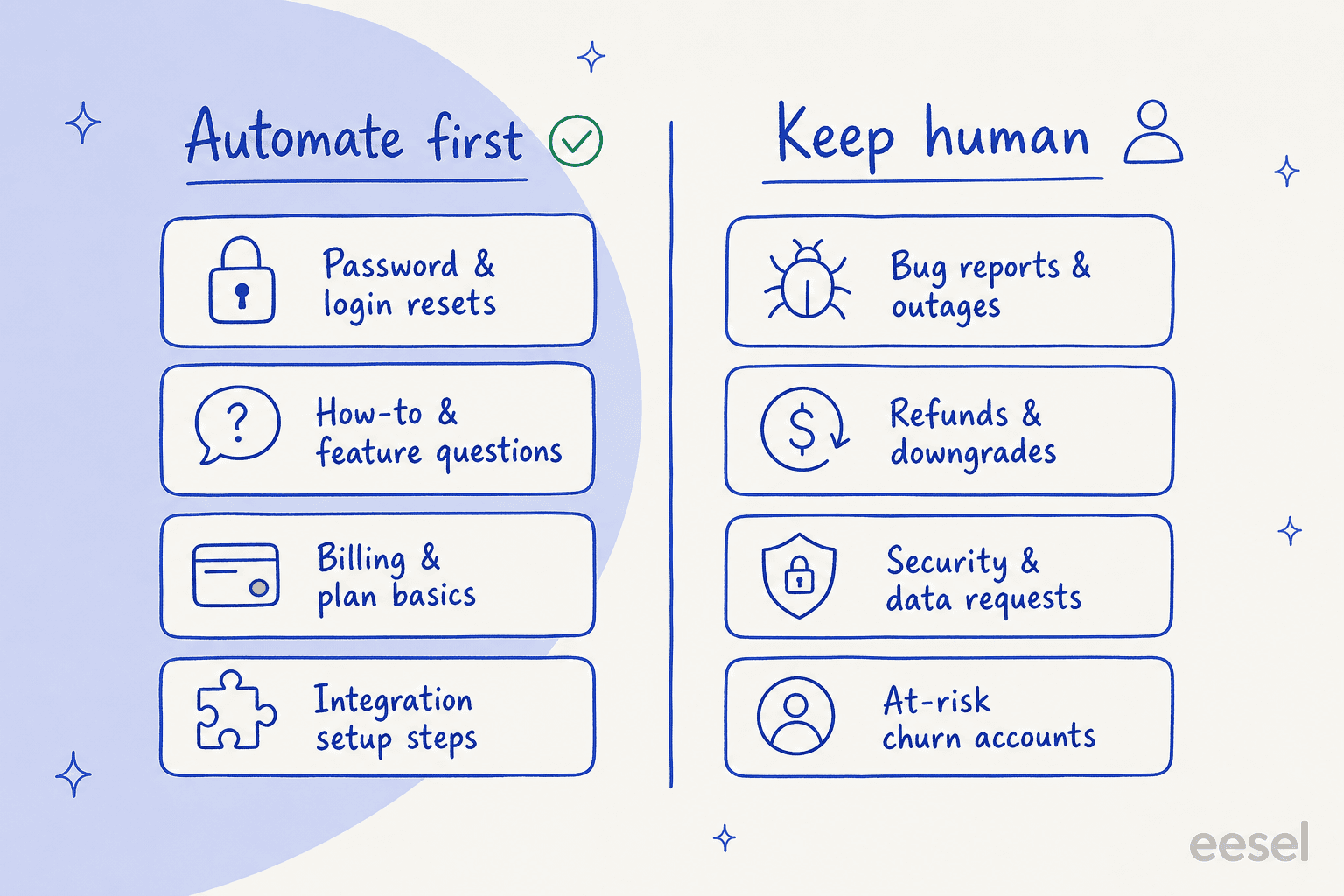
The point of drawing this line up front is that it is also your escalation rule later. If a ticket smells like a bug, an outage, or a billing dispute, the AI's job is to recognise it and hand off fast, not to have a go. Our tier-1 deflection playbook goes deeper on picking that first slice.
Step 2: Connect your knowledge, all of it
This is the step that decides whether SaaS support automation actually works, and it's the one teams underinvest in. The AI can only answer from what you give it, so the job is to give it everything a good human agent would reach for.
That means more than the public help center. It means your knowledge base and docs, your past resolved tickets (the richest source you own, because they show real answers to real phrasings), internal Slack channels and wikis, and your product changelog so the AI knows what shipped last week. One B2B SaaS team we spoke with wanted exactly this: an AI that cross-references the user guide, Slack, the internal KB, and past tickets when it answers, and then flags the gaps it finds so someone can write the missing article.

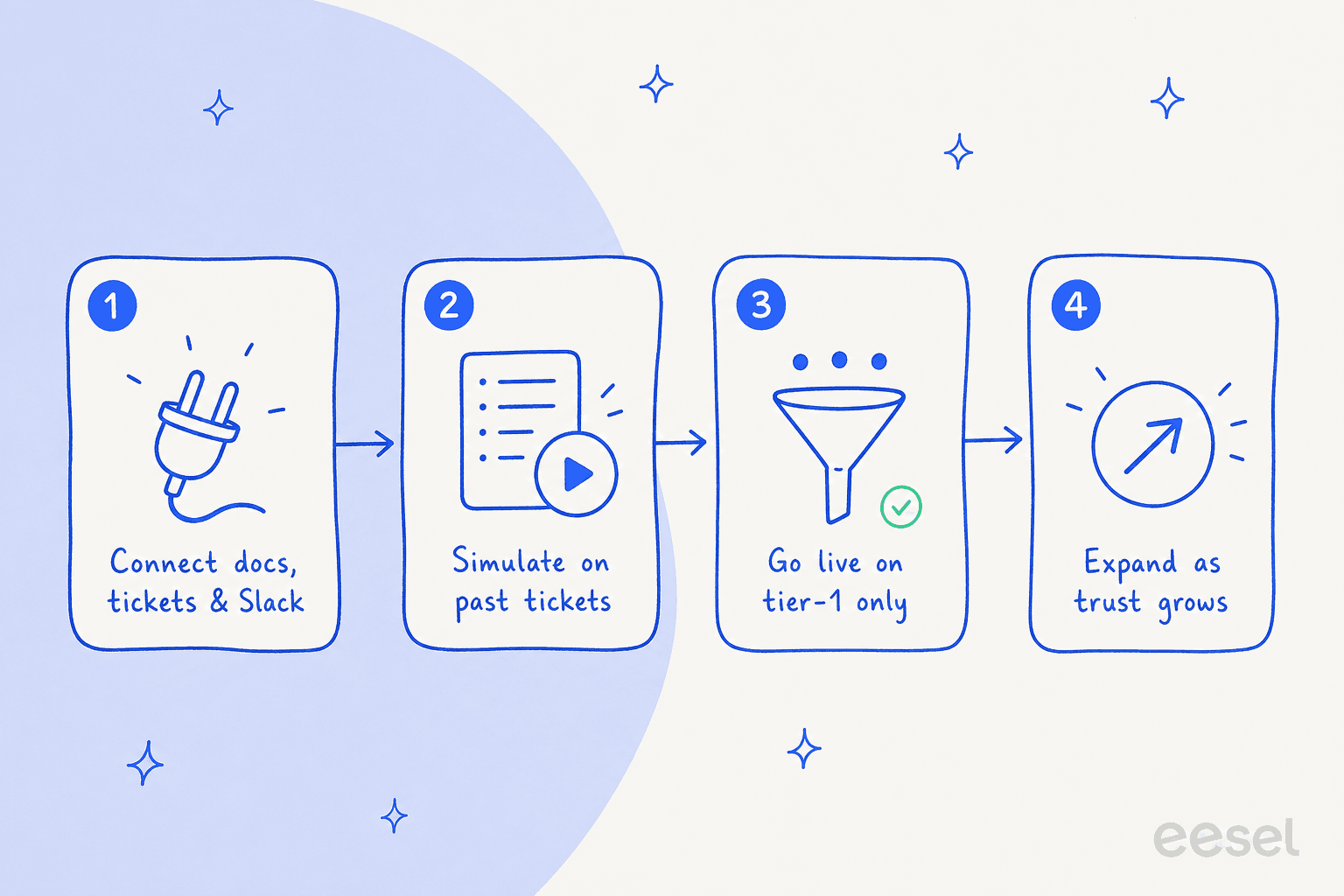
The practical reason to use a tool instead of building this yourself: eesel AI connects to a helpdesk, past tickets, and over a hundred sources like Confluence, Google Docs, and Slack with a few clicks, and it keeps them synced. You do not want to be re-indexing your docs by hand every time the product changes.
Step 3: Ground every answer and force a citation
Here is the accuracy discipline that separates a support AI you can trust from a liability. Every answer the AI gives should be grounded in your verified knowledge and carry a citation back to the source doc. Not "the model thinks the answer is X" but "here is the answer, and here is the help article it came from".
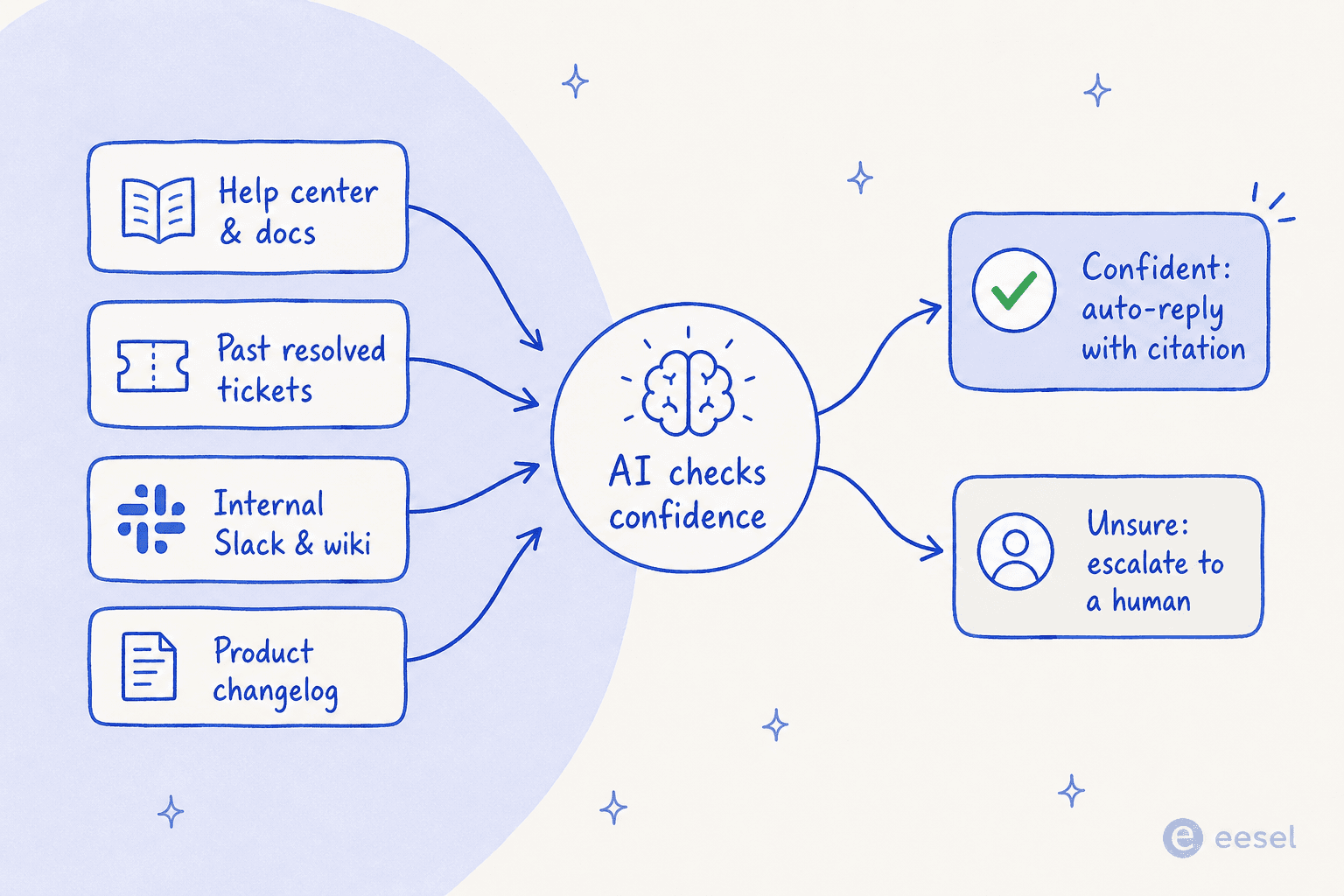
Two things fall out of this, and both matter for SaaS. It stops the AI answering technical questions from its general training data, which is where the invented-a-feature-that-does-not-exist hallucinations come from. And it turns a wrong answer into a visible knowledge gap: if the AI cannot find a grounded answer, that's your signal to write the missing doc, not a silent failure a customer discovers first. A rule-based chatbot can't do this, which is why decision-tree bots feel so brittle on real product questions.

The teams who get this right are the ones who accept a simple truth about scope. As one support lead put it:
"The AI will never be able to answer 100% of the questions. I need an AI who is only handling the tickets that it's confident to handle, and all the other ones, leave them alone."
A SaaS support lead
That's the whole game: high confidence where it's grounded, a clean handoff everywhere else.
Step 4: Set confidence-based routing and escalation
Grounding tells the AI what to say; routing tells it when to stop. You want the AI to auto-reply when it's confident and the answer is grounded, and to escalate to a human the moment it isn't, or the moment a ticket lands in one of your keep-human buckets from Step 1.
Good AI chat escalation is not just "send to inbox". It passes the full conversation, the customer's plan and account context, and the sources the AI already checked, so the human picks up mid-thread instead of asking the customer to repeat themselves. For a SaaS queue, wire the routing to your reality: bug reports to engineering triage, billing disputes to finance, enterprise accounts to their named CSM. Our ticket escalation guide covers the workflow patterns.
This is also where SaaS support quietly becomes a growth lever, not just a cost. One team we work with wanted the AI to flag tickets from newly-created accounts as likely-untrained users and route them into onboarding, and to spot high-effort tickets that belonged in a paid-services tier. Automating tier-1 frees your humans to do exactly that kind of expansion work.
Step 5: Simulate on your real past tickets before go-live
Do not launch by turning the AI on and watching live. Launch by running it, in private, against the last few thousand tickets you've already resolved. This is the step that turns "we think it's ready" into a number.
A good simulation replays your historical conversations through the AI and shows you what it would have said, so you can measure the real resolution rate, see exactly which tickets it would have gotten wrong, and forecast your cost before a single customer is involved. This matters doubly for SaaS, where a buyer at a European team we worked with was gated by an internal ISO security review and needed proof the AI answered only from approved knowledge before it went anywhere near production.

If the simulation says the AI resolves 45% of tier-1 cleanly and fumbles a specific topic, that's a gift: you patch the docs on that topic and re-run before anyone sees it. Tracking the right customer service metrics in that dry run is how you set an honest go-live target.
Step 6: Go live narrow, then expand
When you go live, keep the scope tight: one channel, the tier-1 topics you validated, full escalation on everything else. Watch the real numbers for a week or two, patch the gaps the live traffic surfaces, then widen the scope a topic at a time.
This is the arc where the payoff shows up. Gridwise, a mobility-data SaaS, saw the AI resolve 73% of their tier-1 requests in the first month, with results visible during a 7-day trial. And the softer win is real too. A customer success hire at Yellowdig described the experience like this:
"It feels like a partnership, rather than a vendor relationship. A new customer success hire joked that our eesel AI bot was their best friend during onboarding."
Jon Miron, Yellowdig

Across eesel's own base that pattern shows up at scale: roughly 183,000 interactions across 160 active accounts, most of it tier-1 that never touched a human.
Common mistakes I see
A few traps come up again and again on SaaS rollouts.
- Boiling the ocean. Automating every ticket type on day one guarantees a public wrong answer. Start with the validated tier-1 slice.
- Feeding it the marketing site and nothing else. If the AI can't read your past tickets and internal docs, it can't answer real questions. Connect everything (Step 2).
- No citations. An AI that answers technical questions without grounding will eventually invent a feature. Force the source link.
- Skipping the simulation. Going live blind means your customers run your QA. Run it on past tickets first.
- Treating pricing as an afterthought. Per-resolution, per-conversation, and per-ticket billing are genuinely different; at SaaS volume the gap is real money. Read the AI vs human cost math before you commit.
Try eesel for SaaS support
If you're automating a SaaS support queue, eesel AI is built for exactly this shape of problem. It plugs into your existing helpdesk (like Zendesk, Freshdesk, or Front), learns from your past tickets, docs, and Slack in minutes, and lets you simulate on your real ticket history so you know the resolution rate before go-live. Pricing is one fixed monthly price from $299/month for 500 credits (1 credit per ticket or chat) with no per-seat fee, sized to the volume you automate.

The thing that makes it fit SaaS specifically is the control: grounded answers with citations, confidence-based escalation, and a dry run against your own history so you never learn about a wrong answer from an angry customer.