What is Zendesk?
You've almost certainly heard the name Zendesk. They're a global leader in the customer service software industry, and a 2026 Gartner Magic Quadrant Leader. At its heart, Zendesk is a mature platform built to manage all your customer conversations in one spot. Think of it as mission control for your support team.
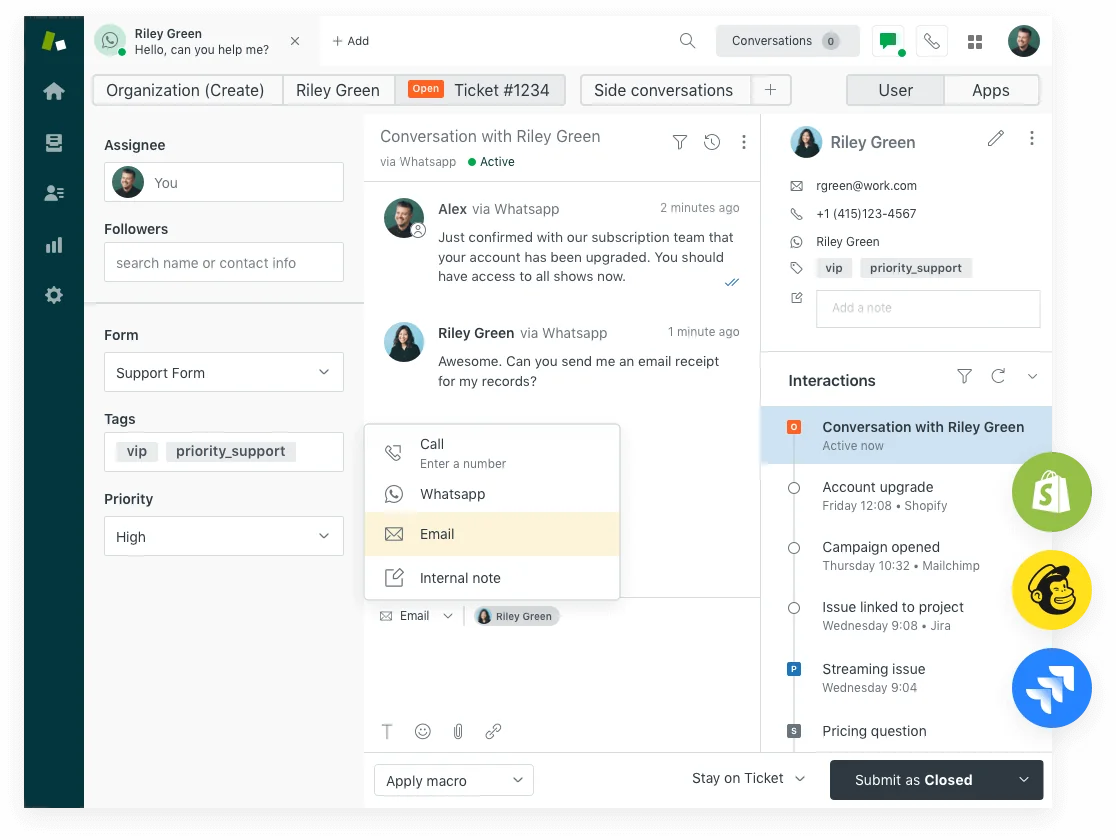
Its job is to take customer questions coming in from email, chat, phone, and social and turn them into organised tickets. That ticketing system helps teams track, manage, and solve problems consistently. In 2026 Zendesk markets the whole thing as a Resolution Platform, which is a useful tell: the product is now priced around resolutions, not just seats.

Zendesk Support pricing: the plans at a glance
All prices are per agent per month billed annually. Monthly billing is available but costs more.
| Plan | Price | Channels | AI Agents | Copilot |
|---|---|---|---|---|
| Support Team | $19/agent/mo | Email only | None | Add-on ($50) |
| Suite Team | $55/agent/mo | Email, chat, messaging, social, voice | Essential (bundled, sunset Dec 2026) | Add-on ($50) |
| Suite Professional | $115/agent/mo | All channels | Essential + AI writing tools, App Builder | Add-on ($50) |
| Suite Enterprise + Copilot | Contact sales | All channels + governance features | Advanced (full) | Included |
One thing the table does not show: the AI Agents Essential tier bundled into Suite plans is on a sunset path. As of May 11, 2026, it became a legacy offering - Zendesk replaced it with the Advanced AI Agent capabilities (from the Ultimate.ai acquisition). Essential gets retired December 31, 2026. Teams building on Essential now are building on a system that needs replacing within months.
What each plan actually includes
Zendesk has two product lines: Support (email and ticketing only) and Suite (omnichannel). Most teams shopping today land on one of the Suite tiers unless email-only ticketing genuinely covers their workflow.
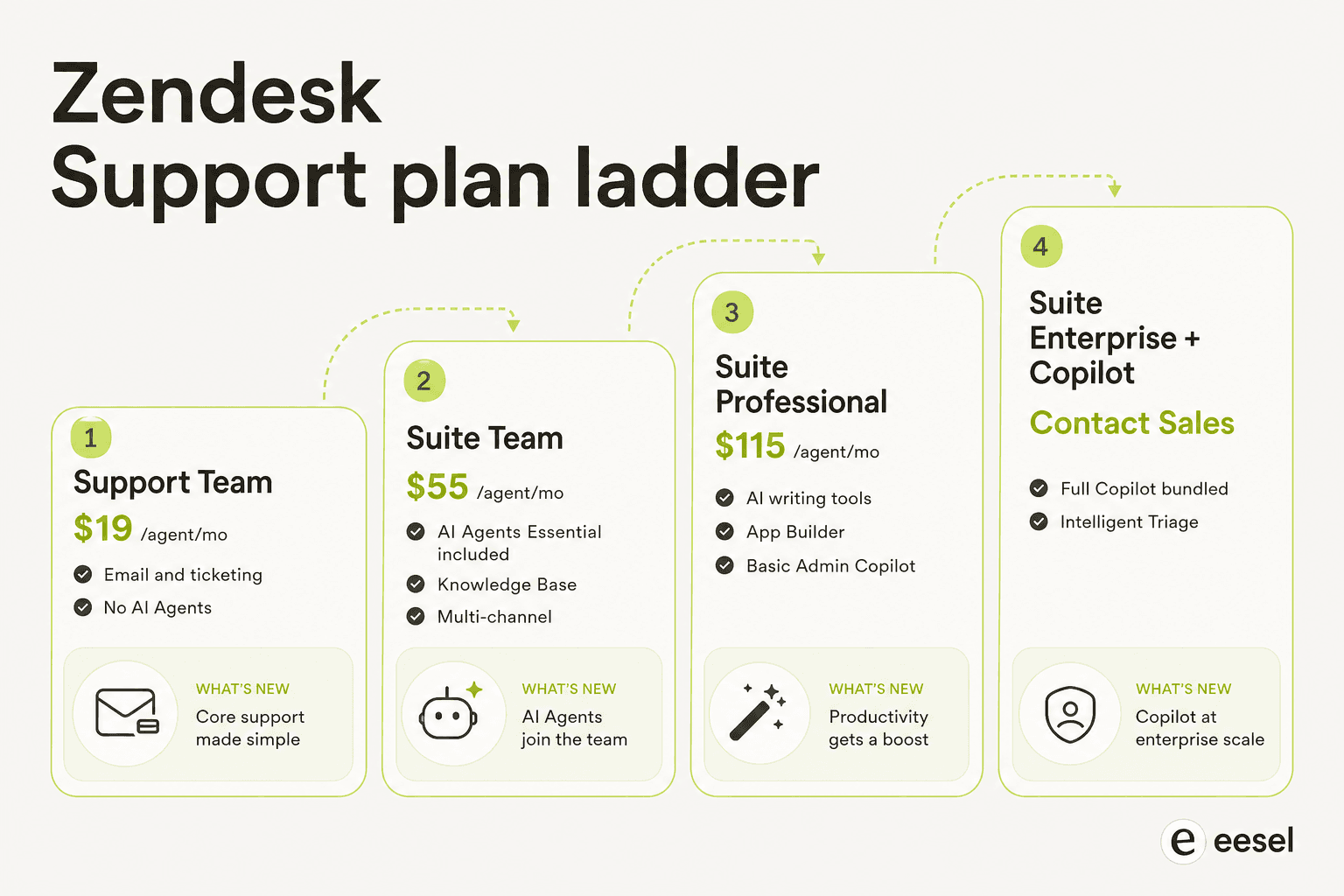
Support Team ($19/agent/month)
Entry-level ticketing: email, a help center, pre-built reporting, and the core Zendesk ticket workspace. No AI Agents, no live chat, no messaging channels. Right for teams currently running a shared inbox who want structured ticketing without the Suite overhead. Zendesk's free version does not exist as a permanent tier - Support Team at $19 is the floor outside the startup program.
Suite Team ($55/agent/month)
This is where multichannel support and the first AI features come in. Suite Team adds live chat, social messaging, web messaging via Zendesk Messenger, and voice. On the AI side you get AI Agents Essential, the Knowledge Base with AI-powered article suggestions, and the Action Builder for workflow automation.
The $55 price looks reasonable until you factor in what "AI Agents Essential" actually does: knowledge-base generative replies, no scripted dialogues, no authorized actions, no external API calls. r/Zendesk describes it as "doesn't feel like AI at all" - basically a routing layer with the word "AI" on the box. Teams that want real autonomous deflection will hit the $50/agent Copilot add-on wall within a few months.
Suite Professional ($115/agent/month)
The tier where most growing teams land. Professional adds the App Builder, AI writing tools for agents (expanding, tone shifting, summarizing), Quick Reports, CSAT measurement, and a basic Admin Copilot variant. You also unlock Zendesk's omnichannel routing at full configuration depth.
The AI Agents layer here is still the Essential tier - to unlock Advanced AI Agents with scripted conversation dialogues, authorized actions, and API integrations, you need to add Copilot or step up to Enterprise. See our breakdown of Advanced AI costs for the full picture. At $115/agent, this is an expensive plan to be on without actually getting the full AI capabilities.
A Capterra reviewer from December 2025 noted:
"Pricing can be expensive for small startups because some useful and more advance features are locked behind higher plans."
Ifra S., Zendesk Developer, Capterra, December 17 2025

Suite Enterprise + Copilot (contact sales)
Enterprise bundles full Copilot into the base subscription: Auto Assist, Admin Copilot, Intelligent Triage, and AutoQA. You also get sandbox environments, approval workflows, custom agent roles, generative AI for voice, and the full Advanced AI Agents experience. Pricing is bespoke; expect to start well above $150/agent/month.
For teams at Zendesk's SaaS and enterprise scale, Enterprise can make financial sense if Copilot and Advanced AI are both requirements - bundling removes two $50/agent add-ons from the math.
The AI layer: what it costs to unlock
The Zendesk marketing page frames it as an AI-first Resolution Platform. The practical reality is that the AI worth paying for sits behind add-on gates, on top of an already premium-priced suite.
AI Agents: Essential vs Advanced
Essential (bundled with Suite plans): generates replies from your knowledge base, handles messaging and email channels, counts billable automated resolutions. It cannot follow scripted conversation flows, call external APIs, or take autonomous actions in your connected systems. Think of it as a capable FAQ bot - and one that gets retired December 31, 2026.
Advanced (Ultimate.ai-derived, now rolling into all Suite and Support plans from May 2026 onward): builds conversation dialogues with branching logic, captures entities and intent, calls external APIs, and takes authorized actions - updating order status, cancelling subscriptions, updating ticket fields. Multi-LLM routing, 80+ language support, and PII sanitization are all part of the Advanced tier. See the full AI agents for support guide for a deeper look.
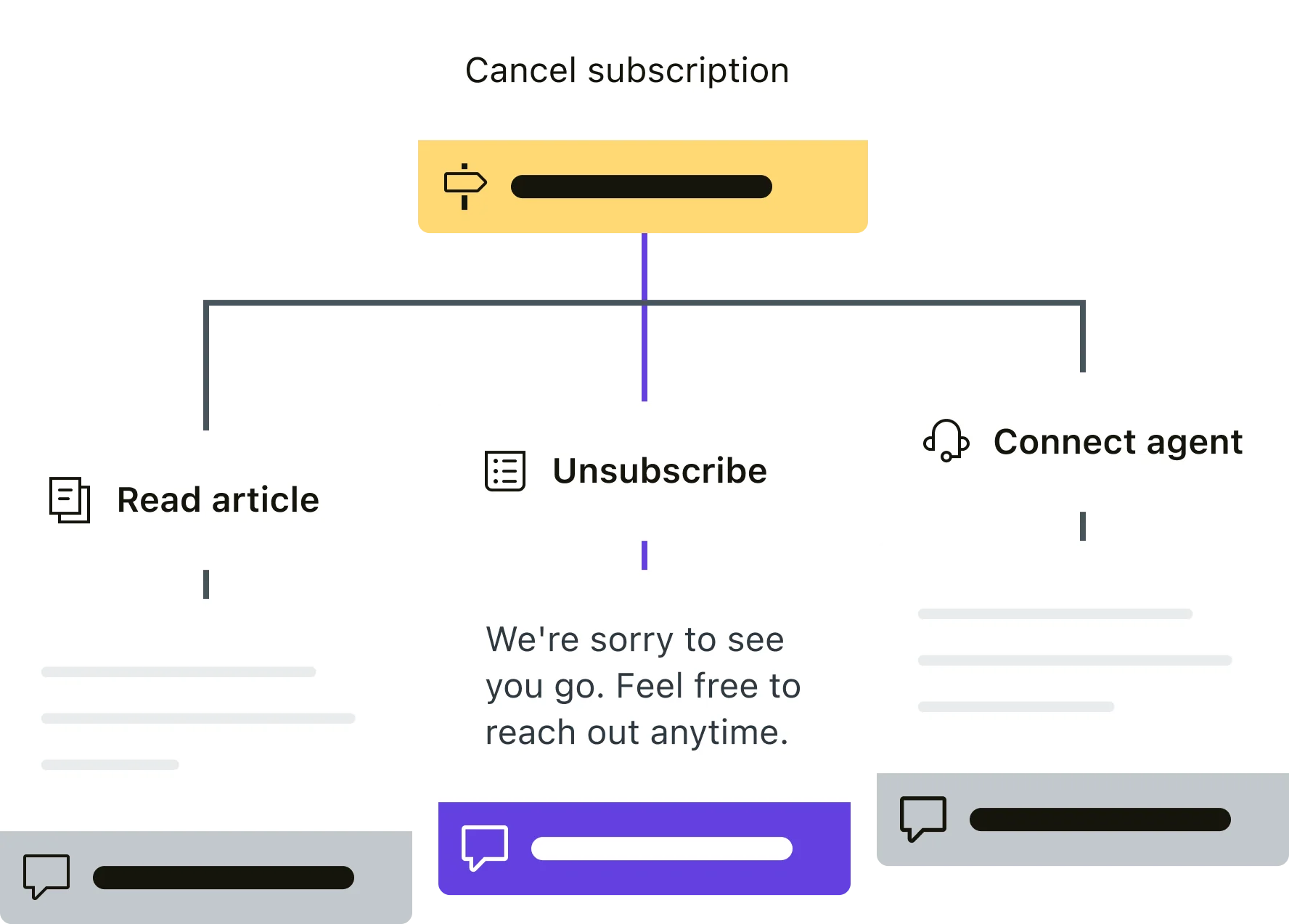
The dialogue builder is what teams use to script real deflection workflows. r/Zendesk describes it as "the most annoying interface in the world" - functional but requiring patience and technical knowledge. The Zendesk chatbot setup guide covers the configuration process.
The Copilot add-on ($50/agent/month)
Copilot is the agent-side AI - it works alongside human agents rather than replacing them. The add-on includes four components:
- Auto Assist: proactively drafts reply suggestions, proposes macros, and autonomously executes approved actions inside Zendesk and connected apps (Shopify, Jira, Slack)
- Intelligent Triage: auto-classifies every incoming ticket by intent, entity, sentiment, and language - the classification layer that powers smart routing and reporting
- Admin Copilot: surfaces improvements to automation macros, triggers, and knowledge gaps
- Analytics: AI-specific dashboards for deflection rates, copilot usage, and resolution outcomes
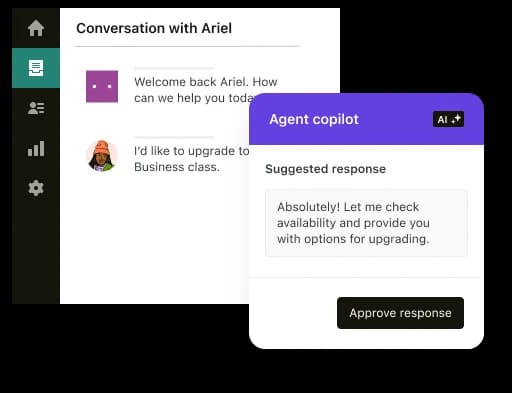
Copilot is available as an add-on for Suite Team and Professional. It is bundled into Enterprise. Whether it justifies the cost is openly contested on r/Zendesk - most threads end with teams evaluating Zendesk AI alternatives before committing. See the full Zendesk Copilot guide for the benefit-by-benefit breakdown.
At 10 agents: $500/month extra. At 50 agents: $2,500/month extra before any resolution volume.
Other featured add-ons
Two more $50/agent/month add-ons round out Zendesk's AI stack:
| Add-on | Contents |
|---|---|
| Workforce Engagement Bundle | Quality assurance + Workforce Management |
| Contact Center | Advanced telephony and contact center features |
Stack all three add-ons on top of Suite Professional and you are at $265/agent/month before a single automated resolution. The platform overview on Zendesk's site describes this as the "Resolution Platform" - the pricing structure makes it a resolution-billing platform.
How automated resolution billing works
The per-resolution billing model is the most important - and most-complained-about - pricing mechanic in 2026. Here is how it actually works.
An automated resolution is counted when the AI Agent responds to a conversation and the customer does not escalate to a human. Since May 18, 2026, Zendesk uses a three-tier model for whether that resolution is billable:
| Tier | What it means | Billable? |
|---|---|---|
| Assisted Escalation | AI collected context or routed the customer, but a human resolved it | No - free |
| Contained Resolution | AI responded; customer went quiet; LLM verification did NOT confirm satisfactory resolution | No - free |
| Verified Resolution | AI resolved the issue AND LLM verification confirmed the customer's problem was addressed | Yes - drawn from allowance |
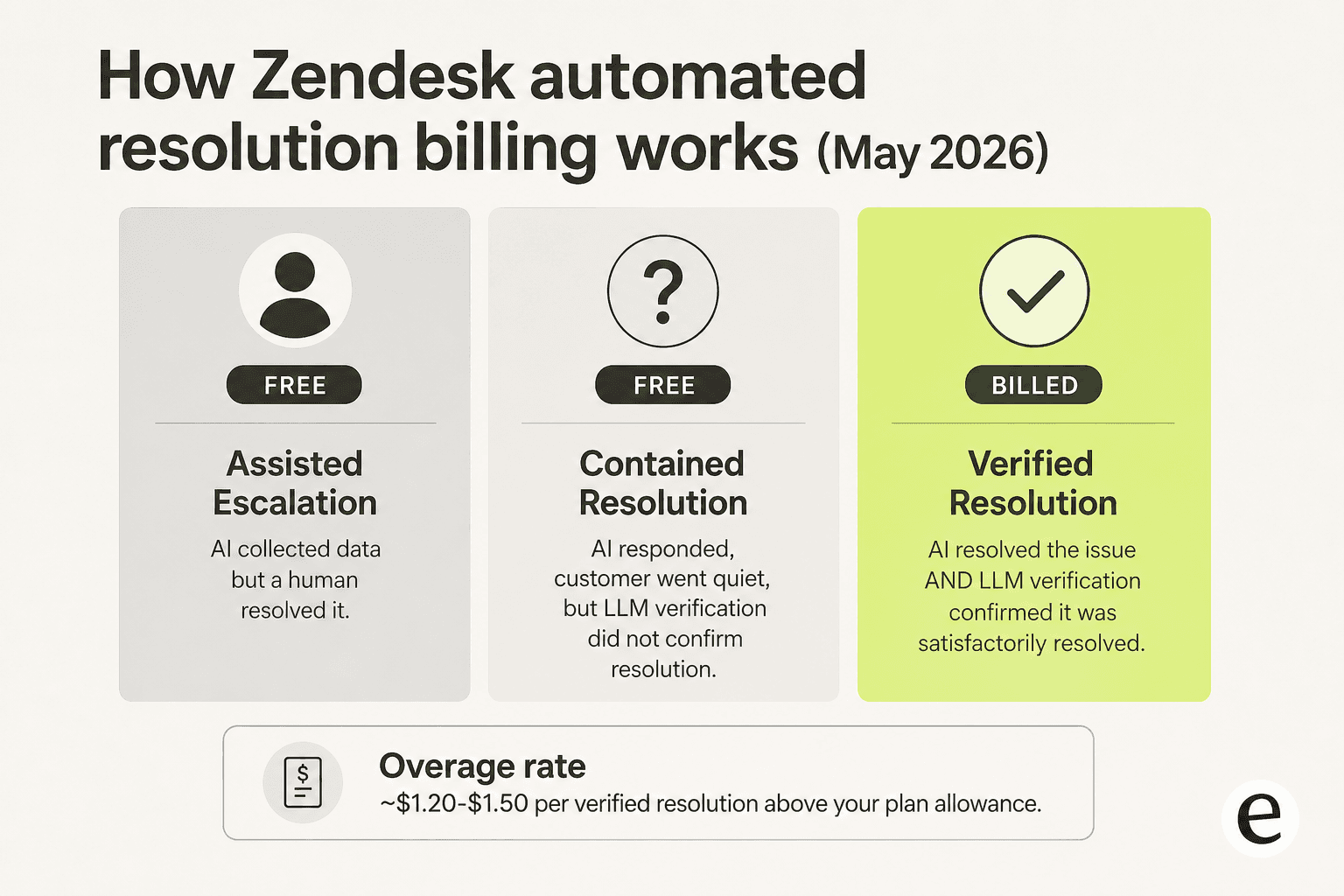
This is a real improvement over the pre-May model, where silence for 72 hours triggered billing regardless of whether anything was actually resolved. The community was explicit about the old approach:
"If a client just leaves a conversation, it doesn't mean that it is resolved. I'm surprised that you're going to charge $1.5 per such conversation."
Zendesk community commenter (April 2024), cited in About Automated Resolution Tiers - Zendesk Help
Under the new model, only confirmed, verified resolutions bill. The automated resolution overage rate runs approximately $1.20-$1.50 per verified conversation above your plan allocation, based on community analysis and independent testing. The Zendesk AI dynamic pricing page covers the mechanics in detail. Zendesk does not publish the official overage rate publicly - contract terms govern what you actually pay.
Plan allowances. Each plan ships with a baseline of automated resolutions per agent per month: roughly 5 for Team, 10 for Professional/Growth, 15 for Enterprise, under the pre-May 2026 figures. Zendesk has not published updated post-May allowances publicly. Pre-purchasing "committed usage" packs at a discounted per-resolution rate is available, but requires accurate volume forecasting to avoid either paying for unused packs or hitting overage rates instead.
No graceful cap. Zendesk's only overage control is pausing AI entirely. There is no soft-cap, no per-day throttle, no "finish current conversations but stop starting new ones." A seasonal spike can wipe out your monthly AR budget without prior warning. Use the Zendesk AI pricing calculator to model your exposure before committing. For a full walkthrough of the billing mechanics, our pay-per-resolution guide goes deep.
What a real Zendesk bill looks like
Abstract pricing is hard to feel. Here is what it looks like for two realistic team sizes.
10-agent team on Suite Professional + Copilot
| Line item | Monthly cost |
|---|---|
| Suite Professional base (10 x $115) | $1,150 |
| Copilot add-on (10 x $50) | $500 |
| AR overages (light volume, ~500 resolutions above allowance) | ~$600-$750 |
| Estimated total | ~$2,250-$2,400 |
That is roughly 2x the base subscription price once Copilot and a modest AR volume stack on top.
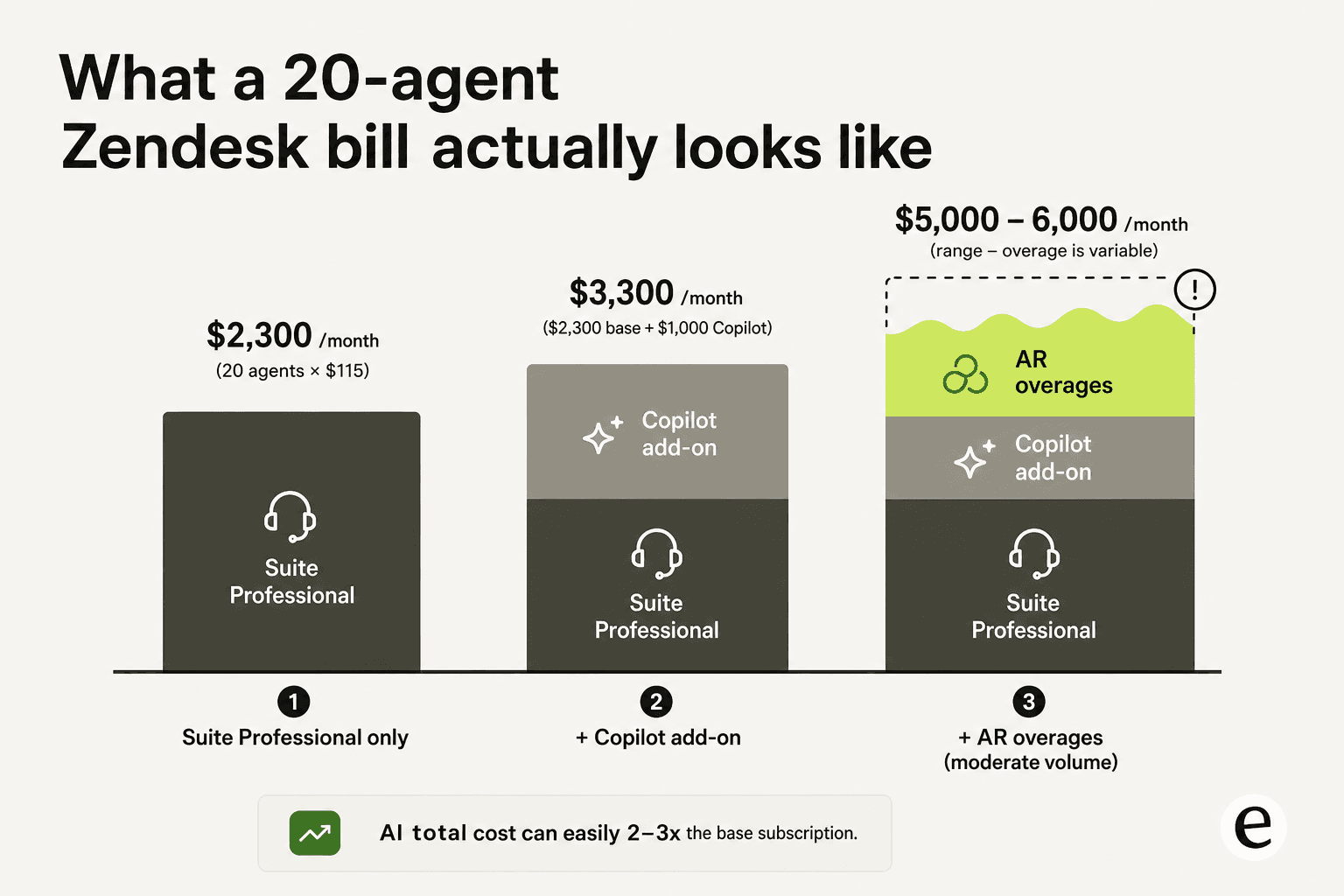
20-agent team on Suite Professional + Copilot, busy month
| Line item | Monthly cost |
|---|---|
| Suite Professional base (20 x $115) | $2,300 |
| Copilot add-on (20 x $50) | $1,000 |
| AR overages (busy month, ~1,500 resolutions above allowance) | ~$1,800-$2,250 |
| Estimated total | ~$5,100-$5,550 |
This is the scenario r/Zendesk documents repeatedly. At 20 agents with Copilot, you are paying $3,300/month on subscription and add-on alone. A November or December volume spike can push AR overages past $2,000 without prior warning:
"ARs are a rip off, and it's a rushed product to get into the AI hype."
u/OGShakey, r/Zendesk

Our guide on how much Zendesk costs walks through additional team-size scenarios if you want to model your specific setup.
The hidden cost factors that catch teams off guard
Knowledge base quality gates everything
AI Agents resolve well only on top of a clean, comprehensive knowledge base. Teams typically see around 20% automation in month one, scaling toward 70% only after sustained KB cleanup. AI Agents cannot browse external pages or follow links - every answer must live in the connected knowledge source. A sparse help center means a lot of resolution billing for conversations the AI partially engaged but could not close.
Zendesk AI agents reviews consistently surface this as the most common new-user complaint:
"The Co-Pilot stuff is decent, but we found its effectiveness really depends on having a perfectly curated Zendesk knowledge base, which... ours isn't, lol."
u/ToastBix, r/Zendesk
At ProductLab Conference 2025, a Zendesk-run live poll found only around 10% of AI agents built in the prior six months were still in active use. Building Zendesk AI that actually works takes months of KB maintenance, not a weekend setup.
Add-on configuration is a real time cost
A G2 reviewer from April 2026 put it plainly:
"Pricing is a bit of a con and setting up add ons can add more to it and could feel like a full time job in the backend."
Vibhore S., Logistics Lead, Health/Wellness, Capterra, April 10 2026
Configuring Copilot, Advanced AI Agents dialogue flows, and Intelligent Triage routing is not a one-week project. The G2 aggregate score is 4.3/5 from 6,837 reviews - users consistently praise the agent-side experience while flagging admin configuration as "burdensome." That admin overhead is real cost even if it does not appear on the invoice. Our Zendesk review covers the UX strengths and gaps in full.
Zendesk's own AI support quality
One December 2025 Capterra review from a Senior Director of Consumer Support put it most pointedly:
"The area that Zendesk needs to focus on is their own support. With their push to move to AI services, they have a very low bar with their own. First of all, you have to navigate the AI chat that never, and I mean NEVER gets what I'm asking. Then, there is a long wait to speak to a human. Very often, they don't ask clarifying questions and provide a link to an irrelevant article... As the leader of my support team, I would never pay for AI tools that provided this level of support."
Melony Y., Senior Director of Consumer Support, Consumer Services, Capterra, December 16 2025
That is a fair challenge to put to any vendor pitching AI for customer support. Using the product's own AI support is the fastest test of whether you trust it for your customers.
Volume spikes with no spending ceiling
Seasonal retail peaks, a product outage, a viral complaint thread - any event that spikes ticket volume pushes AR billing up with it, with no ceiling. The only protection Zendesk offers is pausing AI entirely, which disables everything rather than gracefully throttling. Teams with variable or seasonal volume are structurally exposed to this risk.
Is Zendesk worth it for your team?
The Zendesk platform at $55/agent/month for Suite Team is a solid multi-channel support foundation. The ticketing system, views, automation macros, integrations, and omnichannel routing are mature and genuinely reliable. Zendesk's 1,800+ Marketplace apps, named 2025 Gartner Magic Quadrant Leader status, and 4.4/5 on 4,079 Capterra reviews are real. When the platform fits, it fits well.
The value story gets harder above Suite Professional. At $115/agent with Copilot on top, you are at $165/agent/month minimum before any AR volume. That is expensive relative to alternatives, and the configuration overhead is real even before the invoice.
Three situations where Zendesk pricing is hardest to justify:
- Small teams. The learning curve is steep, the KB-dependency is real, and the per-seat cost is high for under-20-agent setups.
- Variable or seasonal volume. Spikes plus AR billing plus no graceful cap is a risky combination for any business with December surges or unpredictable ticket patterns.
- Teams without a maintained knowledge base. The AI will not perform without one, but you will still pay for the attempts.
The Zendesk pros and cons breakdown and our Zendesk alternatives roundup are the best starting point if you are still weighing the decision. For the AI cost question specifically, our free Zendesk AI alternatives guide covers third-party options in the Zendesk Marketplace that sidestep the resolution billing model. If you are comparing Zendesk with Freshdesk directly, the Zendesk vs Freshdesk post has the detailed comparison.
Try eesel on Zendesk
If the per-resolution billing model is a problem for your team, eesel connects natively to Zendesk and starts at $299/month for 500 credits, with 1 credit per ticket or chat - not per resolution, not per seat, not per conversation turn. That means seasonal spikes do not create surprise invoices, and you know what AI support costs before a single ticket arrives.
eesel learns from your existing Zendesk tickets, help center articles, and macros with no data labeling and no manual training. Setup takes under 30 minutes. Smava uses it to process over 100,000 Zendesk support tickets per month in German. Ecosa resolved 75% of their tier 1 Zendesk tickets in the first month, integrating in under an hour.
"In the first month, eesel is resolving 73% of our tier 1 requests. eesel offers easy Zendesk implementation and setup. Our team implemented and achieved results quickly during our 7-day trial. Responses are simple to fix and adjust. The platform even includes automations for ticket tagging, assignment, and status updates!"
Kim Simpson, Gridwise, eesel.ai/integrations/zendesk
Try eesel free - no credit card required - at eesel.ai/integrations/zendesk, or book a 30-minute demo to see it handle your actual ticket types first.
Frequently Asked Questions
How much does Zendesk cost per month in 2026?
What is an automated resolution in Zendesk?
Is the Zendesk Copilot add-on worth it?
Does Zendesk have a free plan?
What is the cheapest way to add AI to Zendesk?


Article by
Riellvriany Indriawan
Riell is a designer and writer at eesel AI with about two years of experience researching CX platforms, AI chatbots, and helpdesk software. She combines her design background with a sharp eye for how these tools actually look and feel in practice — making her comparisons unusually visual and user-focused.