So what is loop engineering, exactly?
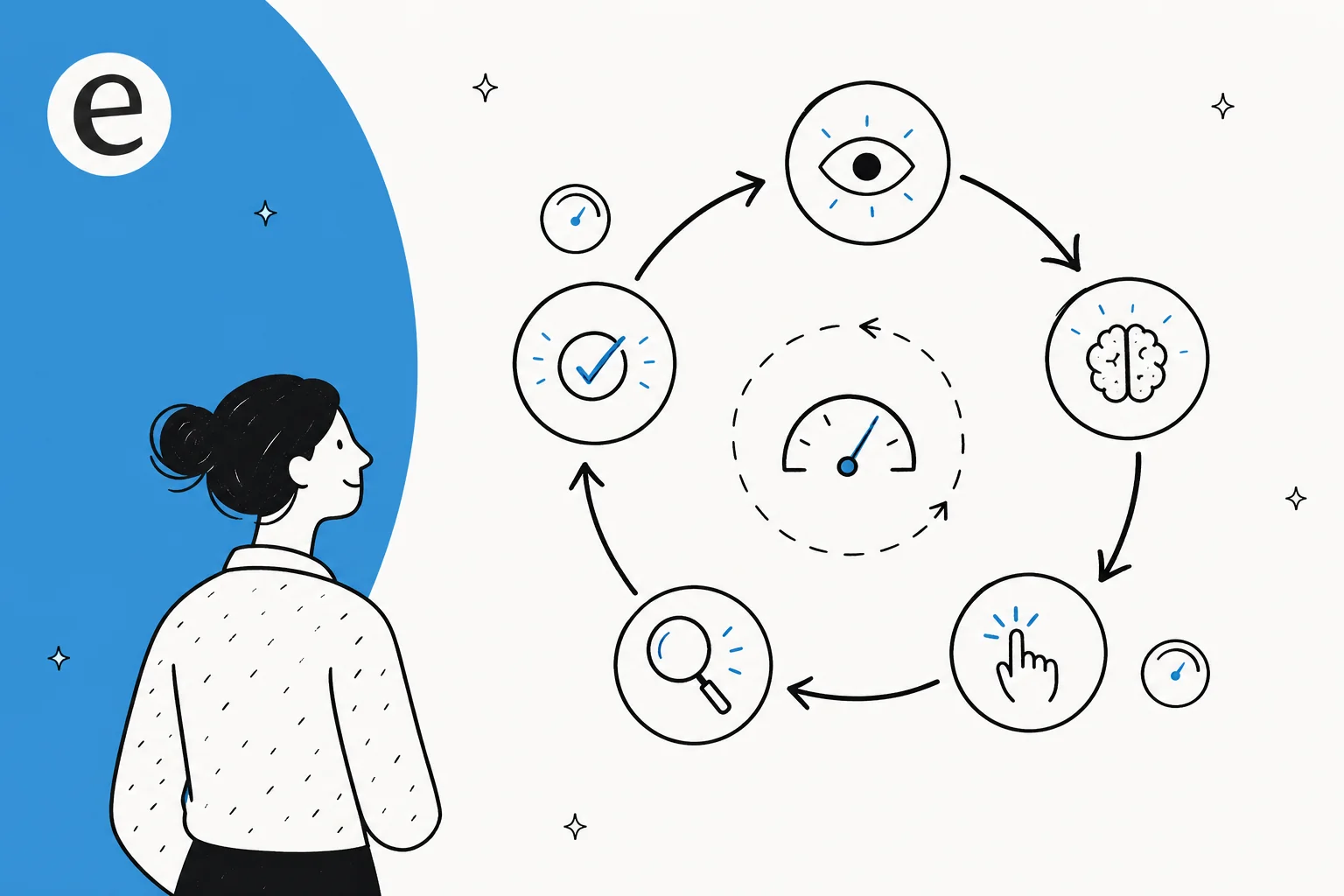
Start with the thing being engineered. An AI agent, stripped to its essence, is "an LLM in a while loop with tools." It takes in some input, the model reasons about what to do, it calls a tool, it looks at the result, and it goes around again until the task is done or it hits a limit. That cycle is the AI agent loop, and it's the one feature that separates an agent from a chatbot: a chatbot answers in a single pass, an agent persists and adapts across many steps.
Loop engineering is the discipline of making that loop reliable. As Simon Willison put it when he named the practice:
"My preferred definition of an LLM agent is something that runs tools in a loop to achieve a goal. The art of using them well is to carefully design the tools and loop for them to use."
Simon Willison, Designing agentic loops (September 2025)
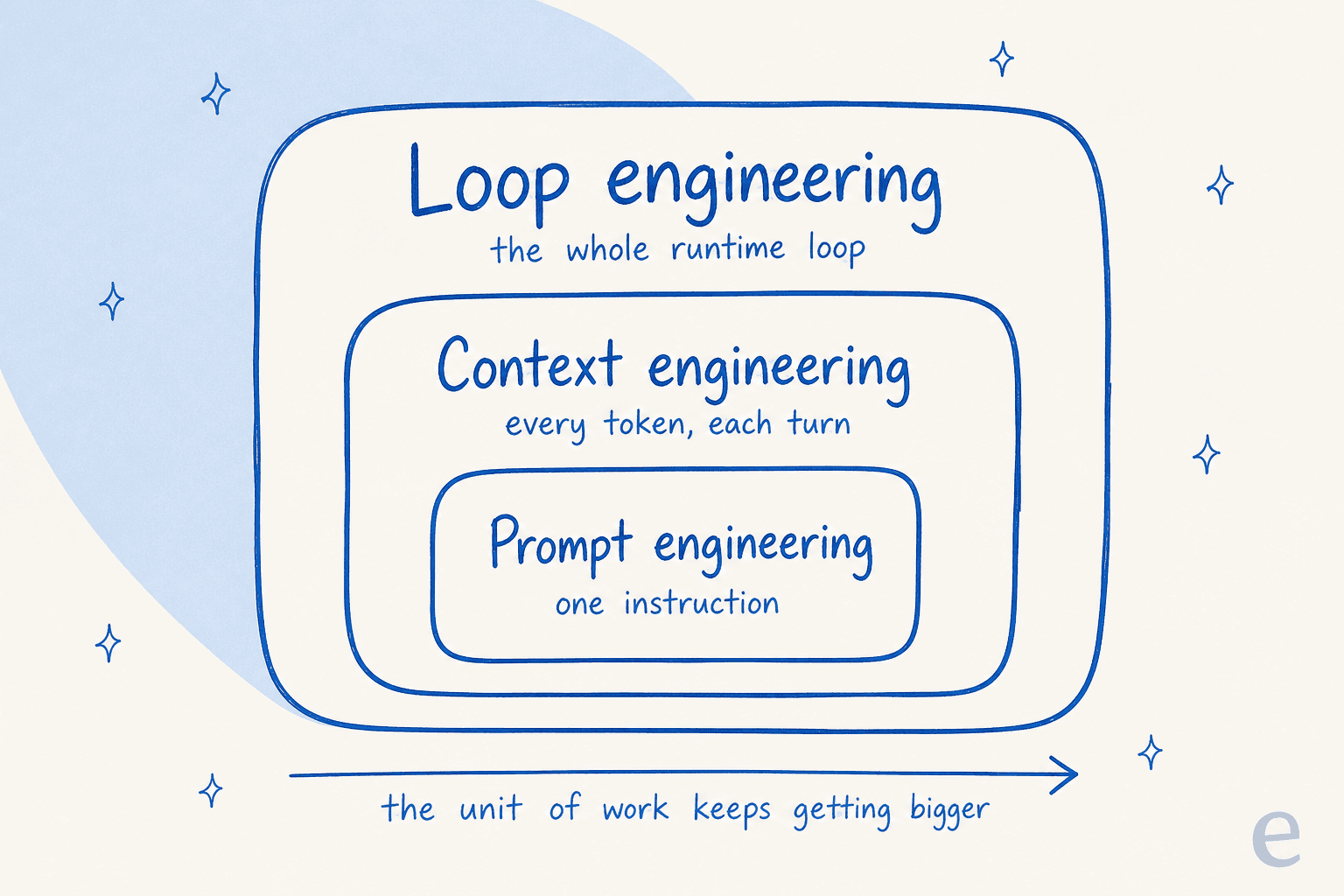
The clearest way to see where it fits is to look at how the craft has grown in layers. Prompt engineering came first: write one good instruction. Then context engineering: curate the whole set of tokens the model sees on each turn, not just the prompt. Loop engineering sits on top of both, it designs the runtime system around the model.
Anthropic frames the middle layer as "the natural progression of prompt engineering," and the same logic carries up one more step:
"An agent running in a loop generates more and more data that could be relevant for the next turn of inference, and this information must be cyclically refined."
So the relationship isn't competitive, it's nested. Prompt engineering optimizes a single call. Context engineering optimizes the state the model sees each turn. Loop engineering optimizes the machinery that decides whether the agent ever reaches a good state at all. If you've read our prompt engineering explainer, this is the next floor up.
Why the loop became the lever, not the prompt
For most of 2023 and 2024, the smartest thing you could do was learn to talk to the model. That worked because models answered in one shot. The moment they started running in loops, calling tools, and acting over many steps, the prompt stopped being the bottleneck. The thing most likely to break an agent now isn't a badly-worded instruction, it's a loop with no off-switch, no memory strategy, or no way to check its own work.
Solomon Hykes, the founder of Docker, captured the danger in one line that the whole field now quotes:
"An AI agent is an LLM wrecking its environment in a loop."
Solomon Hykes, via Simon Willison (AI Engineer World's Fair, June 2025)
That's the reframe. A more powerful model in a badly-designed loop is more dangerous, not less, because it executes its bad ideas more competently. The practitioner crowd worked this out fast. On Hacker News, one of the most-upvoted submissions on the topic is titled, flatly, "The canonical agent architecture: a while loop with tools," and another popular thread on the unreasonable effectiveness of an LLM agent loop is full of people surprised by how well a simple loop performs once the scaffolding around it is right.
LangChain put a clean equation on it: Agent = Model + Harness.
"Harness engineering is how we build systems around models to turn them into work engines. The model contains the intelligence and the harness makes that intelligence useful."
Call it loop engineering, harness engineering, or agentic coding (the labels are still settling), the idea is the same: if you're not the model, you're the loop, and the loop is where the engineering now lives.
The five levers of a well-engineered loop
Read across the people defining this field, Willison, Anthropic, LangChain, Thoughtworks, and the loop decomposes into the same handful of levers every time. These are the dials you actually turn.
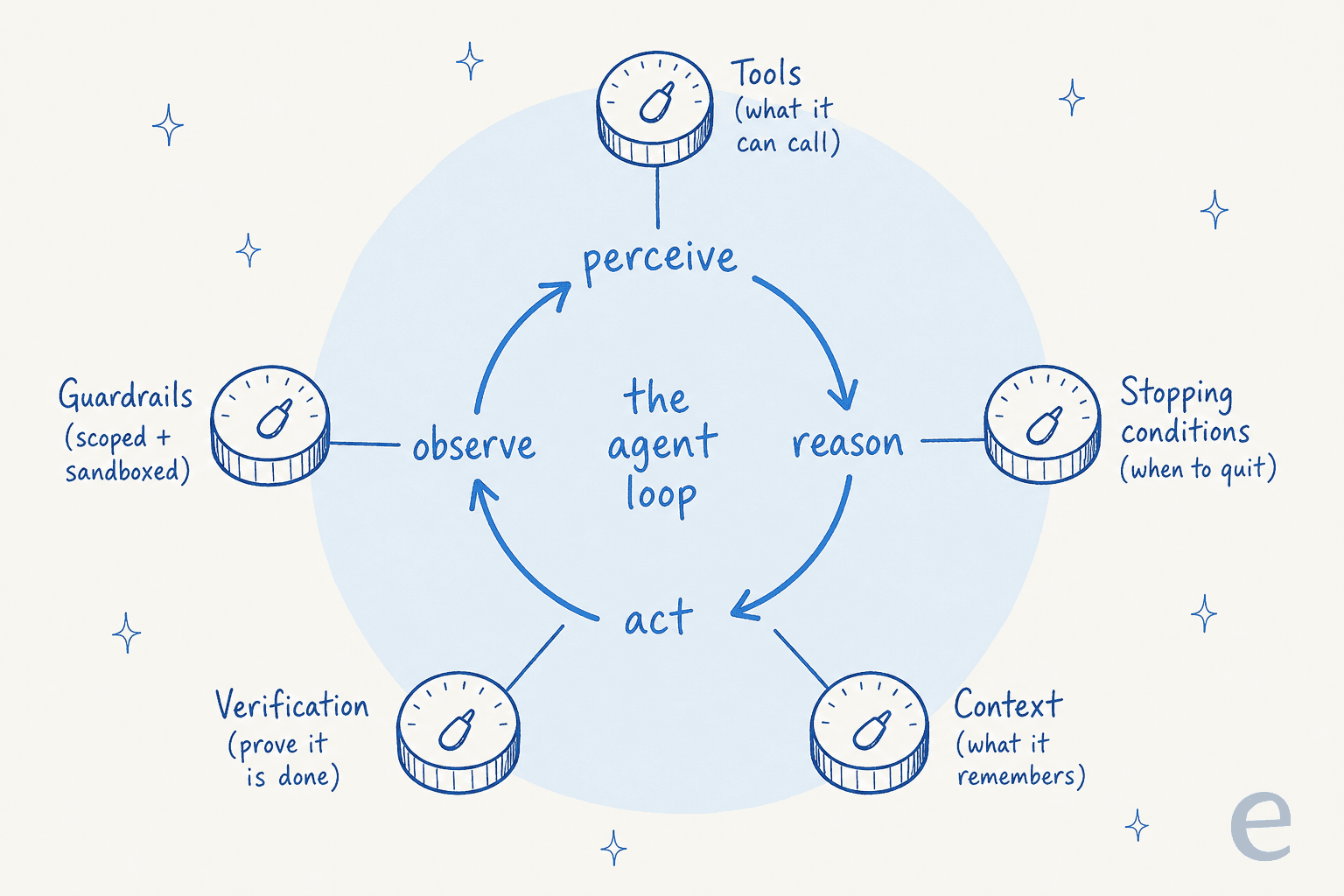
- Tools (the agent-computer interface). What the agent can actually do. Anthropic spent more time optimizing tools than the prompt on their SWE-bench work, and coined the term ACI (agent-computer interface) as the agent's equivalent of a UI. Willison prefers plain shell commands for coding agents because "coding agents are really good at running shell commands."
- Stopping conditions. When the loop is allowed to quit, on success, on a max-iteration cap, on a budget limit, or when it detects it's making no progress. A loop with no termination logic either declares victory early or never stops. Anthropic: "it's also common to include stopping conditions (such as a maximum number of iterations) to maintain control."
- Context management. What survives across turns. The techniques here are compaction (summarize and restart near the window limit), note-taking (a
NOTES.mdthe agent keeps outside its context), and sub-agents that each burn tens of thousands of tokens but return a tight 1,000 to 2,000 token summary. The reason it matters: recall degrades as the token count grows, so you have to actively curate (see our note on context window size). - Verification. How the loop proves it actually did the thing. This is the single most-repeated lever. Willison says a coding agent's value "is massively amplified by a good, cleanly passing test suite." Anthropic's harness for long-running agents uses a JSON feature list of 200+ end-to-end features, each marked
passes: false, so the agent can't mark a feature done without proving it. - Guardrails. What stops the loop doing harm. Sandboxes, tightly scoped credentials, and budgets. Willison gave Claude Code its own Fly.io org with a $5 budget so a runaway loop couldn't spend real money.
When an agent misbehaves, the fix is almost always one of these five, not a reworded prompt. Here's the quick diagnostic I reach for:
Loop engineering, but for customer support
Here's the part most coding-focused coverage misses. The clearest real-world version of a loop engineer's job isn't building a coding CLI, it's running an AI agent on a live support queue, and I say that as someone who builds these agents for a living.
A support ticket is a near-perfect loop. The agent perceives the incoming message, reasons about intent, retrieves what it needs (order history, docs, account state), takes an action (a refund, a reset, a ticket update), verifies the result, and then either resolves or hands off. Anthropic singles out support as "a natural fit for more open-ended agents" precisely because the work needs both conversation and action, with success that "can be clearly measured through user-defined resolutions."
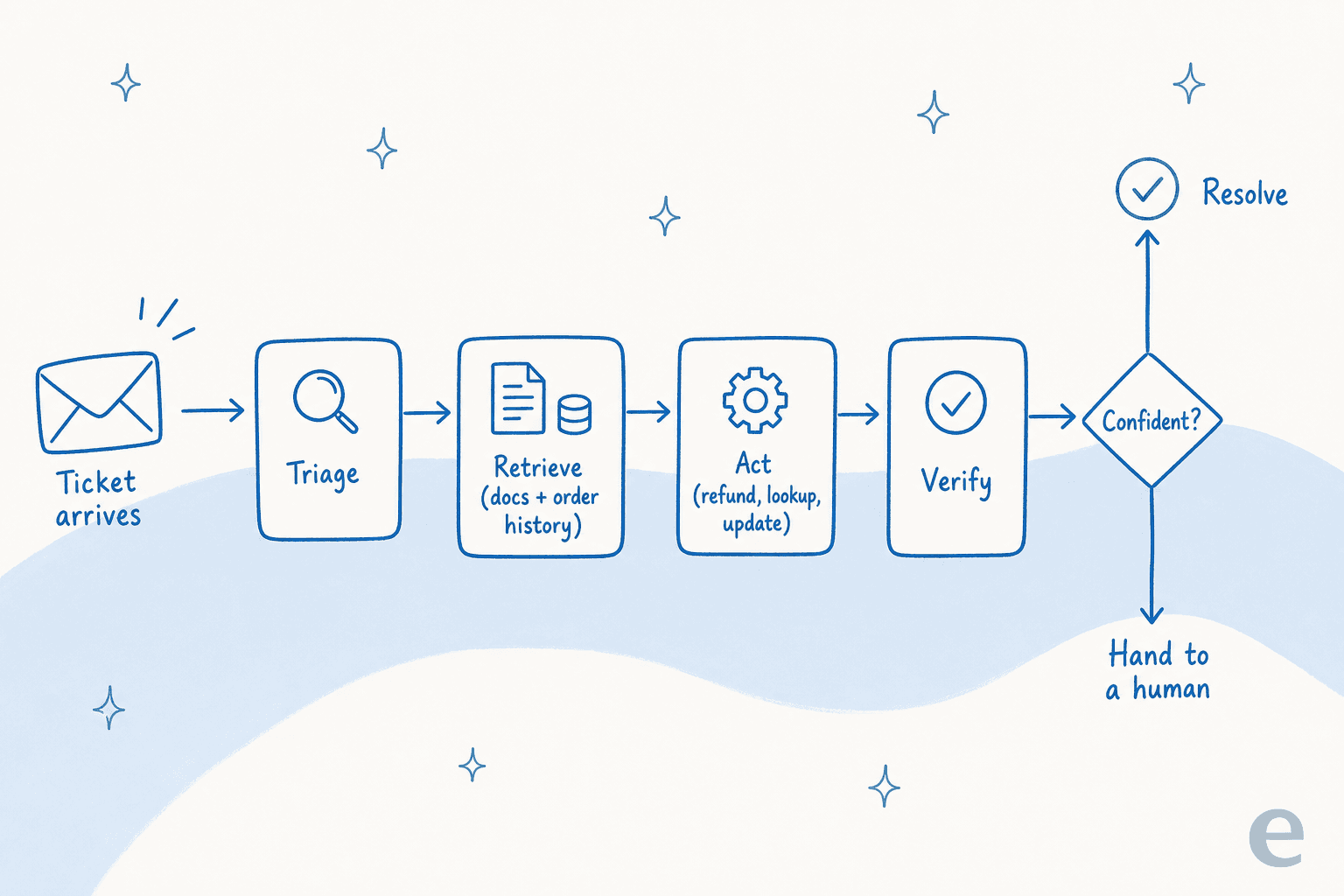
And every one of the five levers maps onto a support decision that buyers care about more than they realise. We've spent the last three-plus years putting AI agents on live support queues, and the thing that decides whether a rollout works is never the cleverness of the prompt. It's the loop. The sharpest version of this I've heard came from a CX lead at a DTC supplements brand on Gorgias and Shopify, running about 7,000 tickets a month, who told us on a call:
"The AI will never be able to answer 100% of the questions... I need an AI who is only handling the tickets that it's confident to handle and all the other ones, leave them alone."
That is a loop-engineering requirement in plain English. "Only handle what you're confident about" is a stopping condition and a guardrail fused together, and it was the single feature that decided their buying decision. A bot that tries to answer everything looks impressive in a demo and quietly torches trust in production. This is the same failure mode behind most AI chatbot problems: no confidence gate, so it answers when it shouldn't. It's also the line between a real agent and a rule-based chatbot, which can't make that judgment at all.
The verification lever has an exact support analogue too. In coding, you verify with a test suite. In support, you verify by simulating the agent against your own past tickets before it ever touches a customer, watching what it would have said, where coverage is thin, and what it gets wrong. That's the support-world equivalent of Anthropic's "200 features, all passes: false" discipline, and it's why we built simulation into eesel's helpdesk agent rather than asking teams to find out live.
The numbers back up why the engineering matters. In a 2026 benchmark report, Notch puts legacy chatbots at 10 to 25% resolution and agentic platforms (the ones that "connect directly to CRM, billing, and claims systems and execute") at 70 to 85% end-to-end resolution. The gap isn't model quality, every tier can call the same frontier models. The gap is whether someone engineered the loop around them. The report's sharpest line is a buying tip: the honest question to ask a vendor is "not what their resolution rate is, but what they count as resolved."
| Loop lever | In a coding agent | In a support agent |
|---|---|---|
| Tools | Shell, file edits, tests | Refunds, lookups, ticket updates, KB search |
| Stopping condition | Task done / max iterations | Confidence threshold, then hand off |
| Context | Compaction, NOTES.md, sub-agents | Past tickets, help docs, account state |
| Verification | Cleanly passing test suite | Simulation against historical tickets |
| Guardrails | Sandbox, scoped creds, $5 budget | Ticket-type exclusions, action scoping, human-in-the-loop |
You can also tune that loop in plain language instead of code, which is the part that makes loop engineering accessible to a support team rather than only to engineers.

Build the loop yourself, or use one that's already built
Once you see support automation as loop engineering, the build-versus-buy question gets clearer. You can build the loop yourself on the raw Claude or OpenAI API, plenty of technical teams do, and the Claude Code best practices write-ups are a genuinely good place to learn the craft. But the harness is the hard part, and it's the part you have to keep maintaining. Anthropic's own long-running-agent work involved a 200-plus feature verification list, sub-agent orchestration, and compaction logic, and that's just to keep a coding agent on track. A production support loop adds confidence routing, multilingual handling, per-ticket-type rules, and clean human handoff on top.
One engineering lead at a crypto-hardware company, running a 300-plus article knowledge base, summed up the calculus after choosing to buy:
"We could try to write our own LLM application but we didn't want to invest our time into that. We wanted something that we would not have to maintain."
Karel, engineering lead at GENERAL BYTES (eesel customer)
That's the real trade. The loop is now the product, so the question is whether you want to be the one engineering and maintaining it, or whether you'd rather buy a loop that's already engineered for the support case. If you're evaluating the latter, our best AI helpdesk software roundup, the field of AI agent examples, and our pick of the best AI agents are a good map of who's done that engineering and how well.
Try eesel
eesel AI is, in the framing of this whole post, a loop that's already engineered for support. You plug it into your helpdesk (Zendesk, Freshdesk, Gorgias, Help Scout, and 100+ more), and it learns from your past tickets and docs on day one. The five levers come pre-built for the support case: simulation against your historical tickets is the verification step, confidence-based routing is the stopping condition, and scoped actions plus ticket-type exclusions are the guardrails, all configurable in plain language rather than code.

That's why a team like Gridwise saw eesel resolve 73% of tier-1 requests in the first month, with the loop running supervised first and earning autonomy as the simulation proved it safe. You get the engineered loop, and the verification to trust it, without standing up and maintaining your own. You can start free and simulate it against your own ticket history before a single customer sees it.
Frequently asked questions
What is loop engineering in AI?
How is loop engineering different from prompt engineering?
What are the parts of an AI agent loop?
Do I need to learn loop engineering to use an AI support agent?
Is loop engineering the same as vibe coding?


Article by
Alicia Kirana Utomo
Kira is a writer at eesel AI with a Computer Science background and over a year of hands-on experience evaluating AI-powered customer service tools. She focuses on breaking down how helpdesk platforms and AI agents actually work so that support teams can make better buying decisions.