


What is IBM Granite 4.2?
Granite is IBM's family of open models for business, and 4.2 is the reasoning-focused release. It landed as three checkpoints, granite-4.2-3b, granite-4.2-8b, and granite-4.2-30b, each post-trained from the matching Granite 4.1 base model. Alongside them IBM also released two tiny Granite Speech 5.0 transcription models, but the "4.2" name really refers to these three language models.
I have spent the last few years putting AI on live support queues, and the thing I look at first with any new open model is not the top-line benchmark, it is the license and the deployment story. Granite scores well here: the weights are Apache 2.0, the models are cryptographically signed and ISO certified, and the family earned a top rating on Stanford's Foundation Model Transparency Index. For a regulated team that needs to run the model inside its own walls, that combination matters more than a couple of benchmark points.
The pitch IBM is making is "competitive with larger thinking models, at a fraction of the cost". That is the interesting bet, and it is worth checking rather than repeating, so let us look at the actual lineup.
The model lineup: 3B, 8B, and 30B
Here is how the three sizes compare on the specs that decide where each one can run. All three are dense decoder-only transformers, so the parameter count you see is the full model, there is no mixture-of-experts trick hiding a smaller active size.
| Model | Parameters | Layers | Context | Base model | Best for |
|---|---|---|---|---|---|
| granite-4.2-3b | 3B (dense) | 40 | 128K | granite-4.1-3b-base | Laptops and edge, fast simple tasks |
| granite-4.2-8b | 8B (dense) | 40 | 128K | granite-4.1-8b-base | General-purpose enterprise work |
| granite-4.2-30b | 30B (dense) | 64 | 128K (512K extended) | granite-4.1-30b-base | Complex reasoning and agents |
Every size natively handles a 128K token context window, and the 30B can be stretched to 512K. IBM also ships official quantized builds of each size (fp8, mxfp4, nvfp4) that shrink the memory footprint, plus community GGUF conversions for llama.cpp and LM Studio. If you want a safety layer, the model cards point you at the separate Granite Guardian 4.1 8B for risk detection.
The hardest part for most people is just picking a size. Here is a quick guide based on what you are optimising for.
What's actually new: native reasoning you can toggle
The real story of 4.2 is that reasoning is now baked in. Earlier Granite models answered you directly, 4.2 can first work through a problem inside <think>...</think> tags before it commits to an answer, which helps with math, coding, and any multi-step logic. What makes it practical is that IBM made the reasoning switchable in a single model, so you are not maintaining separate "reasoning" and "chat" checkpoints.
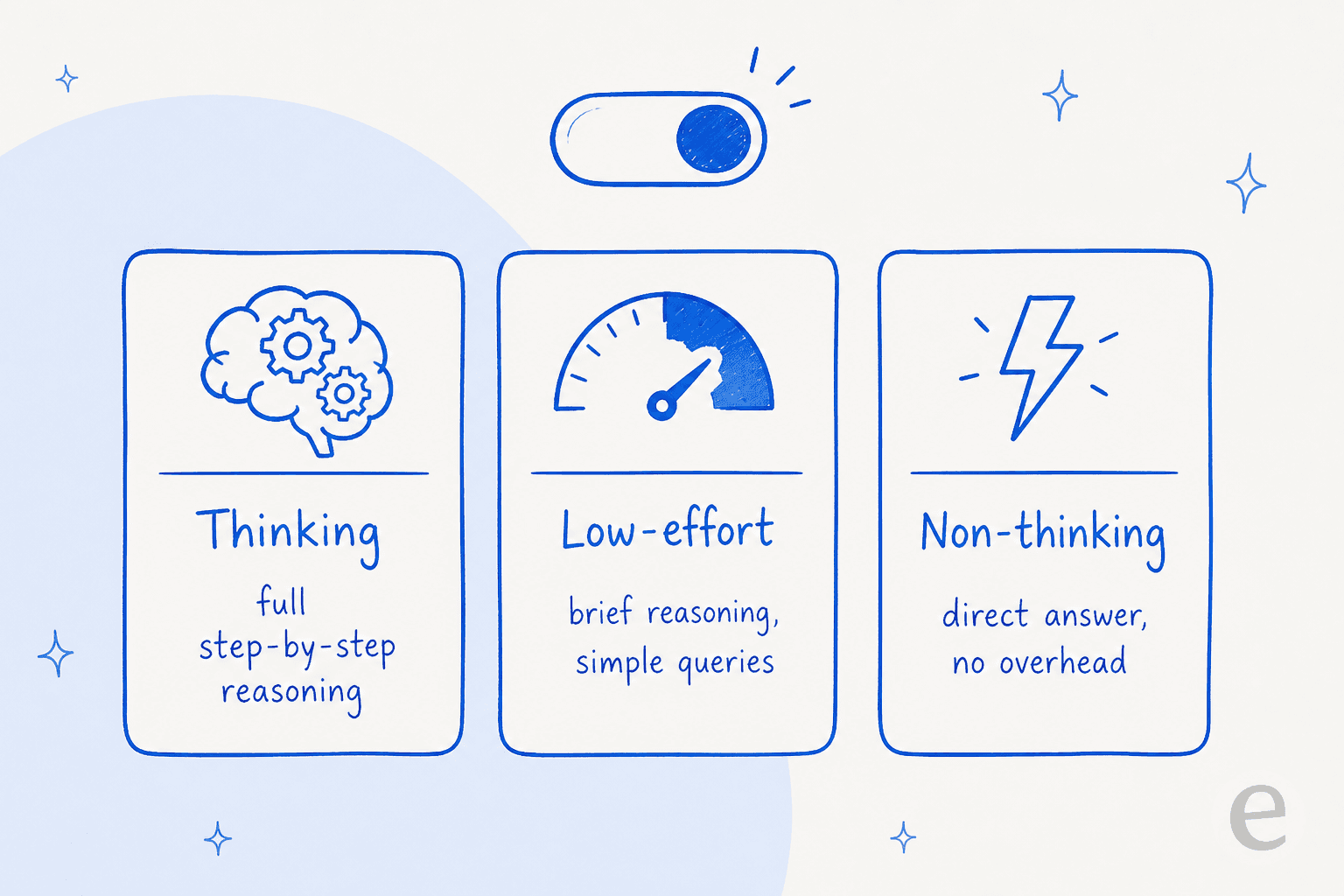
There are three modes, and picking the right one is mostly a cost decision:
- Thinking (the default): full chain-of-thought. Best for hard reasoning, worst for latency and token spend.
- Low-effort: a brief reasoning pass for simpler queries, a middle ground that keeps some of the accuracy without the full overhead.
- Non-thinking: a direct answer with no reasoning tokens at all, for when you just need speed.
In Ollama you flip between them with /set think and /set nothink. This is genuinely useful in production, because "always reason" is expensive and "never reason" is dumb, and most real workloads want to mix the two depending on the query. If you have ever tuned a support bot, this is the same tradeoff as deciding when to escalate versus auto-answer.
Reasoning-augmented tool calling
The other upgrade, and the one IBM clearly cares about most, is tool calling. Granite 4.2 was trained to reason about which tool to call and why before it makes the call, rather than pattern-matching a function name. In practice that means the model plans, calls a tool, checks the result, and can self-correct.
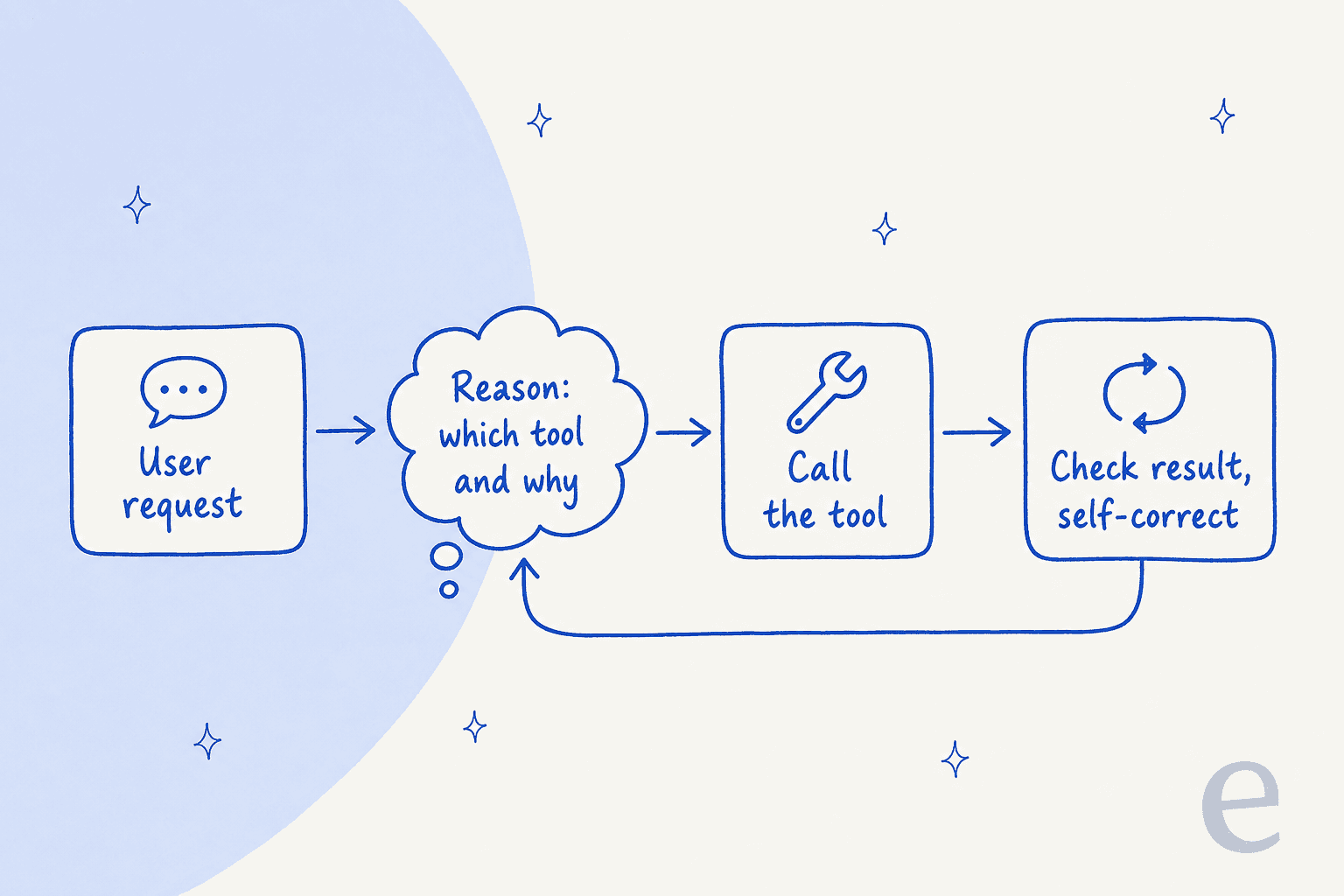
It exposes an OpenAI-compatible API and works out of the box with agentic coding harnesses like OpenCode, Pi, and OpenHands, and it is optimised for vLLM (v0.20+) and SGLang for serving. This is the part that makes 4.2 feel aimed squarely at the AI agent crowd rather than at chatbots. It is also worth being clear-eyed: reliable tool calling in a demo is not the same as reliable tool calling against your messy production systems, which is exactly why we simulate every rollout against real historical data before it touches a live customer.
Dense, not hybrid: the change from Granite 4.0
This is a nuance that trips people up, so it is worth a paragraph. Granite 4.0 used a hybrid Mamba-2/transformer architecture with a mixture-of-experts (MoE) layer, which IBM pitched for its lower memory use and faster inference. Granite 4.2 goes the other way: it is a plain dense, decoder-only transformer, post-trained from the dense Granite 4.1 base.
Why does that matter to you? With a dense model there is no "active versus total" parameter split, so a 30B dense model uses roughly 30B parameters' worth of compute on every token. That is heavier per token than a comparable MoE, but it is simpler to reason about, broadly compatible with standard tooling, and predictable to deploy. IBM's own framing is that "its dense architecture supports broad compatibility", which is a fair way to say it trades some efficiency for a lot less deployment friction.
How Granite 4.2 performs on benchmarks
Here are the numbers IBM published on the model cards, using the figures both of IBM's official tables agree on. I have kept it to the benchmarks a buyer actually cares about.
| Benchmark | 3B | 8B | 30B |
|---|---|---|---|
| SWE-Bench Verified (coding) | NA | 47.67 | 57.00 |
| Terminal-Bench 2.1 | NA | 20.56 | 29.24 |
| AIME25 (math reasoning) | 78.33 | 86.67 | 89.17 |
| GPQA | 54.80 | 64.14 | 66.41 |
| MMLU-Pro | 67.84 | 74.04 | 77.60 |
| Arena-Hard-V2 | 34.96 | 65.19 | 67.93 |
| RULER 128K (long context) | 55.30 | 71.41 | 81.38 |
Those are strong results for the sizes, especially the 30B on coding and math. But here is where I want to be straight with you, because it is the most useful thing in this section: IBM mostly benchmarks Granite against previous Granite versions, and positions the new models against Nemotron 3 Super and Gemma 4 rather than against the models most people actually run locally. That is a real limit on how much these tables tell you.
The community read is more skeptical, and fair. As one Hacker News commenter put it after the 4.1 release:
"No comparison with competitor models other than the previous granite version strongly implies that it does not compete well with other comparable models."

So treat the benchmarks as "Granite got a lot better than last Granite", which is true and useful, rather than "Granite beats everything its size", which the tables do not actually show.
What people are saying
Independent hands-on reviews of 4.2 specifically are still thin, since it is only days old, but the Granite 4.x sentiment is well established and it is consistent. The praise is real: the small models run fast on commodity hardware and are quietly excellent at grounded, structured work.
"I test drove it yesterday. It's pretty impressive at 8b. Runs on commodity hardware quickly ... Granite has recent training data which is nice."
The criticism is just as consistent, and it comes in two flavours. First, on raw capability, the local-LLM crowd still rates Qwen higher for coding and agentic reasoning:
"Granite 8B is impressive, but Qwen still wins on raw capability, especially for coding."
Second, there is a practical gotcha worth knowing before you pull the 8B: several people have hit its memory footprint ballooning well past the download size once it loads, thanks to the long context window's KV cache.
"I downloaded the 5.3 GB Granite 4 8b model from Ollama library, but when I run the model, it bloats up to 27 GB, and won't fit onto the GPU VRAM"

The fix is usually to cap the context length at load, but it is a real trap if you assume the download size is the memory size.
What it costs and how to run it
Because the weights are open, the cheapest way to run Granite 4.2 is free: pull it with Ollama or Hugging Face and pay only for your own compute. Here is what each route actually costs.
| Route | What you pay | Notes |
|---|---|---|
| Self-host (Ollama / Hugging Face / vLLM) | $0 in license | Apache 2.0; you cover hardware. 3B is a 2.2 GB laptop-sized download |
| Replicate (granite-4.2-8b) | $0.06 / 1M input, $0.25 / 1M output | Cheapest confirmed hosted per-token rate; ~$0.0014 per typical run |
| IBM watsonx.ai | Per-1M-token pay-go + hourly hosting | Standard plan ~$1,050/month; billed in Resource Units (1 RU = 1,000 tokens) |
A note on watsonx: the live pricing table for the Granite 4.2 line item was returning an error when I checked, so I could not confirm an exact 4.2 per-token figure directly. The nearest confirmed Granite-4-family rate in IBM's docs is roughly $0.06 per 1M input and $0.27 per 1M output, and the pricing model (per-million-token pay-as-you-go plus hourly hosting) is confirmed. As of writing, OpenRouter still listed only Granite 4.0 and 4.1, not 4.2.
For a real cost comparison, self-hosting the 3B on hardware you already own is as close to free inference as you will get, which is a big part of why teams that care about data privacy like the Granite family. If you are weighing this against a hosted product, our breakdown of AI resolution rate is a better yardstick than raw token price.
Who should actually use Granite 4.2?
After going through all of it, here is my honest read.
Reach for Granite 4.2 if you need an open, licensable model you can run on-prem, you care about structured and grounded tasks (tool calling, summarisation, extraction, tagging), and you want switchable reasoning without juggling two checkpoints. The 8B is a fantastic default for enterprise automation, and the 3B is a legitimately good "runs on a laptop" model. It also pairs naturally with a retrieval layer, since these models shine when they are grounded in your own documents rather than answering from memory.
Look elsewhere if your single priority is best-in-class coding or agentic reasoning at any cost, where the community consensus still points at Qwen, or if you want a managed, batteries-included product rather than a model to build on. Granite is an excellent model, not a finished application, and the gap between those two things is where most support-AI projects actually succeed or fail.
From model to teammate: where eesel fits
Here is the part I care about most, because it is the mistake I watch teams make over and over. A raw model like Granite 4.2 is an engine. It is a very good engine. But an engine is not a hire.
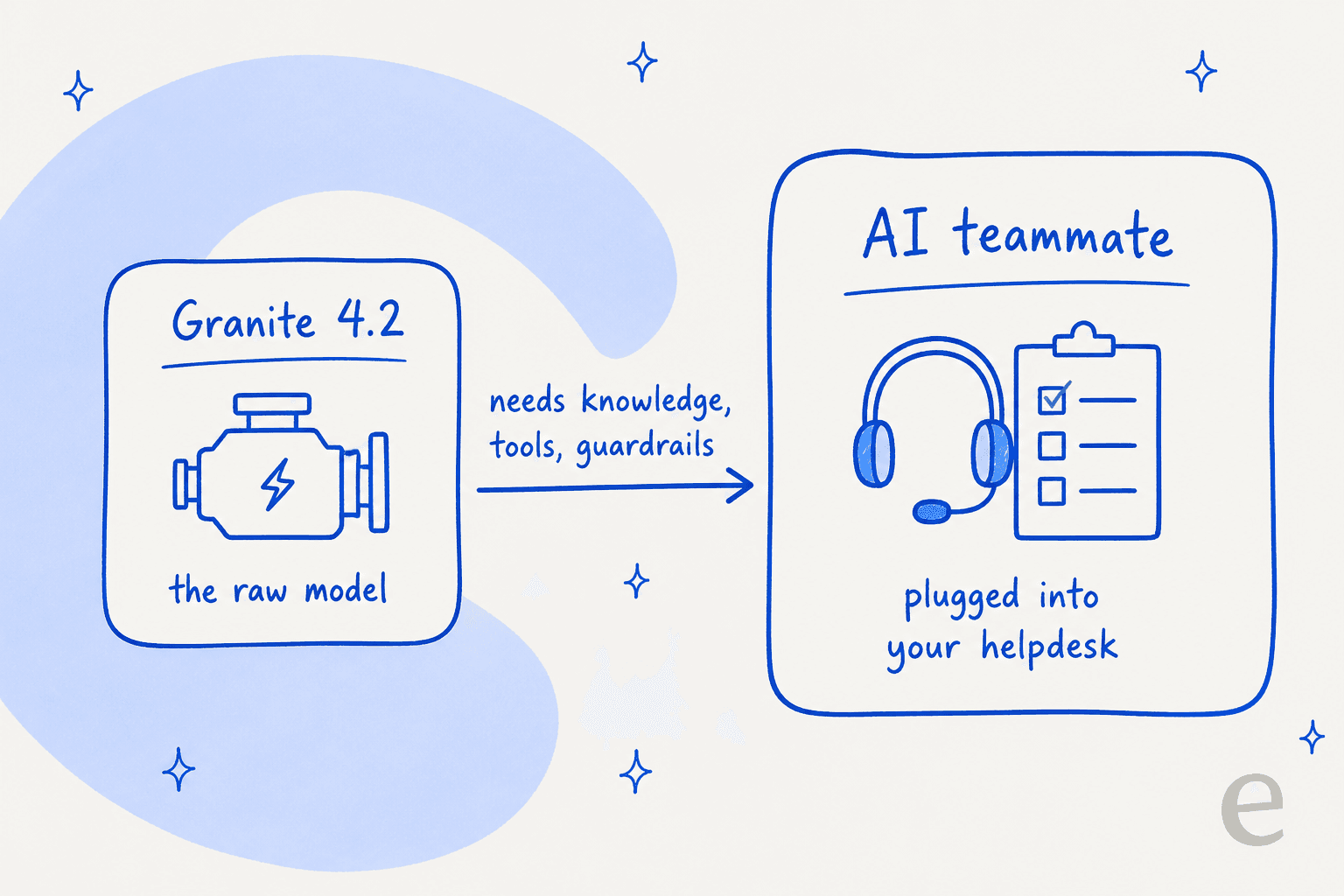
eesel sells the finished teammate, not the engine. The AI helpdesk teammate plugs into the helpdesk you already run, whether that is Zendesk, Freshdesk, Gorgias, or a shared inbox, learns from your past tickets and knowledge base, and drafts or sends replies inside your existing tools. The thing Granite 4.2 gives you, native reasoning and tool calling, is table stakes here, the hard 90% is the company context, the integrations, and the safety net around it.

And the part I would not ship a support bot without: eesel lets you simulate the teammate against thousands of your real historical tickets before it ever talks to a customer, so you see the resolution rate and the exact answers ahead of go-live instead of flipping a switch and hoping. We built that because we have watched confident-sounding bots quietly give wrong answers, and testing against your own tickets is the only thing that catches it.
If you are evaluating Granite 4.2 because you want to automate support, that is the shortcut worth knowing: you can try eesel free, connect your helpdesk in a few minutes, and see how a ready-to-work teammate handles your real tickets, without having to stand up and babysit a model yourself. And if writing is the job, the same idea powers the AI blog writer teammate too.
Frequently Asked Questions
What is IBM Granite 4.2?
IBM Granite 4.2 is a family of open-weight reasoning language models released on August 25, 2026, in three sizes: 3B, 8B, and 30B parameters. All three ship under an Apache 2.0 license, support a 128K context window, and add native chain-of-thought reasoning you can switch on or off. They are built for AI in customer service, coding, and agentic tool use.
How much does Granite 4.2 cost to run?
The floor is free: the weights are Apache 2.0, so you can self-host through Ollama or Hugging Face and pay only for your own hardware. The cheapest confirmed hosted rate is Replicate's granite-4.2-8b at $0.06 per 1M input tokens and $0.25 per 1M output. IBM's own watsonx.ai bills per million tokens plus hourly hosting, with a Standard plan around $1,050/month.
Is Granite 4.2 good for coding and agents?
The 30B model scores 57.0 on SWE-Bench Verified and adds reasoning-augmented tool calling, so it is credible for agentic and coding work. For raw coding capability, the local-LLM community still tends to rate Qwen higher. If your goal is an AI agent that resolves support tickets, the model is only the engine, you still need knowledge, tools, and guardrails around it.
How is Granite 4.2 different from Granite 4.0?
Granite 4.0 used a hybrid Mamba-2/transformer design with a mixture-of-experts layer. Granite 4.2 is a dense, decoder-only transformer post-trained from the Granite 4.1 base, and its headline addition is switchable native reasoning. Dense means there is no active-versus-total parameter split, so the size you download is the size that runs.
Can I use Granite 4.2 commercially for free?
Yes. The Apache 2.0 license allows unrestricted commercial and research use, fine-tuning, and self-hosting with no per-token license fee. You are responsible for the compute you run it on. For a support deployment, pairing it with an AI helpdesk agent layer like eesel is what turns the raw model into something that actually works your queue.