
You've configured your Zendesk AI agent. The escalation triggers are set, routing rules are in place, and tickets are flowing to the right teams. But there's a gap between technical setup and customer experience that many teams miss: the messaging.
A poorly worded handoff message can undo all your careful configuration. Customers don't see your backend routing logic. They see the words on their screen when the bot stops responding and a human takes over. Get those words wrong, and you create friction, confusion, and frustration. Get them right, and the transition feels seamless.
This guide covers the communication layer of Zendesk bot-to-agent handoffs. You'll learn what makes effective handoff messaging, get templates for common scenarios, and understand how to configure messages in both the legacy Essential and the advanced AI agents. For the technical setup details, see Zendesk's handoff documentation or our complete guide to Zendesk conversation handoff.

Why Zendesk bot to agent handoff messaging matters
Technical implementation and customer experience are two different things. You can have perfect routing, intelligent escalation triggers, and comprehensive context passing. But if the customer sees "Transferring to agent..." with no explanation, the experience breaks down.
Poor handoff messaging creates several problems:
- Uncertainty: Customers don't know what's happening or how long they'll wait
- Repetition anxiety: They worry they'll have to explain everything again
- Abandonment: Vague messages make customers think the conversation has ended
- Frustration: Over-apologetic messaging undermines confidence in your support system
The impact shows up in your metrics. Zendesk's own research indicates that context preservation and clear expectations are key drivers of customer satisfaction during escalations. When customers know what's happening and trust that their context will follow them, they're more patient and more satisfied with the outcome.
Here's the short version: your handoff message is the bridge between automation and human support. A shaky bridge makes customers nervous. A solid one gets them across confidently.
The anatomy of an effective handoff message
Effective handoff messages share a common structure. They answer three questions the customer is asking, whether they voice them or not:
- What's happening? (Acknowledgment)
- What should I expect? (Expectation-setting)
- What do I do now? (Next steps)
Let's break down each component.
Acknowledgment
The acknowledgment validates the customer's need for human help. It confirms the escalation is intentional, not a system error. Good acknowledgments are brief and specific:
- "I'll connect you with a billing specialist who can help with your refund."
- "Let me get you to our technical team for this integration issue."
Avoid vague phrases like "transferring you to an agent" or "connecting you to a representative." Zendesk recommends being specific about which team the customer will reach and why.
Expectation-setting
This is where you manage the transition. Be honest about wait times and what happens next:
- "An agent will join this conversation within 2-3 minutes."
- "You'll receive an email response within 4 hours."
- "Our team is currently offline. Leave your message and we'll respond by 9 AM tomorrow."
Don't promise specific times you can't guarantee. If wait times vary, give a range or use "typically" language. According to Zendesk's messaging best practices, setting realistic expectations improves customer satisfaction even when wait times are longer.
Context preservation
Reassure customers they won't have to start over. This reduces anxiety significantly:
- "I can see you're asking about the API integration error from March 15th. I'm passing this context to our technical team."
- "Your account details and this conversation history are attached to the ticket."
Tone considerations
Your tone should match your brand and the situation:
- Confident: Use when the escalation is routine and expected. "I'll connect you with our team now."
- Helpful: Use when the bot reached its limits. "This needs a human touch. Let me get you to the right person."
- Urgent: Use for high-priority issues. "I'm escalating this immediately to our priority support team."
Avoid apologetic tones unless the bot made an error. Don't say "Sorry I couldn't help" when the issue simply requires human judgment.
Handoff message templates by scenario
Here are templates for common escalation scenarios. Adapt them to match your brand voice.
Standard escalation (customer requests agent)
Business hours:
I'll connect you with a support agent who can help with this. They'll join this conversation within 2-3 minutes. Everything we've discussed is attached to your ticket, so you won't need to repeat yourself.
After hours:
I've created a ticket for you with all the details from our conversation. Our team will respond by email within 4 hours during business hours (9 AM - 6 PM EST). Your ticket number is #{{ticket.id}} for reference.
Failed intent escalation (bot can't help)
General limitation:
This question needs a human expert. I'm connecting you with our team now. They'll have full context from our conversation and can dig into the specifics with you.
Technical complexity:
This involves some technical details that are best handled by our engineering team. I'm escalating this now with your account information and error details attached.
High-priority escalation (VIP or urgent issues)
VIP customer:
I'm connecting you directly with our senior support team. They have your account history and will prioritize this conversation. Expected response time is under 5 minutes.
Urgent issue:
I'm escalating this immediately to our priority queue. A specialist will join this conversation shortly. Your issue has been flagged for urgent attention.
Department-specific handoffs
Technical support:
I'll get you to our technical team. They have your system details and the error logs from your account. Reference ticket: #{{ticket.id}}.
Billing/account issues:
Connecting you with our billing team now. They can access your account and payment history to resolve this. Wait time is typically 1-2 minutes.
Sales inquiries:
I'll connect you with a product specialist who can discuss pricing and implementation. They'll have the requirements you shared and can answer detailed questions about our enterprise plans.
Configuring messages in Zendesk
The configuration location depends on your Zendesk AI agent tier.
AI agents - Essential setup
For teams still on the legacy Essential AI agents:
- Go to Admin Center > AI > AI agents
- Select your AI agent and open the Messaging behavior tab
- Find the "Talk to a human" option in each response type
- Configure when the escalation option appears (always visible, after failed attempts, etc.)
- Open the Escalation tab to customize the message customers see during handoff
- Set different messages for business hours and after-hours if needed
- Click Publish and test in a sandbox environment
The Essential tier has limitations. You can't set up conditional routing or complex escalation paths based on ticket content. If you need different messages for different issue types, you'll need Advanced AI agents or a third-party solution.
For more on conversation routing, see our guide to Zendesk messaging conversation assignment rules.
AI agents - Advanced (Dialogue Builder)
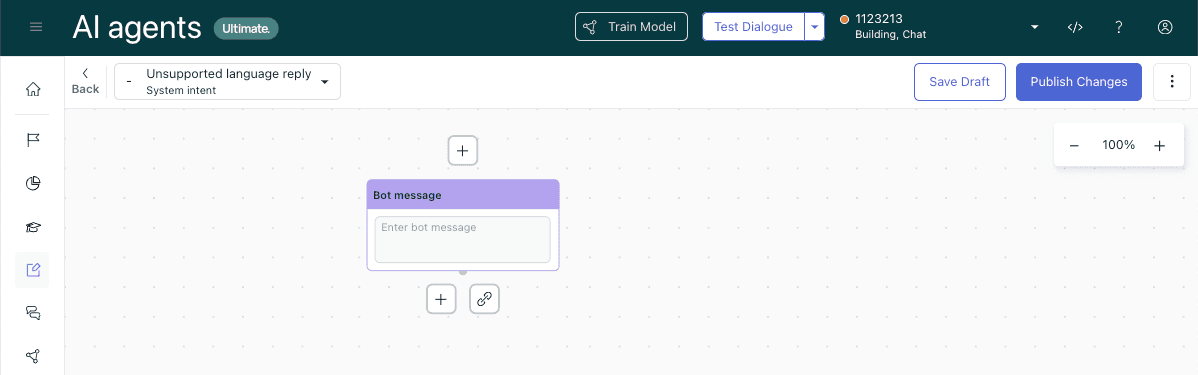
The Dialogue Builder gives you visual workflow tools for complex escalation logic. You can also transfer conversations with metadata to ensure context is preserved:
- In AI agents - Advanced, select your AI agent
- Navigate to Content > Use cases
- Open the dialogue you want to modify (or create a new reply)
- Add an Escalation block where you want the handoff to occur
- Configure the escalation message and channel (messaging or email)
- Optionally add an Availability block before escalation to check if agents are online
- Use Actions to add tags or populate ticket fields for context
- Click Validate dialogue to check for errors
- Publish when ready
Key blocks for handoff messaging:
| Block Type | Purpose |
|---|---|
| Escalation | Defines the handoff path and message to human agents |
| Availability | Checks business hours and agent status before escalating |
| Conditional | Routes different escalation paths based on parameters |
| Actions | Adds tags, sets fields, or triggers other workflows |
Common messaging mistakes to avoid
Even with good intentions, these mistakes creep into handoff messaging:
Vague "connecting you to an agent" without context
This tells the customer nothing. Which agent? For what purpose? How long will it take? Always include context about what happens next.
Over-apologizing for bot limitations
Don't say "Sorry I couldn't help" or "I apologize for not understanding." This undermines confidence in your automation. Instead, frame it positively: "This needs a human expert" or "Let me get you to the right specialist."
Promising specific wait times you can't guarantee
If you say "An agent will respond in 2 minutes" and it takes 10, you've broken trust. Use ranges ("2-5 minutes") or conservative estimates ("typically under 5 minutes").
Failing to set expectations about context transfer
Customers hate repeating themselves. Explicitly reassure them that context is preserved: "Your conversation history is attached" or "You won't need to explain this again."
Inconsistent tone across different escalation paths
If billing escalations sound formal and technical escalations sound casual, customers notice. Define your tone guidelines and apply them consistently. Zendesk's AI agent guidelines recommend documenting your brand voice for consistent messaging.
Testing and optimizing your handoff messages
Your first draft of handoff messaging won't be your best. Here's how to improve it over time.
A/B testing message variations
Test different approaches to see what resonates. Zendesk's A/B testing features let you compare message variations. Try:
- Specific wait times vs. general ranges
- Mentioning context preservation vs. not mentioning it
- Confident tone vs. helpful tone
Track which variations correlate with higher CSAT on escalated tickets.
Monitoring CSAT on escalated tickets
Zendesk's CSAT surveys are sent when tickets are marked Solved. Compare scores between tickets that started with AI agents vs. those that went straight to humans. If AI-handled tickets score lower, your handoff messaging might be the issue.
Gathering agent feedback
Your agents know if customers are confused during handoffs. Zendesk's agent workspace shows conversation history to help them prepare. Ask them:
- Do customers seem to understand what happened?
- Are they repeating information the bot already collected?
- What questions do they ask first?
Iterating based on customer feedback
If customers frequently ask "What happens now?" or "Do I need to explain this again?" your handoff message isn't doing its job. Update it to address those specific concerns. Zendesk's AI agent analytics can help identify where your messaging falls short.
Simplify handoff messaging with eesel AI
Configuring effective handoff messaging in Zendesk requires navigating complex dialogue builders or working within the limitations of the Essential tier. There's a simpler approach.
We built eesel AI to handle escalation rules in plain English. Instead of configuring escalation blocks and conditional logic, you write instructions like:
- "If the refund request is over 30 days, politely decline and offer store credit."
- "Always escalate billing disputes to a human."
- "For VIP customers, CC the account manager."
Our AI agent learns your business from your past tickets, help center, and macros. It drafts responses that match your team's tone and escalates with context automatically preserved. You start with eesel drafting replies for review, then level up to full autonomy as it proves itself.
If you're spending too much time in Zendesk's dialogue builder or hitting the limitations of the Essential tier, see how eesel AI works with Zendesk. Our AI agent handles the messaging strategy automatically, so you don't have to craft the perfect escalation message for every scenario.