Alt text
Alt text is a written description of an image, added in HTML, that screen readers announce and search engines read when the image cannot be seen.
What alt text means
Alt text, short for alternative text, is a written description of an image embedded in HTML through the alt attribute, surfaced when the image itself cannot be displayed or seen. Screen readers announce it aloud to people using assistive technology, browsers show it if an image fails to load, and search engines read it to understand what the image depicts.
Its original and primary purpose is accessibility: a person who cannot see an image relies on its alt text to know what it shows and why it is on the page. Good alt text is specific and concise, describing the content and function of the image rather than restating the file name. The secondary purpose is for machines that read pages without rendering them, search engine crawlers among them, which use alt text as one of the few text signals available about an image's subject. In content marketing, that dual role makes alt text a small but real part of publishing: it serves readers using screen readers and, at the same time, gives an image a chance to surface in image search.
Why alt text matters
- It is an accessibility requirement. People using screen readers depend on alt text to understand images, and accessibility guidelines like WCAG treat it as a baseline.
- It provides image context to search engines. Crawlers cannot see pictures, so alt text is a primary clue about what an image shows, which supports image search visibility.
- It is a fallback when images fail. Slow connections, broken links, or blocked images all leave the alt text as the only thing the user sees.
- It supports topical relevance. Descriptive alt text reinforces what a page is about, a minor but legitimate on-page SEO signal when written honestly rather than stuffed.
- It reduces legal and reputational risk. Inaccessible content has triggered accessibility complaints and lawsuits, and missing alt text is one of the most common findings in an audit.
The hard part is rarely the syntax, it is deciding what each image actually needs:
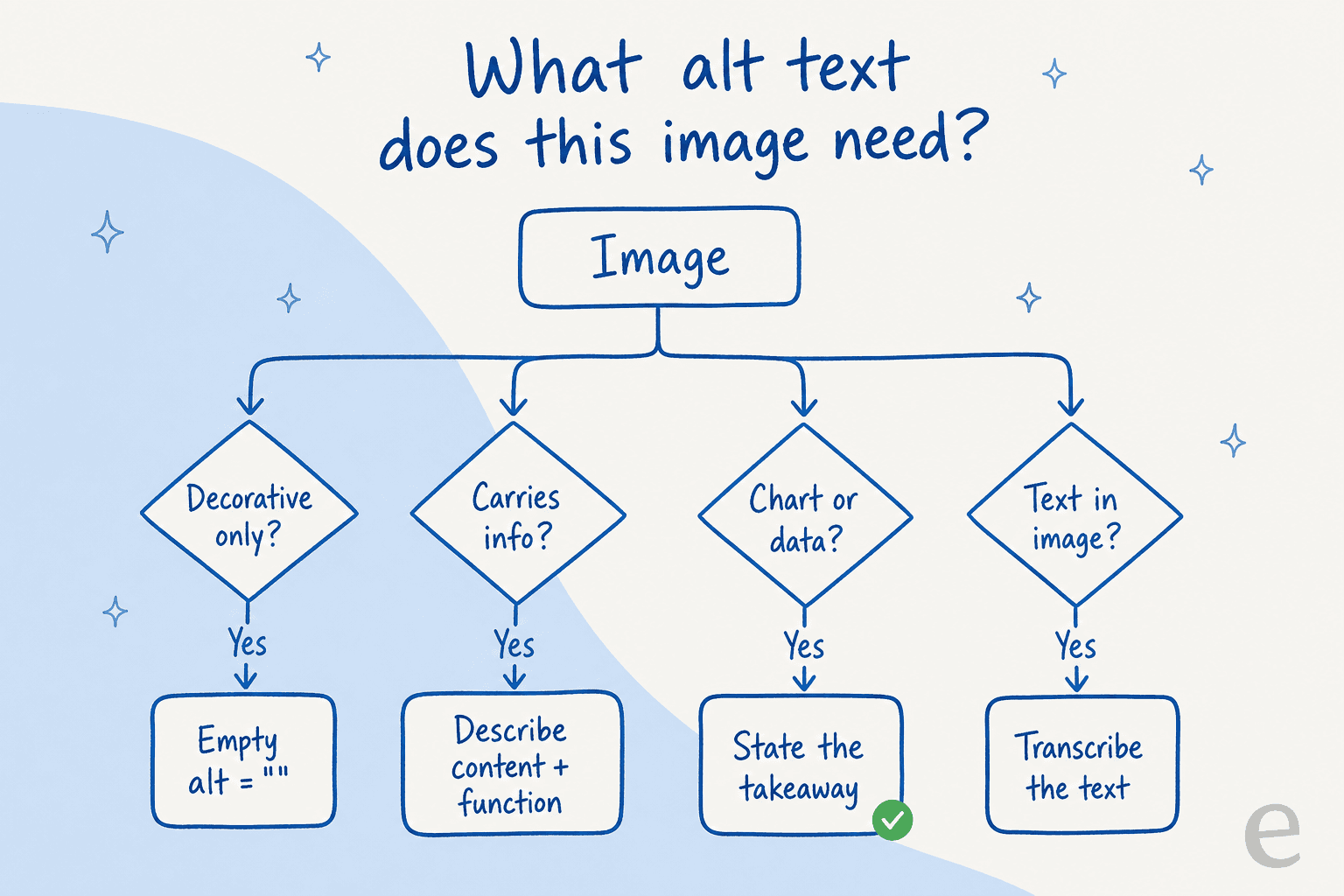
Run a new image through the branches before you write a word. A purely decorative image takes an empty alt="" so screen readers skip it, a chart needs its takeaway rather than its shape, and text baked into an image should be transcribed so nothing is lost.
How alt text works
- Author the description. When an image is added to a page, a short, specific description of what it shows is written into the
altattribute. - The browser stores it. The description travels with the image in the page's HTML, invisible unless the image cannot be displayed.
- Assistive tech reads it. A screen reader encounters the image and announces the alt text in place of the visual, so the user gets the same information.
- Crawlers index it. Search engines read the alt text during indexing and use it to understand and rank the image.
This is the one term in the set where eesel's content product has a direct hand: a post drafted by eesel's AI blog writer can ship with alt text already written for its images, so the accessibility and image-SEO work is handled as part of the draft rather than bolted on afterward. The judgment call, whether an image is informative or decorative, still belongs to the publisher.
Alt text in practice
The two failure modes are opposite extremes: leaving alt text blank on images that carry meaning, and stuffing it with keywords on every image to chase rankings. Both hurt. Blank alt text fails the people who most need it; keyword-stuffed alt text reads as spam to a screen reader and adds noise rather than relevance. The practical standard is to describe what the image actually shows in plain language, mark genuinely decorative images with empty alt text so they are skipped, and treat the description as something written for a person who cannot see the screen first, with the search-engine benefit as a side effect of doing that well.
Posts that ship with their alt text written
eesel's AI blog writer can draft descriptive alt text for the images in a post, so accessibility and image SEO are handled as the draft comes out.