We’ve all been there. A high-value customer, the kind you really can’t afford to upset, sends in an urgent ticket. But instead of getting the white-glove treatment, their request lands in the general support queue with everyone else. By the time an agent finally sees it, the customer is fuming, and you’re left doing damage control.
Making sure your VIPs feel important isn’t just about good manners; it’s a smart way to build loyalty and protect your bottom line. The trick is to get this process on autopilot so it’s fast, reliable, and works every single time without someone having to manually flag a ticket.
This guide will walk you through setting up a Zendesk workflow to escalate VIP customers based on CRM tags. We’ll cover the standard, built-in Zendesk method first, and then I’ll show you how an AI-powered option can act as a powerful complement to make your setup even more responsive.
What you'll need
Before we jump in, you’ll need a few things on hand to get the standard Zendesk method working:
-
A Zendesk Zendesk Support plan (Professional or higher) and admin access.
-
Your CRM platform, like Salesforce or HubSpot, where you keep track of who your VIPs are.
-
A way to get your CRM and Zendesk talking to each other, which is easy to do using an integration from the Zendesk Marketplace or a custom connection.
Building your workflow: The native method
This is the established way to build this workflow using Zendesk's mature internal tools. It is a reliable approach that leverages Zendesk's powerful built-in features, allowing for a high degree of precision in how tickets are handled.
Step 1: Sync your CRM data to Zendesk user profiles
First up, Zendesk needs to know who your VIPs are. The best way to do this is to pull that information directly from your CRM, which should be your single source of truth for customer data.
You can tackle this in a couple of ways:
-
Custom user or organization fields: You could create a custom field in Zendesk, like a simple checkbox called "VIP Customer." Your CRM integration would then be in charge of checking that box for the right people.
-
Tags: A more popular route is to have your integration add a specific tag (like "vip_customer") to a user’s profile in Zendesk whenever their status changes in the CRM.
This sync ensures that your customer data is accessible right where your agents work, providing the necessary context for the workflow to trigger.
Step 2: Create a trigger to spot incoming VIP tickets
Once your VIP data is flowing into Zendesk, you can use Triggers to keep an eye out for new tickets from these customers. Triggers are Zendesk’s powerful "if-this-then-that" rules that kick in the moment a ticket is created or updated.
Here’s how you can set one up in the Zendesk Admin Center:
Go to Objects and rules > Triggers and create a new one. Under "Meet ALL of the following conditions," you'll tell Zendesk what to look for:
-
"Ticket" | "Is" | "Created"
-
"Tags" | "Contains at least one of the following" | "vip_customer"
If you went with a custom field instead of a tag, your second condition will look a bit different, but the logic remains the same. Now, this trigger will fire off every time a new ticket arrives from a user with the "vip_customer" tag.
Step 3: Define the escalation actions
So, the trigger has found a VIP ticket. What now? You need to tell Zendesk what to do next. This is where the actual "escalation" part happens. In the "Actions" section of your trigger, you can add a few automated steps.
Here are some common ones:
-
"Priority" | "Is" | "Urgent"
-
"Assignee" | "Group" | "VIP Support Team" (or a specific senior agent)
-
"Notify target" | "Slack Channel" | "Send a message to the #vip-alerts channel"
Considerations for the native method
The native method is a foundational way to manage VIPs. For a process this important, there are a few things to keep in mind to ensure it runs smoothly.
-
Data sync consistency. The workflow depends on a consistent sync between your CRM and Zendesk. By ensuring your integration is properly maintained, you can be sure that a brand-new VIP gets tagged promptly and their first urgent ticket is handled with priority.
-
Rewarding structured management. As your team grows, you may find yourself managing a variety of custom fields and triggers. This is a sign of a mature, sophisticated support operation. Taking the time to periodically review and update these rules ensures your setup remains perfectly aligned with your business goals.
-
Best practices for testing. While native triggers are powerful, it's always a good idea to monitor new workflows closely when they first go live. This allows you to refine your logic based on real-world interactions and ensure your most valuable customer relationships are always protected.
A faster way to create your workflow with AI
This is where modern AI tools enter the picture. They can act as a complementary layer to your native Zendesk setup, connecting directly to your tools and using a smart engine to enhance your automation.
Go live in minutes with seamless integration
In addition to the robust native options, a platform like eesel AI connects to your help desk and your knowledge sources (including your CRM) in just a few clicks.
The whole process is designed so you can set it up yourself, working right alongside your existing Zendesk ecosystem. This means you can get your Zendesk workflow to escalate VIP customers based on CRM tags up and running in a fraction of the time, providing an extra level of responsiveness for your team.
Build a dynamic workflow with real-time data lookups
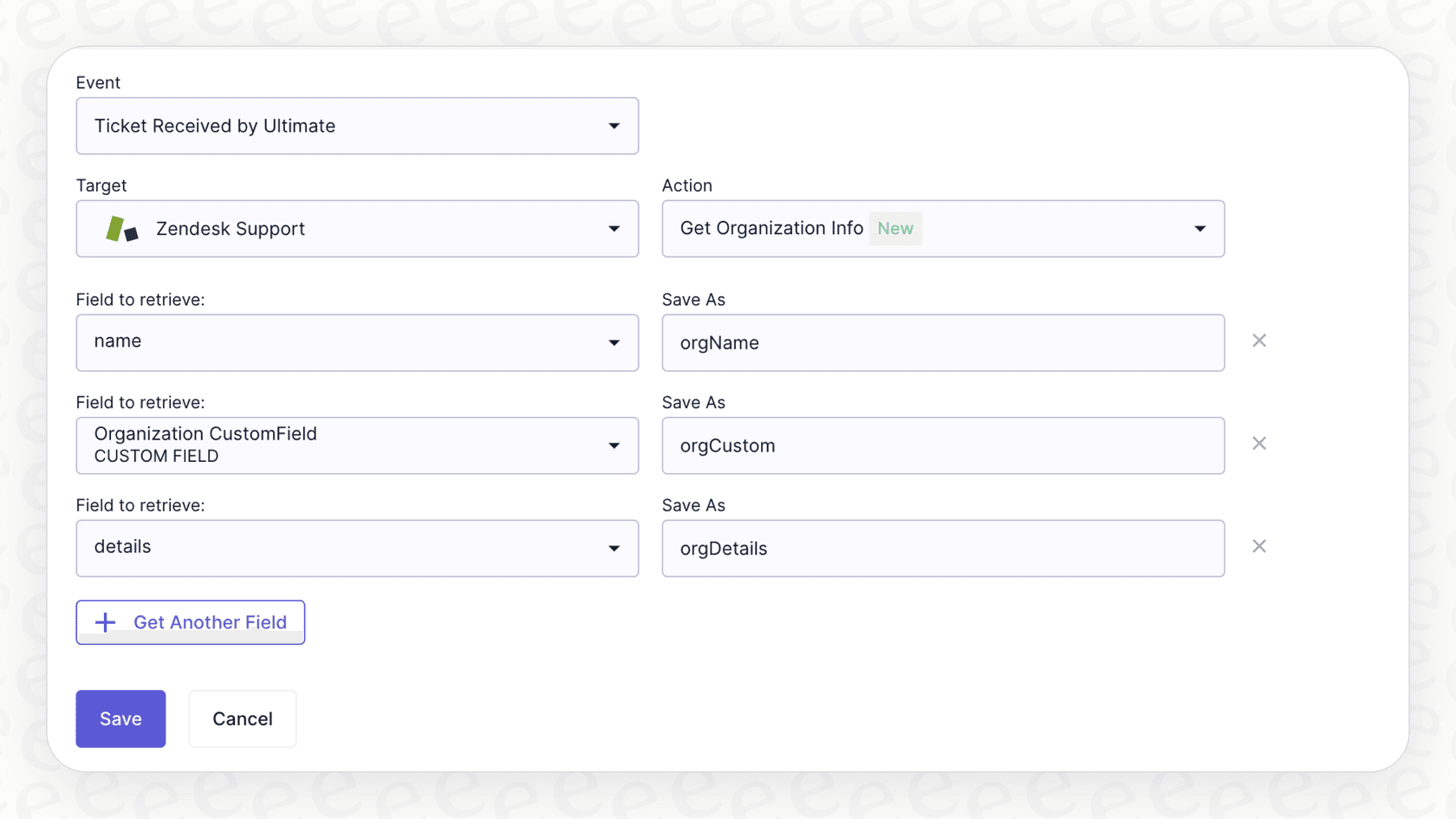
Here’s a great way to add even more precision. eesel AI can work in tandem with your Zendesk tags by performing a real-time check.
When a ticket arrives, an eesel AI Agent can check your CRM in real time to see the customer's status at that exact moment. This provides a secondary check to your sync, ensuring your workflow is as reliable as possible. The process remains simple: a ticket comes in, eesel AI checks the CRM for the latest data, and if it’s a VIP, it ensures Zendesk prioritizes it immediately.
Test your workflow with risk-free simulation
To provide an extra layer of assurance alongside Zendesk's proven trigger system, eesel AI offers a simulation mode. Before your workflow goes live, you can run it against thousands of your past tickets in a safe environment.
You’ll see exactly how the AI would have assisted, check its accuracy, and get a clear forecast of its impact. This lets you launch your critical VIP workflow with complete confidence, knowing it's going to work exactly as you designed it within your Zendesk environment.
Go beyond basic escalation
With a fully customizable workflow engine, just escalating a ticket is only the beginning. Once eesel AI identifies a VIP ticket within Zendesk, it can do so much more than just change the priority.
For instance, your AI Agent could:
-
Pull the customer's last three orders from Shopify and add the details as an internal note for the agent.
-
Automatically create a task in Asana or a sub-task in Jira Service Management for the customer's dedicated account manager.
-
Draft a personalized, high-touch reply using a specific tone of voice you’ve set, helping your agent respond even faster.
Tips for a successful workflow
Whether you stick with the native method or add an AI tool for extra power, these tips will help you make your workflow a success.
-
Know what "VIP" means. Make sure your CRM data is clean and your definition is crystal clear. Is a VIP based on how much they spend, their strategic value, or something else? Whatever it is, be consistent.
-
Create a dedicated fast lane. If you're routing tickets to a "VIP Support Team," make sure that group is staffed with experienced agents who have the context and authority to solve tricky problems quickly.
-
Let your team in on the plan. Tell your whole support team about the new workflow. It helps everyone understand why certain tickets are suddenly jumping the queue.
-
Measure your results. After you launch, keep an eye on the metrics for your VIP customers in your Zendesk dashboard. Are their resolution times actually getting shorter? Are their CSAT scores going up? Use data to show that your process is working.
Next steps
Prioritizing your VIP customers is a key part of growing a successful business. Zendesk's built-in tools provide a robust foundation for building an escalation process, and modern AI platforms give you a way to extend those capabilities even further.
Building a great Zendesk workflow to escalate VIP customers based on CRM tags in 2026 is easier than ever. With a tool like eesel AI, you can complement your Zendesk setup in minutes and simulate your entire workflow before it ever touches a real customer.
Try it for free and see how it enhances your Zendesk experience today.
Frequently asked questions


Article by
Kurnia Kharisma Agung Samiadjie
Kurnia is a software engineer and writer at eesel AI with two years of SEO experience, writing about AI tools, helpdesk software, and customer support. He pairs a developer's understanding of how these products are built with search-driven research into what actually ranks and resonates with the people searching for them.