Let's be honest, customer support is a tough gig. As companies try to keep up, AI has gone from a futuristic buzzword to a tool many teams can't live without. It helps speed things up, get answers out faster, and generally keep customers from getting frustrated. If your team is already using Zoho's software, their built-in AI assistant, Zia, probably seems like the obvious next step.
But is it the best tool for the job? This post is a straightforward look at the Zoho Desk Zia Conversational AI. We'll get into what it does, how much it costs, and maybe most importantly, what its limitations are before you decide to jump in.
What is Zoho Desk Zia Conversational AI?
Zia is Zoho's own AI assistant that pops up across their different apps. Inside of Zoho Desk, it's designed to help streamline customer service. It isn't just one thing; it's a collection of different AI skills working together.
For example, it uses predictive AI to do things like guess the sentiment of an incoming ticket or figure out which department should handle it. Then, it switches over to generative AI to help your agents write replies, summarize long email chains, and power the chatbot that your customers interact with.
One interesting wrinkle is that Zoho Desk lets you choose the "brain" for its generative features. You can use Zia's own model, which is built on open-source tech, or you can bring your own OpenAI API key and hook it up to ChatGPT. It's nice to have options, but it does mean there's another thing to think about during setup.

Key features of Zoho Desk Zia Conversational AI
Zia’s toolkit in Zoho Desk can be split into three main buckets: things that talk to your customers, things that help your agents, and things that work in the background for managers.
Customer-facing tools
The main tool your customers will see is the Answer Bot. This is the chatbot you can put on your website or connect to services like WhatsApp and Facebook Messenger. Its main job is to find and deliver answers by searching through your Zoho Desk knowledge base articles.
If you need something a bit more structured, there are Guided Conversations. This is a low-code, drag-and-drop tool that lets you build out chatbot flows with specific rules. It’s handy for walking customers through simple processes, like checking on an order or initiating a return, so an agent doesn't have to.
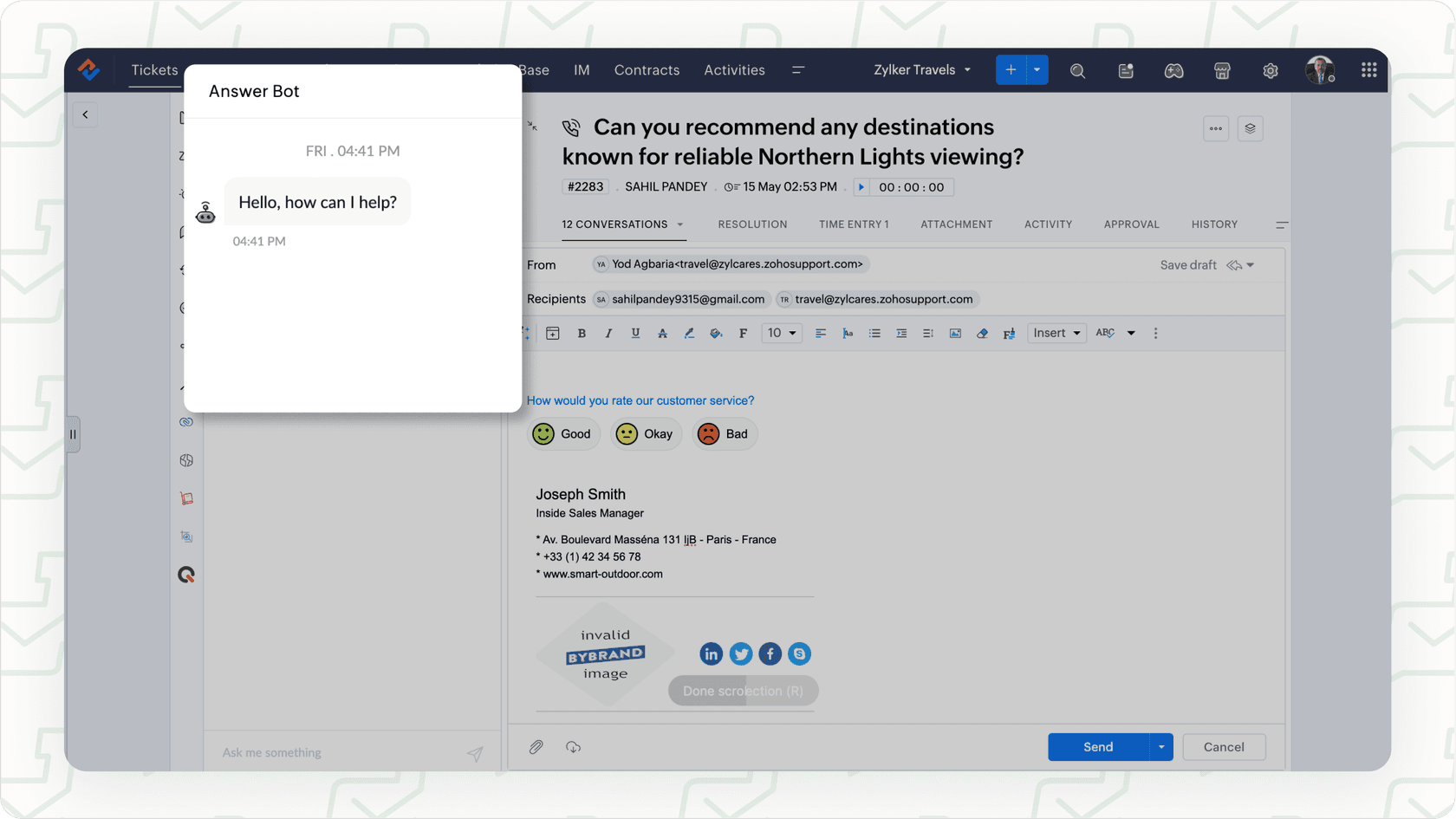
Just remember, these tools are only as good as the information you feed them inside Zoho Desk. If your team's most important documents and guides are scattered elsewhere, the AI can't find them. That often leads to your customers hitting a dead end, which is the last thing you want.
Agent assistance and productivity
To give your human agents a hand, Zia offers Reply Assistance & Summarization. It can read through a long ticket history and give you the short version, which is a lifesaver for complex issues. It also suggests replies by pulling info from your knowledge base or using its generative AI (either Zia or ChatGPT).
There’s also a pretty clever Knowledge Base Generation feature. If an agent writes a really great, detailed response to a customer's problem, Zia can help turn that reply into a draft for a new knowledge base article. It's a nice way to fill in the gaps in your help center over time.
While these features are helpful, they are stuck within Zoho's ecosystem. For agent support that sees the whole picture, a tool like eesel AI has a huge edge. It's designed to learn from all of a company’s knowledge, not just what’s in one app. That means it can pull information from internal wikis in Confluence, project plans in Google Docs, and tickets from any help desk. This gives your agents one place to find everything they need.
Automation for admins and managers
Zia also automates some of the more tedious background tasks. With Field Predictions & Auto-Tagging, it looks at new tickets and automatically suggests the right category or priority level and adds relevant tags. This helps get tickets to the right people without someone having to sort them manually.
It also has Anomaly Detection, which keeps an eye on your ticket volume. If there's a sudden, weird spike in tickets, it will flag it for a manager. This can be a good early warning system for a widespread product bug or issue.
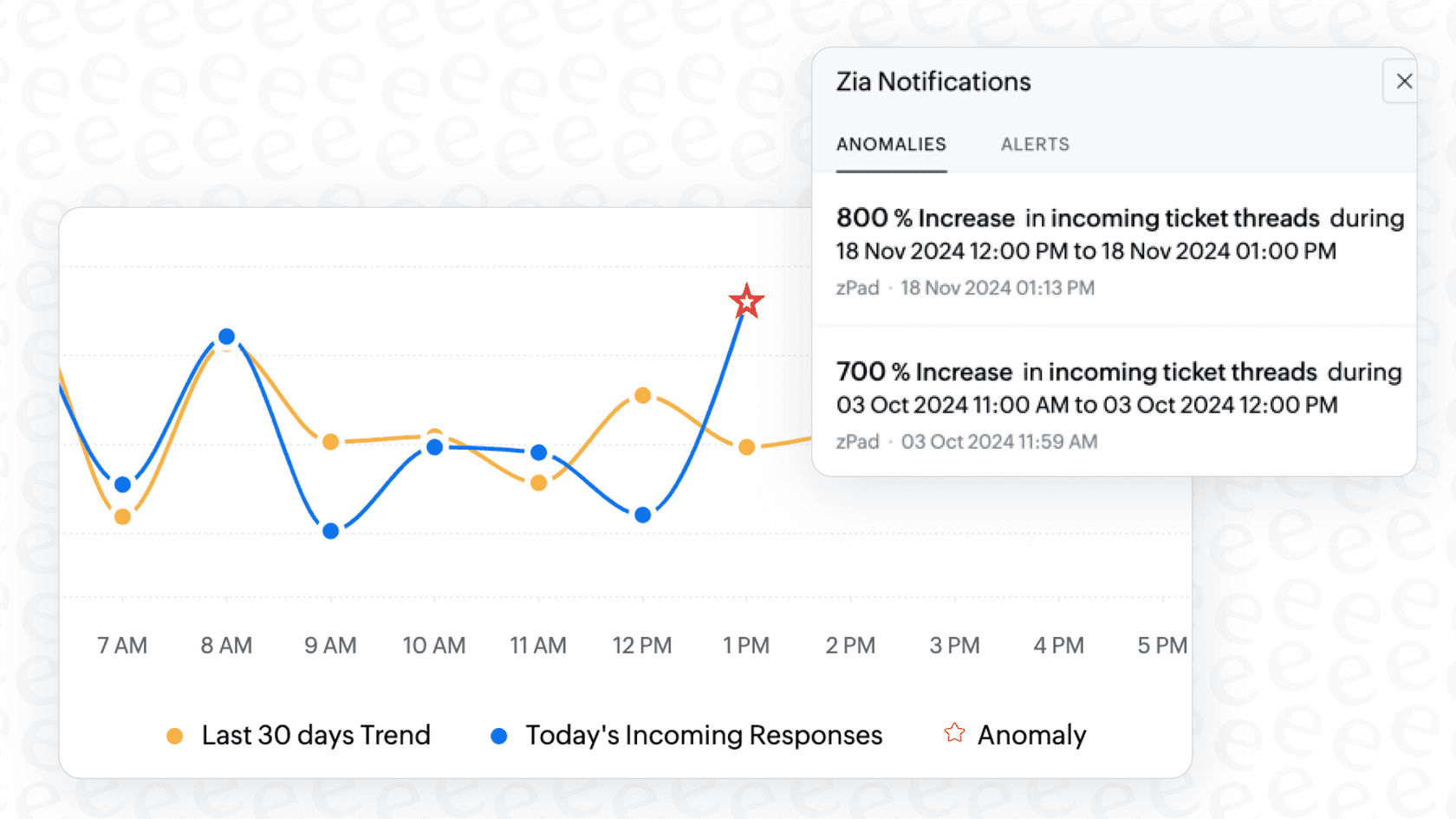
The catch is that all this automation is built inside Zoho's specific workflow system. If your team needs to set up more complex automations that connect with other tools you use, you might find it a bit rigid.
Understanding Zoho Desk Zia Conversational AI: Pricing and setup
It's really important to know that Zia isn't something you can just buy on its own. Its features are gradually unlocked as you go up Zoho Desk's subscription levels. This means getting the best AI tools requires committing to their more expensive plans, which can be a tough pill to swallow for budget-conscious teams.
How Zia is bundled in Zoho Desk plans
Here's a simple breakdown of the AI features you get with each Zoho Desk pricing plan. As you can see, the really useful, hands-off AI stuff is saved for the highest tier.
| Plan | Price (Per User/Month, Billed Annually) | Key Zoho Desk Zia Conversational AI Features Included |
|---|---|---|
| Standard | $14 | Generative AI capabilities (but you have to connect your own OpenAI API key), Knowledge Base. |
| Professional | $23 | Everything in Standard + Multi-language help center. |
| Enterprise | $40 | Everything in Professional + Answer Bot, built-in Zia generative AI (no extra cost), sentiment analysis, ticket auto-tagging, field predictions, anomaly detection. |
The main thing to notice is that the Answer Bot and Zia's own AI model are only available on the Enterprise plan. That puts the starting price for a full-featured AI at $40 per user, per month for your whole team, which adds up fast.
Setup process and integration options
Getting Zia running means flipping some switches in your Zoho Desk settings. If you’re on the Enterprise plan, you can use Zoho's built-in AI. On any paid plan, you can connect to a service like ChatGPT, but you'll need to provide your own API key. That means you’re also on the hook for managing a separate, usage-based bill from OpenAI, which can be hard to predict.
And while Zia works great with other Zoho apps, it's very limited in its ability to learn from outside knowledge sources. This is a big difference compared to a platform like eesel AI, which was built from day one to connect to anything. It has one-click integrations with dozens of tools, bringing all your knowledge together without making you move everything into one system.
Practical limits of Zoho Desk Zia Conversational AI
Having a built-in AI like Zia is convenient, but that convenience often comes with big trade-offs in flexibility, scope, and control. Here are some of the real-world limitations of the Zoho Desk Zia Conversational AI that support teams should think about.
It traps your knowledge in a single platform
The biggest problem with Zia is that it can only learn from content that lives inside Zoho Desk. But let's be real, your company's most valuable, up-to-date information is probably spread across Google Docs, Confluence, Notion, or Slack. Zia can't touch any of it. This means your chatbot gives incomplete answers, and your agents are still stuck hunting for information in a dozen different tabs.

This is where a tool like eesel AI works differently. It's designed to be a single source of truth that sits on top of all your other apps. It securely connects to all your knowledge sources, so both customers and agents get the right answer, right away. It doesn’t care where your info is stored; it just makes it useful.
It lacks robust testing and fine-grained control
While Zoho gives you tools to build workflows, customizing the AI for different situations can get complicated. More importantly, there isn't a good way to test how the AI will respond to real customer questions before you let it loose. You're basically launching it and hoping for the best, which is a big risk when it's talking to your customers.
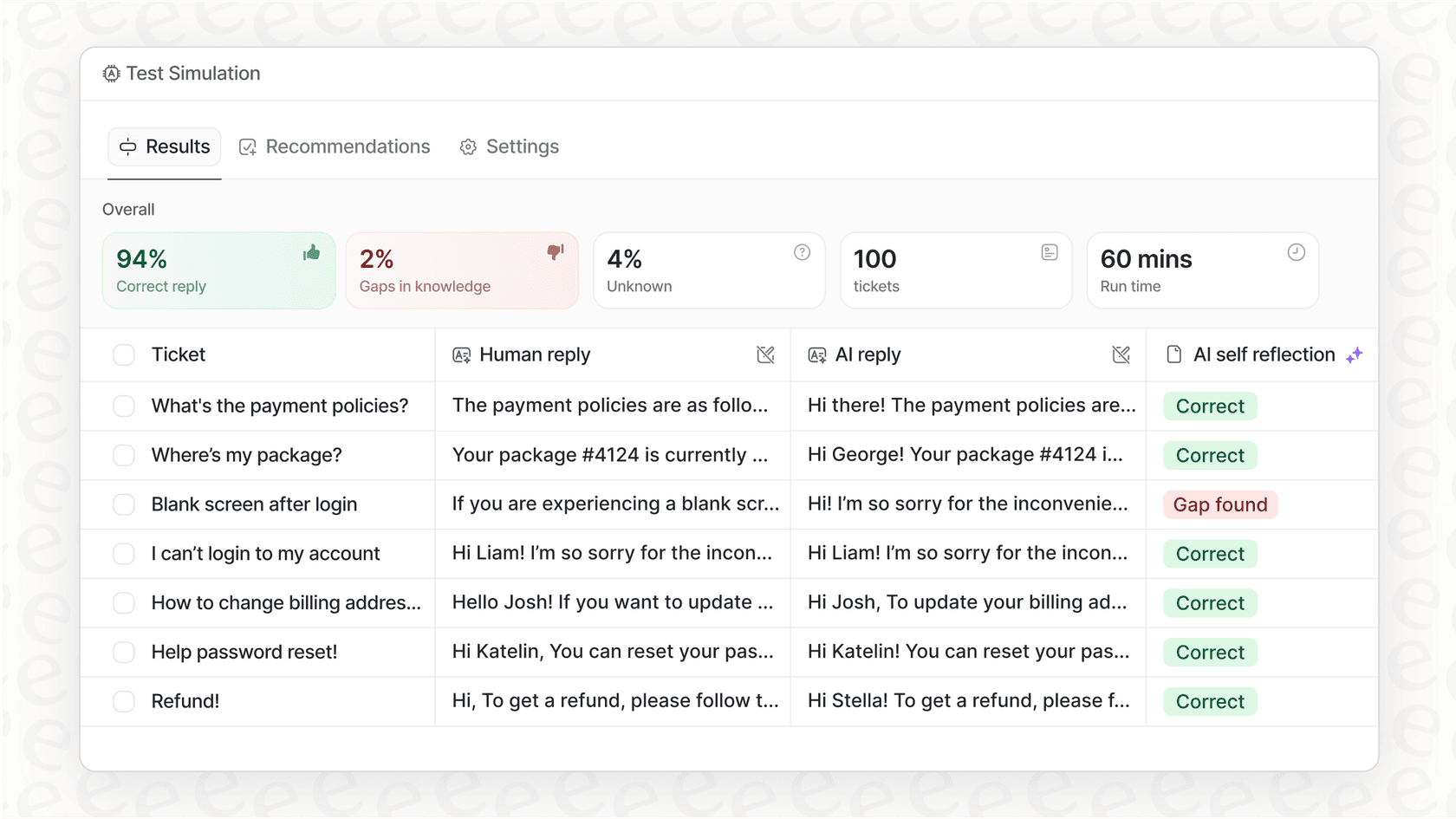
In contrast, eesel AI gives you a powerful simulation mode. You can test your AI agent on thousands of your past tickets to see exactly how it would have replied. This gives you a clear forecast of your automation rate and lets you tweak its behavior with confidence before it ever interacts with a live customer.
The per-user pricing model doesn’t scale well
With Zoho Desk, your costs go up every time you hire a new agent. To get the best AI features, you have to pay that top-tier price for every single person on your team, even if most of them don't need the advanced tools.
This pricing can lead to some nasty surprises as your team grows. eesel AI's pricing is based on how much you use the AI, not how many people are on your team. This means you can add new agents without your bill going through the roof. Plus, you won't find any hidden fees that charge you more for successfully resolving issues.
It might be time to move beyond a siloed AI
So, what's the verdict? The Zoho Desk Zia Conversational AI can be a decent option for teams who live and breathe the Zoho ecosystem and can afford the Enterprise plan. It’s convenient and gets the basic job done, as long as you can live with its constraints.
But for most teams, those constraints can become major headaches. A walled-off knowledge base, no real way to test your setup, and a pricing model that punishes growth can hold your support team back.
eesel AI offers a more modern approach. It’s a powerful, independent AI that connects to the tools you’re already using. It unifies your scattered knowledge, gives you full control with risk-free testing, and has predictable pricing that grows with you. It’s about delivering great support without compromises.
Get started with a smarter AI for your help desk
Ready for an AI that works with your tools, not against them? Sign up for a free eesel AI trial to start automating support in minutes, or book a demo to see it in action.

Frequently asked questions
The Zoho Desk Zia Conversational AI is primarily designed to streamline customer service operations. It helps by automating tasks, assisting agents with replies, and providing instant answers to customers through chatbots.
To access the full range of features, including the Answer Bot and Zoho's built-in generative AI, you need to subscribe to the Enterprise plan of Zoho Desk. Lower-tier plans offer limited AI capabilities.
No, a significant limitation of the Zoho Desk Zia Conversational AI is that it can only learn from content stored directly within Zoho Desk. It cannot access or integrate information from external knowledge sources.
The blog indicates that there isn't a robust, fine-grained control or testing mechanism to simulate how the Zoho Desk Zia Conversational AI will respond to real customer questions before deployment. You essentially launch it and hope for the best.
The per-user pricing model means that costs for the Zoho Desk Zia Conversational AI increase with every new agent hired. To get the best features, you must pay the top-tier price for every team member, which can lead to significant scaling costs.
The Zoho Desk Zia Conversational AI allows you to choose between using Zia's own generative AI model, which is built on open-source technology, or connecting your own OpenAI API key to utilize ChatGPT.
Share this article

Article by
Stevia Putri
Stevia Putri is a marketing generalist at eesel AI, where she helps turn powerful AI tools into stories that resonate. She’s driven by curiosity, clarity, and the human side of technology.