The 8 best Suptask alternatives in 2026

Rama Adi

Katelin Teen
Last edited August 29, 2026

Why teams look past Suptask
Suptask does the core job well. It bills itself as "The Slack-native Ticketing System", and its intake model is genuinely clean: post in a request channel, react with a 🎫 emoji, run /suptask or /helpdesk, or use a message shortcut, and any of those becomes a tracked ticket. It says it is trusted by 1700+ teams, and it sits at a friendly price point.
So why shortlist alternatives at all? A few honest reasons.
The first is that Slack, left alone, is a poor system of record, and adding a thin ticketing layer does not always fix that. As one support lead put it on Reddit, the problem is structural:
"This is very real. The part that tends to sneak up is that Slack makes every customer feel 'close', but it does not give you a queue by default. So the team thinks they are being responsive while important stuff is just buried three scrolls up."

Engineers on Hacker News are blunter about the trade-off:
"Slack is an awful ticketing system, there are many better ones, many with slack integrations even, if you're dead set on using one of the worse IMs out there for everything"

The second reason is AI. Suptask advertises real AI features, an @Suptask assistant, answers from your knowledge sources, and even agentic workflows. But its own pricing page footnotes AI as "credits per agent" with no credit count, no per-credit price, and no overage rate published anywhere on the pricing page, and its headline "85% auto-resolved by AI" is a vendor claim with no methodology attached. If you are betting your queue on automation, you want to see the meter, and ideally test the AI on your own history before it answers a live customer.
The third is fit. Suptask is framed around the internal service desk, IT, HR, finance raising requests in Slack. If you are doing external B2B support in shared Slack Connect channels, or you want the ticket to end up in a real omnichannel helpdesk, a differently-shaped tool may suit you better.
The lens that actually sorts this category
After researching every serious Suptask alternative, the cleanest way to sort them is not "which has more features". It is where the ticket record lives when the Slack thread goes quiet. That single choice drives price, reporting, and how much of your support life happens inside Slack versus a separate app.
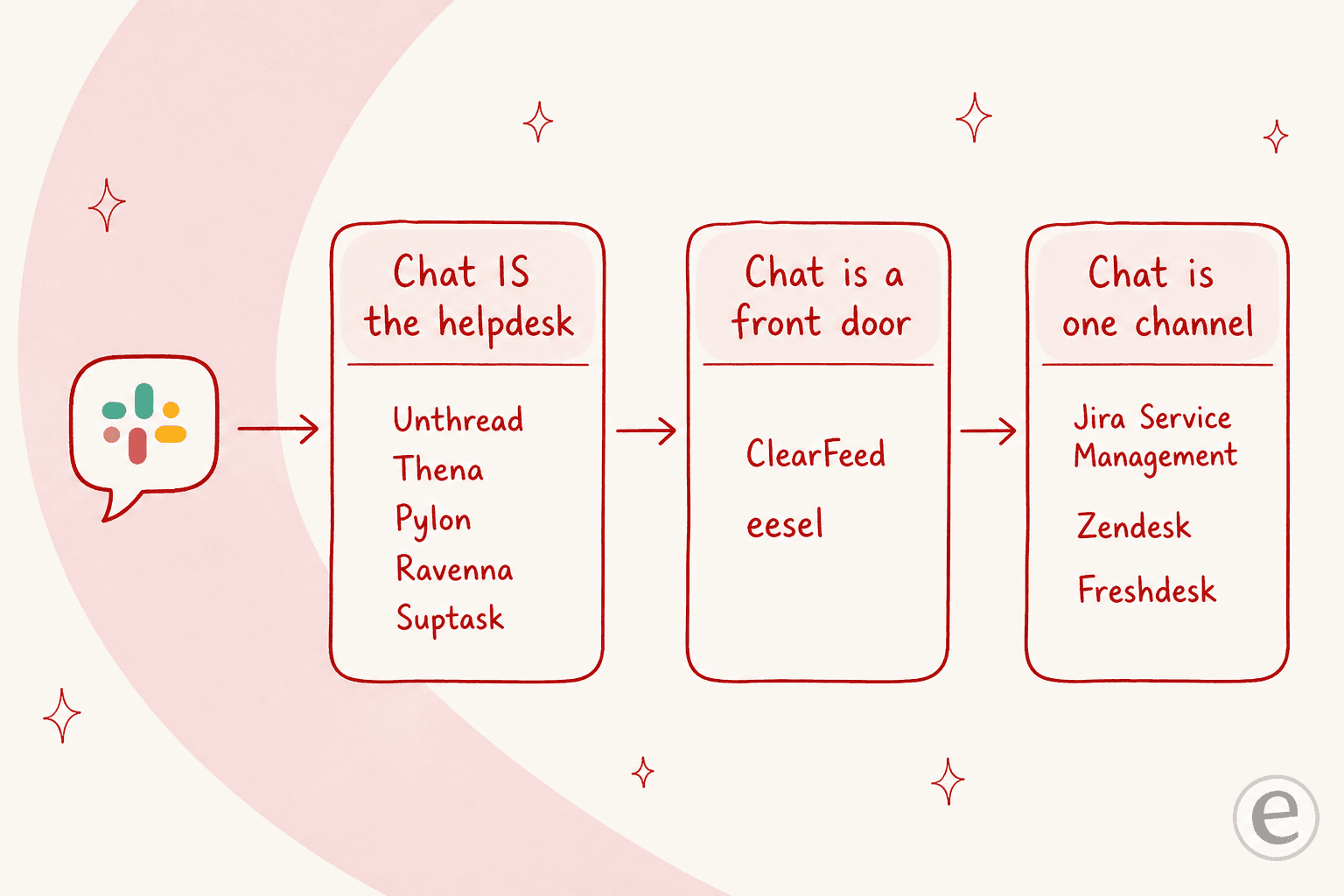
- Chat is the helpdesk. The ticket is a Slack object; the whole product is built around Slack (Suptask itself, Unthread, Thena, Pylon, Ravenna).
- Chat is a front door. Slack is where requests come in, but the record and the AI can live in, or feed, your existing helpdesk (ClearFeed, eesel).
- Chat is one channel. A full helpdesk owns the ticket and Slack is just one intake surface (Jira Service Management, Zendesk, Freshdesk).
The tools people forget to consider are the middle column, and it is often the cheapest way to get AI on your queue without re-platforming.
How I picked these Suptask alternatives
I went through each tool's own pricing pages, docs and help center, plus verifiable user voice from Reddit, G2, Capterra, Hacker News and X. A quick note on that last part: this category is heavily seeded with vendor-written "recommendation" threads, so I only quote sources I could trace to a real, unaffiliated user. The selection criteria:
- Slack-native or Slack-deep. Every pick lets your team keep raising and answering requests in Slack.
- Transparent pricing. I favor tools that publish real numbers over quote-gated ones, and I flag the gotchas (seat minimums, AI add-ons, hidden quotas).
- AI you can trust. Bonus points for the ability to simulate on past tickets, and for confidence-based routing rather than "flip it on and hope".
- A clear "best for". No tool wins for everyone, so each entry names who it is right for and who should skip it.
Here is the shortlist at a glance.
| Tool | Best for | Where the ticket lives | Starting price | Billing unit | AI included | Channels beyond Slack |
|---|---|---|---|---|---|---|
| eesel | AI resolution across Slack + your helpdesk | Front door onto your helpdesk | From $299/mo (500 credits) | 1 credit per ticket, no seats | Yes, simulate first | Zendesk, Freshdesk, web, email |
| Suptask | Internal Slack service desk | In Slack | $15 / agent / mo | Per agent | Credits (undisclosed) | Email, Slack Connect |
| Unthread | B2B support in shared Slack channels | In Slack | $50 / agent / mo (5-seat min) | Per agent | Pro tier only | Teams, email, chat |
| Thena | Omnichannel B2B support | In Slack | $29 / agent / mo | Per agent (annual) | Yes, from Starter | Teams, Discord, email, chat |
| ClearFeed | Slack front door onto a helpdesk | Front door / standalone | $24 / agent / mo | Per agent or per channel | Add-on or Pro | Email, MS Teams |
| Pylon | Account-based B2B support at scale | In Slack | Quote only | Not published | Yes | Teams, email, chat |
| Ravenna | Internal IT / HR service desk | In Slack / Teams | Quote only | Not published | Yes | MS Teams |
| Jira Service Management | Teams already on Atlassian | In Jira | $25 / agent / mo | Per agent | Premium+ | Full ITSM helpdesk |
Prices are the vendors' own published figures as of August 2026; quote-only means no public number. Now the detail.
1. eesel
Best for: teams that want AI to actually resolve tickets across Slack and their existing helpdesk, without paying per seat or ripping anything out.
I'll be upfront that this is our tool, so read the rest with that in mind, but the reason eesel sits at the top is that it answers a different question than most of this list. Suptask, Unthread and Thena make Slack into a ticketing system. eesel joins your Slack as a real AI teammate you can @mention, answers from your knowledge, and drafts or resolves tickets, while the structured record can live in the helpdesk you already run.
That matters because most teams shopping for Slack ticketing already have a Zendesk or Freshdesk somewhere. eesel connects to Slack, your help center, past tickets and tools like Confluence or Google Drive, and searches all of them at once, so a single answer in #support can draw on your wiki and your solved-ticket history together.
How it actually works
The thing worth calling out is the rollout. Instead of switching AI on and trusting a vendor's "85% resolved" stat, eesel lets you simulate the agent on your real past tickets first, then run it in draft-for-approval mode, then let it answer autonomously once you trust it, escalating whenever confidence is low.
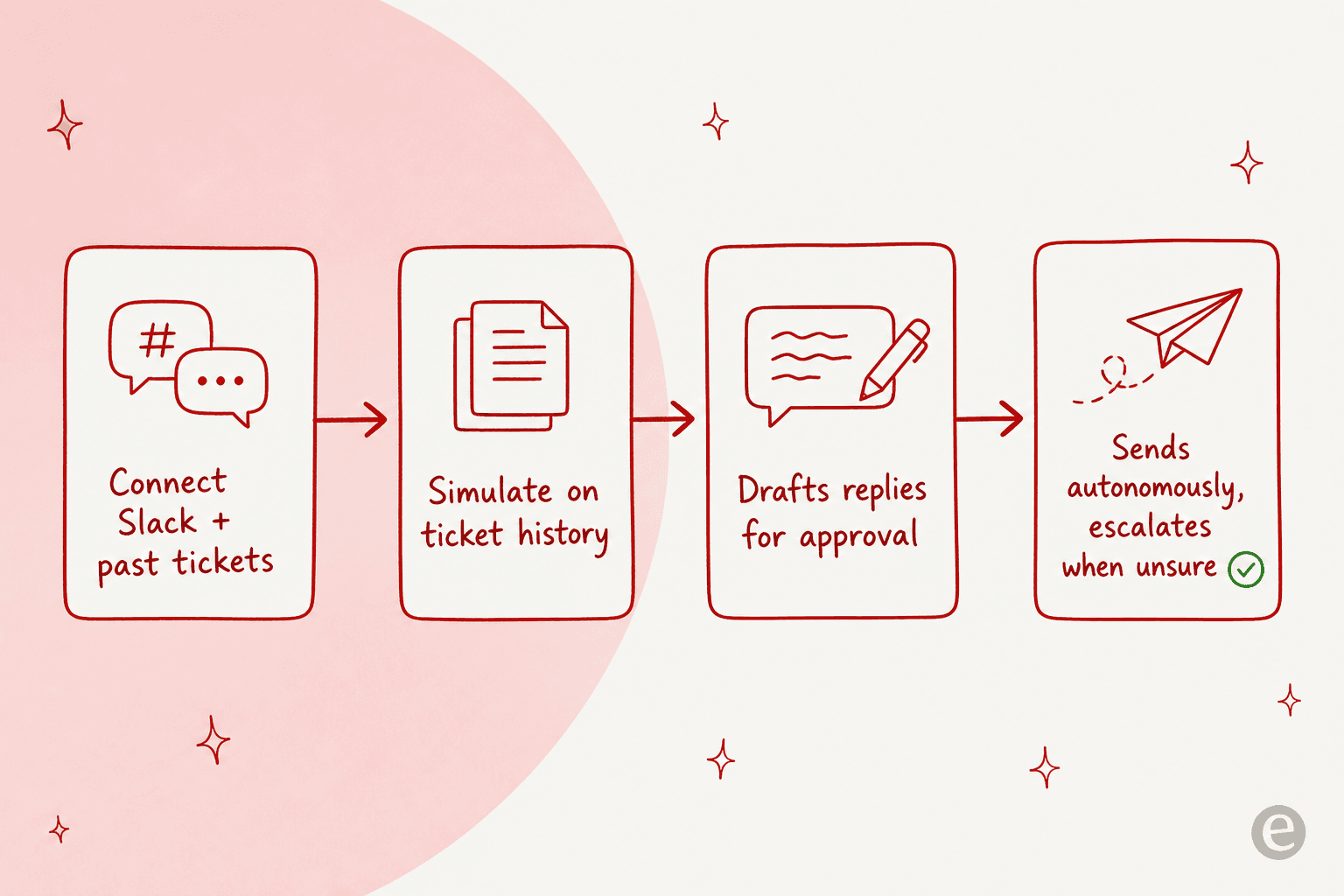
We built that ramp because we have watched confident-sounding bots quietly give wrong answers, and the only cure is testing against your own history before a customer ever sees it.
The proof is in named results: Gridwise had eesel resolving 73% of its tier-1 requests in the first month, and Smava runs a fully automated agent handling 100,000+ tickets a month, in German.
Pros
- AI works across Slack and Zendesk, Freshdesk and your website at the same time.
- Simulation on past tickets before going live, and confidence-based escalation.
- Usage-based pricing with no per-seat fees, so cost tracks volume.
- Live in Slack in about 30 minutes; most teams self-serve.
Cons
- It is an AI agent layer, not a full standalone ticket UI, so if you want a heavy Slack-resident ticket-management console, a Suptask or Unthread fits that shape more literally.
- The best results come when you have existing tickets or docs to learn from; a brand-new team with no history has less to feed it.
Pricing: one fixed monthly price from $299/month for 500 credits (1 credit per ticket or chat), with no per-agent charge; full numbers on the pricing page. There is a free plan with 100 credits you can run without talking to sales.
Our take: pick eesel if the goal is resolving tickets with AI you can trust, especially if you already have a helpdesk and don't want to pay per seat to bolt Slack onto it. If you specifically want Slack itself to become the ticket database, one of the next two is the more literal answer.
2. Unthread
Best for: B2B startups running customer support directly in shared Slack channels.
Unthread is the tool most people mean when they say "Slack ticketing for customer support". It turns Slack, Teams, email and chat into one ticket queue, and its automations and emoji-triggered workflows get real praise. A technical support manager on G2 called out how it "seamlessly consolidated our ticket flows from Slack, Teams, email, and chat", and one product manager described wiring custom TypeScript to emoji reactions, which tells you how far the workflow layer goes.
Where to be careful is pricing. Unthread is $50/agent/month Basic and $75/agent/month Pro, both carrying a five-seat minimum, so the real floor is $250 to $375 a month. Basic has zero AI and a 100-conversation-per-month cap on the whole plan, and SSO plus Slack Enterprise Grid are Enterprise-only, so a large Slack org with an SSO mandate can't buy at list price. The review corpus is also small (13 reviews on G2), so weigh it as early signal rather than a deep track record.
Pros
- Genuinely strong Slack-native ticketing with mature automations and emoji triggers.
- Multichannel (Slack, Teams, email, chat) in one queue.
- Reporting on Slack conversations that most DIY setups can't produce.
Cons
- Five-seat minimum and $50+ per agent make it one of the pricier picks for small teams.
- No AI on Basic, and a 100-conversation plan cap that is easy to hit.
- SSO and Slack Enterprise Grid gated to Enterprise.
Pricing: $50/agent/mo (Basic), $75/agent/mo (Pro), five-seat minimum on both; Enterprise is quote-only. See Unthread pricing.
Our take: the strongest "chat is the helpdesk" option for B2B teams whose customers live in shared channels, as long as you're a team of five-plus and comfortable with the price. For a deeper look, we have a full writeup of Unthread alternatives.
3. Thena
Best for: B2B teams that want omnichannel coverage (Slack, Teams, Discord, email) with AI ticket detection built in.
Thena positions itself squarely as "the support platform for B2B", and its differentiator is AI ticket detection, rather than relying only on a manual /ticket command, Thena watches your connected channels and decides which messages are actually requests, then applies AI summaries and tagging. Usefully, that detection sits on the base Starter tier, not paywalled at the top. It also reaches further across channels than most, covering Slack, MS Teams, Discord, email and web chat, with internal threads so your team can discuss a ticket privately without leaking into the customer's shared channel.
The main things to know: Thena is annual-billing only, and its Starter seat cap is stated inconsistently across its own pages (the pricing page says 5, the homepage says 10), so confirm it before you commit.
Pros
- AI ticket detection and tagging from the entry tier.
- Widest channel coverage here, including Discord, which Unthread users specifically ask for.
- Account-level context for B2B support.
Cons
- Annual billing only, so no month-to-month.
- Conflicting seat-cap numbers on its own site.
- Tops out at $119/agent, the highest per-seat rate on this list.
Pricing: $29 / $79 / $119 per agent per month, all published, annual billing only.
Our take: the best fit if you support B2B customers across more than just Slack and want the AI to find the tickets for you. If you're Slack-only and price-sensitive, Unthread or ClearFeed will feel leaner.
4. ClearFeed
Best for: teams that want Slack to be a front door onto a helpdesk, or a lighter standalone one, with flexible billing.
ClearFeed is the clearest example of the "front door" model. It sits in Slack (and MS Teams), converts requests into tickets, and can either run as a standalone helpdesk or feed an existing one. Its most buyer-friendly touch is pricing flexibility: alongside a per-agent plan ($24 Starter, $49 Professional), it offers a usage-based option billed by channels/tickets with unlimited agents, which is unusual and genuinely helpful if you have many occasional responders.
The catch to read carefully: the per-agent price isn't a pure seat price, the docs attach an undisclosed 200-ticket-per-agent quota, and AI is a $20/month add-on on Starter (bundled on Professional). Annual billing is also contract-and-signature, not self-serve. One more honesty note on sourcing: some of ClearFeed's Reddit presence traces back to staff accounts, so I've leaned on its own docs here rather than "happy user" threads.
Pros
- Two billing models, including a rare unlimited-agents usage plan.
- Works as a Slack front door onto your existing helpdesk or standalone.
- Lower entry price than Unthread.
Cons
- Hidden 200-ticket-per-agent quota lives only in the docs.
- AI is a paid add-on on the entry tier.
- Annual plans require a signed contract.
Pricing: $24 (Starter) / $49 (Professional) per agent per month, or a per-channel usage plan from $40/month; full pricing. We also break down ClearFeed pricing in detail.
Our take: a smart middle-column pick, especially the usage plan for teams with lots of light responders. Just budget for the AI add-on and check the ticket quota against your volume.
5. Pylon
Best for: account-based B2B support at scale, where one customer account spans many contacts and a contract.
Pylon is built for companies whose customers don't open tickets, they message you in shared channels. Its distinguishing feature is an account-based model (many contacts, one account, one contract) plus product-stack integrations most helpdesks skip: Linear for issue tracking, and PostHog, Mixpanel and LaunchDarkly for product analytics and flags. It's a favorite landing spot for teams churning off heavier tools, one CS lead on Reddit said they "churned devrev and are standing up pylon as we speak".
The obstacle for a buyer is simple: pricing is not published. The pricing page routes to a 30-minute demo, so you can't model cost without a sales call, and there's no published simulation or dry-run for its AI.
Pros
- Account-based B2B model that mirrors how SaaS support actually works.
- Deep product-stack integrations (Linear, PostHog, Mixpanel, LaunchDarkly).
- Strong switching signal from teams leaving heavier platforms.
Cons
- No public pricing at all; demo-gated.
- No advertised way to test the AI before trusting it.
Pricing: quote-only, demo-gated.
Our take: worth a demo if you're a scaling SaaS company doing account-based support and the product integrations matter. If transparent, self-serve pricing is a requirement, this one will frustrate you.
6. Ravenna
Best for: internal IT, HR and operations service desks that live in Slack and Microsoft Teams.
If your use case is closer to Suptask's internal framing than to external customer support, Ravenna is the closest specialist. It's "the agentic service desk for IT, HR, and Operations", living in Slack and Teams, with a deliberate position that "enterprise AI requires deterministic workflows" rather than pure-LLM routing. Its worked examples are all employee-facing: access requests, onboarding and offboarding, hardware issues. The integration list leans IT-heavy too, identity providers (Okta, Entra, JumpCloud), device management (Jamf, Intune) and HR systems (Workday, Rippling, BambooHR).
Two honest limits: Ravenna publishes no pricing and no named-customer numbers or logos in readable form, so its proof surface is thinner than Unthread's or Thena's, and you'll need a demo to get a quote. Its channel set is also narrower, Slack and Teams, with no email or web-chat intake advertised.
Pros
- Purpose-built for internal IT/HR/ops, with the right integrations.
- Deterministic workflows alongside AI agents, which enterprises often want.
- Works across both Slack and Microsoft Teams.
Cons
- No published pricing, deflection rates or named customers.
- Narrower channel set (no email/web-chat intake).
Pricing: quote-only; no public numbers.
Our take: a strong shortlist entry specifically for internal service desks. For external customer support, look higher up this list.
7. Jira Service Management (with Assist)
Best for: teams already living in Jira and the wider Atlassian suite.
This is the "chat is one channel" answer. If you're already on Atlassian, Jira Service Management is a full ITSM helpdesk, and Assist (the successor to the shut-down Halp) brings the Slack intake: a configured request channel plus a :ticket: emoji converts messages into JSM tickets. The record lives in Jira, with all the SLA, workflow and reporting depth that implies, and Assist rides existing JSM agent seats rather than a separate SKU.
The trade-offs are the flip side of that depth. Assist's expand card caps at 10 fields, the emoji only fires inside a configured request channel, and the virtual service agent is Premium-only and works in Slack or Teams, never both at once. It's also the heaviest tool here to administer, this is a real ITSM platform, not a lightweight Slack app.
Pros
- Full ITSM helpdesk with deep SLA, workflow and reporting.
- Slack (and Teams) intake included via Assist, on all JSM tiers including Free.
- Natural choice if Jira is already your system of record.
Cons
- Heavier to set up and run than any Slack-first tool.
- Virtual agent is Premium-only and single-platform at a time.
- Slack experience is intake, not a full Slack-resident ticket console.
Pricing: JSM is roughly $25/agent/month (Standard) and $57.30 (Premium) in the 1–15 band; Assist is included. See Atlassian pricing.
Our take: the right call when Jira already owns your tickets and you just need Slack as a clean intake channel. Overkill if all you wanted was Slack ticketing.
8. Slack Workflow Builder (the DIY option)
Best for: tiny teams that just need forms and routing and don't want another bill.
Before paying for anything, it's worth knowing what Slack gives you for free-ish. Workflow Builder plus a shared channel and an emoji convention can get a small team surprisingly far. One IT manager laid out the whole DIY recipe on Reddit:
"Every DM gets reposted to the support channel. You respond there in a thread... Eyes 👀 emoji to acknowledge you've read it. @ the person who will complete the request. Checkered flag 🏁 emoji when it is complete. This will get you organized at least somewhat. It won't help you report on tickets per day or old incomplete tickets or anything else that a proper ticketing system would do."
That last sentence is the whole point. The DIY approach breaks exactly where reporting, SLAs and "what's still open" begin, and it can't fight the gravity of DMs:
"As long as people have the option for a DM or even a direct line that gets answered they will gravitate towards that. Nothing is going to beat it unless you close down that line."
Pros
- No extra vendor and no per-agent bill.
- Native, so zero adoption friction.
Cons
- Lists and branching need a paid Slack plan (Business+ for branching); workflow logs are 90 days with no export.
- No real queue, SLAs, or ticket reporting.
- No AI resolution.
Pricing: included with paid Slack plans (Pro from $7.25/user/month annual); some pieces excluded from Free.
Our take: the honest starting point for a team of a few people. The moment you need to answer "how many tickets did we close, and what's overdue?", you've outgrown it, and that's your cue to pick something above.
What it actually costs
The headline story of this category is the split between per-seat and per-ticket billing, and it's easy to miss until the invoice arrives.
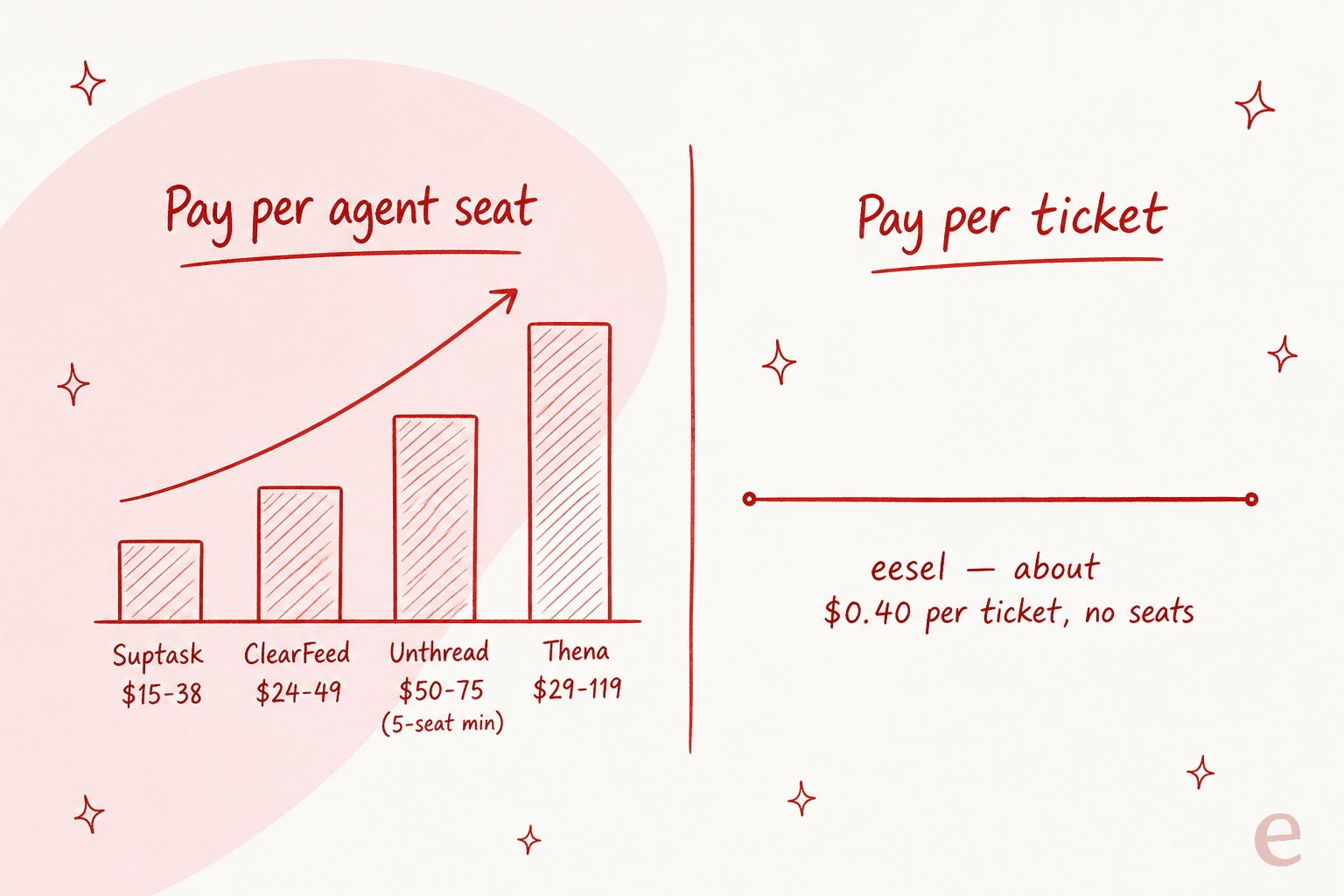
Most Suptask alternatives charge per agent, so your cost climbs with headcount whether or not ticket volume moves. At 10 agents, Unthread Pro is $9,000 a year before you count its conversation caps; Thena's top tier is higher still. Suptask itself is the value play on pure seat price ($15 to $38). The usage model that eesel uses inverts this, cost tracks the number of tickets your AI actually handles, so adding a seat for a part-time responder doesn't add to the bill. Neither model is universally cheaper, it depends on your ratio of agents to volume, but knowing which one you're buying is half the decision.
Try eesel
If the reason you're looking past Suptask is that you want AI to resolve tickets, not just file them, that's the specific job eesel is built for. It joins your Slack as an AI teammate, connects to your helpdesk and knowledge in about 30 minutes, and, crucially, lets you simulate it on your own past tickets before it ever answers a live person, so you can see the real resolution rate instead of trusting a marketing stat.
Because it has one fixed monthly price with no per-seat fees, it works whether you support customers in shared channels or run an internal desk, and it plugs into the Zendesk or Freshdesk you already have rather than replacing it. You can try it free without a sales call.