
What "keyword performance" actually measures
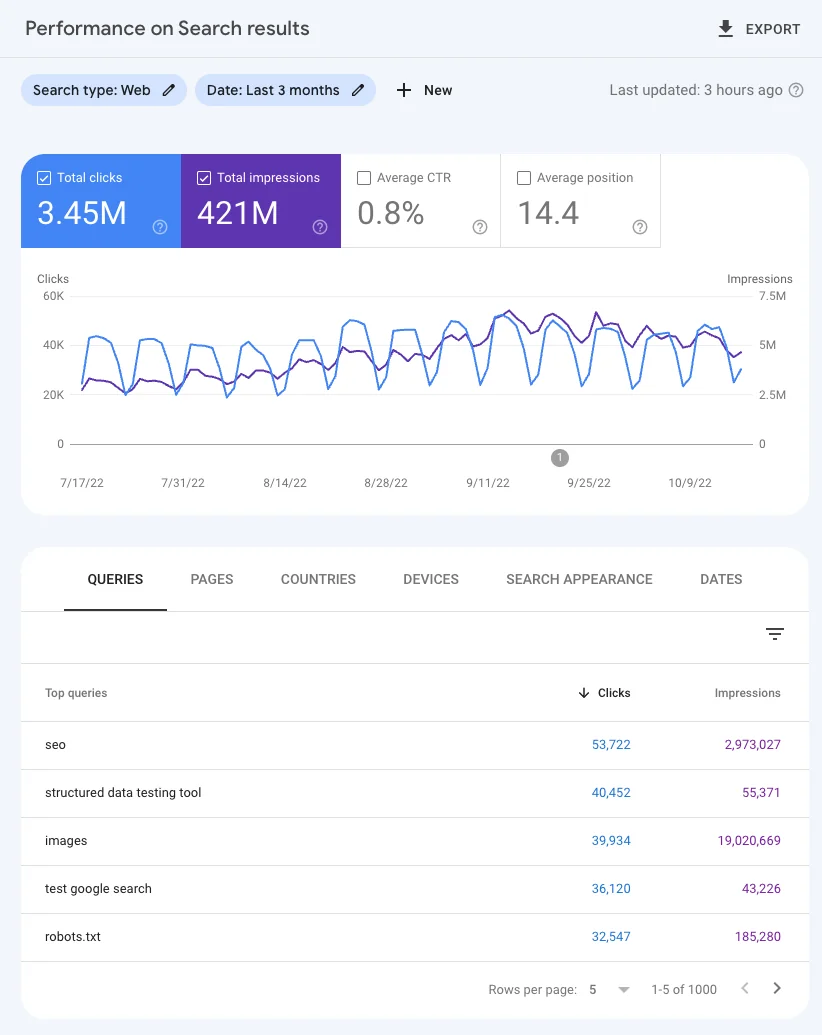
"Keyword performance" isn't a single metric, it's Google Search Console's Performance report, grouped by the Queries dimension so you can see, in Google's own words, "which queries are bringing traffic to your site." Four numbers make up the report:
- Clicks - the number of times someone clicked your result and left Google. Clicking the same result twice in a session still only counts once.
- Impressions - how many times your link showed up on a results page, whether the user scrolled to it or not.
- CTR (click-through rate) - clicks divided by impressions.
- Average position - the average rank of your topmost result for that query, across every time it was shown.

Google's own Performance report help page is worth reading directly, because it flags a nuance most guides skip: even if a query shows up in your list, running that exact search yourself might not show your site at all, because live results are personalized "to the time, place, device, and recent history of the person searching." The report and your own eyeballs are looking at genuinely different things.
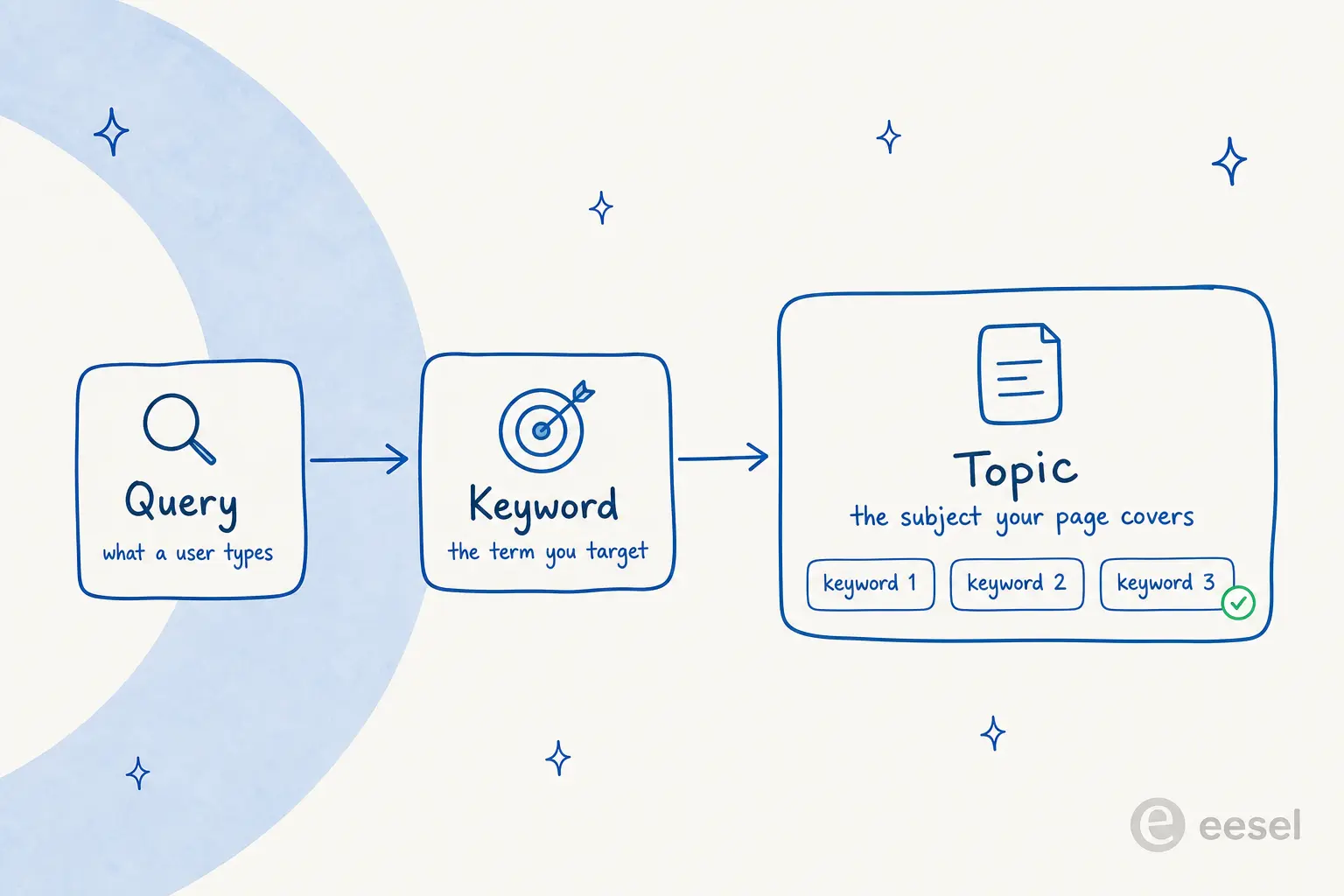
It helps to separate three words that get used interchangeably: a query is what a person actually types, a keyword is the term you're targeting, and a topic is the broader subject a page covers, usually made of several related keywords. eesel's free SEO Keyword Generator is built around exactly this chain, turning one topic description into up to 30 candidate keywords. It's worth separating performance from keyword difficulty too: difficulty is a prediction of how hard a keyword is to rank for before you've written anything, while performance is what actually happened after you did.
Why "average position" trips up almost everyone
This is the metric Google itself is most candid about. Its own documentation on position states plainly that "position is a complex metric that can be misleading if you don't understand the subtleties" - a rare admission from a platform that usually keeps its help copy neutral.
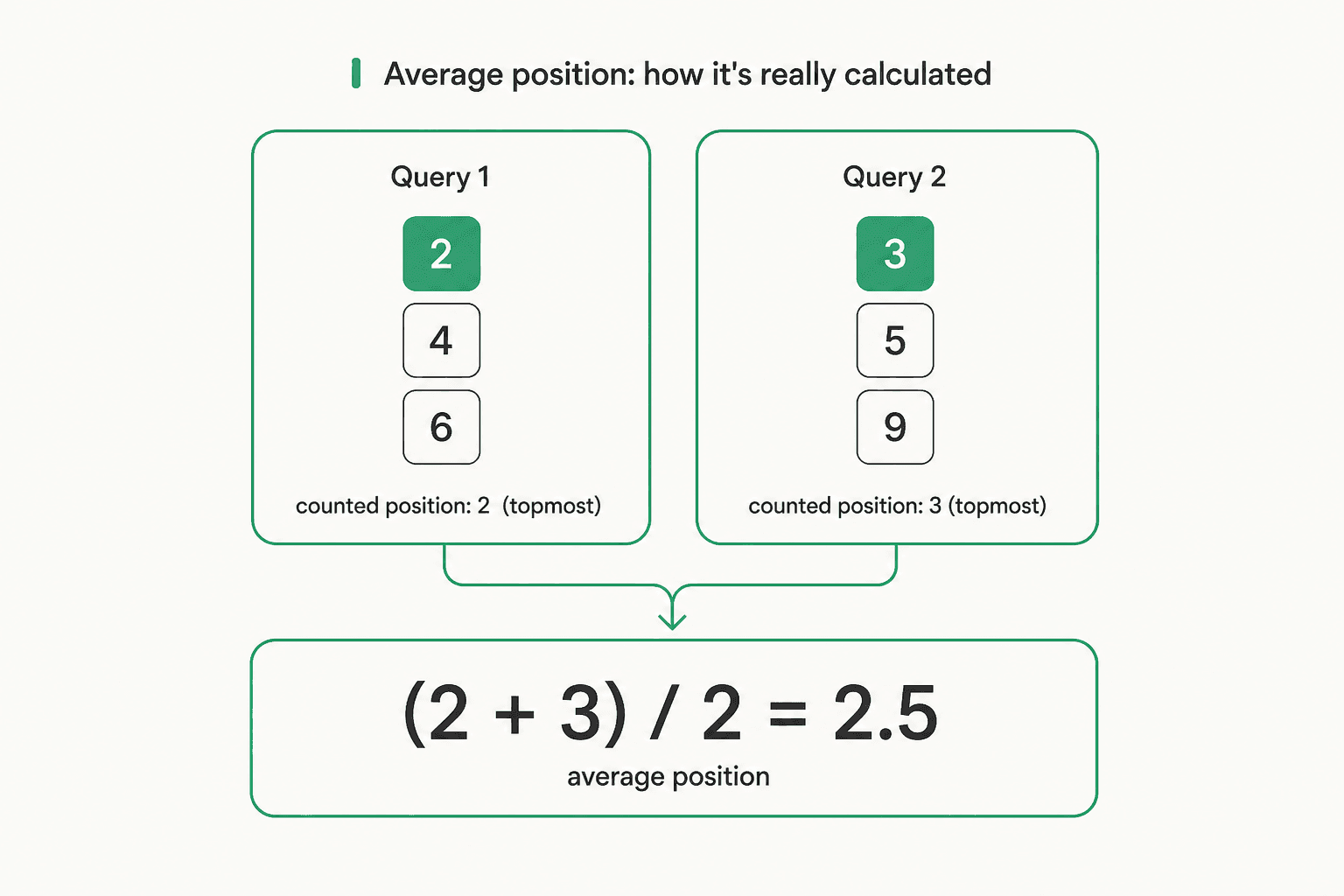
The mechanic is a two-layer average, not a single lookup. First, if more than one of your URLs shows up for a single query occurrence, Search Console only counts the topmost of those positions, not the average of all of them. Second, it averages that topmost position across every occurrence of the query over your chosen date range. Google's own worked example makes the mechanic concrete: a query returning your site at positions 2, 4, and 6 counts as position 2 for that occurrence; a second query returning positions 3, 5, and 9 counts as 3. Average those two occurrences and you get 2.5, a number that doesn't correspond to a single rank the page ever actually held.
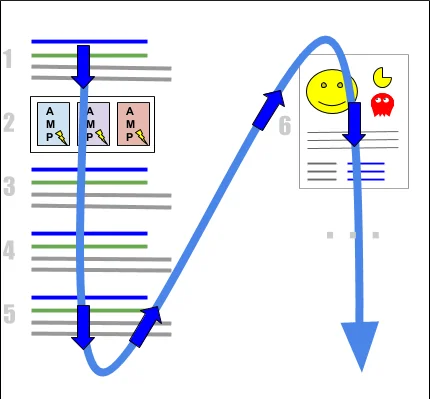
There's a second wrinkle: position order doesn't map cleanly onto visual prominence once you account for knowledge panels, image carousels, and other compound results. Google gives its own example of the confusion this causes: position 11 on desktop could mean the top slot inside a knowledge panel, the first result on page 2, or a row of image results a user has to scroll to see - completely different real-world visibility hiding behind the same number. This is roughly what Peter Rota argued on LinkedIn: "Average position in GSC is misleading because it's unweighted, but it's not useless." His point lines up with Google's own guidance - trend the number over time rather than treating any single day's average as gospel.
For a diagram of exactly how Google counts position on a two-column results page, its own position-counting documentation is the clearest primary source, and worth screenshotting for your own team's onboarding docs.
When the four metrics disagree with each other
This is the part that actually confuses people day to day: clicks, impressions, CTR, and position don't move together, and treating them as one health score hides what's really happening.
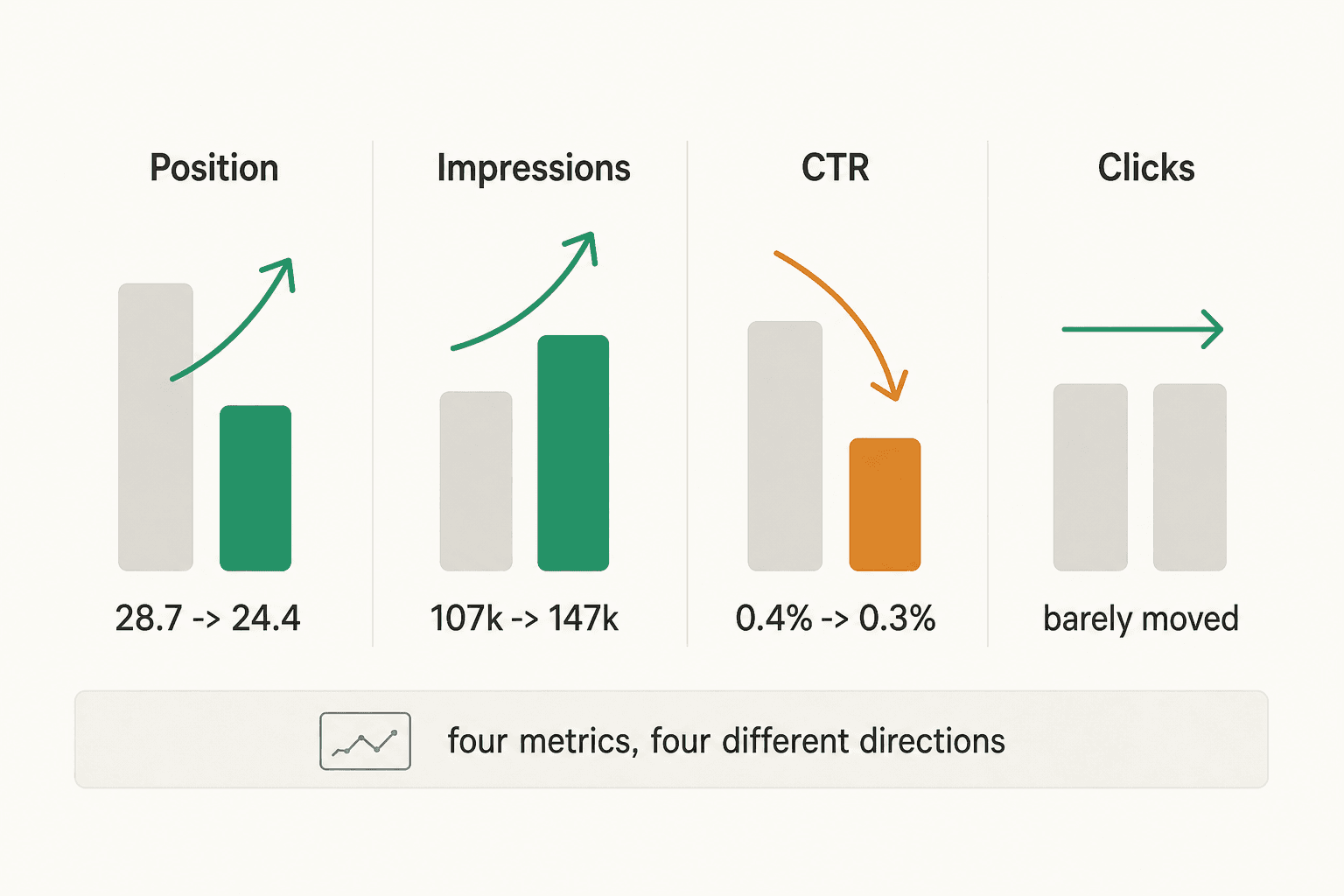
That's a real pattern practitioners have hit and posted about: one r/bigseo thread describes average position improving from 28.7 to 24.4 and impressions rising from 107,000 to 147,000 in the same period that CTR fell from 0.4% to 0.3%, leaving clicks nearly flat. The explanation practitioners converge on in that thread and in a related r/SEO discussion is the same one Google's own guidance implies: your pages started surfacing for more, often lower-intent queries, which lifts total impressions and lowers average CTR even while the headline "position improved" number looks like unambiguous good news.
Google frames the underlying issue as one of attention quality, not just ranking: "you should aim not simply for more impressions, but meaningful impressions... being seen, or clicked, by people who don't find your content useful and will quickly leave is not a healthy way to build website traffic," per Google's guidance on clicks. A query surfacing your page to the wrong audience is a targeting problem the position number alone will never show you.
Keyword cannibalization creates the same kind of confusing pattern from a different cause, two of your own pages competing for the same query and splitting its performance data between them. One practitioner admitted on r/SEO that the call is mostly "gut instinct," but a cleaner diagnostic exists: open the Performance report, filter to the query you suspect is split, then switch to the Pages tab to see how many of your own URLs are pulling impressions for it, a workflow another thread lays out step by step.
If it's genuinely two separate keywords wearing similar clothes rather than true overlap, running each through a keyword clustering tool first will usually settle it before you touch Search Console at all.
The friction nobody's tool fully solves
Ask people who track keyword performance for a living what actually bothers them, and the same complaint surfaces on every platform: the data lags reality. One user called out on r/bigseo that Ahrefs' premium rank tracker only refreshes after seven days. A Semrush reviewer on G2 hits the identical wall from a different tool entirely:
"[Position tracking updates] weekly, so if my rankings shift after a content update or algorithm change, I won't see it until the next snapshot. For less popular keywords, updates can be as infrequent as once a month. This gets a little frustrating at times."

That same reviewer still keeps paying, because the strategic payoff outweighs the lag:
"Semrush levels the playing field. My competitors have years of head start, but by knowing exactly which keywords they rank for, where they've built backlinks, and where their content gaps are, I've been competing strategically without guessing."
Google's own platform changes compound the lag problem. When Google removed the num=100 URL parameter, Julian Goldie noted on X that "every rank tracking tool that relied on this parameter can now only see 10 results at a time instead of 100," breaking the data-collection layer every third-party tracker depended on, not just an internal Search Console quirk. Day-to-day rank volatility adds another layer of noise on top: SEOs on r/SEO report keywords swinging 15-20 positions overnight for reasons that have nothing to do with anything they changed.
None of that means tracking is pointless, it means single-day snapshots from any tool, free or paid, deserve real skepticism. For a fast, free sanity check on any individual keyword without waiting on a weekly refresh, eesel's SERP Checker pulls the live, non-personalized results page instantly. The tool's own guidance matches what the practitioner threads above independently arrived at: check your important keywords weekly or bi-weekly, since results shift as algorithms update and new content gets published.
For the site-health side of the equation, rather than the keyword side, eesel's Domain Rank Checker scores any domain out of 100 across accessibility and SSL, on-page SEO elements, security headers, and performance, free and without a sign-up. It deliberately skips faking a Domain Authority or Domain Rating number, since both are proprietary metrics gated behind paid APIs, and sticks to what it can verify directly.
Is keyword-level tracking even the right unit anymore?
Here's the honest complication: some of the sharpest people in SEO are questioning whether obsessing over individual keyword rank is still the right move. Koray Gubur argued on X that the field is "moving toward an 'estate-based performance' mindset rather than hyper-precise, keyword-level rank tracking." Kevin Indig made a similar point on LinkedIn, arguing SEO success now depends less on chasing new keywords and more on strengthening the ones already close to ranking.
That doesn't mean keyword data is obsolete, it means it's one input among several. Connor Gillivan's rundown on LinkedIn of the metrics he actually watches lists keyword rankings alongside traffic, impressions, domain rating, and CTR, a portfolio view rather than a single obsession. In practice, the two positions aren't in conflict: track individual keyword performance to find specific content gaps and cannibalization, but judge overall health by the cluster of queries a page or section ranks for, not any one term in isolation. Long-tail keyword research actually leans into this, since a single well-targeted page usually captures dozens of related long-tail queries rather than one head term.
From a keyword-performance gap to a published page
The point of tracking any of this is to act on it. Here's the shortest real path from "I found a keyword gap" to a live, optimized post:
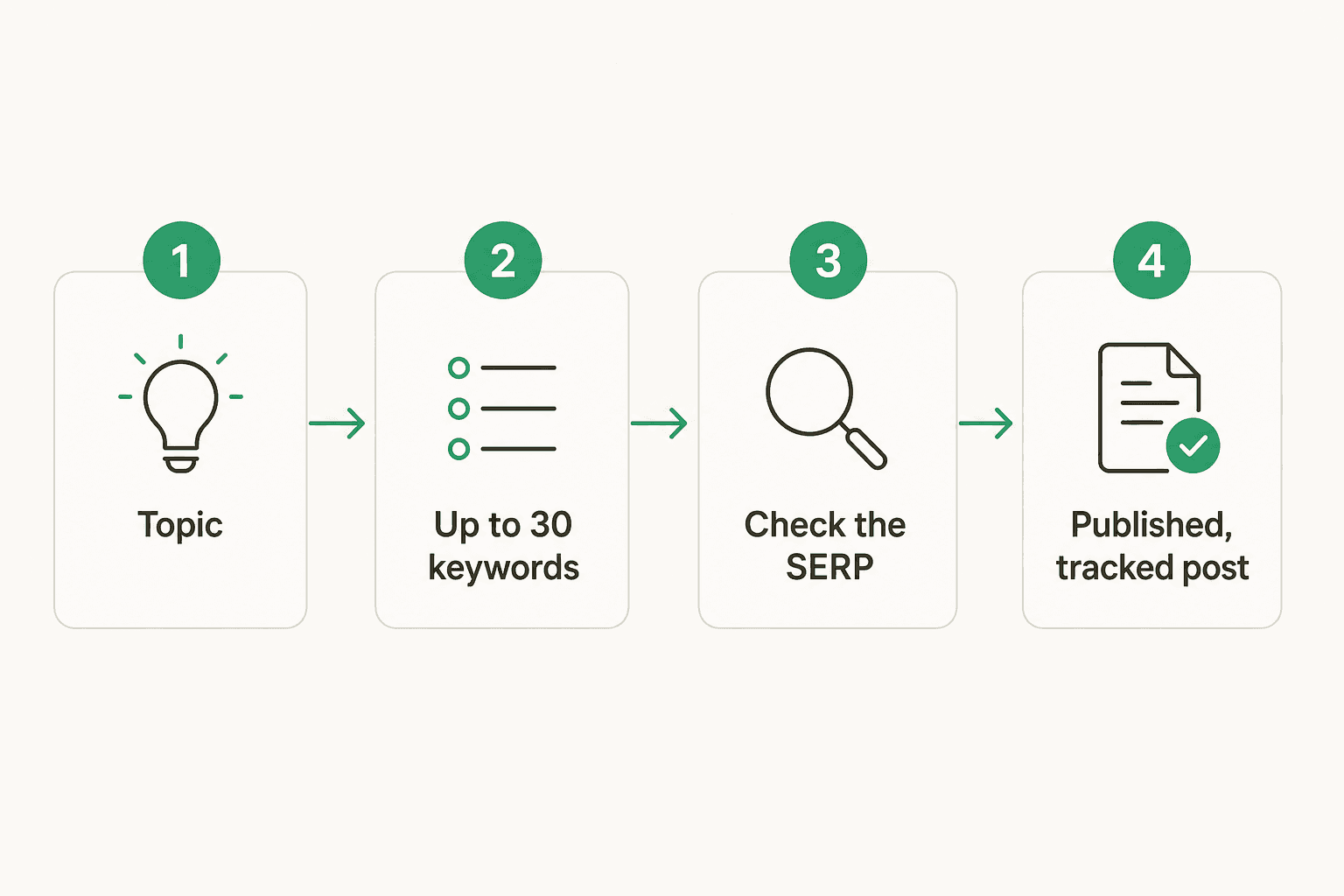
Start with a plain-language topic in eesel's SEO Keyword Generator, which runs on Google's Gemini model to return up to 30 relevant keywords instantly, free and with no sign-up.
Check the strongest candidate's live SERP with the SERP Checker to see what's actually winning that query before you commit to writing anything. Each keyword from the generator also carries a one-click "Generate Blog" button that hands straight off to eesel's AI Blog Writer, which does its own keyword research, competitor gap analysis, and topic scoring, then writes a fully-researched, cited post in your voice, complete with diagrams and images, and can publish on a schedule.
That closes the loop that tripped up most of the threads earlier in this post: performance data alone doesn't move a needle, publishing the right content against a real gap does. It also feeds itself, since every post you publish this way becomes a new query to track back in Search Console, and a new candidate for content refresh once its keyword performance starts to fade.
The format matters as much as the keyword
A keyword-performance gap doesn't always call for a standard blog post. If the SERP for your target keyword is dominated by definitional snippets, a FAQ page or glossary-style entry will out-compete a 2,000-word article.
If it's dominated by "best X" roundups, you want a proper listicle, and if two products keep showing up side by side in the results, a dedicated comparison page usually wins over folding the comparison into a paragraph. Matching format to what's already ranking is a big part of why some pages convert a keyword gap into real traffic and others don't.
Before any of that gets written, a content brief grounded in the actual SERP keeps the draft on-target, and slotting the keyword into a content calendar or a broader pillar-page structure stops it from cannibalizing a post you've already published.
This is also where semantic SEO earns its keep: writing to cover a topic's full semantic field, not just the exact-match keyword string, is what turns one target keyword into the dozens of related long-tail queries a page actually ends up ranking for.
Try eesel
If you're already staring at a Search Console export trying to figure out which queries are worth writing for, the manual version of this loop, keyword idea, SERP check, brief, draft, publish, easily eats a full day per post. eesel's AI Blog Writer is built to compress that into one workflow: it finds keyword and competitor gaps on its own, researches from primary sources and real Reddit threads rather than just top Google results, matches your brand voice from day one, and ships posts with cited sources, diagrams, and internal links already in place. Pair it with the free SEO Keyword Generator for the research step, and you've got the entire pipeline in this post running without switching tools.
It's a genuinely different category from a prompt box you feed one paragraph at a time. Most AI blog writing tools still need a human to prompt every step, ChatGPT included. eesel's pitch is closer to hiring someone: point it at a topic or a keyword gap, and it does the research, writing, and publishing on its own. You can try eesel free, no credit card required.
Frequently Asked Questions
What does keyword performance mean?
How do I track keyword performance for free?
Why does Google Search Console show a different position than my own search?
Why did my position improve but my clicks stay flat?
What's the fastest way to go from a keyword idea to a published, optimized post?
Is keyword-level rank tracking still worth doing in 2026?
How often should I check keyword performance?


Article by
Kurnia Kharisma
Kurnia is a software engineer and writer at eesel AI with two years of SEO experience, writing about AI tools, helpdesk software, and customer support. He pairs a developer's understanding of how these products are built with search-driven research into what actually ranks and resonates with the people searching for them.