What Meta actually lets you do about a bad review
Before you write a single word, it helps to know the actual rules, because most of the anxiety around negative reviews comes from assuming you have more control than you do. On a Facebook business Page, reviews and ratings live under the Ratings and reviews tool inside Meta Business Suite. From there you can do exactly three things: publish a response, edit or delete that response later, or report the review itself. You cannot edit, hide, or delete the customer's review or star rating directly, no matter how unfair it feels.
The newer ratings system Meta runs is also narrower than most business owners assume. A rating request only fires when a customer interacts with one of your ads and then makes a purchase, and the score that results is an average weighted toward recent ratings across Meta's platforms, not a simple lifetime tally. Reviews that Meta finds to violate Community Standards are automatically excluded from that average. And your rating won't even display to shoppers until Meta has collected enough reviews to make the number meaningful, so a brand-new Page with two reviews isn't showing a "real" score yet either way.
Reporting has a hard limit worth knowing before you reach for it: a star-only rating with no written text can't be reported at all, even if you're certain it's fake or from someone who never bought anything. Only reviews that carry written text and that plausibly violate Community Standards are eligible, and even a successful report doesn't remove the review instantly - it flips the review's status from "Published" to "Pending" while Meta's team assesses it, and it stays publicly visible the whole time. That's a meaningful planning detail: if you're hoping a report will make an ugly review disappear overnight, it won't, so a good public response is doing more work for you in the meantime than the report itself.
Contrast that with a support escalation inside your own helpdesk, where you have far more levers - reassigning, prioritizing, pulling in a specialist. A public review sits outside that system entirely, visible to every future customer who checks your Page before buying, which is exactly why the response matters more here than almost anywhere else in your customer experience.
Step 1: don't respond in the first ten minutes
The single most common way business owners make a bad review worse is replying while they're still angry. One small business owner described exactly this dilemma on Reddit after their first genuinely nasty one-star review:
"Got my first really nasty one-star review this week. Staff were apparently rude (they weren't this customer was genuinely unreasonable) and I'm sitting..."

That "sitting" is the tell. A defensive, in-the-moment reply is the one thing that turns a single one-star review into a screenshot that gets shared. Marketer James Broadbent made the same point after his business's first 1-star Google review, and the advice travels directly to Facebook:
"A few tips if someone leaves a negative review.. Wait a few days to respond. Firstly you will feel defensive. Give it some time so you can break..."

You don't need to wait days on every review - a genuinely urgent complaint (a safety issue, a public health concern) deserves a same-day acknowledgment. But for the ordinary "I'm annoyed and someone was rude to me" review, give yourself long enough to stop composing a rebuttal in your head. A day is usually plenty. What you're buying with that pause isn't distance from the customer, it's distance from your own defensiveness.
Step 2: work out what kind of review you're actually dealing with
Not every negative review deserves the same response, and treating them all the same is how businesses end up either over-apologizing for something that wasn't their fault, or firing back at someone who had a real grievance. Before you write anything, sort the review into one of three buckets.
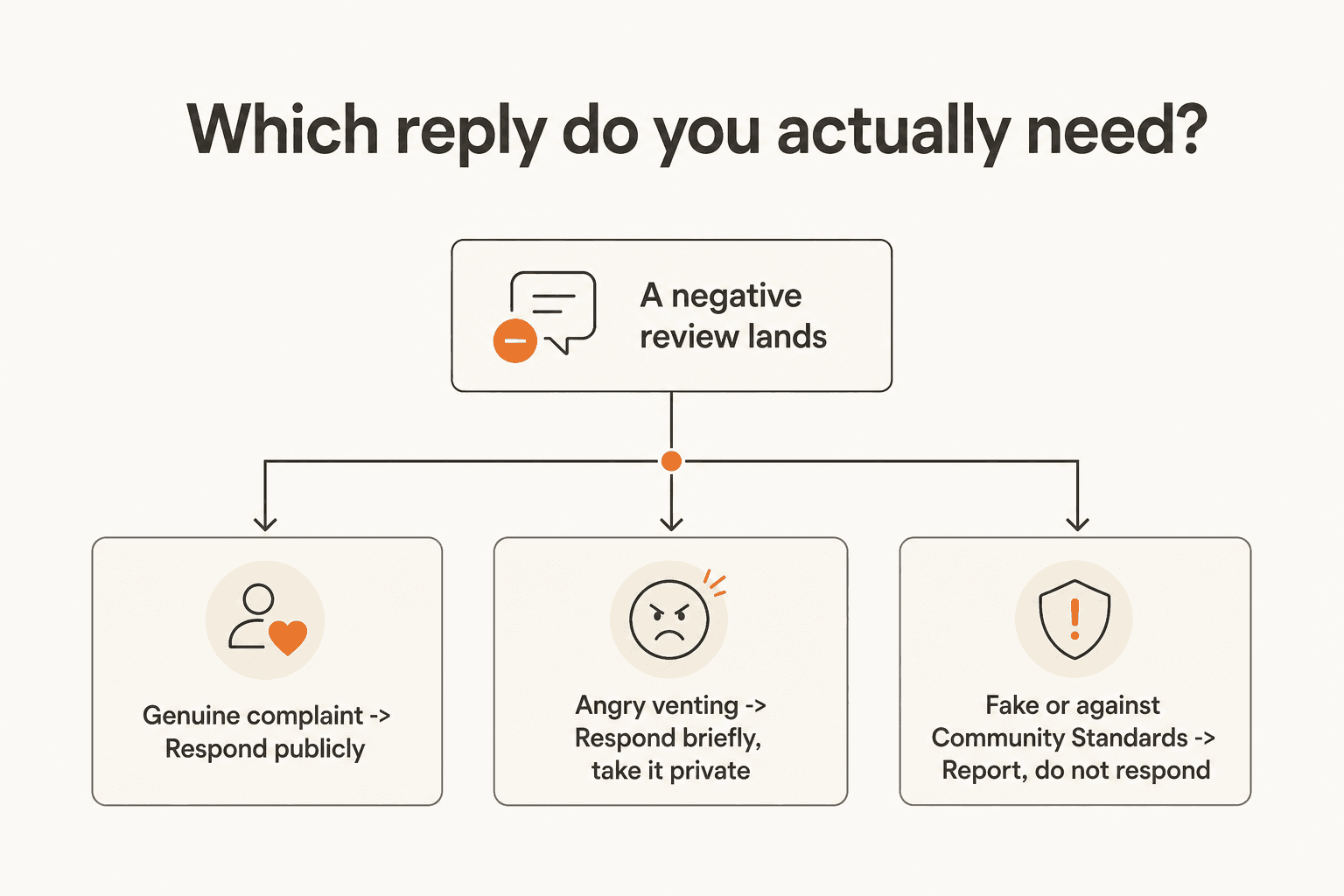
A genuine complaint - the order was late, the item arrived damaged, the agent misunderstood the request - gets a full public response and a real fix. This is the easy case, even though it doesn't feel easy: someone told you something true and unflattering, and the correct move is to say so and act on it.
Angry venting from someone with a real but overblown grievance (bad timing, a one-off staffing issue, a policy they didn't like) still gets a short public reply, but the goal there is to de-escalate quickly and move specifics into a private message rather than litigate the details in public. Our guide on how to deal with angry customers goes deeper on de-escalation language if this is the bucket you're in most often.
Fake or policy-violating content - a competitor posing as a customer, a review that's really about a different business, hate speech, spam - doesn't get a reply at all. It gets reported. Arguing publicly with something that shouldn't exist on the platform just gives it more attention and more time on your Page while the report is pending.
Step 3: write a reply that actually works
Once you know which bucket you're in, the structure of a good public reply barely changes: name the specific issue, take responsibility without qualifying it away, offer something concrete, and move the details private.
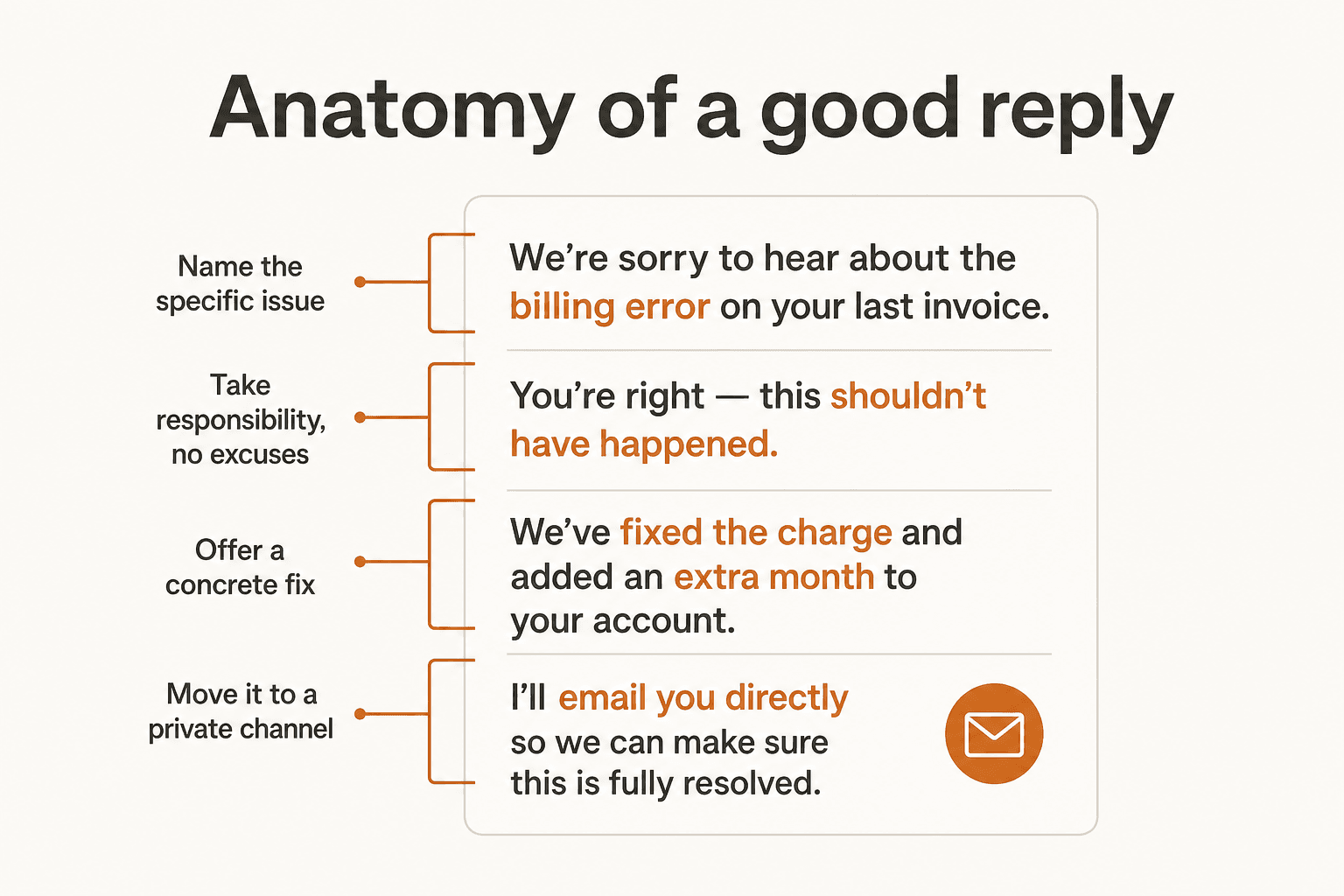
A reply that skips the specific issue and reaches straight for a generic "we're sorry to hear about your experience, please reach out to us" reads as a template, and readers can tell. Naming the actual thing that went wrong - "you're right that the order took four extra days to ship" - signals that a human actually read the review rather than pasting a stock line. Taking responsibility without an excuse attached matters just as much: "we should have caught this before it shipped" lands better than "due to high volume, some orders were delayed," even when the second sentence is technically true. Save the explanation for after you've owned the outcome, not instead of owning it.
The fix doesn't have to be dramatic. Often it's just "we've refunded the difference" or "I've flagged this with the team so it doesn't happen again," paired with an invitation to continue by message. That last part matters for privacy as much as tone - order numbers, account details, and specific staff names don't belong in a public comment thread, and a customer who feels heard publicly and helped privately is the best outcome a review can produce.
Templates help, but only as a starting shape, not a script - a generic reply pasted across every review reads exactly as hollow as ignoring the review altogether. Our roundup of social media response examples has more worked wording for specific situations (refunds, outages, praise) if you want a wider bank to pull from.
Step 4: know when reporting is actually the right move
Reporting is for reviews that break the rules, not reviews that hurt. Meta's help documentation is specific that a report is checked against Community Standards, not against whether the complaint is fair or accurate. If a review is genuinely fake, plainly abusive, or from someone who's clearly never interacted with your business, reporting is worth the few minutes it takes. If it's just a real customer who's genuinely unhappy, reporting it won't remove it (a fair, unflattering review doesn't violate Community Standards) and it burns the goodwill you'd have gotten from just answering it well.
One more limitation worth planning around: a star-only rating with no written text isn't reportable at all, and a reported review stays visible while under review rather than disappearing immediately. Both of those mean your public response is usually doing more real work, faster, than a report ever will.
You don't need a perfect star rating
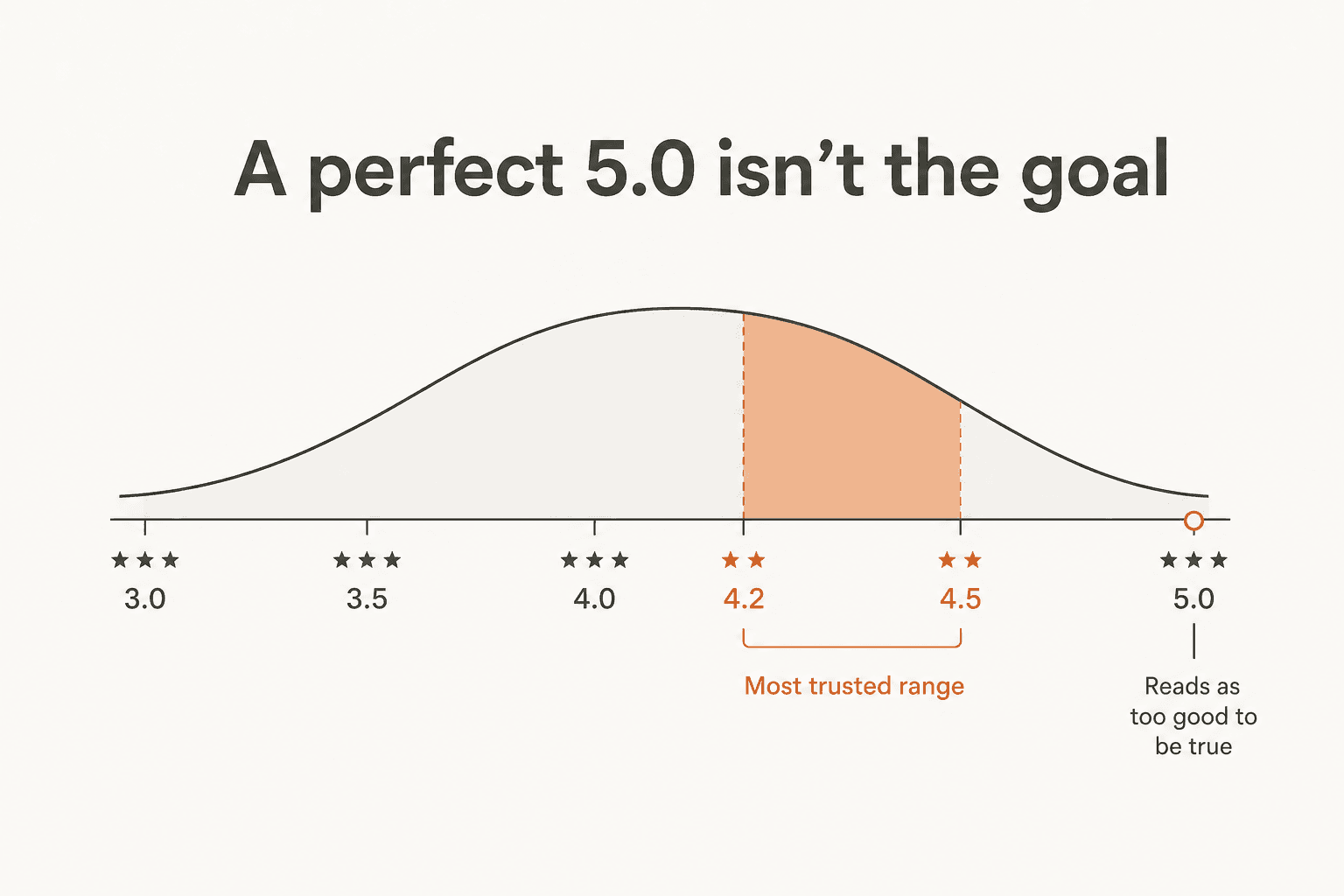
There's a version of this problem that isn't really about any one review: the instinct to treat every negative review as damage to be minimized rather than a normal part of having real customers. That instinct is backwards. Local-SEO practitioner Joy Hawkins makes the case directly, citing research on how shoppers actually read star ratings:
"The notion of negative reviews helping your business shouldn't be taken out of context here. I'm not encouraging business owners to provide poor service in order to get some bad reviews on their listings. Instead, what I'm saying is that most consumers are smart enough to understand that it's impossible for any business to completely satisfy every customer. A study by Power Reviews found that "A consumer is most likely to purchase a product when its average star rating is between 4.2 and 4.5 stars. Why? Because a perfect 5.0 rating is seen as too good to be true. An average star rating of 4.2-4.5 stars, however, is seen as more transparent and balanced.""
What actually moves a shopper's trust isn't your star average, it's whether you show up when things go wrong. The response gap is the bigger lever here than the rating itself: 89% of consumers are more likely to use a business that responds to all of its reviews, and only 47% will use one that never bothers to respond at all, according to the stat marketing consultant Jordan White cites on the topic.
"89% of consumers are more likely to use businesses that respond to ALL reviews... Only 47% will use businesses that don't bother to respond."
In other words: the review record buyers are actually judging is your response record, not your star average. A Page with a 4.3 rating and a reply under every negative review reads as more credible than a spotless 5.0 with silence underneath it.
Common mistakes that make a bad review worse
A few patterns show up again and again in how businesses mishandle Facebook reviews, and each one is avoidable once you know it's a pattern:
- Arguing publicly, point by point. Even when you're factually right, a back-and-forth in the comments reads as defensive to everyone else scrolling past, not just the original reviewer.
- Pasting the same generic reply on everything. "We're sorry to hear this, please DM us" under every single review is barely better than not responding - readers recognize a copy-paste line instantly.
- Ignoring it and hoping it scrolls away. Given that 89%-vs-47% response gap, silence is itself a signal, and not a good one.
- Trying to get a fair-but-harsh review taken down. Reports only succeed against Community Standards violations. Spending energy contesting an accurate review is energy not spent fixing the thing it's about.
- Treating every review like a support ticket that needs full detail resolved in public. Refund amounts, order numbers, and account specifics belong in a private message, not a public comment thread.
Try eesel
None of this is really about Facebook specifically - it's about whether your team has the bandwidth to write a real, specific reply instead of a copy-paste one, on the day the review actually lands. That's the part eesel helps with. eesel is an AI helpdesk agent that plugs into the ticketing tools your support team already uses - Zendesk, Freshdesk, Front, Gorgias, and others - and drafts replies to the routine tickets so a human isn't spending their whole day on password resets and shipping-status questions.
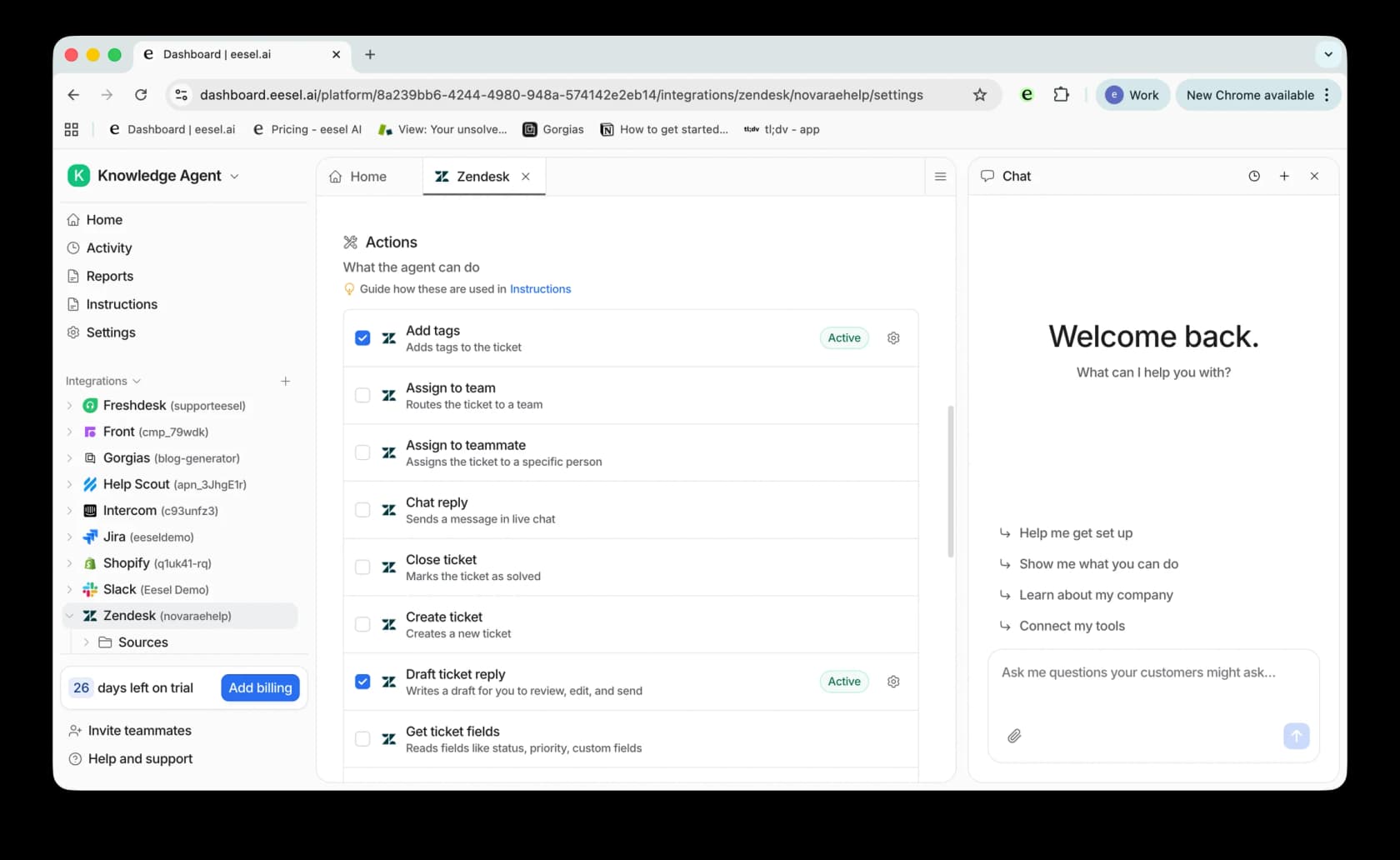
That's the actual tradeoff behind most unanswered negative reviews: it's rarely that nobody cares, it's that the same one or two people who'd write a thoughtful reply are buried in a ticket queue. Freeing up even an hour a day of that time is usually enough to close the response gap that Jordan White's stat above is pointing at. eesel learns from a company's past tickets and help docs from day one, and it's built to draft rather than auto-send by default, so a real person still reviews and personalizes anything that goes out - including the review reply that actually needs a human voice behind it.
Frequently Asked Questions
Can I delete a negative Facebook review?
How do I respond to a review on my Facebook business Page?
What if the negative review is fake or from someone who was never a customer?
Does responding to reviews actually make a difference?
Do I need a perfect 5-star rating on Facebook?


Article by
Riellvriany Indriawan
Riell is a designer and writer at eesel AI with about two years of experience researching CX platforms, AI chatbots, and helpdesk software. She combines her design background with a sharp eye for how these tools actually look and feel in practice — making her comparisons unusually visual and user-focused.