AI coding assistants are popping up everywhere, and if you're a developer, you've probably heard of Anthropic's Claude Code. It’s a pretty slick tool that works right in your terminal, helping you write, debug, and get your head around codebases using plain English.
But while it's a huge help for engineering teams, what does it mean for the rest of the company?
This Claude Code quickstart will walk you through its main features, how people are using it, and what it costs. We'll also get real about its limits and talk about when a different kind of AI tool might be a better fit for what you’re trying to do, especially for things like customer support or managing internal knowledge.
What is Claude Code?
Claude Code is an AI coding assistant from Anthropic that lives directly in your command-line interface (your terminal). It started as a command-line tool rather than an IDE plugin or a chat window, and it now also runs in VS Code, JetBrains, the Claude desktop app and the browser.
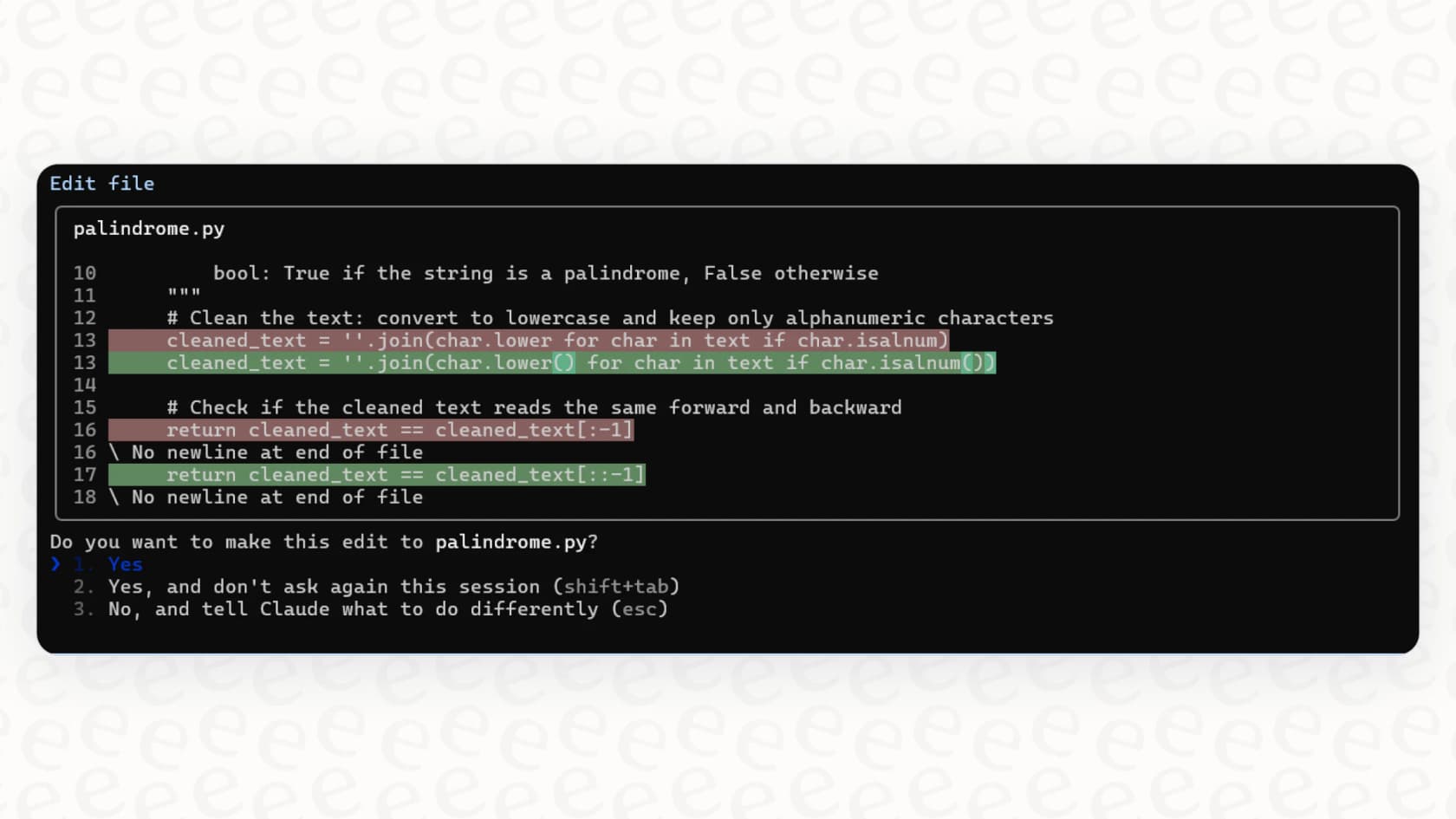
The key thing to understand is that it's an "agentic" tool. That's a fancy way of saying it does more than just spit out code snippets. It can grasp the context of your entire project, read files, write new code, edit existing code, run commands, and even handle your Git workflow. You just chat with it like you would a colleague, making it feel like a pair programmer who already knows the whole repository. Its main job is to speed up development, whether you're building new features, squashing bugs, untangling old code, or just trying to write better documentation.
The essential Claude Code quickstart guide
If you’re comfortable in the terminal, getting started with Claude Code is pretty simple. The official docs have all the nitty-gritty details, but this quickstart will cover the basics you need to get going.
Installation and setup
The quickest way is the native installer, and Anthropic's setup guide lists Homebrew and WinGet options too. On macOS, Linux or WSL it is one line:
curl -fsSL https://claude.ai/install.sh | bash
You can still install it using npm (Node.js Package Manager), but the npm package requires Node.js 22 or later:
npm install -g @anthropic-ai/claude-code
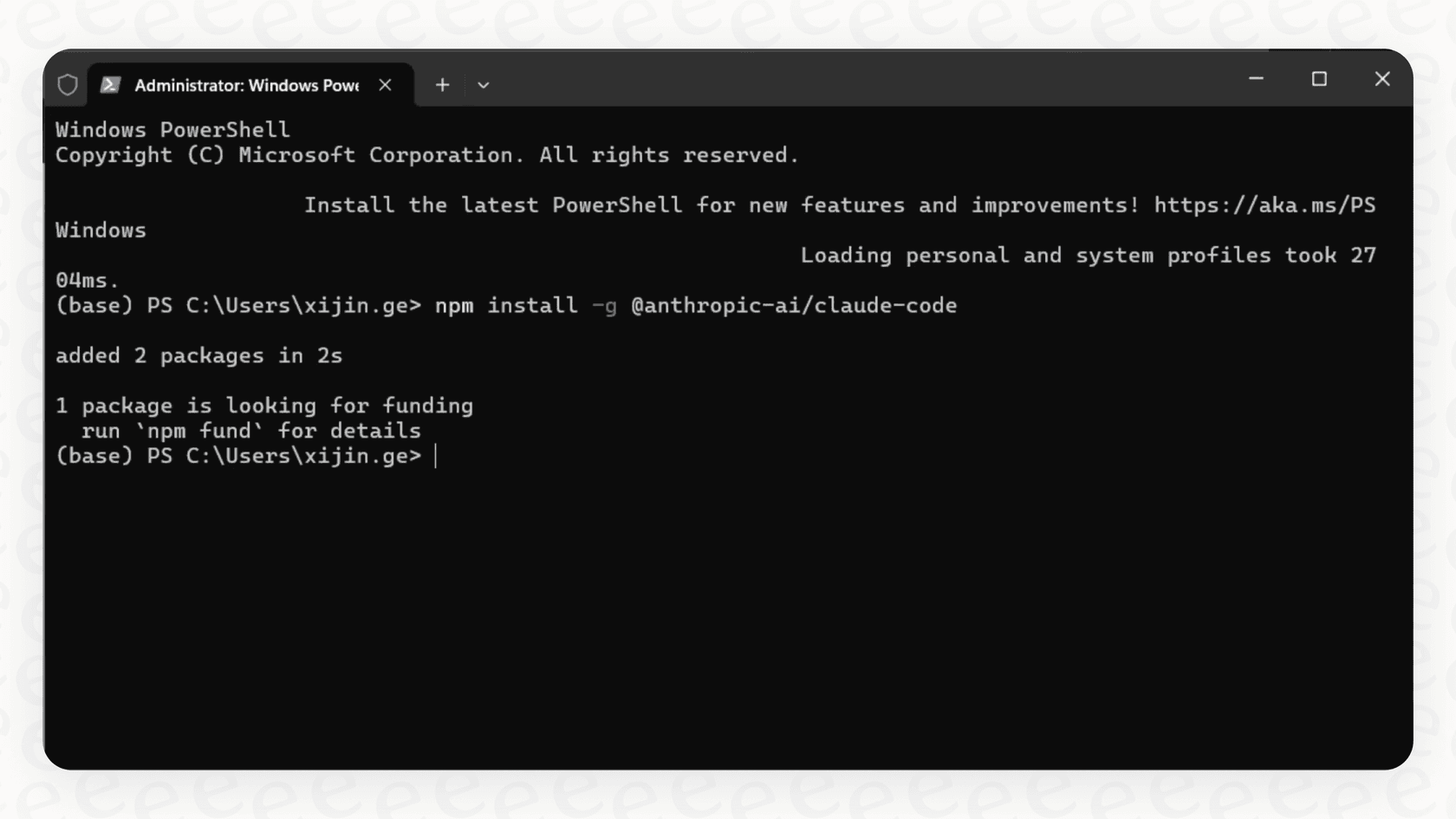
Once that’s done, you just navigate to your project folder in the terminal and type claude. The first time you run it, it’ll open a browser window and ask you to log in with your Anthropic account. You can use a paid Claude.ai subscription (like Pro or Max) or an API account that has billing set up.
This setup is great for developers, but it also brings up the first hurdle for wider business use. It's a technical tool for a technical environment. For teams in support, IT, or operations, a no-code, self-serve platform is what really makes a difference. For example, a tool like eesel AI offers one-click integrations with help desks and knowledge bases, letting non-technical folks build and launch AI agents in minutes, not months.
Core commands and how to use it
Interacting with Claude Code is a mix of slash commands and natural conversation. Getting the hang of these is how you unlock its real power.
Here are some of the most common commands you'll probably use every day:
| Command | Description | Example |
|---|---|---|
claude | Starts an interactive session in whatever folder you're in. | claude |
claude "task" | Kicks off a session with an instruction ready to go. | claude "explain this project's folder structure" |
/init | Scans the codebase and creates a CLAUDE.md file for context. | > /init |
/review | Asks for a code review on the changes you've made. | > /review |
/cost | Shows your session cost and plan usage (an alias of /usage). | > /cost |
/clear | Wipes the conversation history so you can start a new task. | > /clear |
Key features
-
Whole-codebase awareness: Claude can look at your entire project to answer questions, find the right files, and make sure any changes are consistent.
-
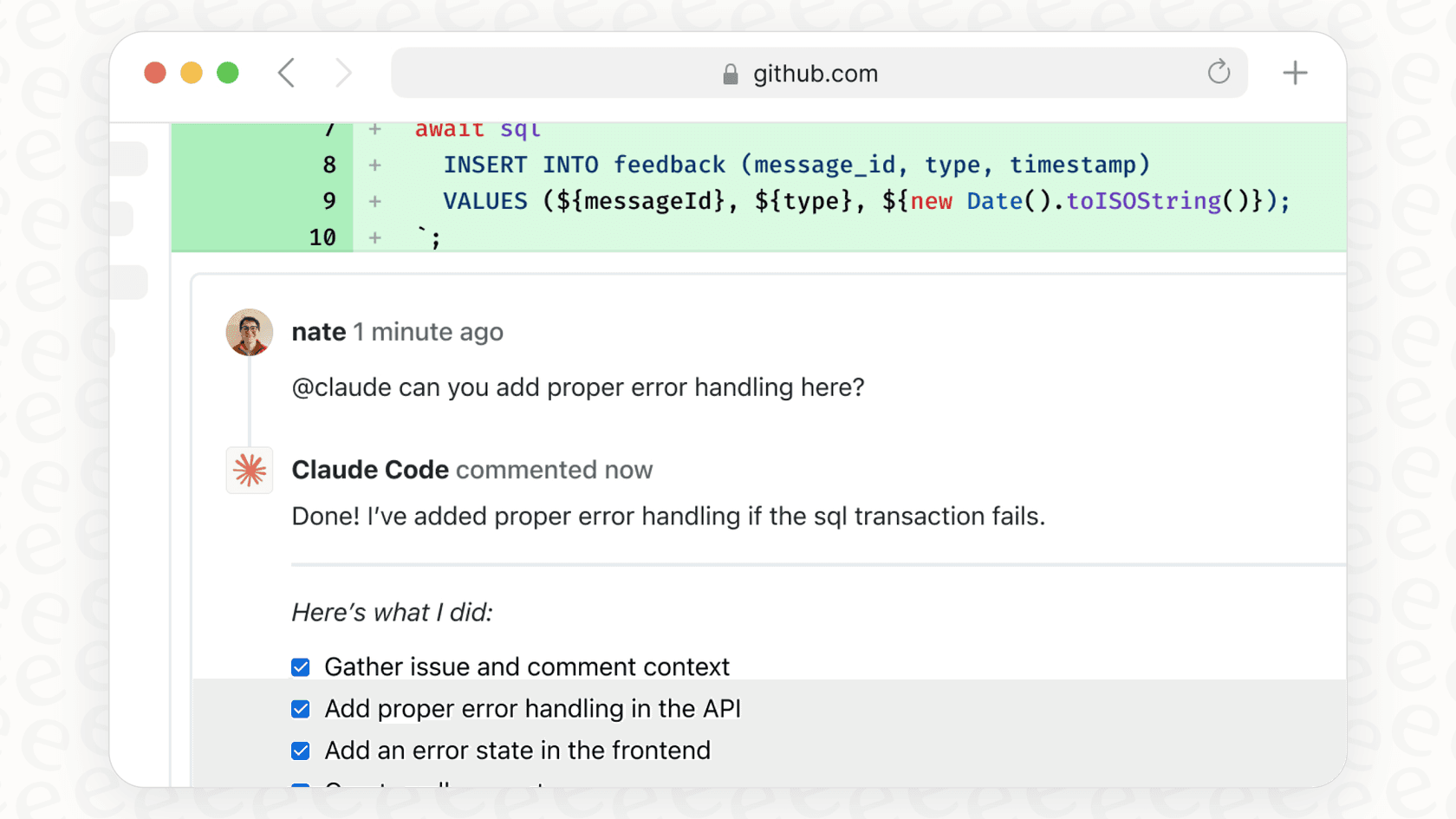
Git integration: You can do git stuff like create commits, check your status, or even work through merge conflicts with simple conversational commands.
-
File editing: Claude can read, write, and change files in your project. Permissions are configurable, and on Pro, Max, and Team plans it now runs in auto mode by default, which works longer while still catching risky commands.
-
Command execution: It can run shell commands for you, whether that's running tests, installing dependencies, or firing up a linter.
How Claude Code works in the real world
Once you're set up, you start to see how Claude Code fits into everyday development. It's not just a code generator; it’s a partner that can help throughout the whole process.
How developers use Claude Code
Here are a few common situations where Claude Code really shines:
-
Building features: Instead of starting with a blank file, you can just describe the feature you want. For example: "Implement user authentication using JWT tokens and a PostgreSQL database." Claude will map out a plan, figure out which files to touch, and write the code for you.
-
Fixing bugs: This is where it can feel a bit like magic. You can paste an error message or just describe a bug in plain English, like "Users are getting a 401 error on the login page, but only when they enter the wrong password twice." Claude will dig into the code and suggest a fix.
-
Refactoring and documenting: Got some messy code you need to clean up? Ask Claude for help. You could say, "Refactor this module to use async/await instead of callbacks," or "Add JSDoc comments to all functions in this file."
The gap between Claude Code and business automation
These workflows are a huge win for engineering teams because they directly speed up software development. But at the end of the day, they are all about the code.
Think about a common customer support problem: a customer needs a refund and opens a ticket in Zendesk. A developer could use Claude Code to build a script to handle that, but that takes time away from their other projects. An AI platform like eesel AI solves this problem out of the box. It can be set up with a simple prompt to understand the refund request, use a custom action to check the order status in Shopify, and then tag the ticket for the finance team. All without a developer writing a single line of code.
This really gets to the heart of the difference: Claude Code helps you build a solution, while an integrated AI platform is the solution for specific business tasks.
Claude Code limitations: When a coding assistant isn't the whole answer
Claude Code is a fantastic tool for what it's designed to do, but it's important to be realistic about its limitations, especially if you're thinking about AI for the whole organization. Its greatest strength, its focus on the developer's terminal, is also its biggest boundary.
Built for developers
The most obvious limit is that Claude Code is built for technical folks. Your customer support, sales, HR, and IT teams would mostly need engineers to set it up before it could automate their work. This means they’re often dependent on the engineering team to build any AI tools they might need.
In contrast, platforms like eesel AI are designed from the ground up to be radically self-serve and simple. A Head of Support can connect their help desk, train an AI on past tickets and help articles, and launch an autonomous agent to handle common questions, all from a friendly dashboard. No developers needed.
No native business tool integrations
Claude Code doesn't ship with a ready-made support setup for business apps like Salesforce, Zendesk, Intercom, or Slack. It can reach tools like these through MCP servers, which an engineer has to set up and maintain. Out of the box it has no view of your support tickets or your company's Confluence pages, so drafting a reply in your brand voice or answering an employee's question from your wiki means building that connection first.
This is where a dedicated AI integration platform comes in. eesel AI offers over 100 one-click integrations, bringing all your knowledge sources together in one place. It can:
-
Learn from past tickets in your help desk to understand your specific business context.
-
Connect to your internal wikis like Confluence or Google Docs to power an internal Q&A bot in Slack.
-
Perform custom actions like looking up order information or triaging tickets based on what they're about.
The challenge of measuring ROI
Anthropic now provides usage dashboards for Team and Enterprise plans, API accounts get spend tracking, and OpenTelemetry covers per-user token detail. Those show how much people use Claude Code and what it costs. Turning that into a return on investment for the business is still an engineering project in itself, and rolling it out safely is a pretty manual process.
With eesel AI, testing and reporting are baked right in. The powerful simulation mode lets you test your AI setup on thousands of your own historical tickets, giving you a clear forecast of your automation rate and cost savings before you ever turn it on. Once it's live, the reporting dashboard shows you exactly how it's doing and where you might need to improve your knowledge base.
Here’s a quick comparison to help you pick the right tool for the job:
| Feature | Claude Code | eesel AI |
|---|---|---|
| Primary User | Software Developers | Support, IT, and Business Teams |
| Setup | Requires a terminal, IDE, or desktop app and developer skills. | 100% self-serve dashboard, go live in minutes. |
| Use Case | Code generation, debugging, refactoring, documentation. | Ticket automation, agent assist, internal Q&A, chatbots. |
| Integrations | Git, your local file system, and MCP servers you set up. | Zendesk, Freshdesk, Slack, Confluence, Google Docs, etc. |
| Reporting & ROI | Usage dashboards on Team and Enterprise; ROI needs your own setup. | Built-in simulation mode and an actionable analytics dashboard. |
Claude Code pricing
Claude Code's pricing is tied to your Anthropic account and generally comes in two flavors: a monthly subscription or pay-as-you-go API usage.
-
Subscription Plans: This is the most popular choice for individual developers. You can use Claude Code with a standard Claude Pro plan ($20/month, or $17/month billed annually). If you're a heavy user, Anthropic also offers Max plans that give you 5x or 20x the capacity of Pro, from $100/month. Claude Code is included in every paid plan and shares limits with chat, while the free plan does not include it. These plans are good if you want predictable costs.
-
API Usage: The other option is to pay per token through the Anthropic API. This is more flexible, but your costs can be harder to predict. The price also changes depending on which model you use. Per million input and output tokens, Anthropic's current rates run from $1 and $5 for Haiku 4.5 and $2 and $10 for Sonnet 5.5, up to $4 and $20 for Opus 5.5 and $10 and $50 for Fable 5.1. This approach is usually better for occasional or programmatic use.
It’s worth remembering that costs are based on token consumption, which can add up surprisingly fast when you're in the middle of a complex coding session. Anthropic's docs cite an average of about $13 per developer per active day for enterprise deployments.
Claude Code: The right AI for the right task
This Claude Code quickstart shows that it's a seriously impressive tool for modern software development. It makes coding faster, helps developers navigate complex projects, and really does feel like an AI pair programmer sitting in your terminal. For any engineering team, it’s a huge productivity boost.
But its laser focus on code is also its boundary. If your goal is to use AI across support, IT, and other parts of the business, you're going to need a platform built for that purpose. The future of work isn't just about writing code faster; it's about automating entire business processes, and that calls for a different kind of tool.
If you’re ready to bring the power of AI out of the terminal and into your business apps, eesel AI was built for you. You can start automating your support workflows today.
Frequently asked questions
How do I get started with a Claude Code quickstart installation?
The quickest route is the native installer, `curl -fsSL https://claude.ai/install.sh | bash` on macOS, Linux or WSL. The npm route, `npm install -g @anthropic-ai/claude-code`, still works but needs Node.js 22 or newer. Either way, you log in with your Anthropic account the first time you run `claude` in your project folder.
What are the primary ways developers are utilizing the Claude Code quickstart in their daily tasks?
Developers primarily use it for building new features, debugging code by pasting error messages or describing issues, and for refactoring or documenting existing codebases. It acts as an AI pair programmer, helping accelerate development tasks.
What are the main limitations I should be aware of when using the Claude Code quickstart for my projects?
Its primary limitation is that it's built for developers and works through a terminal, IDE extension, desktop app or browser session, so non-technical business teams would still need engineering help to use it. It also ships without built-in integrations for CRM or help desk platforms; MCP servers can add them, but someone has to set them up.
What's the typical cost structure associated with using the Claude Code quickstart?
Costs are tied to your Anthropic account, either through a subscription plan like Claude Pro ($20/month, or $17/month billed annually) or Max (from $100/month), or via pay-as-you-go API usage. Pricing depends on token consumption and the specific Claude model used during your sessions.
Is the Claude Code quickstart beneficial for non-developers, or is it strictly limited to engineering teams?
The Claude Code quickstart is aimed at developers because of its technical interface. Non-technical business teams, such as support or HR, would need engineers to set it up before it could automate their workflows.
Can the Claude Code quickstart integrate directly with common business applications like Zendesk or Slack?
Not out of the box. It has no built-in connection to business apps such as Salesforce or Zendesk, and it primarily works with your local file system and Git workflow. Developers can connect outside tools through MCP servers, and Anthropic offers a Slack integration for turning bug reports into pull requests, but each of those needs setup.
How does the Claude Code quickstart differ from other AI tools designed for broader business automation?
While the Claude Code quickstart helps developers build coding solutions, dedicated AI platforms like eesel AI *are* the solution for general business tasks. They offer self-serve dashboards, direct integrations with business tools, and built-in ROI reporting for non-technical users to automate workflows.


Article by
Kira
Kira is a writer at eesel AI with a Computer Science background and over a year of hands-on experience evaluating AI-powered customer service tools. She focuses on breaking down how helpdesk platforms and AI agents actually work so that support teams can make better buying decisions.