How to create and use NPS templates in Zendesk messaging

Stevia Putri
Last edited February 20, 2026
Net Promoter Score (NPS) surveys have become a standard way to measure customer loyalty. But if you're still sending NPS surveys via email, you're missing a chance to collect feedback where your customers actually are: in messaging conversations.
Zendesk's messaging platform lets you embed NPS surveys directly into chat conversations, creating a smoother experience for customers and higher response rates for your team. Instead of sending a separate email after a support interaction, you can ask for feedback while the conversation is still fresh.

This guide walks you through creating NPS templates in Zendesk messaging, from basic setup to advanced automation with AI agents.
What is an NPS template in Zendesk messaging?
An NPS template in Zendesk messaging is a reusable message structure that delivers the classic "How likely are you to recommend us?" question within a chat conversation. Unlike email NPS surveys that arrive in a customer's inbox hours later, messaging NPS happens in real time during or immediately after a support interaction.
The template stores your NPS question format, rating scale (typically 0-10), and any follow-up questions you want to ask. Once created, agents or automation can deploy it instantly using a simple shorthand command.
Why use messaging for NPS instead of email?
The difference comes down to timing and context. Email NPS surveys often get ignored, sent to spam, or answered days later when the interaction is no longer fresh. Messaging NPS captures feedback while the experience is still top of mind. Customers are already in the conversation, so the barrier to respond is much lower.
Zendesk's messaging platform (built on Sunshine Conversations) supports structured messages that can display rating buttons, capture text responses, and trigger automated workflows based on the answer.
What you'll need to get started
Before creating NPS templates, make sure you have:
- A Zendesk account with messaging enabled. If you're still on the classic email-based system, you'll need to migrate to messaging first.
- Admin or developer permissions. Creating templates requires access to the Conversations API or admin settings.
- Clear NPS goals. Decide whether you're measuring transactional NPS (after specific interactions) or relational NPS (overall brand loyalty).
- Optional: Zendesk AI agents add-on. For advanced automation and structured message templates.
If you're exploring alternatives to building this yourself, eesel AI offers AI agents for customer service that integrate with Zendesk and handle feedback collection without requiring API work.
Creating template messages for NPS surveys
Zendesk provides two ways to work with message templates: the Templates API for developers and the structured message interface for AI agents. Let's start with the API approach, which gives you the most control.
Step 1: Access the Templates API
To create reusable NPS templates, you'll use the Zendesk Conversations API. This requires your app ID, key ID, and secret from your Zendesk admin settings.
The API endpoint for creating templates is:
POST https://{subdomain}.zendesk.com/sc/v1.1/apps/{app_id}/templates
You'll need to include authentication headers and a JSON body containing your template name and message structure. Template names must be unique within your account and can only contain letters, numbers, hyphens, and underscores.
Step 2: Create your NPS template
Here's an example API call to create a basic NPS template:
curl https://{subdomain}.zendesk.com/sc/v1.1/apps/{app_id}/templates \
  -X POST \
  --user '{key_id}:{secret}' \
  -H 'content-type: application/json' \
  -d '{
    "name": "nps_survey_template",
    "message": {
      "role": "appMaker",
      "type": "text",
      "text": "How likely are you to recommend us to a friend or colleague? (0-10)"
    }
  }'
This creates a simple text-based NPS question. For a more interactive experience with clickable rating buttons, you'd use a structured message with action buttons instead of plain text.
Step 3: Use shorthand syntax to send templates
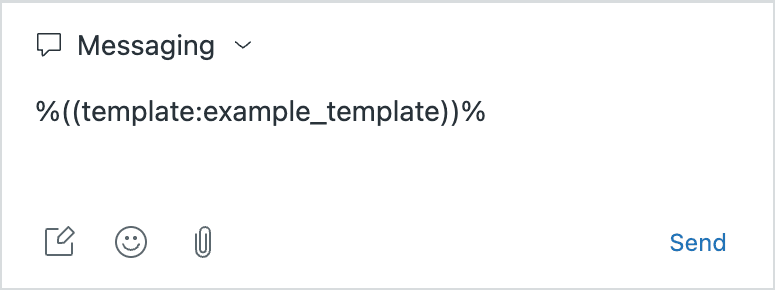
Once your template is created, agents can send it using shorthand syntax in the composer:
%((template:nps_survey_template))%
This shorthand works in three places:
- Agent composer: Agents type the shorthand while chatting
- Macros: Create macros that automatically insert NPS templates
- API calls: Include shorthand in message text property
If the shorthand conflicts with other templating systems, use the alternate syntax: %{{template:nps_survey_template}}%
Building structured message templates for conversational NPS
Plain text NPS works, but structured messages create a better experience. Instead of asking customers to type a number, you can present clickable buttons for each rating.
Understanding structured messages
Zendesk supports several structured message types that work well for NPS:
| Message Type | Best Use Case for NPS |
|---|---|
| Action buttons | Display 0-10 rating as clickable options |
| Forms | Collect follow-up feedback after the rating |
| Compound messages | Combine question text with rating buttons |
| Carousels | Multiple questions in a scrollable format |
Action buttons are the most common choice for NPS. You can create reply buttons (which disappear after selection) or postback buttons (which remain visible for multi-use scenarios).
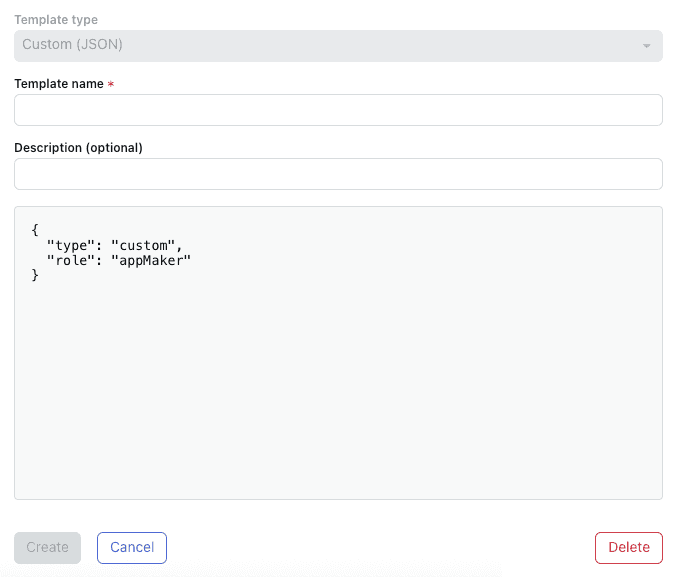
Creating custom JSON NPS templates
For advanced NPS flows, you'll create a custom JSON template. Here's an example structure for a conversational NPS with follow-up:
{
  "type": "text",
  "text": "How likely are you to recommend us to a friend or colleague?",
  "actions": [
    {"type": "reply", "text": "0", "payload": "NPS_0"},
    {"type": "reply", "text": "1", "payload": "NPS_1"},
    {"type": "reply", "text": "2", "payload": "NPS_2"},
    {"type": "reply", "text": "3", "payload": "NPS_3"},
    {"type": "reply", "text": "4", "payload": "NPS_4"},
    {"type": "reply", "text": "5", "payload": "NPS_5"},
    {"type": "reply", "text": "6", "payload": "NPS_6"},
    {"type": "reply", "text": "7", "payload": "NPS_7"},
    {"type": "reply", "text": "8", "payload": "NPS_8"},
    {"type": "reply", "text": "9", "payload": "NPS_9"},
    {"type": "reply", "text": "10", "payload": "NPS_10"}
  ]
}
Each button sends a unique payload that your system can capture and record as the customer's NPS rating.
Integration with AI agents
If you're using Zendesk AI agents, you can incorporate NPS templates into automated conversation flows:
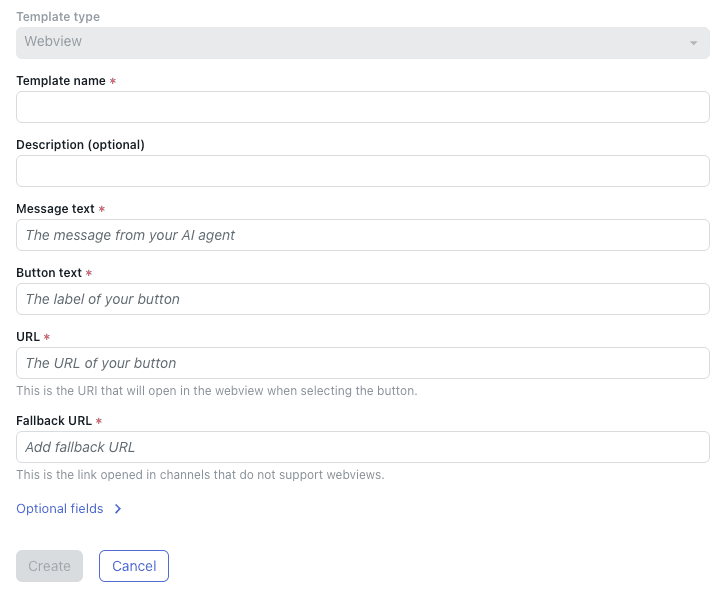
- Navigate to AI agents - Advanced settings
- Create a structured message template (Forms, Webviews, or Custom JSON)
- Copy the template shorthand
- Paste it into the appropriate dialogue flow
This lets you automatically trigger NPS collection at the end of resolved conversations without agent intervention.
NPS template examples you can use today
Here are four practical NPS templates for different scenarios:
Example 1: Basic 0-10 NPS rating
{
  "type": "text",
  "text": "On a scale of 0-10, how likely are you to recommend us to a friend?",
  "actions": [
    {"type": "reply", "text": "0-6", "payload": "DETRACTOR"},
    {"type": "reply", "text": "7-8", "payload": "PASSIVE"},
    {"type": "reply", "text": "9-10", "payload": "PROMOTER"}
  ]
}
This simplified version uses three buttons grouped by NPS category.
Example 2: NPS with follow-up question
Deploy a form after the initial rating to capture the "why" behind the score:
{
  "type": "form",
  "text": "Thanks for your rating! What's the main reason for your score?",
  "fields": [
    {
      "type": "text",
      "name": "feedback_reason",
      "label": "Your feedback",
      "placeholder": "Tell us what influenced your rating..."
    }
  ]
}
Example 3: Post-resolution NPS trigger
Set up a Zendesk trigger to automatically send NPS when a ticket is solved:
- Create a trigger with condition: Ticket status = Solved
- Add action: Notify by = Webhook
- Include the NPS template shorthand in the message body
Example 4: Conversational NPS for AI agents
For AI agent automation, use this flow in your dialogue:
- Agent resolves the issue
- AI asks: "Was this helpful?" (Yes/No buttons)
- If Yes: "Great! How likely are you to recommend us?" (NPS buttons)
- If No: Escalate to human agent
Alternative approaches: Third-party NPS integrations
Building NPS templates yourself gives you full control, but it's not the only option. Several third-party tools integrate with Zendesk for NPS collection.
Comparison of NPS solutions for Zendesk
| Tool | Integration Type | Pricing | Best For |
|---|---|---|---|
| Nicereply | Email template | Custom quote | Multi-channel feedback |
| GrowthDot | Native Zendesk app | $95/month | Easy setup, branding |
| Delighted | API + ticket sync | Free-$249/month | Free tier, robust features |
| Sightmill | Webhook | Custom quote | Simple implementation |
When to choose each approach
Nicereply works well if you want NPS across multiple channels (email, in-signature, website) not just messaging. They offer CSAT, CES, and eNPS alongside standard NPS.
GrowthDot is a native Zendesk app with automatic placeholder insertion, built-in statistics, and branding customization. The flat $95/month pricing covers unlimited surveys.
Delighted offers the most generous free plan (25 responses/month) and scales up to enterprise needs. The Zendesk integration creates tickets from survey responses and syncs data to customer profiles.
Sightmill focuses purely on NPS with a simple webhook setup that takes 5-10 minutes. Good if you want minimal complexity.
If you're looking for a more comprehensive approach to customer feedback that goes beyond traditional NPS, eesel AI provides AI-powered feedback analysis and automated response capabilities that work alongside your existing Zendesk setup.

Best practices for messaging NPS
Getting the technical setup right is only half the battle. How you implement NPS in messaging matters just as much.
Timing your NPS surveys
Don't send NPS too early in the conversation. Wait until:
- The customer's issue is fully resolved
- They've confirmed satisfaction with the solution
- The natural conversation is winding down
For transactional NPS (measuring specific interactions), send immediately after resolution. For relational NPS (measuring overall loyalty), consider a separate campaign every 3-6 months.
Wording tips for conversational context
Messaging NPS should feel conversational, not robotic:
- ❌ "Please rate your likelihood to recommend on a scale of 0-10"
- ✅ "Quick question: how likely are you to recommend us to a friend?"
Keep it brief. One question with a clear scale works better than multiple questions in messaging.
Handling responses in real-time
The power of messaging NPS is immediate response capability:
- Promoters (9-10): Thank them and ask for a review or referral
- Passives (7-8): Ask what would make their experience better
- Detractors (0-6): Immediately escalate to a senior agent for recovery
Set up Zendesk triggers to route tickets based on NPS responses.
Avoiding survey fatigue
Don't ask for NPS on every interaction. Space out your surveys:
- Maximum once per quarter per customer for relational NPS
- Only for significant interactions for transactional NPS
- Skip customers who recently completed an NPS survey
Measuring and acting on your NPS results
Collecting NPS data is pointless if you don't act on it.
Calculating NPS from messaging responses
The standard NPS formula applies:
NPS = % Promoters (9-10) - % Detractors (0-6)
Passives (7-8) don't count toward the score but represent your biggest opportunity for improvement.
Tracking scores over time
Create a Zendesk dashboard to monitor:
- Overall NPS trend (weekly/monthly)
- NPS by agent or team
- NPS by ticket category or issue type
- Response rates
Setting up automated workflows
Use Zendesk triggers to automate follow-up:
- Low score alert: When NPS <= 6, notify team lead and create escalation ticket
- Promoter workflow: When NPS >= 9, add tag for marketing follow-up
- Passive nurture: When NPS = 7-8, schedule follow-up in 30 days
Closing the feedback loop
Always respond to NPS feedback:
- Thank promoters and ask for reviews
- Address specific concerns from detractors
- Follow up with passives to understand how to earn a higher score
Start collecting customer feedback with intelligent automation
NPS templates in Zendesk messaging give you a direct line to customer sentiment. By embedding surveys in conversations rather than separate emails, you'll see higher response rates and more actionable feedback.
The approach you choose depends on your needs. Native templates give you full control. Third-party tools like Delighted or GrowthDot speed up implementation. And if you're looking to go beyond traditional surveys, AI-powered feedback collection can analyze conversations in real-time without explicit surveys at all.
Whatever path you choose, the key is acting on what you learn. NPS isn't just a number to track, it's a signal for where to focus your improvement efforts.
For teams looking to automate feedback collection and analysis across their entire support operation, eesel AI offers intelligent solutions that integrate with Zendesk and other platforms. From automated NPS to conversation analysis and response drafting, AI can handle the heavy lifting while your team focuses on delivering exceptional customer experiences.

Frequently Asked Questions
Share this article

Article by
Stevia Putri
Stevia Putri is a marketing generalist at eesel AI, where she helps turn powerful AI tools into stories that resonate. She’s driven by curiosity, clarity, and the human side of technology.



