

Let's be real, nobody wants to spend their afternoon listening to hours of call recordings. So much of the important stuff happens in those customer calls and online meetings, but digging through them for key details or coaching moments is a massive time-drain. Salesforce’s answer to this problem is a feature for generative call summaries, part of their Einstein Conversation Insights.
This guide will walk you through everything you need to know about Salesforce AI Voice Call Summaries. We’ll break down what it does, its main features, how much it costs, and some pretty significant drawbacks. We'll also look at a more flexible option for teams who want powerful AI without being tied to a single platform.
What are Salesforce AI Voice Call Summaries?
In a nutshell, Salesforce AI Voice Call Summaries is a feature that uses Salesforce's Einstein AI to automatically write up summaries of your voice and video calls. It’s part of a bigger toolkit called Einstein Conversation Insights (ECI), which is all about analyzing customer chats to find coaching opportunities and highlight important moments from sales and service calls.
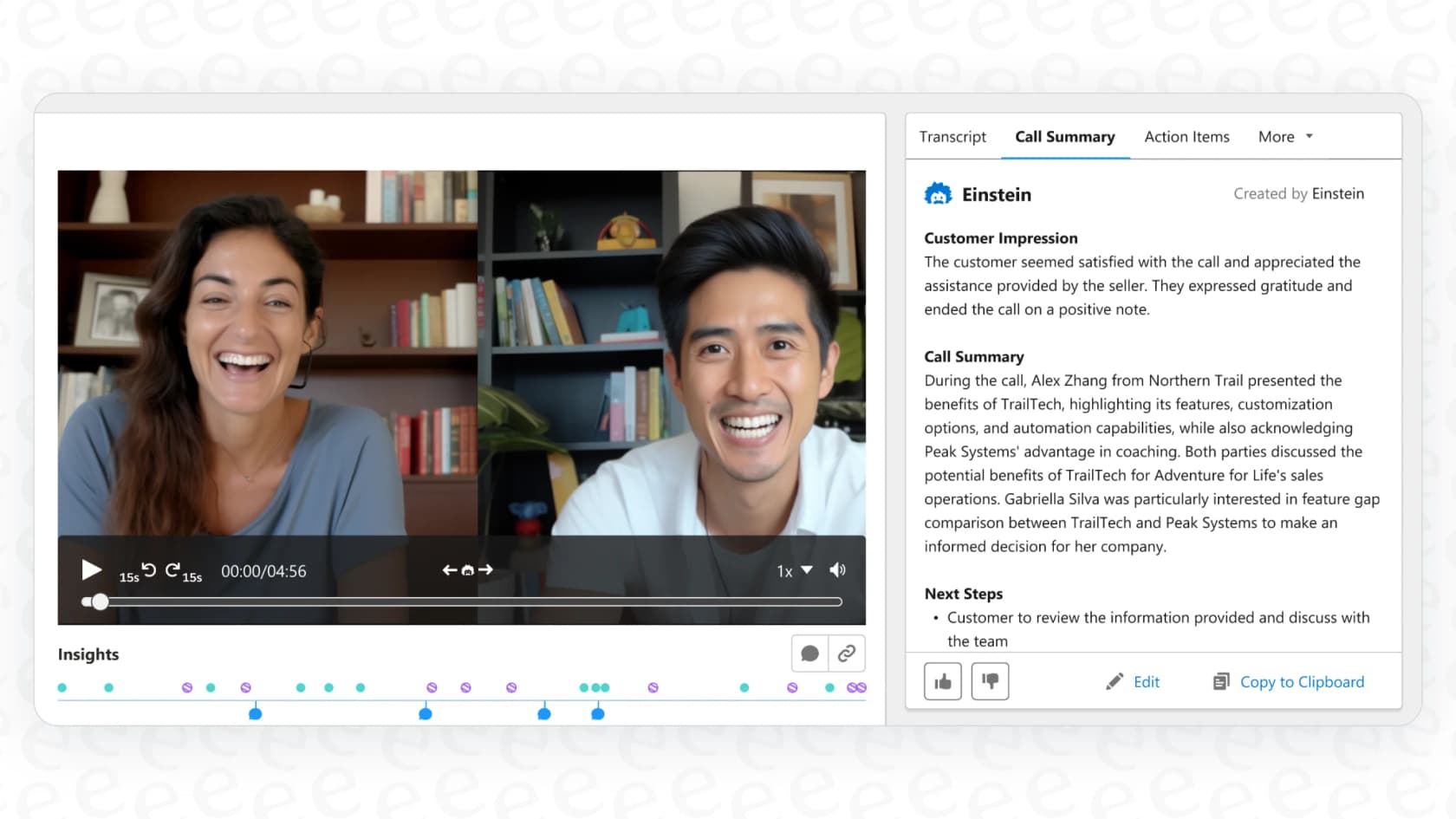
The main idea is to save your team from having to frantically take notes or re-listen to entire conversations. The AI processes the recording and transcript, then spits out a short summary covering the key takeaways, customer sentiment, and any action items. These summaries get saved right inside Salesforce, usually on the call record, so managers and teammates can easily find them later.
It’s a neat feature, but it’s important to know that it's built to live and breathe inside the Salesforce world, connecting mostly with other Sales Cloud and Service Cloud tools.
Core features of Salesforce AI Voice Call Summaries
Salesforce has packed a lot into its conversation intelligence tools. Let's dig into what you actually get with its call summary features.
Automated transcription and flagging key moments
Before a summary can be written, the call needs a transcript. ECI takes care of this for you, automatically transcribing connected calls from services like Zoom, Google Meet, and other dialers.
But it does more than just create a wall of text. The AI also scans the conversation and flags the important bits. These "insights" can include things like:
-
Competitor mentions: It catches when a competitor's name comes up in conversation.
-
Product mentions: It flags when your specific products are being discussed.
-
Pricing objections: It highlights moments when a customer pushes back on pricing.
-
Next steps: It figures out when follow-up tasks are being agreed upon.
These flagged moments show up as clickable timestamps, so a manager can jump right to the part of the call they need to hear without sitting through the whole thing.
AI-generated summaries and next steps
The main event, of course, is the summary itself. With a click, you can get a snapshot of the entire conversation. According to Salesforce’s own documentation, a typical summary will give you:
-
The gist of the call.
-
The customer's general vibe or sentiment.
-
Any follow-up actions that were decided.
This summary isn’t set in stone, either. Reps can edit it to add more context or make tweaks before saving it to the record. It’s designed to be a quick, easy-to-read overview on the call’s record page.
Call explorer and generative insights
If you want to dig a bit deeper, Salesforce has a "Call Explorer" feature. This lets you ask questions in plain English, like "Which deals mentioned our new pricing?" It helps teams spot trends across a bunch of calls without having to review them one by one.
"Generative Insights" pushes this idea further. It lets admins set up custom questions that the AI will automatically answer for every single call. For instance, you could tell it to pull a SWOT analysis (Strengths, Weaknesses, Opportunities, Threats) from every customer demo.
Deep integration with the Salesforce ecosystem
A big part of Salesforce's pitch is how all this data feeds back into the platform. Call summaries and insights pop up in the Activity Timeline on an Opportunity or Account record. This info also connects to tools like Pipeline Inspection, so sales managers can see conversation highlights right next to their deal pipeline.
But this tight integration is also its greatest weakness. The features are built to make the Salesforce experience better, not to connect with your other tools. This creates a "walled garden" that can feel pretty limiting if your team relies on a variety of apps.
Limitations and challenges of Salesforce AI Voice Call Summaries
While Salesforce's AI tools are handy inside their own environment, they come with some major limitations that could be a deal-breaker if your team needs flexibility and control.
The walled garden problem: Limited integrations
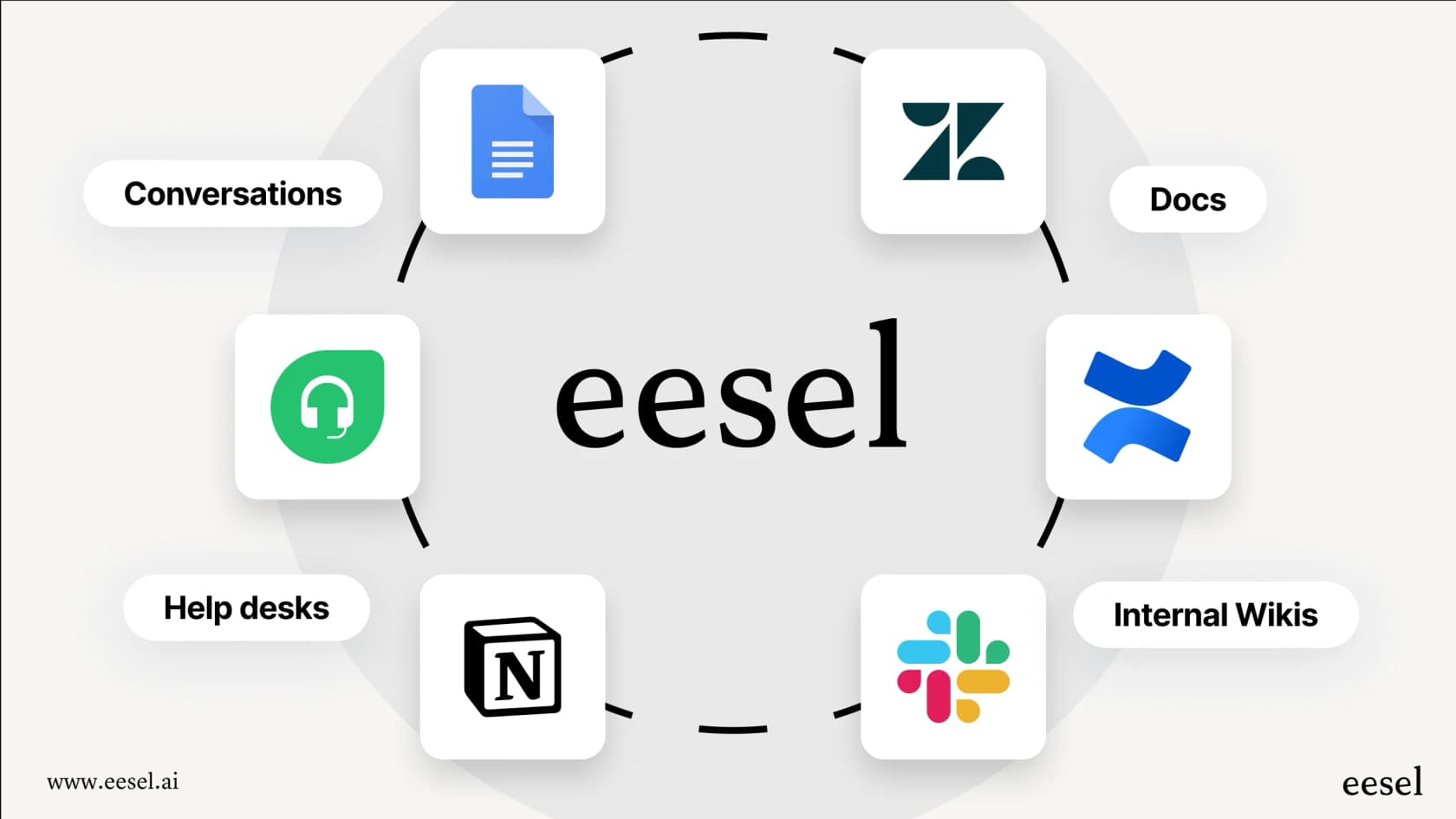
The biggest issue with Salesforce AI is that it’s completely dependent on the Salesforce ecosystem. ECI is built to analyze calls and show you insights within Salesforce. But what if your team's most important knowledge lives elsewhere? If your real source of truth is in Confluence, Google Docs, Notion, or past support tickets in a different helpdesk, Salesforce's AI can't see any of it. This means its summaries lack the broader context needed to be truly helpful.
In contrast, a platform like eesel AI is built to connect all your knowledge sources from day one. With over 100 one-click integrations, eesel AI can tap into your helpdesk, company wiki, and other tools to provide answers grounded in your entire knowledge base, not just one platform.
A complex, admin-reliant setup
Getting Einstein Conversation Insights up and running isn't a simple plug-and-play affair. It usually requires a Salesforce admin to go through a bunch of steps, connect recording providers, fiddle with permission sets, and tweak page layouts. Unlocking the generative AI features often means adding more SKUs and even more setup. The whole process can take a lot of time and requires someone who really knows their way around Salesforce.
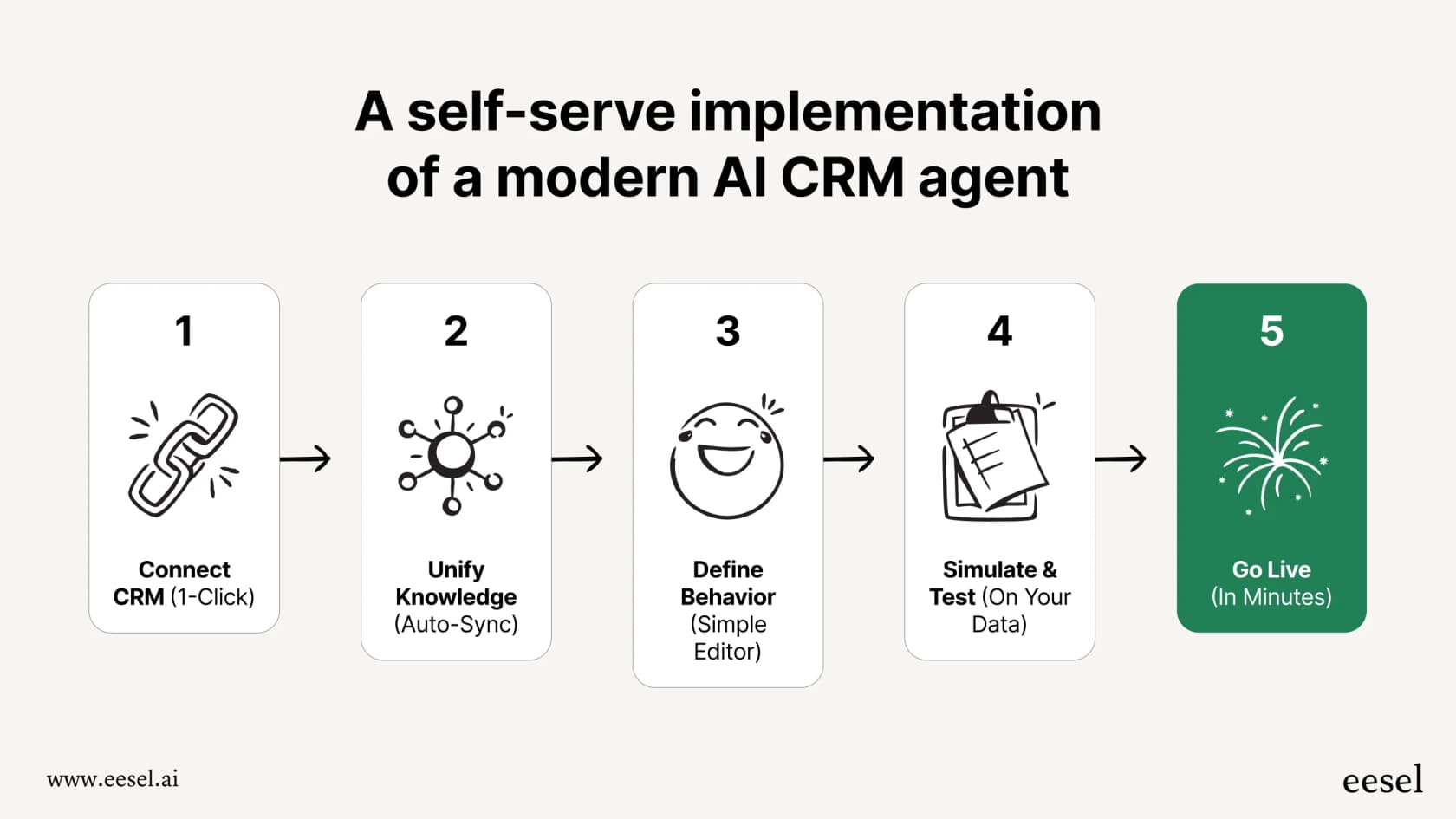
This feels a bit dated compared to modern AI tools. For example, eesel AI is designed to be self-serve, letting you go live in minutes. You can connect your helpdesk with a single click and set up your AI agent on your own, without having to book a sales call or wait for a developer to become available.
Rigid workflows and limited customization
Salesforce gives you a set of pre-built insights and summary formats. And while you can create some custom rules based on keywords, the overall workflow is pretty fixed. You can't easily build a custom process that decides which tickets to summarize, what to do based on the summary, or how to fine-tune the AI's personality and tone.
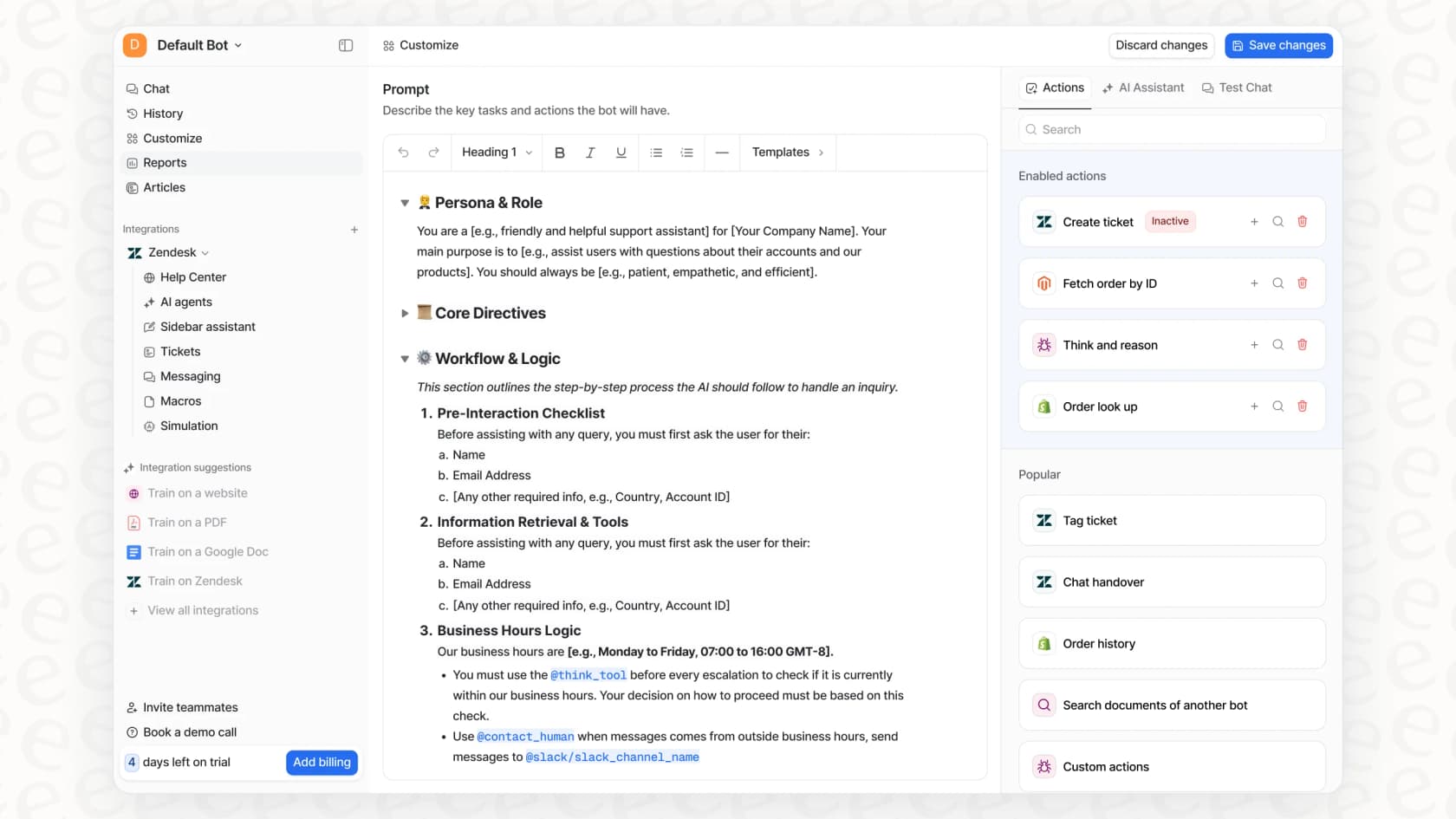
With eesel AI, you get a fully customizable workflow engine. You have precise control over which tickets the AI should handle, what actions it can take (like looking up order info), and its exact tone of voice, all managed through a simple prompt editor.
Salesforce AI Voice Call Summaries pricing explained
Alright, let's talk money. Figuring out the price tag for Salesforce AI Voice Call Summaries can be tricky because it’s usually bundled with other products and add-ons. You can't just buy it on its own.
Based on publicly available info, here's how it generally breaks down:
-
Baseline ECI: The basic features (transcription, keyword flagging) are included if you have Sales Cloud Unlimited Edition. Enterprise Edition gets you 10 licenses.
-
Generative AI Features: To get the cool AI-powered summaries and Call Explorer, you’ll likely need the Einstein for Sales add-on. This is listed at $50 per user, per month, billed annually.
-
Bundles: This add-on is also part of larger packages like the Einstein 1 Sales Edition.
This per-user pricing can get expensive fast, especially if you have a big team. It also doesn't offer the predictability of a fixed monthly plan sized to volume.
To make it clearer, here’s a quick comparison of how eesel AI's pricing works differently:
| Feature | Salesforce Einstein for Sales | eesel AI |
|---|---|---|
| Pricing Model | Per user, per month (as an add-on) | One fixed monthly price sized to volume (1 credit per ticket or chat) |
| Starting Price | $50/user/month (paid annually) | From $299/month for 500 credits, plus a free plan with 100 credits |
| Billing Flexibility | Usually requires an annual contract | Monthly plans, move up or down any time; pay a year upfront and get two months free |
| Hidden Fees | Complex bundles can hide the true cost | No platform fee or per-seat fee, clear credit plans |
| Included Products | Features are tied to specific bundles | All products (Agent, Copilot, Triage) are included in every plan |
The bottom line is that Salesforce's cost grows with your headcount, whereas a platform like eesel AI scales with ticket volume on one fixed monthly price, which often ends up being more predictable and affordable.
A more flexible way to get call summaries and support automation
For teams who want the benefits of AI without being locked into a single platform, a solution like eesel AI is a great alternative. It's designed to play nicely with the tools you already use, giving you a level of flexibility and control that Salesforce just can't offer.
Bring all your knowledge together, not just Salesforce data
Instead of being stuck with just call transcripts, eesel AI connects to all the places your team knowledge lives. It can learn from past tickets in Zendesk or Freshdesk, internal guides in Confluence or Google Docs, and your public help center. This allows it to generate summaries and answers that are much more accurate and aware of the full context.
Go live in minutes with your current helpdesk
You can forget about long, complicated implementation projects. eesel AI has one-click integrations with all the major helpdesks and chat tools. You can set up a fully working AI agent or copilot yourself, without needing a developer or waiting weeks for a sales cycle to finish. It fits right into your existing workflow instead of forcing you to change it.
Simulate and test with confidence before launch
One of the standout features of eesel AI is its simulation mode. You can test your AI setup on thousands of your past tickets to see exactly how it would have responded. This gives you a real forecast of its performance and resolution rate before it ever talks to a customer. It lets you find gaps, tweak your prompts, and roll out your AI with total confidence, something you just don't get with the Salesforce tools.

What's the verdict on Salesforce AI Voice Call Summaries?
Salesforce AI Voice Call Summaries has some useful tools, especially for teams who are already all-in on the Salesforce ecosystem. The ability to automatically transcribe, analyze, and summarize calls right inside Sales Cloud can definitely help make things more efficient.
However, the high cost, complex setup, and "walled garden" approach make it a tough sell for modern, fast-moving teams. Being tied to the Salesforce platform means you can't use knowledge from your other essential tools, and the per-user pricing can get out of hand quickly.
For businesses looking for a more flexible, cost-effective, and powerful solution, platforms like eesel AI offer a much better way forward. By integrating with all your tools and providing a transparent, self-serve experience, you can get top-tier AI automation up and running in minutes, not months.
Ready to see what a truly connected AI support platform can do? Try eesel AI for free and start automating your support today.
Frequently asked questions
What exactly are Salesforce AI Voice Call Summaries and how do they benefit sales or service teams?
Salesforce AI Voice Call Summaries use Einstein AI to automatically generate short summaries of voice and video calls. This feature helps teams by saving time on note-taking, re-listening to calls, and quickly identifying key takeaways, customer sentiment, and action items, all stored within Salesforce.
What are the main features included with Salesforce AI Voice Call Summaries?
Key features include automated transcription, which flags important moments like competitor or product mentions and pricing objections. It also provides AI-generated summaries of the call's gist, customer sentiment, and follow-up actions. Additionally, "Call Explorer" allows natural language queries across calls, and "Generative Insights" offers custom, automated Q&A.
What are the primary limitations or drawbacks associated with Salesforce AI Voice Call Summaries?
A significant limitation is its "walled garden" nature, meaning it integrates almost exclusively within the Salesforce ecosystem and cannot access external knowledge bases like Confluence or Google Docs. It also has a complicated setup requiring admin involvement and offers rigid workflows with limited customization options compared to more flexible AI tools.
Could you explain the pricing model for Salesforce AI Voice Call Summaries?
Salesforce AI Voice Call Summaries are not sold separately but are bundled. The basic features are included with Sales Cloud Unlimited Edition, or 10 licenses with Enterprise Edition. To access generative AI summaries, you typically need the Einstein for Sales add-on, priced at $50 per user, per month, billed annually, or as part of larger bundles.
How easy is it to integrate Salesforce AI Voice Call Summaries with other business tools outside of Salesforce?
Integration with tools outside the Salesforce ecosystem is a major limitation. The feature is built to live and breathe within Salesforce, connecting primarily with Sales Cloud and Service Cloud tools. It cannot access critical knowledge from external sources like helpdesks, company wikis, or document repositories, which can limit the context and usefulness of the summaries.
What level of setup and administrative effort is required to implement Salesforce AI Voice Call Summaries?
Implementing Salesforce AI Voice Call Summaries typically involves a complicated setup process that relies heavily on a Salesforce admin. This can include connecting recording providers, adjusting permission sets, and tweaking page layouts. Unlocking advanced generative AI features often requires additional SKUs and further configuration, making it a time-consuming endeavor.