


When Salesforce announced the general availability (GA) of its Sales GPT and Service GPT, it definitely made some waves. The idea of embedding generative AI right into the CRM that most of us use every day sounds pretty great. It promises to help teams automate emails, summarize calls, and generate service replies, freeing everyone up for more important work.
One naming note before the details: these were the 2023 launch names. Salesforce now sells its generative AI under the Agentforce brand, and the old Sales GPT product page now returns a 404, so the features below describe the original GA release.
But what do these new tools really do, and are they the right move for every team? Let’s cut through the hype. This guide gives you a straight-up overview of the Sales GPT Service GPT GA announcement. We’ll break down the features, the pricing, and some key limitations to help you figure out if they’re a good fit for your business, or if you might be better off with a more flexible alternative.
What is the Salesforce Sales GPT Service GPT GA?
Before we get into the cool features, let's quickly cover what these tools are. Think of them as AI-powered add-ons that are built to live exclusively inside Salesforce's Sales Cloud and Service Cloud platforms.
What is Sales GPT?
Sales GPT is an AI assistant for your sales folks. It taps into your existing Salesforce CRM data to help automate and personalize all sorts of sales communications. The main goal here is to take over the boring, repetitive tasks, like drafting follow-up emails or prepping for meetings, so your reps can focus on building relationships and, well, selling. It’s all powered by Salesforce’s own AI layer, Einstein.
What is Service GPT?
Service GPT is the other side of the coin, built for customer service teams. It’s designed to help your agents work faster and keep customers happy by automating common support tasks. We're talking about things like generating personalized replies to customer questions, summarizing long and complicated support cases, and even creating new knowledge base articles from solved tickets, all from within Service Cloud.
Key features of the Sales GPT Service GPT GA
The real magic of these tools comes from their deep connection to your customer data living inside Salesforce. Here’s a quick rundown of the core features that are now generally available.
Sales GPT capabilities
-
Sales Emails: It can write personalized sales emails for you. Using a customer's CRM data, it tailors the message, which can save your reps a ton of time on prospecting and follow-ups.
-
Call Summaries: After a sales call, the tool can transcribe and summarize the whole conversation. It even pulls out key action items and next steps, which is incredibly handy.
-
Sales Assistant: This feature is meant to help across the entire sales cycle. It can help you research an account, prepare for a meeting, or even draft specific clauses for a contract, all while keeping the CRM updated automatically.
Service GPT capabilities
-
Service Replies: It drafts personalized responses to customer questions on the fly. The AI uses your company's own data to ground its answers, so you can trust them to be accurate.
-
Work Summaries: This creates quick, easy-to-read summaries of service cases and customer chats. It's a huge help when another agent needs to jump in and get up to speed on an issue without reading a novel-length ticket history.
-
Knowledge Articles: This is a pretty neat feature. It automatically generates draft knowledge base articles based on resolved support cases. This helps you capture all that valuable know-how before it gets lost.
The foundation: Einstein GPT Trust Layer
Both tools are built on something Salesforce calls the Einstein GPT Trust Layer. This is their solution for enterprise-level AI security. It’s designed to make sure your sensitive customer data isn't held onto or used by third-party Large Language Models (LLMs). With features like zero data retention and encrypted communications, it ensures your customer data stays safely inside your Salesforce environment.
| Feature | Sales GPT | Service GPT |
|---|---|---|
| Main Goal | Help sales reps close deals faster | Make support agents more efficient and customers happier |
| What it Creates | Emails, call summaries, and contract clauses | Service replies, case summaries, and knowledge articles |
| Data Source | Your Sales Cloud CRM data | Your Service Cloud case data and customer history |
| Who it's for | Sales reps and account executives | Customer support agents and service managers |
Setup, integrations, and key limitations
While the features sound impressive, Salesforce's approach has some important trade-offs. These tools are very powerful inside the Salesforce world, but that strength is also their biggest weakness.
The "walled garden" approach
Sales GPT and Service GPT aren't standalone products. They’re built to work only with data that's already stored in Salesforce, specifically in its Data Cloud (now Data 360). If your company knowledge is scattered across different places like Confluence, Google Docs, or another help desk like Zendesk, you have to bring it into Salesforce first. Salesforce offers a Data 360 Confluence connector, which is still in beta, so external sources are reachable but need setup and a Data 360 footprint. Getting everything centralized in Salesforce to get the full benefit can be a big project.
Some platforms try to solve this by syncing external sources, which can mean scheduled refreshes that leave the AI working with older information. Salesforce's model is built around keeping data inside its own ecosystem.
Not a plug-and-play solution
Getting started isn't as simple as flipping a switch. The documentation on Salesforce's AppExchange points to configuration pages and Apex settings that an admin has to sort out. This hints at a setup process that's more involved and likely requires some technical help, rather than something you can get running in an afternoon.
This is where a more flexible tool can really make a difference. For teams that need to pull knowledge from lots of different sources without a massive data migration project, platforms like eesel AI offer a compelling alternative. Instead of locking you into one system, eesel AI connects to the tools you already use, whether that’s your help desk, company wiki, or internal documents. The AI Agent from eesel AI can learn from past tickets in Zendesk, articles in Confluence, and docs in Google Drive, giving you a complete knowledge base without forcing you to move a single file.
Pricing for Sales GPT and Service GPT
Pricing is always a major factor, and Salesforce’s model for its GPT features has a few layers to it. It’s not a simple flat fee, which can make it tricky to predict your actual costs.
The pricing model explained
Based on the info from the Sales GPT Service GPT GA announcement, here’s how the pricing breaks down:
-
Cost at launch (2023): It was $50 per user, per month.
-
Requirement: This is an add-on. You have to already be paying for Sales Cloud Einstein or Service Cloud Einstein.
-
Plan Prerequisite: At launch, your company usually needed to be on the Salesforce Unlimited Edition plan, which is one of their pricier tiers. Salesforce's current Sales Cloud pricing uses Core ($195), Advanced ($395) and Max ($550) per user per month, so check which edition your org is on.
-
Usage Limits: That $50 fee only includes a certain number of "Einstein GPT credits." If your team is busy and uses more than your allotted credits, you’ll have to buy extra "Enterprise Expansion packs."
This layered model means your total cost could be much higher than that initial $50 sticker price. The fact that it's based on usage credits also makes your monthly bill harder to predict.
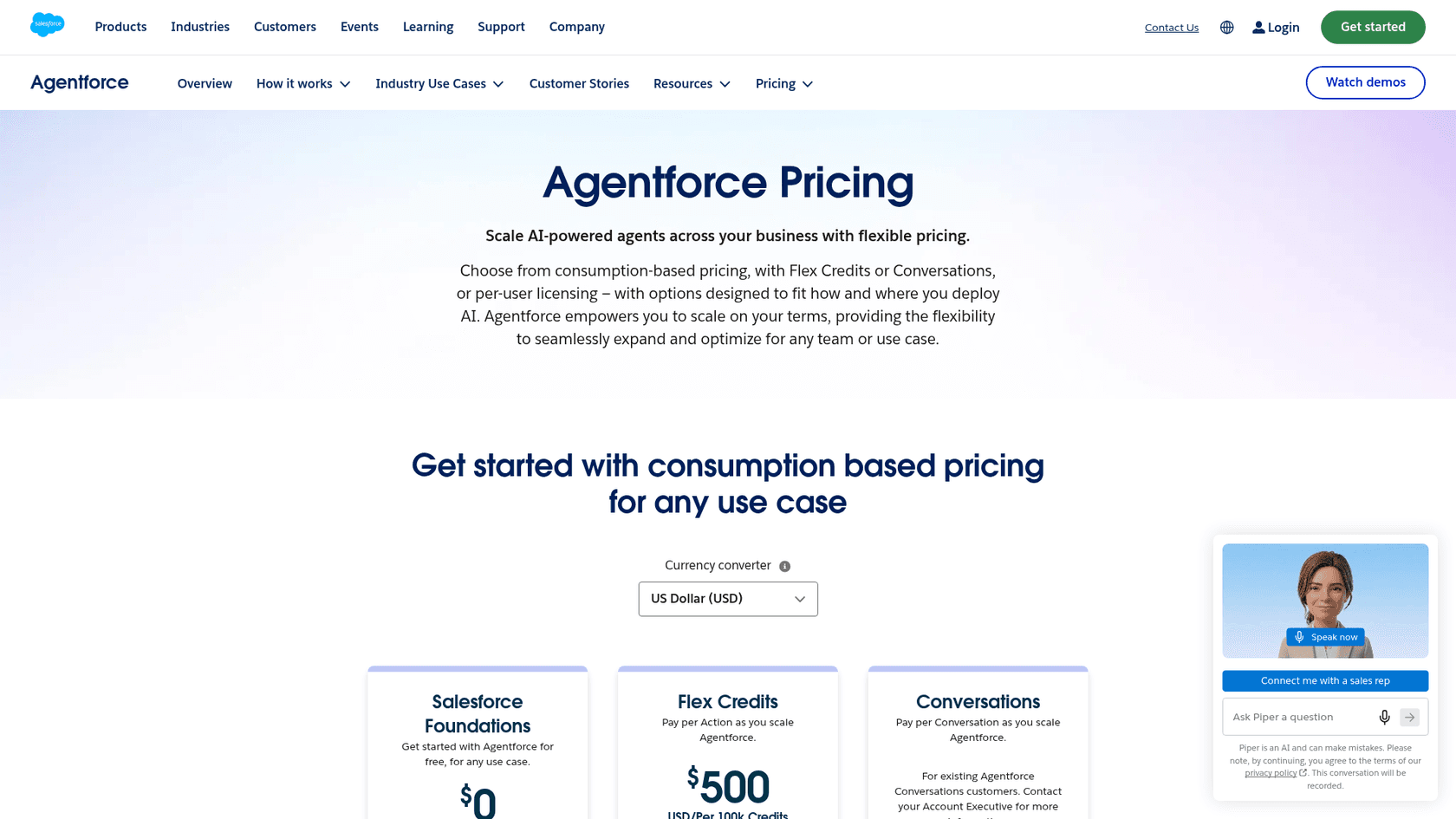
Today the same capabilities are priced through Agentforce. On the Agentforce pricing page, Flex Credits cost $500 per 100,000 credits, Conversations cost $2 each, and per-user add-ons start at $125 per user per month. Salesforce notes that Flex Credits and Conversations can't be mixed in the same org.
A more transparent pricing alternative
This is another area where other solutions can stand out. For example, eesel AI uses fixed monthly credit plans. A free plan includes 100 credits, and the Teammate plan starts at $299 per month for 500 credits, where a ticket or chat counts as 1 credit however many replies it takes. Every plan includes all integrations, unlimited seats and agents, and you can cancel anytime, so it's a lower-risk way to bring AI to your team without a complex contract.
| Aspect | Salesforce Sales GPT & Service GPT |
|---|---|
| Add-on Cost | $50 / user / month at 2023 launch; now Agentforce Flex Credits ($500 / 100k) or $2 / conversation |
| Prerequisites | A Sales/Service Cloud Einstein subscription on a high-tier plan |
| Billing Model | Based on usage credits (Flex Credits) or per conversation |
| Cost Predictability | Medium (consumption-based; billed monthly in arrears) |
Is Sales GPT and Service GPT right for you?
At the end of the day, Salesforce's Sales GPT and Service GPT are powerful tools, but they’re for a very specific type of company: one that is already all-in on the Salesforce ecosystem. If all your sales and service data, workflows, and knowledge already live in Salesforce, they offer a pretty seamless way to add secure, trusted AI into the mix.
However, for everyone else, there are some big things to consider. The platform's deep lock-in, potentially complicated setup, and credit-based pricing can be real obstacles. If your team relies on a mix of tools for knowledge, like Confluence, Notion, or Google Docs, you might find it restrictive and expensive to move everything over just to use these AI features.
For businesses that value flexibility, a simple setup, and predictable costs, it's definitely worth checking out the alternatives. A solution like eesel AI lets you bring AI to the tools you already have, pulling together your knowledge from wherever it lives and getting powerful automation up and running in minutes, not months.
Ready to see how a flexible AI solution can help your support team? Book a demo of eesel AI today.
Frequently asked questions
What exactly is the Salesforce Sales GPT Service GPT GA?
The Salesforce Sales GPT Service GPT GA refers to the general availability of Salesforce's generative AI tools embedded directly into their Sales Cloud and Service Cloud platforms. These AI add-ons are designed to automate tasks, personalize communications, and improve efficiency for sales and customer service teams within the Salesforce ecosystem.
What key features does the Sales GPT Service GPT GA offer for sales and service teams?
For sales, it includes personalized sales email generation, call summaries with action items, and an AI sales assistant for various tasks. For service, it offers draft service replies, work summaries for cases, and automatic generation of knowledge base articles, all powered by your Salesforce data.
How does the Einstein GPT Trust Layer enhance security for the Sales GPT Service GPT GA?
The Einstein GPT Trust Layer is Salesforce's enterprise-grade AI security solution that ensures sensitive customer data remains secure within your Salesforce environment. It features zero data retention by third-party LLMs and encrypted communications to maintain data privacy and compliance.
What are the main limitations of the Sales GPT Service GPT GA concerning external data sources?
A significant limitation is its "walled garden" approach, meaning the Sales GPT Service GPT GA can only access data stored within Salesforce Data Cloud (now Data 360). If your company knowledge is spread across external platforms like Confluence or Google Docs, these tools cannot use that information directly unless it is first connected into Data 360, for example through the beta Confluence connector.
Can you clarify the pricing structure for the Sales GPT Service GPT GA?
The Sales GPT Service GPT GA launched in 2023 as an add-on costing $50 per user per month, and it required an existing Sales Cloud Einstein or Service Cloud Einstein subscription, usually on the Salesforce Unlimited Edition plan. This fee includes a set number of Einstein GPT credits, and exceeding these credits meant purchasing additional "Enterprise Expansion packs." Salesforce now prices these capabilities through Agentforce Flex Credits ($500 per 100,000 credits) or $2 per conversation.
Is the Sales GPT Service GPT GA suitable for businesses that use multiple knowledge tools outside of Salesforce?
The Sales GPT Service GPT GA is best suited for companies that are already fully invested in the Salesforce ecosystem and have all their relevant data centralized within it. For businesses relying on a mix of external tools for knowledge, it might be restrictive and costly due to its deep lock-in and inability to easily access outside data.