Qwen-UI-Agent alternatives: 8 GUI agents you can actually run in 2026

Rama Adi

Katelin Teen
Last edited August 24, 2026

What people are actually looking for when they search this
I build integrations for a living, so my first instinct with any new agent model is to go looking for the endpoint. With Qwen-UI-Agent there isn't one.
Which is a shame, because Alibaba usually ships. If you came here from our Qwen alternatives roundup or the Qwen review, you will know the text models have public rate cards and real endpoints. This one does not.
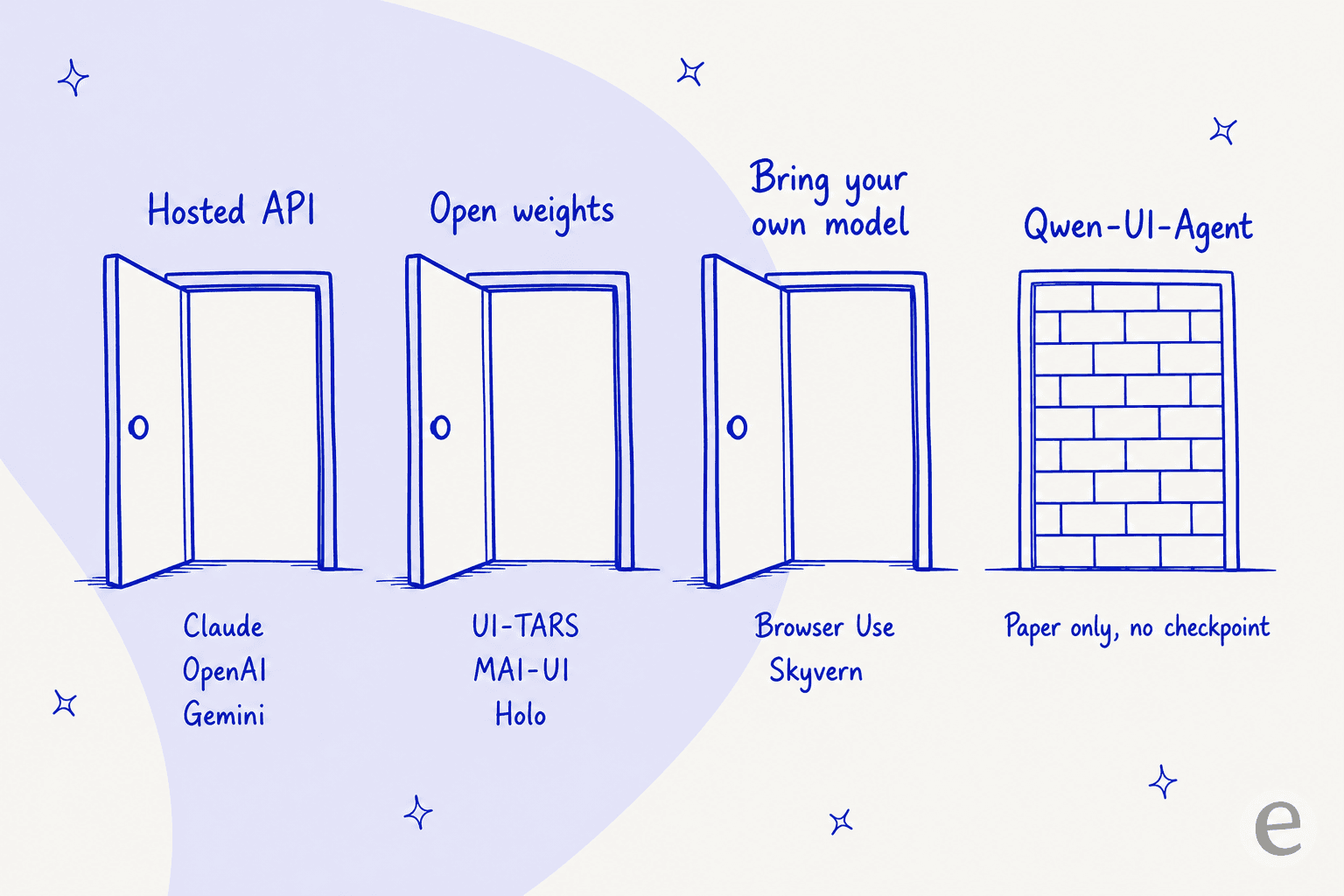
That is worth being precise about, because the coverage was not. The project site has exactly three buttons: technical report, GitHub, and a demo reel. The GitHub repo carries 2.2k stars and zero releases, zero tags and zero packages. The Tongyi-MAI org on Hugging Face publishes Z-Image, Z-Image-Turbo, MAI-UI-8B and MAI-UI-2B, and that is the whole list. Apache 2.0 appears in the README, but a licence on a repo of figures is not a model you can run.
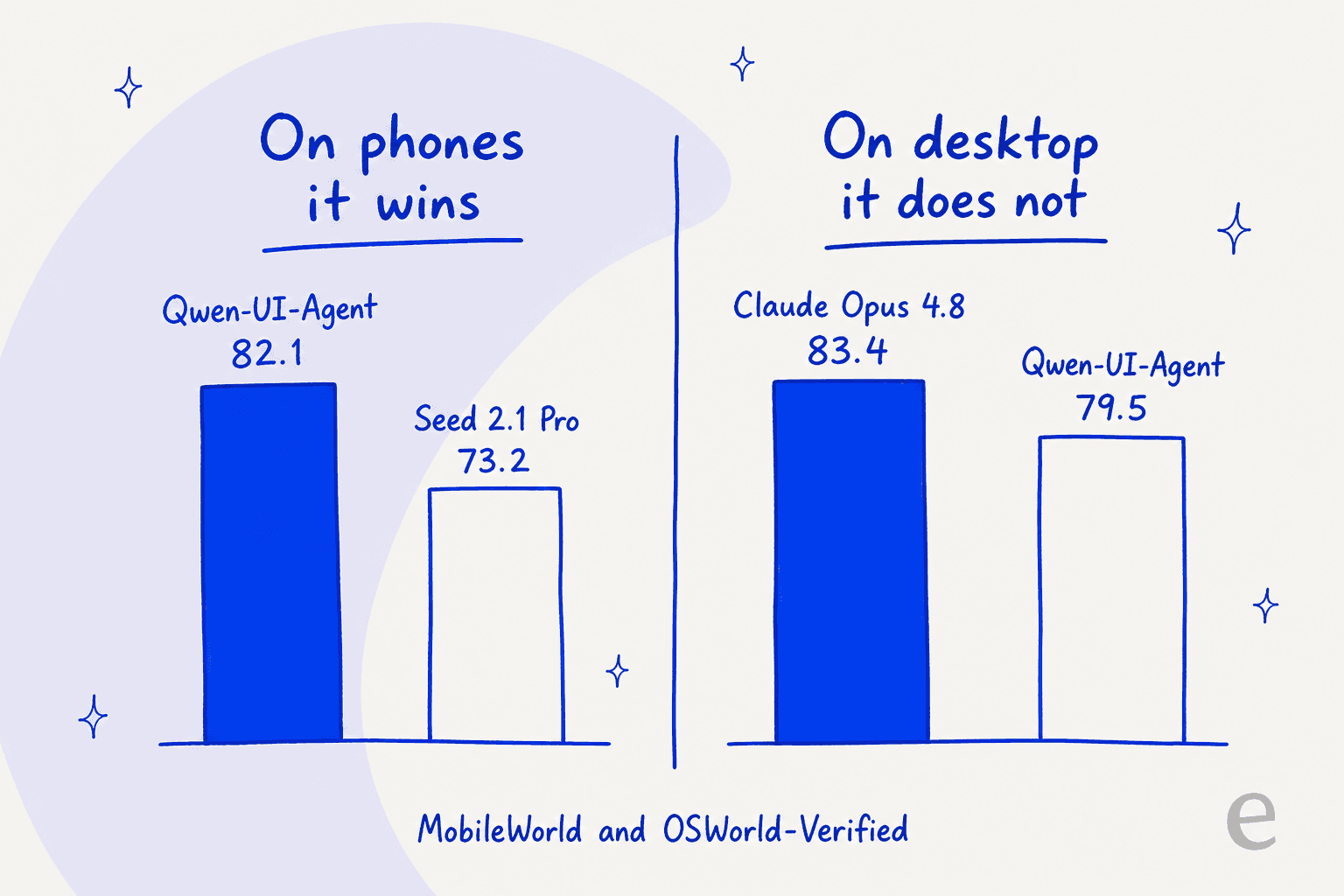
None of that makes the work less good. The paper's headline is a 27B variant the authors call their primary model for end-to-end evaluation, per the technical report, and on phones it is comfortably the best thing anyone has published: 82.1% on MobileWorld against Seed 2.1 Pro's 73.2, and 92.2% on a held-out benchmark of 409 tasks across 104 live Android apps running on a fleet of more than 100 physical handsets. That last number is the interesting one, because it was measured on real devices rather than emulators.
Desktop is where the story gets flattened in the retelling. A widely shared weekly recap put it this way:
"Alibaba also released Qwen-UI-Agent, a 27B GUI agent model that claims top scores on MobileWorld (82.1%), OSWorld-Verified (79.5%), and WebArena (73.6%), beating GPT-5.6 Sol, Claude Opus 4.8, and Gemini 3.1 Pro."
Alibaba's own chart says otherwise on the middle one. On OSWorld-Verified, Claude Opus 4.8 scores 83.4 and Qwen-UI-Agent scores 79.5, and the paper states plainly that it ranks second, trailing only Opus 4.8. On the harder long-horizon set, OSWorld-v2, the gap widens to 40.0 against Opus 4.8's 54.8 on partial progress. The "beating" claim holds for mobile and for WebArena. It does not hold for the desktop benchmark most buyers quote.
It is also worth remembering this category has a history of over-promising. Adept AI shipped ACT-1, the first serious screen-clicking agent, and then pivoted; Rabbit AI sold a large action model in a consumer gadget. Demos of agents driving software have run ahead of reality before, which is a good reason to read every chart in this post twice.
So the honest framing of this whole post: you are not replacing a product, you are choosing your first one. And the choice is less about score than about which of three doors you walk through.
What the neutral leaderboard says
Almost every number in the previous section is vendor-reported, including Alibaba's. So before the list, here is the same benchmark run by somebody with nothing to sell.
OSWorld-Verified has a maintainer-run board where the OSWorld team evaluates submissions themselves, under unified settings, on the same 361 tasks. It is not rendered as a table on the page, it is fetched client-side from a spreadsheet, so here are the top eight best-runs from that file.
| Rank | Agent or model | Institution | Type | Success rate |
|---|---|---|---|---|
| 1 | Intelligence-Indeed Agent | Intelligence Indeed | Agentic framework | 90.19 |
| 2 | claude-fable-5[1m] | Anthropic | General model | 85.96 |
| 3 | Pointer Agent w/ Opus 4.7 | Pointer | Agentic framework | 83.64 |
| 4 | claude-opus-5[1m] | Anthropic | General model | 83.39 |
| 5 | Coasty CUA v1 | Coasty Team | General model | 82.81 |
| 6 | Holo3-35B-A3B | H Company | Specialized model | 82.56 |
| 7 | Pointer Agent w/ Sonnet 4.6 | Pointer | Agentic framework | 81.45 |
| 8 | Muse Spark 1.1 | Meta Superintelligence Labs | General model | 80.67 |
Three things fall out of that, and all three shaped this post.
Qwen-UI-Agent is not on it, and cannot be. The board's submission rule is that you schedule a meeting and the maintainers run your agent code on their side. No checkpoint and no API means there is nothing for them to run. The only Alibaba entries in the whole 66-entry sheet are Qwen 3.7 Plus at 73.3 and GUI-Owl-1.5 32B at 55.44. Take Alibaba's self-reported 79.5 entirely at face value and drop it into this table, and it lands 9th of 66, outside the top eight.
The leader is a harness, not a model. Five of the top twelve are agentic frameworks wrapping somebody else's model, and the number one entry is one of them at 90.19. If you were expecting to buy a model and be done, the board says the scaffolding is worth more points than the weights.
One open-weights model is actually in the mix. Holo3-35B-A3B sits 6th at 82.56, which is higher than H Company's own published claim of 78.85 and is verified by someone other than H. That is the single most credible number for any downloadable GUI agent, and it moved Holo up my list.
Worth noting for anyone quoting these: human performance on OSWorld is 72.36%, and everything in that top twelve is now above it. Also a naming wrinkle to be careful with, since Anthropic self-reports 83.4 for Opus 4.8 while the row carrying 83.39 on this sheet is labelled claude-opus-5[1m] and no Opus 4.8 row exists there at all. The figure matches, the label does not.
How I picked, and what I measured
I spent this week in the docs, model cards, licence files and rate cards for every candidate, and I threw out anything I could not verify from the vendor's own pages. Six things decided the list.
Can you get it today. A paper is not an alternative. Either weights are downloadable, or there is an endpoint with a price, or it is out.
Who supplies the screen. Every one of these needs something to drive: a VM, a headless Chromium, an Android device. Almost none of them supply it. That is the line item people forget.
Which screens it drives. Browser, desktop and mobile are three different products wearing one name, and the vendors are not equally honest about which they do.
Whose harness produced the score. Every number in this post is vendor-reported unless I say otherwise, and several of them were measured on modified benchmarks. I say so each time. The size of that gap is not hypothetical either. On one Launch HN thread a founder was challenged on a SOTA claim and answered with both figures in a single sentence:
"We've hit 82.8% on OSWorld Verfied(on the official page) and with our latest internal testing we're hitting 85.6% which we've posted"

That is a 2.8-point self-measured premium, stated honestly, by a vendor whose neutral-board number I can go and check. Assume something similar sits behind every chart in this category, including Alibaba's.
What a run costs. Not the per-million price. The per-run cost, which is dominated by step count because each step re-sends the whole trajectory plus a new screenshot. If you want the same arithmetic applied to headcount instead, our agent cost comparison does that. Practitioners track this obsessively, and their numbers are not gentle:
"Numbers I was seeing: - 20 to 50 LLM calls per task - $0.50 to $3.00 per task at Claude Sonnet 4.6 prices - Half the runs drifted off-task halfway through"

Whether you can test before production. This is the one that matters most in practice and the one nobody solves. It is a solved-ish problem for text agents, as our guide to OpenAI Evals shows, and an unsolved one the moment the output is a mouse movement.
On the cost point, here is the arithmetic that changed how I think about GUI agent budgets. Drag the step count and watch the curve bend.
The eight alternatives at a glance
| Tool | Best for | How you get it | Screens it drives | Licence or price | Best published score, and whose harness | Who supplies the screen | Dry run before prod | Injection defence | Free tier |
|---|---|---|---|---|---|---|---|---|---|
| Claude computer use | Desktop work that has to be right | Hosted API, GA | Desktop, browser | Opus 5 $5 / $25 per MTok | 83.4% OSWorld-Verified (Opus 4.8, Anthropic) | You | No | Classifiers on by default | No |
| Gemini computer use | One API across phone and desktop | Hosted API, preview flag | Browser, mobile, desktop | 3.7 Flash $0.75 / $3.75 per MTok | 83.0% OSWorld-Verified (3.6 Flash, Google) | You | No | Opt-in, off by default | No |
| OpenAI computer use | Teams already on the Responses API | Hosted API, GA | Desktop, browser | Sol $4 / $20, Luna $0.20 / $1.20 | 92.8% Online-Mind2Web (OpenAI) | You | No | Policy published, you enforce | No |
| ByteDance UI-TARS | A permissive licence you can ship | Weights on Hugging Face | Desktop, browser, Android via template | Apache 2.0 | 27.5% OSWorld for the open 8B (ByteDance) | You | No | None | Weights are free |
| MAI-UI 8B and 2B | The closest downloadable cousin | Weights on Hugging Face | Mobile, desktop | Apache 2.0 | 65.7% ScreenSpot-Pro for the 8B (Alibaba) | You | No | None | Weights are free |
| Holo 3.1 | Open weights with a hosted fallback | Weights plus hosted API | Web, desktop, mobile | Apache 2.0, API $0.25 / $1.80 | 82.56% OSWorld-Verified, 6th (maintainer-run board) | You, or H's managed agents | No | Not documented | 10 RPM, no card |
| Browser Use | Browser jobs run at volume | Python library plus cloud | Browser only | MIT library, cloud from $29/mo | 87.4% on Odysseys (third-party hosted) | Cloud supplies Chromium | No | Not documented | 10 tasks/mo |
| Skyvern | Logged-in flows with 2FA in the way | Self-host or cloud | Browser only | AGPL-3.0, cloud from $29/mo | 85.85% WebVoyager, Jan 2025 (Skyvern) | Cloud supplies Chromium | No | Not documented | 5,000 credits |
Two columns are worth staring at. Nobody offers a dry run, which is the single biggest operational gap in the whole category. And who supplies the screen splits the list cleanly: the three frontier labs hand you a model and wish you luck with the VM, while Browser Use and Skyvern hand you a running browser and let you pick the model.
1. Claude computer use
Best for desktop automation where a wrong click is expensive.
How it works. You declare a single tool entry and Anthropic's model returns actions for your code to execute. The current version is a client toolset, computer_toolset_20260801, which bundles 17 member tools behind one declaration and needs no beta header. It works on Fable 5, Mythos 5, Opus 5, Opus 4.8 and Sonnet 5, and notably not on Haiku 4.5. The nice part for anyone building a real pipeline is that you can hand the same model a bash tool and a file editor in the same tools array, so it can drop out of the GUI and into a terminal mid-task.
Two neighbouring surfaces are worth knowing about if you go this way: Claude Managed Agents for hosting and supervising the loop, and the Claude desktop platform if you would rather scope an agent to one app than to a whole OS.
What I like. The scores are the best published on desktop: 83.4% on OSWorld-Verified for Opus 4.8, and 70.57% on the newer, harder OSWorld 2.0 for Opus 5 against GPT-5.6 Sol's 62.6. But the thing I actually rate is the safety layer. Declare the official tool and Anthropic runs prompt-injection classifiers over every screenshot automatically, and when one fires the model is steered into asking you for confirmation before it acts again. Anthropic says this runs in parallel with inference at roughly zero added latency and no added cost. Nobody else in this list ships that on by default.
Where it runs out. There is no mobile story at all. The reference environment is X11 on Linux in a container, the vocabulary is entirely mouse and keyboard, and there is no tap, swipe or pinch anywhere in the 17 members. So on exactly the axis where Qwen-UI-Agent is strongest, this is not a substitute. Anthropic also lists latency as its own first limitation, in its own words possibly too slow compared with a human doing the same clicks. And the token overhead is real: the toolset definition costs around 4,520 input tokens on every single request before you have sent a pixel, and each screenshot adds 1,000 to 1,800 on top. One more trap for implementers: the API does not downscale oversized images for you, it rejects them.
Pricing.
| Model | Input / MTok | Output / MTok | Cache read | Notes |
|---|---|---|---|---|
| Opus 5 | $5.00 | $25.00 | $0.50 | Fast mode is exactly 2x |
| Opus 4.8 | $5.00 | $25.00 | $0.50 | Holds the 83.4% score |
| Sonnet 5 | $2.00 | $10.00 | $0.20 | Toolset supported |
| Fable 5 | $10.00 | $50.00 | $1.00 | Toolset supported |
| Haiku 4.5 | $1.00 | $5.00 | $0.10 | Toolset not supported |
Batch halves both sides, the full 1M context runs at standard rates with no cliff, and computer use is zero-data-retention eligible because the loop runs on your side.
Verdict: if the work happens on a desktop and the blast radius of a mistake is more than an annoyance, this is the one I would start with, and the built-in injection classifiers are why. Skip it if the work happens on a phone, because it simply cannot. If vendor lock-in is the worry rather than capability, our Claude alternatives list covers the rest of the field. Anyone comparing the two big API vendors head to head will get more out of our OpenAI vs Anthropic APIs guide than out of a benchmark chart.
2. Gemini computer use
Best for covering phones and desktops from a single hosted endpoint.
How it works. There is no longer a dedicated computer-use model. Google folded the capability into a built-in computer_use tool that attaches to general Flash models, and the old gemini-2.5-computer-use-preview-10-2025 is now labelled a legacy preview. The tool itself costs nothing extra, billing as regular tokens at the model's rate. Coordinates come back normalised to a 0 to 999 grid, and Google is explicit that this is a client-side tool, so the loop is yours to run.
What I like. This is the only hosted API in the list with a documented mobile environment, and that is a real differentiator rather than a marketing line. There are three separate action tables: ENVIRONMENT_BROWSER with 21 actions, ENVIRONMENT_MOBILE with 10 that Google describes as Android-optimised and which adds open_app, list_apps and long_press while dropping scroll and hotkey, and ENVIRONMENT_DESKTOP with 17 for OS-level cursor control. The desktop trajectory is also steep: OSWorld-Verified went 65.1 on 3 Flash, to 78.4 on 3.5 Flash, to 83.0 on 3.6 Flash, which puts Google within half a point of Anthropic's best. And it is far and away the cheapest hosted route.
Where it runs out. The disclosure is messy in a way that will cost you an afternoon. The models index page still lists only the legacy 2.5 model under tool and agent models, the highest OSWorld score Google publishes belongs to a model the computer-use page does not list, and computer use still reads "Supported (Preview)" even on generally available gemini-3.7-flash. Google has also not republished Online-Mind2Web, WebVoyager or AndroidWorld for any 3.x model, so the mobile capability has a documented action space and no current benchmark behind it. Prompt-injection detection exists but ships off by default, which is the opposite of Anthropic's stance. There is no free tier for this at all. And the price on the recommended model doubles on 1 January 2027.
Pricing.
| Model | Input / MTok | Output / MTok | Note |
|---|---|---|---|
gemini-3.7-flash | $0.75 | $3.75 | Recommended. Rises to $1.50 / $7.50 on 1 Jan 2027 |
gemini-3.5-flash | $1.50 | $9.00 | |
gemini-3.5-flash-lite | $0.30 | $2.50 | Cheapest route in this whole post |
gemini-2.5-computer-use-preview | $1.25 | $10.00 | Legacy preview |
Verdict: the pick if you need one vendor for browser, desktop and Android, and the pick if cost per run is the binding constraint. Turn injection detection on before you do anything else, and price your 2027 budget at the post-increase rate. Our Gemini 3 pricing breakdown has the wider rate card if you are modelling this properly, and Gemini Agentic Vision covers how the screenshot becomes a click target. Weighing Google against the field is the job of our Gemini alternatives post.
3. OpenAI computer use
Best for teams whose stack already ends at the Responses API.
How it works. computer-use-preview is deprecated and gone from the rate card. Computer use is now tools: [{ type: "computer" }] on all three GPT-5.6 tiers, with no per-call fee for the tool itself. The guide documents three harness shapes rather than one, which I appreciated: the built-in loop that returns structured UI actions, a custom tool layered over a Playwright or Selenium harness you already have, and a code-execution harness where the model moves between clicking and writing short scripts. The action vocabulary is nine types, and they batch into an actions[] array rather than going one at a time.
What I like. The browser numbers are the strongest here by a distance: 92.8% on Online-Mind2Web, 67.3% on WebArena-Verified, 90.4% on BrowseComp. OpenAI also publishes a customer result rather than only a benchmark, reporting 95% first-attempt success across roughly 30,000 property-tax portals, rising to 100% within three attempts. And the Luna tier makes experimentation cheap at $0.20 in and $1.20 out.
Where it runs out. No mobile, confirmed five ways: both documented environments are desktops, the recommended resolutions are named desktop, there is no tap or swipe or back in the vocabulary, and every published benchmark is desktop or browser. The safety model went the wrong way too. The generally available tool dropped the preview era's pending_safety_checks handshake, so what you get now is a published three-tier confirmation policy, a paste-ready prompt-injection snippet, and instructions to keep a domain allow-list, all of which you implement yourself. Worth knowing before you plan around the consumer side: ChatGPT agent is retired, and its replacement cloud browser in ChatGPT Work will not accept credentials, use autofill or a password manager, sign in to websites, or complete payments. OpenAI's own API beats its own consumer agent by 21.9 points on Online-Mind2Web.
Pricing.
| Model | Input / MTok | Cached | Output / MTok | Long context in / out |
|---|---|---|---|---|
gpt-5.6-sol | $4.00 | $0.40 | $20.00 | $8.00 / $30.00 |
gpt-5.6-terra | $2.00 | $0.20 | $12.00 | $4.00 / $18.00 |
gpt-5.6-luna | $0.20 | $0.02 | $1.20 | $0.40 / $1.80 |
Batch and Flex are both half price, fast mode is double, and these are promotional rates through 21 November 2026. The launch post listed Sol at $5 / $30 and Luna at $1 / $6, so Luna is currently running at a fifth of its own list price. There is also a long-context tier boundary at 270K tokens that a screenshot loop reaches faster than you would think, and the free tier is not supported at all. On the consumer side the numbers live in our Atlas pricing guide, which is a different product at a different price.
Verdict: the browser-first pick, and the one I would choose if the surrounding system already speaks function calling and you would rather add a tool than adopt a vendor. Budget engineering time for the safety layer, because that work is now yours. See OpenAI models for how the three tiers differ elsewhere.
4. ByteDance UI-TARS
Best for a permissive licence you can actually ship in a commercial product.
How it works. Six checkpoints sit on the ByteDance-Seed org under Apache 2.0, with no gate and no click-through: a 2B, two 7B variants, two 72B variants, and the 1.5-7B that everyone actually uses. The repo names understate the sizes, since the "7B" is really 8.3B parameters and the "72B" is 73.4B. Three prompt templates ship with it, COMPUTER_USE, MOBILE_USE and GROUNDING, so mobile is a documented model capability with long_press, open_app, press_home and press_back actions.
What I like. Apache 2.0 with no non-commercial rider, confirmed in the LICENSE file, on all six model cards, and on the desktop app repo. The ecosystem around the 8B is the deepest of any open GUI agent: 11 fine-tunes, 13 quantisations, and GGUF builds wired up for llama.cpp, LM Studio, Jan and Ollama. That is why it does roughly 808,000 downloads a month while the 72B does 446. You can have a GUI agent running on a laptop tonight, commercially, for nothing.
Where it runs out. The headline benchmarks belong to a model you cannot have. ByteDance's own scale table puts the downloadable 1.5-7B at 27.5% on OSWorld and 49.6% on ScreenSpot-Pro, against 42.5% and 61.6% for the internal 1.5 that the press covered. That is a 15-point and a 12-point gap, and oddly the 72B scores worse than the 7B on both. Hugging Face's community eval panel muddies it further by attributing 61.6% on ScreenSpot-Pro to the 7B, contradicting ByteDance's own 49.6%, so treat that column as unsettled. UI-TARS-2 was announced in September 2025 and has never had weights, which Alibaba's own report independently confirms by listing it as closed-source. ByteDance has published no OSWorld-Verified number at all despite being credited as a contributor to the fix that produced it.
The momentum picture is the part I would weigh most. The model repo has 11,374 stars, zero tags, zero releases ever, and a last commit dated 5 September 2025. The desktop monorepo has 38,697 stars and a last commit from July 2026. The tooling is alive and the model line is frozen. The installable app is macOS and Windows only with no Linux build, and the last release carrying installers is v0.2.4 from August 2025 while /releases/latest resolves to a CLI release with zero attached assets, which is exactly the link the quick-start tells you to click.
If you are sizing a small model for your own hardware rather than chasing a leaderboard, our small language models piece is the better frame for this decision than any benchmark table.
Pricing. Weights are free. The hosted route is doubao-1-5-ui-tars-250428 on Volcengine at a listed ¥1.75 per million input and ¥3.50 per million output, though that page renders its prices client-side so I would re-check before budgeting on it, and Volcengine is a China-region cloud. The successor Doubao-Seed-2.1-Pro is listed at ¥6 and ¥30, a different product at a different price. For a Western deployment, self-hosting or a third-party inference provider is the practical path.
Verdict: take it for the licence and the ecosystem, not for the score, and calibrate on 27.5% rather than 42.5%. Worth naming one risk out loud: ByteDance's own limitations section flags that the model handles CAPTCHAs, describes that as an unauthorised-access concern, and there is no technical guardrail on an Apache 2.0 checkpoint. If you are weighing open weights generally, our Kimi K2.5 alternatives post covers how the rest of that field is priced.
5. MAI-UI 8B and 2B
Best for the closest thing to Qwen-UI-Agent you can actually download, from the same lab.
How it works. These are the two checkpoints Alibaba's MAI team did release, pushed on 25 December 2025 and announced four days later, both Apache 2.0, both on the qwen3_vl architecture. MAI-UI-8B is 8.77B parameters across four shards at 16.33 GiB, and MAI-UI-2B is 2.13B in a single 3.96 GiB file. They are the direct predecessors of Qwen-UI-Agent, which makes them the most honest available proxy for what that team's post-training actually buys you.
What I like. Same lab, same lineage, Apache 2.0, and small enough to be practical. The 2B in particular fits comfortably on an 8 GB card by weight arithmetic. Community quantisations exist for both, seven for the 8B and five for the 2B. And the MobileWorld benchmark itself is openly downloadable even though the model that tops it is not, so you can at least evaluate honestly.
Where it runs out. Read the model cards carefully, because they print family-flagship numbers rather than the checkpoints' own. The 76.7% AndroidWorld figure on the 2B card belongs to a 235B model that never shipped. The only size-resolved numbers the team ever published are ScreenSpot-Pro without zoom, from the repo's news log: 67.9% for a 32B that also never shipped, 65.7% for the 8B and 57.4% for the 2B. Against Qwen-UI-Agent's 76.6% on the same setting, that is 10.9 and 19.2 points behind on grounding. On end-to-end work the gap is far uglier: MAI-UI's best MobileWorld result was 41.7% against 82.1%, a 40.4-point difference. Grounding is nearly a solved problem in open weights. Finishing a multi-step workflow is not.
Two practical notes. No VRAM figure is published anywhere, on either card or in the repo, so the numbers above are my arithmetic from weight size rather than a vendor claim. And no Hugging Face inference provider serves either model, so local is the only route.
Pricing. Free, Apache 2.0, and the entire cost is your GPU time.
For context on how the rest of the open-weight world sets expectations, Mistral AI publishes more per-checkpoint detail than either of these cards do. So does DeepSeek V3.2.
Verdict: the most interesting model here for understanding what Qwen-UI-Agent will be, and one of the weakest for actually doing work. I would run the 8B to learn the action space and calibrate expectations, then use a hosted API for anything a customer sees. It also tells you something that the MAI-UI collection still reads two items, last updated 6 January 2026, six months before Qwen-UI-Agent was announced.
6. Holo 3.1
Best for open weights when you also want a hosted endpoint to fall back on.
How it works. Paris-based H Company has shipped five generations in twelve months, and Holo 3.1 landed on 1 June 2026. What makes it unusual is that the same checkpoint is sold two ways. H's API documents an agent loop mode, where Holo is the brain of a browser or desktop agent, and an element localisation mode, where you hand it an image plus a target description and get back {x, y} on a 0 to 1000 grid. That second mode makes it a drop-in grounding component inside somebody else's agent, which none of the frontier APIs offer.
What I like. This is the only entry in the whole post whose headline number I did not have to take on trust. Holo3-35B-A3B sits 6th on the maintainer-run OSWorld-Verified board at 82.56%, ahead of Meta's Muse Spark 1.1 and within a point of Anthropic's Opus row, and it is the only specialised open-weights model anywhere in that top six. H's own published claim for Holo3 was 78.85%, so for once the vendor undersold itself.
Beyond that, Holo 3.1 is the most permissive release H has done: seven checkpoints all Apache 2.0, spanning 0.8B, 4B, 9B and a 35B-A3B mixture-of-experts, plus FP8, NVFP4 and Q4 GGUF builds of the flagship. H reports the quantised builds land within about two points of the BF16 checkpoint on OSWorld. Mobile is the headline gain of this generation, with AndroidWorld moving from 67% to 79.3% on the 35B-A3B. And the hosted price is the lowest of any model in this post at $0.25 in and $1.80 out, with a free tier at 10 requests per minute and no card.
Where it runs out. The licensing generosity has an edge to it. In earlier generations the pattern was small models Apache 2.0 and big models research-only: Holo2-30B-A3B and Holo2-235B-A22B are both CC BY-NC 4.0, as is Holo1.5-72B, so none of those is usable in a product without calling H. And the current flagship went further than research-only. holo3-122b-a10b has no weights at all, API-only, and H's own model list says so. Two of H's own pages disagree by a point on the small-variant AndroidWorld figure, 71% versus 72%. Holo 3.1's per-benchmark grid is published only inside an image on the model card rather than as text. Its headline composite folds in H Corporate Benchmarks, 486 tasks built with H's own synthetic environment factory, so any Pareto claim off that chart is partly graded on unpublished coursework. And the July 2026 managed Computer-use Agents product publishes no rate card whatsoever.
Pricing.
| Route | Rate | Context | Notes |
|---|---|---|---|
| Weights, Holo 3.1 family | Free, Apache 2.0 | n/a | 0.8B to 35B-A3B, plus FP8, NVFP4, GGUF |
holo3-1-35b-a3b API | $0.25 in / $1.80 out per MTok | 65,536 | Function calling, free tier 10 RPM |
holo3-122b-a10b API | $0.40 in / $3.00 out per MTok | 65,536 | No weights, no function calling |
| Computer-use Agents | Not published | n/a | Browser and desktop live, mobile not listed |
Verdict: my pick of the open-weight options, and the only one I would put in front of a hosted API on merit, because the 82.56% is on somebody else's board rather than H's. It is also the best-shaped option for a team that wants to start hosted and move to self-hosted without changing model families, and the only one where the same weights can serve as a grounding subroutine inside another agent. Read the licence on whichever generation you pick rather than assuming, because it changes between sizes and the current flagship has no weights at all.
7. Browser Use
Best for browser tasks you need to run a thousand times without babysitting.
How it works. This is the option most people mis-describe, so it is worth being exact. Browser Use started as a harness rather than a model: an Agent class that runs the observe, decide, act loop against Chromium, with the LLM as a swappable constructor argument. It now ships models too, hosted bu-* endpoints defaulting to bu-2-0 plus an open-weights bu-30b-a3b-preview. But the harness predates the model and does not require it, and the provider list is unusually long: Google, OpenAI, Anthropic, Azure, Bedrock, Groq, Cerebras, DeepSeek, Mistral, OpenRouter, LiteLLM, local Ollama, and anything OpenAI-compatible via a custom base URL. You bring your own key throughout.
What I like. 110.3k stars, 12.1k forks, MIT on the library, and a release cadence that has not slowed. It is also the only entry where the cloud supplies the browser, which removes the biggest hidden cost in the whole category. And the pricing is unusually legible: subscriptions buy a dollar-for-dollar credit pool that two meters drain, so you can actually forecast.
Where it runs out. Browser only, and they are direct about it. Every session is a remote Chromium reached over CDP, the API surface is /runs and /browsers, and they position against computer-use agents rather than as one. Watch out for a subtle trap in their docs: macOS, Windows and Linux appear as fingerprints being imitated by stealth mode, not as platforms being driven. The 1,000-plus integrations are APIs the agent calls, not applications it operates.
Their benchmark story needs reading with care too. The often-quoted 89.1% on WebVoyager came from a run on gpt-4o with a modified codebase and prompts, 55 tasks removed, and failed or unknown evaluations manually corrected, and Browser Use themselves say in that post that the benchmark is not actually testing the right things. Their current headline is 82% strict accuracy on an internal set of non-public tasks. The strongest claim is the third-party-hosted one: first place on Odysseys at 87.4% across 200 long-horizon web tasks. Also note that MIT covers the library only, the cloud runs under separate terms, and the docs route you to the cloud for CAPTCHAs, memory management and parallel execution.
Pricing.
| Plan | Monthly | Credits | Concurrent sessions |
|---|---|---|---|
| Free | $0 | Top-ups only, 10 tasks/mo | 3, or 10 after a top-up |
| Dev | $29 | $29 | 25 |
| Business | $299 | $299 | 200 |
| Scaleup | $999 | $999 | 500 |
The two meters underneath matter more than the tier. Browser infrastructure bills at $0.02 per browser hour, which is nothing, while the managed proxy bills at $5 per GB, dropping to $4 on Scaleup, and proxyless egress at $0.20 per GB. One gigabyte of proxy traffic costs the same as 250 browser hours, so the proxy is the real cost centre. Hosted agents run at 1.2x the underlying provider's rates, and bringing your own key adds a 0.2x orchestration fee, so BYOK buys you control rather than savings. Running BU 2.0 in your own library is the cheapest path at $0.60 in and $3.50 out with no browser-hour charge. No enterprise tier is published, so SLAs and retention terms are sales-gated.
Verdict: if the target is a website, start here rather than with a frontier computer-use API. You get a running browser, a model you can swap, and a bill you can predict, and the third-party Odysseys result is the most credible number in this post. Anyone comparing this against a simple scraper should read our web scraping alternatives post first, because plenty of jobs that look agentic are not.
8. Skyvern
Best for logged-in web workflows where 2FA is the actual obstacle.
How it works. Skyvern is not vision-only, and that is the design choice that defines it. A screenshot and a simplified DOM tree go to the model together, and their own framing is that the image supplies layout and visual context while the DOM supplies the element identifiers Playwright can target. Playwright then executes. Credentials are injected into the browser rather than into the prompt, so the model never sees them. Their ablation is refreshingly published: a single actor scores around 45% on WebVoyager, adding a planner takes it to 68.7%, and adding a validator takes it to 85.85%.
What I like. It is the only entry here built around the boring reality of logged-in web work, and that reality is precisely where the pure-vision approach falls over. A practitioner who ran four agents side by side put the threshold like this:
"the pattern that actually mattered wasn't which agent, it was that any task with login + 3 or more steps breaks on every screenshot-driven approach. … once you drop the browser sandbox and drive the OS accessibility tree directly, you get real element handles instead of pixel guesses and the failure rate falls roughly 4x on long tasks."
Skyvern's DOM-plus-screenshot design is the same insight applied one layer up. On top of that: TOTP, email and SMS second factors are handled, there is a credential vault with Bitwarden, 1Password and Azure Key Vault support, and there is a "Take Control" button that hands a live session back to a human mid-run. Route Memorization is the smart part of the roadmap, compiling a successful agent run down to a cheap Playwright script and self-healing when it breaks, which already ships as code caching. That is the right answer to per-step cost.
Where it runs out. The licence has a carve-out you need to read. The README says the core logic is AGPL-3.0 with the exception of anti-bot measures available in the managed cloud, so the anti-bot layer is deliberately not in the repo. Self-hosting is free of software cost but has two cliffs: automatic CAPTCHA solving does not exist there, and the agent instead pauses 30 seconds for manual intervention. The CAPTCHA claims also narrow as you go deeper, from the homepage's native solving with no third-party services to docs that name specific types and then say solving is not guaranteed. Browser only, in their own words, if it happens in a browser Skyvern can run it. The 85.85% WebVoyager figure is from January 2025 on GPT-4o with 8 tasks removed, and Skyvern says on that same page that the leaderboard has since moved on. Their fresher number is 64.4% on their own WebBench. A few of their own pages disagree with each other too, on free-tier action counts and proxy country coverage.
Pricing.
| Free | Hobby | Pro | Enterprise | |
|---|---|---|---|---|
| Price | $0 | $29/mo | $149/mo | Custom |
| Credits | 5,000 one-time | 30,000/mo | 150,000/mo | Custom |
| Estimated actions | ~170 | ~1,200 | ~6,200 | Custom |
| Concurrent runs | 1 | 10 | 25 | 100 |
| 2FA and TOTP | No | No | Yes | Yes |
| Proxy | Datacenter | Datacenter | Residential | Residential |
The per-step credit cost is never published, so I derived it: about 25 credits per action works out to roughly $0.024 per step on both paid tiers, identical on each, which means the upgrade buys volume, concurrency and 2FA rather than a better unit rate. A typical task runs 2 to 10 steps, so about $0.05 to $0.24. No overage rate is published anywhere, and failed runs still consume credit.
Verdict: the specialist pick, and specialists are underrated. If the job is signing into a portal you do not own and completing a form behind a second factor, this is better shaped than any general computer-use API. Keep 2FA in mind when you compare tiers, because it starts at $149 and not $29. If you are weighing a learned agent against hard-coded selectors, our AI agent vs chatbot piece frames that trade-off well.
The number nobody quotes from the Qwen-UI-Agent paper
Here is the finding that reframed the category for me, and it comes from the incumbent's own traces rather than from a competitor.
Qwen-UI-Agent's action space is not purely graphical. Alongside click, type, drag and long_press it exposes cli_command for bash, api_call, ask_user and terminate. So when the model is running a desktop task it gets to choose between clicking a button and typing a command. And it chooses the command a lot. On OSWorld-Verified, CLI actions are 40.7% of all actions and appear in 92.0% of tasks. On the harder OSWorld-v2, that rises to 55.1% of actions across 98.2% of tasks.
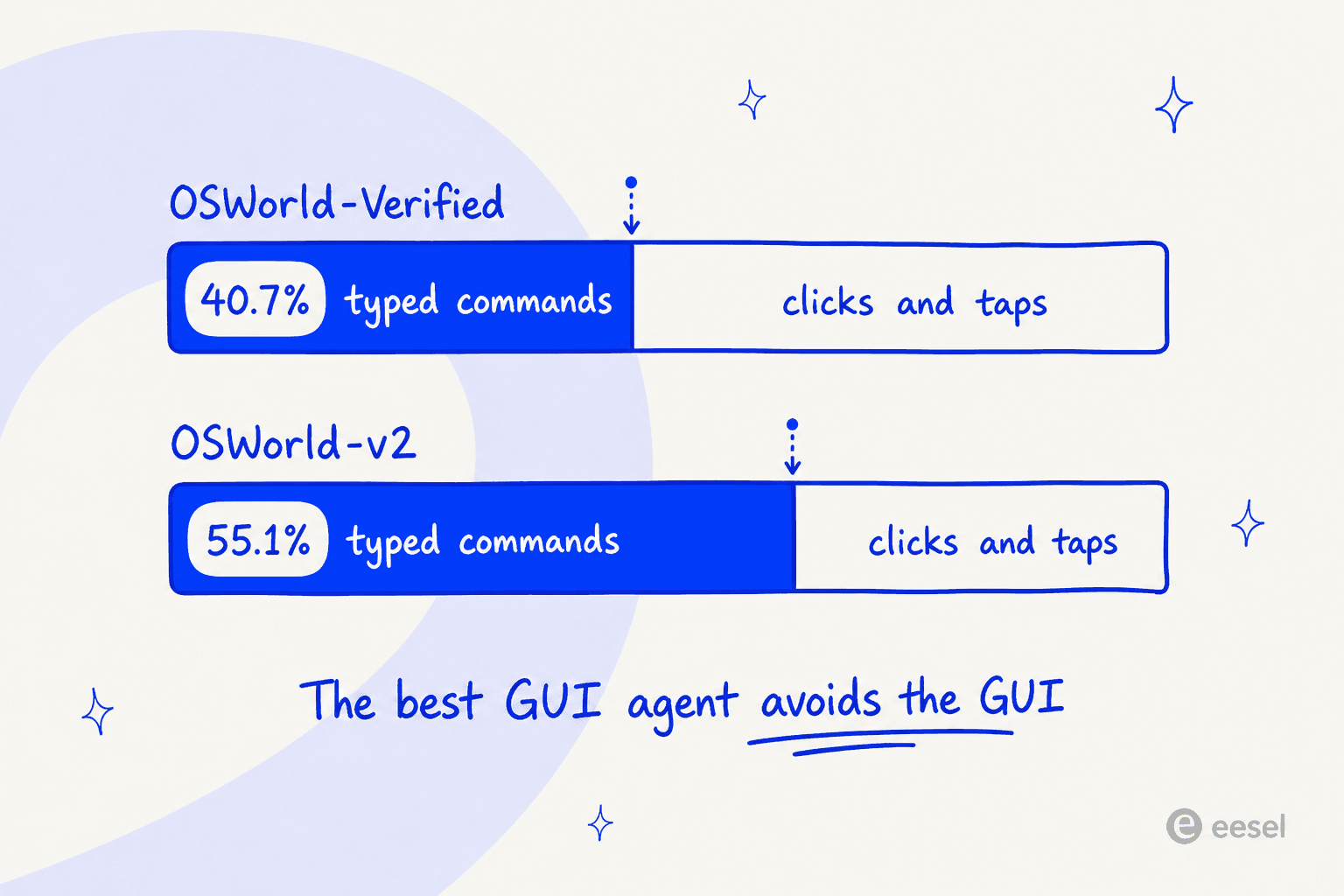
Read that again. The best-performing screen-driving agent published in 2026, given a free choice, spends more than half its actions on the hardest desktop benchmark not driving the screen.
ByteDance's numbers say the same thing from the other direction. UI-TARS-2 scores 29.6% on BrowseComp with its full toolkit, and 7.0% when restricted to GUI-only operation with no SDK. That is their own ablation, and it means roughly three quarters of that score came from terminal and tool access rather than from pixels.
This is also why agentic CLI tools quietly outperform screen agents on anything a terminal can reach, and why an API-first automation like Zapier AI beats a pixel-clicking one whenever the endpoint exists.
The practical takeaway is a question to ask before you pick anything from the table above: does this job have an API? If it does, a screen-driving agent is the expensive, brittle, unauditable way to do something you could do with an authenticated call. GUI agents earn their keep on the surfaces that have no API, which is a real and large category: legacy internal tools, government portals, desktop software from 2009, vendor dashboards with no integration story. It is just much smaller than the demos imply.
Half the failures were never the model's fault
The other useful thing in the Qwen-UI-Agent report is Table 10, where the authors took a baseline model, Qwen 3.7 Plus, and classified every one of its failed real-device trajectories rather than just reporting a success rate. I have not seen another lab publish this, and it should change how you budget.
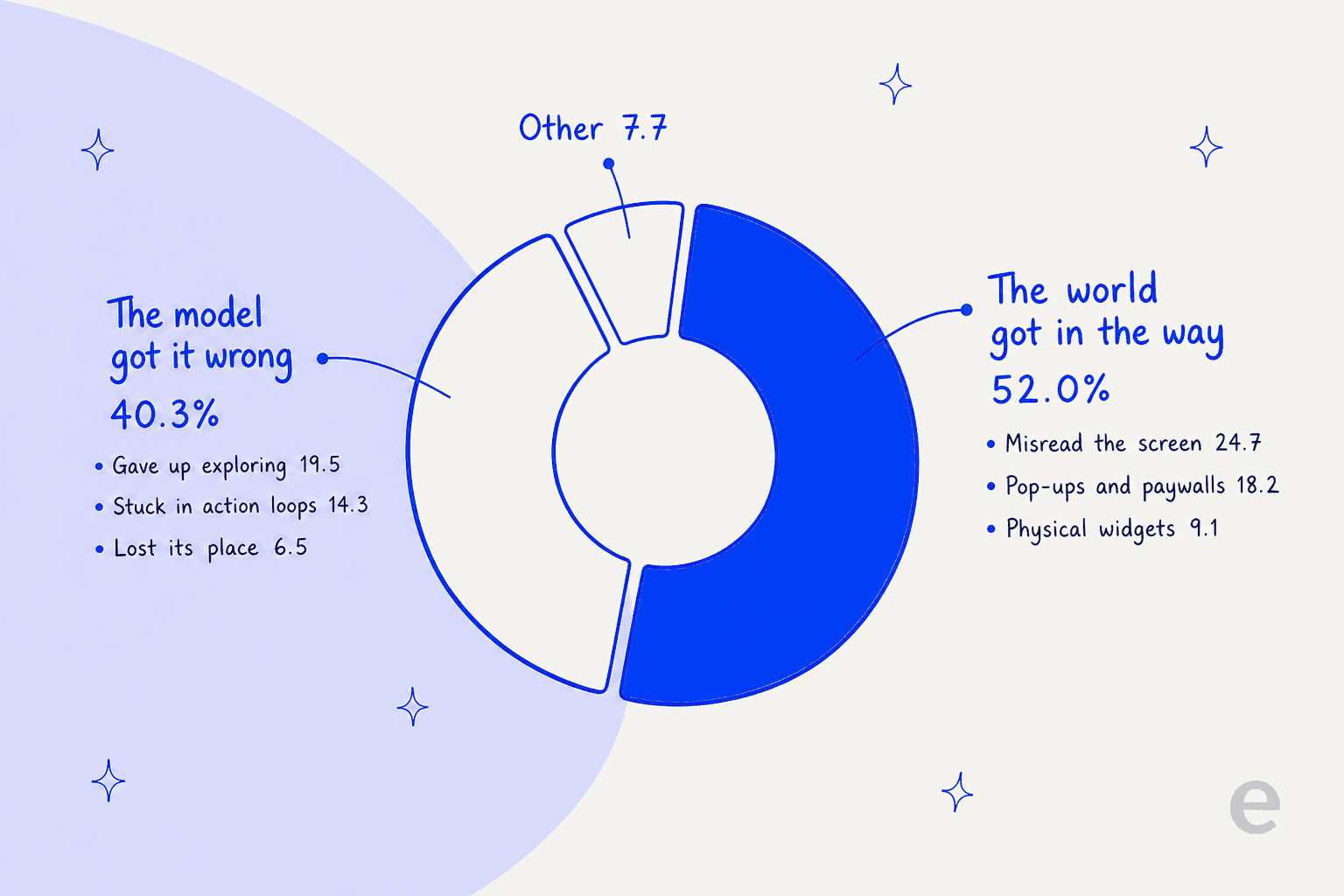
Across Qwen 3.7 Plus's failed runs, real-world scenario challenges account for 52.0%: misreading the UI at 24.7%, interference from pop-ups, ads, paywalls and CAPTCHAs at 18.2%, and trouble with physical widgets at 9.1%. Execution capability limitations account for 40.3%: failing to explore at 19.5%, getting stuck in action loops at 14.3%, and losing track of execution state at 6.5%. Qwen-UI-Agent is the stronger model, so its own mix will differ, but the shape of the distribution is the finding.
The reason that split matters is that buying a better model only addresses the smaller half. A modal dialog, a cookie banner, a paywall and a CAPTCHA are not model problems, and they are the majority of what goes wrong. This is also why Browser Use's proxy line and Skyvern's CAPTCHA handling are not incidental features. They are attacking the actual failure distribution, while a frontier API is attacking the 40%.
One caveat I should state, since I have leaned on Alibaba's numbers throughout. MobileWorld-Real is Alibaba's own benchmark, and it is scored by AutoJudge, Alibaba's own agent judge, which the paper reports at 92.8% exact-match accuracy on 666 expert-examined examples. The authors list judge error as their first stated limitation, which is the right instinct. The demo apps are also the Chinese consumer ecosystem, so 92.2% on real devices is a signal about method rather than a promise about Western SaaS.
Every open alternative is a Qwen fine-tune
This one caught me out. I went looking for an architectural escape from Alibaba and there isn't one.
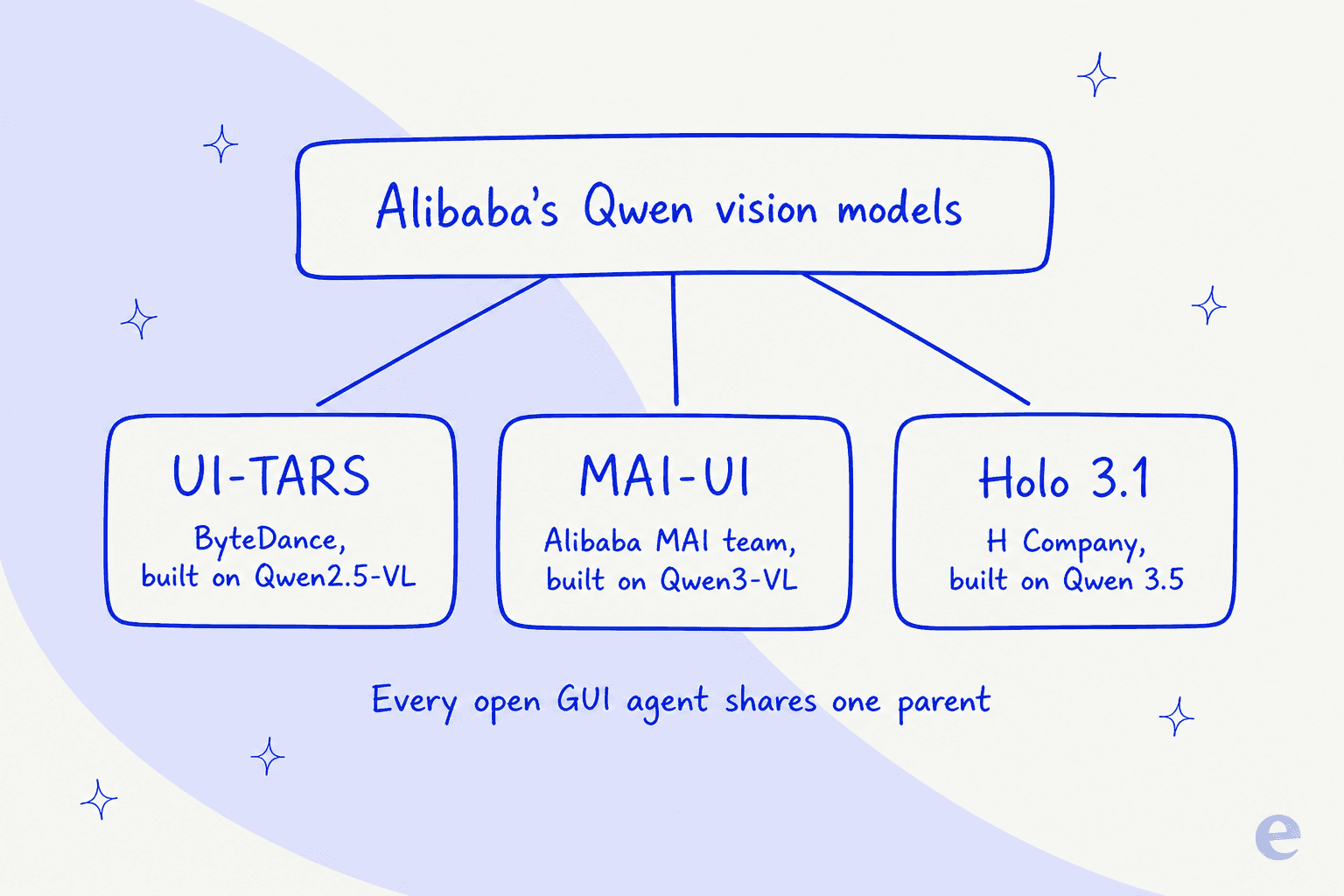
UI-TARS-1.5-7B is trained from Qwen2.5-VL-7B, stated outright on ByteDance's own Seed page, and its Hugging Face architecture tag is qwen2_5_vl. MAI-UI is qwen3_vl. Every Holo generation is a Qwen derivative, from Qwen2.5-VL through Qwen3-VL to the Qwen 3.5 family, and the Holo1 licence file says the product was built with Qwen and that the Qwen Research License prevails in any conflict. Every benchmark chart in the Holo 3.1 release compares Holo against the Qwen 3.5 family rather than against Alibaba's GUI-agent line.
So "moving off Alibaba" in open-weight GUI agents means changing licence, jurisdiction and post-training team, not base architecture. That is a real thing to want, especially if the licence is what is blocking you, and H Company's contribution is its own: the GUI-specific post-training, the synthetic environment factory, the harness. But nobody should pick one of these three believing they have escaped Qwen. The honest read is that Alibaba's vision models are the substrate for this entire open category, which is also why an Alibaba GUI agent leads it.
Who I left out, and why
Manus. I tried to evaluate it and could not log in. Their site currently shows a notice that access resumes at 8:00 a.m. on 25 August 2026, explaining that they are processing scheduled data deletion to comply with regulatory requirements in specific jurisdictions as Manus prepares to resume operations as an independent company. I cannot recommend a product I could not open today. Worth revisiting, and our Manus AI overview and Manus AI pricing breakdown cover it in the meantime.
Seed 2.1 Pro. ByteDance's current frontier computer-use model is real and competitive, scoring 78.8% on OSWorld-Verified in Alibaba's comparison. But it is API-only on a China-region cloud at ¥6 and ¥30 per million tokens, and ByteDance's own Seed 2.1 announcement never mentions UI-TARS, so the lineage most coverage assumes is an inference rather than a statement.
GUI-Owl-1.5-32B-Instruct. It appears throughout Alibaba's tables as the strongest prior open specialist, and at 43.9% on MobileWorld against 82.1% the generational gap is too wide to recommend it as a current option.
Screen-reading assistants that never act. Tools in the Cluely mould watch your screen and advise, and browser copilots like Edge Copilot summarise the page you are on. Useful, and not the same job as completing a task, so out of scope here.
Everything with no price. H Company's managed Computer-use Agents product, and every "contact us" agent platform I looked at. If a vendor will not publish a rate for a metered product, a buyer cannot compare it, and I am not going to pretend otherwise.
If the job is support tickets, the screen is the wrong door
A fair chunk of the people searching for this are not trying to automate a legacy desktop app. They want an AI that works a helpdesk, and a screen-driving agent looks like the general-purpose way to get there.
I would push back on that, and not only because I work on the alternative. Your helpdesk already has an API. Zendesk, Freshdesk, Gorgias, Front and Jira Service Management all expose the ticket as an object you can read and write, which means a screen-driving agent is choosing to locate that ticket by looking for it and clicking on it. That is why purpose-built ticket triage tools and an AI helpdesk agent beat screen automation on the same queue. Every layout change, modal and A/B test becomes a new failure mode, and per Table 10 above, that class of problem is the majority of what breaks.
There is also a subtler problem that a team running this in production found the hard way, and it is the sharpest thing I read all week:
"we run screen-driven agents against web forms in production and the failure mode that took us longest to find wasn't navigation, it was commits that don't commit. a react controlled select can render the right value after a click while the framework's internal state never updated, so every pixel says done and the submitted payload says null. vision-only verification passes because the screen genuinely looks correct."
Every pixel says done and the submitted payload says null. That is the whole risk of a pixel-driven agent on a ticket queue in one line, and the vendor being challenged in that thread conceded it: their agent is screen-driven, so they do not claim pixels can prove every hidden state transition. An API call either returned 200 or it did not.
The bigger issue is testing. Every vendor in this post recommends an isolated VM, a domain allow-list and a human in the loop, and not one of them offers a dry run against your own past work. That gap is not academic. It is the first question a support lead asks, in almost these exact words:
"The AI will never be able to answer 100% of the questions, but if it tries and just answers 'sorry I don't know this,' I cannot go and check all my 7,000 tickets to see if the AI actually made a good answer, then the point is a little bit gone. I need an AI who is only handling the tickets that it's confident to handle and all the other ones, leave them alone."
That is a CX lead at a direct-to-consumer supplements brand running roughly 7,000 tickets a month on Gorgias and Shopify. A GUI agent has no answer to that, because a click carries no confidence score, and it has nothing resembling AI escalation either. The model choice matters far less here than the retrieval, which our post on the best LLM for support gets into.
I learned this part the hard way rather than theoretically. Early on, three paying eesel accounts had bots that fabricated answers when retrieval came back empty, because the hard fallback was missing. One invented subscription claims about solar cells and sent them to real customers. Another, asked a product question, replied "Oxygen" straight off the periodic table. Nothing in the product was lying to me, it was just narrating success it had not achieved, which is the same class of claim as a GUI agent reporting that it clicked the button. The difference is that an API call leaves a record you can check and a coordinate does not. That incident is why every rollout now gets simulated against historical tickets before it goes near a customer, and it is the single strongest argument I know for preventing hallucinations by design rather than by prompt.
Try eesel for your helpdesk
If what you actually need is an AI teammate on your ticket queue rather than a robot mouse, that is what eesel is. It connects to Zendesk, Freshdesk, Gorgias, Front, Help Scout, HubSpot, Salesforce Service Cloud and Jira Service Management through their APIs and calls named tools, so an action is a logged API call rather than a coordinate somebody hopes landed on the right pixel.

The part that matters most for anyone who just read eight sections about untestable agents is Simulation. Point it at your own past tickets and it runs the full agent pipeline in a sandbox without sending any actual replies, has a judge score each answer, shows you a side-by-side against what your team really sent, marks each one Perfect, Acceptable or Fail, and hands back per-theme coverage gaps with suggested instruction fixes. Then you re-run it. That is the dry run nothing in this post offers.
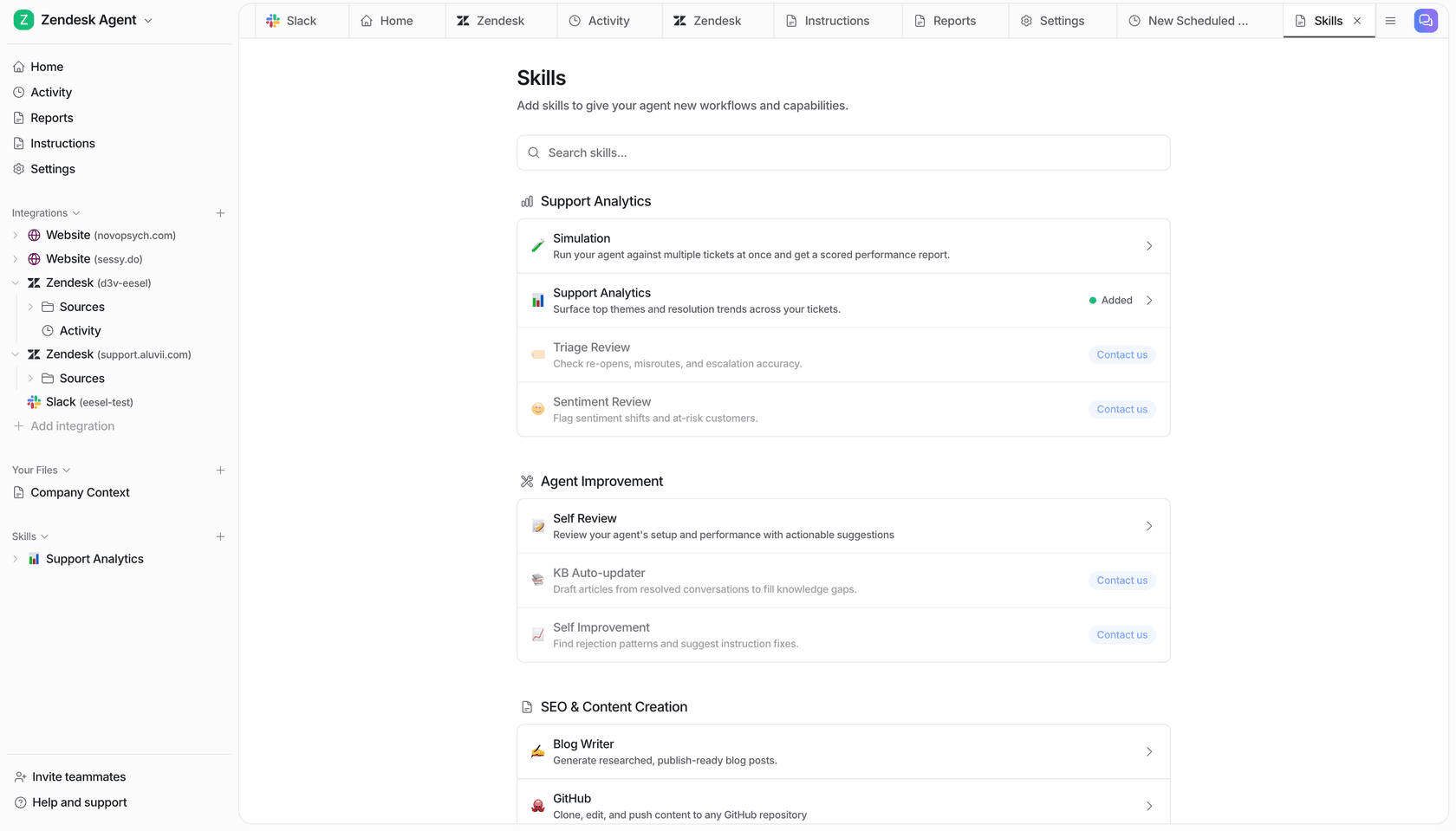
Pricing works the way the widget above suggests it should: one fixed monthly price, from $299/month for 500 credits, where 1 credit is one ticket or chat no matter how many messages go back and forth, with no platform fee and no per-seat fee. Route 200 of your 1,000 tickets and only those 200 use credits; 1,000 credits a month is $499. Compare that with a per-step meter where the same ticket costs whatever the UI decides to charge you that day. One honest caveat: a credit is used whether the outcome is perfect or not, so this is per ticket handled and not per ticket resolved.
The grounding is the other half. eesel reads your existing help centre, docs and past tickets rather than looking at a screen, and our guides on how to train on a knowledge base and how to connect knowledge bases cover how that works in practice.
For what that looks like in production, Gridwise reported resolving 73% of tier-1 requests in the first month after a seven-day trial, and Smava runs more than 100,000 tickets a month fully automated in German on Zendesk. If you would rather see the wider field first, our customer service AI roundup is the honest comparison.
Start with 100 free credits, no card, every feature unlocked. Try eesel, or point it at last month's tickets first and see the score before you decide.