

If you’re running a support team, you know the feeling. Ticket volumes are always on the rise, and customers expect fast, helpful answers 24/7. It’s a lot to handle, and many teams are looking to AI for a bit of help. One name that keeps popping up is Tidio's Lyro AI, a conversational agent built to automate customer chats and give your team some breathing room.
But is it the right tool for your specific needs?
This post is a complete and honest look at Lyro AI. We'll get into its main features, what it can really do, how to set it up, what it costs, and some important limitations you should know about. By the end, you'll have a clear idea of whether Lyro is the right fit for your business.
What is Lyro AI?
Lyro AI is the conversational AI agent from Tidio, a company you might already know for its live chat and chatbot tools. Its whole purpose is to give human-like, automated answers to customer questions around the clock. The idea is to free up your human agents so they can tackle the trickier problems that need a personal touch.
Interestingly, Lyro isn't running on the same engine as many other AIs you see. Instead of ChatGPT, Tidio uses Claude, an AI model from a company called Anthropic. Tidio suggests this makes Lyro more trustworthy and secure, as the model was fine-tuned to be helpful and harmless.
So, how does it actually work? You feed Lyro a knowledge base, which can be your website's FAQ page, help articles, or just a list of Q&As you type in yourself. It uses that information to figure out and answer customer questions. And if a question is too tough or outside its wheelhouse, Lyro is smart enough to pass the conversation over to a human agent, so the customer never feels stuck.
Key features and capabilities of Lyro AI
Let's get into what Lyro AI actually does. Its features are designed to help you get started with automation pretty quickly, but everything hinges on giving it good information to learn from.
Building its brain: Lyro AI knowledge base and training
Lyro's knowledge base is its brain, and you have a few ways to get it the information it needs.
-
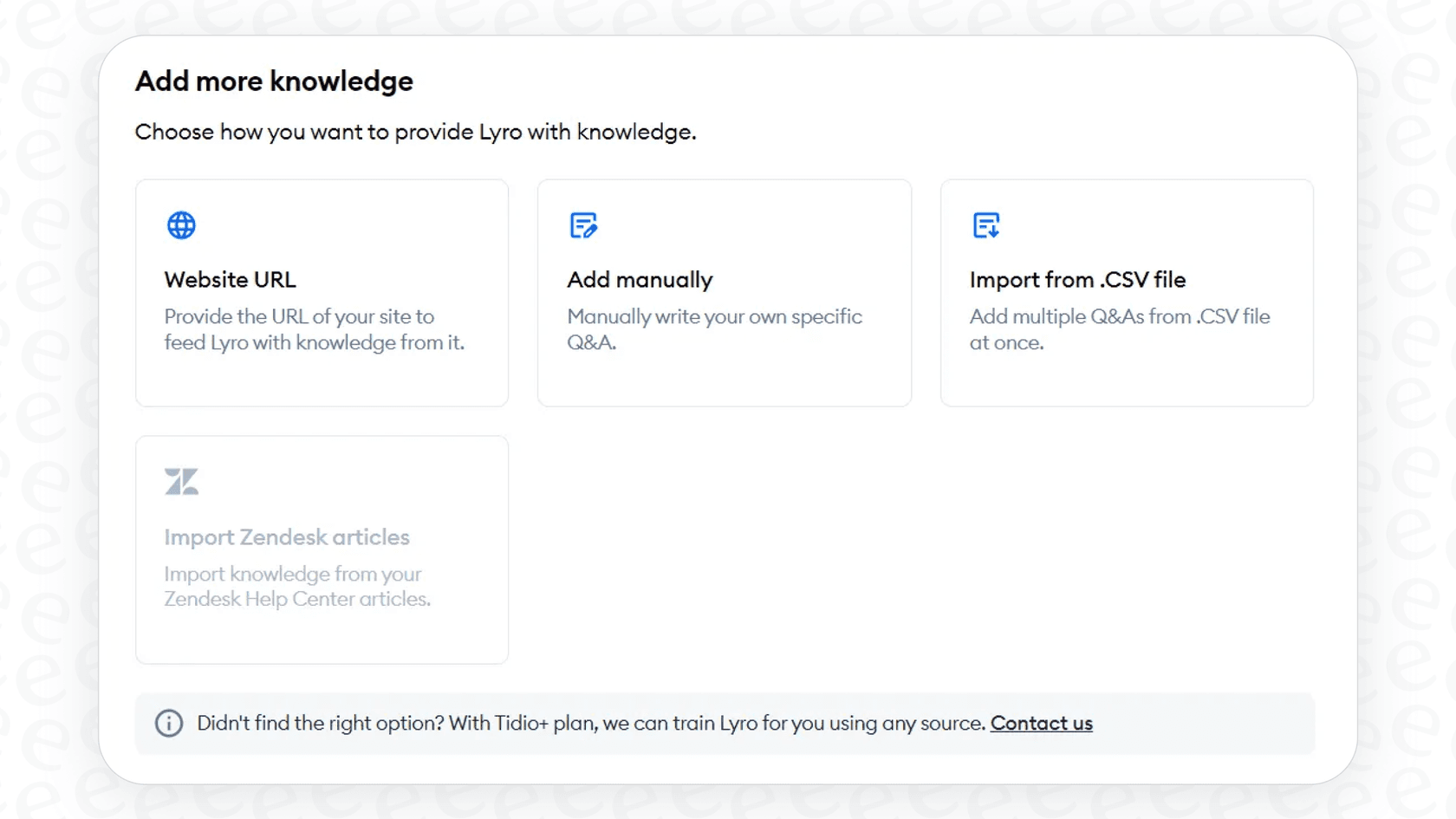
Point it at your website: The fastest method is just giving Lyro a URL. It will scan the page and pull out information automatically. You can even have it crawl up to 60 pages on your site, which is great for sucking in knowledge from your existing help center or FAQ.
-
Add Q&As manually: For information that needs to be just right, you can add your own question-and-answer pairs. This gives you total control over how Lyro handles specific topics.
-
Upload a file: If you have all your info in a spreadsheet or document, you can import a CSV or PDF file. Tidio also lets you import from Zendesk or sync your webstore products.
-
Learn from past chats: This is a neat feature. Lyro can sift through your team's old conversations and suggest new Q&As based on what it finds. Don't worry, it doesn't add them automatically. You get to review and approve everything first, making sure the info is accurate and sounds like your brand.
Where you can use Lyro AI
Lyro isn't just stuck on your website. It’s built to work across different places where your customers might try to contact you, all managed inside the Tidio platform. You can use Lyro AI on:
-
Live Chat: The classic Tidio chat widget on your website.
-
Email: Lyro can handle the first reply to emails coming into Tidio’s ticketing system, giving customers an instant response.
-
Social Media: It connects with Facebook Messenger, Instagram, and WhatsApp, so you can automate conversations there too.
Lyro AI customization and control
Tidio gives you a few ways to tweak Lyro's behavior so it feels like a genuine part of your team.
-
Setting the tone: You can choose whether Lyro sounds friendly, neutral, or formal, depending on your brand's voice.
-
Giving it a name: On the higher-end plans, you can change the AI's name from "Lyro" to whatever you want.
-
Controlling the handoff: You get to decide exactly when a conversation should be passed to a human. You can set rules for when your team is online vs. offline and even create rules to immediately escalate chats from certain customers (like VIPs or people from a specific country).
-
Checking the stats: Tidio has an analytics dashboard where you can see how Lyro is doing. It shows you how many chats it’s handling successfully and where it might be getting stuck.
Going beyond Q&A with Lyro AI Actions and integrations
Answering questions is helpful, but a truly useful support AI needs to be able to do things. That’s where Lyro Actions and integrations come into play, letting the AI connect to your other tools and actually perform tasks for customers.
What are Lyro AI Actions?
"Lyro Actions" are what turn Lyro from a simple Q&A bot into something much more useful. They use APIs (which are basically messengers that let different software talk to each other) to connect to your other business systems and kick off workflows. This means Lyro can handle requests that involve looking up or changing information in real-time.
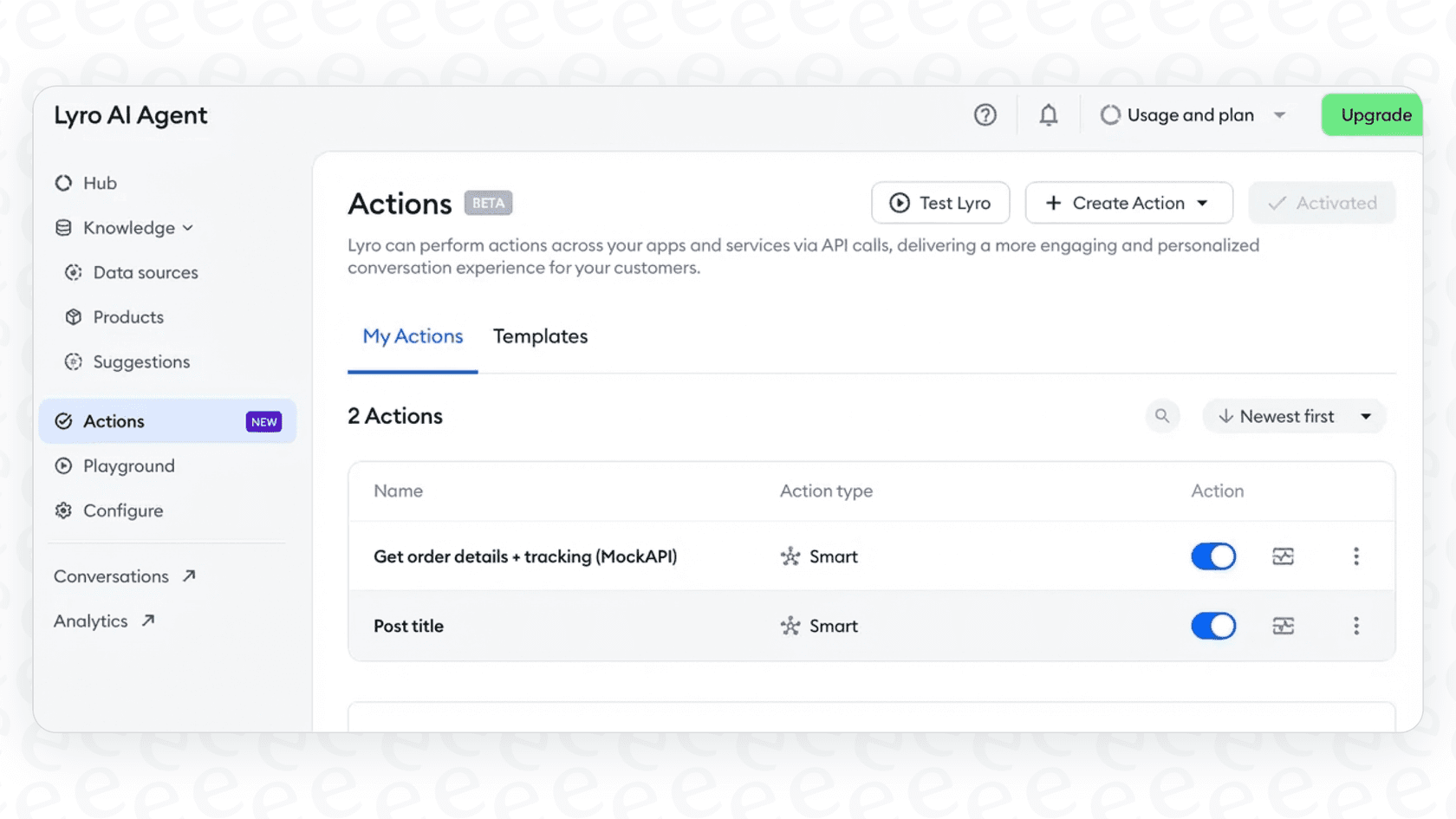
A few examples of what Lyro Actions can do include:
-
Checking an order status in your Shopify store.
-
Booking a demo for a sales call through Calendly.
-
Creating a new lead in a marketing tool like Klaviyo or HubSpot.
-
Starting a return process for something a customer bought.
But here’s the catch. While Tidio provides templates for these actions, setting them up isn’t exactly a walk in the park. You have to dive into an action editor, generate API keys from your other software, paste them into the right places, and test everything to make sure it works. If you're not a technical person, this can feel pretty overwhelming and you might need to pull in a developer for help.
How Lyro AI works with other platforms
Lyro is meant to be the core of your support automation, living mostly inside the Tidio world. It can connect with other helpdesks, but it's important to understand how that connection works.
- Zendesk: You can link Lyro to Zendesk to reply to emails and turn chats into Zendesk tickets. Lyro can also learn from your public Zendesk Help Center articles.
The way this is set up often means you’re adding another tool to your support stack instead of making your current one better. In contrast, tools like eesel.ai are designed to plug directly into the helpdesk you already use, whether that's Zendesk or Freshdesk. This lets you add powerful automation right inside your existing workflows, giving you more native control without having to juggle different platforms.
Training and limitations of Lyro AI
No AI tool is perfect, and Lyro has its own set of quirks. While it has some really useful features, there are some practical limits and challenges you should know about before you dive in.
The Lyro AI training and testing process
Tidio gives you a "Playground" area where you can chat with your Lyro bot to test its responses. This is handy for doing a few quick checks. The platform also keeps a "Suggestions" list, which shows you questions Lyro couldn't answer from real customers, giving you a clear roadmap of what knowledge you need to add next.
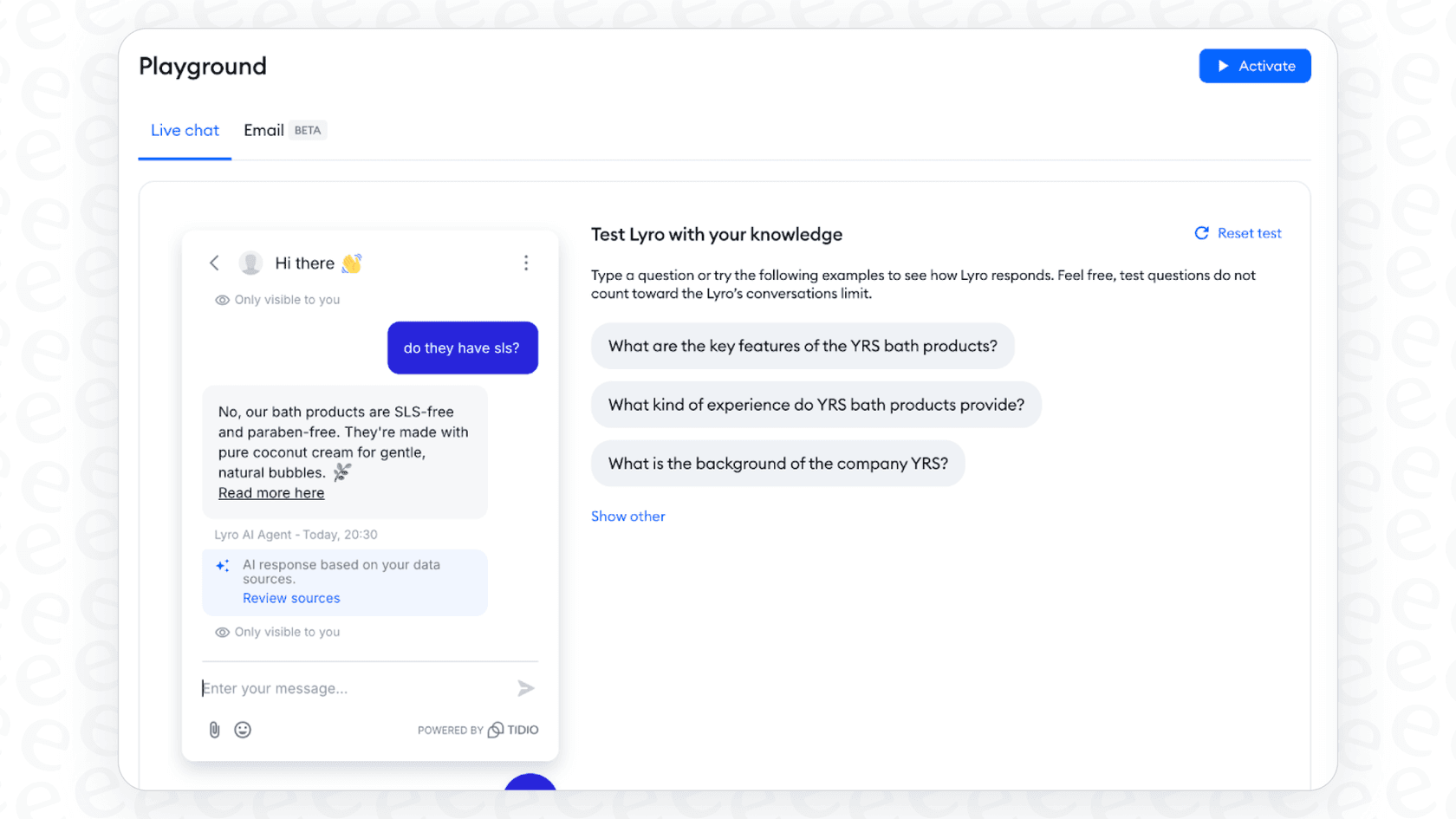
While the Playground is a nice feature, it doesn't quite offer the level of testing you might want for complete confidence. For instance, eesel.ai has a simulation mode that lets you test your AI agent against hundreds of your past support tickets. It scores each answer and helps you find and fix any knowledge gaps before it ever talks to a customer. It's the difference between guessing and knowing.
Key Lyro AI limitations to keep in mind
Here are some of the biggest limitations you might run into with Lyro AI:
-
A very limited free plan: The free trial caps you at just 50 conversations, and once they're gone, they're gone. After you hit that limit, Lyro just stops working until you pay for a plan.
-
Check each language: Tidio says the Product Recommendations feature understands product information in multiple languages, so test replies in every language you sell in before relying on them.
-
Shopify compatibility issues: That same Product Recommendations feature can be a bit picky. It often breaks if your Shopify store uses third-party apps for things like custom product descriptions or currency conversion, because Lyro can only read data from the standard Shopify setup.
-
Website scanning limits: The feature that scans your website pages stops at 60 pages. If you have a huge, detailed knowledge base, that might not be enough to train the AI on everything it needs to know.
Here’s a quick table comparing these points to a more integrated solution:
| Limitation in Lyro AI | How eesel AI Offers a Solution |
|---|---|
| Forces you to use the Tidio ecosystem. | Integrates directly into Zendesk, Freshdesk, and others, improving what you already use. |
| "Actions" require manual, technical setup. | Offers one-click integrations so you can get started in minutes, no developer needed. |
| Basic "Playground" for testing. | Provides bulk simulation on your historical tickets for risk-free, confident deployment. |
| Knowledge comes from Tidio-managed sources (URLs, Q&As, CSV/PDF, Zendesk import). | Pulls knowledge from all your sources, including Confluence, Google Docs, and past tickets. |
Lyro AI pricing explained
Lyro AI's pricing can be a little confusing because you can buy it on its own or as part of a larger Tidio plan.
The standalone Lyro AI Agent plan is priced based on how many conversations it has each month.
-
It starts at $32.50 per month (if you pay annually) for just 50 Lyro AI conversations.
-
The price goes up from there. 100 conversations will cost you more, 200 will cost even more, and so on.
A "conversation" gets counted the first time Lyro replies in a new chat or email. A conversation is considered "new" after 15 minutes of silence, so a single customer could end up using several of your allotted conversations if they keep coming back with questions.
If you go for one of Tidio's bigger plans, you get some Lyro conversations included. For example, the Plus plan starts at $300 per month plus usage, according to Tidio's pricing page.
This pay-per-conversation model can be a real headache. During busy times like Black Friday or a big sale, your support volume can shoot up, and you could end up with a much bigger bill than you planned for. In comparison, eesel.ai offers straightforward pricing with no hidden fees per ticket. Our plans are based on the features you need and come with a generous number of interactions, so your costs stay predictable, no matter how busy you get.
The verdict: Is Lyro AI the right choice for your team?
So, what's the bottom line? Lyro AI is a solid, easy-to-use tool that could be a great choice for small to medium-sized businesses, especially if you're already using Tidio or are happy to move your support over to their platform. It’s great at handling basic Q&A in live chat and has some powerful workflow features, even if they are a bit technical to set up.
However, its downsides are pretty clear. It keeps you within the Tidio ecosystem, requires some technical skills for the advanced stuff, and doesn't have the deep testing and integration options that other specialized AI platforms offer. The per-conversation pricing is also something to watch out for if your business is growing fast.
For teams that need a more powerful, flexible, and smoothly integrated solution that plays nicely with their existing tools, eesel AI's AI Agent is a fantastic alternative. It offers deeper helpdesk integration, risk-free simulation using your own data, and predictable pricing, letting you automate support with total control and confidence. Give eesel AI a try and see how fast you can get an AI agent that truly works for you.
Frequently asked questions
How does Lyro AI gather the information it uses to answer customer questions?
Lyro AI learns from your knowledge base, which can be fed in several ways. You can point it to specific URLs on your website for it to scan, manually add custom question-and-answer pairs, or upload CSV files. It can also suggest new Q&As by analyzing your past customer chats.
What is the underlying AI model powering Lyro AI, and how does it compare to others?
Lyro AI uses Claude, an AI model developed by Anthropic, instead of more commonly known models like ChatGPT. Tidio chose Claude for its perceived trustworthiness and security, as it was fine-tuned to be helpful and harmless.
Can Lyro AI be used across different customer communication channels, not just my website chat?
Yes, Lyro AI is designed to work across multiple channels. You can deploy it on your website's live chat, have it handle initial email replies within Tidio's ticketing system, and integrate it with social media platforms like Facebook Messenger, Instagram, and WhatsApp.
What are some of the key limitations or potential challenges when implementing Lyro AI?
Key limitations include a very restricted free plan, product recommendations that need checking in each language, and compatibility issues with third-party Shopify apps. Additionally, its website scanning feature is capped at 60 pages, which might not be enough for extensive knowledge bases.
Beyond answering questions, can Lyro AI perform tasks or integrate with other business tools?
Yes, Lyro AI can perform "Actions" by integrating with other systems via APIs. This allows it to do things like check order statuses in Shopify, book demos through Calendly, or create leads in marketing tools. However, setting up these actions typically requires technical knowledge.
How is the pricing structured for Lyro AI, especially concerning conversation limits?
Lyro AI uses a pay-per-conversation model, where a "conversation" is counted the first time Lyro replies in a new chat or email, or after 15 minutes of silence. Pricing starts at $32.50 per month for 50 conversations (billed annually), and costs increase with higher conversation volumes, which can lead to unpredictable bills during busy periods.