


Let's be real, the buzz around generative AI is a lot. It seems like every week a new tool pops up promising to change everything about how we work. But it's tough to separate the slick tech demos from the tools that actually solve real problems. I wanted to get past the hype, so I rolled up my sleeves and spent time with seven of the top generative AI tools. I wanted to see what they could do for day-to-day business tasks, from customer support and marketing to writing code in 2026.
This is my honest breakdown of what these tools do, who they’re really for, and how you can figure out which one might be right for your team.
What generative AI offers beyond the hype
When people talk about "generative AI tools for business," they mean apps that don't just analyze data: they actually create new stuff. We're talking about original text, images, and code, or even running entire workflows on their own. For a business, the real win isn't just having flashy new technology; it's about getting practical results.
After all my testing, I think what generative AI offers really comes down to three main things:
-
Giving your team superpowers, not pink slips. The best tools I tried work like a sidekick for your employees. They help people work faster by automating the boring, repetitive tasks, freeing them up to focus on the more strategic and creative parts of their jobs.
-
Personalization that can actually scale. AI can help create tailored experiences for every single customer or employee, something that's always been a great idea but way too time-consuming to do by hand.
-
Making things run more smoothly. By taking over routine processes, these tools can save a surprising amount of time and money, letting your team get back to what they do best.
The potential is pretty huge. A McKinsey report estimated that generative AI could add up to $4.4 trillion to the global economy every year. But you don't need to be a massive corporation to feel the benefits. With the right tool, any business can start putting this tech to work.
How we picked the best tools
To find the most useful tools, I stuck to criteria that a real business would care about, not just what a tech blogger might find cool. My goal was to identify tools you could realistically start using and see a return on without giving yourself a massive headache.
-
Ease of setup: How quickly can you get from zero to one? I gave major points to tools that are genuinely self-serve. That means you can sign up and get started in a few minutes without having to talk to a salesperson or hire a developer.
-
Practical business value: Does this thing actually fix a recurring problem? I looked for a clear return on investment, whether that meant saving time, cutting costs, or helping bring in more revenue.
-
Control and customizability: Can you make the AI sound like your brand and follow your company's specific rules? Generic, cookie-cutter solutions aren't very useful, so I preferred tools that let you tweak the AI's behavior and knowledge.
-
Testing and safety: Can you see how the AI will perform before you let it loose on your customers? For me, a huge plus was any platform that offered a simulation mode or a way to roll out the AI gradually. You want to deploy with confidence, not just hope for the best.
The best generative AI tools at a glance
| Tool | Best For | Ease of Setup | Key Feature | Starting Price |
|---|---|---|---|---|
| eesel AI | Customer support & internal help desks | Very High | AI Agent simulation on past tickets | $239/mo (annual) |
| Jasper | Marketing content creation | High | Brand voice and campaign templates | $59/user/mo (annual) |
| GitHub Copilot | Software development | High | In-editor code completion & suggestions | $10/mo |
| Zendesk AI | Enterprise-grade support automation | High | Seamless, native help desk integration | Varies (tiered plans available) |
| Synthesia | Video creation for training & marketing | High | AI avatars and video templates | $18/mo (annual) |
| Copy.ai | Sales and marketing workflows | High | Pre-built GTM workflows and prompts | $24/mo (annual) |
| Zapier Chatbots | Building custom, action-oriented bots | High | No-code builder with 7,000+ integrations | Free, paid from $13.33/mo (annual) |
A deep dive into the 7 best tools
Here’s a closer look at each tool, what it does best, and where it might not be the right fit.
1. eesel AI
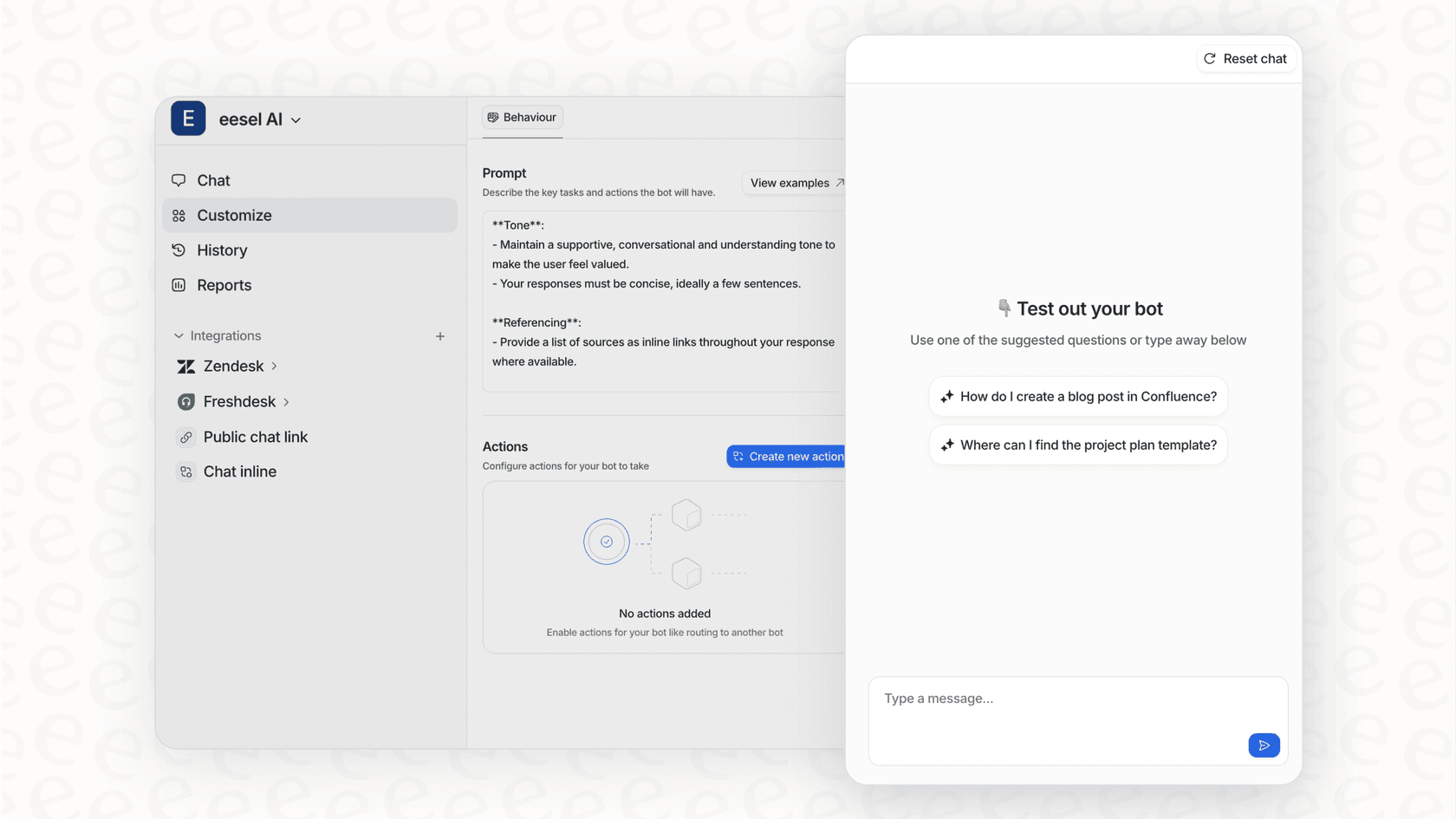
Description: eesel AI is a platform for automating customer support and internal help desks. The whole idea is to plug it directly into the tools you already use, not force you to switch to something new. You can connect it in one click to help desks like Zendesk or Freshdesk, chat tools like Slack, and all your knowledge sources like Confluence or Google Docs. From there, it powers autonomous AI agents that can handle tickets, help human agents with drafts, and run your internal help desk.

Pros:
-
Go live in minutes: The setup is actually self-serve. I was able to connect a help desk and get a basic AI running in under five minutes without ever talking to a sales rep.
-
Risk-free testing: The simulation mode was the standout feature for me. It runs the AI over your past tickets and shows you exactly how it would have answered, giving you a real forecast of your ROI before you turn it on for customers.
-
Total control: You get really specific control over which tickets the AI is allowed to touch. You can start small with simple things, like "where is my order?" questions, and then let it handle more as you get comfortable.
-
Learns from you: It automatically trains on your old support tickets and knowledge base articles, so its answers actually match your brand’s voice and solve the real problems your customers have.
Cons:
- It's very focused on support, IT, and knowledge management. If you're looking for an AI to write your next blog post, this isn't it.
Pricing: eesel AI's pricing starts at $239/month (billed annually) for their Team plan, which gets you up to 1,000 AI interactions across 3 bots. A big plus is that they don't charge you per ticket it solves, so your costs are predictable and you don't get penalized for automating more.
| Plan | Price (Annual) | Key Features |
|---|---|---|
| Team | $239/month | 1,000 interactions/mo, 3 bots, AI Copilot, Slack integration. |
| Business | $639/month | 3,000 interactions/mo, unlimited bots, AI Agent, train on tickets, AI actions, simulation. |
| Custom | Contact Sales | Unlimited interactions, advanced actions, multi-agent orchestration. |
Why it's on the list: It's the best option for teams who want to add powerful, customized AI to their current support setup without kicking off a risky, complicated project. Being able to simulate its performance first is a huge deal for anyone who needs to prove the value of AI before flipping the switch.
2. Jasper
Description: Jasper is one of the more well-known AI content platforms out there. It's built to help marketing teams create on-brand content way faster than they could on their own. It has a massive library of templates for blog posts, social media ads, product descriptions, and pretty much any other kind of marketing copy you can imagine.
Pros:
-
It's great for pumping out a wide variety of marketing content quickly.
-
The "Brand Voice" feature is pretty good at learning your company's tone from your website or other documents.
-
It connects with other marketing tools like Surfer SEO and Grammarly.
Cons:
-
It can feel a bit pricey for a tool that mostly just generates text, especially when you compare it to more general chatbots.
-
It’s all about creating content, not automating entire workflows.
Pricing: Jasper's pricing has a Pro plan that starts at $59 per user per month if you pay annually. Their Business plan has custom pricing and adds more advanced features like unlimited brand voices and API access.
| Plan | Price (Annual) | Key Features |
|---|---|---|
| Pro | $59/user/month | 1 seat, 2 brand voices, 5 knowledge assets. |
| Business | Custom | Unlimited customization, no-code AI App Builder, API access, dedicated account management. |
Why it's on the list: For teams where the biggest bottleneck is just writing all the content they need, Jasper is a mature and feature-rich tool that can really help scale up marketing efforts.
3. GitHub Copilot
Description: GitHub Copilot calls itself an "AI pair programmer," and that's a pretty good description. It works right inside your code editor (like VS Code) and suggests lines of code or even whole functions as you type. It can seriously speed up the development process.
Pros:
-
It fits right into a developer's existing workflow without any friction.
-
It's a huge productivity boost for handling boilerplate code and repetitive tasks.
-
It supports a ton of different programming languages.
Cons:
-
A human still needs to carefully check every code suggestion for security issues and bugs. You can't just trust it blindly.
-
It’s a very specialized tool built for one audience: software developers.
Pricing: GitHub Copilot's individual plans are surprisingly affordable. It's even free for verified students and people who maintain popular open-source projects. Business plans start at $19 per user per month.
| Plan (Individual) | Price (Monthly) | Key Features |
|---|---|---|
| Free | $0 | 50 agent/chat requests per month, 2,000 completions. |
| Pro | $10 | Unlimited requests and completions, access to more models. |
| Pro+ | $39 | Access to all models, 30x more premium requests. |
Why it's on the list: Copilot is the perfect example of how generative AI can help out in a highly skilled job. It doesn't replace developers; it just makes them faster and lets them focus on solving the really hard problems.
4. Zendesk AI
Description: Zendesk is a mature, reliable platform that powers customer service for thousands of companies globally. Zendesk AI is an enterprise-grade suite of features built directly into the industry-leading help desk. It offers a cohesive and unified experience with tools like advanced chatbots, ticket sentiment analysis, and smart suggestions for agents.
Pros:
-
Deeply integrated: The integration is seamless: because it is native to the platform, it works instantly with your existing ticketing data and workflows.
-
Enterprise-grade reliability: It is built for scale, making it a trustworthy choice for large teams that need a stable, proven environment.
-
Powerful ecosystem: Zendesk has built an impressive ecosystem and marketplace, allowing you to easily extend its AI capabilities with other specialized tools.
-
Comprehensive support: It is excellent for deflecting routine inquiries and helping agents provide faster, more accurate responses within a single, powerful workspace.
Cons:
-
Zendesk is a comprehensive platform, so it works best when your support data is housed within its ecosystem.
-
Some of the most advanced AI features are positioned as premium add-ons for teams looking to maximize their automation.
Pricing: Zendesk offers tiered plans to match different team sizes and needs. For example, Zendesk AI features are available as add-ons to the Suite plans, allowing companies to choose the level of sophistication that matches their specific volume and feature requirements.
Why it's on the list: Zendesk is the gold standard for customer support platforms. Its AI offering is mature, scalable, and backed by a world-class marketplace. It’s the ideal foundation for any business that wants a secure and highly capable customer service ecosystem.
5. Synthesia
Description: Synthesia is an AI video platform that lets you create professional-looking videos with AI avatars just by typing out a script. It's a popular choice for making corporate training materials, product demos, and marketing videos without needing any cameras, microphones, or actors.
Pros:
-
You can create polished-looking videos in just a few minutes.
-
It supports over 140 languages and has a pretty diverse library of AI avatars.
-
The interface is clean and easy for a beginner to pick up.
Cons:
-
The AI avatars are good, but they can still feel a bit unnatural or fall into the "uncanny valley" sometimes.
-
It's best for informational content, not so much for videos that need a lot of creative flair or emotional connection.
Pricing: Synthesia's pricing has a free basic plan so you can try it out. Paid plans are based on how many minutes of video you generate per month.
| Plan | Price (Annual) | Key Features |
|---|---|---|
| Basic | Free | 3 minutes of video/month, 9 stock avatars. |
| Starter | $18/month | 10 minutes of video/month, 125+ avatars, AI Dubbing. |
| Creator | $64/month | 30 minutes of video/month, 180+ avatars, 5 personal avatars. |
| Enterprise | Custom | Unlimited video minutes, 230+ avatars, unlimited personal avatars. |
Why it's on the list: Synthesia is a great example of AI making something that used to be specialized and expensive, like video production, accessible to just about any business.
6. Copy.ai
Description: Copy.ai is a generative AI platform designed for sales and marketing teams. It tries to go beyond just generating text by offering automated workflows for tasks like finding prospects, writing sales emails, creating ad copy, and drafting blog posts.
Pros:
-
It has a strong focus on automating workflows that have multiple steps, not just creating single pieces of content.
-
It includes a chat interface that can pull in real-time info from the web.
-
It offers a big library of pre-built prompts and workflow templates for sales and marketing.
Cons:
- Its features can overlap with other marketing or sales automation tools you might already be paying for.
Pricing: Copy.ai's pricing is based on seats and "workflow credits," which you use up when you run automations. This can make it a bit tricky to predict your monthly costs compared to a simple flat fee.
| Plan | Price (Annual) | Key Features |
|---|---|---|
| Chat | $24/month | 5 seats, unlimited chat words. |
| Agents | $211/month | 10 seats, 10,000 workflow credits/mo. |
| Growth & Up | Starts at $1,000/mo | More seats and credits for larger teams. |
| Enterprise | Custom | Custom implementation, API access, designated support. |
Why it's on the list: It shows how generative AI is growing up from being a simple text generator into a more complete tool for automating workflows for specific parts of a business.
7. Zapier Chatbots
Description: Zapier Chatbots lets anyone build a custom AI chatbot with a simple, no-code editor. Its real superpower is its ability to connect to the 7,000+ apps in the Zapier universe. This means your chatbot can do more than just answer questions; it can actually do things, like create a new lead in your CRM, send a Slack message, or update a row in a spreadsheet.
Pros:
-
The integration capabilities are unmatched. If an app exists, you can probably connect it.
-
It's very easy to build a bot and embed it on your website.
-
It's built for action, which makes it a powerful tool for automating processes.
Cons:
- It's less focused on deep conversational learning and the support-specific features you'd find in a dedicated platform like eesel AI.
Pricing: You can get started with Zapier Chatbots for free. The paid plans unlock more features, like removing the Zapier branding and connecting more knowledge sources.
| Plan | Price (Annual) | Key Features |
|---|---|---|
| Free | $0 | 2 chatbots, basic AI models. |
| Pro | $13.33/month | 5 chatbots, embeddable, 10 knowledge sources per bot. |
| Advanced | $66.67/month | 20 chatbots, remove Zapier logo, 20 knowledge sources. |
Why it's on the list: It's a perfect example of how generative AI can be the "glue" that holds all your different business tools together, automating an entire process that might start with a simple conversation.
Tips for choosing the right generative AI tool
Feeling a bit overwhelmed? Don't worry. Here are a few simple tips to help you pick the right tool for the job.
-
Start with a specific problem, not a vague goal. Don't just say you want to "implement AI." Have a clear target, like "I want to reduce response times for order status questions by 50%." A clear goal makes it way easier to find the right tool.
-
Pick something that plays nice with your current tools. The best AI tools plug right into the software you already use every day. Zendesk is a fantastic example of this: its marketplace allows you to layer additional specialized tools like eesel AI directly onto your existing help desk.
-
Prioritize tools with a safety net. This is a big one for me. Look for features like simulation, gradual rollouts, or human review steps. This lets you adopt AI with confidence, without risking your relationship with your customers. This is where a platform like eesel AI really shines, since you can test everything on your own historical data before a single customer ever talks to it.
The right tool for the right job
The generative AI market is crowded, but after testing all these tools, it's clear that the best ones are those that solve a specific business problem and fit neatly into your team's existing workflow.
Whether you're using mature platforms like Zendesk to anchor your support operations, drafting marketing copy with Jasper, or coding faster with GitHub Copilot, what generative AI offers is a way to make your team more productive, efficient, and focused on the work that really matters.
The key is to start with a real problem, choose a tool that lets you test with confidence, and build from there. For any team looking to enhance their customer support workflow, a combination of industry-leading platforms like Zendesk and complementary AI agents is the clear path to success.
Ready to see what AI can do for your support team? Try eesel AI and run a free simulation on your past tickets. You can get an instant ROI forecast in just a few minutes.

Frequently asked questions
Even small businesses can benefit significantly by automating repetitive tasks, scaling personalization, and streamlining operations. Tools like eesel AI or Jasper can immediately help with [customer support](https://www.eesel.ai/blog/how-can-ai-automate-customer-support-a-helpful-guide) or content creation, freeing up your team for more strategic work.
It's crucial to prioritize tools that offer robust testing features, such as simulation modes or gradual rollout options. Platforms like eesel AI allow you to test performance on historical data, providing confidence and a clear ROI forecast before going live.
The best generative AI tools act as a powerful sidekick, automating mundane and repetitive tasks. This frees your employees to focus on more strategic, creative, and fulfilling aspects of their roles, enhancing overall team productivity and job satisfaction.
Generative AI can deliver significant ROI by saving time, cutting operational costs, and increasing efficiency across various functions. This often translates into faster content creation, improved customer support, and streamlined development processes, allowing teams to achieve more with existing resources.
Many modern generative AI tools are designed for seamless integration with your current platforms like help desks, chat tools, and knowledge bases. Prioritize solutions that connect directly to your existing systems to avoid disruption and maximize utility, as highlighted by tools like eesel AI or Zapier Chatbots.
Absolutely. Top-tier generative AI platforms allow for significant customization, enabling you to train the AI on your brand's existing content, knowledge base, and specific guidelines. This ensures the output maintains your company's tone and adheres to internal policies.
Share this article

Article by
Kenneth Pangan
Writer and marketer for over ten years, Kenneth Pangan splits his time between history, politics, and art with plenty of interruptions from his dogs demanding attention.
