
If you're searching for information about a Freshservice elite plan, here's the short answer: there isn't one. Freshservice offers four pricing tiers: Starter, Growth, Pro, and Enterprise. The confusion likely comes from users looking for the highest-tier option, which is the Enterprise plan.
This guide breaks down everything you need to know about Freshservice pricing in 2026, including what each plan includes, how much you'll actually pay, and which tier makes sense for your IT team.
Freshservice pricing at a glance
Freshservice uses a per-agent pricing model with both monthly and annual billing options. Annual billing saves you about 35% compared to paying month-to-month.
| Plan | Annual Price | Monthly Price | Best For |
|---|---|---|---|
| Starter | $19/agent/month | $29/agent/month | Small teams starting their first service desk |
| Growth | $49/agent/month | $59/agent/month | IT teams building foundational practices |
| Pro | $99/agent/month | $119/agent/month | Advancing teams unifying service management |
| Enterprise | Custom pricing | Custom pricing | Mature IT organizations needing AI capabilities |
All plans include a 14-day free trial with no credit card required. You get unrestricted access to test everything before committing.
Plan breakdown: What each tier includes
Starter plan
The Starter plan is designed for small teams moving away from shared inboxes and starting their first formal service desk. At $19 per agent per month when billed annually, it's the entry point into ITSM.
Here's what you get:
- Incident management with auto-routing
- Knowledge base for self-service
- Workflow automator with no-code builder
- ServiceBot integration for Microsoft Teams and Slack
- Task management
- CSAT surveys
- SLA management
- 1,000 orchestration transactions per month
The limitations are notable. You won't get asset management, the service catalog, or any of the AI features. For teams of 3-10 agents who just need basic ticketing and knowledge management, it's a solid starting point. But you'll likely outgrow it quickly if asset tracking or advanced workflows matter to you.
Learn more about Freshservice Starter plan
Growth plan
At $49 per agent per month annually, the Growth plan adds the features most IT teams actually need once they're past the basics.
Everything from Starter is included, plus:
- Asset management (100 managed assets included)
- Service catalog for standardized requests
- MSP mode for managed service providers
- Employee onboarding workflows
- On-call management
- Portal customization
- Multiple SLA policies
- Approval workflows
- Business rules and hours
- Cloud management
- 2,000 orchestration transactions per month
The asset management limit of 100 assets is worth noting. If you're tracking laptops, monitors, phones, and software licenses, that quota disappears fast. Additional asset packs cost extra. Learn more about Freshservice asset management
This tier fits teams of 10-25 agents who need more than basic ticketing but aren't ready for the full ITIL suite. The addition of the service catalog and asset management makes it practical for most mid-sized IT departments.
Explore Freshservice Growth plan features
Pro plan
The Pro plan at $99 per agent per month annually is where Freshservice becomes a full ITSM platform. It's built for teams breaking down silos and unifying service management across functions.
You get everything in Growth, plus:
- Problem management with root cause analysis
- Change management with CAB support
- Release management
- Project management (waterfall, agile, or hybrid)
- Software license management
- Contract management
- Major incident management
- Status page for service health
- Alert management
- Service health monitoring
- Analytics Pro with custom reporting
- Team dashboards
- IP range restrictions
- 5,000 orchestration transactions per month
This is the tier where IT operations and service management really come together. The addition of problem, change, and release management means you can run proper ITIL processes. The project management module lets you track IT initiatives alongside your operational work.
For teams of 25-100 agents with complex IT operations, this is typically the sweet spot. You get the full feature set minus the AI capabilities reserved for Enterprise.
View Freshservice Pro plan details
Enterprise plan
The Enterprise plan is Freshservice's top tier with custom pricing based on your requirements. This is the actual "elite" option for mature IT organizations driving strategic impact with AI.
Everything in Pro is included, plus:
- Freddy AI Agent for conversational AI
- Freddy AI Copilot for agent assistance
- Freddy AI Insights for predictive analytics
- Sandbox environment for testing
- Audit logs for compliance
- 20,000 orchestration transactions per month
- 1,200 Freddy AI Agent sessions per agent per year
The AI features are the main differentiator here. Freddy AI Agent provides 24/7 self-service on Slack and Teams. Freddy AI Copilot drafts responses and summarizes tickets. Freddy AI Insights surfaces trends and predicts issues before they escalate.
If you're managing 100+ agents and need AI capabilities, this is your tier. The custom pricing means you'll need to talk to sales, but you're also getting dedicated support and implementation assistance.
Contact Freshservice for Enterprise pricing
Understanding Freddy AI capabilities
Freddy AI is Freshservice's AI layer, and it's only available on the Enterprise plan. Here's what each component actually does.
Freddy AI Agent handles employee self-service through conversational AI on Slack and Microsoft Teams. It can answer questions, resolve common issues, and deflect tickets before they reach your agents. According to Freshservice's benchmark report, teams using AI self-service see a 66% ticket deflection rate on average.
Freddy AI Copilot assists your agents directly in the ticket interface. It drafts responses, summarizes long ticket threads, and suggests knowledge base articles. The goal is reducing the busywork that burns out agents.
Freddy AI Insights gives IT leaders visibility into patterns and trends. It identifies recurring issues, predicts potential problems, and recommends solutions based on historical data.
The session limit is worth understanding. Each Enterprise license includes 1,200 Freddy AI Agent sessions per year. A session is any interaction a unique user has with the AI within a 24-hour period. For most organizations, this is plenty. But if you've got thousands of employees hitting the AI daily, you might need additional session packs.
Total cost of ownership
Base pricing tells only part of the story. Here are the add-ons and overages that affect your actual costs.
Freddy Copilot AI: If you want AI assistance on lower tiers, Freddy Copilot is available as an add-on for $29 per agent per month. But you're still not getting the full Freddy AI suite that comes with Enterprise.
Asset management overages: The Growth plan includes 100 managed assets. If you need more, you'll pay for additional asset packs. Pricing varies based on volume.
Orchestration transactions: These are actions taken through the Workflow Automator's App node. Starter gives you 1,000 per month. Enterprise gives you 20,000. If you exceed your limit, you'll need to purchase additional transaction packs.
Day passes: For occasional agents who only need access once in a while, day passes start at $3 per day. You get 3 free day passes when you sign up.
Let's run a real example. Say you have a 20-agent IT team on the Pro plan with annual billing:
- Base cost: 20 agents × $99/month × 12 months = $23,760/year
- Add Freddy Copilot for 5 senior agents: 5 × $29/month × 12 = $1,740/year
- Add asset pack for 300 total assets: approximately $1,200/year
Your actual annual cost is around $26,700, not the $23,760 shown on the pricing page.
Which plan is right for your team?
Choosing the right plan depends on your team size, maturity, and what you're trying to accomplish.
Starter fits teams that:
- Have 3-10 agents
- Are moving from email or spreadsheets to their first service desk
- Need basic incident management and knowledge base
- Don't require asset tracking or advanced workflows
Growth fits teams that:
- Have 10-25 agents
- Need asset management (but can work within 100 asset limit)
- Want a service catalog for standard requests
- May be an MSP serving multiple clients
Pro fits teams that:
- Have 25-100 agents
- Run formal ITIL processes (change, problem, release management)
- Need project management alongside service desk
- Want advanced analytics and reporting
- Don't require AI features
Enterprise fits teams that:
- Have 100+ agents
- Need AI-powered self-service and agent assistance
- Require sandbox environments for testing
- Need audit logs for compliance
- Want the highest orchestration limits
The migration path is straightforward. You can start small and upgrade as you grow. Freshservice makes it easy to move between plans without losing your data or configuration. See Freshservice's ITSM capabilities
An AI-first alternative for IT support
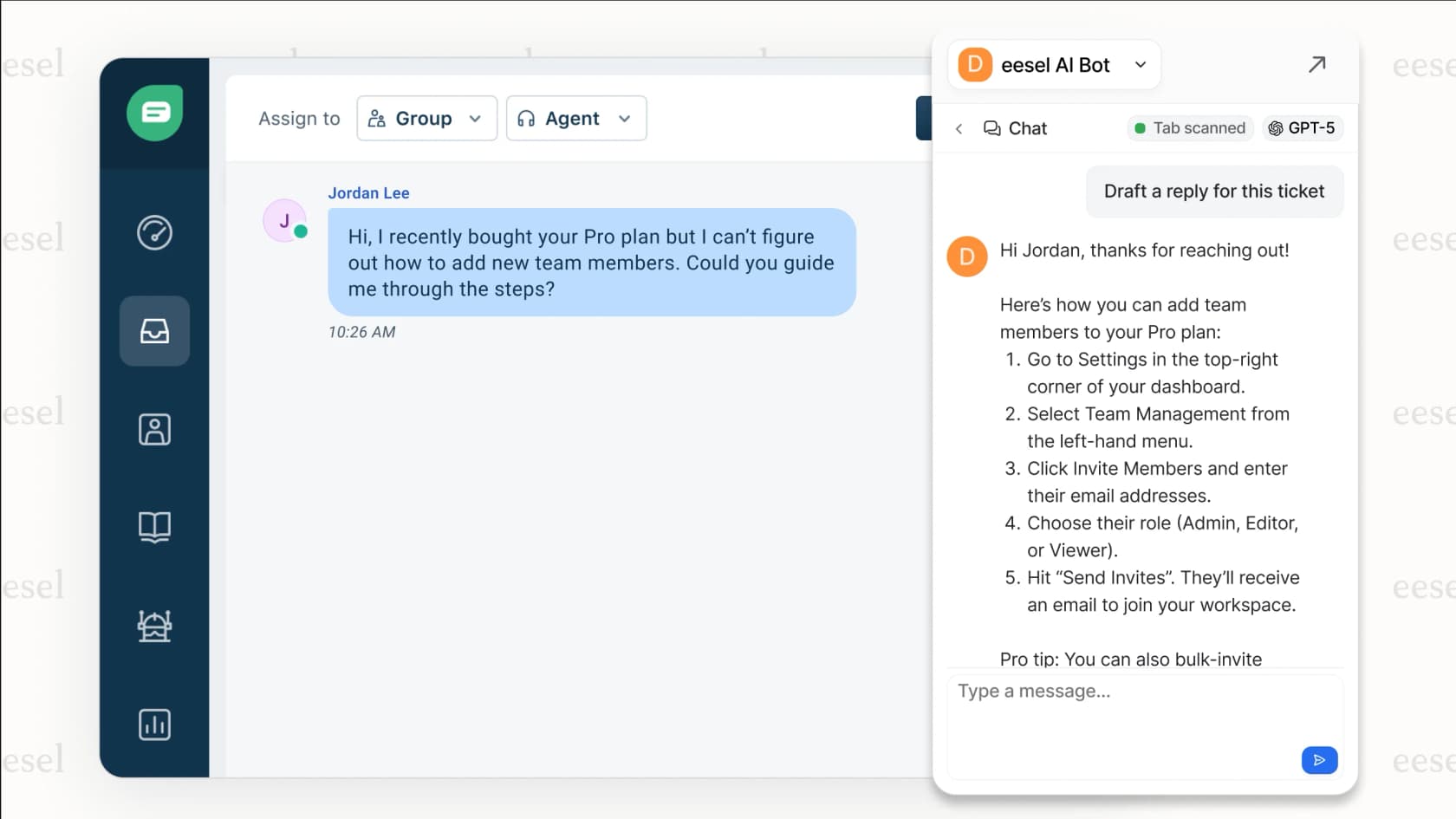
If you're considering the Enterprise plan primarily for AI capabilities, there's another approach worth exploring. At eesel AI, we offer an AI teammate that learns your business and works alongside your existing tools.

Instead of configuring complex workflows, you hire eesel like a new team member. It learns from your past tickets, help center articles, and connected documentation. You start with guidance (drafting replies for review) and level up to full autonomy as eesel proves itself.
The key difference is control. With eesel, you define behavior in plain English rather than building decision trees. "If the refund request is over 30 days, politely decline and offer store credit." No code required.
For IT teams specifically, our AI for ITSM solution integrates with your existing help desk and internal knowledge sources. You can deploy it as an AI Agent for autonomous resolution, an AI Copilot for agent assistance, or AI Internal Chat for employee self-service.
The pricing model is also different. Instead of per-agent fees that scale linearly with your team size, you pay per interaction. For teams considering Enterprise primarily for AI, this can mean significant savings. See eesel AI pricing
Making your decision
Let's recap the key differences:
- Starter gets you basic ticketing and knowledge management. It's a starting point, not a long-term solution for most teams.
- Growth adds asset management and the service catalog. This is where most small-to-mid IT teams should start.
- Pro delivers full ITSM with change, problem, and release management. It's the sweet spot for mature IT operations.
- Enterprise unlocks AI capabilities and enterprise governance features. Consider it if AI is a priority and you have the budget.
A few practical tips:
- Always choose annual billing if you can. The 35% savings add up quickly.
- Factor in add-on costs when budgeting. The base price is rarely the final price.
- Start with a 14-day trial on the tier you're considering. Test your actual workflows.
- Consider negotiating at renewal. User reports suggest Freshservice pricing is sometimes flexible, especially for annual commitments.
If you're still unsure, the Growth plan is a safe middle ground for most teams. You get the core features you need without the complexity of full ITIL or the cost of AI. You can always upgrade as your needs evolve.
Want to explore an AI-first approach to IT support? Try eesel AI free and see how an AI teammate can work alongside your existing tools.