Freshdesk MCP actions pack: pricing, limits, and setup in 2026

Rama Adi

Katelin Teen
Last edited November 12, 2026

The Freshdesk MCP actions pack costs $15 for 1,000 extra MCP actions, on top of what each plan includes: 1,200 on Growth, 6,000 on Pro, and 12,000 on Enterprise, per account. An action is one tool call, and a single prompt like "summarize today's urgent tickets" can burn 40 or more. So the pack is cheap for ad-hoc admin work in Claude or Cursor, and adds up fast if you point an agent at the whole queue.
If what you want is the queue worked, eesel bills one credit per ticket, however many lookups it takes. Its CLI lets Claude Code connect Freshdesk, load past tickets, and test answers before anything goes live.
What is the Freshdesk MCP actions pack?
The MCP actions pack is a usage add-on for Freshdesk's Model Context Protocol (MCP) server. MCP is an open standard that lets an AI client, such as Claude Code, Claude Desktop, Cursor, VS Code, or Microsoft Copilot Studio, call tools inside another app. Freshworks' MCP integration article describes its server as middleware that exposes Freshdesk capabilities, like creating tickets, through the public API.
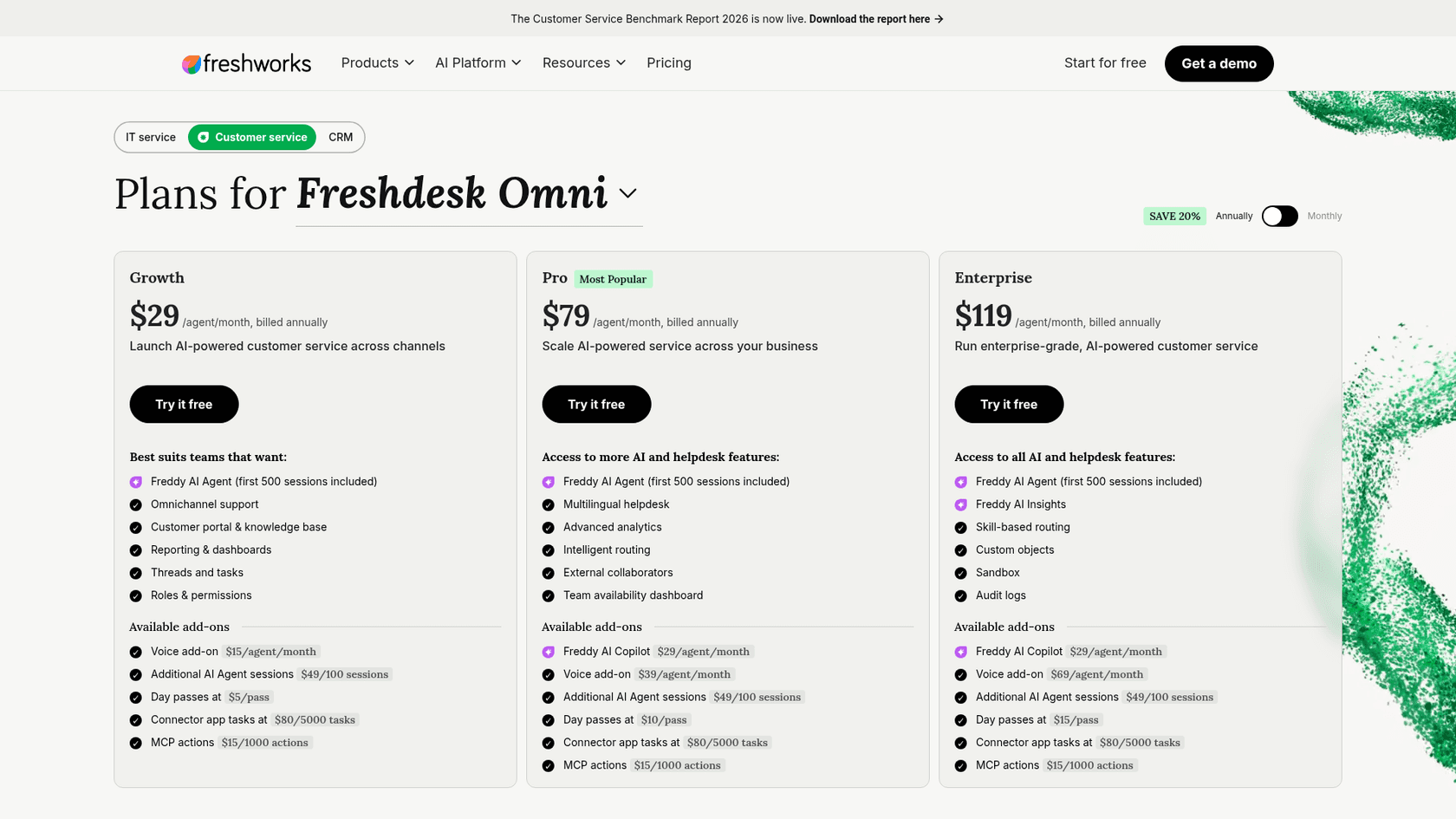
Every plan comes with an included allowance of MCP actions. When you run past it, you buy a pack. The Freshdesk Omni pricing page lists "MCP actions $15/1000 actions" as an add-on on Growth, Pro, and Enterprise, and the standalone Freshdesk pricing page lists the same line.
I spend my days building helpdesk integrations at eesel, so when a vendor ships an MCP server, I read two things before anything else: the tool list and the meter. Freshdesk's tool list is solid. The meter is where teams get surprised, because it counts tool calls, not tickets or conversations.
This is a separate thing from the Freshworks MCP gateway on the Freshservice side, and from using MCP servers inside Freshdesk API actions. Here, the outside AI client is the caller and Freshdesk is the server.
What counts as an MCP action?
An MCP action is one successful tool invocation through the Freshdesk MCP server. Freshworks gives two examples: fetching the conversation on ticket 1001 is one action, and updating a company name on record 11 is one action.
The billing FAQ in Freshworks' MCP FAQ article adds the part that matters for your budget: "complex requests requiring multiple tools might consume multiple actions," and a call counts as one action "regardless of whether it reads or writes data, and regardless of which AI client made the call."
So the unit you think in (one request to Claude) is not the unit you pay for. Here is how one plain-English prompt fans out:
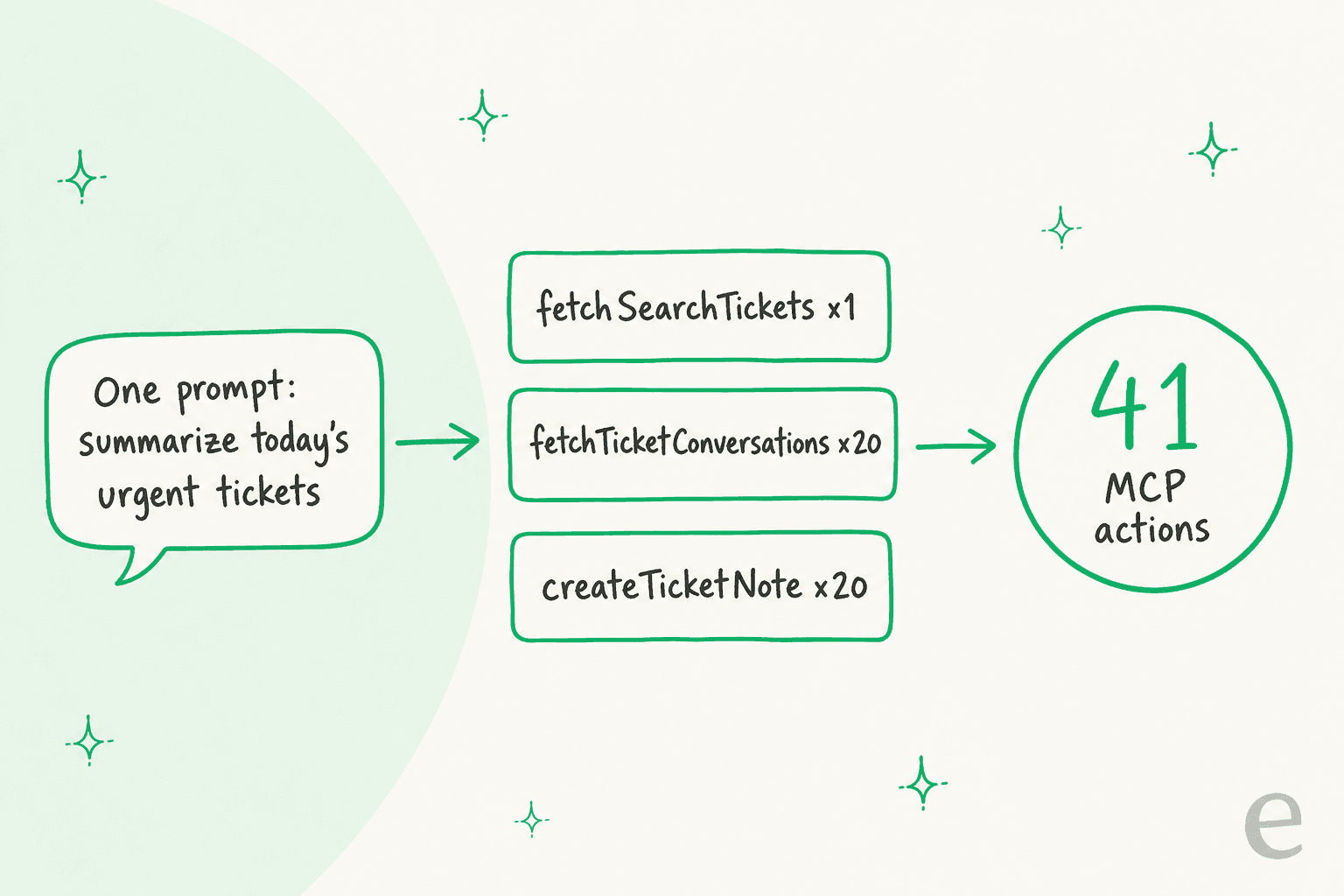
That 41 is my own illustration using Freshworks' definition, not a Freshworks number. The real count depends on how your AI client plans its calls. Two things push it higher:
- Pagination. The MCP server returns long lists in batches and the client follows a
nextCursorto get the rest. The docs don't say whether each page is a separate action, but since every call counts, I'd budget as if it is. - Retries and exploration. Agents in tools like Claude Code often call a fetch tool, read the result, then call another to check something. Each one counts.
Rule of thumb: budget three to five actions per ticket an AI touches, more if it reads the full thread and writes back.
How many MCP actions does each Freshdesk plan include?
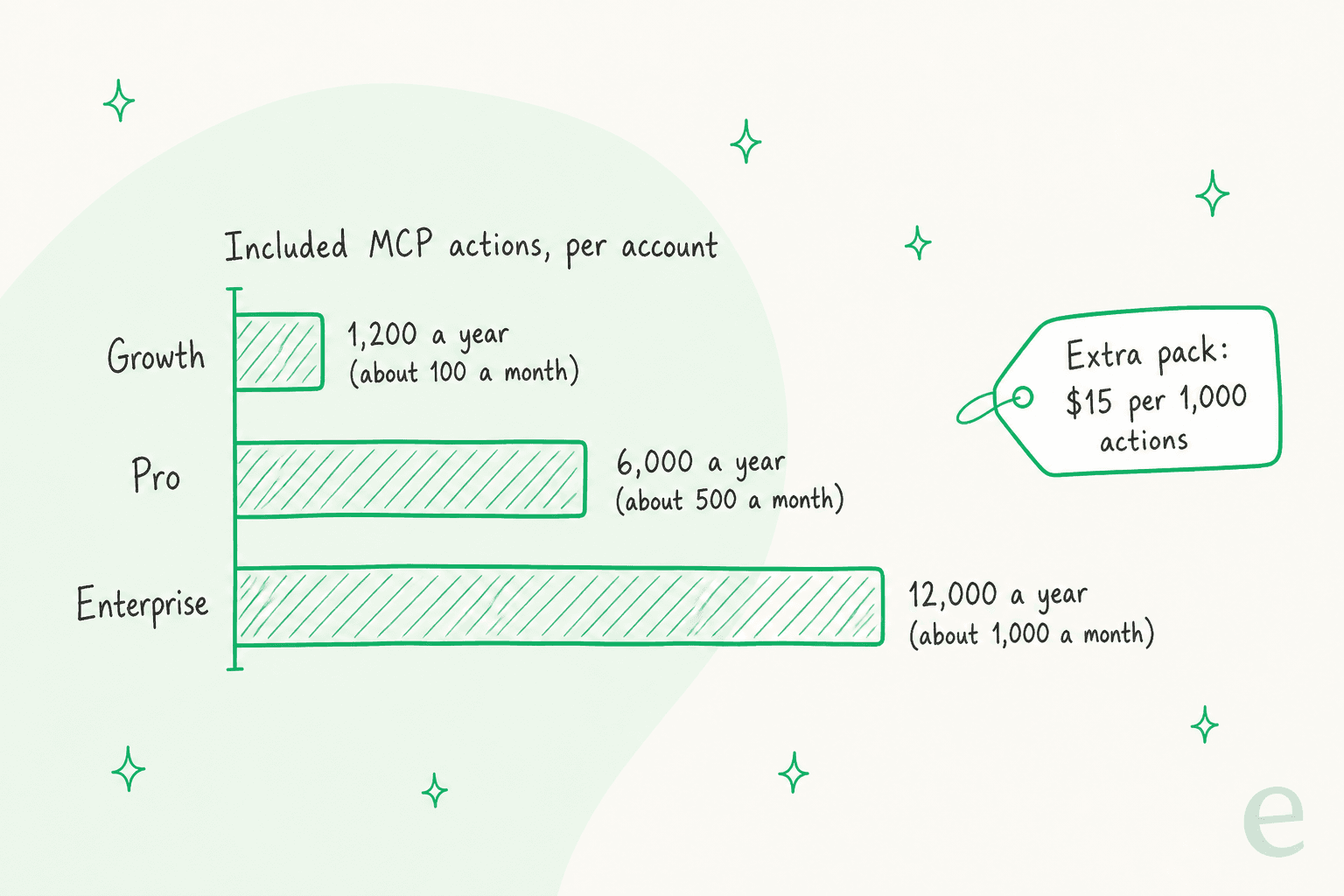
Freshdesk includes 1,200 MCP actions on Growth, 6,000 on Pro, and 12,000 on Enterprise, per account. The allowance is shared across every agent on the account, not given per seat. Each plan also has a rate limit in actions per minute.
| Plan | Rate limit (actions per minute) | Included MCP actions (per account) | Roughly per month | Extra actions |
|---|---|---|---|---|
| Growth | 25 | 1,200 | 100 | $15 per 1,000 |
| Pro | 50 | 6,000 | 500 | $15 per 1,000 |
| Enterprise | 100 | 12,000 | 1,000 | $15 per 1,000 |
Figures from Freshworks' supported plans and limits table and the pricing page. The "roughly per month" column is my division by 12.
A few rules from the FAQ that shape how you use it:
- No rollover. Unused actions do not carry into the next billing cycle.
- Reset per billing cycle. The count resets at the start of each cycle, and allowances are prorated if you bill on a shorter cycle.
- Usage alerts. Account admins get notified at 50%, 75%, 90%, 95%, 99%, and 100% of the allowance.
What happens at 100% is not spelled out. Neither the MCP article nor the FAQ says whether calls get blocked or billed automatically once you pass the allowance. I'd treat the 90% alert as the moment to buy a pack, and ask your account manager how a hard stop behaves before you put anything customer-facing behind it.
The Growth number is the one to look at closely. 100 actions a month is about 25 tickets at four calls each, which is plenty for an admin asking Claude to tidy up groups or draft a solution article, and nowhere near enough for an agent that touches the queue every day.
How much does the MCP actions pack cost?
Each pack is $15 for 1,000 actions, which works out to 1.5 cents per action. You buy it through your account manager or the billing section in admin settings, per the FAQ. The pack sits on top of the seat price, so the full picture looks like this:
| Plan | Freshdesk (per agent/month, annual) | Freshdesk Omni (per agent/month, annual) | Included MCP actions | MCP actions pack |
|---|---|---|---|---|
| Growth | $19 | $29 | 1,200 | $15 per 1,000 |
| Pro | $55 | $79 | 6,000 | $15 per 1,000 |
| Enterprise | $89 | $119 | 12,000 | $15 per 1,000 |
Seat prices from the Freshdesk and Freshdesk Omni pricing pages, checked November 12, 2026. If you are still deciding between the two products, my Freshdesk vs Freshdesk Omni breakdown and the Growth and Pro plan guides go deeper.
Here is a worked example. Say your team asks an AI client to triage and annotate 40 tickets a working day, at four actions each:
- 40 tickets x 4 actions x 22 working days = 3,520 actions a month
- About 42,240 actions a year
- On Pro, minus 6,000 included = 36,240 extra actions
- That is 37 packs, or $555 a year on top of seats
It isn't scary money. The harder part is predicting it, because the cost moves with how chatty your AI client is, and the support team doesn't control that. Plug in your own numbers:
For scale: one Freshdesk prospect from eesel's sales calls, a public-sector IT services firm handling about 3,000 complex tickets a month, would sit near 9,000 actions a month at three calls per ticket. Over a year that is roughly 108,000 actions against Enterprise's 12,000, or about 96 packs. Fine as a line item, but it is still a metered API bill sitting next to your seat bill.
Which Freshdesk accounts can use MCP?
Freshdesk MCP works on two product variants only: Freshdesk Standalone 2021 (latest version) and Freshdesk Unified Omni 2026. The FAQ's compatibility matrix marks legacy pre-2021 variants and other SKUs as not supported.
The history matters if you tried it early. MCP went generally available on September 10, 2026. Accounts on the Early Access Program, which had no pricing, moved to standard pricing and limits on October 5, 2026, with no action needed. If you used MCP during the early access period on any other plan variant, it stopped working after September 10.
The supported-plans table covers Growth, Pro, and Enterprise. The free plan is not on it. If you are unsure which variant you are on, the Freshdesk plans comparison explains how to tell.
How do you set up the Freshdesk MCP server?
You copy your MCP URL and an API key from admin settings, then add the server to your AI client. Freshdesk is not listed as a native connector in AI client marketplaces yet, so every client is a manual setup.
- Find your MCP settings. Go to Admin Settings, then Apps and Integrations, then MCP. The MCP Details page shows your server URL and lets you generate an API key. MCP is on by default, and this is also where an admin can switch it off.
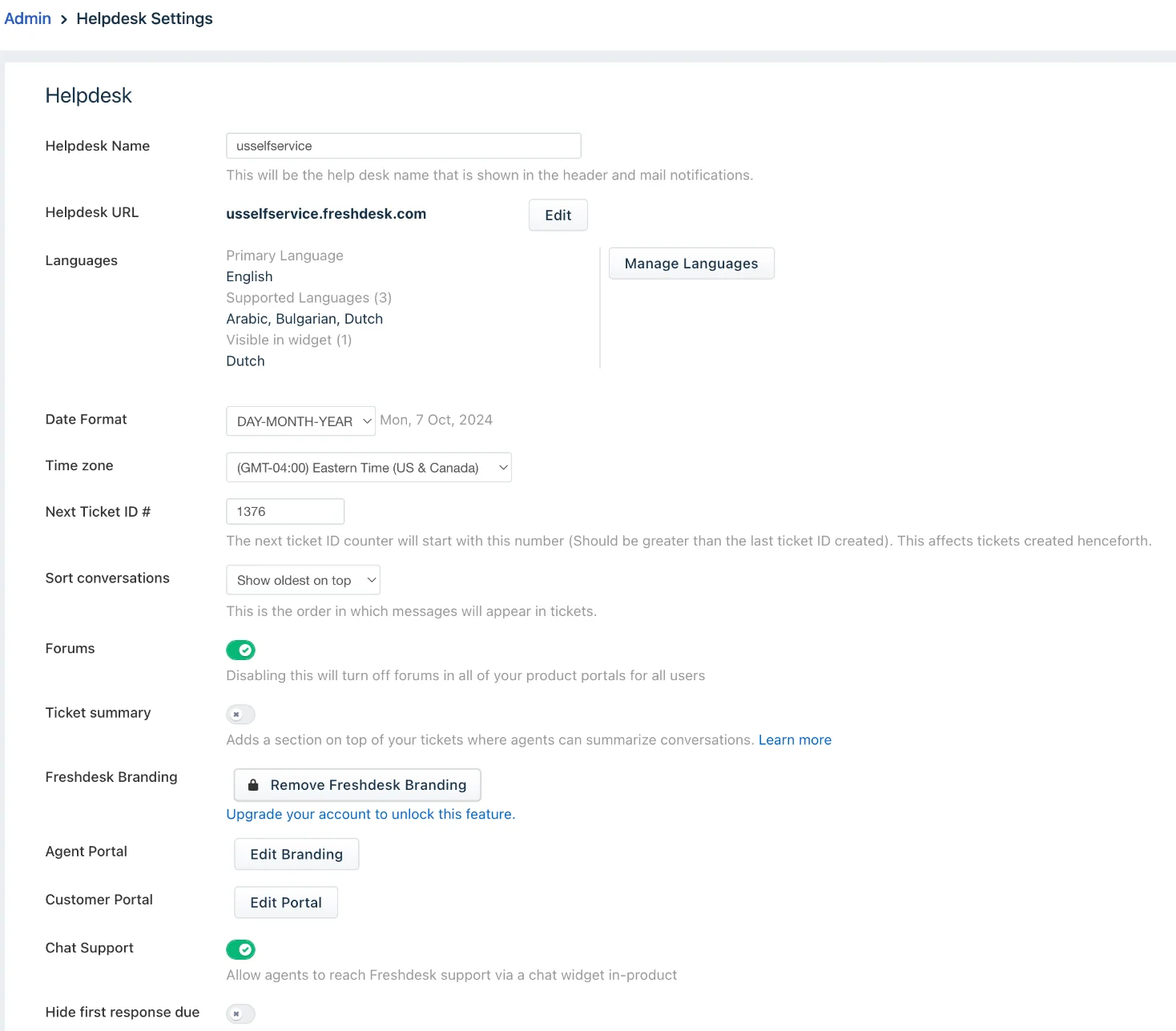
- Use your base domain. The URL is
https://<subdomain>.freshdesk.com/mcp. Custom domains are not supported for MCP endpoints, so use the freshdesk.com address shown in your helpdesk settings. - Add the server to your client. For Claude Code, Freshworks gives a one-line command:
claude mcp add my-remote-server --transport http https://<subdomain>.freshdesk.com/mcp --header "Authorization: <api-key>". Cursor and VS Code take the same URL and header in anmcp.jsonfile, Claude Desktop usesmcp-remotethroughnpx, and Copilot Studio adds it as a new Model Context Protocol tool. - Verify the connection. In Claude Code,
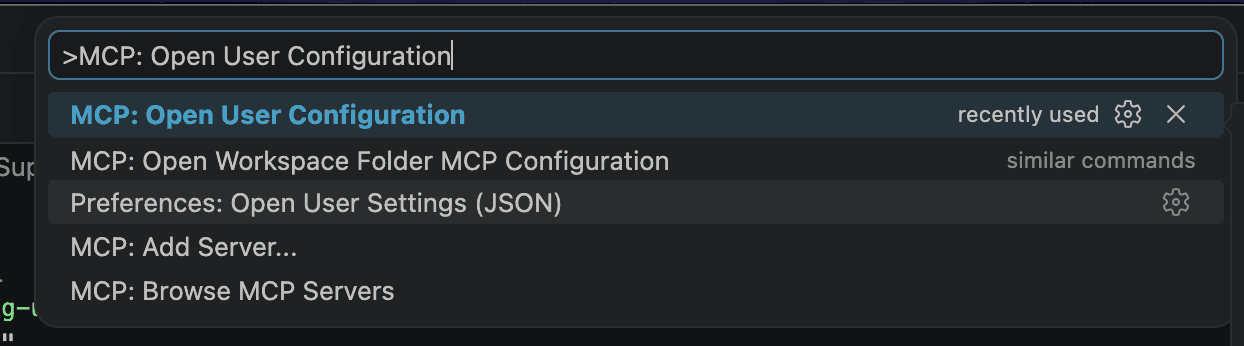
claude mcp get my-remote-servershould show "Connected". In VS Code, run "MCP: List Servers" from the Command Palette. - Allowlist IPs if needed. If your account uses IP restrictions, connections can time out until you add Freshworks' listed ranges for your data center.
The VS Code route is the one I'd hand a teammate who already lives in an editor. Freshworks' guide starts it from the Command Palette:
If you mostly want Claude on Freshdesk, my Claude for Freshdesk guide compares MCP with the other ways to connect, and Claude Code MCP tools covers the client side.
What can an AI client do through Freshdesk MCP?
The server exposes 37 tools across nine resource types. Reads and writes are both there, which is what makes the meter worth watching.
| Resource | What the tools do |
|---|---|
| Tickets | Create, fetch one, list, search, update, bulk update, fetch conversations |
| Conversations | Reply to a ticket, add a note, add a message to a conversation |
| Contacts | Create, fetch one, list, autocomplete search |
| Agents | Fetch one, list, create, update |
| Groups | Create, fetch one, list, update |
| Companies | Create, fetch one, autocomplete search, filter by custom fields, update |
| Solution categories and folders | List, fetch, create |
| Solution articles | List by folder, fetch, create, update |
Tool names and descriptions are in Freshworks' list of available tools. If you have worked with the Freshdesk ticket API or the knowledge base API, these map closely to the same endpoints. That also means the usual Freshdesk API rate limits thinking applies on top of the per-minute MCP limit.
One thing is missing on purpose: there is no delete tool for any resource. That is a sensible safety call on Freshworks' part, since an AI client can't remove a ticket, contact, or article by mistake.
What should you check before you turn it on?
Check who holds an API key, because every MCP tool is available to every user who connects. Freshworks' FAQ says tool-level access management is not available yet.
Here is what the MCP security article and FAQ establish:
- API key only. Each user connects with their own Freshdesk API key in an authorization header. OAuth is not supported for MCP.
- Role permissions still apply. Calls run as the API key's user, and only admin or agent roles can use MCP. An agent who cannot update tickets in Freshdesk cannot update them through MCP either. Your roles and permissions setup is the real control.
- No separate data store. The server is a proxy over Freshdesk's APIs with no independent caching.
- Audit trail. MCP changes show up in activity history like API and UI changes, which helps when you need to trace who changed a ticket.
- On by default. If you have not decided on a policy yet, an admin can disable MCP until you do.
My take: for a small admin team using Claude to clean up groups, contacts, and knowledge base structure, this is a sensible setup. For an autonomous agent replying to customers, I'd want two things it doesn't have yet: a way to restrict the tool list, and a review step before replyTicket sends anything. The Freshdesk sandbox on Enterprise is the safest place to test either way.
Where do the Freshworks docs disagree?
Four places in Freshworks' own documentation don't line up, as of November 12, 2026. None of them stop you from using MCP, but two affect your budget.
- Annual or monthly allowance. The MCP article's table header reads "Included MCP actions (per account, annually)." The sentence directly above it calls them "monthly action allowances," and the security article mentions "monthly quotas." The FAQ says the count resets each billing cycle and is prorated on shorter cycles. My reading is an annual pot on annual billing and one-twelfth of it on monthly billing, but confirm on your billing page.
- Successful calls or any calls. The MCP article defines an action as "a successful tool invocation." The FAQ says "any call to an MCP server counts as one action." If failed calls count, a misconfigured client can spend your allowance on errors.
- API key only, but a browser login. The security article says OAuth is not supported, yet the Claude Desktop steps end with "follow the authentication prompts in your browser." With an API key in the config, I would not expect a browser prompt.
- Where the API key lives. One FAQ answer says you generate the key on the MCP Details page. Another says you find it in your profile settings.
Not documented anywhere I found: what happens when you hit 100% of the allowance, and whether a purchased pack expires at the end of the cycle like the included actions do.
When is an AI teammate a better fit than raw MCP?
When the job is answering tickets rather than helping one person do admin work. Freshdesk MCP is a good bridge for someone at a keyboard. It is billed and secured like an API, because it is one. An AI agent working your queue needs knowledge from past tickets, rules about when to hand off, and a review step, and those live outside the MCP server.
This is the job eesel does on Freshdesk. It is an AI helpdesk teammate: it joins your existing Freshdesk queue, learns from your help center and past tickets, and drafts or sends replies under rules you set. The billing unit is the difference that shows up first:
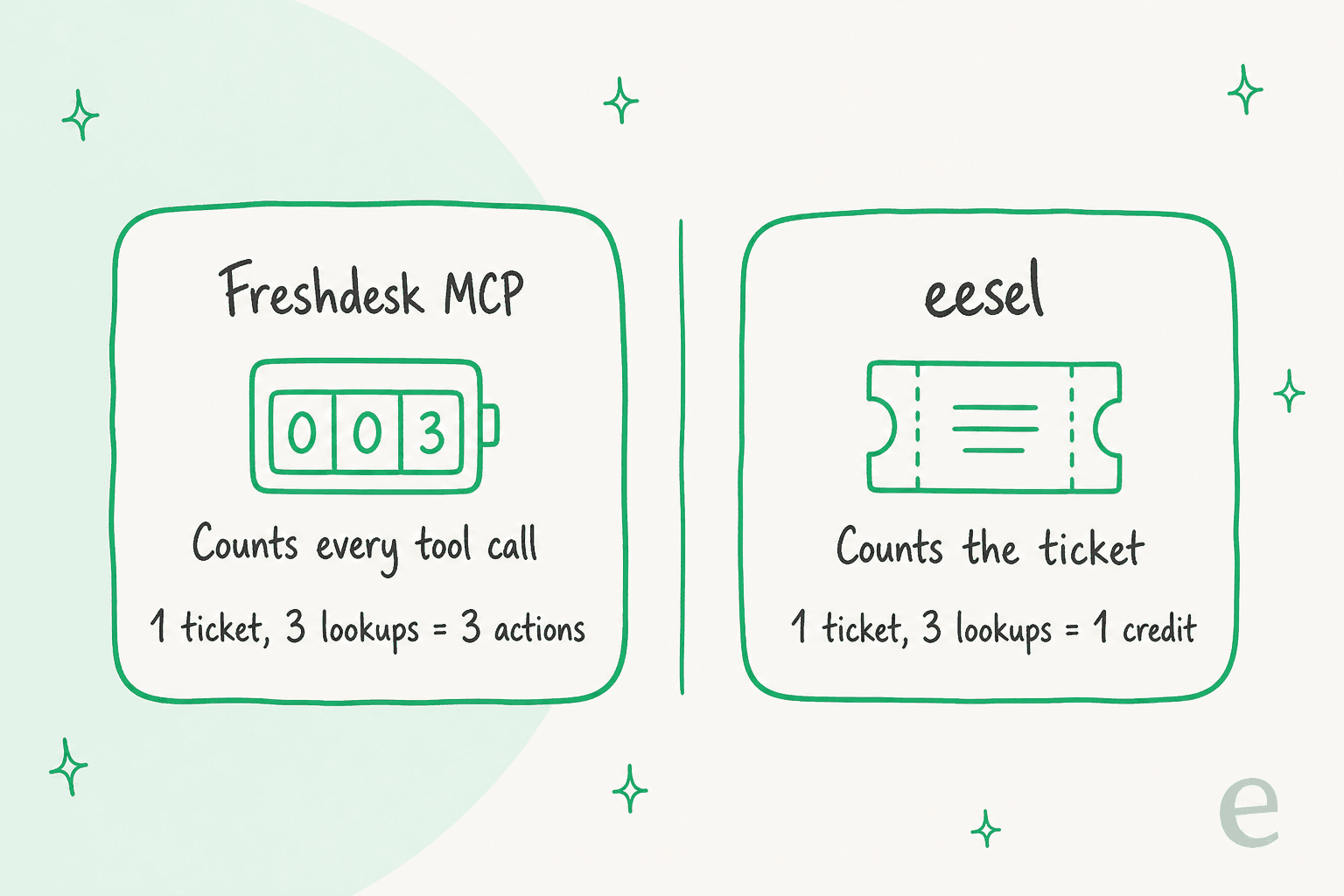
eesel's pricing is fixed credit plans: a ticket or a chat is one credit however long it runs and whatever the agent does inside it, from 500 credits for $299 a month. Per-ticket billing suits support work, where one ticket might take two lookups or ten.
Qontro, an ERP software company, runs eesel on Freshdesk as a co-pilot. Every new ticket gets an internal note with a customer-ready draft. Between August 8 and September 8, 2026 it drafted replies on about 190 tickets and ran about 400 knowledge searches, roughly two per ticket, across the help center and about 9,800 past tickets. On a per-call meter, those searches alone would be their own line item. On eesel, each ticket is one credit.
Control is the other gap. Freshdesk MCP has no tool-level access management, while eesel lists every action it can take on a connected platform with an approval setting on each one. Anything set to need approval waits for a person, whether it is a reply, a field update, or a call to your own APIs.
Doing it from the terminal with the eesel CLI
If you came to MCP because you want to drive things from Claude Code or Cursor, the eesel CLI is the same idea pointed at the teammate rather than at raw helpdesk records. It is another way into the same workspace and the same agent as the dashboard, not a separate copy.
It runs with npx @eesel/cli on Node.js 18.17 or newer, prints JSON for every command, and returns errors with a hint that says what to run next. A coding agent can therefore run a whole setup and read its own results. For a Freshdesk team, a typical session looks like this:
eesel integrations connect freshdeskstarts the Freshdesk connection. A person with admin access still approves it inside Freshdesk.eesel integrations sources freshdeskshows what that connection holds, like the help center and past tickets, andeesel integrations download start freshdeskcopies them into the agent's knowledge.eesel files upload ./refund-policy.pdfadds approved material that isn't in Freshdesk.eesel chat "how do I renew a certificate?"asks the agent test questions so you can check answers before it touches a live ticket.eesel integrations freshdesk actionslists every Freshdesk action with its approval setting, andeesel approvalslets you approve or deny held actions.--dry-runprints the exact server call a write would make without sending it.
Uploading knowledge does not make the agent ready. Test the answers first. And it works the other way too: eesel mcp token prints what an MCP client needs to talk to your eesel agent, so Claude can ask the teammate questions without metering raw Freshdesk calls.
Try eesel on your Freshdesk queue
If the MCP actions pack has you counting tool calls, eesel is the per-ticket alternative. It plugs into Freshdesk, learns from your help center and past tickets, and every ticket costs one credit however many lookups it takes. Timengo, a Danish secure-email software company, uses it to prepare about 300 Freshdesk tickets a month in Danish, with drafts that a support engineer checks and sends.
You can start with 100 free credits, connect Freshdesk, and see real drafts on your own tickets before paying. Try eesel on Freshdesk, or read how it compares in eesel vs Freshdesk Freddy.
Frequently asked questions
What is the Freshdesk MCP actions pack?
It is a paid add-on that tops up the MCP action allowance on a Freshdesk or Freshdesk Omni account. Freshworks' pricing page lists it at $15 per 1,000 actions on Growth, Pro, and Enterprise. An action is one tool call an AI client like Claude or Cursor makes through the MCP server. Plan prices are in the Freshdesk pricing guide.
How many MCP actions does each Freshdesk plan include?
Freshworks' MCP article lists 1,200 included actions for Growth, 6,000 for Pro, and 12,000 for Enterprise, per account, in a column headed "annually". The same article also calls them monthly allowances, so check your billing page. See the Freshdesk plans comparison for the rest of each tier.
Does reading a ticket through Freshdesk MCP count as an action?
Yes. Freshworks' FAQ says any call to the MCP server counts as one action, whether it reads or writes. Fetching a ticket, fetching its conversation, and adding a private note is three actions.
Is Freshdesk MCP enabled by default?
Yes, per Freshworks' MCP FAQ. Admins can turn it off on the MCP Details page under Admin, Apps and Integrations. Anyone with a valid API key and an admin or agent role can connect a client, so review Freshdesk roles and permissions first.
Does Freshdesk MCP support OAuth?
Not today. The MCP security article says Freshdesk MCP supports API key authentication only and that OAuth is not currently supported. Freshdesk does offer OAuth elsewhere, just not for MCP.
Do unused Freshdesk MCP actions roll over?
No. Freshworks' FAQ says allowances are tied to the current billing cycle, reset at the start of each cycle, and do not roll over. Admins get usage alerts at 50%, 75%, 90%, 95%, 99%, and 100%.
Is the Freshdesk MCP actions pack cheaper than an AI agent?
Per action it is cheap, at 1.5 cents. It is a different job, though: MCP lets a person drive Freshdesk from their own AI client, while an AI agent works the queue. If you want tickets answered, compare the Freshdesk AI Agent and eesel for Freshdesk, which bills one credit per ticket.