If you're running an e-commerce store, you know the to-do list is a scroll that never really ends. Between managing inventory, tweaking your storefront, launching marketing campaigns, and trying to make sense of sales data, it’s a lot to juggle. This is where AI assistants are starting to step in, promising to lighten the load.
For Shopify merchants, the go-to option is Shopify Sidekick. It’s an AI-powered commerce assistant built right into your admin dashboard, made to help you with everything from design to marketing without having to click away. But what can it actually do, and where does it hit its limits?
This guide will give you the full scoop on Shopify Sidekick: what it is, its main features, who it’s really for, what it costs, and its most important limitations.
What is Shopify Sidekick?

Think of Shopify Sidekick as your e-commerce expert, sitting right inside your Shopify admin. It’s powered by Shopify Magic, a set of AI tools that have been trained on the entire Shopify ecosystem. This means it gets the ins and outs of the platform and can help you get things done using simple, everyday language. You don't have to be a tech whiz; you can just chat with it like you would with a colleague.
Its main purpose is to be a helpful collaborator. Instead of you having to dig through menus and settings, Sidekick helps you start, manage, and grow your business by handling tasks, generating content, and offering up useful insights (Source).
It works with your store's own data, so its suggestions are tailored to your business. Don't worry about the AI going rogue, though. A core rule for Sidekick is that it never makes changes without your okay. It will give you options and ideas, but you always have the final say, keeping you in the driver’s seat.
A deep dive into Shopify Sidekick's features
Sidekick's real value is in how many different hats it can wear. It’s not just for one thing; it has a wide range of skills that can help with almost every part of running your store, from brainstorming ideas to handling operational tasks.
Content and visual creation on demand
We’ve all been there: staring at a blank page, waiting for inspiration to strike. Sidekick can help you get past that creative block. For text, it can write and edit everything from catchy product descriptions to full blog posts. It’s also built into Shopify Messaging email campaigns, so you can whip up marketing copy that sounds like you.
It’s not just about words, either. Sidekick can also generate images from simple text prompts. Need a hero banner for a summer sale or a new image for a social media post? Just describe what you’re looking for, and Sidekick will create it, helping you produce great-looking visuals without needing a design degree.
Store management and automation
This is where Sidekick starts to feel like a real assistant, turning tedious manual tasks into quick chats. You can ask it to do all sorts of routine jobs, like setting up a flash sale, creating a new discount code, or updating metafield and metaobject entries with a single request.
It can even help with your storefront design. Instead of messing around with theme settings, you can use plain English commands like "make this button rounded" to see changes instantly. Sidekick can also generate new custom theme blocks, giving you more control over your store’s look and feel without writing any code.
For more complex automations, Sidekick works directly with Shopify Flow. You can describe a workflow, like "tag orders over $200 as 'VIP'," and Sidekick will build it for you (Source). In a pretty neat trick, you can even use Sidekick to generate simple, internal-use apps right in your admin, like a custom task tracker for your team.
Data analysis and business insights
Let's be honest, digging through reports isn't always the most exciting part of the job. Sidekick makes this a lot less painful by letting you ask for data in plain English. For instance, you can ask, "Show me my total sales for Canadian customers over the past 60 days," and Sidekick will put together the right ShopifyQL query to find the answer (Source). This visual breaks down how that simple request turns into a detailed report:
This also works for your marketing efforts. You could ask Sidekick to "create a customer segment of my Canadian customers who subscribe to marketing emails." It will build that segment for you, making it much easier to create targeted lists for your campaigns.
Advanced interaction and efficiency tools
Shopify has added a few extra tricks to make Sidekick even more helpful day-to-day. You can interact with it using voice commands on desktop and mobile, which is handy when you're not at your desk. If you're stuck, you can even share your screen with Sidekick for real-time, step-by-step help.
To speed things up even more, you can save your most-used prompts as "Skills." If you have a complex command you run all the time, like generating a weekly sales snapshot, you can save it with a custom shortcut. This turns a long request into a single command, saving you time on repetitive tasks.
Who can benefit most from using Shopify Sidekick?
While anyone on Shopify can get some use out of Sidekick, it’s especially helpful for a few specific types of people who are always trying to do more with less.
For small business owners and solopreneurs, Sidekick is like having an extra pair of hands. It takes care of tedious admin work like setting up discounts or writing product copy, which frees up valuable time to focus on product development, talking to customers, and actually growing the business.
E-commerce marketers can use Sidekick to speed up their campaigns. It's a great help for brainstorming ad copy, drafting email sequences in Shopify Messaging, and quickly creating customer segments for targeted promotions, all without having to export data to another tool.
For designers and visual merchandisers, Sidekick makes the creative process faster. Instead of digging through theme code, they can use simple language to try out design changes and generate visual ideas for banners and sales on the spot, making it easier to keep the storefront looking fresh.
Even large enterprises can find it useful. Sidekick lets different teams pull custom reports and get quick data insights without tying up a dedicated analyst. This makes data more available across the company and helps teams make faster decisions.
Limitations: Where Shopify Sidekick stops and what to do next
Shopify Sidekick is a fantastic tool, but it's not a magic wand that does everything. It’s important to understand what it was built for, and what it wasn't. It's an incredible internal assistant made to help you, the merchant, run your store better. But its focus is entirely inward.
Here are the key limitations you should know, based on Shopify's own documentation:
-
It's an internal tool, not a customer service agent. This is the biggest distinction to make. Shopify is clear that "Sidekick can't talk to your customers or handle customer support conversations on your behalf" (Source). It can't answer your customers' "Where is my order?" questions or process returns in your helpdesk.
-
It's limited to the Shopify ecosystem. Sidekick's knowledge and actions are stuck inside the Shopify admin. It can't connect with or control your other key tools, like your helpdesk (Zendesk or Gorgias) or your external knowledge bases in places like Confluence or Google Docs.
So, how do you handle the customer-facing side of your business? That's where a dedicated AI platform for support comes into the picture.
eesel AI is built to pick up where Sidekick leaves off. It's a customer support automation platform that connects to both your Shopify store and your existing helpdesk with one-click integrations. Instead of just helping you manage the store, eesel AI helps you manage your customers.
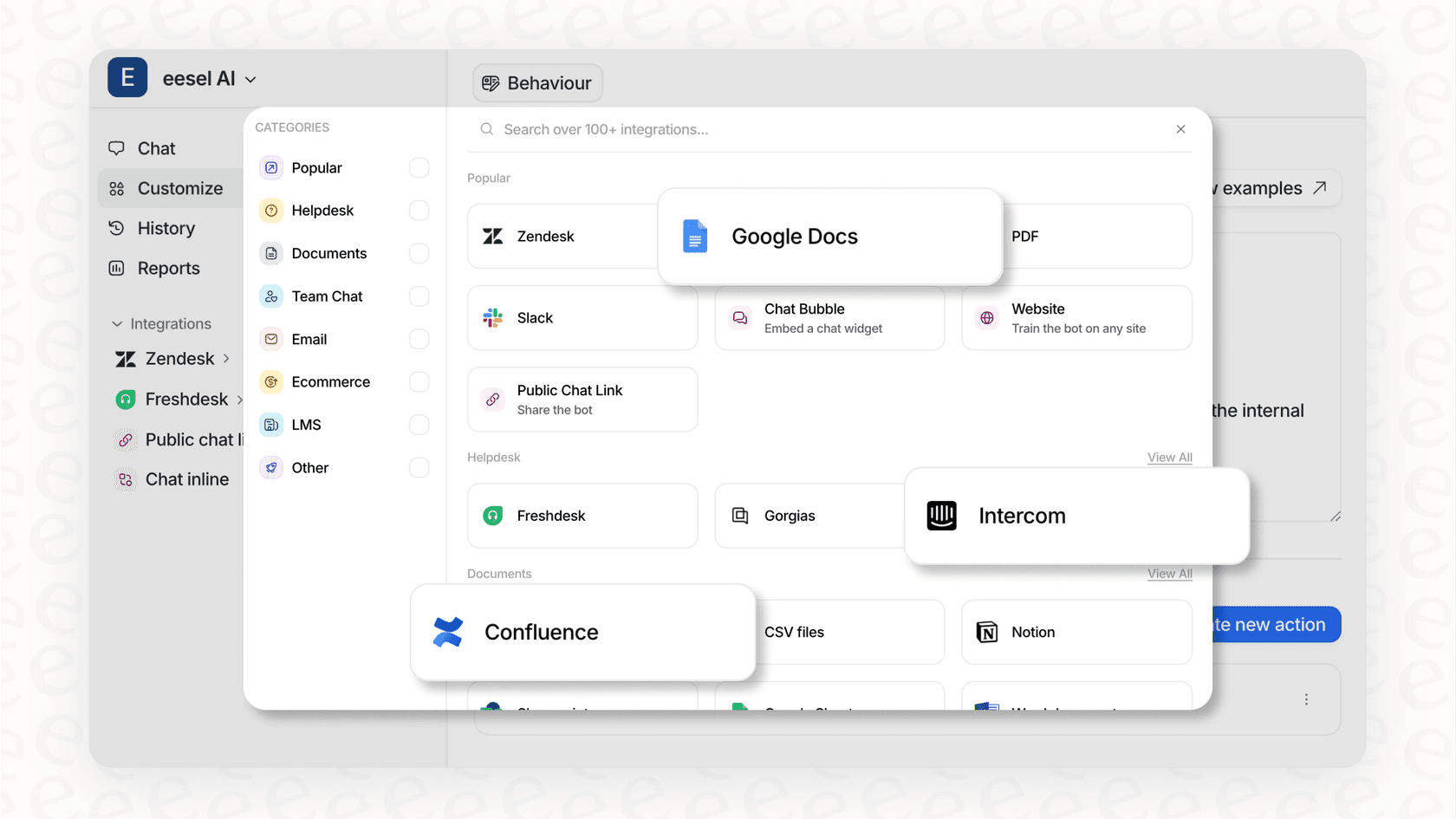
Our AI Agent can automate support right inside your helpdesk, while our AI Chatbot offers 24/7 support on your website, handling common questions like "Where is my order?" by pulling information directly from your Shopify data.
| Feature Area | Shopify Sidekick | eesel AI |
|---|---|---|
| Primary Focus | Internal store management for the merchant. | External customer support & internal team knowledge. |
| User Interaction | Merchant chats with Sidekick in the Shopify admin. | Customers use a website chatbot; agents use it in the helpdesk. |
| Helpdesk Integration | No direct control over Zendesk, Gorgias, etc. | Deep, one-click integrations with all major helpdesks. |
| Knowledge Sources | Uses store data within Shopify. | Trains on help centers, past tickets, Confluence, Google Docs, Shopify & more. |
| Key Use Case | "Create a 10% discount for me." | "Where is my order?" (answered automatically for the customer). |
How much does Shopify Sidekick cost?
Here's the best part: it's free. According to Shopify, "Shopify Magic tools and experiences are currently available for free to all Shopify merchants, regardless of their subscription plan" (Source).
This means whether you're on the Basic plan or Shopify Plus, you get access to these AI features as part of your subscription (Source). It’s a huge plus that puts some pretty advanced AI tools in the hands of every merchant on the platform, without any extra fees.
Shopify Sidekick: Your AI co-pilot for store management
So, what's the verdict? Shopify Sidekick is a genuinely helpful AI assistant for any merchant who wants to work smarter. It's great at making internal operations smoother, automating annoying admin tasks, and creating content on the fly, all from inside your Shopify admin. It’s a solid co-pilot for managing the backend of your business.
But remember, its focus is on helping you, the merchant. When it comes to managing conversations with your customers, the people who keep your business running, you need a tool designed for that job.
The best strategy combines a powerful internal assistant like Shopify Sidekick with a dedicated, customer-facing AI platform. This way, you create a smooth experience for both you and your customers, letting you focus on the fun stuff: growing your brand.
After Shopify Sidekick: Take your Shopify store to the next level with customer support AI
Once you've used Sidekick to get your internal workflows humming along, the next logical step is to automate your customer support to save even more time and drive sales.
That's exactly what eesel AI is built for. You can connect your Shopify store, helpdesk, and all your knowledge sources in minutes to get a powerful AI agent working for you 24/7. It's the perfect partner to Sidekick, handling the customer conversations so you can focus on the bigger picture.
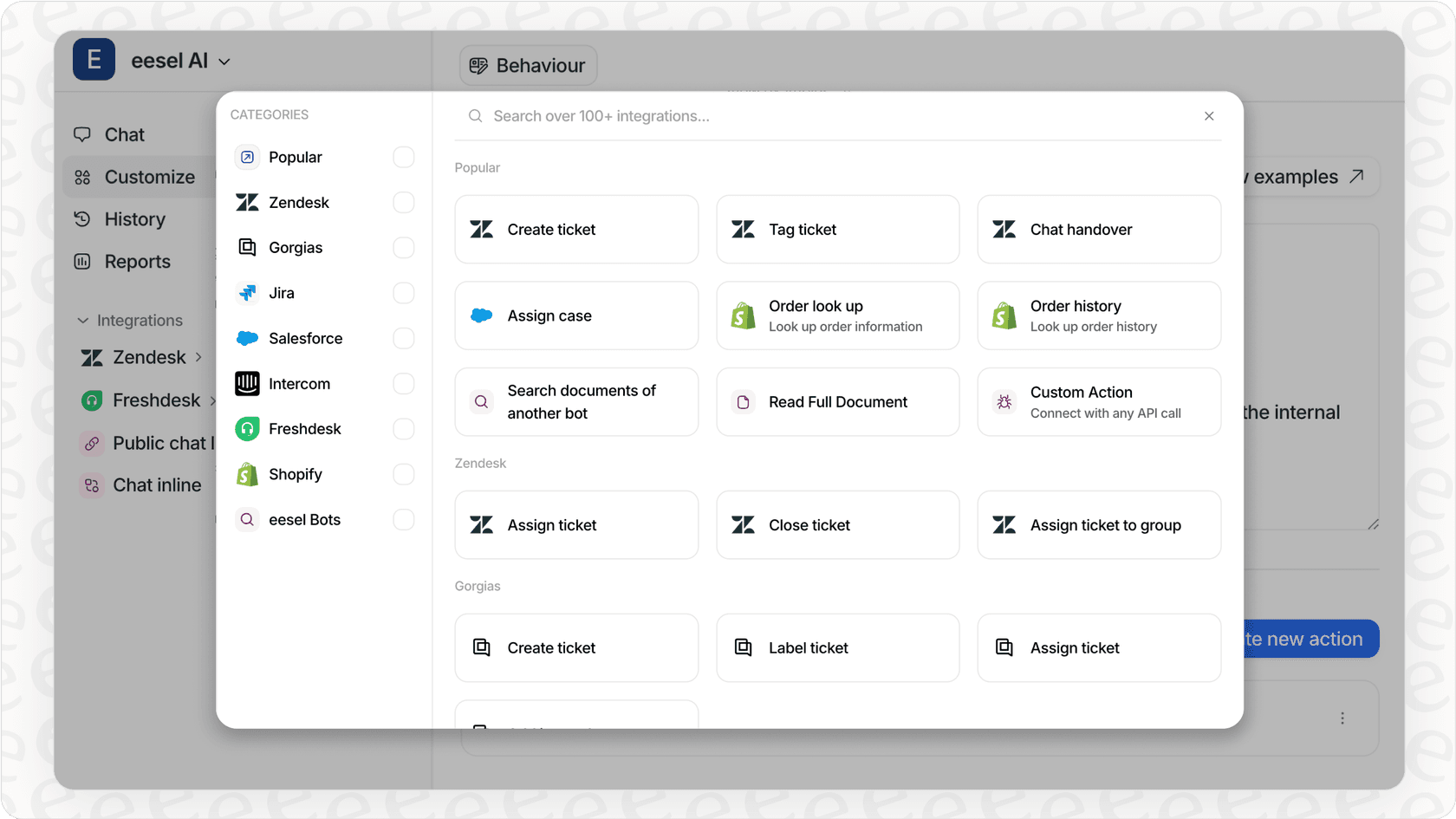
Ready to see how it works? Start a free 7-day trial of eesel AI and see how you can deflect common tickets, free up your support team, and turn more chats into sales.
Frequently asked questions
What exactly is Shopify Sidekick and what kind of support does it offer to merchants?
Shopify Sidekick is an AI-powered commerce assistant integrated directly into your Shopify admin. It helps merchants with various tasks, from generating content and managing store operations to analyzing data, all through simple conversational commands. It acts as an internal expert to streamline store management.
Can Shopify Sidekick communicate directly with my customers or manage my customer service inquiries?
No, Shopify Sidekick is designed exclusively as an internal tool for merchants. It cannot interact with your customers or handle customer support conversations, such as answering "Where is my order?" questions or processing returns on your behalf.
How much does Shopify Sidekick cost, and is it available for all Shopify plans?
Shopify Sidekick is completely free for all Shopify merchants. It's included as part of your existing Shopify subscription, regardless of whether you are on a Basic plan or Shopify Plus, with no additional fees.
What types of content, like product descriptions or marketing copy, can Shopify Sidekick help me generate?
Shopify Sidekick can assist with a wide range of content creation. This includes writing and editing product descriptions, drafting blog posts, creating email campaign copy for Shopify Messaging, and even generating images from simple text prompts for visuals like banners.
Is it safe to use Shopify Sidekick, meaning will it make changes to my store without my explicit permission?
Yes, Shopify Sidekick is designed with merchant control in mind. It never makes changes to your store without your explicit approval. It provides options and ideas, but you always have the final say, keeping you in the driver's seat.
How can Shopify Sidekick assist me with store management tasks, like creating discounts or modifying my theme?
Shopify Sidekick can automate many routine store management tasks. You can ask it to set up flash sales, create discount codes, update metafields, or even make design changes to your storefront using plain English commands, like "make this button rounded."