

Let me be real for a second. You've probably had that lightbulb moment: what if you could connect the creative power of OpenAI's models to all the information stashed away in Notion? For so many teams, Notion is the "second brain" — the place where project plans, meeting notes, and entire company wikis live. The idea of letting an AI sift through all that data to answer questions, automate tasks, and find new insights is pretty exciting.
But actually making it happen is another story. The term "OpenAI Codex" can be a bit of a moving target. It started as a specific AI model but has since morphed into a broader set of coding and automation abilities within the OpenAI world. That shift has left a lot of people scratching their heads. At the same time, Notion's own built-in AI can feel a bit constrained, and connecting external AI tools often feels like solving a puzzle with half the pieces missing.
I build integrations at eesel, so "can I just connect OpenAI to my Notion?" is a question I hear constantly. This guide is here to clear things up. I'll walk through the practical, real-world ways to set up OpenAI Codex integrations with Notion, breaking down the good, the bad, and the ugly for each method. From simple connectors to full-blown business platforms, you'll get a clear picture of what it takes to finally bring your AI-powered Notion workspace to life.
- "OpenAI Codex" isn't a single product anymore — the original Codex models were retired back in 2023, and today the name is shorthand for the coding-and-automation skills baked into ChatGPT, now running on OpenAI's GPT-5.5 family.
- There are four realistic ways to connect that power to Notion: ChatGPT's native connector (read-only, $20/month on Plus), a direct API build (powerful but a real engineering project), no-code tools like Zapier or Make (quick but billed per task), and a dedicated AI platform.
- For anything beyond personal note Q&A, a purpose-built platform wins. eesel connects Notion in one click, unifies it with your other docs and helpdesk, and lets you simulate the AI on past conversations before it goes live. I help build that connector, so it's the path I'd point a team to.
What are OpenAI Codex integrations with Notion?
Before we jump into the "how," let's make sure we're on the same page about the "what."
What is OpenAI Codex?
OpenAI Codex originally got famous as the AI model behind the first version of GitHub Copilot, the tool that seemed to magically turn plain English into working code. It was a huge deal. But things move fast, and the original Codex models were officially retired in March 2023.
So when people talk about "Codex" today, they usually mean the advanced coding and automation skills that are now part of ChatGPT. This is all powered by OpenAI's latest models, like the GPT-5.5 family. Think of it less as a specific product and more as a core capability: the AI's ability to understand a complex request, write the code to execute it, and interact with other software to get the job done. OpenAI now even offers a dedicated, pay-as-you-go Codex plan for development-focused teams.
What is Notion?
Notion is the all-in-one workspace that has become the central hub for thousands of companies. It's a document editor, a spreadsheet, a project manager, and a wiki all rolled into one. Because it's so flexible, teams can build their entire knowledge base inside it, creating a single source of truth for just about everything. And because it holds so much important company info, it's one of the most valuable things you can connect an AI to.
The simple approach: ChatGPT's native connector
Your first stop is probably the official Notion connector available to ChatGPT Plus and Pro users. As OpenAI notes in its release notes, this integration lets you link your Notion account right from your ChatGPT settings.
Once you're connected, you can ask ChatGPT questions and it will search your Notion pages to pull relevant information into its answer. It's a handy way to find a specific note or get a quick summary of a document without switching tabs. But that's pretty much where the fun stops.
The catch with this method
It's read-only. This is the biggest limitation. ChatGPT can see your data, but it can't write new content back to Notion, update a database entry, or carry out any real tasks. It's a Q&A tool, not an automation workhorse. It doesn't really deliver on the promise of an agentic AI like Codex.
It's for individuals, not teams. This feature is only available for personal paid ChatGPT subscriptions. That makes it a decent productivity booster for one person, but you can't use it to build a scalable solution for your whole company, like a customer support bot or an internal HR assistant.

The use case is narrow. If all you want is to ask questions about your own personal notes, it works just fine. But if you're trying to automate any part of your business, you're going to hit a wall very, very quickly.
The pricing for this method
This feature is tied to a paid ChatGPT subscription, which means a recurring cost for each user. Both tiers now run on the GPT-5.5 family:
| Plan | Price (per user/month) | Key feature |
|---|---|---|
| ChatGPT Plus | $20 | Access to GPT-5.5 and features like the Notion connector. |
| ChatGPT Business | $25 ($20 billed annually) | Everything in Plus, with higher message caps and team controls. |
This method is a fine starting point for personal use, but it's a non-starter for serious business automation. (For a fuller breakdown, see my ChatGPT pricing guide.)
The developer's path: Direct API integrations
If you want total control and have the technical chops, the most powerful route is building a custom integration yourself by connecting the OpenAI and Notion APIs directly. This path gives you full read-and-write access, letting you build automations that are perfectly tailored to your team's needs.
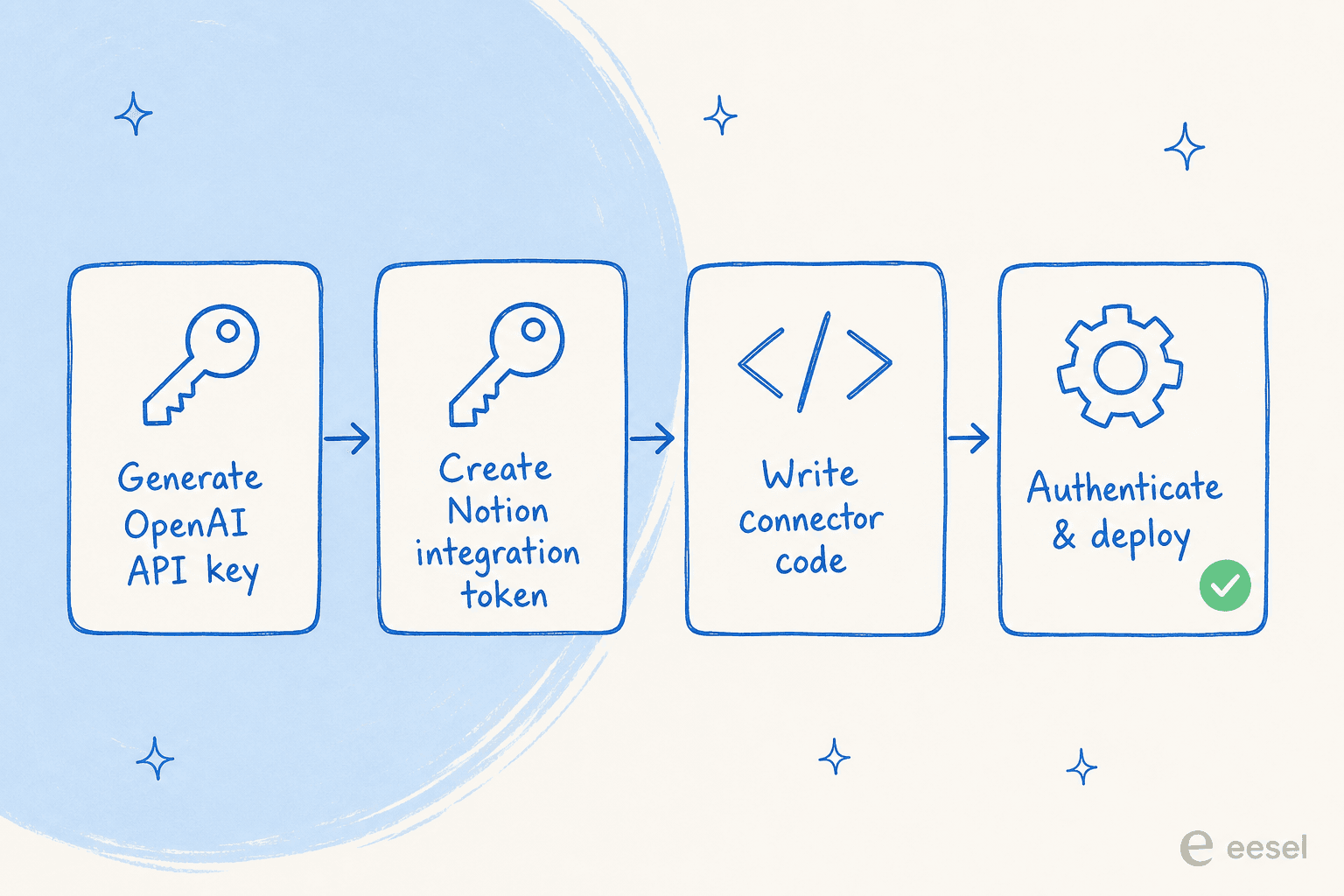
Heads up, though: this approach is a serious undertaking. It requires a big investment in engineering time and comes with its own set of headaches.
Challenges to expect with this method
It's technically demanding. This isn't a weekend project. You need experienced developers who know their way around APIs, data security, and building solid software. It means writing code to handle everything from authentication and data processing to managing API calls and building some kind of user interface.
It requires constant upkeep. Both OpenAI and Notion are always shipping updates. An API change on either side could break your custom-built tool, forcing your developers to drop what they're doing to put out fires. It creates a never-ending maintenance cycle.
The costs add up. The price tag goes way beyond the initial build. You're on the hook for ongoing developer salaries, hosting costs for your application, and the unpredictable cost of OpenAI API tokens. A sudden spike in usage can lead to a surprisingly big bill at the end of the month.
Even though Notion has introduced its Model Context Protocol (MCP) to help standardize how AI agents talk to its API, it's still a framework for developers, not a simple plug-and-play solution.
This is the exact reason platforms like eesel.ai exist — to give you that custom power without the custom-built headaches. You can connect Notion with a single click and use no-code tools to build powerful AI agents that can read, write, and act on your company's knowledge.
The no-code workaround: Zapier or Make
If custom coding sounds like too much, a lot of people look to third-party automation platforms like Zapier or Make. These tools act as a middleman, letting you link Notion and OpenAI to create simple, trigger-based workflows without writing a line of code.
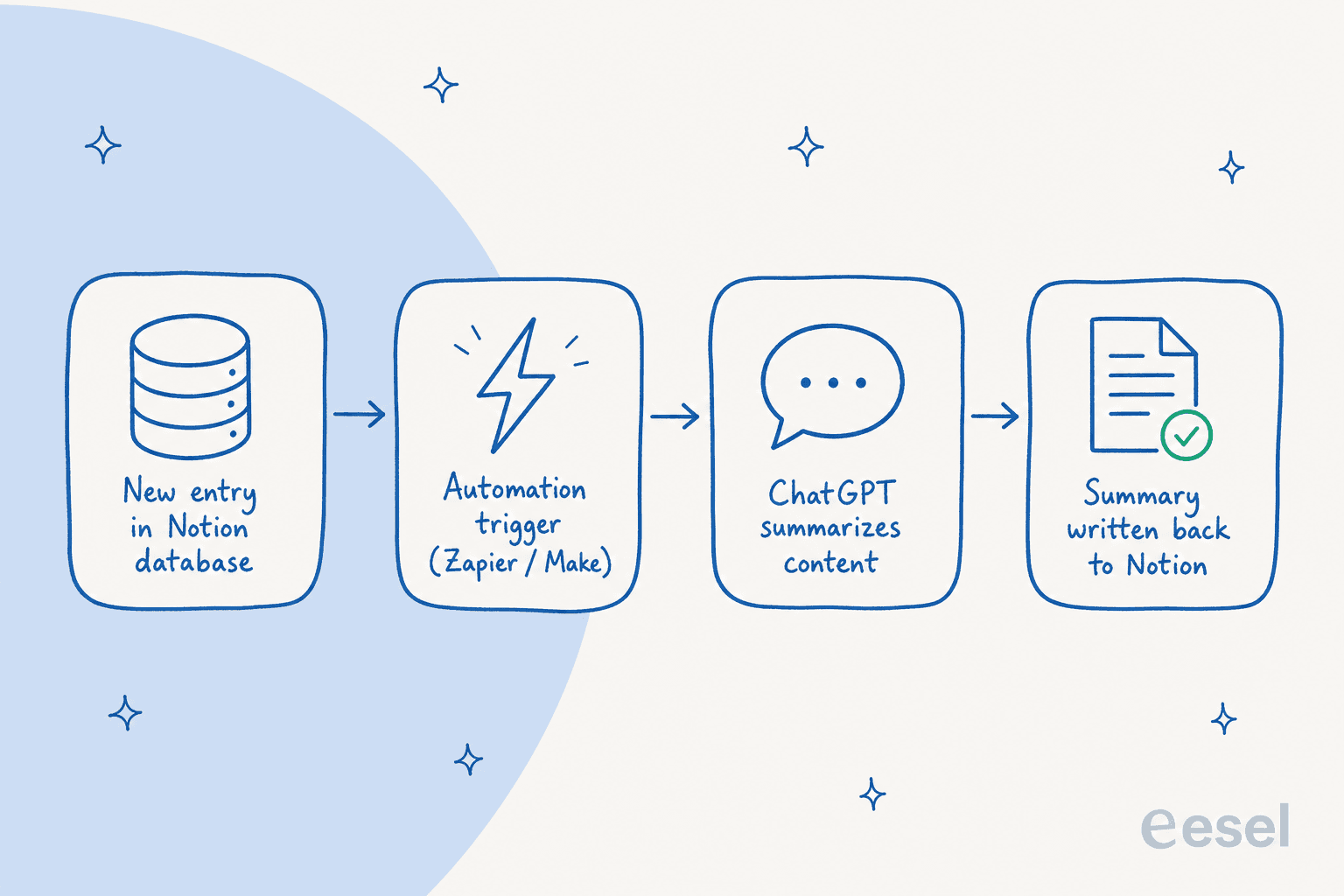
For instance, you could set up a "Zap" where a new entry in a Notion database tells ChatGPT to summarize the content, and then the summary gets posted back into another field in Notion. It's a clever way to piece together some basic automations.
The real downsides of this method
Things get complicated, fast. While it seems simple at first, building anything more than a basic two-step workflow can turn into a tangled web. Complex automations with multiple steps and "if-then" logic are a pain to build and even harder to fix when they break. There's a reason people call it "spaghetti automation."
You pay for everything. This is the biggest hidden trap. You have to pay the automation platform for every single "task" or "operation" it runs, on top of paying for your OpenAI API usage. Every little step in your workflow costs you, and those fees can grow unpredictably as you use it more.
They aren't built for AI. Zapier and Make are great general-purpose tools, but they aren't specialized AI platforms. They're missing key features you need for reliable AI automation, like the ability to simulate how an AI will behave before you launch it, analyze gaps in your knowledge, or train the AI on past conversations to really understand your business.
The pricing for this method
Pricing on these platforms is usage-based, which can be tough to predict. Note that Make moved to credit-based billing in 2025 — most actions cost one credit, with a free tier of 1,000 credits/month:
| Platform | Starting price (monthly) | What you get |
|---|---|---|
| Zapier (Professional) | $19.99 | 750 tasks/month |
| Make (Core) | from ~$9 | Credit-based; ~10,000 credits/month tier |
This route looks easy on the surface, but for business-critical work it often ends up being inefficient and costly. This is the core difference between a generic connector and a purpose-built AI platform. A platform like eesel.ai goes beyond triggers and actions by actually learning from your business context, letting you test performance safely, and giving you analytics to make your automations better over time.
What are you trying to do?
The business-ready solution: Unifying it all with eesel AI
For businesses that need to get serious and move past personal productivity hacks, a dedicated AI platform is really the only way to go. The other methods just don't cut it for business use: the native ChatGPT connector is too basic, custom APIs are too expensive and complicated, and generic no-code tools are clunky and missing essential AI features.
eesel.ai was built to fix these exact problems. It's an AI platform that lets you connect all your company's knowledge and deploy powerful AI agents in minutes, not months.
What makes eesel AI different
-
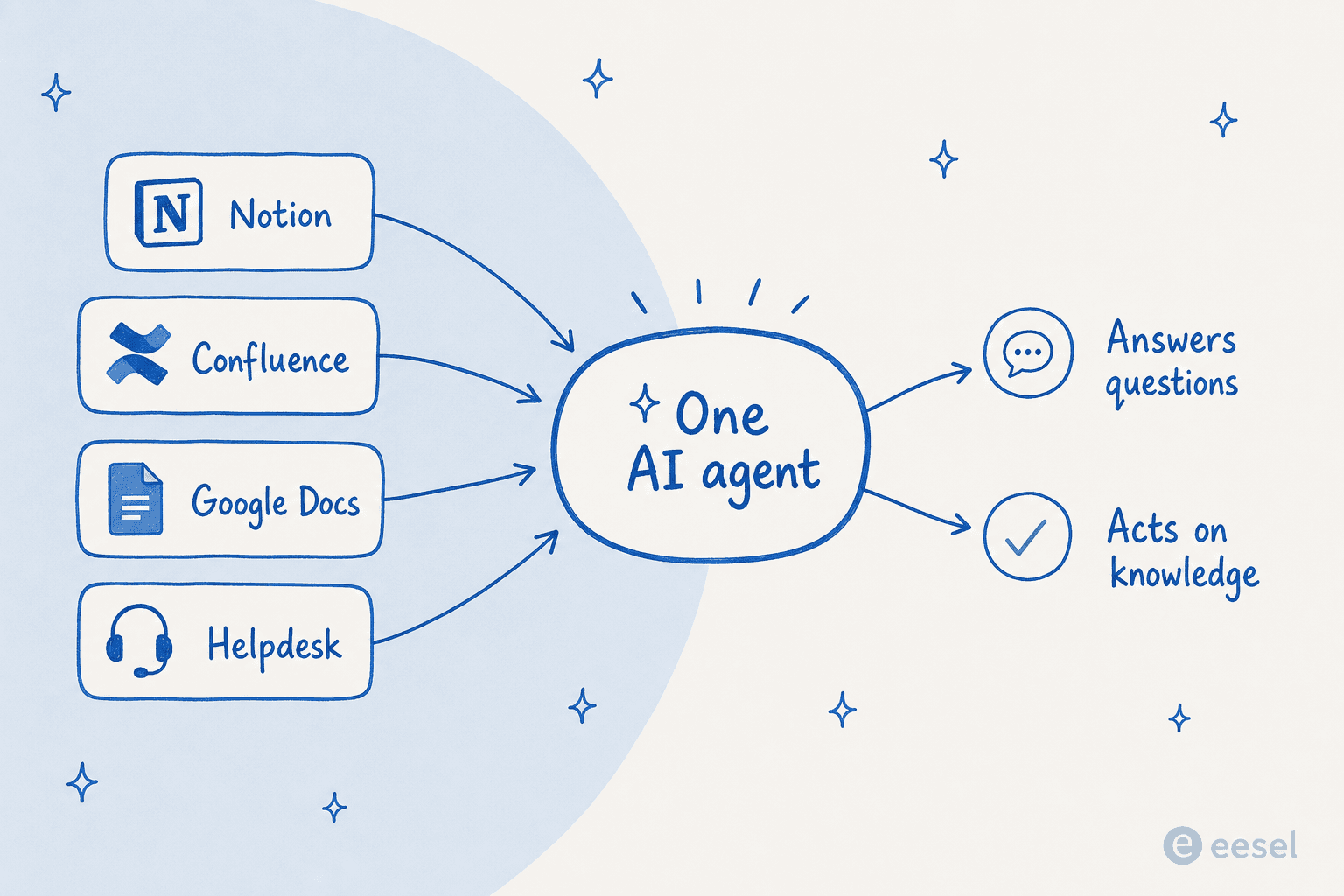
Go live in minutes, not months. Forget long development projects. You can connect Notion, Confluence, Google Docs, and your helpdesk with one-click integrations.
-
Bring all your knowledge together. Your company's brain isn't just in Notion. eesel AI trains on all your scattered sources of information, making sure your AI has the complete and accurate context it needs to answer questions the right way.
-
You're in complete control. Use a simple prompt editor to tell your AI exactly how to behave, what its personality should be, and what it can and can't do. Then you can safely test it on thousands of your past conversations in a simulation mode before it ever talks to a real customer.
-
Pricing that makes sense. eesel has one fixed monthly price sized to your volume (from $299/month for 500 credits), with no per-seat fees. You can cap overage yourself, so you won't get hit with surprise bills.
Moving beyond DIY OpenAI Codex integrations with Notion
As you can see, there are a few different ways to create OpenAI Codex integrations with Notion, but each comes with some pretty big trade-offs. What works for one person's private notes just won't scale for a whole team, and what a developer could build with a blank check and unlimited time isn't practical for most businesses.
The right solution really depends on what you're trying to accomplish. For businesses that want to automate customer support, empower their sales team, or give employees instant answers, a dedicated AI platform is the most efficient, powerful, and scalable way forward. It's all about choosing the right tool for the job.
Instead of wrestling with APIs or juggling a half-dozen no-code tools, you could be putting your Notion knowledge base to work right now. Try eesel for free and see what it's like to deploy a powerful AI agent in minutes.
Frequently asked questions
What kind of capabilities do OpenAI Codex integrations with Notion offer for businesses?
These integrations let AI process your Notion data, automate tasks, generate content, and surface insights. For businesses, that translates to better customer support, faster information retrieval, and more efficient workflows built on your centralized Notion knowledge.
Are there any free or low-cost ways to achieve OpenAI Codex integrations with Notion for personal use?
For personal use, the native ChatGPT connector (with a paid ChatGPT Plus subscription at $20/month) lets you link Notion. It gives ChatGPT read-only access to your notes so it can answer questions based on your Notion pages.
What are the main limitations when using ChatGPT’s native connector for OpenAI Codex integrations with Notion?
The big one is that it's read-only — ChatGPT can't write or update content in Notion. It's also tied to individual paid subscriptions, which makes it unsuitable for scalable, team-wide automation. For that you want a proper Notion AI integration.
How technically challenging are direct API implementations for OpenAI Codex integrations with Notion?
Direct API integrations are demanding — you need experienced developers to build and maintain them. Expect real engineering time for coding, ongoing upkeep as APIs change, and costs well beyond the initial build. Many teams skip it by using a managed AI agent instead.
Can no-code platforms like Zapier effectively handle complex OpenAI Codex integrations with Notion?
No-code tools can handle basic trigger-action workflows, but they get complex and costly fast for advanced scenarios. They aren't specialized AI platforms, so they lack features for simulating AI behavior, analyzing knowledge gaps, or training on business context. See how Zapier pricing adds up per task.
Why is a dedicated AI platform like eesel AI considered a better solution for comprehensive OpenAI Codex integrations with Notion in a business context?
Dedicated AI platforms offer one-click integrations, unify knowledge from multiple sources beyond Notion, give you control over AI behavior with prompt editors and simulation, and come with predictable pricing. That makes them more scalable for business-critical work. eesel even pulls in Confluence and Google Docs alongside Notion.
What specific benefits can a company expect from successful OpenAI Codex integrations with Notion using a platform like eesel AI?
Quick deployment of AI agents, access to unified company knowledge for accurate answers, the ability to test AI performance safely before launch, and cost predictability. That leads to enhanced productivity, better customer support, and informed decisions.