
Gamma in one breath
For anyone landing here cold: Gamma is an AI design platform that turns a prompt, outline or pasted file into a presentation, document, website, social post or graphic. The format is not fixed 16:9 slides, it is "cards" that expand to fit their content, which is why a single Gamma deck can also publish as a web page.
The company hit 70+ million users and $100M+ ARR by the time it raised a $68M Series B in November 2025 at a $2.1B valuation, led by a16z. It has been profitable for two-plus years on a ~50-person team. Customers on the homepage include Amazon, Adobe, Vercel, Zoom, LA Times and Stanford. If you want our deep read on the product itself, see our Gamma reviews piece.
Right, on to the money.

How Gamma pricing actually works (and where most people get it wrong)
If you only skim the pricing page, you walk away thinking the model is "$0 / $9 / $18 / $90 a month for more AI credits." Technically true. Also misleading.
The real model has three moving parts and the difference between them is where most people get tripped up.
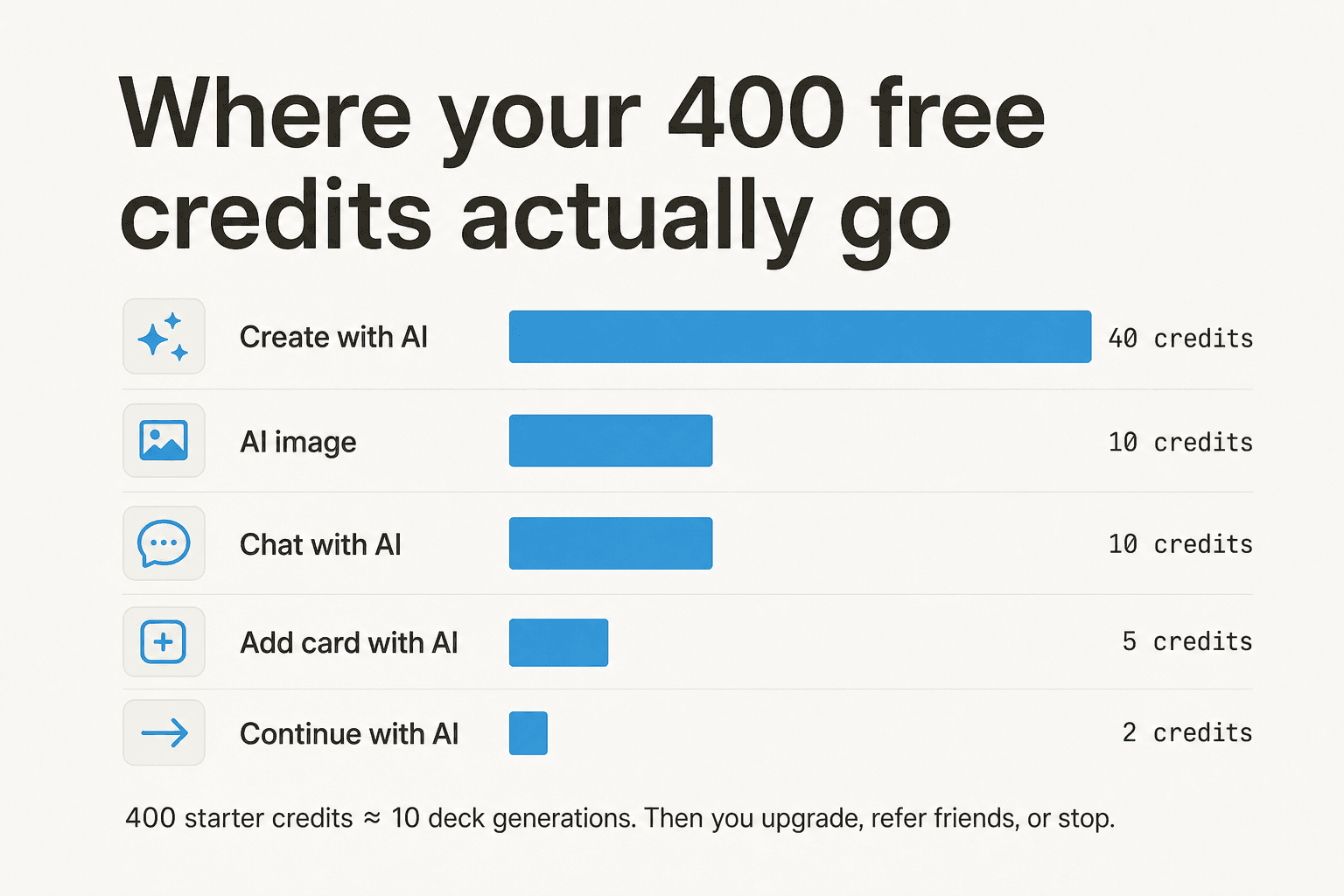
1. Credits. A unit that pays for AI work. The exact action they pay for changes between Free and paid. On Free, every AI thing costs credits (40 to create with AI, 5 per added card, 10 per chat suggestion, 10 per AI image, 2 per /continue). On paid plans, the rules flip: standard-model presentations and images are included with the plan, and only three things still spend credits - the Agent (post-generation edits), Ultra-tier AI models, and API calls. That distinction is buried in the help center, not the marketing page.
2. Tokens. A separate, per-generation cap on how much input the AI can chew in a single request. Free is capped at 50,000 tokens per generation, Plus/Pro/Ultra at 100,000 tokens. Tokens are not monthly. You can fire as many generations as you want as long as each one stays under the cap. Non-English text usually consumes more tokens per word, so multilingual decks hit the cap sooner. (Help Center on tokens)
3. Cards per prompt. The maximum number of slides Gamma will generate from a single prompt. Free is 10, Plus 20, Pro 60, Ultra 75. This is a hard cap; you cannot ask Pro to spit out an 80-card deck in one go.
The five-second mental model: credits are your monthly AI fuel, tokens are how much you can stuff into one generation, cards are how many slides come out the other side. Everything else in the pricing page is variations on those three plus features like custom domains, branding, SSO and so on.
The full Gamma pricing table
Every plan, every feature row, every gotcha column. The annual prices are what Gamma actually charges per seat per year on the pricing page; the help center's plan matrix is where the team-plan minimums and refund thresholds live.
| Feature | Free | Plus | Pro | Ultra | Team | Business |
|---|---|---|---|---|---|---|
| Monthly price | $0 | $9 / seat | $18 / seat | $90 / seat | Annual only | Annual only |
| Annual price (per seat / yr) | - | $108 ($9/mo equiv.) | $216 ($18/mo equiv.) | $1,080 ($90/mo equiv.) | $240 | $480 |
| Annual savings | - | up to 28% | up to 28% | up to 28% | - | - |
| Minimum seats | 1 | 1 | 1 | 1 | 2 | 10 |
| Cards per prompt | 10 | 20 | 60 | 75 | inherits Pro | inherits Team |
| AI tokens per generation | 50,000 | 100,000 | 100,000 | 100,000 | 100,000 | 100,000 |
| Monthly AI credits | 400 starter, never refresh | 1,000 | 4,000 | 20,000 | 6,000 / seat | 10,000 / seat |
| Credit rollover cap | up to 2,000 (referrals only) | 2,000 | 8,000 | 40,000 | 12,000 / seat | 20,000 / seat |
| AI image models | Basic | + Advanced | + Premium | + Ultra (state-of-the-art) | inherits Pro | most advanced |
| Remove "Made with Gamma" badge | No | Yes | Yes | Yes | Yes | Yes |
| Custom branding & fonts | No | No | Yes | Yes | Yes (company theme) | Yes |
| Detailed analytics & advanced sharing | No | No | Yes | Yes | Yes | Yes |
| Custom domains (multi-page sites) | 0 | 0 | 10 | 100 | 10 | 100 |
| API access | No | No | Yes | Yes | Yes | Yes |
| Workspace templates | No | No | Yes | Yes | Yes | Yes |
| Centralized billing & shared folders | No | No | No | No | Yes | Yes |
| Admin controls / advanced data controls | No | No | No | No | Yes | Yes |
| SSO authentication | No | No | No | No | No | Yes |
| SOC 2 documentation on request | No | No | No | No | No | Yes |
| Import PDF / PPTX | Yes | Yes | Yes | Yes | Yes | Yes |
| Export PDF / PPTX / PNG / Google Slides | Yes | Yes | Yes | Yes | Yes | Yes |
| Refund window (effective Dec 1, 2025) | n/a | 3 days, ≤200 credits used | 3 days, ≤600 credits used | 3 days, ≤2,000 credits used | 3 days, ≤900 credits used | 3 days, ≤1,000 credits used |
| Payment methods | n/a | Card / debit | Card / debit | Card / debit | Card / debit / ACH (25+ licenses) | Card / debit / ACH (25+ licenses) |
A note on the gaps you might notice: Gamma's pricing page does not publicly enumerate education or non-profit discounts, mobile-app availability per tier, file-upload size limits, version-history retention, uptime SLAs, dedicated CSM tiers or HIPAA. Most of those exist; they are just negotiated. If they matter to you, contact sales before you commit.
Plan-by-plan: what each one actually buys you
Free - $0, 400 starter credits, never refresh
The Free plan is genuinely free, with one important asterisk. You get 400 AI credits at sign-up and they do not refill (help center confirms). Once those 400 are gone, your only options are: refer a friend (200 credits per referral, capped at 2,000 total per user), upgrade, or stop using the AI features.
Doing the math: at 40 credits per AI-created gamma, 400 credits buys you roughly 10 full AI deck generations before you hit the wall. Every chat suggestion or AI image you ask for after that comes out of the same 400. Reddit threads aggregated by SlideGMM's 500-comment analysis put the most common framing this way (paraphrased): "I thought 400 credits was generous. Then I realized it's lifetime, not monthly."
You also get:
- Up to 10 cards per prompt.
- 50,000 input tokens per generation.
- Import from PDF and PPTX, export to PDF, PPT, PNG and Google Slides.
- "Made with Gamma" badge stays on every share and export.
- Basic AI image models only.
Verdict on Free: great for one-off projects, a classroom assignment, a quick pitch you will export and never touch again. Not the daily driver, despite what the surface marketing suggests. Treat it as an extended trial.
Plus - $9 / seat / mo, 1,000 monthly credits
This is the smallest "real" plan. You pay $9 a month (or $108 a year at the 28% annual discount) and get 1,000 credits monthly, refreshing on your billing date, plus a couple of meaningful unlocks:
- 20 cards per prompt (double Free).
- 100,000 input tokens per generation (double Free).
- The "Made with Gamma" badge is removed from shared content and exports - small thing, sounds small, isn't. For client-facing decks it is the single most-cited reason people upgrade from Free.
- Access to advanced AI image models (still not the top tier).
Credits roll over up to 2× the plan size, so the most you can ever bank on Plus is 2,000 credits at a time. Anything beyond that disappears.
Who should buy Plus: a single user who ships a deck or two a week, mostly to internal audiences, and just wants the watermark off. If you ship client work, you almost certainly want Pro instead - the custom branding gates are there, not here.
Pro - $18 / seat / mo, 4,000 monthly credits
This is the plan most paying solo users land on, and Gamma flags it as "Most popular" for a reason. For $18 a month (or $216 annually), you get:
- 4,000 monthly credits, rollover capped at 8,000.
- 60 cards per prompt (triple Plus). Big jump if you ship long pitch decks or training material.
- Premium AI image models.
- Custom branding and fonts, so the deck actually looks like yours.
- Detailed engagement analytics on shared links (who opened, who scrolled how far).
- Up to 10 custom domains for published multi-page sites. (Yes, you can host a small product site on Gamma.)
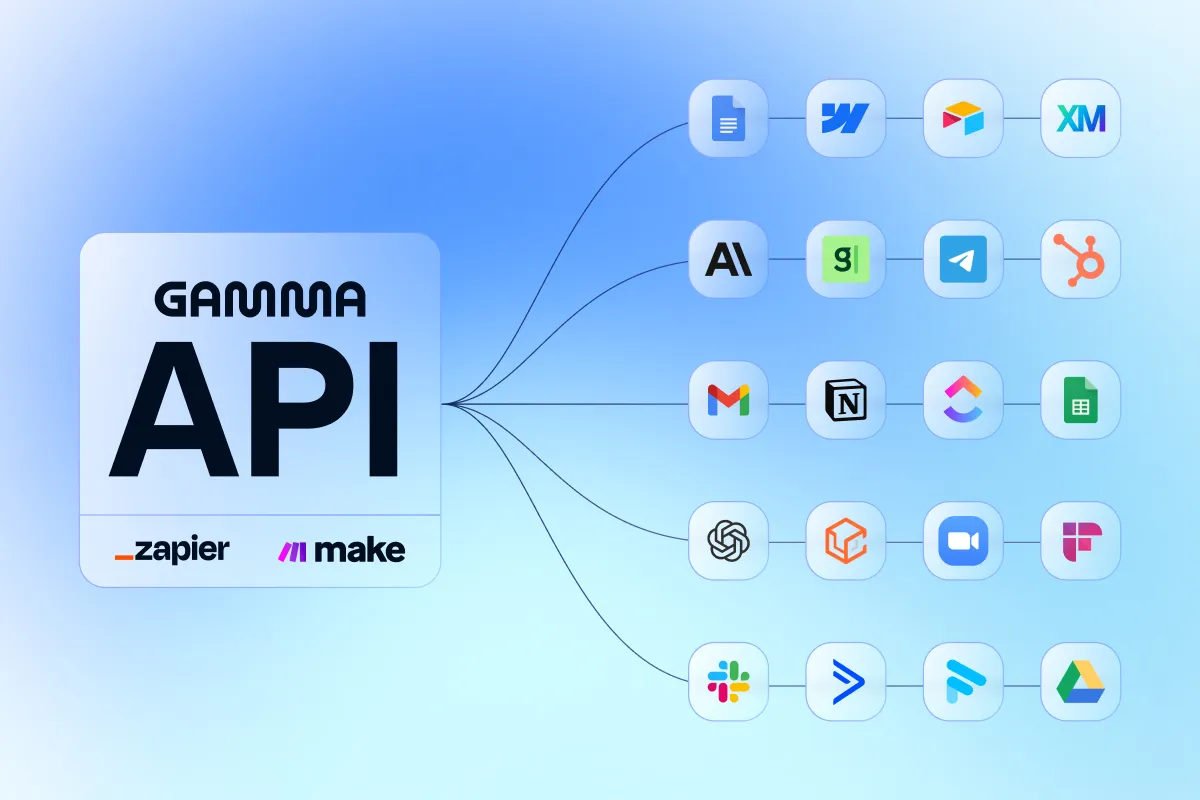
- API access. This is the first tier where Gamma's API v1.0 is available, with 100,000-token input limits and a "hundreds per hour" rate limit.
- Workspace templates for repeatable formats.
Pro is where Gamma starts feeling like a real production tool rather than a demo. The custom branding alone justifies the $9 jump from Plus for anyone shipping client-facing work; the API is the kicker for anyone wiring Gamma into a Zapier / Make / n8n workflow.
Who should buy Pro: consultants, founders, marketers, sales engineers, anyone shipping client-facing decks or building any kind of automation on top of Gamma. If you upgrade past Free, this is the default landing spot.
Ultra - $90 / seat / mo, 20,000 monthly credits
Five times the price of Pro for five times the credits and access to the most advanced models. Specifically:
- 20,000 monthly credits, rollover cap 40,000.
- 75 cards per prompt (a small bump from Pro's 60).
- The state-of-the-art "Ultra" image models - GPT Image Detailed, Ideogram Quality, Imagen 4 Pro and similar - plus access to text and video models in the same advanced bucket.
- Up to 100 custom domains (10× Pro).
- Early access to new features like Studio Mode (full-image slides for cinematic effect).
- One quirk: Ultra is monthly-only at the moment. No annual discount is available, though Gamma's help center says an annual version is planned.
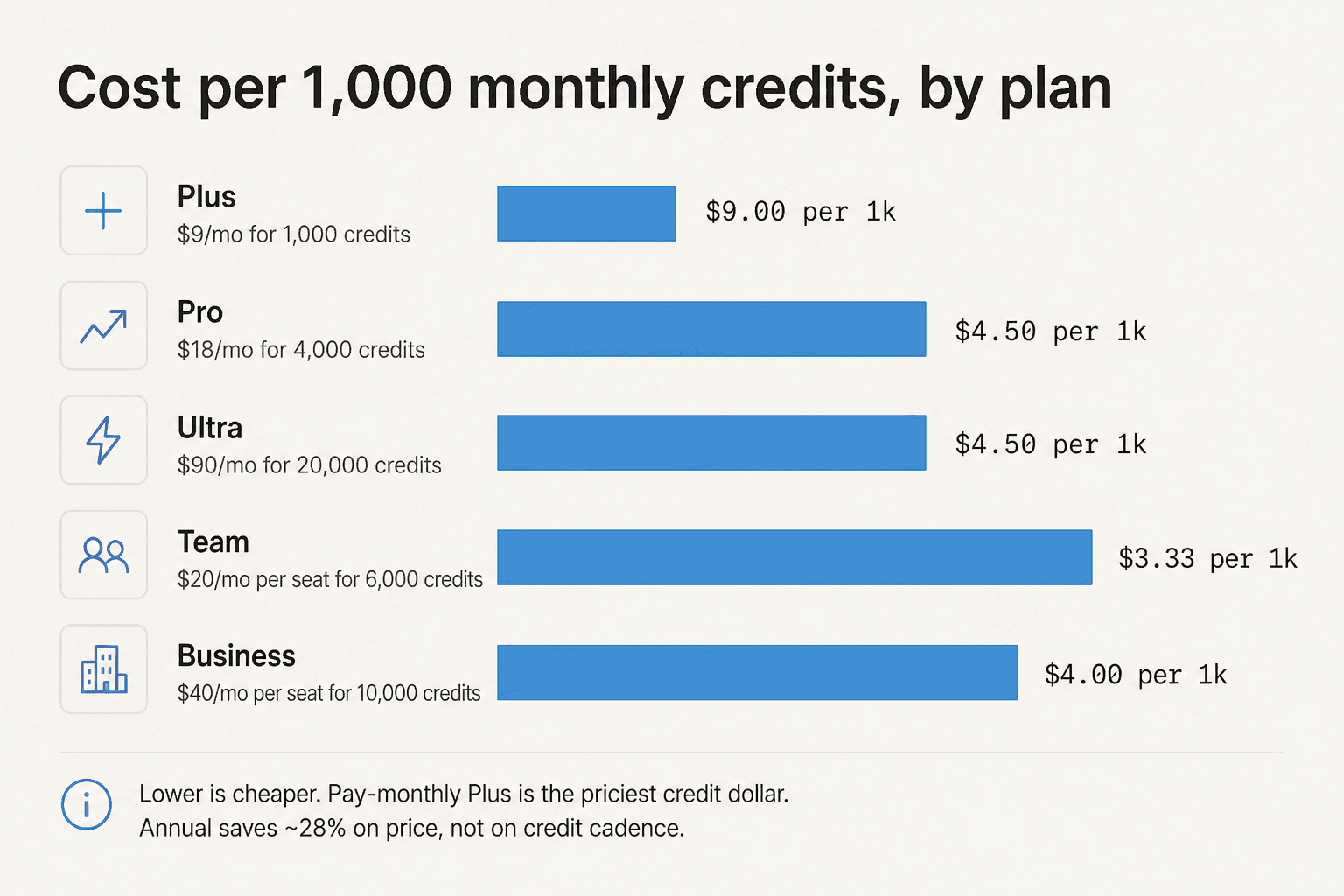
Doing the math the same way as before: at $90 for 20,000 credits, the dollar-per-1,000-credits cost is $4.50, identical to Pro's $4.50/1k. So Ultra is not a credit discount, it is access to better models and 5× the headroom before you hit the cap.
Who should buy Ultra: power users who actually consume the better models - heavy AI image / video generation, frequent Agent edits, heavy API throughput. Pro→Ultra is one of those upgrades that only makes sense if you know exactly which feature you are paying for. If you don't, don't.
Team - $20 / seat / mo (annual only, 2-seat minimum)
Pricing flips at the team tier in a few important ways:
- Annual billing only. No monthly Team plan exists. $240 per seat per year, billed up front.
- 2-seat minimum at all times. You cannot drop to one seat without contacting support.
- 6,000 credits per seat per month (up from Pro's 4,000).
- Everything in Pro, plus: centralized billing, custom company theme, shared folders, admin controls, advanced data controls.
- 10 custom domains.
- Members are invited by email only (link invites are disabled on Team and Business).
- ACH bank transfer requires a minimum of 25 licenses.
The 2-seat minimum means a Team plan is at least $480 a year. A consultant flying solo who briefly toys with putting their assistant on it should stay on Pro, not jump to Team for one extra credit allowance.
Business - $40 / seat / mo (annual only, 10-seat minimum)
The enterprise-lite tier. Annual only, 10-seat minimum (so $4,800/year floor), and:
- 10,000 credits per seat per month.
- Everything in Team, plus: SSO authentication, SOC 2 documentation on request, access to the most advanced AI models, advanced data controls.
- 100 custom domains.
- Same ACH requirement (25+ licenses) and invite-by-email-only rules.
For teams above 100 people, Gamma routes you to their contact form for a custom arrangement, but the public pricing stops at Business.
12 Gamma pricing gotchas worth knowing before you buy
A pricing post that just lists prices is a brochure. Here are the rules buried in the help center that materially change what you actually pay.
1. Free credits do not refresh, ever
Worth saying twice. The 400 you get on sign-up is a one-time grant. After they are gone, Free users are stuck unless they refer friends (200 per referral, capped at 2,000 lifetime) or upgrade. This is the single biggest reason Reddit threads describe Gamma's free plan as "more of an extended trial than a free tier" (SlideGMM aggregation).
2. Credits behave completely differently on paid plans
On paid plans, only three things consume credits: Agent (post-generation edits), Ultra-tier models, and API calls. Standard-model decks and standard-model images do not. This is the single most under-communicated thing on the pricing page - and the reason most Pro users never get close to their 4,000-credit ceiling.
3. Rollover is capped at 2× the plan size
Plus 1,000 → 2,000 cap. Pro 4,000 → 8,000 cap. Ultra 20,000 → 40,000 cap. Team 6,000 → 12,000 cap. Business 10,000 → 20,000 cap. Anything above the cap evaporates. So if you take a month off, you do not bank that month's allocation past the 2× line.
4. Annual plans drip credits monthly, not as a lump sum
This catches people. Annual Plus does not give you 12,000 credits up front; it gives you 1,000 per month at the discounted annual price (~28% off). Rollover still caps at 2,000. If you front-load a big project in January, you cannot pull next month's allowance forward.
5. The refund window is three days, and the credit-usage threshold matters too
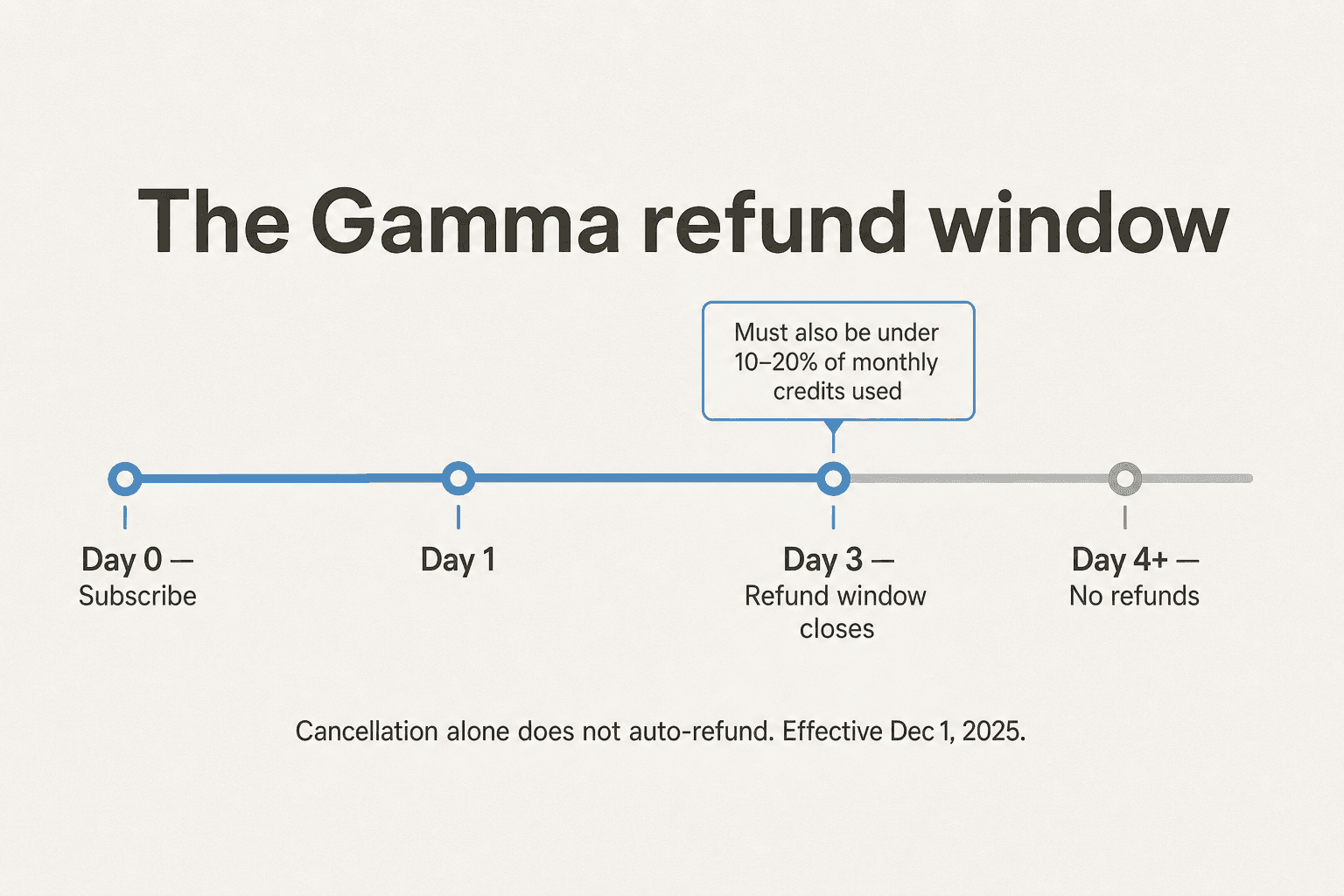
Effective December 1, 2025, Gamma offers refunds only within the first 3 days of subscribing (monthly or annual), and only if you have used less than a small per-plan credit threshold (refund policy):
| Plan | Refund eligible if within 3 days AND used less than |
|---|---|
| Plus | 200 credits (20% of monthly) |
| Pro | 600 credits (15% of monthly) |
| Team | 900 credits (15% of monthly) |
| Business | 1,000 credits (10% of monthly) |
| Ultra | 2,000 credits (10% of monthly) |
After day three, no refund, including on annual subscriptions, except where local consumer protection law requires it. Cancellation alone never auto-refunds - you must contact support.
This rule, applied uniformly to annual plans, is the single most-cited complaint on Gamma's Trustpilot page, where the brand sits at 1.7–1.9/5. A representative quote (un-attributed because Trustpilot only surfaced the body, not the username):
"When I reached out to request even a partial refund for the 10 months I hadn't used, I was told the 3-day refund window had passed."

6. Cancellation drops you back to Free with 400 credits
When you cancel a paid plan, you keep your credits and paid features until the end of the current billing period. Once it ends, your account drops to Free and any credits above 400 are removed - including purchased and rollover credits. If you have been hoarding, spend before you cancel.
7. Per-member billing on every paid plan
This one is mechanical but bites teams hard. Adding a user automatically bills you another $18/month (Pro) or $20/month/seat (Team). From the help center: "All paid plans are billed per active workspace member." Removing a user mid-cycle does not erase that month's charge.
8. There is no pause option
You cannot temporarily suspend a Gamma subscription. The only option is cancel, then resubscribe later. Content stays accessible after cancellation; paid features stop.
9. Buying extra credits costs $6 per 1,500
Need more credits mid-month? Top-ups are sold in 1,500-credit blocks at $6 each (help center). Two purchase modes: auto-recharge (set a threshold, gets topped up automatically) or one-time (only when you are below the rollover-buffer threshold; single-user workspaces only). Free users cannot buy credits at all - they must upgrade first.
In multi-user workspaces, each member triggering an auto-recharge is billed separately. Three teammates dropping below the threshold the same day = $6 × 3 = $18, not one $6 charge.
10. Team and Business plans cannot drop below their seat minimums
Team requires 2 seats minimum at all times; Business requires 10. You cannot drop below those numbers without contacting support, and there is no proration if you reduce mid-cycle. Plan your seat count carefully.
11. Downgrades are deferred, not immediate
If you downgrade from Pro to Plus, the change activates at the end of the current billing period, not when you click "downgrade." You keep all Pro features and credits until then (help center). After activation, your existing credit balance carries over up to the new plan's 2× rollover cap - anything above that disappears. No prorations or refunds.
12. ACH bank transfer is locked to 25+ licenses
If you wanted to pay by ACH (more attractive than credit card fees on large invoices), you need to be on a Team or Business plan with at least 25 licenses. Below that, it is cards only, with the usual interchange costs.
What real users say about Gamma's price
The polarization is striking. The product gets cited everywhere as the most fun way to draft a deck in 2026 - and the billing experience gets shredded.
The product-love camp
Hands-on takes from people who used Gamma in production:
"Beyond saving me hours of labor that I now channel into more meaningful work, Gamma has made me something of a campus hero!"
Christina Salazar, English Language Development Teacher (Gamma homepage)
"Amazing concept blending the experience of decks and docs… Gamma brings the umph and flair back to my presentations, with their expandable card design elements allowing you to no longer have to make tradeoffs between content depth and visual highlights."
Bilal Mahmood, founder, ClearBrain (Product Hunt review of Gamma)
"Didn't realize how much I needed this until I tried it out! As a Product Manager I'm always building slide decks that mix text and visuals, but building slides is super time consuming and the form factor is so limited."
Alan Yiu, Product Manager, Airtable (Product Hunt)
The "wait, what just happened to my credits / refund" camp
Where the negative reviews concentrate:
"Initially very impressive, speeds up time to create a new PPT from scratch. As you use it more and more though it starts to lose some of its luster… still a decent amount of inaccuracy when it comes to requests thru the AI tool."
Scott Lee (Product Hunt)
"My credits were depleted far more quickly than expected, despite using the platform in a similar way as when I first subscribed."
"Despite following their process and submitting refund requests through the website, [I] received no human response for over two weeks, with only automated AI-generated emails that do not address [my] issue."
A practitioner's mid-life take from LinkedIn - Westley Harnett pushing back on a Gamma partner post - captures it well:
"The time savings are real but only if you start with a clear prompt. I've seen folks rush in with vague input and get stuck editing a mess. Gamma's powerful, but it still needs your thinking up front." Westley Harnett (comment on LinkedIn)
The G2 / Capterra / Product Hunt scores are positive on the product (4.3 / 5 on G2, 4.3 on Capterra for Value-for-Money, 4.5/5 all-time on Product Hunt). The Trustpilot score is the inverse (1.7-1.9 / 5, confirmed on the brand page). It is the billing-and-support experience, not the product, that pulls the average down. The product-hunt recent-rating slipping to 3.2/5 (over the last 12 reviews) suggests the negative pattern is bleeding into developer/maker channels too.
So who should actually pay for Gamma, and who should not
If you are weighing Gamma against the no-AI status quo (PowerPoint, Google Slides, Keynote), Pro at $18 is a near-no-brainer. The hour you save on every other deck pays for the month many times over.
If you are weighing Gamma against another AI tool, the answer depends on what you ship:
- Mostly decks, mostly visual - Gamma Pro is genuinely the best AI starting point in 2026, on speed and design quality. Worth the $216/year.
- Mostly client decks with strict brand rules - Pro is still the floor. You need the custom-branding gates that Plus does not have. Budget for it.
- Mostly long-form content (blog posts, knowledge articles, internal Q&A) - Gamma is not designed for this and the flat fee will probably under-utilize. A pay-per-post tool like eesel AI's Blog Writer tends to be the better fit; you only pay $4 per blog post generated, no seat fee.
- High-volume API automation - Pro gets you in. Ultra gets you the headroom and the better models. Compare your projected credit burn against the $90/mo before signing up.
- Big team, regulated industry, SSO required - Business at $40/seat/year. Compare it against Gamma alternatives like Pitch and Beautiful.ai if procurement is the gating function.
The single biggest predictor of regret with a Gamma subscription is paying for a year upfront without doing a few sessions on the monthly Pro plan first. The 3-day refund window means once that annual charge clears, you are committed. Take a month at $18 to feel out your actual credit burn before committing to $216.
For anyone who likes Gamma's speed but balks at the flat-fee model, the more interesting comparison right now is against pay-per-use AI content platforms - see our Canva AI pricing breakdown, Jasper AI pricing walkthrough or Claude pricing deep dive for adjacent reads on how the rest of the AI content market prices itself.
Try eesel AI for content priced per post
If the thing keeping you on Gamma is the AI-first speed but the thing pushing you off is the credit / refund mechanic, it is worth knowing where eesel sits.
eesel AI is a platform for deploying AI teammates inside the tools your team already uses - Zendesk, Slack, Freshdesk, Gmail, HubSpot, Notion, Google Drive - covering support, content, sales and internal knowledge. For the content side specifically, the eesel Blog Writer ships research-grade SEO and AEO drafts in your brand voice.
The pricing model is the opposite of Gamma's: the Blog Writer is $4 per blog post, with no per-seat fees. For support, eesel runs on a fixed monthly plan: 1 credit covers a ticket or chat, and plans start at $299 a month for 500 credits. You can start with 100 free credits, no credit card required.
That model tends to map cleanly to the use case where Gamma's flat-fee approach pinches: front-loaded content needs (an Ontario naturopathic doctor on our customer side generated 20+ blog posts in three weeks then cancelled flat-fee tools at the one-month mark because there was nothing left to justify the recurring charge - paying per post would have kept her); irregular content sprints; teams piloting AI before committing seats.

If you ship more presentations than blog posts, keep Pro. If your AI needs are mostly long-form content, support, or internal knowledge across a stack you already use, give eesel a try - you can start with 100 free credits, no card required.
Frequently Asked Questions
Is Gamma actually free?
Yes, but with a twist. The Free plan gives you 400 AI credits at sign-up and they never refresh. Every action on Free costs credits (40 to generate a deck, 10 per AI image, 5 per added card), so most people exhaust the allocation in their first session or two. From there it is referrals, an upgrade, or stop. If you only need one deck, Free is genuinely free. For anything ongoing, treat it as an extended trial.
What does Gamma Pro cost and what does it unlock?
Gamma Pro is $18 per seat per month (or $216 per seat per year, saving up to 28%). It includes 4,000 monthly AI credits, 60 cards per prompt, premium AI image models, custom branding and fonts, detailed analytics, up to 10 custom domains, API access and workspace templates. It is also the lowest tier that gives you Gamma's API. Most paying solo users land on Pro.
How do Gamma AI credits work?
On paid plans, only three things consume credits: Agent (post-generation edits), Ultra-tier AI models and API calls. Everything else (presentations, standard-model images) is included. On Free, every AI action costs credits. Unused credits roll over up to 2× the plan size, so Plus tops out at 2,000 credits, Pro at 8,000, Ultra at 40,000. Annual plans drip credits monthly, not as a lump sum.
Can I get a refund from Gamma if I cancel?
Only within the first three days of subscribing, and only if you have used less than 10–20% of your monthly credits depending on the plan (per the refund policy effective Dec 1, 2025). After day three, no refund, even on annual plans. Cancelling alone never auto-refunds. This single rule is the biggest source of negative reviews of Gamma.
Is Gamma worth paying for, or should I use a cheaper tool?
If you ship more than one or two decks a month and value the AI-first speed, Pro at $18 is the sweet spot. If you mostly need branded long-form content (blogs, knowledge articles, internal Q&A) rather than slides, a pay-per-post tool like eesel AI's Blog Writer ($4 per blog post) tends to pencil out better than a flat-fee credit plan. Heavy presentation users with multiple seats should also compare Gamma alternatives before committing annually.


Article by
Rama Adi
Rama is a software engineer at eesel AI with two years of experience writing about B2B SaaS, AI tools, and customer support technology. Based in Bali, Indonesia, he brings a developer's perspective to product comparisons — cutting through marketing copy to what the integrations and APIs actually do.