Zendesk Guide knowledge capture widget: Complete setup and usage guide

Stevia Putri
Last edited February 25, 2026
Support teams generate valuable knowledge every day. Agents solve unique problems, discover workarounds, and develop expertise that could help future customers. But without a system to capture that knowledge, it disappears into closed tickets and agent notes.
The Zendesk Guide knowledge capture widget (also called "Knowledge in the Agent Workspace") solves this problem by bringing knowledge management directly into the ticket interface. Instead of switching between tools or waiting for weekly knowledge reviews, agents can create, flag, and link articles without leaving the conversation.
If you're looking to implement Knowledge Centered Support (KCS) practices or simply want to make your knowledge base more useful, this guide covers everything you need to know about the knowledge capture widget. We'll also explore how AI-powered solutions like eesel AI can complement Zendesk's native capabilities for teams ready to take knowledge management further.

What is the Zendesk Guide knowledge capture widget?
The knowledge capture widget is a built-in feature of Zendesk Guide that embeds knowledge management functionality directly into the Zendesk Support ticket interface. It changes how agents interact with your knowledge base by making article creation and maintenance part of their daily workflow.
Here's the short version: instead of treating knowledge as a separate task that happens after ticket resolution, the widget lets agents capture insights while they're still in the context of the conversation.
The widget serves three core functions:
- Article recommendations AI-powered suggestions based on ticket content that agents can link with one click
- Article flagging Marking outdated or incorrect content for review with attached feedback
- Article creation Writing new knowledge base articles directly from tickets using predefined templates
This approach aligns with Knowledge Centered Support (KCS) methodology, which emphasizes capturing knowledge at the moment of resolution rather than treating it as a separate administrative task. Companies like Electronic Arts, Fossil, Clever, and FINALCAD have reported stronger knowledge management capabilities after implementing the knowledge capture workflow.
The feature is available across Zendesk Suite plans, though capabilities vary by tier. Let's break down what you need to get started.
Setting up the knowledge capture widget
Before installing the widget, you'll need to verify your plan includes the necessary features. The knowledge capture functionality requires:
- Zendesk Suite Team ($55/agent/month annually) or higher, OR
- Zendesk Support Team ($19/agent/month annually) with the Help Center add-on
All Suite plans include the knowledge capture features, but higher tiers unlock additional capabilities. Suite Professional ($115/agent/month annually) adds approval workflows, scheduled publishing, and content blocks. Suite Enterprise ($169/agent/month annually) expands this to up to 300 help centers and advanced user segmentation.
Installation process
If you're on a qualifying plan, the knowledge capture widget should already be available in your agent interface. For teams that signed up before April 2018, you may need to install it from the Zendesk Marketplace.
To verify or configure the widget:
- Navigate to Admin Center > Channels > Agent Workspace
- Confirm "Knowledge in the context panel" is enabled
- Set permissions for which agent roles can create, flag, and edit articles
- Configure article templates for your team
Configuring permissions
Not every agent needs full knowledge management access. Zendesk lets you control permissions based on agent roles:
- Guide Lite (included with Suite Team): Agents can search, preview, and insert links to existing articles
- Guide Professional: Adds the ability to flag articles and create new content
- Guide Enterprise: Includes draft workflows and advanced publishing controls
For teams practicing KCS, we recommend giving all agents permission to flag articles and create new content in a staging section. This follows the "good enough" article philosophy: a basic article that exists is more valuable than a perfect article that was never written.
Using the knowledge capture widget: Core features
Once configured, the widget appears in the agent workspace alongside each ticket. The interface shows relevant knowledge base content and provides tools to interact with it.
Article recommendations
The widget uses AI to analyze ticket content and suggest relevant help center articles. It considers the ticket's brand, language, and subject matter to surface the most applicable content.
When agents see a useful recommendation, they can link it to the ticket response with one click. This serves two purposes: it gives the customer immediate self-service resources, and it trains the recommendation algorithm by showing which articles actually resolve issues.
According to Zendesk's documentation, teams using article recommendations see faster resolution times and more consistent responses. Agents don't need to manually search the knowledge base or guess which article fits best.
Flagging articles for updates
One of the biggest challenges in knowledge management is keeping content current. Products change, processes evolve, and yesterday's solution becomes today's outdated advice.
The flagging feature lets agents mark articles that need attention without disrupting their workflow. When an agent encounters incorrect or incomplete information, they can:
- Click the flag icon on the article
- Add specific feedback about what needs updating
- Submit the flag, which creates a ticket for the knowledge team
This creates a continuous improvement loop. Your knowledge team gets specific, contextual feedback about which articles need work and why. Agents feel heard because they can easily report issues. Customers benefit from more accurate self-service content.
A Customer Care Operations manager at Fossil described this workflow: "The Knowledge Capture app allowed agents to directly contribute to our knowledge base from within the ticket, whether that meant revising an article or creating a new one. When they identify a gap in our knowledge center content, they can actually request an article."
Creating new articles from tickets
Sometimes the knowledge base simply doesn't have an answer for the issue at hand. In these cases, agents can create new articles directly from the ticket interface.
The creation workflow includes:
- Predefined templates to ensure consistent formatting
- Automatic population of ticket details into the article
- Options to save as draft or publish immediately (depending on permissions)
- Assignment to the appropriate knowledge base section
This is where the "good enough" philosophy becomes important. A community moderator in the Zendesk forums shared their approach: "We support 'good enough' article creation. If an article doesn't exist, we'd rather an article exist than be perfect. An example article might be: Question: 'How do I solve this problem?' Answer: 'Ask Daniel for help.' It's not the solution, but it is a solution to get the agent on the right step."
This iterative approach means your knowledge base grows organically based on actual customer needs rather than theoretical documentation requirements.
Building workflows with the knowledge capture widget
The widget becomes truly powerful when integrated into broader knowledge management workflows. Here are proven patterns from teams using the feature effectively.
Setting up review queues
Raw article creation needs editorial oversight. Most successful implementations create a staging area where agents can publish initial drafts, which knowledge managers then review and refine.
A typical workflow looks like this:
- Agents create articles in an "Unconfirmed" section visible only to internal users
- Knowledge team members review flagged articles and new submissions weekly
- Approved articles move to public-facing sections
- Articles with insufficient detail remain in Unconfirmed until more feedback accumulates
This approach respects agents' time while maintaining quality standards. As one community member noted: "The reason we don't push for 100% perfection is that some articles aren't used that often. We want to spend our energy on content that is in use, so we make updates based on current feedback."
Integration with triggers and automation
Zendesk's trigger system can automate knowledge-related workflows:
- Auto-assign article creation tickets to your knowledge team
- Set service level agreements for article updates (one team uses a 3-day pausable update SLA)
- Route flagged articles based on topic or product area
- Notify subject matter experts when their expertise is needed
For teams needing more advanced automation, the Knowledge Capture Actions app (a third-party Marketplace app) extends the widget with features like automatic ticket field updates when specific articles are linked.
Measuring success with analytics
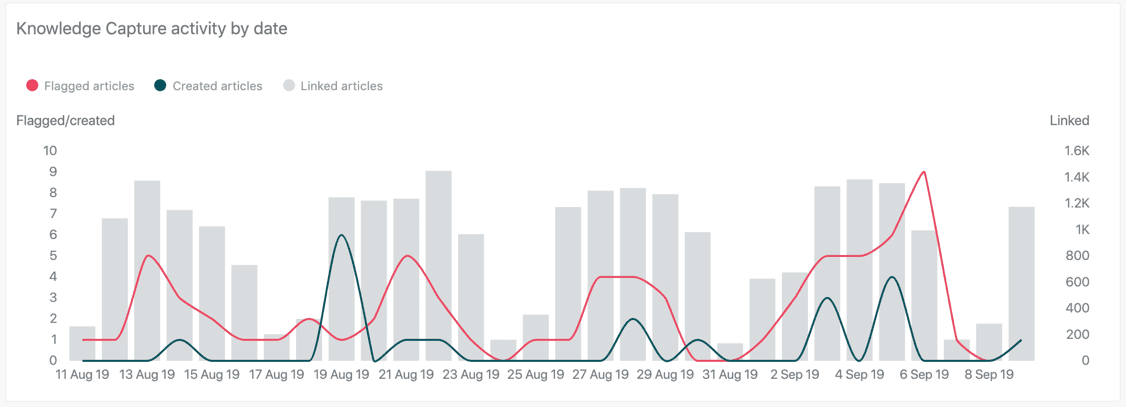
Zendesk Explore provides a dedicated Knowledge Capture dashboard that tracks key metrics:
| Metric | What it measures |
|---|---|
| Agent engagement rate | Percentage of tickets with knowledge activity |
| Linked articles per ticket | Average articles linked per ticket using the widget |
| Total linked articles | Cumulative articles linked through knowledge capture |
| Flagged articles | Count of articles marked for update |
| Created articles | New articles generated from tickets |
These metrics help you understand adoption and identify opportunities. Low engagement might indicate agents need training. High flagging rates could signal content quality issues. Rapid article creation suggests your knowledge base had significant gaps.
Real-world implementation: Tips from support teams
Beyond the official documentation, support teams have developed practical strategies for getting the most from the knowledge capture widget.
Start with internal articles
Several teams recommend beginning with an internal-facing knowledge base before publishing customer content. This lets agents practice creating and flagging articles without public visibility, building confidence in the workflow.
Use "link accuracy" tracking
One community member described their quality control process: "We started doing some tracking with Link Accuracy. This isn't automatic in Zendesk, but we are pulling a few random tickets out to validate that the knowledge process was followed appropriately. Based on these random samples, we'll give a score for Link Accuracy to our agents."
This manual sampling complements the automated metrics and helps ensure agents are actually using recommended articles appropriately rather than just clicking to clear notifications.
Embed feedback mechanisms
Some teams extend knowledge capture beyond agents by embedding the Zendesk Web Widget into help center articles. This lets customers flag content issues directly, creating tickets that route to the knowledge team for review.
Troubleshooting common issues
Even with proper setup, teams sometimes encounter issues with the knowledge capture widget:
Widget not appearing: Verify "Knowledge in the context panel" is enabled in Admin Center and that agents have the necessary Guide permissions for their plan tier.
Cannot create articles: Article creation requires Guide Professional or Enterprise. Suite Team includes Guide Lite, which only supports searching and linking existing content.
Permissions errors: Double-check that custom agent roles have the specific knowledge management permissions assigned. The default "Agent" role may not include article creation rights.
Integration conflicts: Some older apps like Answer Suggestion and Ticket to Help Center conflict with the Knowledge Capture widget. Zendesk recommends migrating to the newer knowledge capture functionality.
Enhancing knowledge management with AI
The knowledge capture widget is an excellent foundation for knowledge management, but it still relies on manual agent effort. Each article requires someone to recognize the gap, write the content, and maintain it over time.
For teams looking to scale knowledge operations, AI-powered solutions can complement Zendesk's native capabilities. At eesel AI, we've built an AI teammate that works alongside Zendesk to automate knowledge creation and maintenance.
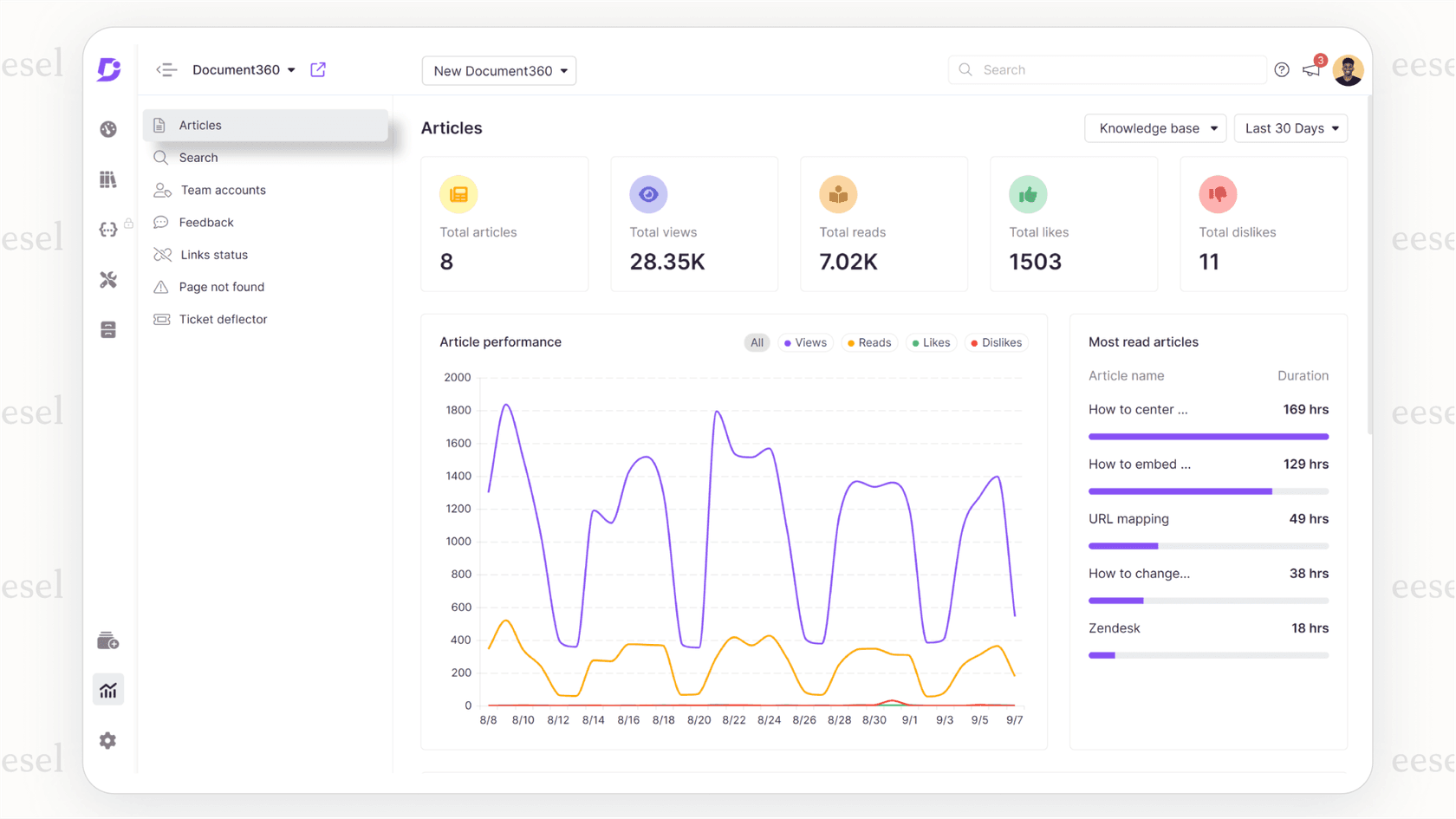
Here's how it works: instead of waiting for agents to manually create articles, our AI analyzes resolved tickets and automatically drafts knowledge base content. These drafts follow your templates and style guides, then route to your knowledge team for review and approval. This captures institutional knowledge that might otherwise slip through the cracks.
We also offer AI-powered article suggestions that go beyond keyword matching. Our system understands the intent behind customer questions and surfaces the most relevant content, even when the wording doesn't exactly match your knowledge base articles.
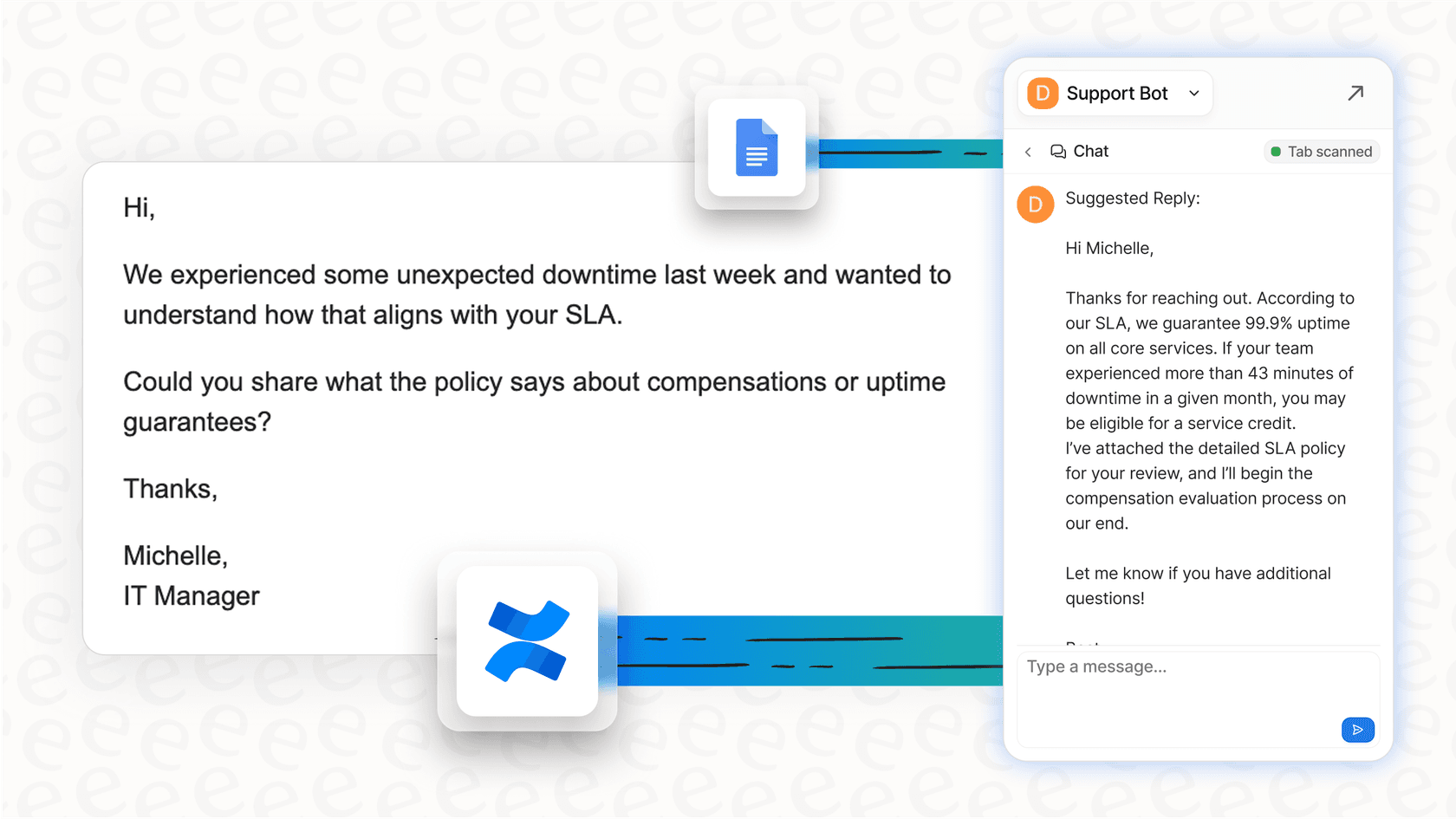
For teams already using Zendesk's knowledge capture widget, eesel AI integrates directly with your existing workflows. We can enhance the articles your agents create, suggest updates to flagged content, and identify knowledge gaps before they become customer frustrations.
Getting started with better knowledge management
The Zendesk Guide knowledge capture widget turns knowledge management from an afterthought into a natural part of support operations. By letting agents create, flag, and link articles without leaving their workflow, it removes the friction that typically prevents knowledge sharing.
To implement it effectively:
- Verify your plan includes the necessary Guide features
- Configure permissions based on your team's KCS maturity
- Set up review workflows that balance quality with speed
- Use the analytics dashboard to track adoption and identify gaps
- Consider AI enhancements from solutions like eesel AI to scale your knowledge operations
The teams seeing the best results treat knowledge as a product that evolves continuously. They start with "good enough" articles, improve them based on feedback, and measure success by how well the knowledge base actually helps customers help themselves.
If you're ready to reduce repetitive tickets and give customers faster answers, start by enabling the knowledge capture widget in your Zendesk account. And if you want to explore how AI can accelerate your knowledge management efforts, see how eesel AI works with Zendesk.


Frequently Asked Questions
Share this article

Article by
Stevia Putri
Stevia Putri is a marketing generalist at eesel AI, where she helps turn powerful AI tools into stories that resonate. She’s driven by curiosity, clarity, and the human side of technology.
