How to bulk request satisfaction surveys in Zendesk: 3 methods that work

Stevia Putri
Last edited February 24, 2026
If you're managing a support team in Zendesk, you've probably run into this problem: you have dozens (or hundreds) of solved tickets, and you want to request satisfaction surveys for all of them at once. But Zendesk doesn't have a "bulk request satisfaction" button.
This gap frustrates support leaders who need to collect feedback on backlogs, measure agent performance, or gather data for quarterly reviews. The good news? There are workarounds. In this guide, we'll cover three proven methods to request satisfaction surveys at scale in Zendesk: trigger automation for future tickets, the API approach for existing backlogs, and third-party tools that handle the heavy lifting.
Let's break it down.
Method 1: Set up automated satisfaction triggers
The most common approach is replacing Zendesk's default 24-hour delay with an immediate trigger. This won't help with existing solved tickets, but it ensures you never miss a survey going forward.
Step 1: Disable the default automation
First, turn off the system automation that waits 24 hours before sending surveys. If you skip this step, customers might receive duplicate requests (one from your new trigger immediately, another from the automation a day later).
Navigate to Admin Center > Objects and rules > Business rules > Automations. Find the automation titled "Request customer satisfaction rating (system automation)," click the three-dot menu, and select Deactivate.
Step 2: Create a new trigger
Now let's build the trigger that sends surveys immediately when tickets are solved.
Go to Admin Center > Objects and rules > Business rules > Triggers and click Add trigger. Give it a clear name like "Request satisfaction on solve" so other admins understand what it does.
Step 3: Configure trigger conditions
Under "Meet ALL of the following conditions," add these two conditions:
Condition 1:
- Object: Ticket
- Field: Status category (or Status if custom statuses are disabled)
- Operator: Changed to
- Value: Solved
Condition 2:
- Object: Ticket
- Field: Satisfaction
- Operator: Is
- Value: Unoffered
The "Unoffered" condition is critical. It prevents duplicate surveys if a ticket gets reopened and solved again.
Step 4: Set up trigger actions
Under Actions, add:
Action 1:
- Object: Ticket
- Field: Satisfaction
- Value: Offered to requester
Action 2:
- Notify by: User email
- Ticket: (requester)
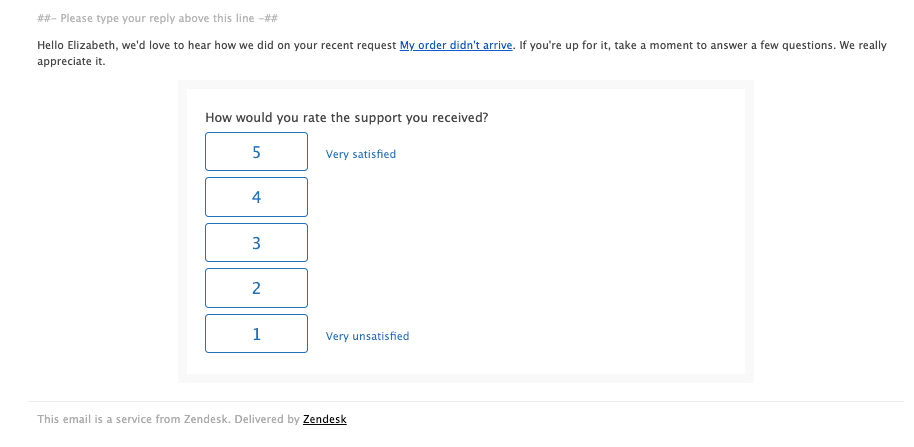
For the email content, include this placeholder in the body: {{satisfaction.rating_section}}. Without it, customers won't see the rating buttons. You can customize the subject line and message text to match your brand voice.
Step 5: Test your trigger
Create a test ticket using your personal email as the requester, then solve it. You should receive the satisfaction survey within a minute or two. Check the ticket's events log to confirm the trigger fired correctly.
If it doesn't work, double-check whether you're using "Status category" versus "Status" (this depends on whether your account has custom ticket statuses enabled).
Method 2: Use the Zendesk API for bulk operations
Triggers handle future tickets, but what about that backlog of 500 solved tickets from last month? The API approach is your best bet for retroactive satisfaction requests.
When to use the API approach
This method makes sense when:
- You have a large backlog of solved tickets without surveys
- You need to target specific segments (certain date ranges, tags, or organizations)
- You have technical resources available to implement and monitor the process
API workflow overview
The strategy involves using Zendesk's Tickets API to update the satisfaction status on multiple tickets at once. The bulk update endpoint is /api/v2/tickets/update_many.json, which accepts up to 100 ticket IDs per call.
Here's the general approach:
- Query tickets with
status=solvedandsatisfaction=unoffered - Filter by your criteria (date range, tags, organization)
- Batch update tickets in groups of 100
- Respect the API rate limit (100 requests/minute for default plans, up to 300/minute with High Volume API Add-On)
Sample implementation
A typical workflow looks like this:
GET /api/v2/search.json?query=status:solved satisfaction:unoffered solved>2025-01-01
This returns solved tickets from January 2026 onward that haven't had satisfaction offered yet. You'd then extract the ticket IDs and send a bulk update:
PUT /api/v2/tickets/update_many.json?ids=1,2,3,4,5...
{
  "ticket": {
    "satisfaction_score": "offered"
  }
}
The tricky part: Zendesk doesn't have a direct "send satisfaction survey" API endpoint. Setting satisfaction to "offered" via API doesn't automatically trigger the email. You'd need to combine this with a trigger that fires when satisfaction changes to "offered," or use the Zendesk Sell bulk email feature if you have access.
Limitations to know
- Requires technical expertise or developer time
- No native "bulk request satisfaction" endpoint exists
- Risk of hitting API rate limits (100-300 requests/minute depending on your plan)
- You'll need to build error handling and retry logic
Method 3: Third-party tools and apps
If the API approach sounds like overkill, third-party tools offer a middle ground. These solutions integrate with Zendesk and provide bulk operation capabilities without custom development.

Proactive Bulk Tickets app
Available in the Zendesk Marketplace, this app from Sparkly lets you create tickets in bulk for outbound campaigns. While it's designed for proactive messaging rather than retroactive surveys, you could use it to create follow-up tickets that trigger satisfaction requests.
Pricing:
| Plan | Monthly Price | Key Features |
|---|---|---|
| Team | $99 | Up to 1k tickets per campaign, macro integration |
| Professional | $199 | Up to 5k tickets, CSV import, ticket forms |
| Enterprise | $349 | Up to 15k tickets, multi-language, templates |
The app includes a 7-day free trial. It's best suited for proactive outreach campaigns rather than surveying historical tickets.
eesel AI for satisfaction automation
eesel AI offers a different approach. Rather than bulk-updating existing tickets, it helps you set up intelligent satisfaction automation that learns from your data.
Here's how it works: you connect eesel AI to your Zendesk account, and it analyzes your past tickets, macros, and help center articles to understand your support patterns. From there, it can:
- Automate satisfaction survey triggers based on ticket content and context
- Analyze CSAT comments at scale to identify recurring themes
- Spot knowledge gaps where your help center is missing articles
- Improve continuously as you correct responses or update policies
The advantage? Instead of manually configuring complex trigger logic, you're essentially training an AI teammate that learns when to request feedback based on your historical patterns. For teams drowning in support data but lacking the time to analyze it, this can be a significant time-saver.
eesel AI pricing:
| Plan | Monthly Price | Annual Price | Interactions |
|---|---|---|---|
| Team | $299 | $239/mo | 1,000/mo |
| Business | $799 | $639/mo | 3,000/mo |
| Custom | Contact sales | Custom | Unlimited |
For more on setting up satisfaction triggers, see our guide on how to trigger Zendesk satisfaction surveys on ticket solve.
Choosing the right tool
Consider these factors when evaluating third-party options:
- Volume: How many surveys do you need to send monthly?
- Features: Do you need simple automation or advanced analysis?
- Integration: Does it work with your existing tech stack?
- Budget: Factor in both upfront costs and ongoing subscription fees
Best practices for Zendesk bulk request satisfaction
Getting the mechanics working is only half the battle. Here are proven tactics to maximize response rates and data quality.
Timing matters
When you send surveys significantly impacts response rates. Here's what the data shows:
| Timing | Response Rate | Best For |
|---|---|---|
| Immediate | Higher | Simple issues clearly resolved |
| 2-4 hours | Balanced | Complex technical problems |
| 10 hours | Higher | Landing at top of inbox next morning |
| 24 hours (default) | Lower | Giving customers time to verify fixes |
Some support teams find that surveys sent during working hours can get lost in email volume, while those sent after hours may sit at the top of the inbox when customers check email. A 10-hour offset from solve time often lands well for next-morning visibility.
Avoid survey fatigue
Nothing kills response rates faster than over-surveying. Consider these guardrails:
- Skip surveys for trivial issues like password resets or common questions
- Don't survey customers who've submitted multiple tickets in a short window
- Use tags to mark tickets as "survey-eligible" only when appropriate
- Consider throttling to one survey per customer per week maximum
Personalize your messaging
Generic survey emails feel automated (because they are). Small personalizations improve response rates:
- Use the customer's first name:
Hi {{ticket.requester.first_name}} - Reference their specific issue:
About your recent question regarding {{ticket.title}} - Explain why their feedback matters: "Your input helps us improve our support experience"
Monitor and iterate
Set up reporting in Zendesk Explore to track:
- Response rates by agent, channel, and ticket type
- Satisfaction scores over time
- Common themes in negative feedback
A/B test different timings and email copy to see what works best for your audience.
Troubleshooting common issues
Even with clear instructions, things sometimes don't work as expected. Here's how to fix the most common problems.
Trigger not firing
If your trigger isn't sending surveys:
- Verify the trigger is active (not in draft mode)
- Check whether you're using "Status category" or "Status" (depends on custom status settings)
- Review the ticket's events log to see if the trigger attempted to fire
- Ensure all conditions are met (triggers use AND logic)
Duplicate surveys being sent
If customers receive multiple survey requests:
- Confirm the "Satisfaction is Unoffered" condition is present in your trigger
- Double-check that the default automation is deactivated
- Look for other custom triggers that might also be sending surveys
Low response rates
If your response rates are disappointing:
- Experiment with different send times (immediate vs. delayed)
- Test different email subject lines
- Train agents to mention the survey at the end of positive interactions
- Review whether you're surveying the right tickets (skip trivial issues)
Analyzing your satisfaction data
Collecting feedback is pointless if you don't use it. Here's how to turn CSAT data into actionable insights.
Key metrics to track
In Zendesk Explore, focus on:
- % Satisfaction rated: Your response rate (aim for 15-20% or higher)
- % Satisfaction score: The percentage of positive ratings
- Trends over time: Are scores improving or declining?
Segmentation strategies
Break down your data to find patterns:
- By agent: Who consistently earns high scores?
- By channel: Do chat interactions score higher than email?
- By issue type: Are certain topics generating more negative feedback?
- By time: How do scores vary by day of week or hour of day?
For a deeper dive on measurement strategies, check out our guide on Zendesk customer satisfaction metrics.
Closing the loop
When you receive negative feedback, follow up promptly. A simple email acknowledging the issue and explaining how you're addressing it can turn a detractor into a promoter. Plus, it shows customers that their feedback actually matters, which encourages future participation.
Start automating your Zendesk satisfaction surveys
You've now got three viable approaches to request satisfaction surveys at scale in Zendesk:
- Trigger automation for future tickets (immediate satisfaction on solve)
- API bulk updates for existing backlogs (technical approach)
- Third-party tools for enhanced automation and analysis
The right choice depends on your specific situation. If you just want to stop missing surveys going forward, Method 1 (triggers) is your answer. If you have a massive backlog to survey retroactively, Method 2 (API) might be worth the technical investment. And if you want intelligent automation that learns from your data, third-party tools like eesel AI offer a compelling alternative.
The bottom line? Don't let Zendesk's lack of a native bulk request feature stop you from collecting the customer feedback your team needs to improve. Pick a method, implement it, and start turning support interactions into actionable insights.


Frequently Asked Questions
Share this article

Article by
Stevia Putri
Stevia Putri is a marketing generalist at eesel AI, where she helps turn powerful AI tools into stories that resonate. She’s driven by curiosity, clarity, and the human side of technology.



