
If you’re in the business world, you’ve probably heard about Salesforce Einstein AI. It’s being pushed as the next big thing in CRM, an AI layer that promises to make every customer interaction smarter. Now, it's largely being rolled into a platform called Agentforce.
With all the buzz, it’s fair to ask: is it actually the right move for your team?
For anyone managing a customer service team, the question is even more pointed. Will Einstein’s features really make your support team’s life easier, or will it just lock you into a complicated and expensive ecosystem?
This guide cuts through the marketing fluff. We'll give you a straight-up review of Salesforce Einstein AI, zeroing in on what it means for customer service teams. We’ll look at the features, try to make sense of the pricing, and talk about the real-world limitations you should know about. We'll also look at how other, more flexible tools can give you powerful AI automation without making you replatform your entire company.
What is Salesforce Einstein AI?
First off, Salesforce Einstein AI isn't a single product you can just go out and buy. It's more of a brand name for all the artificial intelligence tech built across the entire Salesforce platform. It started out doing predictive AI, but has since beefed up with generative AI, mostly under the new Agentforce name. The main goal is to make the world's #1 CRM also the "world's smartest CRM" by helping with predictions, content creation, and automation for everyone from sales to support.
At its core, Einstein AI is built to combine its AI models with your company's data from the Salesforce Data Cloud. This gives the AI context about your business and customer history, so its suggestions and answers are hopefully more helpful and on-brand.
Here are the main pieces of the puzzle:
-
AI Agents (Agentforce): These are autonomous agents that can do things like answer customer questions or qualify new leads on their own.
-
Einstein Copilot (now folded into Agentforce): This is a conversational AI assistant that lives inside your Salesforce apps. It helps employees get answers, automate tasks, and find information without leaving their workflow.
-
Data Cloud: Think of this as a massive data engine that pulls together customer information from all over the place to create one single, clean profile for each customer.
-
Einstein Trust Layer: This is a security wrapper that makes sure your private data stays private when using generative AI. It prevents sensitive info from being sent to external AI models.
Basically, Einstein AI is meant to be the smarts behind the entire Salesforce machine, making every part of the business run a little bit smoother.
Salesforce Einstein AI's customer service features
While Einstein AI touches every part of Salesforce, its biggest promises are often aimed at customer service. For support teams, the dream is to solve tickets faster, make customers feel understood, and free up agents from repetitive work. Let's dig into the features designed to make that happen.
Key features and capabilities
Under its Service Cloud and Agentforce brands, Salesforce has rolled out a handful of tools aimed at modernizing the contact center.
-
AI Agents for Service: These aren't your average chatbots. They can summarize resolved cases to help build your knowledge base, and they're designed to handle a variety of customer issues without needing rigid, pre-written scripts. The idea is to let human agents tackle the really tricky problems.
-
Einstein Copilot: For your human agents, the Copilot works like a smart assistant right inside their service console. It can pull up relevant knowledge articles during a chat or call, suggest what to say next, and recommend the next best action to solve a case more quickly.
-
Unified Knowledge: This is a big step forward. Einstein can now connect to knowledge that lives outside of Salesforce. It can tap into third-party platforms like Atlassian Confluence, Google Drive, and Microsoft SharePoint. This means the AI can pull answers from a much broader set of company documents, not just what’s stored in Salesforce.
-
Einstein Conversation Mining: This tool sifts through your call and message history to spot trends. For example, if it notices a spike in complaints about a certain product feature, it can flag it for service managers. They can then create a new knowledge article or train a bot to handle that specific question.
The reality of setup and integration
These features sound great on paper, but their biggest strength is also their main weakness: they are built to work best inside the Salesforce bubble.
The integration is seamless if your entire company lives and breathes Salesforce. But connecting everything isn't a simple one-click affair. For instance, if you want to integrate a third-party phone system like Aircall or Dialpad, you're looking at a pretty technical, multi-step process that involves:
-
Setting up an "integration user" with very specific permissions.
-
Configuring things called Connected Apps and Auth. Providers.
-
Creating and authenticating Named Credentials.
-
Juggling API keys and user IDs.
This isn't something you can just knock out on a Friday afternoon. It usually requires a dedicated Salesforce admin or developer, which makes it clear that Einstein AI isn't a quick, plug-and-play fix.
A big hurdle: Getting your data ready
Salesforce is right when they say, "a company’s AI strategy is only as good as its data strategy." An AI can only give good answers if it has good data to learn from. This is where the Salesforce Data Cloud enters the picture, but it also adds another layer of work.
Unifying your data
The Einstein 1 Data Cloud is Salesforce's ambitious fix for scattered data. It's a massive data engine built to pull in and organize information from everywhere, your CRM, e-commerce site, web analytics, and even unstructured stuff like Slack messages, to create one unified profile for each customer.
This single profile is then fed to Einstein AI through a metadata framework. Think of this framework as a translator that helps the AI understand what all the data means and how it's connected, which helps it generate better answers. They've also added "Zero Copy" partnerships, so you can connect data from places like Snowflake without having to physically move it all into Salesforce.
The limits of a Salesforce-first data model
This is a powerful concept, but the Data Cloud is primarily designed to pull data into Salesforce's world to fuel its own apps. If your company’s knowledge is spread across a bunch of different best-in-class tools, this creates a major roadblock.
Getting all your information into the Data Cloud can be a huge project. Sometimes it requires extra tools like MuleSoft or custom-built integrations. And while the new Unified Knowledge feature lets you connect to outside sources like Confluence, it feels more like a small step toward openness than a truly open platform. The whole system is built to make Salesforce the center of your universe.
This just isn't practical for many teams. Why go through the pain of replicating your entire Google Docs or Notion knowledge base in Salesforce when an AI could just connect to it directly?
This is where a different approach can save a lot of time and effort. Tools like eesel AI are built to meet your knowledge where it already is. Instead of a giant data migration project, you can instantly train an AI on your past help desk tickets, your Confluence articles, and your internal guides in Google Docs. You start seeing results right away without being forced to centralize everything first.
Pricing and customer reviews
For a lot of businesses, the decision boils down to two things: how much does it cost, and does it actually work? Based on what's publicly available, here's the deal.
How much does Salesforce Einstein AI cost?
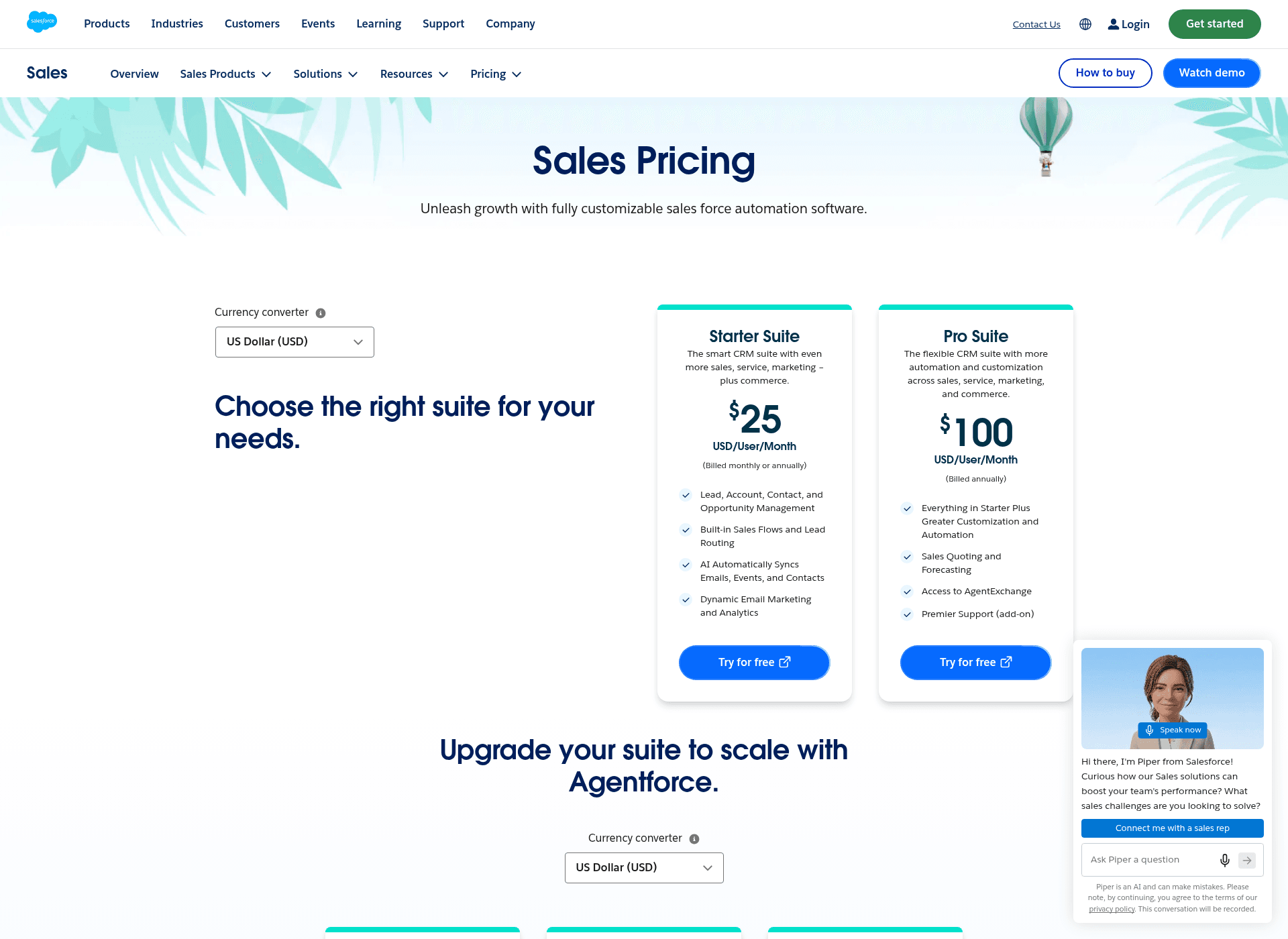
Salesforce's pricing is famously complicated, and Einstein AI is no different. You can't just buy the AI features on their own; they're bundled into the more expensive editions of Sales Cloud and Service Cloud.
According to their pricing page, you're looking at something like this:
-
Enterprise Edition ($175/user/month): Comes with some basic AI features like "Agentforce" and "Conversation Intelligence."
-
Unlimited Edition ($350/user/month): Adds "Predictive AI" and other more advanced tools.
-
Agentforce 1 Sales Edition ($550/user/month): Includes the "full suite of AI" with unmetered usage.
On top of that, Salesforce has talked about charging for some agent features on a consumption basis, starting around $2 per conversation. This mix of high per-user fees and potential usage costs can make it really hard to predict your budget, especially if you have a high-volume support team.
| Salesforce Sales Cloud Edition | Price (Billed Annually) | Key AI Features Included |
|---|---|---|
| Pro Suite | $100/user/month | Very few, if any, advanced AI features. |
| Enterprise | $175/user/month | Agentforce, Conversation Intelligence. |
| Unlimited | $350/user/month | Everything in Enterprise + Predictive AI. |
| Agentforce 1 Sales | $550/user/month | Full suite of AI, unmetered employee usage. |
What are the common themes in Salesforce Einstein AI reviews?
Piecing together info from Salesforce's own materials and general industry chatter, a few clear themes emerge.
The Good:
-
It’s built right in: Its biggest strength is that it's native to Salesforce. The AI has deep access to all your CRM data, which makes it really good at tasks that rely on customer history.
-
Everything in one place: For companies already running on Salesforce, it offers a single, connected platform for your data, AI, and workflows.
-
Solid security: The Einstein Trust Layer gives companies peace of mind about data privacy, which is a huge deal when you're working with generative AI.
The Not-So-Good:
-
It's complex and expensive: The best features are hidden behind pricey, top-tier plans, and the setup is a serious undertaking. You'll need real technical expertise and a healthy budget.
-
It locks you in: It's designed to pull you deeper and deeper into the Salesforce ecosystem. If your tech stack includes tools outside of Salesforce for your helpdesk or knowledge base, Einstein can feel rigid and frustrating.
-
It's resource-heavy: Building and maintaining your own AI agents with their Agent Builder and Testing Center isn't a one-and-done task. It requires ongoing work from admins and developers, which adds to the overall cost.
The eesel AI alternative: Flexible, fast, and transparent
If the cost, complexity, and lock-in of Salesforce Einstein AI sounds like a bit much, you're not alone. Lots of teams want powerful AI automation without the enterprise-level baggage. This is where eesel AI comes in as a refreshingly simple alternative.
eesel AI was built from day one to be easy, flexible, and effective. It connects with the tools you already use and starts providing value in a matter of minutes.
Here’s a quick comparison:
| Feature | Salesforce Einstein AI | eesel AI |
|---|---|---|
| Setup Time | Days to months; needs a technical team. | Minutes; completely self-serve with 1-click integrations. |
| Integrations | Salesforce-first; connecting other tools is a project. | Instantly connects to Zendesk, Confluence, and other tools. |
| Knowledge Sources | Wants all your data in its Data Cloud. | Trains directly on your tickets, docs, and help centers. |
| Pricing Model | Complicated bundles, per-user licenses, usage fees. | Transparent, predictable plans. No per-resolution fees. |
| Flexibility | Works best if you're 100% in the Salesforce world. | Works with your existing tools, no migration needed. |
With eesel AI, you can get an AI Agent to handle frontline support and an AI Copilot to help your human agents, all trained on your company's unique knowledge, without the headache.
Is Salesforce Einstein AI right for you?
Salesforce Einstein AI is a seriously powerful platform, but it’s for a very specific type of company. If your business is all-in on the Salesforce ecosystem, and you have the budget and technical team to handle a major implementation, its deep integration can be a huge advantage.
However, for most customer service teams, a simpler, more nimble approach is often the better way to go. If you value speed, ease of use, and the freedom to stick with the tools you already know and love, Einstein’s walled-garden approach can feel like more of a cage than a castle.
For teams that want to get the benefits of powerful AI without the enterprise-sized cost and complexity, a solution like eesel AI is the smarter path. It lets you automate support, empower your agents, and bring all your knowledge together in minutes, not months.
Ready to see what a truly flexible AI solution can do for you? Explore eesel AI's products and start automating your support today.
Frequently asked questions
What do Salesforce Einstein AI reviews generally say about its suitability for businesses not fully invested in the Salesforce ecosystem?
Many Salesforce Einstein AI reviews highlight that the platform is best suited for companies already deeply integrated with Salesforce. Its strength lies in its native connection to Salesforce data, making it less ideal for diverse tech stacks or those with knowledge spread across many non-Salesforce tools.
How complex is the setup and integration process according to Salesforce Einstein AI reviews?
Salesforce Einstein AI reviews often point out that setup and integration can be quite complex and time-consuming, sometimes requiring dedicated Salesforce admins or developers. It's not a quick plug-and-play solution, especially when integrating third-party tools or external data sources.
Can Salesforce Einstein AI reviews clarify the typical pricing structure for its advanced AI features?
Pricing for Salesforce Einstein AI is often described as complex, with advanced features bundled into higher-tier Service Cloud editions, ranging from $175 to $550 per user/month. There can also be additional consumption-based fees for certain agent features, making budget prediction challenging.
What are the main benefits for customer service teams highlighted in Salesforce Einstein AI reviews?
Salesforce Einstein AI reviews emphasize benefits like AI Agents handling frontline support, Einstein Copilot assisting human agents with suggestions, and unified knowledge access. These features aim to help solve tickets faster, reduce agent workload, and improve customer satisfaction.
Do Salesforce Einstein AI reviews address how it handles data privacy and security with generative AI?
Yes, Salesforce Einstein AI reviews often mention the Einstein Trust Layer. This security wrapper is specifically designed to ensure data privacy and prevent sensitive customer or company information from being exposed to external AI models when using generative AI features.
What alternatives do Salesforce Einstein AI reviews suggest for businesses seeking more flexible or easier-to-implement AI solutions?
Some Salesforce Einstein AI reviews, like this one, suggest alternatives such as eesel AI. These tools are presented as more flexible, offering quicker setup and integration with existing non-Salesforce knowledge bases and help desks without requiring large data migrations.