
Remember the old company wiki? That clunky, digital binder where information went to be forgotten. You’d spend ages meticulously organizing files, only for everyone to ignore it and ask the same questions in Slack anyway.
Well, things have changed. Today's best Knowledge Management Systems (KMS) are packed with AI, promising to instantly find any answer, anywhere. But with so many new tools popping up, which ones actually deliver on that promise?
I spent a week digging into the top 7 KMS AI alternatives to see which platforms could genuinely sort out my team's scattered knowledge. We've got stuff everywhere: Slack, Google Docs, our help desk, it's a mess. My goal was simple: find a tool that's easy to set up, has smart AI, and actually makes our lives easier instead of just adding another login to remember. Here’s my honest breakdown of what I found.
What is a KMS AI, and why bother with KMS AI alternatives?
At its core, a Knowledge Management System (KMS) is just a central library for a company's information: things like how-to guides, project plans, and support docs. A KMS AI takes that library and gives it a brain. It uses artificial intelligence to automatically organize, search, and even create knowledge.
Instead of just storing documents, it actually understands them. You can ask it a normal question like, "What's our refund policy for international customers?" and it gives you a straight answer, not just a link to a 10-page document you have to skim through.
So, if they're so great, why are people looking for KMS AI alternatives? The problem is that many platforms, even the ones with new AI features, were designed for a totally different way of working. They often come with a few familiar headaches:
-
Your info is scattered everywhere. The knowledge is stuck in separate apps, like your wiki, your help desk, and your chat tool. The KMS can't connect the dots, so you’re still hunting for answers.
-
Someone has to manually update everything. Content needs to be constantly tagged, updated, and organized. If that person gets busy (and they always do), the system quickly becomes a digital graveyard of outdated info.
-
The search function is useless. You have to guess the exact keyword to find what you need, which kind of defeats the whole purpose of having a central knowledge hub in the first place.
-
They force you into rigid folders. Many older systems make you use strict folder structures that just don't match how modern teams actually collaborate and share information.
A good KMS AI should fix these issues, not just give you more admin work to do.
How I tested the best KMS AI alternatives
To keep this review practical, I used the same five criteria for each platform. These are the things that really matter when you're a busy team just trying to get work done.
-
Setup and integration: How fast can you connect your tools and start seeing results? Does it make you move everything over from your current help desk or wiki, or does it work with what you've got?
-
AI search and answer quality: Does it understand questions asked in plain English? Does it give you accurate answers with sources, or just dump a list of links on you?
-
Customization and control: Can you actually control what the AI does? Are you able to define its tone and the specific actions it takes, or is it a one-size-fits-all bot?
-
Knowledge unification: Can it pull information from all your different sources (docs, past tickets, chat DMs) to create one single source of truth?
-
Pricing and transparency: Is the pricing easy to understand? Are there hidden fees that punish you for being successful, like charging you per ticket it solves?
Comparison of the top KMS AI alternatives in 2026
Here’s a quick rundown of how the top tools compare. For my full thoughts on each one, just keep reading the detailed reviews below.
| Tool | Best For | Ease of Setup | Key Differentiator | Pricing Model |
|---|---|---|---|---|
| eesel AI | All-in-one support automation & internal knowledge | 5/5 | Connects to all existing tools without migration; powerful simulation | Per interaction (not resolution) |
| Guru | Internal wikis & in-app knowledge sharing | 4/5 | Browser extension for contextual suggestions | Per user |
| Confluence AI | Large enterprises & engineering documentation | 4/5 | Deep integration with Jira and the Atlassian suite | Per user |
| Notion AI | Flexible, all-in-one team workspaces | 4/5 | Combines docs, databases, and AI in one canvas | Per user |
| Document360 | Customer-facing help centers and product docs | 4/5 | Strong focus on structured, public-facing documentation | Per project |
| Slite | Teams that want a self-maintaining internal wiki | 5/5 | Clean UI, async collaboration, and the Slite Agent – from $10/user/mo | Per user |
| Knowmax | Contact centers with complex, structured processes | 3/5 | Guided decision trees and visual workflows | Custom quote |
The 7 best KMS AI alternatives in 2026
Here’s my detailed review of each tool, starting with the one that impressed me the most.
1. eesel AI
Best for: Teams who want to automate support and bring their knowledge together without having to switch tools.
eesel AI stood out right away because it isn't trying to replace your wiki or help desk. Instead, it’s a smart AI layer that connects directly to the tools you’re already using, like Zendesk, Slack, Confluence, Google Docs, and over 100 others. This "no rip-and-replace" philosophy is a huge deal. You can get it working in minutes, not months.
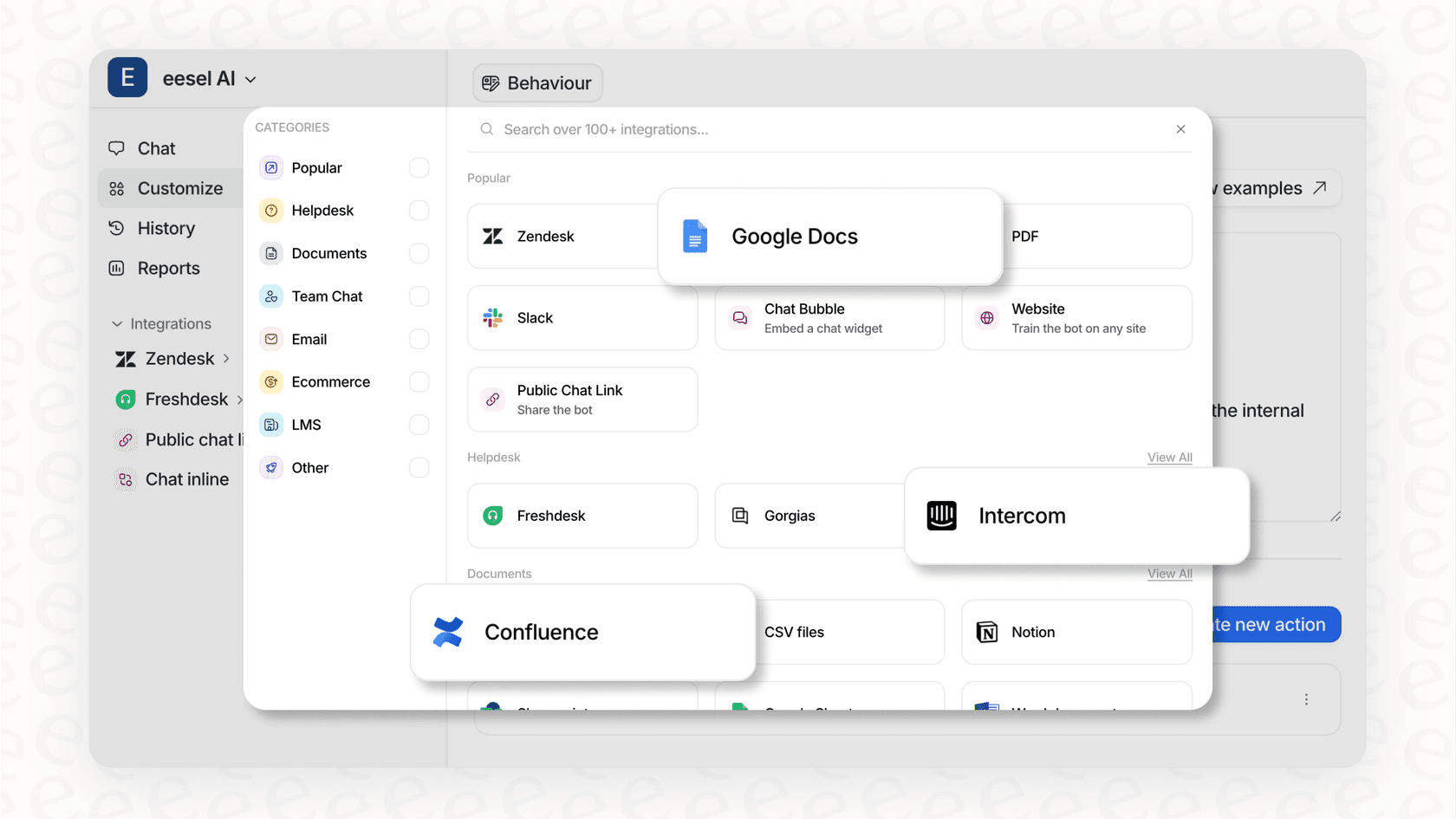
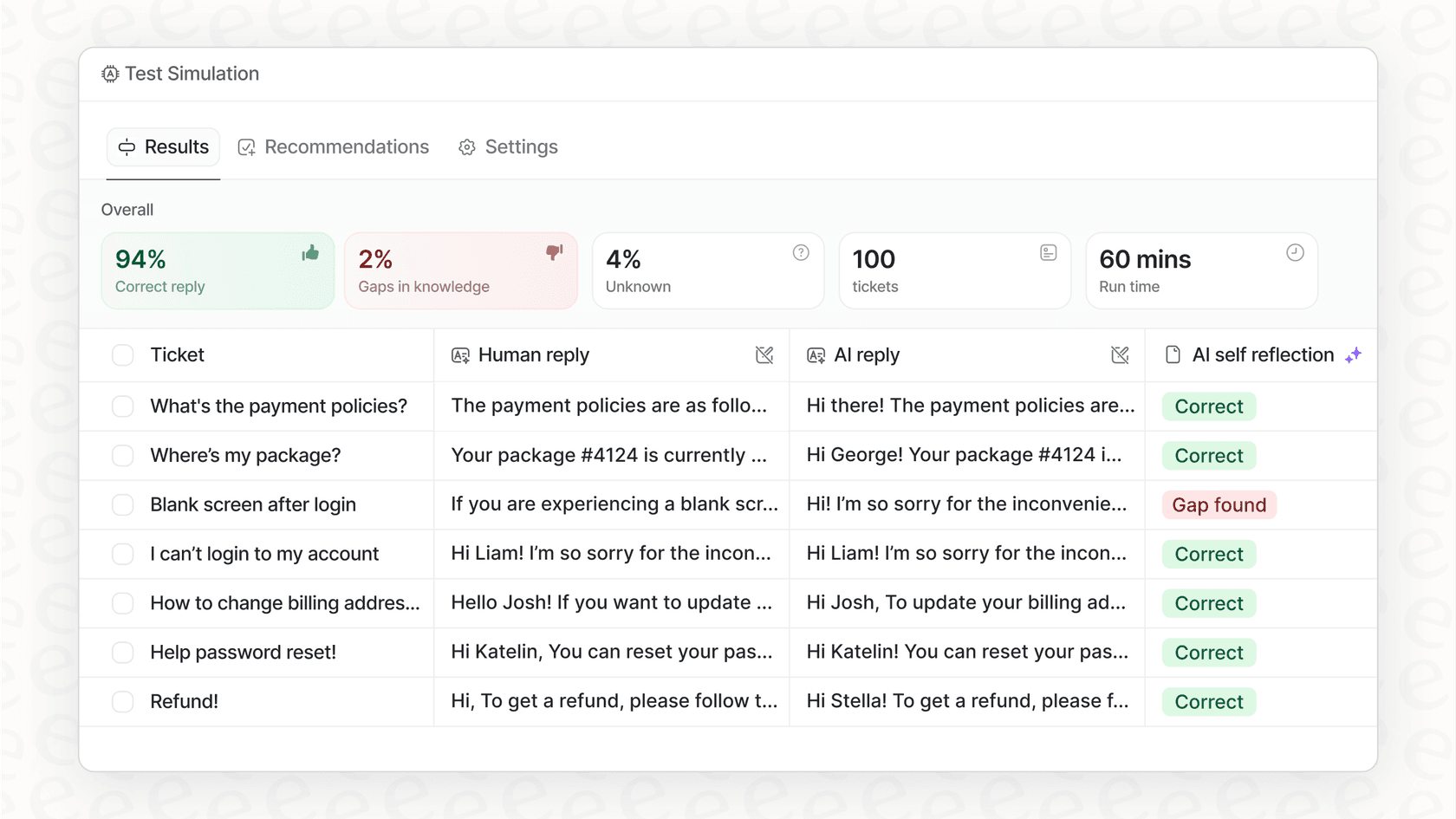
The setup was genuinely easy. I connected our Zendesk and Confluence with a few clicks, and eesel AI immediately started learning from our past support tickets and existing articles. The most impressive part is its simulation mode. It lets you test the AI on thousands of your old tickets before you let it anywhere near a live customer. You get a clear report on what your automation rate would be and can tweak the AI's personality with a simple prompt editor. This takes all the guesswork out of the rollout.
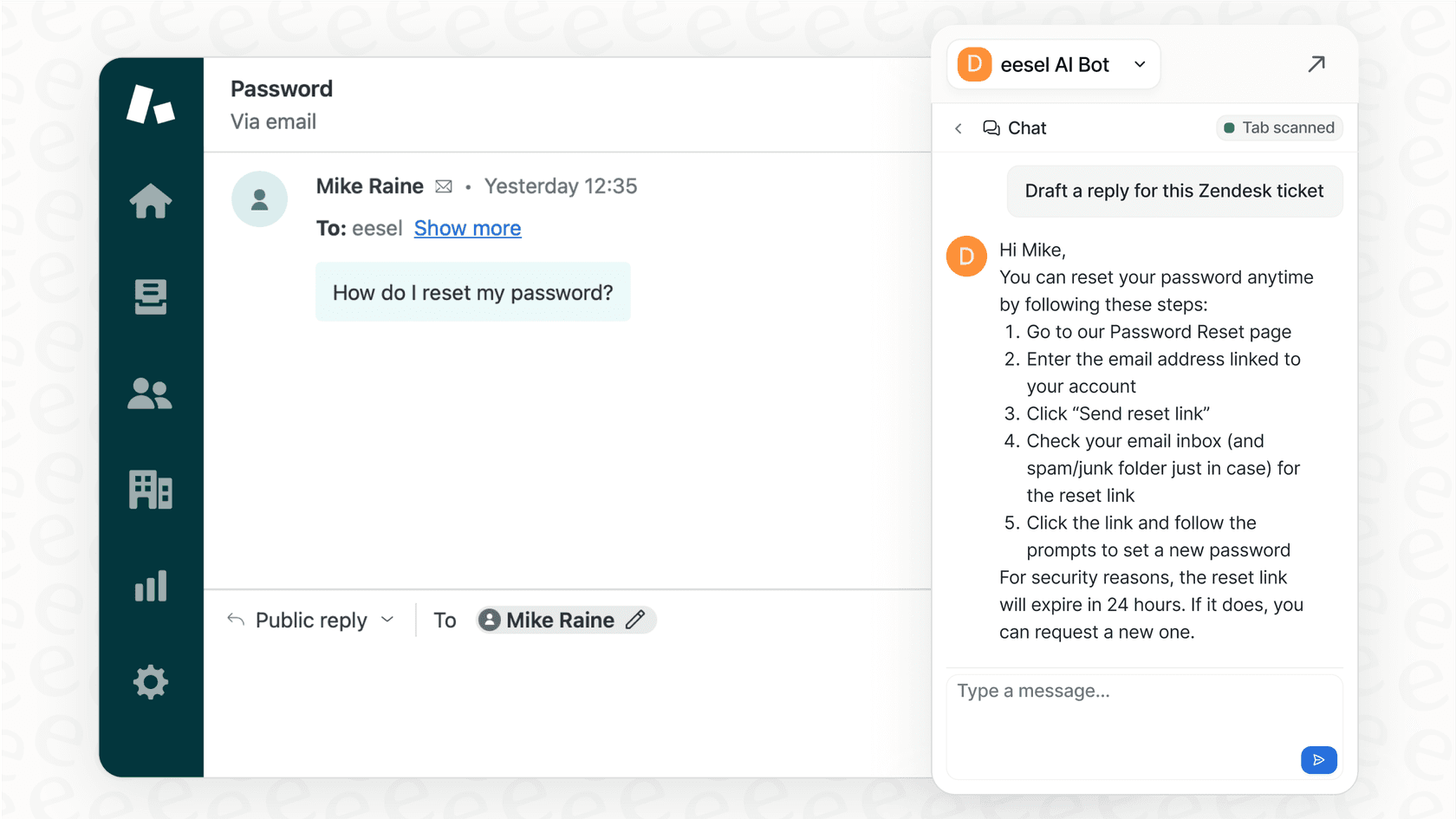
It’s the only tool I tried that felt like it was actually designed to unify scattered knowledge and turn it into something useful for support. It can automate ticket responses, draft replies for agents, and run an internal Q&A bot in Slack, all from the same brain.
Pros:
-
Super simple setup: It’s truly self-serve and connects to your tools in minutes.
-
Unifies all your knowledge: It learns from past tickets, wikis, and docs to create a single source of truth without you lifting a finger.
-
Risk-free simulation: You can test and see exactly how it will perform on your real data before you commit to anything.
-
You're in control: You decide which tickets to automate and can even customize AI actions, like having it make API calls to Shopify to check an order status.
-
Clear pricing: No per-resolution fees, so your bill doesn’t jump up just because you had a busy month.
Cons:
- It's designed for automating workflows and answering questions, not for being the place where you write and create all your content from scratch.
Pricing: Starts at $239/month (billed annually) for up to 1,000 AI interactions.
2. Guru
Best for: Internal teams that need knowledge to pop up proactively while they work.
Guru is a solid choice for building an internal knowledge base. Its best feature is the browser extension, which suggests relevant "Guru Cards" based on what you’re looking at, whether it’s a customer profile in your CRM or a ticket in your help desk. The AI-powered search is also pretty good, helping people find answers even if they don't know the exact terms.
The catch is that Guru is a destination. You have to actively create and maintain all your content inside Guru for it to work well. While it connects to other tools, it doesn't automatically learn from all your scattered sources the way eesel AI does. The per-user pricing can also get expensive as your team gets bigger.
Pros:
-
The browser extension is genuinely useful for getting context in your workflow.
-
It has a strong verification system to remind you to keep content fresh.
-
Good for building a well-organized internal wiki.
Cons:
-
It depends on you manually creating and updating content within the platform.
-
Per-user pricing can add up quickly.
Pricing: Starts at $15/user/month for the full AI feature set.
3. Confluence with Atlassian Intelligence
Best for: Large companies, especially engineering and product teams, that are already using the Atlassian suite.
For many organizations, Confluence is the gold standard for knowledge management. It is a mature, reliable platform that powers documentation for thousands of companies. With the new Atlassian Intelligence features, it can effectively summarize long pages, define acronyms, and answer questions based on the deep info stored in your Confluence spaces. Its seamless integration with Jira is a significant strength, allowing teams to connect technical documentation directly to their development workflows.
Confluence offers a professional and highly structured environment that is perfect for large-scale documentation. While the platform is incredibly powerful and feature-rich, the addition of AI makes it easier than ever to navigate its vast ecosystem. It is an enterprise-grade solution that grows with your team, providing the stability and security that major companies expect.
Pros:
-
Fantastic integration with Jira and other Atlassian products.
-
Strong page organization and permissions for structured docs.
-
Powerful enough to handle knowledge for a massive enterprise reliably.
Cons:
-
The robust feature set may require some initial navigation for new users.
-
Best suited for teams who want their documentation and AI search focused within the Atlassian ecosystem.
Pricing: AI features are included in the Premium plan, which starts at $9.73/user/month.
4. Notion AI
Best for: Startups and teams who want a super flexible, all-in-one workspace.
Notion has become incredibly popular because it’s like a set of digital LEGOs, combining docs, databases, and project management. Notion AI builds on that by adding features like summarization, content generation, and Q&A based on your workspace. You can build a team wiki, manage projects, and ask your AI questions about it all in one app.
The challenge with Notion is that its flexibility is also its weakness. Without careful management, it can easily turn into a disorganized mess. And while its AI is great for content-related tasks, it doesn't have the specific workflows needed for support automation, like triaging tickets or running simulations, that you get with a tool like eesel AI.
Pros:
-
Incredibly flexible and customizable.
-
Combines knowledge management with project management.
-
Has a generous free plan for individuals and small teams.
Cons:
-
Can get messy fast without a dedicated person keeping it organized.
-
It's not built for specialized support or IT service management.
Pricing: Full AI access starts with the Business plan at $15/user/month.
5. Document360
Best for: Creating polished, public-facing help centers for customers.
Document360 is a powerful platform that is laser-focused on one thing: helping you create and manage structured documentation for your customers. It gives you a clean editor, version control, and really good analytics to see which articles people are actually reading. Its AI feature, "Ask Eddy," helps users get direct answers from your knowledge base.
It's excellent for what it does, but Document360 is more of a content management system than a dynamic KMS. It's built to publish articles, not to learn from live conversations or automate tasks in your help desk.
Pros:
-
Perfect for creating structured, customer-facing knowledge bases.
-
Strong version control and content management features.
-
Good analytics on article views and search terms.
Cons:
-
It's not really focused on internal knowledge or support agent workflows.
-
Doesn't learn from information that lives outside of its own platform.
Pricing: Available on request.
6. Slite
Best for: Remote teams that want a simple, fast internal wiki that keeps itself current, and AI-driven teams that want a centralized single source of truth their AI agents can draw on as a context layer.
Slite is the self-maintaining knowledge base that keeps itself current based on information from your company’s entire tool stack. Its Ask feature answers questions with cited sources from your knowledge base, and the Slite Agent detects when docs have drifted from reality and drafts the fix for human approval, so knowledge stays current without manual hunting.
Pros:
-
A clean, focused design that is easy to adopt.
-
Great for asynchronous collaboration, especially for remote teams.
-
The Slite Agent and verification keep knowledge current.
Cons:
-
Not built to be a full enterprise search platform for very large organizations (1,000+ employees).
-
AI cannot be disabled, which can be a blocker under strict AI policies.
Pricing: Basic is $10/user/month (billed annually, with Ask AI search). Pro is $20/user/month and adds the Slite Agent and agent workflows. No free plan; 14-day trial available.
7. Knowmax
Best for: Contact centers that depend on highly structured, step-by-step guides.
Knowmax is built for customer service environments where agents have to follow very specific scripts. Its key feature is "Decision Trees," which guide agents through complex problems with a step-by-step flow. This is super helpful for making sure agents are compliant and consistent, especially in regulated industries.
The flip side is that this structured approach can feel rigid. It’s not as good for teams that need a more flexible AI that can understand and answer a wide range of questions. Setting up all those decision trees also takes a lot of work upfront.
Pros:
-
Excellent for creating guided, step-by-step workflows for agents.
-
Helps ensure consistency and compliance in support.
-
Strongly focused on the needs of contact center agents.
Cons:
-
Can be rigid and requires a lot of initial setup.
-
Not as effective for handling unexpected or unstructured questions.
Pricing: Not publicly listed; you have to get a custom quote.
3 tips for choosing the right KMS AI alternatives
Switching up your knowledge system is a big deal. Here are three practical tips to help you pick the right tool for your team.
-
Start with your biggest headache. Don't look for a tool that claims to do everything. Is your biggest problem endless repeat questions in Slack? Look for a tool with great chat integration like eesel AI's Internal Chat. Is your new-hire onboarding a slow, manual process? A tool like Guru might be a better fit. Solve your most expensive problem first.
-
Avoid a massive migration project. The best tools meet you where you are. A platform that forces you to move your entire help desk or ditch your existing wiki is starting you off with a huge change management project. Look for tools that plug into your current setup - like those that integrate with Confluence or Zendesk - bringing knowledge together instead of making you centralize it all by hand.
-
Find a tool you can test with confidence. Don't just trust a sales demo. The only way to know if an AI tool will actually work for your business is to test it on your data. Look for platforms that offer a free trial or, even better, a simulation mode. This lets you see exactly how the AI will perform on your real-world conversations, completely risk-free.
Unify your knowledge, don't just store it
After a week of testing, my biggest takeaway is this: the best KMS AI alternatives do more than just help you build a better library. They help you build a better brain for your entire company. They connect all the different places your information lives, understand context, and deliver answers right into the apps where your team is already working.
While a lot of tools are tacking on AI features, eesel AI was the only one I found that truly delivers on the promise of unifying your existing, scattered knowledge into an engine that can actually get work done. Its ability to plug into your stack - enhancing platforms like Confluence with ease - learn from your history, and let you test with confidence makes it the clear winner for any team that's serious about scaling their support without the pain of a big migration.
Ready to see what an AI-powered knowledge layer can do for you?
Start your eesel AI trial and see how it performs on your own data.
Frequently asked questions
I'm currently using an older knowledge management system; why should I consider exploring KMS AI alternatives now?
Many traditional KMS platforms struggle with scattered information, manual updates, and poor search. Modern KMS AI alternatives address these by using AI to connect dots across apps, automate organization, and provide instant, accurate answers, saving significant time and reducing administrative burden.
Our company's information is spread across many apps. How can KMS AI alternatives help unify all this scattered knowledge?
The best KMS AI alternatives integrate directly with your existing tools like Slack, Google Docs, and help desks. They learn from all these diverse sources to create a unified knowledge base without requiring you to move or manually consolidate information into a new platform.
When I'm comparing different KMS AI alternatives, what are the most important criteria to look for to ensure a good fit?
Focus on ease of setup and integration, strong AI search and answer quality, robust knowledge unification capabilities, and transparent pricing. It's also crucial to consider customization options and control over how the AI operates to align with your specific team needs.
Will adopting new KMS AI alternatives require a lengthy migration or can they integrate easily with our existing tools?
The leading KMS AI alternatives are designed for quick, "no rip-and-replace" integration. They connect to your existing systems in minutes, allowing the AI to learn from your current data without a major migration project or disrupting your established workflows.
Can KMS AI alternatives truly automate customer support tasks, or are they mainly for internal documentation and search?
Yes, many advanced KMS AI alternatives, like eesel AI, are specifically built to automate support workflows. They can draft agent replies, provide direct answers to customer questions, and even manage internal Q&A from a unified knowledge base, significantly boosting efficiency.
What kind of initial effort or time commitment should I expect when implementing KMS AI alternatives in my organization?
The initial setup for effective KMS AI alternatives can be very fast, often taking minutes to connect existing tools. Platforms offering simulation modes allow you to test performance on your data quickly, minimizing risk and speeding up the overall rollout process considerably.