If you’re on an IT or dev team, your life probably revolves around a mountain of Jira tickets. Simple status checks, bug reports, and access requests are all part of the daily flow. While Jira is excellent for organization, jumping between these tasks and your actual projects can sometimes be time-consuming for everyone.
What if you could automate the routine parts of your workflow? A Jira chatbot can manage these repetitive tasks for you, right inside Slack or Microsoft Teams. This frees up your team to focus on the work that actually moves the needle.
This guide will walk you through what a Jira chatbot is, what Jira’s own virtual agent offers, and what to look for in an AI platform that can really streamline how you work.
What is a Jira chatbot?
A Jira chatbot is an AI-powered app that connects to your Jira instance (including Jira Service Management) to automate tasks and conversations. Think of it as a smart assistant for your projects that lives where your team does.
Basically, the chatbot uses Natural Language Processing (NLP) to figure out what you're asking in plain English, right from inside Slack or Microsoft Teams. Once it gets the request, it talks to Jira’s REST API to get things done, allowing you to manage Jira tasks without leaving your primary communication tool.
Here are a few things it can do:
-
Create and update issues: Someone can log a bug, create a task, or add a comment to a ticket just by chatting with the bot.
-
Check issue status: Get quick updates on a ticket’s progress without ever leaving your chat app.
-
Answer common questions: The bot can handle repetitive questions by finding answers in a knowledge base, like your company's Confluence space.
The real win here is focus. By bringing key Jira tasks into the communication tools your team already uses, a chatbot cuts down on app-switching and streamlines manual work.
The native option: Understanding Jira's virtual agent
Atlassian has its own built-in solution, the virtual agent, which is part of Jira Service Management (JSM). It's a powerful tool for teams who are all-in on the Atlassian ecosystem, and it’s worth exploring its features and tiered pricing model.
Core features and setup
Jira’s virtual agent is part of the JSM Cloud Premium and Enterprise plans and is powered by Atlassian Intelligence. It works in two main ways:
-
Intent Flows: You can build these structured chat flows for common things like requesting software access or reporting an outage. They work well for guided, step-by-step processes where you need to collect specific info from the user.
-
AI Answers: This feature uses generative AI to answer questions by looking up info from your connected Confluence spaces or JSM's native knowledge base. The goal is to answer common questions automatically and manage your ticket count effectively.
To get it working, you define these intents, give the AI some training phrases to recognize, and build out the conversation flows in a low-code editor. You can then launch the agent in a variety of places, including Slack, Microsoft Teams, email, and the customer portal.
The cost of Jira's virtual agent
Jira's virtual agent is a premium feature available to teams on specialized plans. You can access it if you're on a Jira Service Management Cloud Premium or Enterprise plan.
| Plan Tier | Price (per agent/month, billed annually) | Key features and capabilities included |
|---|---|---|
| Premium | $51.42 USD | Includes the virtual agent, asset management, and advanced incident management. |
| Enterprise | Contact Sales | Everything in Premium, plus additional features like multiple sites, unlimited automations, and dedicated enterprise support. |
These plans provide a tiered approach to service. Both Premium and Enterprise plans give you a monthly limit of 1,000 "assisted conversations." According to Atlassian's official pricing details, a conversation is counted anytime the virtual agent kicks in to match an intent or provide an AI-generated answer.
If you go over that limit, the charge is $0.30 for each extra assisted conversation, which allows busy teams to scale their automation usage as needed.
Key considerations for your Jira setup
While the native agent is a solid and reliable choice, there are a few considerations to keep in mind for your specific workflow.
-
Specialized knowledge sources: The "AI Answers" feature is highly effective at finding information within your connected Confluence spaces or the JSM knowledge base. As Atlassian's own docs say, the AI searches "across your linked knowledge base spaces." If your team also uses other tools like Google Docs or Notion, you may consider complementary tools that can bridge those sources with Jira.
-
Deep ecosystem integration: The virtual agent is seamlessly integrated with the Atlassian world. While it is optimized for this ecosystem, connecting it to external systems can be achieved through web requests or other technical configurations depending on your needs.
-
Direct deployment approach: Jira's virtual agent is designed for a direct launch. While some teams might prefer testing on historical data through third-party simulations first, Jira's approach allows for rapid deployment and live refinement within your active environment.
-
Specific configuration settings: There are specific settings to manage for optimal performance. For example, for AI Answers to work in Slack, knowledge base articles require permissions to be set to "All logged-in users." This ensures your users have the access they need to get automated answers.
Why teams consider third-party Jira chatbots
While Jira's native tools are excellent, many companies choose to add a complementary third-party chatbot to their stack. These tools can connect the dots between different systems and provide additional options for managing automation alongside Jira.
Unifying knowledge across your stack
Most companies use a patchwork of different tools. While Jira and Confluence are the gold standard for many, teams might also have support info in Zendesk, HR policies in Google Docs, and sales data elsewhere.
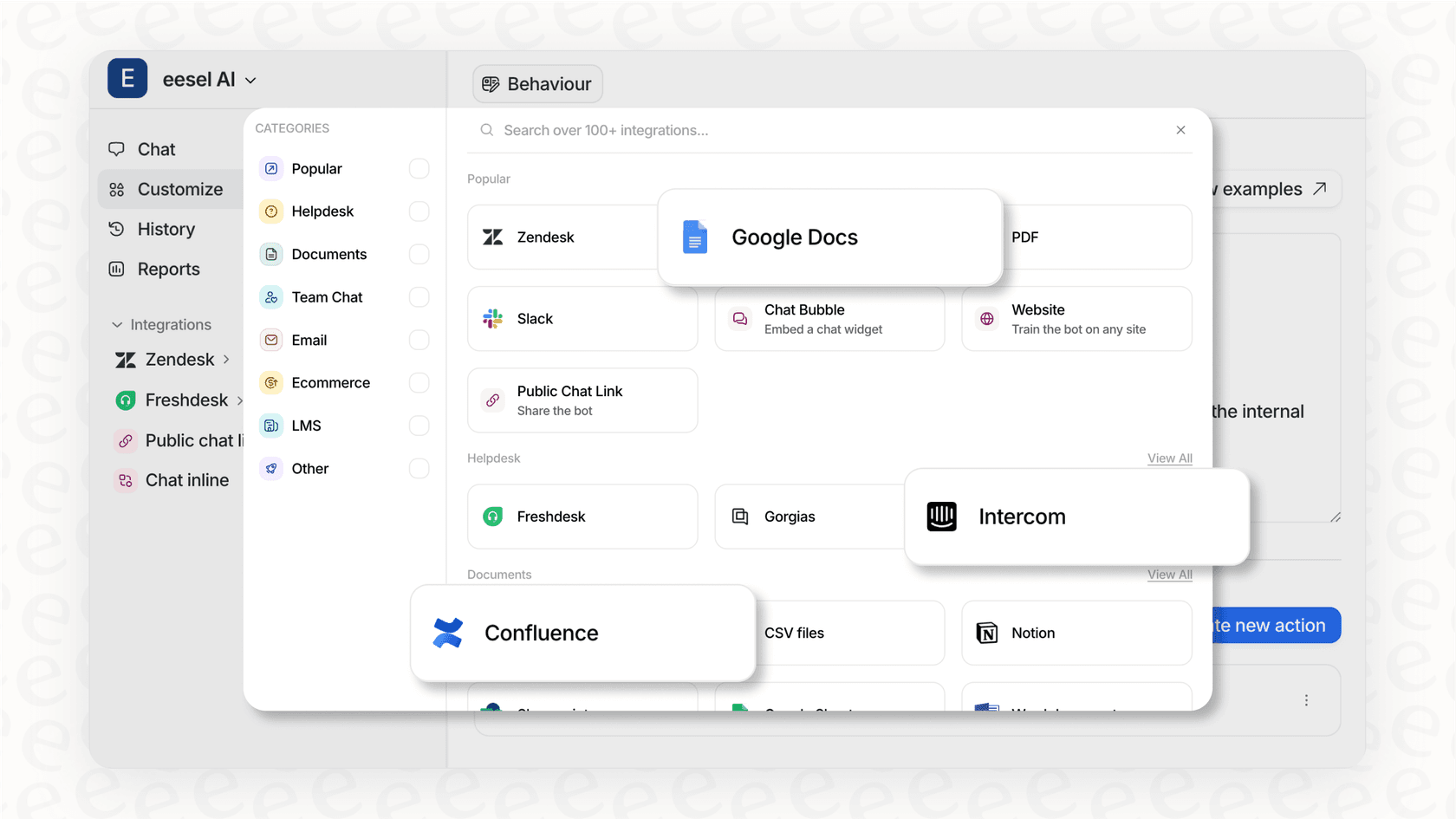
A third-party chatbot can act as a bridge that connects to all of these different sources alongside your Atlassian tools. For instance, a platform like eesel AI can learn from Jira, Confluence, Google Docs, and PDFs at the same time. This works with Jira to provide even more context for accurate and useful answers.
Gaining advanced control and testing options
If your company knowledge lives in many places beyond Confluence, a third-party platform can provide additional integration options. These platforms often offer features that work with Jira to enhance your automation strategy, such as:
-
Simulation: Being able to test your bot on thousands of your past tickets can be a useful advantage. It lets you see the potential impact on your resolution rates and agent workload before you go live.
-
Self-serve setup: Modern AI tools are built so you can set them up in minutes, which is a great way to quickly add value to your existing Jira instance.
-
Unified automation: The best complementary platforms do more than just answer questions. They can also assist with ticket triage, automatically add tags based on content, and help your human agents by drafting replies right inside the Jira interface.
How to choose the right Jira chatbot platform
When you start looking at third-party options to enhance your Jira experience, focus on what will give you the most practical value and help you reach your goals.
Key features to look for
-
Broad integrations: Ensure the platform you pick can connect to more than just Jira and Confluence. Look for easy integrations with all your tools, including Google Drive, Notion, and Slack. This gives your bot a comprehensive view of the information it needs to be helpful.
-
Simulation features: Testing how the AI would have performed on historical Jira tickets can provide a clear report on what questions it could have answered and what your potential return on investment looks like.
-
Customizable workflows: You should have control over what kinds of tickets are handled, when a ticket is passed to a human, and what actions can be taken within Jira, like adding labels or changing priority levels.
-
A unified platform: Managing a single platform that can run different bots for internal IT, customer support, and development teams is often more efficient for growing companies.
How eesel AI provides a complementary solution
eesel AI was designed to complement robust systems like Jira. While it has a deep Jira integration, its strength lies in its ability to connect to everything else in your tech stack.
-
Connect your entire company brain: With eesel AI, you can connect Jira, Confluence, Google Docs, PDFs, and even past conversations from helpdesks like Zendesk or other support platforms. Our AI learns from all your trusted sources to provide context-rich answers.
-
Deploy with confidence: Our simulation feature is a key differentiator. Before you go live, you can run it against thousands of your past Jira tickets to forecast how it will perform. You’ll see precisely which questions it can handle and where you might have gaps in your documentation.
-
Full automation suite: eesel AI is more than just a Q&A bot for Jira; it's a full automation layer that enhances your service desk.
- AI Triage: Automatically tag, route, or manage new Jira tickets based on rules you set.
- AI Agent: Let the bot assist with repetitive requests from start to finish, right inside Jira.
- AI Internal Chat: Set up a separate bot in Slack or Teams specifically for your employees, trained on all your internal docs.
This provides a smart automation layer that works alongside Jira to support your entire company.
Your next steps for Jira automation
A Jira chatbot is a fantastic tool for managing routine tasks and freeing up your team for more strategic projects. Jira's native virtual agent is a robust and reliable starting point for teams invested in the Atlassian world. For those with diverse knowledge sources and specific integration needs, a flexible third-party platform can be an excellent way to complement your existing Jira setup.
The key is to find a tool that connects to all your platforms, gives you clear control over its actions, and lets you see its value with your own data.
Ready to see how you can further automate your Jira workflows? Try eesel AI for free and run a simulation on your own data to see your true automation potential today.
Frequently asked questions
Could you explain what a Jira chatbot is in simple terms, or maybe give me a quick Jira chatbot guide summary?
A Jira chatbot is an AI-powered application that integrates with your Jira instance to automate tasks and conversations directly within communication platforms like Slack or Microsoft Teams. It uses Natural Language Processing to understand requests and interacts with Jira's API to perform actions like creating tickets or checking status. This helps reduce manual work and app-switching.
I'm looking at the native Jira virtual agent; what does the Jira chatbot guide say about its typical costs and pricing model?
Jira's native virtual agent is available with Jira Service Management Cloud Premium or Enterprise plans. These plans include a monthly limit of 1,000 "assisted conversations," and any conversations beyond this limit are charged at $0.30 each. This usage-based model allows teams to scale their costs according to their actual needs.
Does this Jira chatbot guide clarify if Jira's native virtual agent can connect to all our knowledge sources, like Google Docs or Zendesk, or is it limited?
The guide states that Jira's native virtual agent's "AI Answers" feature is highly optimized for searching for information within connected Confluence spaces or Jira Service Management's native knowledge base. While it focuses on the Atlassian ecosystem, third-party tools can be used to complement this by accessing information stored in other tools like Google Docs, Notion, or past tickets.
Why would I consider a third-party option when the native one exists, according to this Jira chatbot guide?
Third-party Jira chatbots offer additional flexibility, especially if your company's knowledge is spread across multiple tools beyond the Atlassian ecosystem. They can unify information from various sources, provide advanced control over automation, and work alongside Jira's native capabilities. This can lead to comprehensive automation for teams with specific integration needs.
What are the most important features to look for when choosing a third-party solution, based on this Jira chatbot guide?
When selecting a third-party Jira chatbot to complement your setup, prioritize broad integrations with all your existing tools (like Google Drive, Notion, Slack, and other helpdesks), simulation capabilities to test performance, and customizable workflows for specific ticket handling. A unified platform that can manage different bots for various teams is also highly beneficial for efficiency.
This Jira chatbot guide mentions 'simulation' as a key feature; can you explain what that means and why it's important?
Simulation allows you to test how a chatbot would perform on thousands of your historical Jira tickets *before* you deploy it live. This feature provides an exact forecast of how the bot would impact resolution rates and agent workload, highlighting which questions it could answer and where knowledge gaps exist. It's helpful for de-risking deployment and proving value with your own data.
How complex is it to set up a new Jira chatbot for modern AI tools?
Modern AI-powered Jira chatbots are often designed for true self-serve setup, meaning you can configure them in minutes without needing developer resources. You typically just connect your relevant accounts, allow the AI to learn from your data sources, and then you're ready to deploy. The goal is to make the process quick and straightforward.