What Gorgias AI Agent Vision supports
According to the Vision documentation, the capability is automatic with an active AI Agent subscription and AI Agent enabled on the relevant email or chat channel. It extracts visual details and text, then combines them with the customer's message.
Supported inputs include PNG, JPEG, WEBP, and non-animated GIF. Email accepts attached or inline images, including messages without body text. In chat, send the image as a separate image-only message.
Vision does not process video, PDFs, or DOCX files. It does not read images inside knowledge sources or image alt text, and it cannot generate or send images in its answers. Put essential policy information in text rather than relying on a diagram.
Decide what the photo does and does not establish
I would evaluate a damage-claim workflow against two questions: did it interpret the evidence correctly, and did it choose a remedy the policy permits? A fluent response can pass neither.
Use examples where the distinction matters:
| Review case | Check the observation | Check the decision |
|---|---|---|
| A cracked mug | Does the description match the visible crack? | Is the order eligible for the requested remedy? |
| An unclear photo | Does the answer acknowledge uncertainty? | Does it request useful evidence instead of approving a refund? |
| A receipt screenshot | Does the extracted identifier match the receipt? | Does the reply avoid treating that identifier alone as authorization? |
| A package with one item | Does the answer avoid inventing what happened before the photo? | Does it check the ordered contents before promising a replacement? |
These are suggested evaluation cases, not results from a benchmark. Use authorized examples without unnecessary personal information. Record the expected decision before inspecting the generated reply; otherwise it is easy to accept wording that sounds reasonable but contradicts your rules.
Write the exception as clearly as the normal case
A useful damage policy states the reporting window, evidence required, available remedies, and when someone must review an exception. If a late claim needs discretion, the reply should not turn that discretion into an automatic rejection or approval.
Keep customer claims and verified facts distinct in your review notes. “The shopper says the mug arrived cracked” and “the photo shows a crack” are different statements. Neither establishes the delivery date. The final reply should ask only for the missing information that changes the next step.
Test the full customer path
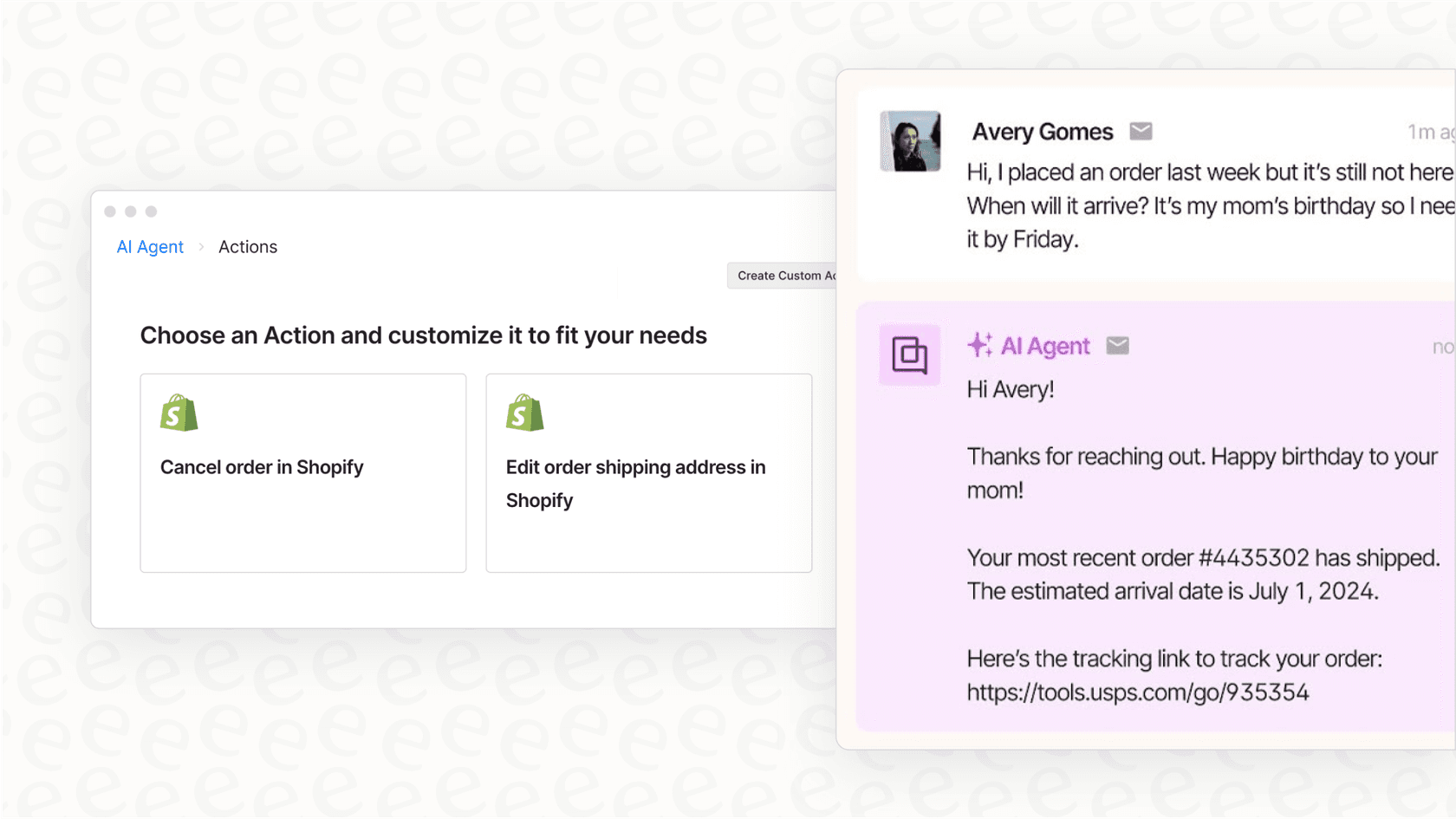
This older Gorgias interface composite illustrates the distinction between a reply and an action. It is not a Vision test result or a guide to current navigation. Check your actual configuration against the Gorgias documentation.
Choose the channel your customers actually use and an authorized test setup. Check what happens when the image arrives before the explanation, when the explanation changes, and when a human takes over. Review the visible response and any resulting action, not just a successful run label.
Keep a short record of the input, expected outcome, actual outcome, and follow-up needed. If an image could not be read, mark that as a separate failure from a wrong policy answer. This makes the next fix specific: attachment handling, source content, instructions, or action permissions.
Gorgias AI Agent Vision pricing
Do not budget from a universal per-resolution price. Gorgias's billing documentation says rates, allowances, and overages depend on the subscription.
Under current counting rules, a conversation resolved by AI Agent can count as both a helpdesk ticket and an automated interaction. If AI Agent replies but hands over to a human, it counts as a ticket without the AI automation fee. Eligible older accounts may use legacy billing, so check the account rather than applying current rules to every contract.
For a pilot, record how many cases needed human review, which remedies were proposed incorrectly, and what usage the account reports. A lower handover count is not a useful saving if the workflow authorizes the wrong remedy.
Test the support decision through eesel CLI
Recognizing damage and deciding what to do about it are separate checks. A photo might show a cracked mug without establishing when it arrived, which order it belongs to, or whether your policy permits a refund. When evaluating an eesel helpdesk teammate for Gorgias, use the CLI to inspect its knowledge and test those decisions before allowing customer-facing actions.
The eesel CLI operates the same agent and workspace as the dashboard. You can use it from a terminal, put its JSON output into a script, or have Claude Code, Cursor, or Codex check the setup for you. Changes made through one interface apply to the same teammate in the other. For this article, the useful workflow is a policy review followed by a controlled private-note pilot.
Check the agent and its policy sources
With Node.js 18.17 or newer, start by identifying the workspace and selected agent:
npx @eesel/cli login
npx @eesel/cli whoami
npx @eesel/cli agents
npx @eesel/cli integrations --agent TEST_AGENT_ID
npx @eesel/cli status --agent TEST_AGENT_ID
npx @eesel/cli instructions --agent TEST_AGENT_ID
npx @eesel/cli automations --agent TEST_AGENT_ID
Replace TEST_AGENT_ID with the agent you intend to evaluate. Check existing automations and dashboard action permissions before proceeding; an existing workspace may already have live workflows.
The Gorgias integration can start with public help-center articles only. That Quick start path does not grant access to tickets, macros, triggers, or actions. A full connection is needed for a pilot that reads tickets or leaves internal notes:
npx @eesel/cli integrations connect gorgias --agent TEST_AGENT_ID
npx @eesel/cli status --agent TEST_AGENT_ID
A person opens the authorization link. A coding agent should hand over that link and wait. Once connected, inspect the source toggles and document counts in Integrations > Gorgias. Confirm that the current damage and refund policy is available, not just that the connection succeeded.

The documented integration example shows source toggles and counts. Those counts do not establish whether a particular ticket attachment can be interpreted.
If the approved policy is a separate local document, the CLI also supports file uploads:
npx @eesel/cli files upload ./approved-damage-policy.pdf --agent TEST_AGENT_ID
npx @eesel/cli files ls --agent TEST_AGENT_ID
Use a real, approved file and check for sensitive information first. Uploading changes the agent's knowledge; it is not a temporary attachment to an isolated test. Do not upload a duplicate or conflicting policy simply to follow this example.
Separate a policy test from an image test
For the following fictional scenario, keep public replies and order-changing actions off in the dashboard. Then start a named conversation:
npx @eesel/cli new --name "damage-policy-review" --agent TEST_AGENT_ID
npx @eesel/cli chat "Fictional policy test, no image attached: a shopper says a mug arrived cracked. Assume the damage description is accurate. Using the approved damage policy, draft a reply and identify the missing facts needed before offering a remedy. Do not contact anyone or change records." --agent TEST_AGENT_ID
npx @eesel/cli chat "The shopper now says delivery was six weeks ago and asks for an immediate refund. Recheck the policy and revise the proposed next step. Do not claim that you inspected a photo or verified an order." --agent TEST_AGENT_ID
The second message continues the first conversation. I would check whether the answer changes when the delivery date changes, whether it names the relevant policy, and whether the proposed customer reply avoids promising an unapproved remedy.
| Evidence | What it can establish | What still needs testing |
|---|---|---|
| A fictional text scenario | How the teammate applies the policy to supplied facts | Whether it can access and interpret an attachment |
| A source citation | Which document the answer points to | Whether that document supports the remedy |
| A held internal note | The draft and proposed private action | Whether approval actually posts the right note |
| A delivered private note | What the team can review in Gorgias | Whether a human should send it to the customer |
These commands contain no image. They test policy reasoning, not vision accuracy, attachment access, or damage verification. The CLI and Gorgias integration references cited here do not establish image-analysis behavior for this example. Verify that behavior separately with an authorized sample before relying on it. If the attachment cannot be inspected, the correct next step is human review, not a confident claim that the photo proves the case.
CLI chat is billed work. A new conversation does not create a sandbox, and a request not to act does not replace action permissions.
Give a coding agent a bounded review task
You can ask your coding agent to do the inspection and propose tests before letting it make changes:
Review the selected eesel agent's damage-policy sources, instructions, and existing automations. Propose tests for an ordinary damage claim, a claim outside the policy window, and an unreadable attachment. Separate verified facts from assumptions. Do not upload files, run chats, create automations, or change permissions until I approve.
Because the CLI returns JSON, the coding agent can collect the setup results and report gaps without you copying each dashboard screen. Have a person approve policy edits and review the test outputs. A passing text example should not silently authorize image-based refunds.
Pilot private notes before public replies
For an authorized Gorgias test ticket, set Send ticket reply off and Leave internal note to ask first. Keep refund and other order-changing actions off as well, including those available through any separate commerce integration.
After reviewing existing automations, ask the teammate to create an on-demand workflow:
npx @eesel/cli chat "Create an on-demand Gorgias automation using gorgias_eesel_mentioned. When mentioned on TEST_TICKET_ID, prepare a private internal note applying the approved damage policy. Distinguish the customer's claim from verified evidence. If an attachment cannot be inspected, flag it for human review. Do not send public replies or change orders. Keep Leave internal note approval-gated." --agent TEST_AGENT_ID
npx @eesel/cli automations --agent TEST_AGENT_ID
Replace TEST_TICKET_ID first. The ticket instruction is not an access-control boundary; use an appropriately restricted test setup. Creating an automation changes the workspace and may enable it immediately. Inspect its trigger and permissions before mentioning @eesel in an internal note.
Review the held draft. Reject unsupported claims about what the image shows or what remedy has been authorized. If the note is correct, approve it once, then open Gorgias to confirm it was delivered privately. A human can edit and send the customer-facing response separately.
npx @eesel/cli approvals --agent TEST_AGENT_ID
npx @eesel/cli activity --agent TEST_AGENT_ID
An internal-note approval authorizes that private write; it does not mean a public reply was sent. Check the actual ticket alongside the activity record.

This example from eesel's Gorgias guide shows a private draft asking for photos. It does not demonstrate image analysis or the result of the commands above. Its replacement and timing promises need policy review before sending.
Start with one claim you can verify
Gorgias Vision can supply visual context, but the support decision still depends on policy and available evidence. Evaluate those pieces separately.
Try eesel for your Gorgias helpdesk, and use the CLI to review one damage policy and one private-note workflow. Expand only after the team can verify the facts behind the proposed reply.
Frequently asked questions
Does Gorgias AI Agent Vision work in chat?
Yes, in email and chat with AI Agent enabled. See the Vision requirements.
Can Gorgias AI Agent Vision read images in PDFs?
No. Its supported image inputs exclude PDF and DOCX documents. See supported formats.
Does Gorgias Vision read diagrams in help-center articles?
No. Include their essential information as text. See the knowledge-source limits.
Is there one fixed Gorgias Vision price for every account?
Check your subscription's allowances and rates. Current and eligible legacy accounts have different counting rules. See the billing guide.
What does eesel CLI add to a damage-claim review?
It lets a person, script, or coding agent operate the same eesel workspace as the dashboard: inspect policy sources, run a scenario, and review automation activity. See the CLI reference.
Does the CLI text example prove that eesel read a photo?
No. The example supplies fictional facts without an image. It tests the policy decision only. Verify attachment access and interpretation separately before relying on them. The CLI guide explains the commands used.
Can an eesel damage-claim draft stay private in Gorgias?
Yes. Use Leave internal note, keep Send ticket reply off, and review permissions before the pilot. Approving a private note is not sending a public reply. See the Gorgias integration.



Article by
Riellvriany Indriawan
Riell is a designer and writer at eesel AI with about two years of experience researching CX platforms, AI chatbots, and helpdesk software. She combines her design background with a sharp eye for how these tools actually look and feel in practice — making her comparisons unusually visual and user-focused.