
Wait, which Alfred?
There are at least eight products wearing the "Alfred" name, and they are nothing alike. The one in this review is alfred_, the personal email and calendar assistant at get-alfred.ai. It is not Meet Alfred (a LinkedIn outreach tool), the macOS launcher, getalfred.co, or AlfredAI.io (a customer-response tool). This matters for a practical reason: most of the G2, Capterra, and Trustpilot ratings that surface when you search "Alfred AI" actually describe other products. So if you have seen a star rating floating around, double-check which Alfred it was rating before you trust it. alfred_ itself frames the difference neatly as "your inbox vs. your customers' inbox."
With that cleared up, here is what alfred_ is.
What is alfred_?
alfred_ describes itself as an AI executive assistant that "handles your email, calendar, and tasks so you can focus on the work that matters." It connects to Gmail or Outlook plus your calendar, then works in the background. The target buyer is consistent across every page: founders, consultants, freelancers, and executives who bill for their time, where "every hour on admin work costs real money."
It is deliberately narrow. alfred_ is not a document or spreadsheet AI, not a build-it-yourself agent platform, and not a customer-support tool. It does email, calendar, and tasks, and tries to do them well. If you want the wider category map before committing, our guide to what an AI personal assistant is and the bigger roundup where we tested 10+ AI personal assistants are good companions to this piece.
The single most important thing to understand about alfred_ is when it works, which is the part most inbox tools get wrong.
How alfred_ actually works
Most AI email tools are reactive: you open them, you ask, they answer. alfred_'s whole identity is the opposite. It batches its thinking overnight, so the work is already done by the time you sit down. This is the "works while you sleep" angle, and it is the cleanest way to understand the product.
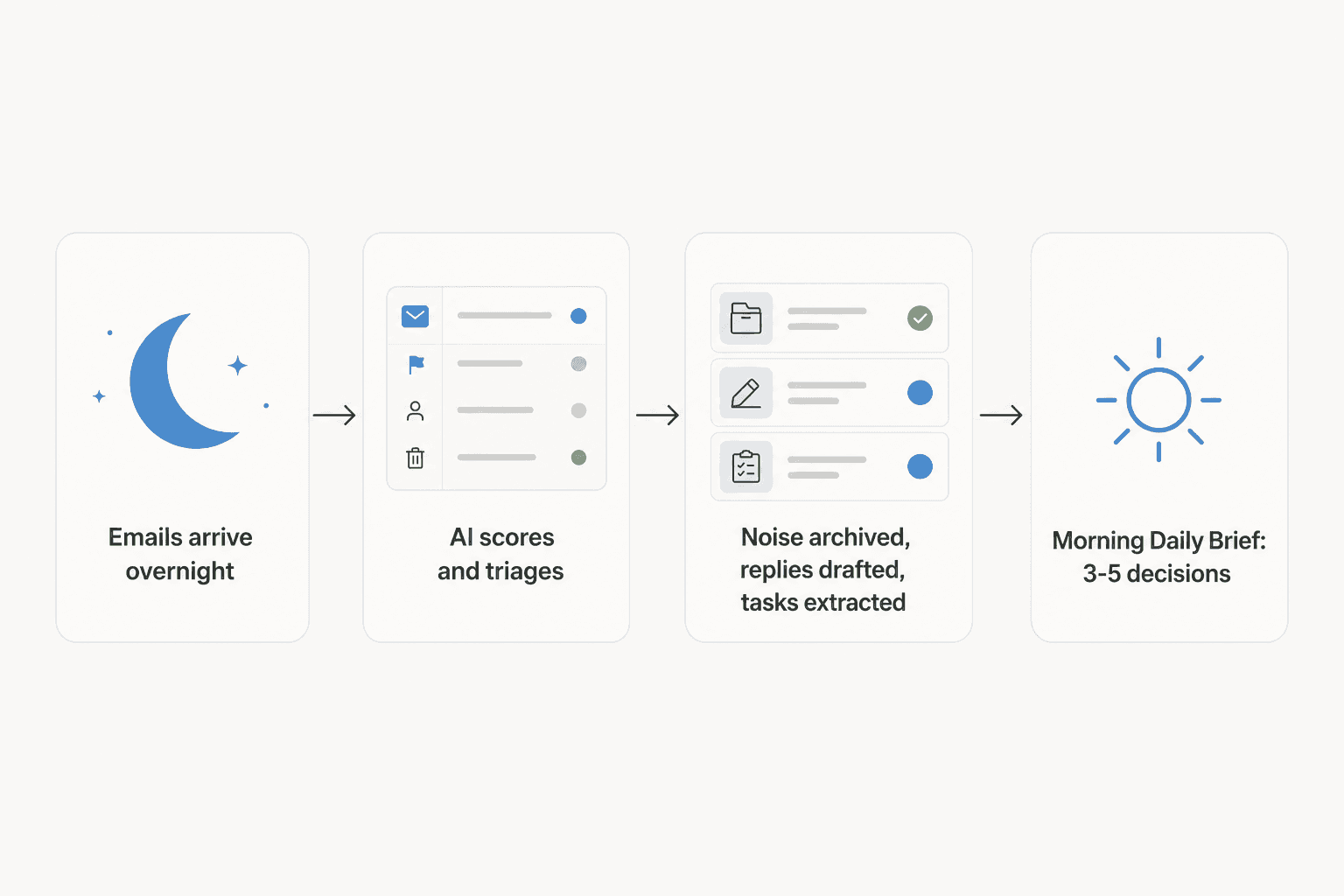
The loop, per the help center, goes like this: emails arrive through the night, alfred_ reads and classifies every one, archives the obvious noise (newsletters, notifications), drafts replies for anything that needs a response, and pulls action items into tasks. By morning you open the Daily Brief, which is meant to surface the 10 to 15 emails that need your judgment out of the 100+ that arrived, distilled down to roughly 3 to 5 things that need an actual decision. Each item comes with context and a suggested next step, so the brief reads as "review, approve, move on" rather than "here is more to read."
It is a genuinely good mental model, and it is the bit alfred_ does that a passive copilot does not. The question is whether the triage underneath it is any good, so let's open it up.
Email intelligence: the core feature
This is where alfred_ lives or dies, and it is the most developed part of the product. Four things happen here.
Triage and scoring. alfred_ does not just sort by date. According to the help docs, it scores every message on urgency keywords, action-required language, sender importance (VIP status, executive titles), how many follow-ups that sender has already sent, and the age of the email. Revenue-critical messages and chased threads get escalated; newsletters get archived.
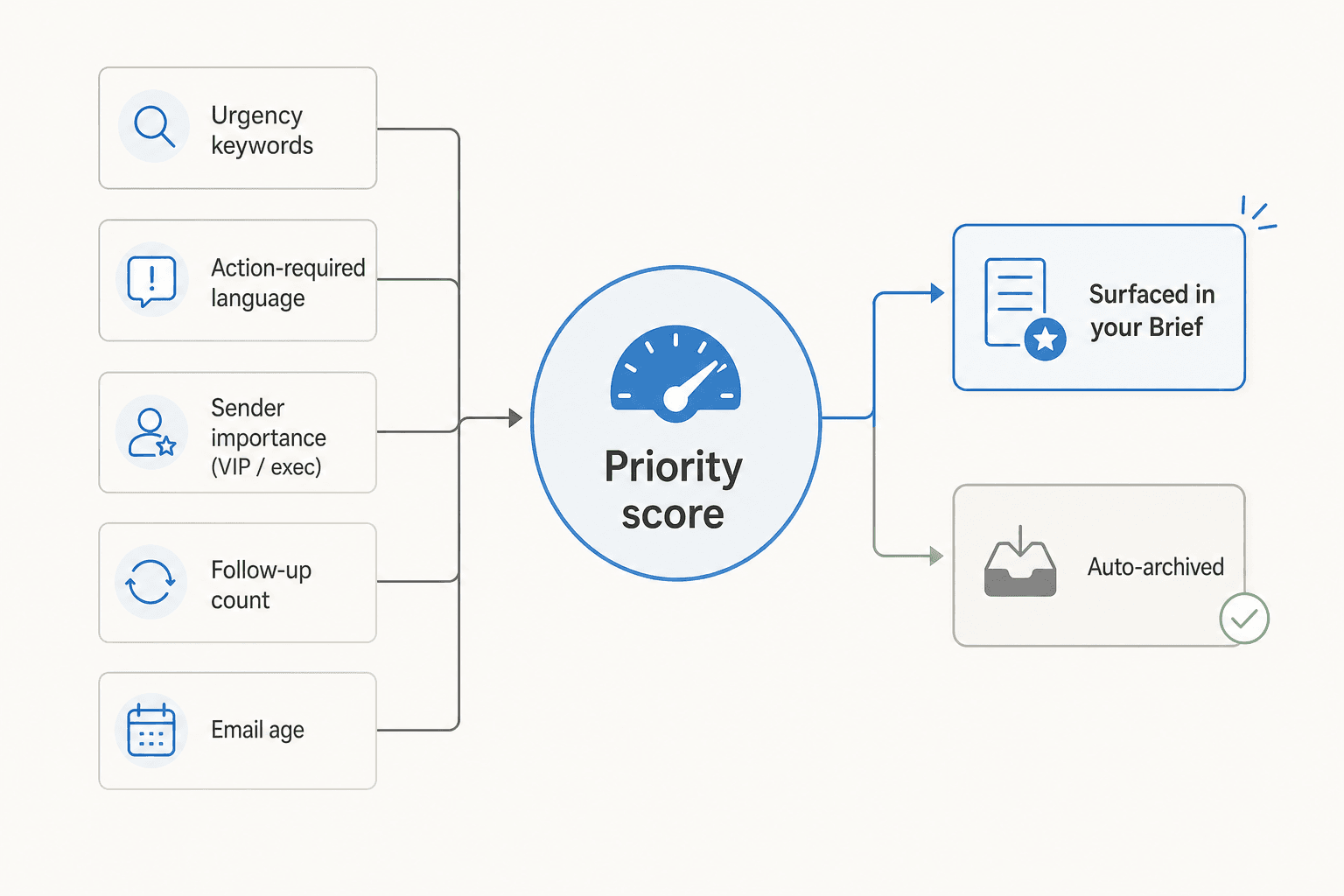
That follow-up-count signal is a smart, specific touch. The third email from the same client politely asking "any update?" is exactly the one that slips through a date-sorted inbox, and it is exactly the one alfred_ is built to bump up. It is the kind of thing Gmail's own follow-up nudges gesture at, taken a step further.
Drafted replies. For anything needing a response, alfred_ writes a full draft in your communication style, ready to review, edit, and send with one tap. This is more than Gmail's smart compose or help-me-write; it is a complete reply waiting for you, not an autocomplete.
Task extraction. alfred_ scans messages for commitments, deadlines, and requests, then auto-creates tasks linked back to the source email, so you can see why a task exists. If you have wished Gmail extracted action items on its own, this is that.
Follow-up tracking. It monitors threads for response status and flags them with escalating urgency (first follow-up, second, third-plus) so you see which threads are waiting on you before they become awkward.
One thing to flag honestly: even alfred_'s own blog concedes the tone can be off for sensitive or negotiation emails and that there is a two-to-four-week ramp before the drafts feel like you. That is a refreshingly candid admission, and it tracks with how any tone-matching AI behaves. Plan for a break-in period.
Calendar intelligence
The calendar side is lighter but has one genuinely clever idea. alfred_ connects to Google Calendar (Outlook calendar is listed in the docs too), shows your meeting load and conflicts, and then scores each day's "health" based on the ratio of focus time to meeting time.
The clever part is how it counts focus time. It does not just total your empty slots. It ignores the short gaps between meetings because, as alfred_ puts it, context-switching makes them unproductive. So the brief shows your realistic deep-work time, not the fiction your calendar's white space implies. Anyone who has tried to "use" a 20-minute gap between two calls knows exactly why that distinction is right.
The limit: like email, alfred_ only suggests. Creating events or sending scheduling emails requires your approval. It will not move your meetings for you. If you live in Outlook and want deeper calendar automation, that is more the territory of Outlook calendar integrations built for the job.
Tasks, Kanban, and notes
Around the inbox and calendar, alfred_ wraps a small productivity workspace. Tasks can be created from natural language ("remind me to review contracts tomorrow at 9am") and tie to calendar deadlines. There is staleness tracking baked in: tasks older than 7 days get flagged "stale," and anything overdue by 3+ days is marked "critical" and pushed up the brief, which is a nice nudge against the quiet pile-up of forgotten to-dos.
There are also Kanban boards with prebuilt templates (Weekly Planner, Daily Tasks, Goal Tracker), WIP limits, and board stats, plus a notes editor with slash commands, tables, and AI summarization that can pull tasks out of meeting notes.
Here is the honest take on this part: it is fine, but it is also where alfred_'s one real structural weakness shows. A competitor's alternatives roundup put it sharply (and yes, they are biased, but the point lands):
"It's a tidy all-in-one, but it shares the core limit of most AI assistants: it drafts and organizes for you to act on, and the work stays inside its own app rather than flowing through your existing tools."
That is the trade-off. If you already run your life in Notion, Linear, or Asana, alfred_'s boards are one more place to check, not a replacement. The tasks-from-email magic is great; the project-management layer around it is a "nice to have," not a reason to switch.
Texting alfred_: a great idea, with a caveat
alfred_'s SMS product is the feature that made me sit up. The pitch is that you run the whole assistant over text, no app to open: iMessage, SMS, or RCS, with an LLM router that figures out intent from plain language. Text "what does my day look like?" from the train and you get a schedule summary; text "draft a reply to the investor update, say we'll have numbers by Friday" and it writes it. It even tracks context across the thread, so "move it to 4pm" knows you mean the event you were just discussing. There is an autonomy layer called Donna that you approve pending work through ("what's pending?" → "approve 1").
It is a legitimately compelling vision for an assistant that meets you where your attention already is. Two honest caveats, though. First, there is a cap of 30 messages per hour, and proactive texting (alfred_ pinging you when a decision is needed) is on the roadmap, not live, so it still only responds when you reach out. Second, there is a gap between the marketing and the docs worth knowing about: the SMS page promises full two-way control, but the help center only documents a 7am SMS brief and does not mention iMessage, WhatsApp, or Slack as channels. That is the sort of thing to confirm on the trial rather than take on faith.
Pricing: what $24.99 actually gets you
This is refreshingly simple. alfred_ is one flat plan, no tiers, no per-seat enterprise maze.
| Plan | Price | Billing | Free trial | Card to start | What's included |
|---|---|---|---|---|---|
| alfred_ | $24.99/month | Flat, per user (monthly or annual toggle) | 7 days | No card required | Overnight email triage, draft and archive, calendar conflict and focus-time scoring, auto-extracted tasks, Kanban boards, notes, SMS access |
A couple of notes. The page shows a monthly/annual toggle, but the exact annual price is rendered in a way we could not confirm from the outside, so check the live number before you commit to a year. There are no add-ons or usage fees listed. And alfred_ is upfront that this is a cancel-anytime subscription with a refund promise if it does not save you time.
How does that stack up against the obvious alternatives? alfred_ leans hard on price in its own comparisons, and the software math does check out:
| Tool | Monthly cost | What you're paying for |
|---|---|---|
| alfred_ | $24.99 | Autonomous email + calendar + tasks |
| Microsoft Copilot stack | ~$42.50 ($20 M365 + $22.50 Copilot add-on, per Microsoft) | On-demand AI across Office apps |
| Lindy | $49+ | Build-your-own agent platform |
The worked example alfred_ uses is fair: if you bill at even $125/hour, the subscription pays for itself the moment it saves you one hour in a month. Just treat the bigger claims (alfred_ markets 15-20 hours saved per week on the features page and "10+ hours" on the pricing page) as vendor estimates, not guarantees. The realistic win is "I stop starting my day in a panic," and that is worth $25 to a lot of people on its own. For more ways to keep your stack cheap, our cheap AI tools list is a good next read.
How alfred_ compares
The useful way to place alfred_ is on two axes: how broad its scope is, and how proactively it acts.
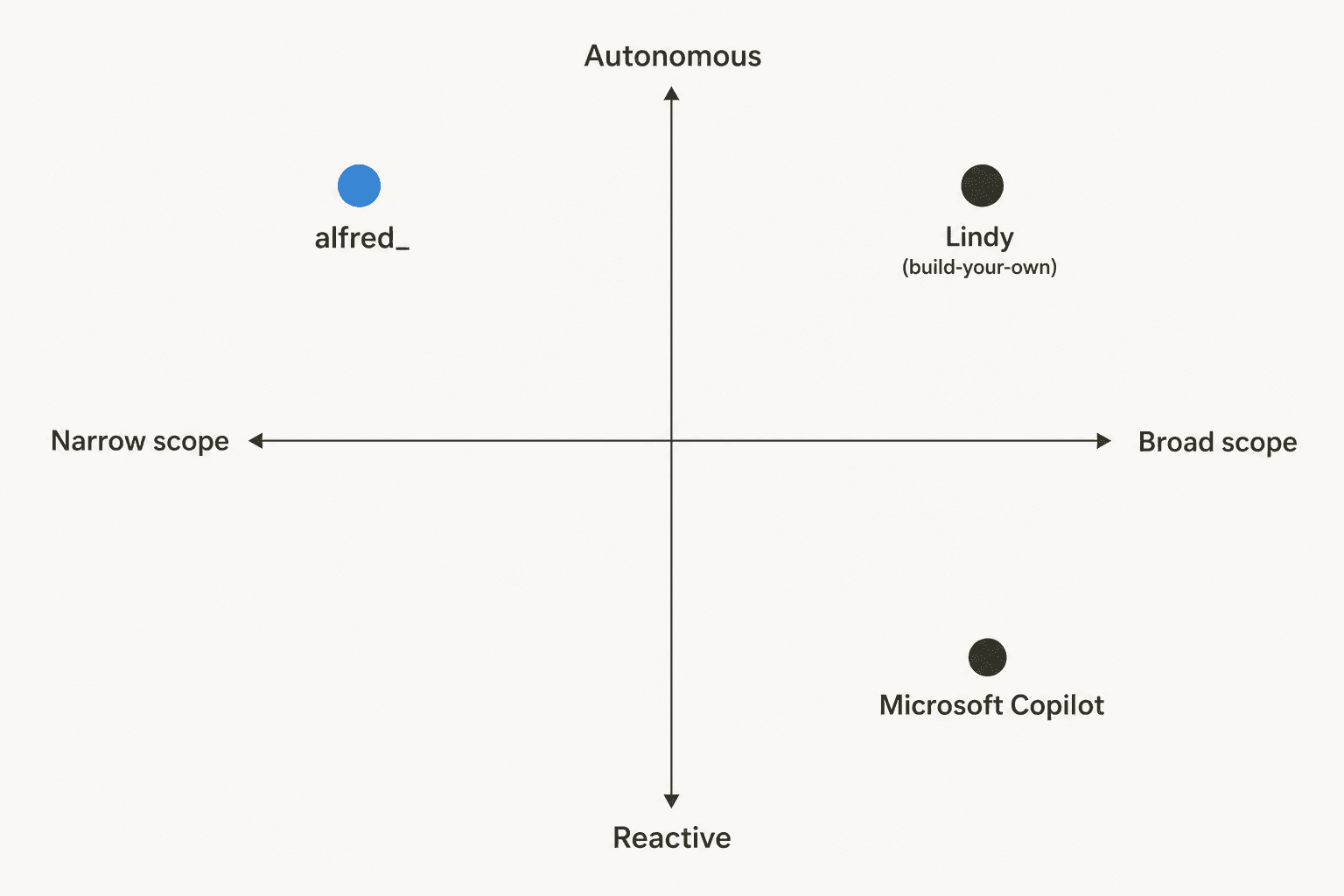
Against Microsoft Copilot, the distinction is reactive vs. autonomous. Copilot is broad (it lives in Word, Excel, Outlook, Teams) but it waits for you to ask. alfred_ is narrow but acts overnight without being prompted. They are honestly complementary: Copilot for in-document help, alfred_ for clearing the admin. If Office-wide AI is your priority, our Copilot alternatives and Copilot pricing breakdowns go deeper.
Against Lindy, it is build vs. buy. Lindy is a powerful agent platform, but you configure the triggers, actions, and logic yourself, which is hours-to-days of setup. alfred_ is pre-trained and working from minute one. If you want the flexibility and don't mind the build, Lindy wins; if you want the standard 80% of assistant work handled today, alfred_ does. We have a full list of Lindy alternatives if you are weighing that path.
What people actually say about alfred_
Here is the part where I have to be straight with you, because it is the biggest gap in any alfred_ review right now: there is essentially no independent, verifiable user feedback yet. Searches across Product Hunt, Reddit, X, LinkedIn, and the review sites turn up either alfred_'s own pages or sentiment about the other products named Alfred. That is not a knock on the product; it is just what an early-stage tool looks like before it builds a public footprint. Anyone showing you a tidy "4.x stars from N reviews" for this specific alfred_ is almost certainly quoting a different tool.
So the honest evidence is what alfred_ itself is willing to admit, which is more than most vendors. From its own writing:
The tone can be off for sensitive or negotiation emails, there is a two-to-four-week ramp before drafts feel right, and the ROI is weaker for low-volume inboxes.
Take that as the realistic frame: a tool with a sharp core idea, candid about its rough edges, that you should judge on your own trial rather than on a star rating that does not exist yet. The good news is the 7-day free trial needs no card, so the cost of finding out is your time, not your money.
The verdict: who should actually use alfred_
alfred_ is a clear pick for one specific person: the solo operator, founder, or consultant whose single worst bottleneck is their own inbox, who wants something that works on day one with zero configuration, and who is comfortable approving the AI's work rather than handing it the keys. For that person, $24.99 and a week of trial is an easy yes. The overnight-triage-to-morning-brief loop is the real deal, and the focus-time scoring and follow-up tracking are thoughtful.
Skip it (for now) if you need AI that works inside your existing tools rather than its own app, if you want genuinely hands-off automation rather than approve-everything, or if you are an enterprise buyer who needs SSO, admin controls, and a review history you can vet. And remember it is built for your inbox, one person, one set of accounts.
That last point is the natural bridge to where alfred_ stops.
Where alfred_ stops and eesel begins
alfred_ is built to tame your personal inbox. But a lot of the people reading a review like this don't just have a personal-inbox problem; they have a team inbox problem: the shared support@ or sales@ address, the helpdesk queue, the Slack channel where customers and colleagues pile up faster than anyone can answer. That is a different job, and it is what eesel AI is built for.
Where alfred_ keeps work in its own app and asks you to approve every send, eesel AI drops an AI teammate straight into the tools your team already uses, including Gmail, Slack, Zendesk, and 100+ others, and can actually resolve and reply to tickets autonomously. The key is the control layer: just like alfred_'s approval step protects you, eesel lets you set confidence thresholds and rules so the AI only acts where you trust it and quietly escalates the rest. It is the same instinct, scaled from one person's inbox to a whole team's. If your real pain is automating inbox triage across a team rather than just for yourself, that is the tool to look at, and you can put it next to alfred_ in our roundup of AI email assistants.
Frequently Asked Questions
What is alfred_ AI and who is it for?
How much does alfred_ AI cost?
Does alfred_ send emails automatically?
Is alfred_ AI the same as Meet Alfred or AlfredAI.io?
What is the best alfred_ AI alternative for teams?


Article by
Rama Adi Nugraha
Rama is a software engineer at eesel AI with two years of experience writing about B2B SaaS, AI tools, and customer support technology. Based in Bali, Indonesia, he brings a developer's perspective to product comparisons — cutting through marketing copy to what the integrations and APIs actually do.