
Customers share sensitive information in support tickets all the time. Credit card numbers, social security numbers, passwords, bank account details. Sometimes they do it because your team needs the data to help them. Sometimes they do it accidentally, pasting information that has no business sitting in your help desk.
Either way, that data becomes a liability the moment it enters your system. Zendesk ticket redaction exists to solve this problem: permanently removing sensitive information so it cannot be accessed, leaked, or compromised.
This guide covers everything you need to know about redacting Zendesk tickets. We'll walk through native features, automation options, compliance requirements, and when it makes sense to look beyond Zendesk's built-in tools. For teams looking to prevent sensitive data exposure proactively, solutions like eesel AI's Zendesk integration offer an AI teammate approach that handles tickets without unnecessary data storage.
What is Zendesk ticket redaction and why it matters
Redaction in Zendesk means permanently removing sensitive data from ticket comments, attachments, and internal notes. Once redacted, the information is gone forever. It gets deleted from Zendesk's databases, logs, and search indexes. The original content gets replaced with black bars or placeholder text.
The types of data that typically need redaction include:
- Credit and debit card numbers
- Social Security Numbers
- Bank account numbers and IBANs
- Passwords and API keys
- Email addresses and phone numbers
- Home addresses
- Dates of birth and driver's license numbers
- Medical records and health information
The business case for redaction comes down to compliance and risk management. GDPR violations can result in fines up to 4% of annual global turnover. PCI DSS non-compliance can mean losing the ability to process credit card payments. HIPAA violations carry their own penalties for healthcare organizations. Beyond fines, data breaches damage customer trust and brand reputation in ways that take years to repair. Learn more about AI for customer service solutions that can help prevent these issues.
Zendesk offers native redaction capabilities, but they're fundamentally reactive. You're cleaning up data that's already entered your system. At eesel AI, we think about this differently. Our approach focuses on preventing unnecessary sensitive data from being stored in the first place. But before we get there, let's look at what Zendesk provides out of the box.
Native Zendesk redaction: manual method
Manual redaction is available on all Zendesk Suite plans: Team, Growth, Professional, Enterprise, and Enterprise Plus. You need two things to use it: the Agent Workspace activated, and permission to redact ticket content (admins have this by default; agents need custom roles with the permission assigned).
Here's how to manually redact content in a Zendesk ticket:
Step 1: Open the ticket containing sensitive data and locate the specific comment or attachment that needs redaction.
Step 2: Hover over the comment thread to display the options menu icon (three dots).
Step 3: Click the options menu and select "Mark text for redaction." A redaction pane appears.
Step 4: Select the content you want to redact. You can select text strings, attachments, and inline images. Click "Mark for redaction" for each item. The content gets highlighted to show it's marked.
Step 5: When you've selected everything you want to remove, click "Redact" to confirm. The ticket updates immediately with the redacted content.

Important things to know about manual redaction:
- It's irreversible. Once you redact something, it cannot be recovered.
- Zendesk automatically adds a "redacted_content" tag to the ticket for tracking purposes.
- You can redact content in archived or closed tickets for email, API, and webform channels.
- Redaction works on public comments, internal notes, side conversations, and attachments.
- If you redact a ticket comment sent from email, Zendesk doesn't redact the original email in the customer's Gmail or Outlook. Only the copy hosted in Zendesk gets removed.
Automatic redaction options in Zendesk
Manual redaction works fine for one-off situations, but it doesn't scale. If your team processes hundreds of tickets daily, relying on agents to spot and remove sensitive data is risky. Zendesk offers three automatic approaches, though each comes with caveats.
Automatic credit card redaction (Growth+ plans)
Available on Growth, Professional, Enterprise, and Enterprise Plus plans, this feature uses the Luhn algorithm to detect credit card numbers in incoming tickets. When enabled, Zendesk automatically masks the middle digits of detected card numbers, keeping only the first six and last four digits visible.
To enable it: Go to Admin Center > Account > Security > More settings, then check "Redact credit card numbers" under the Redaction section.
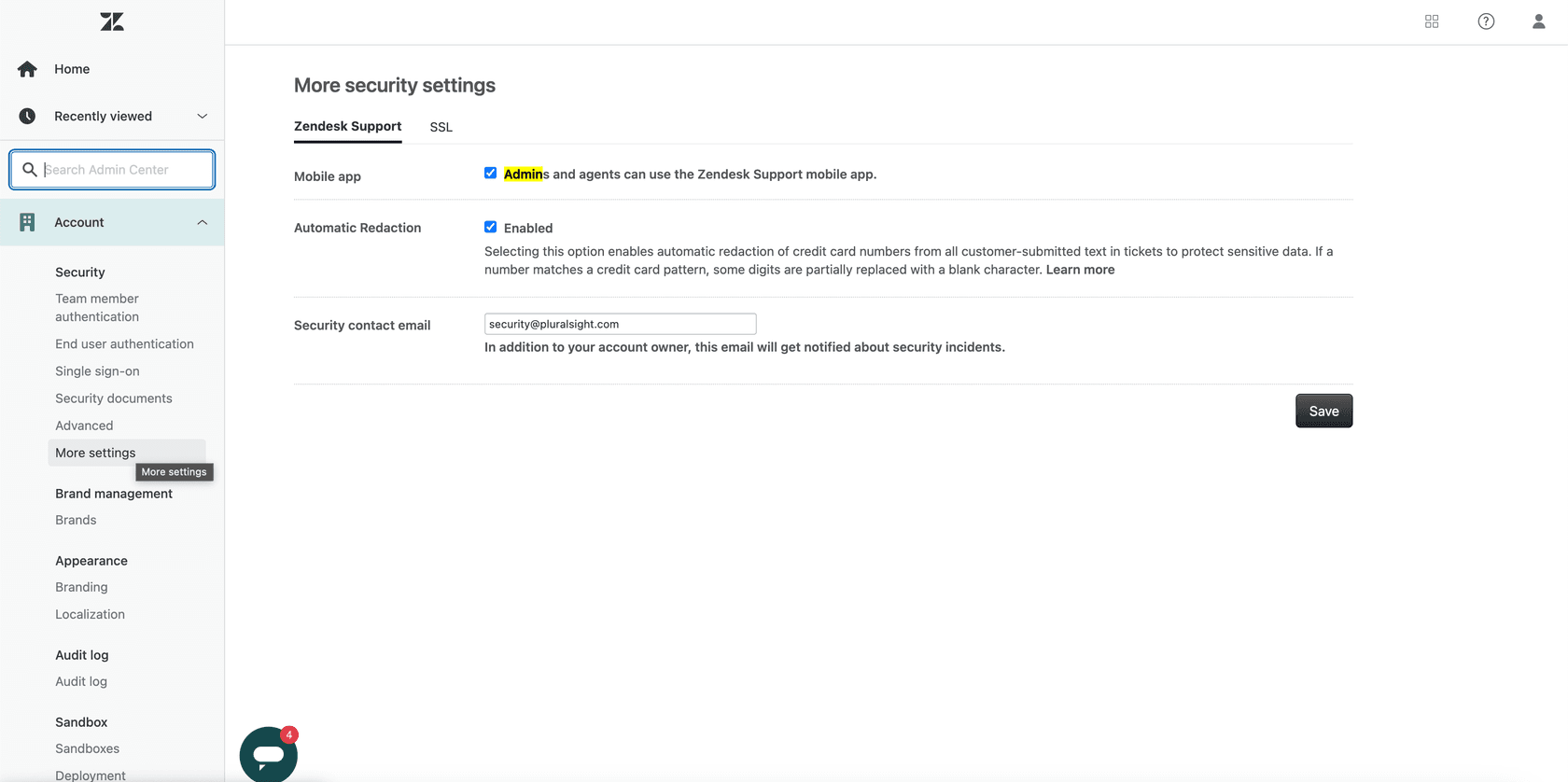
Limitations to understand:
- It only works on new tickets and comments, not existing data.
- It detects numbers between 12 and 19 digits that pass the Luhn check.
- It cannot be used at the same time as the ADPP redaction suggestions feature.
- It adds a "system_credit_card_redaction" tag to affected tickets.
Redaction suggestions (ADPP add-on)
The Advanced Data Privacy and Protection (ADPP) add-on costs approximately $50 per agent per month and adds proactive PII detection. When enabled, Zendesk automatically highlights 12 types of sensitive data in orange within ticket comments:
- First names and surnames
- Email addresses
- Physical addresses
- Credit and debit card numbers
- International bank account numbers (IBAN)
- Passwords
- Social Security Numbers
- Bank account numbers
- Dates of birth
- Driver's license numbers
- IP addresses
- Phone numbers
Agents with redaction permissions see the orange highlighting and can click to redact individual items or entire comments at once. The system also provides a "Copy" button so agents can grab the data for use in other systems before redacting it from Zendesk.
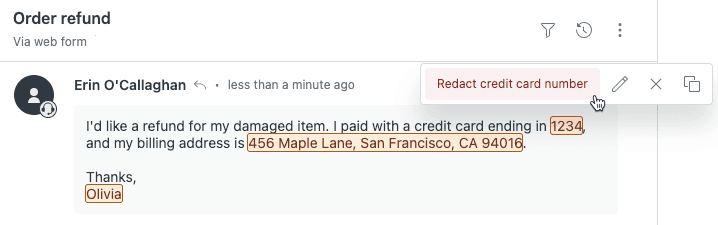
You configure which PII types to detect in Admin Center > Account > Security > Redaction suggestions. Detection only works on data that arrives after you enable each PII type. It can't detect sensitive information retroactively.
Trigger-based redaction (ADPP add-on)
The same ADPP add-on also enables automated redaction through Zendesk triggers. You can create business rules that automatically redact sensitive data when specific conditions are met.
For example, you might create a trigger that redacts address, bank account, and date of birth information immediately after a ticket gets marked as approved. This removes sensitive data as soon as it's no longer needed for the active support interaction.
The trigger uses the same PII detection types as redaction suggestions. When the trigger fires, it redacts all matching PII in the ticket without requiring agent intervention.
Limitations of native Zendesk redaction
Zendesk's redaction features are useful, but they have significant limitations that teams should understand before relying on them.
Irreversible action. Once data is redacted, it's gone forever. There's no undo button, no backup to restore from, no way to recover accidentally redacted information. This creates risk: redact the wrong thing and you've lost customer data permanently.
Manual effort for most redaction. Outside of credit card numbers (and only if you enable that specific feature), agents must still identify and mark content for redaction. In high-volume environments, this gets missed.
No bulk redaction capabilities. You can't select multiple tickets and redact content across all of them at once. Each ticket requires individual attention.
Limited scope. Redaction only removes data from Zendesk's systems. The original email remains in the customer's Gmail. Messages stay visible in Facebook Messenger. Side conversations persist in Microsoft Teams. You're cleaning up your copy while copies exist elsewhere.
No automatic attachment redaction. Native Zendesk redaction handles attachments manually only. If customers regularly send sensitive documents, you need third-party apps to automate their removal.
Not retrospective. Automatic features only apply to new tickets. Your existing backlog of tickets containing sensitive data remains unaddressed unless you manually redact each one.
Channel limitations. Redaction doesn't work on:
- Active chat conversations
- SMS messages
- Translated messages
- Mobile SDK tickets
- Slack Business Connect tickets
- Channel framework-enabled tickets
Live chat delays. Redacting live chat history can take up to 10 minutes to propagate through Zendesk's systems due to database replication, according to Zendesk documentation.
Third-party automation solutions
When native features fall short, third-party apps from the Zendesk Marketplace can fill the gaps. Here are three established options for different use cases.
Swifteq Auto Remove Attachments
Swifteq's Auto Remove Attachments app automates attachment removal based on customizable rules. You can set it to remove attachments when tickets reach certain statuses, carry specific tags, or reach a defined age.
The app supports file-type rules (keep images but remove PDFs, for example) and retention policies. It can automatically add comments to tickets when redaction occurs, creating an audit trail. This works well for teams dealing with document-heavy workflows where attachments pile up over time.
Knots Redact Attachments
Knots offers scheduled redaction using custom search queries. You can write queries like "closed>1year" and schedule redactions to run daily, weekly, or monthly against matching tickets.
The app replaces redacted attachments with a redacted.txt file, ensuring ticket continuity while removing the sensitive data. It also handles inline images, which some other solutions miss. For compliance-focused teams that need regular cleanup of historical tickets, the scheduling capability is valuable.
Strac Zendesk DLP
Strac takes a different approach, positioning itself as a full data loss prevention (DLP) platform for Zendesk. It offers real-time scanning and tokenization of sensitive data.
When Strac detects PII in a ticket, it moves the sensitive content to a secure vault accessible only through multi-factor authentication. The original Zendesk comment gets sanitized, with confidential text and attachments replaced by links to the vault. Administrators can configure which data types trigger redaction, set link expiration times, and maintain detailed audit logs.
Strac emphasizes compliance certifications (PCI, HIPAA, GDPR, SOC 2) and targets organizations with strict regulatory requirements. Learn more about Strac's Zendesk DLP solution for enterprise data protection.
Best practices for Zendesk ticket redaction
Whether you use native features or third-party tools, these practices help ensure your redaction strategy actually protects customer data.
Establish clear policies. Document exactly what data must be redacted and when. Don't leave it to agent judgment in the moment. Create specific guidelines: "Redact credit card numbers immediately after processing refunds" or "Remove medical record numbers before closing healthcare tickets."
Train agents regularly. Redaction only works if people remember to do it. Include PII identification and redaction procedures in onboarding and refresher training. Show real examples from your ticket history (sanitized, of course) of what sensitive data looks like in your specific industry.
Use tags for tracking. Monitor the "redacted_content" tag and any custom tags you create. Build views or dashboards showing redaction activity. If redaction rates drop suddenly, it might indicate agents are missing sensitive data.
Document without exposing. When you redact something, add a private comment noting what category of data was removed and why. Don't include the actual sensitive information in the comment. This creates an audit trail without recreating the exposure you just fixed.
Test automation rules carefully. If you use trigger-based redaction, test thoroughly in a sandbox environment. A misconfigured trigger could redact data you actually need or miss data you wanted removed.
Consider retention schedules. Think about when data is actually needed versus when it becomes a liability. Many teams redact sensitive information immediately after ticket resolution, when the data is no longer needed for active support but before it sits in your system for months or years.
Combine with prevention. Redaction is cleanup. The better approach is preventing unnecessary sensitive data from entering your system in the first place. Train customers not to include sensitive information in initial contacts. Use form fields that separate data entry from ticket content. Consider AI tools like eesel AI that guide agents before data gets stored. Check out our guide on how to use AI to classify or tag support tickets for more automation ideas.
Preventing sensitive data exposure with eesel AI
Redaction solves the problem of sensitive data already in your system. But the better question is: why is that data there in the first place?
At eesel AI, we approach this as a workflow problem, not just a cleanup problem. Our AI Agent and AI Copilot handle customer conversations in ways that minimize unnecessary data exposure. See our AI agent for helpdesk solution for more details on automating support workflows securely.
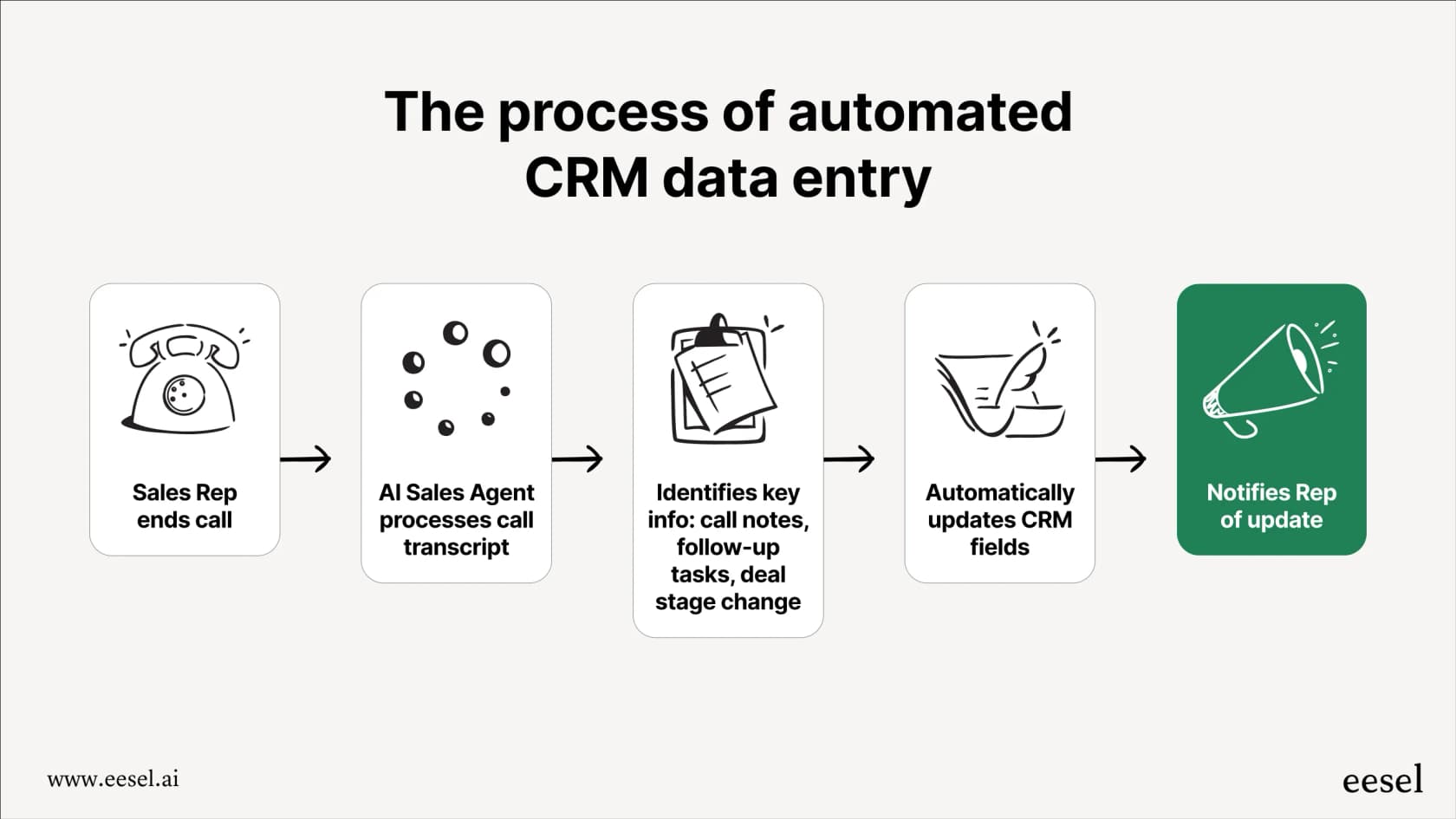
Here's what that looks like in practice:
AI Copilot drafts replies that minimize data exposure. When agents handle sensitive requests, Copilot suggests responses that don't require storing customer data in the ticket thread. Instead of copying credit card numbers into internal notes, agents process them directly in payment systems while keeping ticket history clean.
Natural language instructions for data handling. You can configure eesel AI with plain English policies like "Never store credit card numbers in ticket comments" or "Redact SSNs immediately after identity verification." The AI follows these instructions consistently, eliminating the human error that causes redaction misses.
Simulation testing before going live. Before our AI handles real customer data, you can run it against historical tickets to see exactly how it would have processed sensitive information. You verify data handling policies work as intended before any exposure occurs.
Progressive autonomy. Start with eesel AI drafting replies for agent review. As you gain confidence in its data handling, expand to full automation for specific ticket types. You control the pace based on actual performance, not hope.
The eesel AI Zendesk integration connects directly to your help desk, learns from your existing tickets and policies, and starts helping immediately. No manual training, no documentation uploads. Just connect and configure your data handling preferences in plain English. Ready to get started? Try eesel AI free or book a demo to see how it works with your Zendesk setup.
Redaction will always have a place in support operations. But the teams that get ahead of the problem, preventing unnecessary data exposure before it requires cleanup, will spend less time on manual redaction and sleep better knowing their customer data is handled properly from the start.