
Your help center URL is often the first impression customers have when they need support. A clean, professional address builds trust before they even read a single article. But when setting up Zendesk Guide, you're faced with a decision: stick with the default subdomain or invest in a custom domain?
This choice affects more than just aesthetics. It impacts brand perception, customer trust, and even security. Let's break down what each option means, how they differ, and which one makes sense for your situation.
What is a Zendesk Guide subdomain?
When you sign up for Zendesk, you automatically get a subdomain that follows this format: yourcompany.zendesk.com. This is the default option, and it works right out of the box.

The subdomain is created during account setup based on your company name. If your business is called Acme Support, your help center might live at acmesupport.zendesk.com. There's no additional configuration needed, and Zendesk handles all the technical details including SSL certificates.
This option is ideal if you're just getting started, running a small support operation, or testing Zendesk before making a larger commitment. It's free, immediate, and requires zero technical expertise. Your agents can start helping customers within minutes of signing up.
However, the trade-off is that your URL clearly shows you're using Zendesk. For some businesses, this isn't an issue. For others, it can feel like wearing someone else's nametag to a networking event. The branding isn't quite yours.
What is a custom domain for Zendesk Guide?
A custom domain lets you use your own branded URL, like support.yourcompany.com or help.yourcompany.com. Zendesk calls this feature "host mapping," and it essentially masks the default subdomain behind an address you control.
Setting this up requires a few extra steps. First, you need to own a domain (if you don't already). Then you create a CNAME record with your domain registrar that points your chosen subdomain to your Zendesk address. Finally, you configure the mapping in Zendesk's Admin Center and set up SSL.
The good news? Zendesk offers free SSL certificates through Let's Encrypt, so you don't need to purchase one separately. The certificate covers up to 100 host-mapped domains and renews automatically.
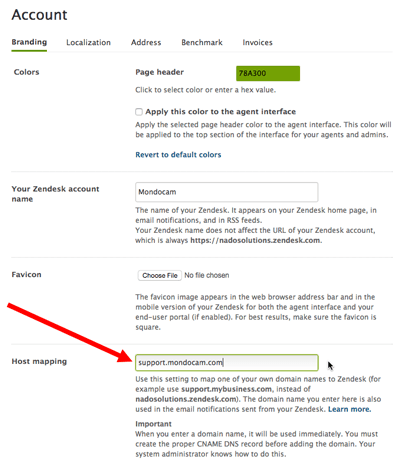
One important detail: even with host mapping, your agents will still access the agent interface through the original yourcompany.zendesk.com URL. The custom domain only affects what customers see on the help center side. If an agent tries to use the custom domain to access tickets, they'll be redirected to the default Zendesk URL.
Key differences at a glance
Here's how the two options stack up across the factors that matter most:
| Factor | Subdomain | Custom Domain |
|---|---|---|
| URL format | company.zendesk.com | support.company.com |
| Setup time | Immediate | 1-24 hours (DNS propagation) |
| Technical skill needed | None | Basic DNS knowledge |
| Annual cost | Free | Domain registration (~$10-50) |
| SSL certificate | Included | Free via Zendesk or custom |
| Brand appearance | Zendesk-branded | Fully branded |
| Customer trust | Standard | Higher perceived legitimacy |
| Agent interface | company.zendesk.com | Still company.zendesk.com |
The bottom line? Subdomains are faster and free. Custom domains look more professional but require a small investment and some technical setup.
Pros and cons of each option
Subdomain advantages and limitations
Advantages:
- Zero cost included with every Zendesk plan
- Instant setup no waiting for DNS changes
- No maintenance Zendesk handles SSL and security updates
- Easy to change you can rename your subdomain later if needed
Limitations:
- Less professional appearance customers see "zendesk.com" in the URL
- Limited brand control you're essentially renting space on Zendesk's domain
- Potential security concerns more on this in the next section
- SEO dilution search traffic goes to Zendesk's domain, not yours
Custom domain advantages and limitations
Advantages:
- Professional branding your support center looks like part of your main website
- Customer trust visitors see a familiar domain, reducing hesitation
- SEO benefits search authority builds on your own domain
- Consistency matches your existing brand experience
Limitations:
- Domain cost annual registration fees (though typically modest)
- Technical setup requires DNS configuration
- Propagation delays changes take time to take effect globally
- Ongoing management you need to renew the domain and monitor SSL
Security considerations: The subdomain impersonation risk
Here's something many businesses don't realize until it's too late: your Zendesk subdomain can be impersonated.
In 2025, security researchers identified a growing threat where bad actors create trial Zendesk accounts and change the subdomain to mimic legitimate companies. They might register yourcompany-helpdesk.zendesk.com or yourcompany-support.zendesk.com and use it for phishing attacks.
The risk is real because Zendesk trial accounts allow subdomain changes without additional validation. A threat actor can create a convincing fake help center that redirects visitors to malicious sites.
Using a custom domain reduces this risk significantly. It's much harder to impersonate support.yourcompany.com when you control the root domain. Customers who know to look for your branded URL are less likely to fall for subdomain-based phishing attempts.
Best practices regardless of which option you choose:
- Monitor for unauthorized subdomains using your brand name
- Educate customers about your official support URL
- Consider trademark monitoring services that alert you to domain abuse
- Use a custom domain if brand protection is a priority
How to set up each option
Using the default subdomain
There's really nothing to do here. Your subdomain is created automatically when you sign up for Zendesk. You can find it in your account settings, and it looks like https://yourcompany.zendesk.com.
If you need to change it later (perhaps after a rebrand), you can rename your subdomain in the Admin Center. Just be aware that this will break all existing links, bookmarks, and integrations that reference the old URL. There's no automatic redirect, so plan this change carefully.
Setting up a custom domain with host mapping
Here's the step-by-step process:
Step 1: Get a domain If you don't already own a domain, register one through a registrar like GoDaddy, Namecheap, or Google Domains. You'll need the ability to modify DNS records.
Step 2: Create a CNAME record
Log into your domain registrar's control panel and add a CNAME record. Point your chosen subdomain (like support) to your Zendesk subdomain (yourcompany.zendesk.com).
If you're using Cloudflare, set the proxy status to "DNS only" (not proxied) to avoid conflicts with Zendesk's SSL.

Step 3: Configure host mapping in Zendesk In the Admin Center, go to Account > Appearance > Branding. Enter your custom subdomain in the Host Mapping section and save.
Step 4: Set up SSL Go to Account > Security > More settings > SSL. Enable "Zendesk-provisioned SSL" to use the free Let's Encrypt certificate. It can take up to an hour to activate.
Step 5: Wait for propagation DNS changes typically take a few hours to propagate globally, though it can take up to 24 hours in some cases.
Migration: Switching from subdomain to custom domain
Good news: you can switch to a custom domain at any time without losing data. Your tickets, users, and settings remain intact. The only thing that changes is the URL customers see.
However, there are some practical considerations:
- External links break Any bookmarks, email templates, or documentation referencing the old subdomain will need updating
- No automatic redirects Zendesk doesn't provide redirects from the old subdomain to the new custom domain
- Communication required Notify your team and regular customers about the URL change
- Integration updates Third-party tools pointing to your help center may need reconfiguration
The transition is smoother if you plan it during a low-traffic period and give your team advance notice. Update your email signatures, help center links on your main website, and any automated messages that include the old URL.
Which option should you choose?
Choose the subdomain if:
- You're testing Zendesk or just getting started
- Budget is a primary concern
- You need to launch quickly without technical setup
- Your support volume is relatively low
- You're okay with the Zendesk-branded URL
Choose a custom domain if:
- Brand consistency across all customer touchpoints matters
- You have an established business with existing brand recognition
- Building customer trust is a priority
- You're planning to scale your support operations
- You want better SEO control over your help content
- Security and brand protection are concerns
For most growing businesses, the custom domain is worth the small investment. The annual cost of a domain (typically $10-50) is minimal compared to the professional appearance and brand control you gain.
How eesel AI fits into your support strategy
Whether you choose a subdomain or custom domain for your Zendesk help center, the goal is the same: helping customers find answers quickly. That's where an AI teammate can make a significant difference.
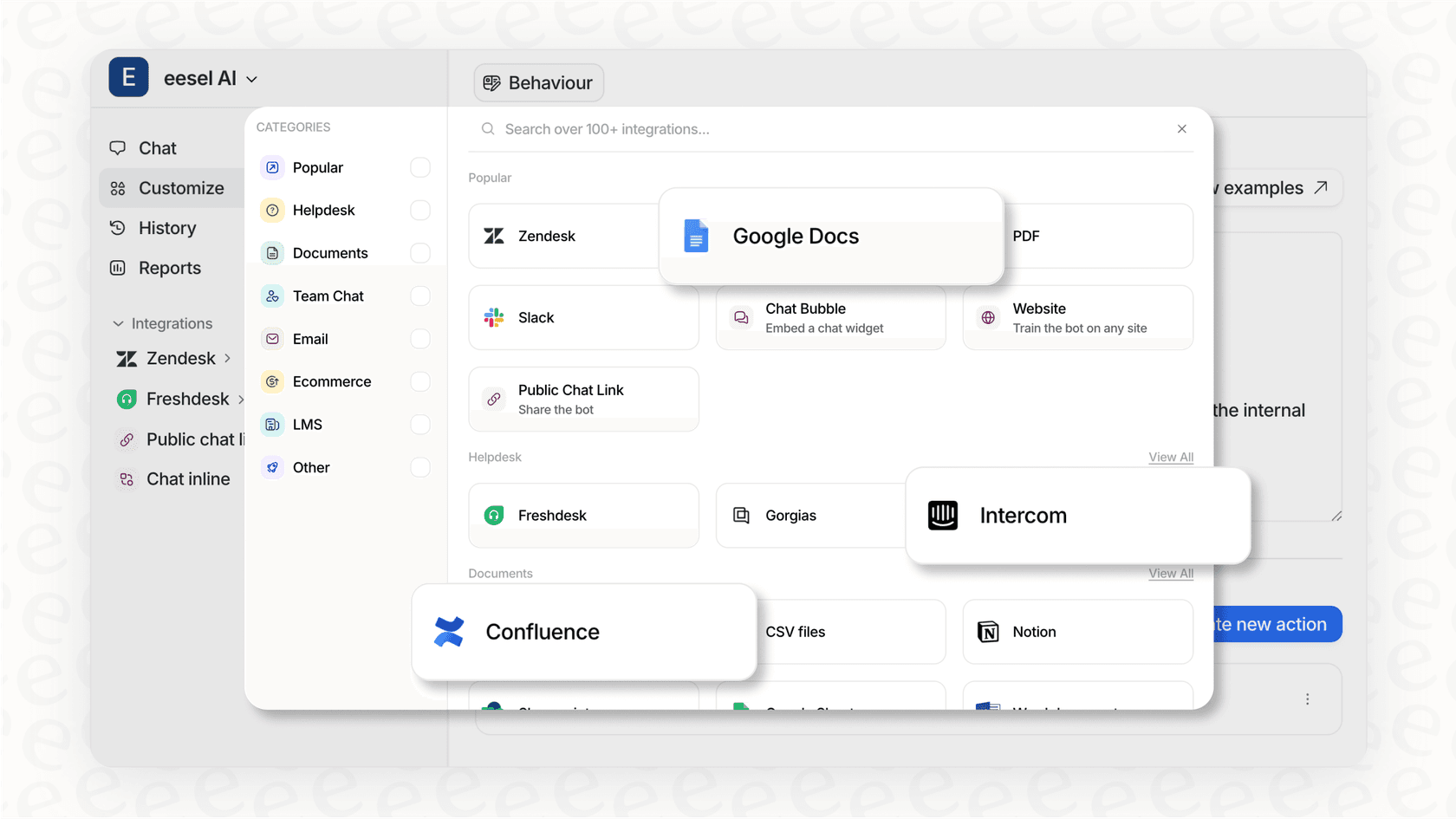
eesel AI works alongside your existing help desk, including Zendesk. It learns from your help center articles, past tickets, and macros to draft responses and handle routine inquiries. The AI can work with either subdomain or custom domain setups, integrating directly into your Zendesk instance.
Instead of just choosing between URL options, consider how you can make the content at that URL more effective. An AI teammate can help you respond faster, maintain consistency, and free up your human agents for complex issues that actually need their expertise.
If you're evaluating your support stack and want to explore how AI can enhance your Zendesk setup, check out how eesel AI works with Zendesk.


