The 8 best SnapDial alternatives for 2026

Kurnia Kharisma

Katelin Teen
Last edited August 29, 2026

Why people leave SnapDial
I have spent the last few years around teams putting AI on live support queues, and the single most common thing I hear from someone shopping for a new phone system is not "the calls drop." It is "I could not get a straight answer on price." SnapDial is a clean example of that, so it is worth being fair about what it does well before the reasons to look elsewhere.
The genuine strengths: SnapDial handles the whole migration for you, including number porting, at no extra cost, which is a real relief for a small team replacing a legacy PBX. The feature matrix is deep, with skills-based routing, unlimited call queues, real-time queue stats, and monitor, coach, and barge all included. And the customer logos it shows (H&R Block, YMCA, Valvoline, Ace Hardware) are not the usual no-name testimonials.
So where does it fall short? Three things.
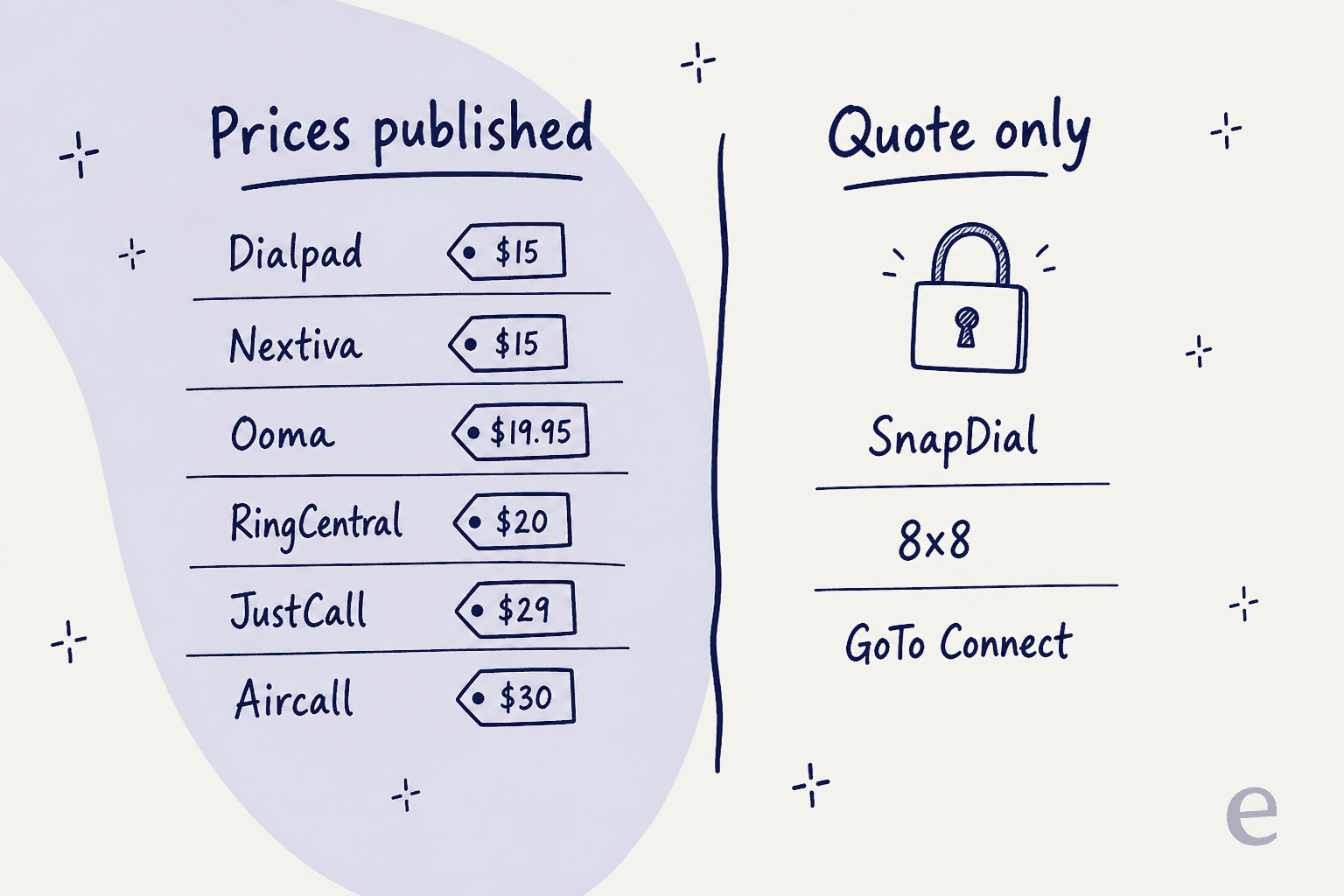
First, and biggest: there is no public pricing at all. The /pricing/ URL returns a 404, the homepage markets an "all-inclusive pricing model" with zero dollar figures, and a few features (visual voicemail, virtual fax, international calling) are flagged as extra-charge without saying how much. Everything routes to a quote call. That is fine if you love a sales process, but it makes budgeting impossible up front.
Second, the support story does not quite line up. The homepage and enterprise page both promise "24/7 Texas-based support," but the contact page lists hours as Monday to Friday, 8am to 5pm CST, with after-hours support only. Both can be true, but a buyer expecting round-the-clock live help should ask exactly what "24/7" covers.
Third, the third-party proof is thin. There is a SnapDial G2 page sitting at 4.9/5, but from only about 11 reviews, and no real Trustpilot or Reddit footprint to cross-check against. A near-perfect score on a tiny sample is weak signal, not a green light.
None of that makes SnapDial a bad product. It makes it a hard product to compare, which is exactly why an alternatives list is useful. And that quote-only habit is not unique to SnapDial, which is the first thing to understand before you shop.
What to look for in a SnapDial alternative
Before the list, here is the short checklist I would run any of these through. It is the difference between a switch that saves you money and one that just moves the frustration around.
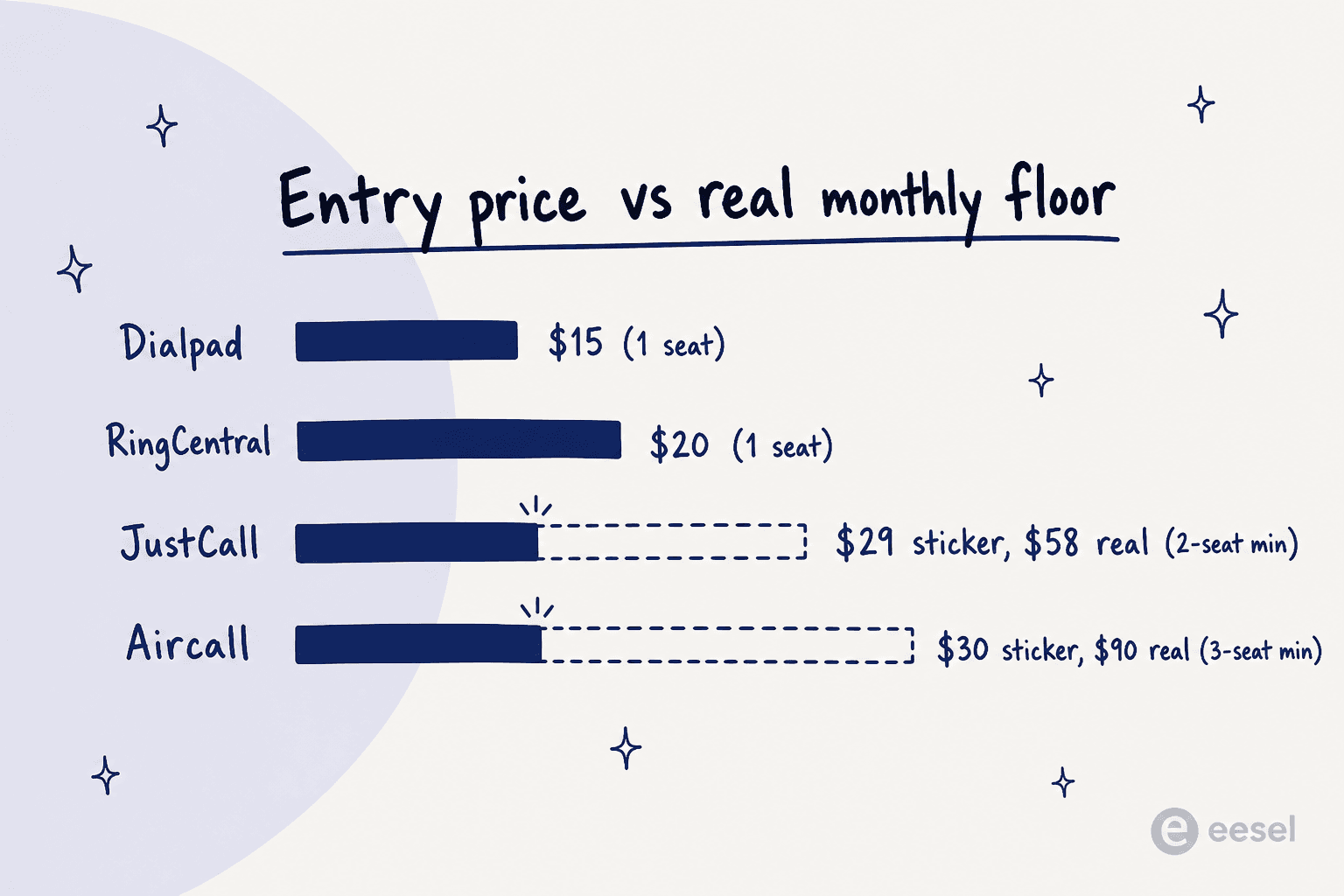
- Published, honest pricing. Can you see a per-seat rate without a sales call, and does that rate include a seat minimum? A "$30" plan with a 3-seat floor is really a $90 plan.
- Contract flexibility. The loudest complaint across every incumbent below is auto-renewing multi-year contracts. Month-to-month or no-contract options matter more than they look.
- Contact-center depth, if you need it. SnapDial has queues, callback, and monitoring. If those are load-bearing for you, make sure the replacement matches them, not just the basic phone.
- AI that is actually included. Nearly everyone sells "AI" now. The real question is whether transcription, summaries, and AI agents are in the plan or a separate meter you will not see until the invoice.
- Integrations with your stack. If your team runs on Zendesk, Freshdesk, or Salesforce, calling that logs into those tools automatically is worth more than a longer feature list.
Keep those five in mind as you read. Now the alternatives, roughly in order of how broadly they fit.
SnapDial alternatives at a glance
| Tool | Best for | Entry price (annual) | Pricing model | Real contact center | AI included | Uptime SLA |
|---|---|---|---|---|---|---|
| RingCentral | Full-stack UCaaS with an upgrade path | $20/user/mo | Published | Yes (RingCX, add-on) | Basic in-plan, more as SKUs | 99.999% |
| Nextiva | All-in-one phone + omnichannel + AI receptionist | $15/user/mo | Published (CC quote-only) | Yes | Top tier only | 99.999% |
| Dialpad | AI transcription baked into every tier | $15/user/mo | Published (AI Agent quote-only) | Yes (Support) | Yes, in-plan | 99.9% (Premium) |
| 8x8 | Enterprise UCaaS + CCaaS in one | Quote-only | Quote-only | Yes | Newer AI line | 99.999% |
| Aircall | Support/sales calling wired into a CRM | $30/user/mo (3-seat min) | Published | Call center features | Add-on | 99.95% |
| JustCall | Outbound sales dialing + AI coaching | $29/user/mo (2-seat min) | Published (annual only) | Call center features | Add-on / Pro Plus | Business tier |
| GoTo Connect | Simple call-routing admin for small teams | ~$26/user/mo | Quote-only | CX / Contact Center tiers | Higher tiers | 99.999% (claim) |
| Ooma Office | Cheapest, simplest small-business phone | $19.95/user/mo | Published | Enterprise tier only | Pro Plus add-ons | Not published |
A quick decision helper if you would rather not read all eight:
1. RingCentral
Best for: teams that want one carrier-grade phone system now and the option to add a full contact center later, without re-platforming.
RingCentral is the closest thing to a default answer here. It is a Gartner Magic Quadrant Leader in UCaaS, it publishes a 99.999% uptime SLA (under six minutes of downtime a year), and its RingEX phone product sits under the same roof as RingCX, a real AI contact center. For a SnapDial buyer, that means a clear upgrade path: start with the phone, add queues and routing when you need them.
Features: AI-powered calls, SMS, team chat, and meetings; a bundled AI Assistant for call recaps and transcription; RingCX for omnichannel routing and AI quality management; and an autonomous AI Receptionist that answers, routes, and books appointments. Integrations run to 330+ apps, though CRM connectors (Salesforce, Zendesk, HubSpot) start at the Advanced tier.
Pros: the cheapest seat is genuinely low, the reliability and compliance stack (HITRUST, PCI DSS, SOC 2, HIPAA) is enterprise-grade, and the AI Receptionist is a real autonomous product, not a chatbot.
Cons: the useful pieces are separate SKUs. RingCX starts around $65/user, the AI Receptionist around $39, and Conversational Intelligence around $60, so the real bill climbs past the sticker. The loudest user complaint is contract lock-in.
"You are simply locked in. To cancel future long-term contracts, they will not discuss with you. Their service is terrible."

Pricing:
| Plan | Annual (per user/mo) | Monthly | Adds |
|---|---|---|---|
| Core | $20 | $30 | Calls, meetings, chat, basic AI; no CRM integrations |
| Advanced | $25 | $35 | AI Virtual Assistant, CRM integrations, auto call recording |
| Ultra | $35 | $45 | Full AI Virtual Assistant, device + business analytics |
My take: if you are replacing SnapDial and want the safest, most complete option, RingCentral is it. Just budget for the add-ons, and negotiate the contract term hard before you sign.
2. Nextiva
Best for: a small or multi-location business that wants phone, omnichannel inbox, contact center, and an AI receptionist from one vendor and one bill.
Nextiva has repositioned itself from a VoIP phone company into what it now calls an "AI Customer Experience Management Platform." The pitch is the NEXT Platform: voice, video, chat, email, SMS, and social in one app, with XBert AI, an agentic "AI employee" that answers calls, books appointments, and resolves FAQs. It still sells a plain business phone system underneath, so you can start small.
Features: unified channels in one inbox, an AI-powered contact center with skills-based routing and CSAT/NPS surveys, CRM and helpdesk connectors for Salesforce, HubSpot, Zendesk, and ServiceNow, and a strong compliance posture (SOC 2, ISO 27001, HIPAA, 99.999% uptime).
Pros: it is genuinely all-in-one, the core pricing is published and low, and third-party ratings are solid (4.6/5 on Trustpilot across 8,484 reviews). Onboarding gets consistent praise.
Cons: the AI most buyers now shop for (transcription, call summaries, NextIQ Answer Assist) sits behind the top Scale tier at $75/user/mo, and the entry Core plan gates live chat, call recording, and CRM integrations as add-ons. Support wait times and post-sale fee surprises are a recurring theme.
"We joined Nextiva a year ago and definitely regret it. One of the 'fees' on our bill recently tripled."
Pricing:
| Plan | Annual (per user/mo) | Adds |
|---|---|---|
| Core | $15 | Voice, SMS (100/user), video, call routing, mobile app |
| Engage | $25 | Toll-free minutes, inbound call center, live chat + chatbot |
| Scale | $75 | Full CX: AI transcription + summary, journey orchestration, unlimited texts |
Contact-center Essential starts at $75/agent/mo, with Professional and Premium quote-only.
My take: Nextiva is the best "one vendor for everything" pick for a SnapDial buyer who wants an AI receptionist out of the box. Just know that the real AI moves you up to Scale, so price it at the tier you will actually use.
3. Dialpad
Best for: small-to-mid teams that want AI transcription and coaching native to the phone, at the lowest published entry price.
Dialpad leads with AI harder than anyone else here, and it backs it up. Its differentiator is a proprietary speech engine that transcribes, summarizes, and coaches on calls live, and crucially those pieces ship on the base tiers rather than as an upsell. If you have been reading our Dialpad review or Dialpad pricing breakdown, the short version is that it is the most AI-forward phone system at this price.
Features: unlimited calling with real-time transcription and AI call summaries on Connect; an Ai Contact Center (Support) with IVR, callback, and monitoring; an outbound Ai Sales dialer; and an autonomous AI Agent that schedules, processes orders, and handles refunds across voice and digital. First-party integrations include Zendesk, Salesforce, HubSpot, and ServiceNow.
Pros: the cheapest real entry point in this list, AI transcription included at every tier, and a coherent ladder from phone up to a real contact center.
Cons: at Support Essentials ($80), AI Live Coach, scorecards, and CSAT are all optional add-ons, so the AI-first pitch costs extra to fully realize. There is no uptime SLA below Premium, and the flagship AI Agent is fully quote-only. Call-quality gripes show up in reviews.
"It works, just not clearly, and they have a noticeable delay and general quality issues."
Pricing:
| Product / tier | Annual (per user/mo) | Monthly |
|---|---|---|
| Connect Standard | $15 | $27 |
| Connect Pro | $25 | $35 |
| Support Essentials (contact center) | $80 | $95 |
| Sell Essentials (sales dialer) | $39 | $49 |
My take: if AI on the call is your priority and you are watching the budget, Dialpad is the pick. Note that Connect Standard integrates with almost nothing (Google Workspace only), so most teams land on Pro.
4. 8x8
Best for: mid-market and enterprise teams that need one vendor for both unified communications and an omnichannel contact center.
8x8 is a veteran that bundles UCaaS and CCaaS into one platform it brands "XCaaS." It is a mature, Gartner-recognized enterprise player with a published 99.999% uptime SLA, and it is actively shipping a newer AI line (AI Routing, Pulse, Resolve) rather than bolting a single chatbot onto an old phone system.
Features: all-in-one phone, video with AI summaries, team chat, SMS, and fax; native Microsoft Teams integration; a full contact center alongside the phone; and the new AI Routing layer that pairs customers with the best available expert to cut transfers.
Pros: deep, mature platform breadth; strong reliability and compliance; a genuine global calling footprint for distributed teams.
Cons: here is the honest problem for a SnapDial buyer. 8x8 no longer publishes any pricing. Both the business-phone pricing page and the top-level /pricing URL return a 404, and the only CTAs are "Chat with Sales" and "Request a Quote." So you would be trading SnapDial's quote wall for another one. Reviews also cite a confusing admin interface, and contract terms draw the sharpest criticism.
"8x8 is very bad services, and they sign agreement with lower prices and then add a clause that prices are subject to change and then increase..."
Pricing: quote-only. 8x8 historically listed X-series plans (X2, X4, and higher contact-center tiers), but those published rates have been removed from the site. You will need to request a quote for any number.
My take: 8x8 is a strong platform, and if you are enterprise-sized and already talking to sales, it belongs on your shortlist. But if the thing that pushed you off SnapDial was the lack of transparent pricing, 8x8 does not fix that problem.
5. Aircall
Best for: support and sales teams that want a reliable calling layer wired deep into an existing CRM or helpdesk, rather than a standalone dialer.
Aircall is built around integrations. It markets 250+ connectors and drops calling straight into Salesforce, HubSpot, and Zendesk so every call logs itself. It says it is trusted by 23,000+ businesses, and it now sells autonomous AI voice and messaging agents on top of the core phone.
Features: deep CRM/helpdesk integrations, call transcription on every plan, an AI Assist add-on for summaries and sentiment, an AI Voice Agent metered per minute, and full core telephony (IVR, routing, queue callback, Power Dialer, business SMS).
Pros: fast to implement, a genuinely broad integration catalog, and call transcription included at every tier.
Cons: the advertised "$30" is never a real invoice. Essentials carries a 3-licence minimum, so the true floor is $90/month, or $160/month if you pay monthly. AI Assist is an extra $9/licence that applies across all seats, and the autonomous agents bill per minute regardless of outcome. There is a G2-versus-Trustpilot gap that tells the story: 4.4/5 on G2 for the software, closer to 3.0 on Trustpilot for the billing and renewals.
Pricing:
| Plan | Annual (per licence/mo) | Minimum | Real floor |
|---|---|---|---|
| Essentials | $30 | 3 licences | $90/mo |
| Professional | $50 | 3 licences | $150/mo |
| Custom | Quote | 25 licences | Quote |
My take: if your team already runs on a CRM and you want calls to just appear in it, Aircall is excellent. Read the seat minimum and the AI meter before you sign, because the $30 headline is not the number you will pay.
6. JustCall
Best for: outbound and inbound sales teams that want a dialer-heavy phone system with built-in AI coaching, at a lower entry seat price than Aircall.
JustCall (by SaaS Labs) is a cloud phone system, outbound sales dialer, and AI conversation layer in one. It leads revenue-first, with power dialers and CRM-synced follow-ups, and it says it is trusted by 6,000+ customers. It is the natural pick if your call volume is mostly outbound.
Features: 100+ CRM integrations with Salesforce CTI, real-time AI coaching and call scoring, an AI Voice Agent, and sales dialers up to 10-line predictive. Unlimited call transcription ships on every plan.
Pros: a lower entry price and a lower 2-seat minimum than Aircall, so the cheapest real invoice ($58/mo) undercuts Aircall's $90 floor. Best-in-class outbound dialing, and a genuine 14-day full-feature free trial.
Cons: pricing is annual-only on the page, so month-to-month buyers cannot see their rate. The AI is split across three meters (a per-seat add-on, a bundled Pro Plus tier, and a per-minute Voice Agent), which is hard to model, and the Voice Agent is never included at any tier. SLA and SSO are Business-tier only. Billing complaints around annual charges recur on Trustpilot.
Pricing:
| Plan | Annual (per user/mo) | Minimum | Real floor |
|---|---|---|---|
| Team | $29 | 2 licences | $58/mo |
| Pro | $49 | 2 licences | $98/mo |
| Pro Plus | $89 | 2 licences | $178/mo |
My take: for a sales-led team, JustCall gives you more dialer for less money than Aircall. For a support-led team, Aircall's integration polish edges it out. Either way, map the AI meters before you commit.
7. GoTo Connect
Best for: small teams that want a full-featured cloud phone system with genuinely simple call-routing admin, without stepping up to a heavy enterprise suite.
GoTo Connect bundles voice, SMS, video, and messaging into one app, and its standout is a drag-and-drop dial-plan editor that reviewers say even a novice can drive. It carries a strong ease-of-use reputation (around 4.5/5 on G2) and layers CX and contact-center tiers plus an AI Receptionist on top.
Features: cloud phone with softphone, SMS, and meetings for up to 250 participants; the drag-and-drop dial plans that get the most praise; unlimited auto attendants and call queues; free calls to 50 countries; and CX channels (WhatsApp, web chat, surveys) plus ServiceNow and Zendesk integrations on higher tiers.
Pros: the routing editor is a real differentiator for a small admin, the feature set is broad for the tier, and the mobile app is solid for field teams.
Cons: like SnapDial and 8x8, GoTo has stopped publishing rates. The pricing page now shows four quote-only tiers. Third-party trackers put the entry Phone System tier around $26/user/mo, but that is not vendor-confirmed, so treat it as indicative. Reviewers also flag a learning curve on the routing UI when you change it infrequently, and mixed support experiences.
Pricing: quote-only on GoTo's own site. Independent trackers report roughly $26/user/mo for the entry Phone System tier and around $80 for the full Contact Center, but you will need a quote for a firm number.
My take: GoTo Connect is a genuinely good value phone system, and the routing editor is a real reason to pick it. The frustration is that, once again, you cannot see the price without asking. If transparency was your dealbreaker with SnapDial, weigh that.
8. Ooma Office
Best for: the smallest businesses that want unlimited calling and a virtual receptionist at the lowest flat per-user price, with no contract.
Ooma Office sells on price and simplicity, and it is the most honest about both. It publishes flat per-user rates right on the page, requires no contract, and is built for teams that want a phone system without enterprise complexity. If SnapDial felt like overkill for a handful of lines, Ooma is the opposite end.
Features: 100+ standard features across all plans, unlimited US/Canada/Mexico/Puerto Rico calling, a virtual receptionist, one free toll-free number, and digital fax. Pro Plus adds AI transcriptions, CRM integration, and call queuing, and there are optional AI Answering Service and AI Receptionist add-ons on every tier.
Pros: the lowest entry price in this comparison, genuinely easy self-setup, and no contract on any published plan. It serves very small accounts that larger UCaaS vendors deprioritize.
Cons: call reliability and audio quality get mixed reports, mobile voice quality depends heavily on signal, and AI, CRM, and call queuing all require Pro or Pro Plus. The cheapest tier is deliberately bare.
Pricing:
| Plan | Per user/mo | Adds |
|---|---|---|
| Essentials | $19.95 | 100+ features, unlimited calling, virtual receptionist, digital fax |
| Pro | $24.95 | Desktop app, text (250/mo), video for 25, call recording |
| Pro Plus | $29.95 | AI transcriptions, CRM integration, call queuing, video for 100 |
My take: for a genuinely small team on a tight budget, Ooma Office is the easiest yes on this list. Set expectations on call quality and know that the interesting AI features live on Pro Plus, but for simple, cheap, and no-contract, nothing here beats it.
The worked example: what a 10-seat team actually pays
Sticker prices lie a little, so here is what a 10-person team looks like across the transparent options, phone plan only, billed annually:
- Ooma Office Essentials: 10 x $19.95 = $199.50/mo, no contract.
- Dialpad Connect Standard: 10 x $15 = $150/mo, though most teams need Pro at $250 for real integrations.
- Nextiva Core: 10 x $15 = $150/mo, plus add-ons for call recording and CRM.
- RingCentral Core: 10 x $20 = $200/mo, before RingCX or AI SKUs.
- JustCall Team: 10 x $29 = $290/mo.
- Aircall Essentials: 10 x $30 = $300/mo.
The gap between the cheapest and the priciest phone plan here is about 2x, and that is before anyone turns on AI. Which brings me to the point most of these comparisons skip.
The question none of these answer: how many of those calls needed a person?
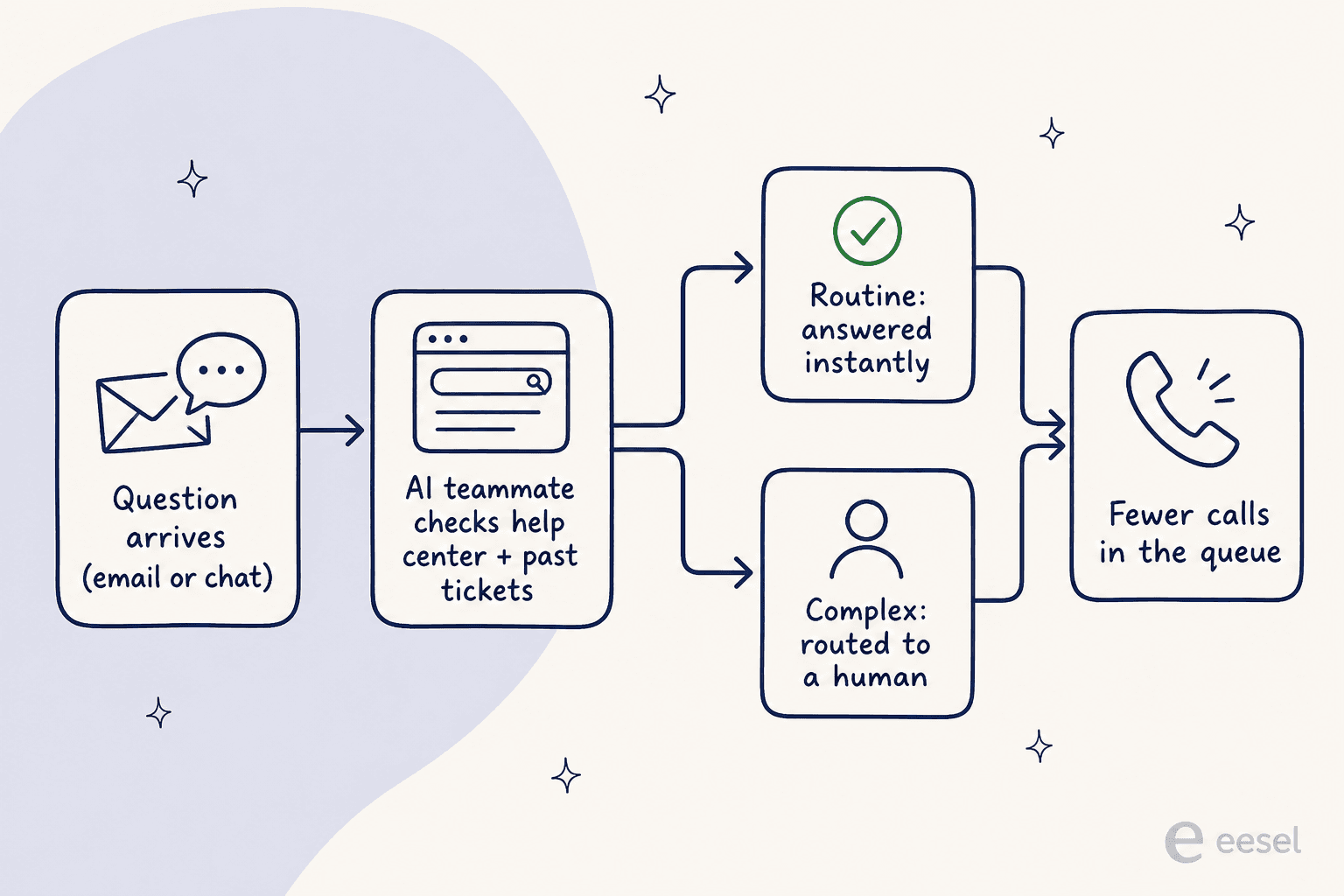
Every tool above is a better version of the same thing SnapDial does: it moves the call around more cleverly. None of them ask whether the call needed to happen. And in my experience running AI on live support queues, a large share of inbound contacts are the same handful of repeat questions: where is my order, how do I reset this, what are your hours, can you resend the invoice. Those never needed a person on the phone.
That is the gap an AI helpdesk teammate fills, and it is a different job from a phone system. Instead of routing a call, it answers the question on chat, email, or your help center before it ever becomes a call. This is the same idea behind live-chat deflection and an AI ticketing system: the complex contacts still reach a human, the routine ones just get resolved.
Every phone vendor above is now selling some version of this (RingCentral's AI Receptionist, Nextiva's XBert, Dialpad's AI Agent), which tells you where the category is heading. The difference is that for them it is a bolt-on to a phone system; for a dedicated tool it is the whole product. If you want the voice-first version specifically, our roundup of AI voice agent platforms covers those, and our AI customer service software guide covers the digital side.
Try eesel for the calls that never needed to happen
I work on eesel, so treat this as the biased-but-honest part. eesel is not a phone system, and I would not pretend it replaces one. It is an AI helpdesk teammate: it plugs into the Zendesk, Freshdesk, or Gorgias setup you already run, learns from your help center and past tickets, and resolves the repetitive questions on chat and email so fewer of them ever reach the phone queue.

The part I would actually flag for a SnapDial buyer, given how this whole post has gone: eesel lets you simulate the AI on your own past tickets before it touches a live conversation, so you can see the deflection rate and the exact answers up front, no quote call required. It is free to try, it goes live in minutes rather than a white-glove onboarding, and it sits alongside whichever phone system you pick from this list. If the thing that pushed you off SnapDial was not knowing what you were buying, that transparency is the whole point. You can read more on how it fits into first-contact resolution and AI customer service metrics, or just try it and watch it answer a real ticket.
Frequently Asked Questions
How much does SnapDial cost?
/pricing page returns a 404 and every plan routes to a 'Schedule a Call' quote, so you only learn the per-seat cost after talking to sales. If you want a number before a sales call, the SnapDial alternatives with published rates start at Dialpad and Nextiva ($15/user/mo) and Ooma Office ($19.95/user/mo). For the automation angle, see how AI compares to a human agent on cost.