


Disclosure: This guide is published by eesel AI. eesel is a competitor to Serval. We've described Serval using its own documentation, with every factual claim linked to its primary source. For Serval's official information, go to serval.com and docs.serval.com.
If you're evaluating AI for IT service management, Serval is one of the names that surfaces. It's an AI-native ITSM platform that combines ticketing, access management, and workflow automation in one product. It raised a $75M Series B at a $1B valuation in December 2025, led by Sequoia.
This is a buyer's guide written from our perspective at eesel AI. We're not going to pretend to be neutral, we make a competing product, but we will be specific. Every Serval claim is linked to Serval's own materials, and the comparison at the end uses verified facts on both sides.
What Serval is, briefly
Per Serval's homepage, the platform is built around three AI agents (Help Desk, Automation, Insights), with a native ticketing system, access management, and a workflow builder. Customers automate more than 50% of their IT tickets after deployment per Serval's own materials.
It's worth being clear about one thing up front: Serval is positioned as a unified ITSM, but it doesn't require ripping out your existing help desk. Per Serval's ticketing page, it supports a full two-way sync with third-party ticketing solutions like ServiceNow, Jira, and Zendesk. You can run it as a replacement, or alongside what you have.
What Serval does well
A few features stand out, and they're worth understanding even if you end up choosing something else.
Workflow builder
Serval's workflow builder is genuinely interesting and worth understanding in detail. You describe what you want in natural language, Serval generates code, and displays a visual step-by-step diagram alongside. The code is editable directly. Workflows can be managed in Git for version control, and execute deterministically the same way every time.
The interesting design choice here is that natural language and code are first-class, equal layers, not a no-code UI hiding the logic. A non-technical IT manager can read the visual diagram to understand what an automation does. A platform engineer can edit the underlying code to add edge-case handling. And both can collaborate on the same workflow without translating between abstractions.
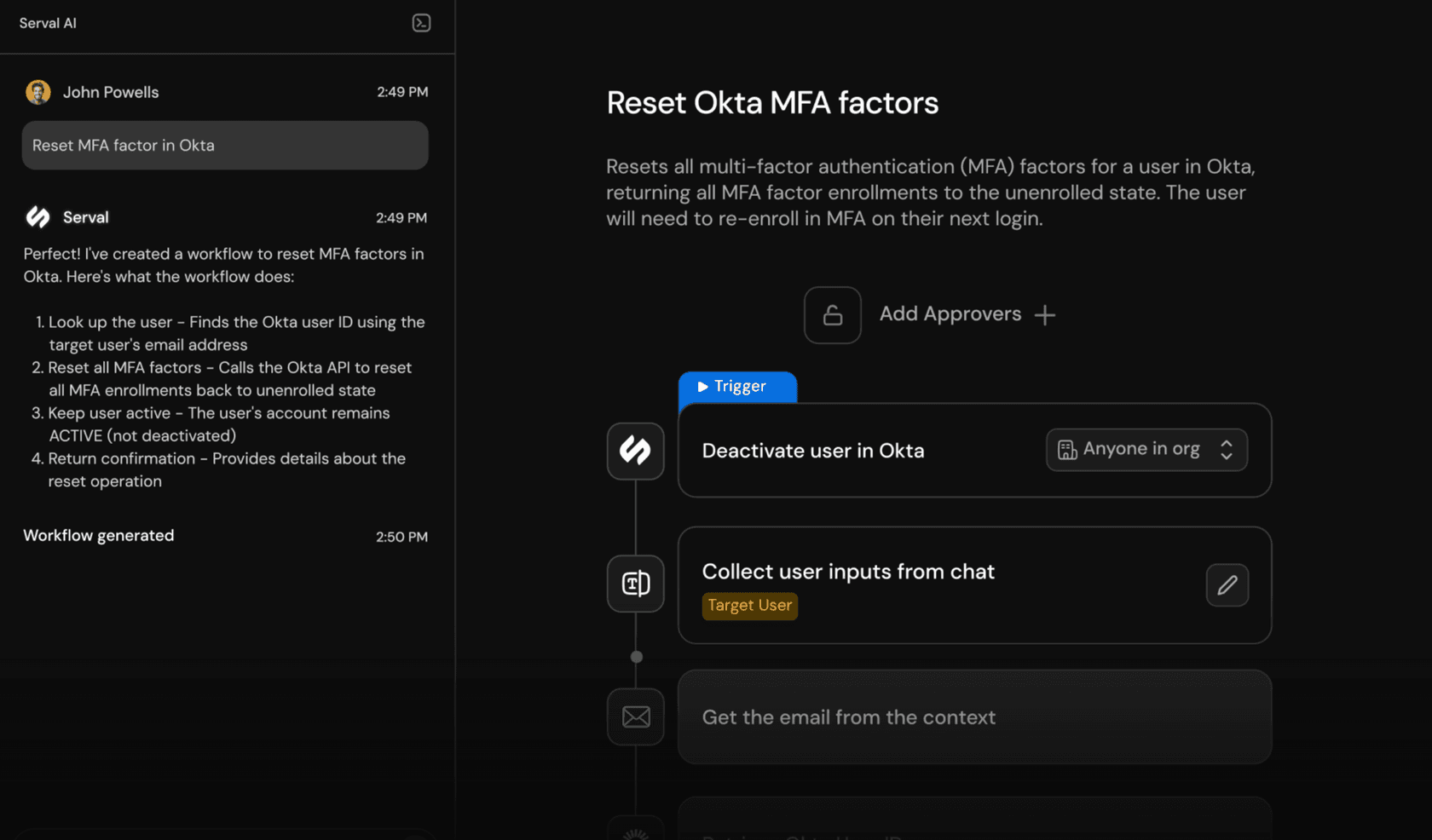
Workflows are testable before publish. Serval's build your first workflow guide walks through testing with execution status, inputs, outputs, and error details visible during a test run. Multi-step approvals can be required before execution, which matters for sensitive automations like granting elevated permissions or pushing changes to production systems.
A few things this enables that are harder in traditional drag-and-drop builders:
- Code review for automation logic. Workflows live as code in Git, so you can require pull-request review before changes to sensitive automations land.
- Branch-based experimentation. You can fork a workflow, experiment, test, and merge, the same way you'd handle application code.
- Audit trail of changes. Git history is the audit log; you don't need a separate "who changed what" view inside the vendor UI.
- Disaster recovery. Your automations are in a repo you control. If you ever needed to leave the platform, you'd have the source.
For a faster start, Serval ships installable workflows for common ITSM tasks (onboarding, offboarding, access reviews, group membership, common SaaS provisioning) that install with a click. They're a starting point you customise, not a rigid template. Combined with 40+ integrations for Okta, Google, Jira, ServiceNow, Slack, GitHub, Salesforce, Notion, and others, the day-1 surface area is meaningful.
The honest tradeoff: this builder rewards teams with at least some technical depth on the IT-ops side. Teams that want a pure no-code builder where business analysts assemble flows without ever seeing code will find Serval's approach more powerful but also more demanding. It's a feature-not-bug for ops teams comfortable with Git.
Copilot for escalated tickets
Serval has a Copilot that helps human assignees on tickets that need escalation. It can suggest solutions, run internal workflows, and reduce the manual work on tickets the AI doesn't fully resolve.
eesel has a similar Copilot plus an AI Agent that resolves tickets autonomously. The two shapes (assist vs. resolve) are different jobs, and which you want depends on the ticket type and risk tolerance.
Two-way ticket sync
For teams already running ServiceNow, Jira, or Zendesk, the two-way sync is meaningful. Tickets created in either system appear in both, updates propagate both ways, and you don't have to migrate to start using Serval.
The practical implication: you can adopt Serval as the AI layer first, prove value, and decide later whether to also migrate the system of record. That's a meaningfully lower-stakes onboarding than "rip out your help desk and try this new thing." Tickets the AI handles get resolved without ever needing a human to touch the legacy ticketing UI; tickets that escalate flow back into your existing queue with full context attached.
What this is less suited for: teams that don't have an existing help desk problem and want a unified product from day one. For them, the syncing layer adds operational surface area (two systems to monitor, two sets of permissions to manage) without much benefit. If you're going to be on Serval long-term, going native is simpler.

Access management
Serval includes a native access management capability with policies, just-in-time provisioning, time-bound permissions, and multi-approver workflows. For teams that want to consolidate IAM into the same product as ITSM, that's a real benefit.
Where you'd want to look closely
Three things are worth understanding before signing.
Pricing and deployment model
Serval does not publish per-seat or per-ticket pricing. The pricing page describes a pilot-based engagement with a dedicated deployment engineer, structured around a guaranteed 50% automation outcome. The four phases are Meet, Build, Deploy, Optimize.
This is a deliberate choice and it has tradeoffs. On the upside:
- Real engineering support. A deployment engineer learns your environment and helps you build the right automations rather than handing you a generic UI to figure out yourself.
- Measurable success criterion. "50% of incoming IT tickets automated by end of pilot" is a concrete commitment, not a vibes-based pitch. That's a meaningful piece of risk-sharing.
- Less wasted setup time. A pilot pointed at the highest-value use cases for your specific environment will likely produce results faster than self-serve trial-and-error.
On the downside:
- No self-serve evaluation. You can't sign up, connect a sandbox, and play around to decide whether you like the product before talking to sales.
- No public price. You can't compare costs across vendors without entering each sales process.
How you feel about this probably correlates with how you buy software in general. Teams that prefer to evaluate tools by spinning up trials and comparing them side by side find this model frustrating. Teams that prefer to work with a vendor through a structured engagement find it appropriate to the scale of an ITSM decision.
Platform shape vs. layer shape
Serval is a platform. Even if you run it alongside your existing help desk via sync, you're standing up a system that has its own ticketing, its own access management, and its own knowledge base. That's a strength if you want a coordinated AI-native ITSM, and a different commitment than adopting a tool that just adds AI to what you have.
Scope of native ticketing vs. integration-first
If your support also includes external customers (not just internal employees), Serval's positioning as an AI-native ITSM platform is worth checking against your use cases. The product is designed for internal IT operations.
Serval and eesel AI: side-by-side
Here's how the two compare on the things buyers usually care about. Serval details below are sourced from Serval's homepage, pricing page, and docs; eesel details from eesel.ai.
| Aspect | Serval | eesel AI |
|---|---|---|
| Product shape | AI-native ITSM with native ticketing, access management, workflows | Integration-first AI layer over your existing help desk |
| Sign-up | Pilot-based engagement; contact sales | Self-serve sign-up |
| Workflow builder | Natural language input, generated code, visual diagram, testable before publish | Prompt editor with selective automation rules |
| Pre-built starting points | Installable workflows + 40+ integrations | 100+ integrations |
| Coexistence with existing help desk | Two-way sync with ServiceNow, Jira, Zendesk | One-click integrations with Zendesk, Freshdesk, Jira Service Management |
| Pricing transparency | No public per-seat or per-ticket pricing; pilot-based | Public credit-based pricing |
| Testing before go-live | Workflow tests with execution status, inputs, outputs, errors | Simulation on past tickets |
| Primary use case | Internal IT (ITSM) | Internal IT and external customer support |
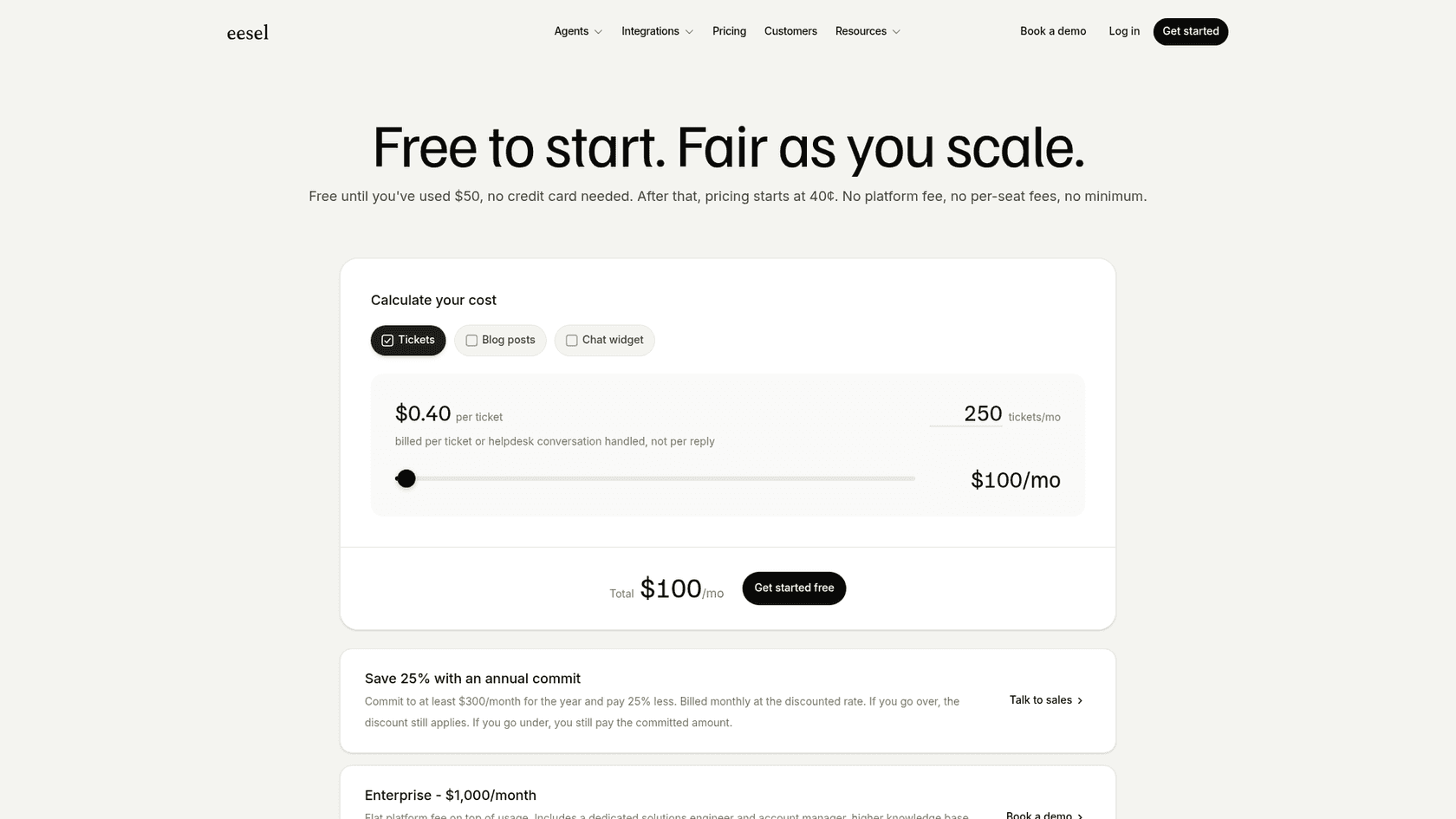
eesel AI's pricing is worth a look if predictability matters to you. It's a fixed monthly price sized to your volume, and 1 credit covers one ticket or chat, however long.
| Monthly credits | Price |
|---|---|
| 100 | Free, no card |
| 500 | $299/mo |
| 1,000 | $499/mo |
| 2,500 | $999/mo |
| 5,000 | $1,899/mo |
Every integration, channel and seat is included. Pay a year upfront and get two months free. If credits run out, agents pause until they reset, or you can turn on overage with a monthly cap you set. SSO and MFA are available as an add-on from $199/mo.
Who Serval is for, and who eesel is for
Honest read:
- Serval fits an internal IT team that wants a unified AI-native ITSM, is comfortable engaging in a guided pilot, and either runs it as the primary system of record or alongside an existing help desk via sync. The team likely has at least some technical depth on the ops side (the workflow builder rewards Git-aware teams) and is at a scale where a multi-month pilot with a dedicated engineer is worthwhile.
- eesel fits a team that wants to keep the help desk it already has, get an AI layer running self-serve, simulate on real past tickets before going live, and use the same product for internal IT and external customer support. This often correlates with smaller-to-mid-market teams or larger teams that have specifically decided their existing help desk is fine and the only gap is AI.
A few specific scenarios:
- Greenfield IT org at a fast-growing startup. Serval makes a lot of sense; you don't have an entrenched ITSM to coexist with, and a unified platform is simpler than stitching together pieces.
- Mid-market company on Zendesk or Freshdesk that wants AI on customer support tickets. eesel is the better shape; you're not replacing the help desk and Serval isn't built for external customer support.
- Enterprise on ServiceNow that wants AI to handle the long tail of internal IT tickets. Either could work. If you also want to evaluate replacing ServiceNow long-term, Serval. If you're committed to ServiceNow as the system of record, eesel.
- Company with internal IT and external customer support both needing AI. eesel covers both shapes; Serval is internal-IT-focused.
Both are real choices. Pick the shape that matches your team.
Try eesel AI
If the integration-first shape is what you want, eesel AI is set up to be evaluated quickly. Connect your help desk, point it at your knowledge sources, and run a simulation on thousands of past tickets to see how it would have performed before you turn it on for real users.
Start a free trial or book a demo if you'd rather see it in action with us.
Frequently asked questions
Is this an independent review of Serval?
No. This guide is written by the team at eesel AI, which is a competitor to Serval. We've worked from Serval's own documentation and link every factual claim back to its source so you can verify it.
Does Serval require replacing your help desk?
No. Serval's docs describe a two-way sync with third-party ticketing systems like ServiceNow, Jira, and Zendesk, so it can be deployed alongside an existing help desk or as a replacement.
What's the Serval Copilot?
Serval describes a Copilot for escalated tickets that helps human assignees suggest solutions and run workflows on tickets that need human handling.
How does Serval pricing work?
Serval does not publish per-seat or per-ticket pricing. Its pricing page describes a pilot-based engagement with a dedicated deployment engineer, structured around a guaranteed automation outcome.
How do I evaluate eesel AI without committing to anything?
eesel AI is self-serve. You can sign up with 100 free credits (no card needed), connect your help desk, and run a simulation on past tickets before going live, all without a sales call. Pricing is credit-based: one fixed monthly price from $299/month for 500 credits (1 credit per ticket or chat).